

Programvare for innholdsmarkedsføring hjelper deg med å planlegge, opprette, publisere og analysere det digitale innholdet ditt på tvers av flere kanaler fra ett sted. Hvis du sammenligner den beste programvaren for innholdsmarkedsføring, føler du sannsynligvis presset ved å måtte håndtere store innholdsmengder, flere interessenter og fragmenterte verktøy.
Ved å velge riktig plattform kan du få en tydeligere arbeidsflyt, overholde tidsfrister, holde teamet samkjørt og se hvordan innholdet påvirker virksomheten. I denne veiledningen får du en praktisk gjennomgang av de beste løsningene, slik at du kan tilpasse teamets behov til programvaren som faktisk gir reell verdi.
Why Trust Our Software Recommendations
6,700+
Reviews
20
Industry experts
16+
Evaluation factors
14
Years
Our team has been testing and reviewing software since 2012. As publishers and media operators ourselves, we know how difficult—and important—it is to choose the right software.
For this guide, we evaluated tools using hands-on testing and independent research, scoring tools using our selection criteria.
Our reviews reflect our human editorial judgment, not a sales pitch.
Sammenligningstabell for programvare for innholdsmarkedsføring
Denne sammenligningstabellen oppsummerer prisopplysningene for min utvalgte programvare for innholdsmarkedsføring:
| Tool | Best For | Trial Info | Price | ||
|---|---|---|---|---|---|
| 1 | Best for small teams | 14-day free trial | From $29/month | Website | |
| 2 | Best for AI-powered content optimization | 14-day free trial | From $139/month | Website | |
| 3 | Best for multichannel content scheduling | Free plan available | From $5/month per channel (billed annually) | Website | |
| 4 | Best for creating interactive experiences | Free plan + free demo available | Pricing upon request | Website | |
| 5 | Best for user-generated content curation | Free demo available | From $1,249/month | Website | |
| 6 | Best for marketing data integration | Free demo available | From $200/month (billed annually) | Website | |
| 7 | Best for lead data governance | Free demo available | Pricing upon request | Website | |
| 8 | Best for AI-generated interactive content | 14-day free trial | Pricing upon request | Website | |
| 9 | Best for template-driven project planning | Free plan + free demo available | From $5/user/month | Website | |
| 10 | Best with AI-powered resource allocation | Free plan available; 14-day free trial | From $9/user/month (billed annually) | Website |


Anmeldelser av den beste programvaren for innholdsmarkedsføring
Nedenfor finner du mine detaljerte sammendrag av den beste programvaren for innholdsmarkedsføring som kom med på kortlisten. Anmeldelsene mine gir et detaljert innblikk i funksjonene, de beste bruksområdene og integrasjonene til hver plattform, slik at du kan finne den som passer best for deg.

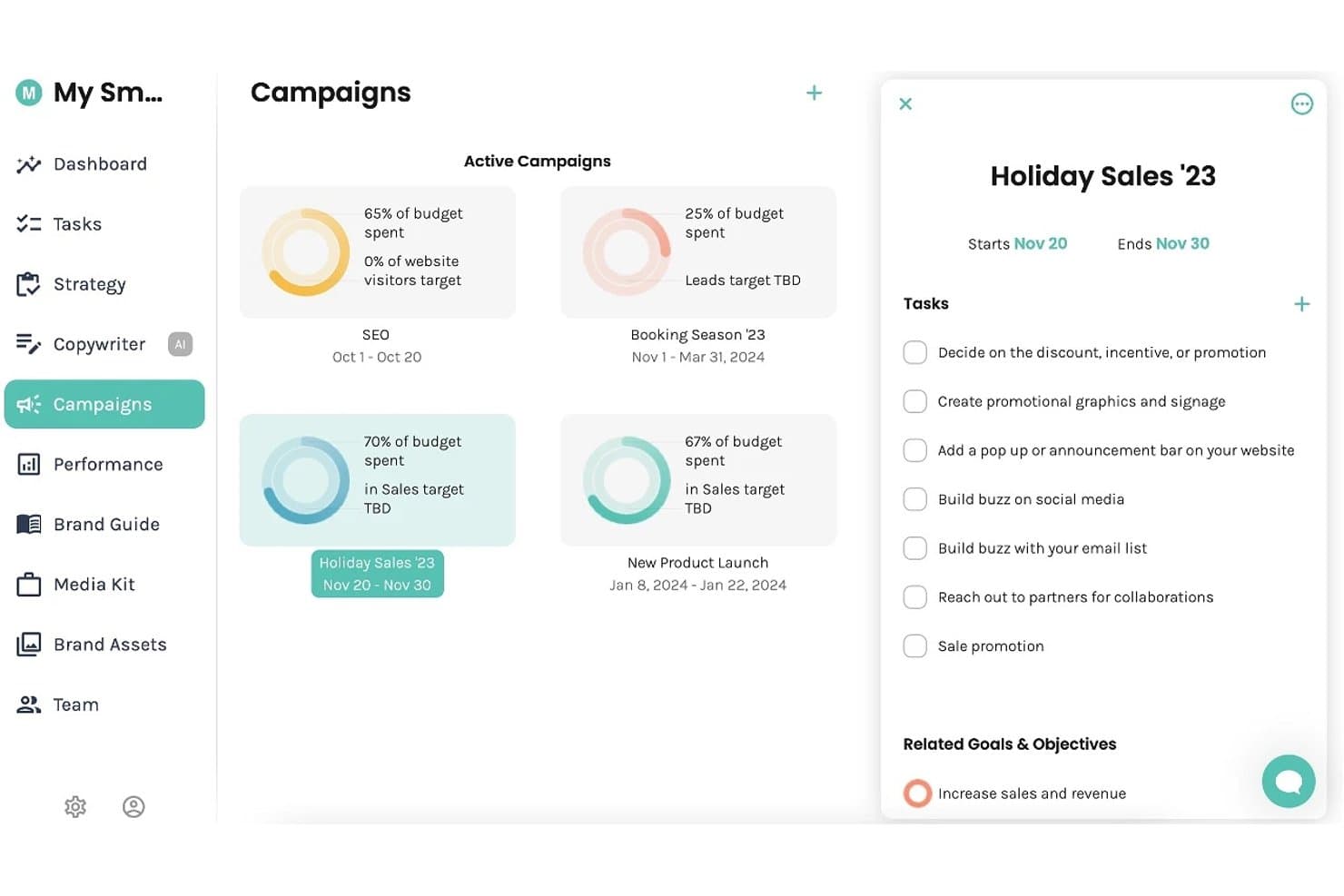
Enji offers a Campaigns dashboard where users can track active campaigns, budget spend, and manage tasks and goals. Enji is a marketing planning and execution platform for small businesses that combines AI-powered content creation, a marketing calendar, social media scheduling, and performance tracking.
Who Is Enji Best For?
Enji is a strong fit for solopreneurs and freelancers who manage their own marketing without a dedicated team or marketing background.
Why I Picked Enji
I picked Enji as one of the best because it bundles strategy generation, AI copywriting, and social scheduling into a single platform built specifically for one- or two-person teams. I love how the Marketing Strategy Generator builds a personalized plan from a short questionnaire, so small teams don't have to start from a blank page. The Content Repurposing Tool then turns a single blog post or caption into a full month of social content.
Enji Key Features
- KPI dashboard: Centralizes social and website analytics for quick access to performance metrics.
- Marketing campaign templates: Provides ready-to-use campaign outlines with tasks and timing built in.
- Brand library: Organizes brand voice, visual assets, and messaging guidelines in a single location.
- Canva integration: Allows users to pull designs directly into content workflows without manual uploading.
Enji Integrations
Enji offers native integrations with Canva, Google Analytics, Facebook, Instagram, Pinterest, YouTube, LinkedIn, TikTok, and Threads.
Pros and Cons
Pros:
- Social scheduling and planning in one place
- Strategy builder removes guesswork for solopreneurs
- Built-in AI generates content from scratch
Cons:
- No multi-user collaboration or approval workflows
- Limited SEO and keyword research tools
Learn more about Enji: Best for AI-powered content optimization
- 14-day free trial
- From $139/month
Visit WebsiteCustomer Rating:4.5/5
Semrush analyzes keywords, competitors, content performance, and site health. Semrush is an SEO and content marketing platform with tools for keyword research, topic ideation, on-page content optimization, competitive content analysis, and technical site auditing.
Who Is Semrush Best For?
Semrush is a strong fit for SEO-focused content marketers, in-house marketing teams, and digital agencies managing content strategy and search performance at scale.
Why I Picked Semrush
I've included Semrush in my top picks because its AI content optimization tools go deeper than most. The SEO Writing Assistant scores your content in real time against top-ranking pages for tone, readability, and keyword use as you write.
I also rely on ContentShake AI to generate briefs and draft articles directly from search data. That combination of live scoring and AI drafting in one platform is what sets it apart.
Semrush Key Features
- Keyword Magic Tool: Search a seed keyword to generate thousands of related keyword ideas with search volume, difficulty scores, and intent filters.
- Topic Research: Enter a subject to surface trending subtopics, headline ideas, and related questions pulled from top-performing content.
- Content audit: Connect your sitemap to analyze existing pages by traffic, backlinks, and content quality to identify what to update or remove.
- On-page SEO checker: Get a prioritized list of optimization recommendations for specific URLs based on your target keywords and top competitors.
Semrush Integrations
Semrush offers integrations with Google Analytics, Google Search Console, Google Ads, Google Docs, Google Sheets, Looker Studio, WordPress, Trello, and social platforms including Facebook, Instagram, LinkedIn, Pinterest, and YouTube. It also has partner integrations with tools like monday.com, Wix, AIOSEO, Zoho Analytics, and Scalenut. Semrush connects with Zapier, and an API is available for custom integrations.
Pros and Cons
Pros:
- Built-in competitor content gap analysis
- Tracks brand visibility in AI search
- Largest keyword database with 25 billion terms
Cons:
- Free plan has very limited daily queries
- Add-on costs can increase unexpectedly
Learn more about Semrush: Best for multichannel content scheduling
- Free plan available
- From $5/month per channel (billed annually)
Visit WebsiteCustomer Rating:4.4/5
Buffer schedules, publishes, and analyzes social content across channels. Buffer is a social media management platform that lets you schedule, publish, and analyze content across channels like Instagram, LinkedIn, TikTok, X, and more, with built-in tools for content creation, team collaboration, and audience engagement.
Who Is Buffer Best For?
Buffer is a good fit for small businesses, freelancers, and solo creators who manage social media content across multiple platforms without a large team.
Why I Picked Buffer
Buffer earns its spot on my shortlist for how well it handles multichannel content scheduling across 11 platforms, including TikTok, LinkedIn, Instagram, YouTube, and Bluesky.
I love that you can create a post once and crosspost it everywhere, with per-channel previews so you can see exactly how it'll render before it goes live. The Queue feature keeps your publishing calendar consistently filled without you manually scheduling every single post.
Buffer Key Features
- AI assistant: Generate post captions, repurpose existing content, and get suggestions for different tones directly inside the post composer.
- Analytics dashboard: Track post performance by channel, including reach, clicks, and engagement, with exportable reports.
- Engagement inbox: View and reply to comments and mentions across connected social channels from a single inbox.
- Content ideas: Log and store content ideas in Buffer before they're ready to schedule, so nothing gets lost between brainstorms.
Buffer Integrations
Buffer offers 24 integrations, including Canva, Bitly, Dropbox, Google Drive, Feedly, WordPress, OneDrive, Unsplash, IFTTT, and Make. It also connects with Zapier for additional automation workflows.
Pros and Cons
Pros:
- Saves reusable hashtag groups for posts
- AI repurposes content per individual channel
- Supports scheduling to 11+ social channels
Cons:
- Limited team collaboration for larger groups
- Analytics are basic on lower-tier plans
Learn more about Buffer: Best for creating interactive experiences
- Free plan + free demo available
- Pricing upon request
Visit WebsiteCustomer Rating:4.3/5
Ceros builds interactive infographics, microsites, lookbooks, and landing pages. Ceros is a no-code design platform for building interactive digital content, including infographics, microsites, lookbooks, and landing pages with animation and embedded media.
Who Is Ceros Best For?
Ceros is a strong fit for content and creative teams at B2B companies who produce high-volume marketing assets and need to publish without relying on developers.
Why I Picked Ceros
Ceros earns its spot on my shortlist because its Studio editor lets my team build scroll-triggered animations, clickable hotspots, and layered interactive states without writing a single line of code.
I especially like the built-in engagement analytics, which show exactly where readers click and drop off inside a published experience. That kind of content-level behavioral data is something static PDFs and blog posts simply can't provide.
Ceros Key Features
- Template library: Browse and customize pre-built templates for common content formats like infographics, pitch decks, and interactive reports.
- Real-time collaboration: Multiple team members can work inside the same Studio project simultaneously, with live edits visible to all.
- Embed publishing: Publish finished experiences as embeddable code snippets that drop into any CMS, website, or landing page.
- Brand kit: Store and apply shared fonts, colors, and logos across projects to keep content on-brand.
Ceros Integrations
Ceros offers a small set of integrations focused on marketing automation and analytics, including Google Analytics, Google Tag Manager, HubSpot, Marketo, Eloqua, and Adobe Analytics. Its MarkUp collaboration tool integrates with Microsoft Teams and Slack, and connects with Zapier. Ceros also provides an SDK for building custom plugins and extensions.
Pros and Cons
Pros:
- Small teams can create assets without developers
- Studio can freeze on complex projects
- No-code animation familiar to Adobe users
Cons:
- Hosted content may limit SEO control
- Studio can freeze on complex layered projects
Learn more about Ceros: Best for user-generated content curation
- Free demo available
- From $1,249/month
Visit WebsiteCustomer Rating:4.4/5
Pixlee curates customer and influencer content across ecommerce and social channels. Pixlee is a UGC platform, now part of Emplifi, that lets brands collect, curate, and publish customer and influencer content across ecommerce pages, social channels, and marketing campaigns.
Who Is Pixlee Best For?
Pixlee is a natural fit for ecommerce and retail brands that rely on social proof and customer content to drive product page conversions.
Why I Picked Pixlee
I've included Pixlee in my top picks because its rights management workflow is something I haven't seen done as cleanly elsewhere. When my team spots customer photos on Instagram or TikTok, Pixlee's automated outreach sends rights approval requests directly to the content creators, so we're never manually DMing dozens of people.
I also like that its AI image recognition automatically tags products within UGC photos, making it easy to turn a customer selfie into a shoppable gallery on a product page.
Pixlee Key Features
- Customizable display: Build dynamic UGC galleries and carousels that you can embed directly on product pages, homepages, or campaign landing pages.
- Ratings & reviews collection: Gather and display product reviews, Q&As, and seller ratings across your site, with moderation tools for language filtering and content tagging.
- Publisher integration: Schedule and distribute UGC across digital channels from within the same platform where you collect and curate it.
- Influencer discovery: Search a database of over 30 million influencers using AI-matching to find creators that align with your brand, then manage campaigns and track ROI in one place.
Pixlee Integrations
Pixlee offers ecommerce integrations with Shopify, BigCommerce, Magento, Adobe Commerce, and Salesforce Commerce Cloud, along with integrations with marketing platforms like Klaviyo, Attentive, Emarsys, and Movable Ink. It also supports Google Tag Manager, provides iOS and Android SDKs, and has an API for custom integrations.
Pros and Cons
Pros:
- UGC widgets update in real time on-site
- Influencer search filters by follower size and hashtags
- Automates hashtag and location-based content discovery
Cons:
- High content volume makes moderation time-consuming
- Embedded widgets can increase page load time
Learn more about Emplifi (formerly Pixlee): Best for marketing data integration
- Free demo available
- From $200/month (billed annually)
Visit WebsiteCustomer Rating:4.5/5
Funnel unifies marketing data, attribution, modeling, and automated reporting. Funnel is a marketing intelligence platform that collects, unifies, and organizes data from 600+ marketing sources, with built-in tools for multi-touch attribution, marketing mix modeling, and automated reporting.
Who Is Funnel Best For?
Funnel is a natural fit for performance marketing teams at mid-size to enterprise companies managing paid spend across multiple channels who need clean, centralized data for reporting.
Why I Picked Funnel
I've included Funnel in my top picks because no other tool in this space handles cross-channel data normalization as cleanly. When my team pulls in data from paid social, search, and programmatic simultaneously, Funnel's data mapping layer reconciles mismatched field names and metrics automatically.
I also like that it pushes clean, analysis-ready data directly to downstream tools like Looker Studio and BigQuery without manual exports.
Funnel Key Features
- Multi-touch attribution modeling: Assign conversion credit across multiple paid and organic touchpoints using configurable attribution models.
- Budget pacing tracker: Monitor actual spend against planned budgets in real time across all active campaigns and channels.
- Custom metric builder: Create calculated metrics by combining raw data fields from different sources into a single, unified measure.
- Automated report scheduling: Set reports to generate and deliver to stakeholders on a recurring schedule without manual intervention.
Funnel Integrations
Funnel offers 635 native data connectors for pulling in marketing data from sources like Google Ads, Facebook Ads, LinkedIn, TikTok Ads, Microsoft Advertising, Instagram, and Pinterest, plus 44 destination connectors for pushing data to tools like Google Sheets, Looker Studio, BigQuery, Tableau, Microsoft Power BI, and Amazon S3. It also supports webhooks for file imports via Zapier and provides an API for custom integrations.
Pros and Cons
Pros:
- Historical data tracking across all sources
- Supports 500+ advertising platform connectors
- Unifies cross-channel marketing data automatically
Cons:
- Data refreshes every 2-4 hours only
- Limited built-in visualization and dashboarding
Learn more about Funnel:

Integrate validates, deduplicates, and routes B2B leads from demand sources. Integrate is a B2B lead management platform built for enterprise marketing teams that centralizes lead ingestion from multi-channel demand sources and automates lead validation, deduplication, compliance checks, and data delivery to MAPs and CRMs.
Who Is Integrate Best For?
Integrate is a strong fit for enterprise demand generation teams that buy leads from multiple third-party vendors and need a central system to validate and normalize that data before it hits their CRM.
Why I Picked Integrate
I picked Integrate as one of the best because its lead governance engine does something no basic MAP can replicate. Every inbound lead, regardless of source, goes through automated validation, deduplication, field standardization, and privacy compliance checks before it ever reaches your CRM.
I especially like the out-of-the-box content syndication reporting, which lets my team see exactly which partners are delivering quality leads versus burning budget. That level of data control is what makes Integrate the right call for teams managing high-volume, multi-source demand programs.
Integrate Key Features
- Buying group engagement tracking: Monitor how groups of stakeholders from the same account interact with your campaigns across channels.
- Privacy compliance automation: Automatically screen every incoming lead against global privacy regulations like GDPR before it reaches your MAP or CRM.
- Channel and partner performance dashboards: Use out-of-the-box reports to compare lead quality and volume across your content syndication partners and demand channels.
- Lead field transformation: Map and reformat incoming lead data fields to match your CRM or MAP's exact data schema on ingestion.
Integrate Integrations
Integrate offers pre-built integrations with Salesforce, Marketo, 6sense, and HubSpot, along with a universal API and inbound connector for custom integrations with any technology or data source. The platform also connects with event lead capture tools through its Captello partnership and supports CSV file imports for non-integrated channels. Zapier support is not clearly documented.
Pros and Cons
Pros:
- Real-time campaign performance reporting by source
- Built-in GDPR compliance screening on ingestion
- Automated lead validation catches bad data pre-CRM
Cons:
- Bulk source updates require repetitive manual edits
- Initial campaign setup takes significant onboarding time
Learn more about Integrate:

Dot creates no-code quizzes, product finders, videos, and gamified campaigns. Dot is an AI-powered interactive content platform that lets you build quizzes, product finders, interactive videos, flipbooks, assessments, guided selling experiences, and gamified campaigns without writing any code.
Who Is Dot Best For?
Dot is a strong fit for marketing teams at mid-size to enterprise companies that produce high volumes of campaign content and want to move beyond static formats.
Why I Picked Dot
I picked Dot as one of the best because its AI Interactive Builder is something my team genuinely relies on to turn campaign briefs into live content fast. I type a prompt like "build a five-question product finder for a skincare brand" and Dot generates the full logic, triggers, and layout in minutes.
I also like that every AI-generated component saves as a reusable building block inside Dot.vu Studio, so my team can repurpose quiz formats or calculator structures across multiple campaigns without rebuilding from scratch.
Dot Key Features
- Branching video builder: Add decision points to videos so viewers choose their own path, creating a different viewing experience based on their answers.
- Gamification engine: Layer badges, points, leaderboards, and referral mechanics onto any interactive experience, including quizzes and flipbooks.
- Lead gating controls: Gate an entire experience or specific sections with a lead form, letting you decide exactly when to capture visitor data.
- A/B testing: Set conditional rules within any project to test different content variations and identify what drives the most engagement.
Dot Integrations
Dot offers integrations with Salesforce, HubSpot, Mailchimp, Google Analytics, Google Tag Manager, Adobe Marketo Engage, Pardot, LinkedIn, Facebook, and YouTube. It also connects with Zapier and supports custom JavaScript through its code addon for additional third-party connections.
Pros and Cons
Pros:
- No-code editor for branching video experiences
- Built-in gamification for quizzes and campaigns
- 200+ ready-to-customize interactive content templates
Cons:
- Bulk action editing across slides is unavailable
- Editor navigation feels unintuitive at first
Learn more about Dot: Best for template-driven project planning
- Free plan + free demo available
- From $5/user/month

Hive for Marketers coordinates campaigns, content schedules, approvals, and teamwork. Hive for Marketers is a project management platform built for marketing teams, with tools for campaign planning, content scheduling, proofing and approvals, and team collaboration across multiple project views.
Who Is Hive for Marketers Best For?
Hive for Marketers is a strong fit for in-house marketing teams at small to mid-size companies that run multiple concurrent campaigns.
Why I Picked Hive for Marketers
I picked Hive for Marketers as one of the best because its template library is built specifically for marketing workflows. There are ready-to-use templates for content calendars, paid campaigns, PR outreach, and product launches, and each one comes pre-loaded with phased tasks, status stages, and sample assets.
I also like that you can switch any template between Gantt, Kanban, and table views without rebuilding the project structure. That flexibility makes it easy to start a new campaign from scratch in minutes, not hours.
Hive for Marketers Key Features
- Proofing and approvals: Annotate and approve files directly inside Hive, with internal or external reviewers attached to specific tasks.
- Form intakes: Build intake forms that route incoming content requests straight into your project boards as new action cards.
- Resourcing: Assign team members to projects and view their availability across active campaigns in a single timeline.
- Hive Notes: Create collaborative documents that connect directly to tasks, useful for drafting briefs, meeting notes, or content outlines.
Hive for Marketers Integrations
Hive offers 1,000+ integrations in total, with native integrations including Google Drive, Google Calendar, Dropbox, Slack, Zoom, Jira, GitHub, Microsoft OneDrive, Microsoft Teams, and Bynder. It also connects with Zapier and provides an API for custom integrations.
Pros and Cons
Pros:
- Proofing supports markup and version comparison
- External reviewers join without paid seats
- Built-in chat threads keep content feedback organized
Cons:
- Key features like proofing are paid add-ons
- Mobile app lacks full desktop functionality
Learn more about Hive for Marketers: Best with AI-powered resource allocation
- Free plan available; 14-day free trial
- From $9/user/month (billed annually)
Visit WebsiteCustomer Rating:4.6/5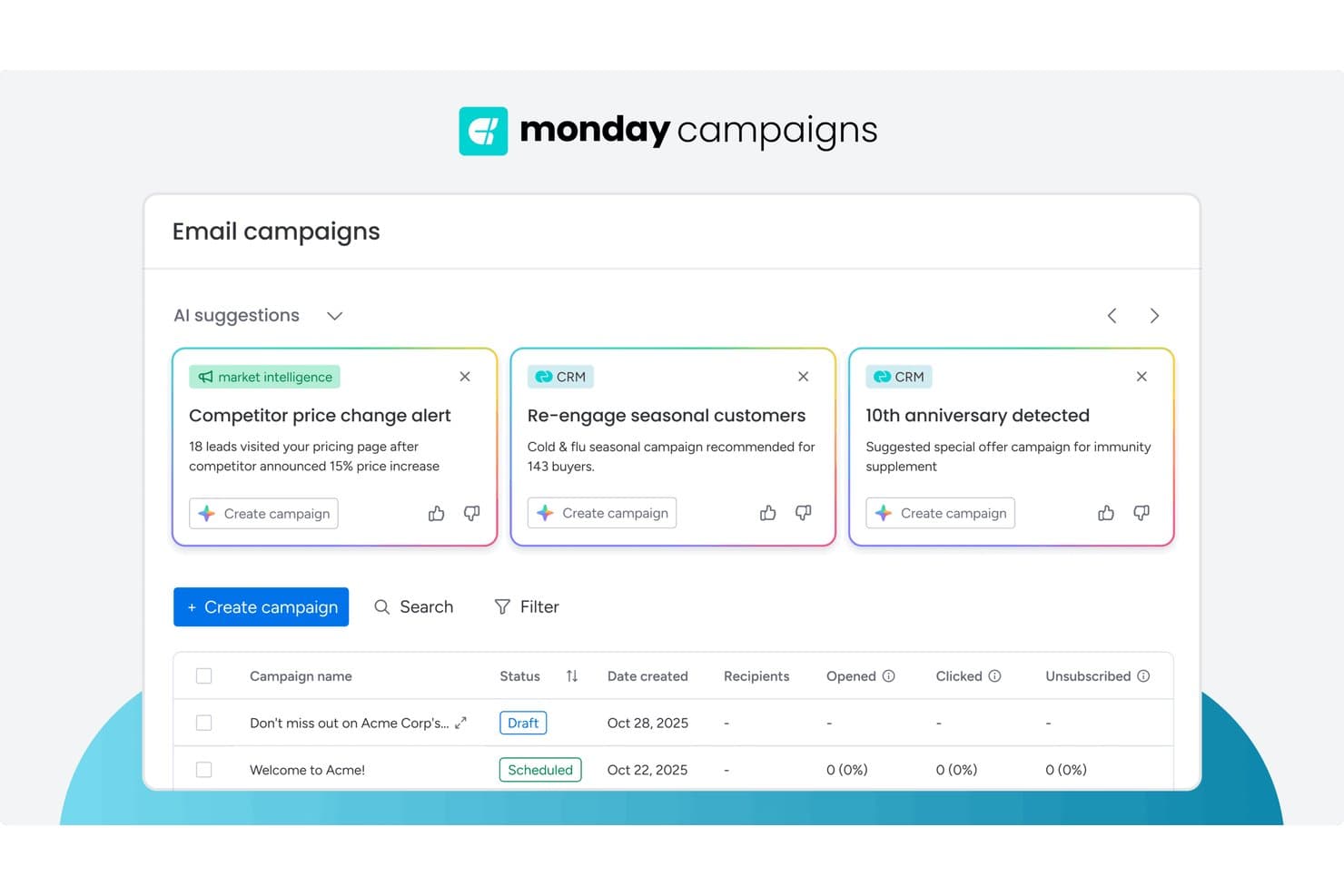
monday AI Workspace offers AI-powered campaign suggestions pulling from CRM and market intelligence data to help marketers create targeted email campaigns faster. monday AI Workspace is an AI-powered work management platform that combines editorial planning, content pipeline management, cross-functional workflow automation, and multi-team collaboration tools in a single workspace.
Who Is monday AI Workspace Best For?
It's a strong fit for marketing teams that manage complex, cross-functional content operations and need a flexible, AI-assisted workspace to coordinate multiple stakeholders.
Why I Picked monday AI Workspace
monday AI Workspace earns its spot on my shortlist because its AI-powered resource allocation genuinely changes how content teams operate at scale. I use the AI workflow builder to automatically route new content requests to the right writer or designer based on current workload, rather than manually checking who has capacity. The AI Blocks feature goes further, triggering automated label assignments and handoffs when a piece moves between drafting, review, and approval stages.
monday AI Workspace Key Features
- Multi-view editorial calendar: Visualize content plans with board, timeline, Gantt, and calendar views for different levels of planning detail.
- Workdocs with real-time editing: Draft, share, and collaboratively edit documents with version history and commenting in the same workspace.
- Campaign management boards: Track creative briefs, approvals, and production workflows with customizable columns and automations.
- Native integration hub: Connect to HubSpot, Salesforce, Google Drive, WordPress, Slack, and more for seamless martech stack handoffs.
monday AI Workspace Integrations
monday AI Workspace offers hundreds of native integrations through its built-in integrations and marketplace, including Slack, Salesforce, HubSpot, Google Drive, Microsoft 365, Outlook, Gmail, Mailchimp, Adobe Creative Cloud, and Canva. It also supports Zapier and provides an API for custom integrations.
Pros and Cons
Pros:
- Automated campaign handoffs and label triggers
- Highly flexible editorial calendar views
- AI-powered workload balancing for content teams
Cons:
- Approval process lacks granular permission settings
- No built-in content optimization for SEO
Learn more about monday AI Workspace:
Annen programvare for innholdsmarkedsføring
Her er noen flere alternativer for programvare for innholdsmarkedsføring som ikke kom med på kortlisten min, men som likevel er verdt å se nærmere på:
- 11HootsuiteBest for social analytics depth
- 12WrikeBest for cross-team project visibility
- 13Falcon.ioBest for social media campaign planning
- 14PaperfliteBest for real-time content engagement tracking
- 15Facelift CloudBest for GDPR-compliant social publishing
- 16SprinklrBest for unified brand management
- 17TrelloBest for visual task organization
- 18KapostBest for B2B content collaboration
- 19ContentlyBest for managing large-scale content operations
- 20BuzzSumoBest for content performance insights
- 21SpottBest for shoppable media experiences
- 22ContentStudioBest for multi-network social publishing
- 23CurataBest for automated content curation
- 24WordtuneBest for AI-powered editorial suggestions
- 25TopicBest for SEO-focused content briefs
- 26IssuuBest for digital magazine publishing
- 27FoleonBest for interactive content creation at scale
- 28ClearVoiceBest for end-to-end freelancer collaboration
- 29MyAdBoxBest for distributed brand asset control
- 30BlogelyBest for research-driven blog writing
- 31Ion by Rock ContentBest for enterprise interactive content
- 32ReadableBest for content readability analysis
- 33OrchestraCMSBest for Salesforce-native content workflows
How I Evaluate Content Marketing Software
I split my evaluation into baseline requirements every SaaS content team needs—editorial workflows, SEO, analytics—and the differentiators that set tools apart.
Core Functionality (Table Stakes For This List)
When I'm selecting tools for my list, I rank each one on a scale from 0 (does not offer the functionality) to 5 (excels in this area) for each core functionality listed below. Then, I calculate the tool's total score into a percentage. Each tool needs to achieve a minimum total score of 75% to be considered for inclusion.
- Editorial Planning & Calendar: I check whether the calendar supports campaign grouping, assignees, and deadlines—like planning a SaaS product launch across blog, email, and social.
- Content Creation & Collaboration: Teams need to draft, review, and approve assets in one place, so I look for inline comments, approval workflows, and version history.
- SEO & Content Optimization: From keyword research to on-page scoring, I evaluate how well a tool helps writers build search-optimized briefs and hit target topics.
- Multi-Channel Publishing & Distribution: I look for native publishing to CMS, social, and email so a single blog post can be scheduled across WordPress, LinkedIn, and HubSpot.
- Content Performance Analytics: Traffic and engagement are a start, but I evaluate whether the tool ties content to conversions, MQLs, and pipeline—not just page views.
- Workflow Automation & Integrations: A content tool needs to fit your martech stack, so I check for native connections to platforms like HubSpot, Salesforce, GA4, and Slack.
Once I have a list of tools that meet this criteria, I consider what sets each platform apart.
Differentiating Factors (What Sets Vendors Apart)
Here's how I compare and contrast different vendors:
Standout Features
AI-powered content generation is a big differentiator. I evaluate whether a tool can draft briefs, outlines, or full posts tuned to your brand voice rather than producing generic output. Competitive content intelligence also matters—knowing which topics your SaaS competitors rank for helps you spot gaps faster than manual SERP analysis. I also look at custom attribution reporting to see if the tool connects content assets to trials, signups, and pipeline instead of stopping at traffic dashboards.
Beyond Features
Martech stack fit is one of the first things I evaluate. A content tool that doesn't sync with your CRM, analytics, or automation platform creates data silos that make attribution impossible. Time-to-value also weighs heavily—I check whether a vendor offers SaaS-specific templates and onboarding resources so a two-person content team isn't spending weeks configuring workflows. Pipeline impact matters too. I look for case studies from SaaS companies showing the tool helped tie content to revenue outcomes, not just vanity metrics.
Slik velger du programvare for innholdsmarkedsføring
Det er lett å gå seg vill i lange funksjonslister og komplekse prisstrukturer. For å hjelpe deg med å holde fokus mens du arbeider deg gjennom den unike prosessen med å velge programvare, får du her en sjekkliste over faktorer du bør ha i mente:
| Faktor | Dette bør du vurdere |
|---|---|
| FaktorSkalerbarhet | Dette bør du vurdereVil verktøyet støtte veksten din når det gjelder innholdsmengde, brukerplasser og nye kanaler, uten store ekstrakostnader? |
| FaktorIntegrasjoner | Dette bør du vurdereKobles det naturlig til CMS-et, analyseverktøyene, CRM-systemet og plattformene for sosiale medier, slik at du unngår manuell import eller eksport? |
| FaktorTilpasningsmuligheter | Dette bør du vurdereKan du endre arbeidsflyter, godkjenningsprosesser eller merkevareretningslinjer slik at de samsvarer med teamets daglige virkelighet? |
| FaktorBrukervennlighet | Dette bør du vurdereVil brukerne tilpasse seg raskt, eller kan det oppstå motstand på grunn av kompleksitet eller ukjente mønstre i brukeropplevelsen? |
| FaktorImplementering og innføring | Dette bør du vurdereHvilke ressurser krever det første oppsettet? Se etter behov for IT-involvering, migreringsstøtte og opplæringsressurser. |
| FaktorKostnad | Dette bør du vurdereEr alle nødvendige funksjoner tilgjengelige innenfor budsjettet ditt? Se etter skjulte gebyrer eller priser på tillegg som påvirker TCO. |
| FaktorSikkerhetstiltak | Dette bør du vurdereOppfyller programvaren organisasjonens krav til databeskyttelse, tilgangskontroller og samsvar? |
| FaktorTilgjengelig kundestøtte | Dette bør du vurdereNår problemer oppstår, er hjelp tilgjengelig i teamets tidssone – og er støtten begrenset til chat, eller tilbys den via flere kanaler? |
Hva er programvare for innholdsmarkedsføring?
Programvare for innholdsmarkedsføring er en digital plattform utviklet for å hjelpe team med å planlegge, opprette, organisere, distribuere og analysere markedsføringsinnhold på tvers av flere kanaler.
Disse verktøyene samler innholdsarbeidsflyter på ett sted, legger til rette for samarbeid mellom teammedlemmer og gir oversikt over kampanjeresultater. Det blir dermed enklere å samordne innholdsproduksjonen med virksomhetens mål og målgruppens behov.
Funksjoner
Når du velger programvare for innholdsmarkedsføring, bør du se etter følgende viktige funksjoner:
- Innholdskalender: Organiserer publiseringsplaner, frister og kampanje tidslinjer, slik at teamet ditt kan se kommende innhold med et øyekast og samordne arbeidet.
- Arbeidsflytstyring: Gjør det mulig å sette opp trinn som utarbeidelse, gjennomgang, godkjenning og publisering, slik at alle vet hva de har ansvar for, og oppgavene kan gå videre uten flaskehalser.
- Distribusjon i flere kanaler: Gjør det mulig å publisere eller planlegge innhold på tvers av blogger, sosiale medier, e-post og mer fra én plattform, noe som sparer tid og sikrer konsistens.
- Samarbeidsverktøy: Støtter kommentarer i appen, fildeling og tildeling av oppgaver, slik at skribenter, designere og redaktører kan samarbeide sømløst i sanntid.
- Forvaltning av digitale ressurser: Samler merkevarebilder, videoer, maler og dokumenter på ett sted, slik at de rette personene raskt kan finne, oppdatere eller gjenbruke ressurser.
- Innholdsanalyse: Sporer måltall som rekkevidde, engasjement og konverteringer for å hjelpe teamet ditt med å forstå hvilket innhold som gir best resultater, og legge grunnlaget for fremtidig strategi.
- Versjonskontroll: Opprettholder en oversikt over redigeringer og tidligere utkast, slik at brukerne kan gå tilbake til tidligere versjoner og spore endringer for å sikre ansvarlighet.
- Tillatelser og roller: Lar deg definere hvem som kan opprette, redigere, godkjenne eller publisere innhold, noe som forebygger feil og opprettholder sikkerheten.
- Malbibliotek: Tilbyr ferdiglagde oppsett og innholdsdisposisjoner som setter fart på produksjonen og bidrar til å opprettholde merkevarekonsistens på tvers av kampanjer.
Vanlige AI-funksjoner i programvare for innholdsmarkedsføring
I tillegg til standardfunksjonene i programvare for innholdsmarkedsføring som er nevnt ovenfor, tar mange av disse løsningene i bruk AI med funksjoner som:
- Automatiserte innholdsforslag: AI gjennomgår innholdskalenderen og markedsføringsstrategien din for å foreslå nye emneideer, disposisjoner eller overskrifter tilpasset målgruppens preferanser og aktuelle temaer.
- Generering av naturlig språk: AI lager komplette artikler, innlegg i sosiale medier eller sammendrag basert på nøkkelord eller beskrivelser, produserer raskt førsteutkast og sparer teamene for betydelig tid på tekstproduksjon.
- Prediksjon av innholdsresultater: AI analyserer historiske data og målgruppeengasjement for å forutsi hvor godt et utkast eller planlagt innlegg vil gjøre det, og veileder teamene før publisering.
- Forbedring av bilder og video: AI optimaliserer automatisk visuelt innhold ved å justere lysstyrke, beskjære eller til og med generere merkevaretilpassede bilder og korte klipp i tråd med målene for innholdet ditt.
- Sentimentanalyse: AI skanner kommentarer, anmeldelser og interaksjoner i sosiale medier for å vurdere den følelsesmessige tonen rundt innholdet ditt, og gir konkrete tilbakemeldinger som kan brukes til å justere budskap eller tidspunkt.
Fordeler
Implementering av programvare for innholdsmarkedsføring gir flere fordeler for teamet og virksomheten din. Her er noen av fordelene du kan se frem til:
- Mer konsekvent innhold: Sentraliserte kalendere og maler bidrar til å opprettholde merkevarens stemme og publiseringsrytme på tvers av kanaler.
- Raskere gjennomføring av kampanjer: Effektiviserte arbeidsflyter og samarbeidsverktøy forkorter godkjenningssyklusene og gjør det mulig å gjøre raske justeringer i kampanjene.
- Bedre samkjøring av teamet: Delte oversikter og rollebaserte tillatelser holder alle informert og gir hver bidragsyter mulighet til å fokusere på sin del.
- Mer innsikt i målgruppen: Innebygde analyse- og rapporteringsverktøy gir tilbakemeldinger i sanntid som tydeliggjør hva som treffer målgruppen, og hvor det er rom for forbedring.
- Forenklet administrasjon på tvers av kanaler: Distribuer og overvåk innhold for nettsteder, blogger, e-post og sosiale medier på ett sted, slik at den manuelle innsatsen reduseres.
- Bedre samsvar og sikkerhet: Tillatelseskontroller og versjonssporing reduserer risikoen for uautoriserte endringer eller budskap som ikke er i tråd med merkevaren.
Kostnader og priser
Valg av programvare for innholdsmarkedsføring krever en forståelse av de ulike prismodellene og abonnementene som er tilgjengelige. Kostnadene varierer ut fra funksjoner, teamstørrelse, tillegg og mer. Tabellen nedenfor oppsummerer vanlige abonnementer, gjennomsnittsprisene deres og typiske funksjoner som er inkludert i løsninger for programvare for innholdsmarkedsføring:
Sammenligningstabell for abonnementer for programvare for innholdsmarkedsføring
| Plantype | Gjennomsnittspris | Vanlige funksjoner |
|---|---|---|
| PlantypeGratisplan | Gjennomsnittspris$0-$15/user/month | Vanlige funksjonerGrunnleggende innholdskalender, tilgang for én bruker, begrensede maler, grunnleggende analyse og brukerstøtte fra fellesskapet. |
| PlantypePersonlig plan | Gjennomsnittspris$10-$35/user/month | Vanlige funksjonerPublisering i flere kanaler, enkle arbeidsflytverktøy, innholdsforvaltning, standardrapportering og brukerstøtte via e-post. |
| PlantypeForretningsplan | Gjennomsnittspris$30-$80/user/month | Vanlige funksjonerSamarbeid i team, tilgangskontroll, godkjenningsarbeidsflyter, kampanjeanalyse, integrasjoner og prioritert brukerstøtte. |
| PlantypeEnterprise-plan | Gjennomsnittspris$70-$200+/user/month | Vanlige funksjonerAvansert sikkerhet, tilpassede arbeidsflyter, dedikert oppstart, premiumintegrasjoner, samsvarsverktøy og brukerstøtte med SLA-garanti. |
Vanlige spørsmål om programvare for innholdsmarkedsføring
Her er noen svar på vanlige spørsmål om programvare for innholdsmarkedsføring:
Hvordan hjelper programvare for innholdsmarkedsføring med å administrere store team?
Programvare for innholdsmarkedsføring samler kalendere, oppgavetildelinger og tilbakemeldinger på én plattform. Dette gjør det enklere for store team å administrere kampanjer, koordinere godkjenninger og følge opp ansvarsområder uten e-post eller regneark.
Kan jeg integrere programvare for innholdsmarkedsføring med de eksisterende verktøyene mine?
Ja, de fleste plattformer tilbyr integrasjoner med CMS-, CRM-, analyse- og sosiale medier-verktøy. Kontroller alltid om de viktigste systemene dine støttes direkte, eller om det kreves mellomvare for smidige arbeidsflyter.
Passer programvare for innholdsmarkedsføring for små bedrifter?
Ja, mange løsninger tilbyr fleksible abonnementer og funksjoner for små team. Se etter plattformer med priser på startnivå, enkel oppstart og enkle samarbeidsmuligheter som passer for noen få brukere.
Hvor sikre er dataene som lagres i programvare for innholdsmarkedsføring?
De fleste leverandører tilbyr standard sikkerhetstiltak som rollebasert tilgang, datakryptering og regelmessige sikkerhetskopier. Gå gjennom samsvarssertifiseringene og personvernerklæringene for hvert verktøy for å sikre at de oppfyller organisasjonens krav.
Hvilke ressurser for oppstart er tilgjengelige med de fleste løsninger for innholdsmarkedsføring?
Mange plattformer inkluderer veiledninger for konfigurering, opplæringsvideoer, nettseminarer for oppstart, startmaler og produktrundturer i appen. Noen tilbyr også direktechat eller spesialister på oppstart, avhengig av abonnementnivået ditt.
Tilbyr programvare for innholdsmarkedsføring analyse av publisert innhold?
Ja, funksjoner for sporing og analyse er standard. Du kan forvente oversikter over resultater, kampanjerapporter og engasjementsmålinger som hjelper deg med å analysere hva som gir resultater, og hva som bør forbedres.