

Software-ul pentru calendare de conținut ajută echipa să organizeze, să programeze și să urmărească producția de conținut pe canalele de marketing, social media și editoriale. Dacă ești în căutarea celui mai bun software pentru calendare de conținut, probabil că jonglezi cu termene-limită strânse, fișiere împrăștiate și presiunea de a menține echipele aliniate pe tot parcursul anului.
Platforma potrivită îi menține pe toți la curent, astfel încât să poți planifica cu încredere și să nu pierzi niciodată din vedere ce urmează. În această listă, voi analiza principalele opțiuni disponibile, voi evidenția punctele forte ale fiecărui instrument și te voi ajuta să alegi o soluție care se potrivește fluxului tău de lucru unic în 2026.
Why Trust Our Software Recommendations
6,700+
Reviews
20
Industry experts
16+
Evaluation factors
14
Years
Our team has been testing and reviewing software since 2012. As publishers and media operators ourselves, we know how difficult—and important—it is to choose the right software.
For this guide, we evaluated tools using hands-on testing and independent research, scoring tools using our selection criteria.
Our reviews reflect our human editorial judgment, not a sales pitch.
Tabel comparativ pentru software-ul de calendare de conținut
Tabelul de mai jos compară detaliile privind prețurile pentru principalele mele selecții de software pentru calendare de conținut.
Sorted by: Default
| Tool | Starting Price | Website | |
|---|---|---|---|
Best for solo creators | 4.3 out of 5 | $29/month 14-day free trial | Website |
Best for scalable, AI-powered data collaboration | 4.6 out of 5 | $20/user/month Free plan available | Website |
Best for AI-assisted social media content scheduling | 4.6 out of 5 | $65/month Free plan + trial available | Website |
Best for campaign and editorial planning at scale | 4.4 out of 5 | $10.99/user/month Free plan + free trial + free demo available | Website |
Best for managing cross-channel brand experiences | 4.0 out of 5 | Pricing upon request 30-day free trial | Website |
Best for centralizing all project work in one hub | Not rated | $12/user/month Free plan + trial + demo available | Website |
Best for agencies managing multi-channel media plans | Not rated | Pricing upon request Free demo available | Website |
Best for structured content approval workflows | Not rated | Pricing upon request Free demo available | Website |
Best for integrated marketing campaign planning | Not rated | $117.33/month 7-day free trial | Website |
Best for teams needing advanced automation | 4.3 out of 5 | $10/user/month Free plan + 14-day free trial + demo available | Book Demo |


Recenzii pentru cele mai bune software-uri de calendare de conținut
Mai jos sunt rezumatele mele detaliate ale celor mai bune software-uri pentru calendare de conținut care au ajuns pe lista mea scurtă. Recenziile mele oferă o privire detaliată asupra funcțiilor, celor mai potrivite cazuri de utilizare și integrărilor fiecărei platforme, pentru a te ajuta să o găsești pe cea mai potrivită pentru tine.

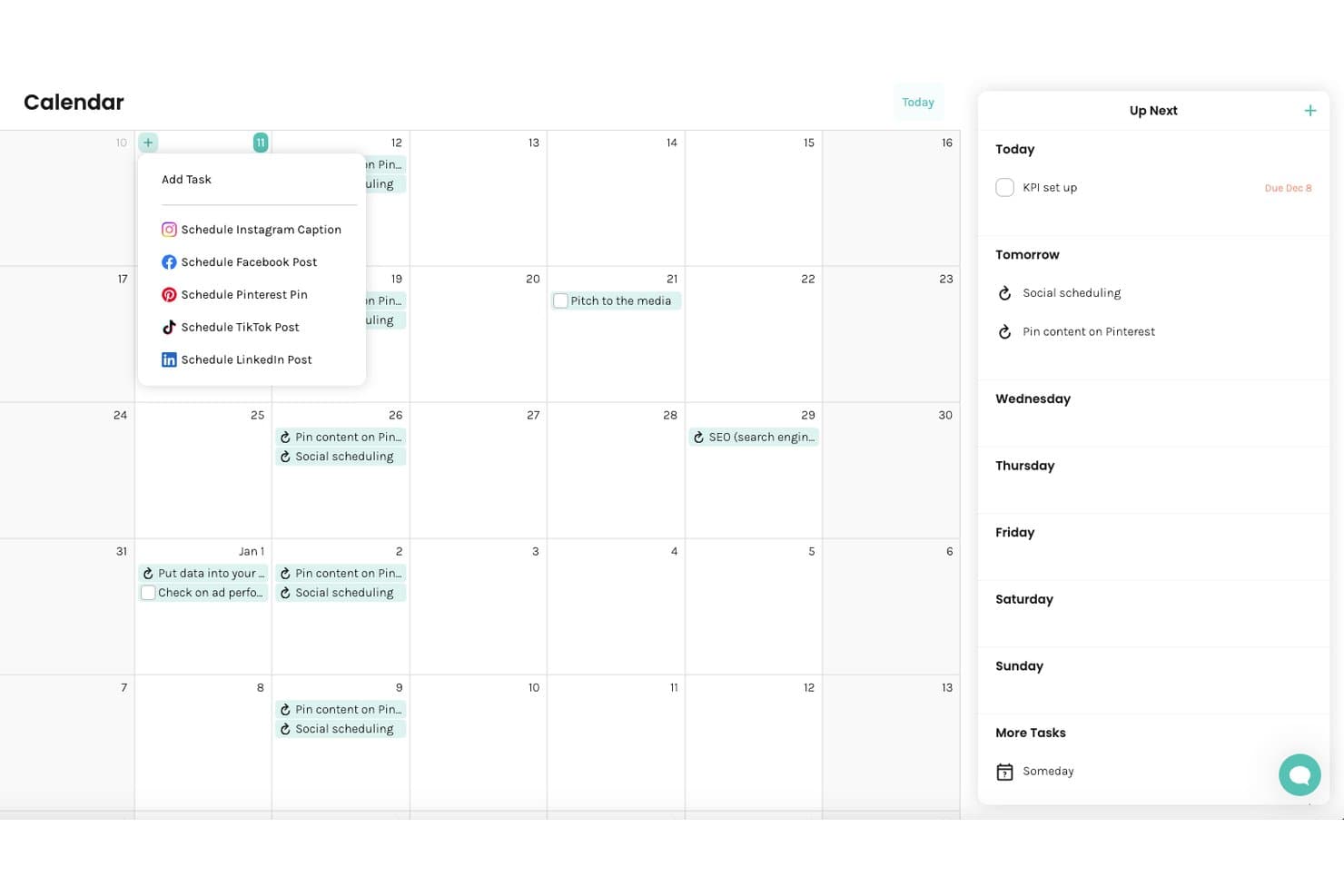
Enji offers a calendar view with social media post scheduling options, recurring tasks, and a sidebar showing daily and weekly task breakdowns. Enji is a small business marketing platform that combines a guided strategy generator, marketing calendar, AI copywriter, and social media scheduler into a single tool.
Who Is Enji Best For?
Enji is built for solopreneurs and small business owners who handle their own marketing without a dedicated team or marketing background.
Why I Picked Enji
I picked Enji as one of the best because its Marketing Strategy Generator does something most content calendar tools skip entirely. Answer a short questionnaire, and Enji auto-builds a personalized marketing plan with tasks that land directly on your calendar. I also like the pre-built two-week campaign templates, which come with mapped tasks, timing, and metrics so a solopreneur can launch a campaign without building the strategy from scratch.
Enji Key Features
- AI copywriter: Generates social media captions, blog drafts, newsletters, and more in your brand voice.
- Content repurposing tool: Quickly turns one piece of content into multiple new assets for different channels.
- KPI dashboard: Displays analytics from social channels and Google Analytics 4 within the platform.
- Brand management storage: Stores and organizes your brand voice, visuals, and key brand details for easy reference.
Enji Integrations
Enji offers native integrations with Instagram, Facebook, LinkedIn, TikTok, YouTube, Pinterest, Threads, Google Analytics 4, and Canva.
Pros and Cons
Pros:
- AI copywriter covers blogs, social, and newsletters
- Pre-built templates include mapped content tasks
- Auto-populates your marketing calendar
Cons:
- Reporting limited compared to dedicated tools
- Not designed for multi-person team workflows
Learn more about Enji: Best for scalable, AI-powered data collaboration
- Free plan available
- From $20/user/month (billed annually)
Visit WebsiteCustomer Rating:4.6/5
Airtable organizes content workflows, custom views, databases, and AI agents. Airtable is a no-code database and app-building platform where teams can plan, organize, and manage content workflows using customizable views like calendar, grid, Kanban, and Gantt, with AI agents built directly into the data layer.
Who Is Airtable Best For?
It's a strong fit for mid-size to enterprise content and marketing teams that manage high volumes of content across multiple contributors and need structured, customizable workflows.
Why I Picked Airtable
Airtable earns its spot on my shortlist because no other content calendar tool handles data at this scale. Field Agents let you deploy AI across thousands of records at once, so your team can analyze content performance, categorize assets, or generate briefs across an entire content library without manual effort.
HyperDB supports up to 100 million records per table, which means the platform doesn't break as your content operation grows. I also like that every team works from the same shared data layer, so campaign updates sync in real time across every view and workflow.
Airtable Key Features
- Calendar view: Visualize scheduled content by date across any table, with drag-and-drop rescheduling directly on the calendar.
- Automations: Set trigger-based workflows to notify team members, update records, or move content through approval stages without manual input.
- Interface designer: Build custom dashboards and intake portals that surface only the fields and views each contributor or stakeholder needs.
- Content intake forms: Collect content requests through shareable forms that feed directly into your base as structured records.
Airtable Integrations
Airtable offers native integrations with Google Drive, Google Calendar, Slack, Salesforce, Jira, GitHub, Gmail, Box, Dropbox, and Tableau, among others listed on its integrations page. It's available on Zapier and provides an API for custom integrations.
Pros and Cons
Pros:
- Custom automations match your exact workflows
- Multiple calendar and Kanban views included free
- Linked records connect content across tables
Cons:
- Calendar view limited to one table only
- No built-in approval workflows for content
Learn more about Airtable: Best for AI-assisted social media content scheduling
- Free plan + trial available
- From $65/month
Visit WebsiteCustomer Rating:4.6/5
Loomly orchestrates AI post creation, scheduling, approvals, and targeting. Loomly is a social media content calendar platform that combines AI-assisted post creation, multi-channel scheduling, approval workflows, and audience targeting across major social networks.
Who Is Loomly Best For?
Loomly is a good fit for small to mid-sized social media teams and freelance managers handling content across multiple brand accounts.
Why I Picked Loomly
Loomly earns its spot on my shortlist because of how its AI-assisted post creation actually works in practice. When I'm scheduling content, the Post Ideas feature surfaces topic suggestions pulled from trending hashtags, RSS feeds, and date-based events.
I also like that the AI generates caption variations per platform, so the same campaign message doesn't read identically across LinkedIn and Instagram.
Loomly Key Features
- Post optimization tips: Loomly surfaces channel-specific recommendations on each post draft, flagging character count, image size, and timing suggestions before you publish.
- Labels and campaign categorization: Assign color-coded labels to posts so you can filter, group, and track content by campaign, content type, or client across the calendar.
- Unified community inbox: Manage comments, mentions, and direct messages from all connected social channels in one inbox, with the option to assign conversations to specific team members.
- UTM parameter tracking: Add UTM parameters directly to post links within Loomly to track click-through performance in your analytics platform without leaving the tool.
Loomly Integrations
Loomly offers native integrations with Slack, Microsoft Teams, Canva, Giphy, Google Drive, and Unsplash, along with direct publishing connections to Instagram, Facebook, LinkedIn, TikTok, YouTube, Threads, Pinterest, Snapchat, and Google Business Profile. It also connects with Zapier. A public API for custom integrations is not clearly documented.
Pros and Cons
Pros:
- Post mockups preview content before publishing
- Built-in approval workflows with role assignments
- AI generates per-channel captions and visuals
Cons:
- Steep pricing jumps between plan tiers
- Limited video scheduling for Reels and TikTok
Learn more about Loomly: Best for campaign and editorial planning at scale
- Free plan + free trial + free demo available
- From $10.99/user/month (billed annually)
Visit WebsiteCustomer Rating:4.4/5
Asana organizes task tracking, project timelines, workflows, and team collaboration. Asana is a work management platform that combines task tracking, project timelines, workflow automation, and team collaboration tools for planning and executing campaigns and editorial projects.
Who Is Asana Best For?
Asana is well-suited to mid-size and enterprise marketing teams that run multiple campaigns or editorial programs simultaneously and need structured coordination across departments.
Why I Picked Asana
Asana earns its spot on my shortlist for how well it handles editorial and campaign planning across multiple teams simultaneously. I use the Portfolios feature to track every active campaign in a single view, with status, progress, and deadlines visible at a glance.
The Timeline view lets my team map content dependencies so nothing gets published out of sequence, and Workload shows where capacity is stretched before it becomes a scheduling problem.
Asana Key Features
- Custom fields: Tag tasks with content type, channel, or campaign stage to filter and sort your editorial pipeline.
- Rules and triggers: Automatically assign tasks, update statuses, or move content to the next stage based on set conditions.
- Goals: Link individual content tasks directly to broader campaign or business objectives.
- Calendar view: See all scheduled content by due date across multiple projects in one calendar layout.
Asana Integrations
Asana offers 300+ integrations through its built-in app directory, including Slack, Google Drive, Google Calendar, Microsoft Teams, HubSpot, Salesforce, Jira, Figma, Adobe Creative Cloud, and Hootsuite. It also connects with Zapier and provides an API for custom integrations.
Pros and Cons
Pros:
- Workflow automation moves content through approval stages
- Cross-project task tracking avoids duplicate work
- Multiple project views including calendar and timeline
Cons:
- No built-in content publishing or scheduling
- Reporting dashboards locked behind higher-tier plans
Learn more about Asana: Best for managing cross-channel brand experiences
- 30-day free trial
- Pricing upon request
Visit WebsiteCustomer Rating:4/5
Sprinklr centralizes content scheduling, campaign planning, and publishing. Sprinklr is an enterprise social media and content management platform that centralizes content scheduling, campaign planning, and publishing across 30+ social and digital channels.
Who Is Sprinklr Best For?
It's a strong fit for large enterprises and global brands with distributed marketing teams managing content across multiple regions and channels simultaneously.
Why I Picked Sprinklr
I've included Sprinklr in my top picks because no other platform gives content teams the same level of cross-channel control at enterprise scale. I like that Sprinklr's AI flags off-brand or non-compliant content before it goes live, so distributed teams across regions and business units can publish without a manual review bottleneck.
I also use the custom workflow builder to route content through brand-specific approval chains, which is something most content calendar tools can't match at this depth.
Sprinklr Key Features
- Unified content calendar: View and manage scheduled posts across 30+ channels in a single, filterable calendar.
- Campaign planning: Group content by campaign, theme, or initiative and track publishing timelines across teams.
- Digital asset library: Store, tag, and retrieve brand-approved images, videos, and copy directly within the platform.
- Publishing rules: Set channel-specific rules that automatically format and adapt content for each platform before it goes live.
Sprinklr Integrations
Sprinklr offers a marketplace of integrations with details for each app, including tools like Salesforce, Adobe, Snowflake, and Jira. It has 90+ available integrations across categories like analytics, CRM, digital asset management, and content management, including Google Analytics, HubSpot, Slack, Microsoft Teams, Google Drive, Shutterstock, WordPress, Power BI, Tableau, and Zendesk.
Pros and Cons
Pros:
- Built-in analytics with customizable campaign metrics
- Filter calendar by account, channel, and status
- Paid, owned, and earned content in one calendar
Cons:
- No visual grid preview for social feeds
- Slow load times with large data volumes
Learn more about Sprinklr: Best for centralizing all project work in one hub
- Free plan + trial + demo available
- From $12/user/month

ClickUp manages tasks, docs, calendars, goals, and content production. ClickUp is an all-in-one productivity platform where content teams can manage tasks, write docs, schedule publishing calendars, and track goals across every stage of content production.
Who Is ClickUp Best For?
ClickUp is a strong fit for small to mid-size teams that manage content production alongside broader project work and don't want to juggle multiple tools.
Why I Picked ClickUp
I picked ClickUp as one of the best because it keeps content briefs, tasks, and publishing timelines in the same workspace. I like that ClickUp Docs lives directly inside a project, so writers can draft content right next to the task that tracks its status and deadline.
My team can also switch between calendar, list, and board views on the same content plan without rebuilding anything, which means editors and strategists see the same work in whichever format makes sense for their role.
ClickUp Key Features
- Custom statuses: Define content-specific workflow stages like Draft, In Review, and Scheduled to match your team's publishing process.
- Recurring tasks: Set tasks to repeat on a schedule so regular publishing commitments like weekly newsletters auto-generate without manual setup.
- Automation builder: Trigger status changes, task assignments, or notifications automatically when content moves through defined workflow stages.
- Time tracking: Log time directly on content tasks to monitor how long briefs, drafts, and revisions actually take.
ClickUp Integrations
ClickUp offers 40+ native integrations, including Slack, Google Drive, Google Calendar, HubSpot, Microsoft Teams, Figma, Zoom, Dropbox, GitHub, and Calendly, and it connects with Zapier. An API and webhooks are available for custom integrations.
Pros and Cons
Pros:
- Over 100 pre-built workflow automations
- Docs embedded inside tasks for inline drafting
- Multiple view types for content scheduling
Cons:
- Slow load times in larger workspaces
- Calendar event colors too similar to distinguish
Learn more about ClickUp: Best for agencies managing multi-channel media plans
- Free demo available
- Pricing upon request

Mediatool plans media budgets, campaigns, performance, and activation. Mediatool, now Camphouse, is a media planning and campaign management platform that covers budget allocation, multi-channel media planning, performance reporting, and campaign activation across global teams.
Who Is Mediatool Best For?
Mediatool is a strong fit for media agencies and in-house marketing teams running paid campaigns across multiple channels, regions, or brands simultaneously.
Why I Picked Mediatool
I picked Mediatool as one of the best because of how it handles multi-channel media planning at the agency level. The Allocation module lets me distribute global budgets across regions and brands while enforcing hard caps to prevent overspend.
Planning happens in a dynamic Sheet View with automated naming conventions and multi-level approval workflows, so client plans stay consistent across every market. For agencies juggling dozens of clients and channels, that structure removes the manual collation work that eats into margins.
Mediatool Key Features
- Activation module: Automatically push approved campaign structures, UTMs, and placement identifiers directly to buying platforms via API or middleware.
- Real-time reporting dashboards: Consolidate planning, budget, and performance data into unified dashboards with formula-based custom metrics and pacing across global markets.
- AI Co-Pilot: Generate complete media plans from a brief using historical performance data and industry benchmarks, with scenario comparison built in.
- Outlier detection: Automatically flag performance deviations mid-flight so you can rebalance budgets before a campaign ends.
Mediatool Integrations
Mediatool offers native integrations with Google Analytics, Google Ads, Google Campaign Manager, Google Display & Video 360, Google Search Ads 360, Google Search Console, Google Sheets, Facebook Ads, Facebook Pages, Instagram Pages, LinkedIn Ads, LinkedIn Pages, X (Twitter) Ads, Adform, Pinterest Ads, TikTok Ads, The Trade Desk, and Outbrain Amplify.
Pros and Cons
Pros:
- Automated naming conventions and UTM generation
- Custom calendar view per user role
- Planned vs. actual budget tracking built in
Cons:
- Onboarding requires lengthy initial campaign setup
- Sheet view row ordering can be inconsistent
Learn more about Mediatool: Best for structured content approval workflows
- Free demo available
- Pricing upon request

GatherContent guides content creation, approvals, and CMS publishing. Content Workflow by Bynder, formerly GatherContent, is a content workflow and planning platform that covers template-based content creation, multi-stage approval workflows, and direct CMS publishing for editorial and marketing teams.
Who Is GatherContent Best For?
GatherContent is well-suited to content managers and editors at digital agencies or in-house publishing teams who coordinate content production across large contributor groups.
Why I Picked GatherContent
I've included GatherContent in my top picks because its multi-stage workflow engine is built specifically for approval-heavy content pipelines. Each content item moves through named stages, with specific team members assigned at each step and a clear status visible across the whole team.
I like that you can configure as many stages as your process requires, whether that's a legal review, a brand check, or a final sign-off before publishing.
GatherContent Key Features
- Calendar view: Visualize all scheduled content items by due date across a shared team calendar.
- Inline commenting: Leave feedback directly on specific content sections for contextual, in-context review.
- Content templates: Build reusable templates with structured fields and guidance text to standardize content creation.
- Content inventory dashboard: Track every content item, its owner, and current workflow stage from one central view.
GatherContent Integrations
GatherContent offers native integrations with WordPress, Sitecore, Drupal, Craft CMS, and Umbraco for direct content migration to your CMS. It also integrates with Gatsby, Vercel, and Netlify for headless publishing workflows. GatherContent connects with Zapier and has an API for custom integrations.
Pros and Cons
Pros:
- Exports content directly to your CMS
- Multi-step approval workflows with audit trails
- Reusable content templates enforce consistency
Cons:
- No built-in change tracking for edits
- Notification emails trigger on every update
Learn more about GatherContent: Best for integrated marketing campaign planning
- 7-day free trial
- From $117.33/month (billed annually)

Semrush Marketing Calendar organizes campaigns, content plans, and SEO tracking. Semrush Marketing Calendar is a content planning and campaign scheduling tool built inside the Semrush platform, where you can plan, organize, and track content across campaigns alongside built-in SEO, keyword research, and topic tracking data.
Who Is Semrush Marketing Calendar Best For?
It's a natural fit for digital marketing teams already working inside Semrush who want to tie content scheduling directly to SEO research and campaign data.
Why I Picked Semrush Marketing Calendar
I picked Semrush Marketing Calendar because it's the only content calendar that lives inside a full marketing intelligence suite. I can pull keyword data from the Keyword Magic Tool, map it to a campaign, and schedule content in the same workflow.
Campaign tags let me group related content pieces so I can see how a product launch maps across channels and timelines, all without leaving Semrush.
Semrush Marketing Calendar Key Features
- Campaign templates: Save any existing campaign as a reusable template, with activities automatically rescheduled relative to the new campaign's start date.
- Post-publish performance tracking: Monitor page views, engagement metrics, and other KPIs for published content directly inside the calendar.
- Real-time deadline notifications: Get alerts on content deadlines, publication dates, and task progress as they update.
- Social publishing scheduler: Plan, schedule, and publish content across Facebook, Instagram, LinkedIn, Google Business Profile, Pinterest, and TikTok from inside the platform.
Semrush Marketing Calendar Integrations
Semrush offers native integrations with Google Analytics, Google Search Console, Google Ads, Google Docs, Looker Studio, WordPress, Trello, and you can link your Google Analytics account to track campaign results and import Outlook, Google, and Apple calendars into the Marketing Calendar. It's available on Zapier and has an API for custom integrations.
Pros and Cons
Pros:
- Reusable campaign templates with auto-rescheduling
- Campaign-level tagging groups cross-channel content
- SEO data feeds directly into content planning
Cons:
- Only one user seat included per plan
- Shared calendar links are static snapshots
Learn more about Semrush Marketing Calendar: 10Best for teams needing advanced automation
Wrike
- Free plan + 14-day free trial + demo available
- From $10/user/month (billed annually)
Visit WebsiteCustomer Rating:4.3/5
Wrike coordinates campaigns, editorial workflows, tasks, and approvals. Wrike is a project and work management platform that lets marketing and content teams plan campaigns, build editorial workflows, track tasks, and manage approvals across multiple projects in one place.
Who Is Wrike Best For?
Wrike is a strong fit for mid-size to enterprise marketing teams managing high-volume content production across multiple departments or regions.
Why I Picked Wrike
I picked Wrike as one of the best because its automation depth goes well beyond what most content calendar tools offer. I particularly like the automated approval workflows, where content pieces can trigger review requests, notify stakeholders, and update statuses automatically without anyone manually moving tasks along.
Wrike also lets you apply automation rules across multiple projects simultaneously, so if your team runs several content programs at once, a single rule set can govern all of them.
Wrike Key Features
- Custom request forms: Capture content briefs from stakeholders through structured intake forms that auto-generate tasks on your editorial board.
- Interactive Gantt charts: Drag and drop content deadlines across a timeline view to see how publishing schedules overlap across campaigns.
- Proofing and markup tools: Review and annotate images, videos, and documents directly inside Wrike without exporting files.
- Blueprints: Save repeatable content campaign structures as templates and launch them with pre-set tasks, assignees, and due dates.
Wrike Integrations
Wrike offers 50+ native integrations and marketplace apps, including Salesforce, Microsoft Teams, Google Drive, Adobe Creative Cloud, Slack, Zoom, Power BI, Tableau, QuickBooks, and Google Sheets.
Pros and Cons
Pros:
- Workload charts show team capacity at a glance
- Custom request forms for content intake
- Cross-project calendar views for deadline tracking
Cons:
- Notification overload without careful configuration
- Calendar view locked to higher-tier plans
Learn more about Wrike:
Alte software-uri pentru calendare de conținut
Iată câteva opțiuni suplimentare de software pentru calendare de conținut care nu au ajuns pe lista mea scurtă, dar care merită totuși verificate:
- 11monday.comBest for building custom workflows with no code
- 12BufferBest for publishing to multiple social platforms
- 13CoScheduleBest for AI writing and content optimization tools
- 14MeisterTaskBest for GDPR-compliant task management
- 15TrelloBest for customizable visual planning boards
- 16KapostBest for aligning content to buyer journeys
- 17ContentCalBest for social post planning with visual drag-and-drop
- 18StoryChiefBest for agency-style campaign collaboration
- 19NinjaContentBest for in-app content brief generation
- 20HootsuiteBest for monitoring brand reputation in real time
- 21WordPress Editorial CalendarBest for managing multi-author WordPress blogs
How I Evaluate Content Calendar Software
I split my evaluation into baseline criteria—multi-channel scheduling, editorial workflows, visual calendars—and differentiators that set apart tools for lean SaaS teams vs. scaled demand gen orgs.
Core Functionality (Table Stakes For This List)
When I'm selecting tools for my list, I rank each one on a scale from 0 (does not offer the functionality) to 5 (excels in this area) for each core functionality listed below. Then, I calculate the tool's total score into a percentage. Each tool needs to achieve a minimum total score of 75% to be considered for inclusion.
- Visual Calendar View: I check whether the calendar supports drag-and-drop rescheduling, multiple views (weekly, monthly, timeline), and filtering by channel or content status.
- Multi-Channel Scheduling: Each tool should let you plan blog posts, social updates, emails, and paid campaigns from one calendar rather than toggling between separate platforms.
- Editorial Workflow Management: I look for custom content statuses (draft, in review, approved), assignee fields, due dates, and approval stages that mirror how SaaS marketing teams actually move content from brief to publish.
- Collaboration & Commenting: Teams need to leave feedback directly on calendar items, so I evaluate whether the tool supports @mentions, threaded comments, and reviewer notifications.
- Content Asset Storage: I check whether you can attach briefs, images, and drafts to each entry and tag them by campaign, persona, or funnel stage for easy retrieval later.
- Integrations & Publishing: The tool should connect to the platforms your team already uses—WordPress, HubSpot, or social networks—with native publishing or two-way sync rather than manual copy-paste.
Once I have a list of tools that meet this criteria, I consider what sets each platform apart.
Differentiating Factors (What Sets Vendors Apart)
Here's how I compare and contrast different vendors:
Standout Features
I look for campaign and funnel mapping that lets you group calendar items by product launch, persona, or funnel stage—essential when you're coordinating a SaaS feature release across blog, email, and social simultaneously. Built-in analytics that tie post-level performance data back to calendar entries also matter, since they help teams spot what's working without jumping into a separate dashboard. AI content assistance is another differentiator worth evaluating, especially for smaller teams that need to generate briefs or repurpose content quickly.
Beyond Features
Integration with the broader SaaS marketing stack is one of the first things I evaluate—whether a tool natively connects to your CMS, marketing automation platform, and project management tools determines how much manual work your team inherits. Pricing model matters too, particularly how per-seat costs scale as you add freelancers or cross-functional collaborators. I also consider time-to-value: does the platform offer pre-built content workflow templates, or will your team spend weeks configuring statuses and approval chains from scratch?
Cum alegi software-ul pentru calendare de conținut
Este ușor să te pierzi în liste lungi de funcții și structuri complexe de prețuri. Pentru a te ajuta să rămâi concentrat în timp ce parcurgi procesul tău unic de selectare a software-ului, iată o listă de verificare a factorilor de care trebuie să ții cont:
| Factor | Ce trebuie avut în vedere |
|---|---|
| FactorScalabilitate | Ce trebuie avut în vedereInstrumentul va rămâne potrivit dacă echipa ta de marketing se dublează sau dacă preiei mai multe canale? Verifică dacă limitele de utilizatori sau structura planului vor necesita în curând trecerea la un nivel superior. |
| FactorIntegrări | Ce trebuie avut în vedereSe conectează nativ la cele mai importante rețele sociale, sisteme de gestionare a proiectelor sau DAM-uri? Evită soluțiile manuale și pașii suplimentari de export. |
| FactorPosibilități de personalizare | Ce trebuie avut în vederePoți adapta calendarele, câmpurile, aprobările sau tipurile de conținut pentru a se potrivi fluxurilor de lucru unice ale echipei tale sau cerințelor de branding? |
| FactorUșurință în utilizare | Ce trebuie avut în vedereEste simplu de utilizat pentru membrii echipei cu orice nivel de cunoștințe tehnice? Încearcă înainte să cumperi și observă eventualele navigări suplimentare, acțiuni ascunse sau zone cu încărcare lentă. |
| FactorImplementare și integrare inițială | Ce trebuie avut în vedereCât de dificil este să începi? Sunt disponibile șabloane pentru pornire rapidă sau asistență live pentru integrare, pentru o tranziție mai rapidă? |
| FactorCost | Ce trebuie avut în vedereAnalizează costurile recurente ale software-ului, modelele de licențiere pentru utilizatori și taxele suplimentare pentru stocare, utilizatori sau analize avansate. Stabilește un buget atât pentru utilizarea inițială, cât și pentru extindere. |
| FactorMăsuri de securitate | Ce trebuie avut în vederePlatforma îți va proteja conținutul, ciornele, datele clienților și accesul la cont? Verifică existența SOC2, SSO, MFA și a controalelor de permisiuni, după caz. |
| FactorDisponibilitatea asistenței | Ce trebuie avut în vederePoți obține ajutor la timp dacă echipa ta întâmpină un obstacol? Notează programul, canalele de răspuns, resursele de autoservire și limitările asistenței specifice regiunii. |
Ce este software-ul pentru calendare de conținut?
Software-urile pentru calendare de conținut sunt instrumente digitale care ajută echipele să planifice, să programeze, să organizeze și să urmărească conținutul de marketing pe mai multe canale, într-o vizualizare centralizată a calendarului.
Aceste platforme acceptă de obicei atribuirea sarcinilor, fluxurile de lucru pentru aprobare și gestionarea termenelor-limită, facilitând coordonarea campaniilor, gestionarea colaborării și menținerea vizibilității asupra conținutului pe parcursul procesului de producție.
Funcții
Atunci când alegi un software pentru calendare de conținut, fii atent la următoarele funcții esențiale:
- Vizualizarea calendarului: Afișează tot conținutul viitor și trecut într-un format codificat prin culori și organizat cronologic, astfel încât echipele să poată identifica rapid termenele-limită și lacunele.
- Atribuirea sarcinilor: Permite utilizatorilor să atribuie sarcini specifice, termene-limită și responsabilități membrilor individuali ai echipei pentru fiecare element de conținut sau campanie.
- Programarea pe mai multe canale: Vă permite să planificați și să programați conținut pentru mai multe platforme — precum e-mail, bloguri și rețele sociale — direct dintr-un tablou de bord unificat.
- Fluxuri de aprobare: Oferă suport pentru procese de aprobare personalizate, în mai multe etape, care notifică părțile interesate pentru verificări și aprobări finale înainte ca materialele să fie publicate.
- Biblioteca de conținut: Stochează toate schițele, materialele, șabloanele și conținutul publicat într-un depozit organizat, pentru a simplifica reutilizarea și colaborarea.
- Editarea prin glisare și fixare: Permite utilizatorilor să mute, să reprogrameze sau să actualizeze rapid conținutul prin glisarea elementelor sau blocurilor din calendar, făcând ajustările simple și vizuale.
- Instrumente de colaborare: Oferă fire de comentarii, notificări și spații de editare partajate pentru comunicarea în timp real a echipei în jurul fiecărui element de conținut.
- Urmărirea versiunilor: Păstrează un jurnal istoric al editărilor și actualizărilor conținutului, ajutând echipele să recupereze schițele anterioare și să urmărească modificările.
- Automatizarea publicării: Se conectează la canalele acceptate și publică automat conținutul pe baza orelor programate, reducând nevoia de publicare manuală.
- Tablou de bord pentru analize: Oferă rapoarte privind activitatea de publicare, termenele-limită respectate și productivitatea echipei, pentru a ajuta la gestionarea volumului de lucru și la măsurarea performanței campaniilor.
Funcții AI comune ale software-ului pentru calendare de conținut
Pe lângă funcțiile standard ale software-ului pentru calendare de conținut enumerate mai sus, multe dintre aceste soluții integrează inteligența artificială prin funcții precum:
- Sugestii de conținut: Analizează datele privind interacțiunea publicului și subiectele în tendințe pentru a recomanda idei noi de postări care se aliniază strategiei de conținut a mărcii dumneavoastră.
- Generarea legendelor: Creează automat legende sugerate pentru postări folosind procesarea limbajului natural, ajutând echipele să redacteze rapid postări fără a începe de la zero.
- Analiza momentului optim pentru publicare: Examinează performanța conținutului anterior și analizele privind interacțiunea pentru a recomanda cele mai bune zile și ore pentru programarea postărilor pe fiecare platformă.
- Recomandări de hashtaguri bazate pe inteligență artificială: Sugerează hashtaguri relevante și în tendințe pentru a crește vizibilitatea și interacțiunea postărilor, adaptând sugestiile la conținutul și publicul fiecărei postări.
- Analiza sentimentului: Utilizează inteligența artificială pentru a analiza tonul și sentimentul conținutului planificat, semnalând postările care ar putea fi interpretate greșit sau care nu respectă orientările mărcii dumneavoastră.
Beneficii
Implementarea software-ului pentru calendare de conținut oferă mai multe beneficii pentru echipa și compania dumneavoastră. Iată câteva dintre cele de care vă puteți bucura:
- Planificare centralizată: Păstrează toate programele campaniilor, termenele-limită, sarcinile și materialele de conținut organizate într-o singură vizualizare de calendar, ușor accesibilă.
- Colaborare simplificată: Permite echipelor să atribuie sarcini, să partajeze feedback și să gestioneze aprobările într-un singur spațiu de lucru, reducând schimburile de e-mailuri.
- Publicare consecventă: Asigură publicarea la timp și fiabilă pe toate canalele datorită programării integrate, mementourilor și automatizării publicării.
- Responsabilitate clară: Atribuie responsabilitatea și etapele de aprobare pentru fiecare proiect, facilitând identificarea persoanei responsabile pentru fiecare element și reducând termenele-limită ratate.
- Vizibilitate îmbunătățită: Oferă analize ale calendarului și urmărirea versiunilor pentru a ajuta echipele să identifice lacunele, să măsoare impactul conținutului și să optimizeze campaniile viitoare.
- Crearea mai rapidă a conținutului: Utilizează instrumente de glisare și fixare, șabloane și, adesea, sugestii asistate de inteligență artificială pentru a ajuta echipa să genereze și să organizeze eficient ideile de conținut.
- Gestionarea securizată a materialelor: Protejează schițele campaniilor și conținutul publicat prin permisiuni pentru utilizatori și piste de audit, sprijinind conformitatea și siguranța mărcii.
Costuri și prețuri
Selectarea software-ului pentru calendare de conținut necesită înțelegerea diferitelor modele și planuri de tarifare disponibile. Costurile variază în funcție de funcții, dimensiunea echipei, suplimente și alți factori. Tabelul de mai jos rezumă planurile comune, prețurile medii ale acestora și funcțiile incluse de obicei în soluțiile software pentru calendare de conținut:
Tabel comparativ al planurilor pentru software-ul de calendare de conținut
| Tipul planului | Preț mediu | Funcții comune |
|---|---|---|
| Tipul planuluiPlan gratuit | Preț mediu$0 | Funcții comuneVizualizări de bază ale calendarului, număr limitat de utilizatori, publicare pe un singur canal, atribuirea de bază a sarcinilor și instrumente simple de programare. |
| Tipul planuluiPlan personal | Preț mediu$5-$15/utilizator/lună | Funcții comuneProgramare pe mai multe canale, raportare de bază, șabloane pentru postări, fluxuri de aprobare limitate și stocarea materialelor pentru persoane fizice. |
| Tipul planuluiPlan pentru companii | Preț mediu$20-$50/utilizator/lună | Funcții comuneColaborarea echipei, permisiuni pentru mai mulți utilizatori, fluxuri de aprobare avansate, tablouri de bord pentru analize și opțiuni extinse de integrare. |
| Tipul planuluiPlan pentru întreprinderi | Preț mediu$60-$150/utilizator/lună | Funcții comuneFluxuri de lucru personalizate, asistență prioritară, securitate îmbunătățită, analize avansate, furnizarea utilizatorilor și gestionarea dedicată a contului. |
Întrebări frecvente despre software-ul pentru calendarul de conținut
Iată întrebările frecvente despre software-ul pentru calendarul de conținut:
Poate software-ul pentru calendarul de conținut să accepte mai multe canale?
Da, multe instrumente acceptă bloguri, rețele sociale, campanii de e-mail, buletine informative, videoclipuri și campanii plătite, oferind echipelor un singur loc pentru gestionarea programelor de publicare.
Poate software-ul pentru calendarul de conținut să gestioneze fluxurile de aprobare?
Da, multe platforme includ etape de revizuire pentru ciorne, editări, materiale creative și aprobări finale înainte ca materialele să fie publicate.
Îmbunătățește software-ul pentru calendarul de conținut colaborarea echipei?
Da, le oferă autorilor, editorilor, designerilor și managerilor vizibilitate comună asupra termenelor-limită, responsabilității pentru sarcini și stării conținutului.
Poate software-ul pentru calendarul de conținut să urmărească progresul campaniilor?
Da, multe instrumente folosesc tablouri de bord, etichete de stare și vizualizări calendaristice pentru a arăta dacă materialele sunt planificate, în desfășurare, în curs de revizuire, aprobate sau publicate.
Oferă software-ul pentru calendarul de conținut permisiuni bazate pe roluri?
Da, multe instrumente permit echipelor să controleze cine poate vizualiza, edita, aproba sau publica materiale, ceea ce este util atunci când se lucrează cu freelanceri, clienți sau recenzori externi.