

Software-ul pentru redactarea conținutului vă oferă instrumente digitale pentru a redacta, edita și optimiza mai rapid conținutul scris. Dacă sunteți în căutarea celui mai bun software pentru redactarea conținutului, probabil că doriți să reduceți distragerile și să ridicați standardul de calitate—fără să încetiniți ritmul de lucru.
Alegerea soluției potrivite contează, deoarece diferența dintre un conținut obișnuit și unul excepțional se reduce adesea la precizie, claritate și eficiență. În această listă, veți afla ce instrumente merită timpul echipei dumneavoastră, ce le diferențiază și cum se integrează în fluxurile de lucru din lumea reală.
Why Trust Our Software Recommendations
6,700+
Reviews
20
Industry experts
16+
Evaluation factors
14
Years
Our team has been testing and reviewing software since 2012. As publishers and media operators ourselves, we know how difficult—and important—it is to choose the right software.
For this guide, we evaluated tools using hands-on testing and independent research, scoring tools using our selection criteria.
Our reviews reflect our human editorial judgment, not a sales pitch.
Tabel comparativ pentru software-ul de redactare a conținutului
Tabelul de mai jos compară detaliile privind prețurile pentru selecțiile mele de top de software pentru redactarea conținutului.
Sorted by: Default
| Tool | Starting Price | Website | |
|---|---|---|---|
Best for solo creators | 4.3 out of 5 | $29/month 14-day free trial | Website |
Best for real-time team collaboration | 4.7 out of 5 | $7/user/month Free plan + trial available | Website |
Best for marketing content workflow automation Price 1-liner: | 4.8 out of 5 | $59/month 7-day free trial + free demo available | Website |
Best for performance-predicted copy creation | 4.8 out of 5 | $39/month Free trial + free demo available | Website |
Best for brand-safe AI tailored to your company | 4.4 out of 5 | Pricing upon request Free trial + free demo available | Website |
Best for simplifying complex writing | Not rated | $8.33/month 14-day free trial | Website |
Best for personalized voice replication | Not rated | $7.50/month Free plan available | Website |
Best for contextual rewriting options | Not rated | $6.99/month Free plan available | Website |
Best for multilingual content generation | Not rated | $19/month 1,000-word free trial available | Website |
Best for in-depth story and manuscript analysis | Not rated | $10/month Free plan available | Website |


Recenzii pentru cel mai bun software de redactare a conținutului
Mai jos se află rezumatele mele detaliate ale celor mai bune soluții software pentru redactarea conținutului care au ajuns pe lista mea scurtă. Recenziile mele oferă o privire detaliată asupra funcțiilor, celor mai potrivite cazuri de utilizare și prețurilor fiecărui software, pentru a vă ajuta să îl găsiți pe cel mai potrivit pentru dumneavoastră.

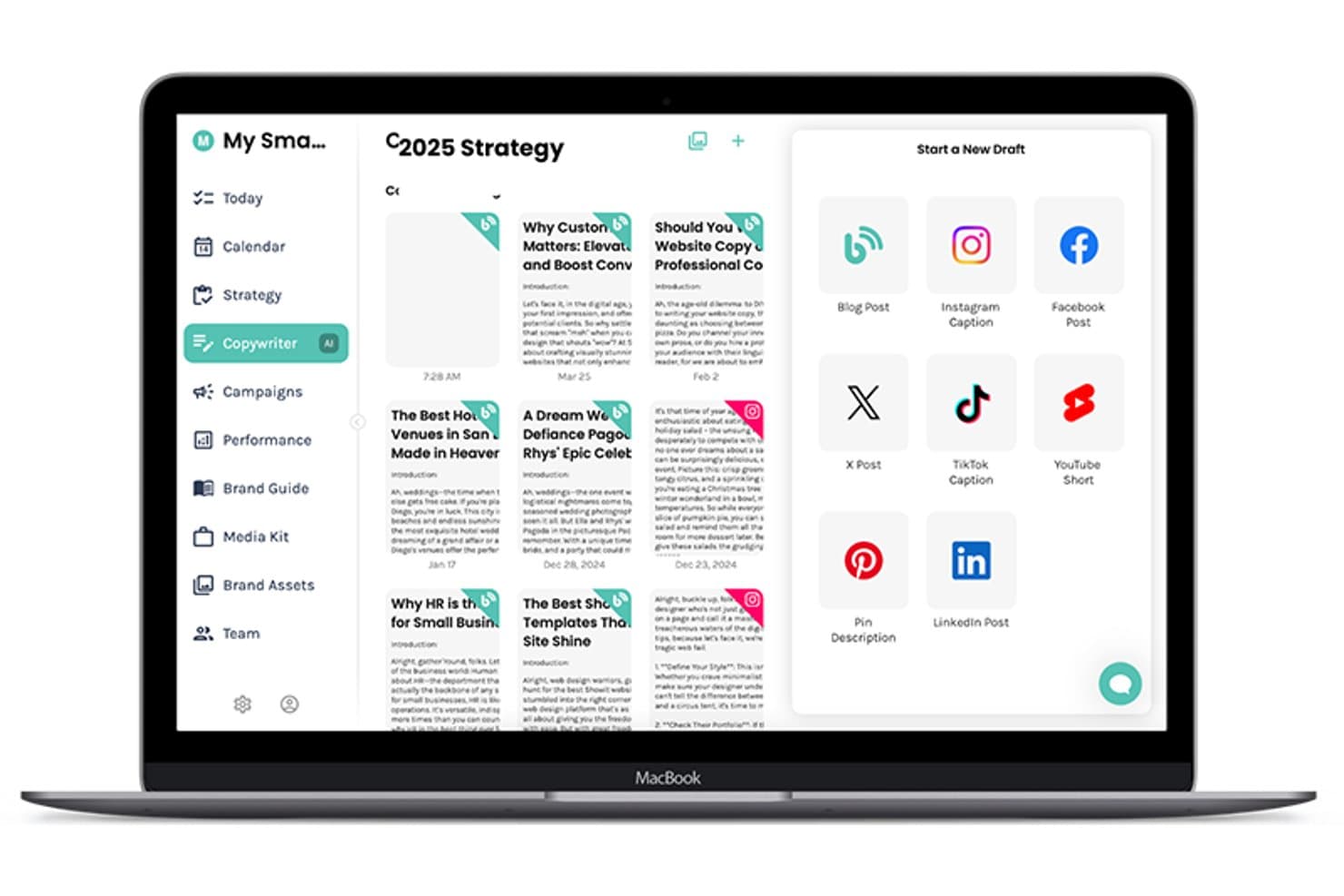
Enji offers an AI Copywriter tool that lets users draft blog posts, Instagram captions, TikTok captions, and more from a single dashboard. Enji is a small business marketing platform that pairs an AI copywriter for blog posts, captions, and newsletters with a built-in strategy generator, content scheduler, and performance dashboard.
Who Is Enji Best For?
Enji suits solopreneurs and one-person businesses who handle all of their own marketing without a dedicated team or agency behind them.
Why I Picked Enji
Enji earns its spot on my shortlist because it's the only content writing tool I've found that pairs AI drafting with a built-in strategy layer designed around one person's workflow. I like how the Brand Voice Generator captures your tone and applies it consistently across blog posts, captions, and newsletters. The content repurposing feature is especially useful: you give it one piece, and it maps out a full month of derivative content, which is exactly what a solo creator needs.
Enji Key Features
- Marketing strategy generator: Builds a personalized marketing plan and tasks from a simple onboarding quiz.
- KPI dashboard: Tracks performance across social channels and Google Analytics 4 in one place.
- Campaign templates: Offers ready-made, pre-mapped campaigns with detailed tasks and suggested timing.
- Canva integration: Lets users access and insert designs directly from Canva without downloading or re-uploading files.
Enji Integrations
Enji offers native integrations with Instagram, Facebook, LinkedIn, Pinterest, Threads, TikTok, YouTube, Canva, and Google Analytics 4.
Pros and Cons
Pros:
- Content repurposing maps one piece into many
- Brand voice applied consistently across content types
- Built-in strategy layer for content creation decisions
Cons:
- Not built for team or collaborative workflows
- Limited SEO optimization features
Learn more about Enji: Best for real-time team collaboration
- Free plan + trial available
- From $7/user/month (billed annually)
Visit WebsiteCustomer Rating:4.7/5
Google Docs creates, edits, formats, comments, and tracks document versions. Google Docs is a cloud-based word processing tool from Google that lets you create, edit, and format documents with built-in commenting, version history, and real-time multi-user editing.
Who Is Google Docs Best For?
Google Docs is a natural fit for teams of any size that need a simple, accessible writing environment without the overhead of desktop software.
Why I Picked Google Docs
Google Docs earns its spot as one of the best on my shortlist because real-time co-editing is genuinely where it excels. I can see my teammates' cursors moving live on the same document, leave inline comments with @mentions, and use suggesting mode to propose edits without overwriting anyone's work.
My team uses suggesting mode specifically during content reviews to track every change before anything gets accepted.
Google Docs Key Features
- Version history: Automatically saves every edit so you can view, name, and restore any previous version of a document.
- Voice typing: Lets you dictate content directly into a document using your device's microphone.
- Document outline: Automatically generates a navigable outline from your headings to help you structure long-form content.
- Word count tool: Displays a live word and character count, including counts for selected text only.
Google Docs Integrations
Google Docs connects natively with Google Workspace apps like Google Sheets, Google Slides, Google Drive, Gmail, and Google Meet. It also extends through the Google Workspace Marketplace, where you'll find add-ons from tools like Grammarly, Lucidchart, DocuSign, and Canva that work directly inside Docs.
Pros and Cons
Pros:
- Automatic saving prevents lost work
- Accessible from any device or browser
- Simultaneous editing with multiple collaborators
Cons:
- Limited formatting for complex documents
- No built-in SEO or content optimization
Learn more about Google Docs: Best for marketing content workflow automation Price 1-liner:
- 7-day free trial + free demo available
- From $59/month (billed annually)
Visit WebsiteCustomer Rating:4.8/5
Jasper produces marketing content, ad copy, social posts, and email campaigns. Jasper is an AI writing platform built for marketing teams, with tools for generating long-form content, ad copy, social media posts, and email campaigns across multi-step content workflows.
Who Is Jasper Best For?
Jasper is a natural fit for mid-size to enterprise marketing teams that produce high volumes of campaign content across multiple channels.
Why I Picked Jasper
I've included Jasper in my top picks because its Campaigns feature genuinely changes how my team handles multi-channel content production. I drop in a single creative brief, and Jasper generates matched assets across blog posts, social captions, and email copy in one pass. Its workflow builder also lets me chain prompts into repeatable sequences, so recurring campaign types don't require rebuilding from scratch each time.
Jasper Key Features
- Brand voice: Store your brand's tone, style, and terminology so every output stays consistent across writers and content types.
- Templates: Choose from 50+ pre-built content templates covering product descriptions, press releases, blog outlines, and more.
- Jasper Chat: An interactive AI chat interface for iterating on drafts, brainstorming angles, or rephrasing sections in real time.
- Knowledge base: Upload company documents, product specs, or style guides so Jasper references your own source material when generating content.
Jasper Integrations
Jasper offers native integrations with Slack, Google Drive, Google Docs, Google Sheets, Google BigQuery, Microsoft SharePoint, Microsoft Word, Salesforce, Semrush, Adobe Workfront, Box, and Webflow. It also connects with Zapier, Make, and Pabbly Connect, and provides an API for custom integrations.
Pros and Cons
Pros:
- Supports content creation in 29+ languages
- 50+ marketing-specific writing templates included
- Campaign-level content generation from one brief
Cons:
- Short-form copy excels over blog writing
- Long-form output struggles with niche topics
Learn more about Jasper AI: Best for performance-predicted copy creation
- Free trial + free demo available
- From $39/month (billed annually)
Visit WebsiteCustomer Rating:4.8/5
Anyword predicts copy performance for ads, emails, posts, blogs, and landing pages. Anyword is an AI content writing platform that generates and scores copy for ads, emails, social posts, blog posts, and landing pages using performance prediction data.
Who Is Anyword Best For?
Anyword is a strong fit for performance marketers and growth teams who write and test copy across paid and organic channels at scale.
Why I Picked Anyword
Anyword earns its spot on my shortlist because its performance prediction engine does something most AI writing tools don't: it scores copy variations before you publish them. The data-driven editor pulls from A/B-tested marketing data to surface which headline, ad, or email subject line is most likely to convert.
I also like the content intelligence feature, which compares your published content against that dataset to flag underperforming assets and suggest improvements.
Anyword Key Features
- Blog wizard: Generate full blog posts from a keyword or topic, with the output structured to include headers, body copy, and SEO-friendly formatting.
- Website automation: Personalize on-site messaging for different audience segments at scale without manual copy rewrites.
- Brand voice: Store your tone of voice, audience profiles, and messaging guidelines in one place so every output stays on-brand across channels.
- Chrome extension: Access Anyword's performance scoring and copy generation in any browser-based writing environment.
Anyword Integrations
Anyword offers native integrations with marketing, CRM, CMS, and advertising platforms, including Salesforce, HubSpot, Google Ads, Meta Ads, LinkedIn Ads, Marketo, Drupal, Sitecore, Wrike, and Braze. It also connects with Zapier, and an API is available for custom integrations.
Pros and Cons
Pros:
- Outputs content in 30+ languages
- 100+ marketing-specific writing templates
- Built-in predictive scoring for each variation
Cons:
- No direct WordPress publishing connection
- Long-form blog output needs manual editing
Learn more about Anyword: Best for brand-safe AI tailored to your company
- Free trial + free demo available
- Pricing upon request
Visit WebsiteCustomer Rating:4.4/5
Writer generates branded AI content and enforces company style guidelines. Writer is an enterprise AI writing platform that combines AI-generated content, brand style guide enforcement, and a custom AI model trained on your company's own terminology and guidelines.
Who Is Writer Best For?
Writer is a strong fit for enterprise marketing and content teams that need AI outputs to stay consistent with established brand voice, terminology, and compliance requirements.
Why I Picked Writer
Writer earns its spot on my shortlist because no other AI writing tool I've used lets you train the AI on your actual brand guidelines the way Writer does. I rely on its Knowledge Graph feature to feed the AI company-specific terminology, approved messaging, and product names, so every output reflects how my brand actually speaks.
Its built-in style guide checker flags deviations in real time, which means I'm not manually reviewing every piece for off-brand language.
Writer Key Features
- Playbooks: Build repeatable, multi-step content workflows that your team can run on demand without re-prompting from scratch.
- Voice profiles: Create named voice profiles tied to specific personas, like a CEO or brand tone, so AI-generated content matches the right voice every time.
- Skills: Capture and codify your team's domain expertise once, then make it available across all AI outputs and team members.
- AI-generated presentations: Generate on-brand slide decks directly from a prompt, pulling in your brand themes automatically.
Writer Integrations
Writer offers 20+ native connectors through its proprietary MCP gateway, including Google Workspace apps, Microsoft 365 apps, Slack, HubSpot, Salesforce, Atlassian (Jira and Confluence), Asana, Gong, Snowflake, Databricks, Figma, Contentful, and Adobe Experience Manager. It also connects with Zapier and provides an API for custom integrations.
Pros and Cons
Pros:
- Real-time style guide enforcement built in
- Outputs feel human, not AI-generated
- Custom AI trained on your brand data
Cons:
- Social media content generation falls short
- Overlapping features create initial confusion
Learn more about Writer: Best for simplifying complex writing
- 14-day free trial
- From $8.33/month (billed annually)

Hemingway App highlights hard-to-read sentences and improves direct writing. Hemingway App is a writing editor that highlights hard-to-read sentences, passive voice, and adverb overuse to help writers produce cleaner, more direct prose.
Who Is Hemingway App Best For?
Hemingway App is a natural fit for bloggers, journalists, and technical writers who need to make dense or complex content readable for general audiences.
Why I Picked Hemingway App
Hemingway App earns its spot on my shortlist because its color-coded editor makes readability problems impossible to miss. I paste in a draft and instantly see red-highlighted sentences that are too dense to follow and yellow ones that need trimming.
The grade-level score at the top keeps me honest—I target Grade 8 or below for most content, and Hemingway App shows me exactly where I'm falling short.
Hemingway App Key Features
- Write mode: A distraction-free editor that lets you draft content without readability feedback visible until you switch to edit mode.
- Direct publishing: Lets you publish content directly to WordPress or Medium from inside the app.
- Passive voice detection: Flags passive voice constructions in green so you can rewrite them in active voice.
- Desktop app: Available as a downloadable desktop application for Mac and PC, letting you work offline without a browser.
Hemingway App Integrations
Hemingway App offers one-click integrations with Medium and WordPress for direct publishing. It does not offer an API or broader integration options with other software, making it a relatively standalone tool compared to other content writing software on the market.
Pros and Cons
Pros:
- Free browser version with full editing features
- Suggests simpler alternatives for complex words
- Instant readability grade scoring on every draft
Cons:
- Flags every long sentence as a problem
- Does not catch spelling or grammar errors
Learn more about Hemingway Editor:

Rytr crafts blog posts, emails, and ad copy with custom tone profiles. Rytr is an AI writing assistant that lets you generate content across 40+ use cases—from blog posts and emails to ad copy—using custom tone profiles and a built-in voice training feature.
Who Is Rytr Best For?
Rytr is a strong fit for freelance writers, solo content creators, and small marketing teams who need to produce consistent, on-brand copy without a large budget.
Why I Picked Rytr
I've included Rytr in my top picks because its "My Voice" feature does something genuinely useful: it analyzes a writing sample you provide, then mirrors that tone across everything it generates. Freelancers managing multiple clients can build separate voice profiles for each one, keeping outputs distinct without starting from scratch each time.
I also like that those custom tone profiles travel with you through Rytr's Chrome extension, so voice consistency isn't limited to the app itself.
Rytr Key Features
- 40+ use case templates: Choose from pre-built templates for content types like emails, CTAs, SEO meta titles, social captions, and blog paragraphs.
- Built-in plagiarism checker: Run plagiarism checks directly inside Rytr without switching to a separate tool.
- AI command generator: Write a plain-language instruction and Rytr generates copy based on exactly what you describe.
- Multilingual writing: Write content in 30+ languages, available on the Premium plan.
Rytr Integrations
Rytr doesn't have native integrations with CRMs, CMSs, or project management tools. Its primary connectivity comes through a Chrome extension that lets you use Rytr wherever you write in the browser.
Pros and Cons
Pros:
- Custom use case templates on paid plans
- Built-in SERP analyzer and keyword tool
- Excels at short-form copy like ads
Cons:
- No real-time fact sourcing or verification
- Outputs get repetitive in longer drafts
Learn more about Rytr: Best for contextual rewriting options
- Free plan available
- From $6.99/month (billed annually)

Wordtune rewrites sentences, refines tone, and improves clarity across drafts. Wordtune is an AI writing assistant that offers sentence-level rewriting, paraphrasing, and text expansion tools designed to help writers refine tone, clarity, and word choice across drafts.
Who Is Wordtune Best For?
Wordtune is a strong fit for content writers, marketers, and non-native English speakers who need sentence-level rewriting options to sharpen clarity and tone across short-form content.
Why I Picked Wordtune
I picked Wordtune as one of the best because no other tool I've used surfaces rewriting options quite like this. When I highlight a sentence, Wordtune generates multiple context-aware rewrites that match my existing tone and subject matter rather than replacing my voice entirely.
I also use the tone toggle constantly, switching between casual and formal registers in seconds when repurposing content across channels. The Smart Synonym generator adds another layer, surfacing vocabulary options that fit contextually rather than just alphabetically.
Wordtune Key Features
- AI proofreading: Scans your text for spelling, grammar, and phrasing issues with suggested corrections.
- Continue writing: Generates a continuation of your existing text when you get stuck mid-draft.
- Text summarizer: Condenses documents, articles, webpages, and YouTube videos into key points.
- Smart Translate: Converts text written in 10 languages, including Spanish, Arabic, and Mandarin, into natural-sounding English.
Wordtune Integrations
Wordtune works through its browser extensions for Chrome and Microsoft Edge, rather than through traditional native integrations. The browser extension brings Wordtune's features to platforms like Google Docs and other web-based writing tools. Wordtune does not currently offer an API or work with Zapier.
Pros and Cons
Pros:
- Translates from 10 languages into English
- Adjusts tone between casual and formal
- Multiple rewrite options per sentence
Cons:
- Free plan caps daily rewrites at 10
- Pop-up suggestions can interrupt writing flow
Learn more about Wordtune: Best for multilingual content generation
- 1,000-word free trial available
- From $19/month (billed annually)

Copymatic generates blogs, ads, product descriptions, and social content. Copymatic is an AI writing tool that generates blog articles, ad copy, landing page copy, ecommerce product descriptions, and social media content in 25+ languages.
Who Is Copymatic Best For?
Copymatic is a strong fit for content marketers and freelancers who need to produce written content across multiple languages without a team of native-language writers.
Why I Picked Copymatic
I picked Copymatic as one of the best because its language support is genuinely broad. It generates content in 25+ languages, and I can switch the output language directly within any writing tool without leaving the editor.
I also like the tone of voice and creativity level controls, which let me fine-tune outputs for different regional audiences in one session rather than managing separate prompts per market.
Copymatic Key Features
- Long-form article writer: Generate 1,000+ word blog posts by producing titles, outlines, introductions, and full paragraphs in sequence.
- Grammar check and rewriter: Review and rewrite existing content to correct grammar issues and rephrase sentences.
- Chrome extension: Access 80+ AI writing tools directly in your browser without switching tabs or applications.
- WordPress plugin: Import articles created in Copymatic directly into WordPress in one click.
Copymatic Integrations
Copymatic offers a smaller set of native integrations, including a WordPress plugin for one-click article importing and a Chrome extension for in-browser writing. An API is available for custom integrations, but Zapier support is not clearly documented.
Pros and Cons
Pros:
- Outputs content in 25+ languages
- 80+ writing tools in Chrome extension
- Built-in SEO scoring for generated articles
Cons:
- Repetitive phrasing in generated content
- Long-form output often needs manual editing
Learn more about Copymatic: Best for in-depth story and manuscript analysis
- Free plan available
- From $10/month (billed annually)

ProWritingAid analyzes grammar, style, pacing, repetition, and readability. ProWritingAid is a writing analysis tool that checks grammar, style, pacing, repetition, and readability across long-form documents, with dedicated reports built specifically for fiction manuscripts and creative writing projects.
Who Is ProWritingAid Best For?
ProWritingAid is a natural fit for fiction writers, novelists, and authors who need detailed structural feedback on long-form creative writing.
Why I Picked ProWritingAid
I picked ProWritingAid as one of the best because no other writing tool gives fiction writers this level of structural feedback on a full manuscript. I love the pacing report, which visualizes tension and flow chapter by chapter so you can spot where your story drags. The dialogue tags report and repeated phrase detection are equally sharp, catching the kinds of patterns that only show up across a full draft.
ProWritingAid Key Features
- Grammar and style checker: Scans your writing for grammar, punctuation, spelling, and sentence structure issues in a single pass.
- Readability report: Scores your text across multiple readability indexes to help you match your writing to your intended audience.
- Word explorer: Surfaces synonyms, collocations, and contextual word suggestions directly within the editor.
- Plagiarism checker: Compares your text against online sources to flag unintentional duplication before you publish.
ProWritingAid Integrations
ProWritingAid works through desktop apps and browser extensions rather than traditional native integrations. The Desktop Everywhere app for Windows and Mac provides editing suggestions directly in Microsoft Word, Scrivener, and other desktop writing apps. The Chrome, Edge, and Firefox browser extensions bring ProWritingAid's features to Google Docs, Notion, Atticus, Campfire, and hundreds of other websites. ProWritingAid no longer offers an API for custom integrations, and Zapier support is not available.
Pros and Cons
Pros:
- Echoes feature catches repeated words across documents
- Handles full-length manuscripts and book drafts
- 25+ specialized reports for deep writing analysis
Cons:
- Sometimes suggests irrelevant style corrections
- Can slow down with very long documents
Learn more about ProWritingAid:
- 11GrammarlyBest for tone and clarity suggestions
How I Evaluate Content Writing Software
I split every evaluation into two layers: whether a tool can actually produce publish-ready blog posts and landing pages, and what separates it from every other option on the market.
Core Functionality (Table Stakes For This List)
When I'm selecting tools for my list, I rank each one on a scale from 0 (does not offer the functionality) to 5 (excels in this area) for each core functionality listed below. Then, I calculate the tool's total score into a percentage. Each tool needs to achieve a minimum total score of 65% to be considered for inclusion.
- AI Content Generation: I evaluate whether a tool can produce full blog drafts, landing page copy, and product descriptions from a prompt or brief, not just short snippets or single-line suggestions.
- SEO Optimization Tools: Each tool should surface keyword recommendations, on-page scoring, or SERP-informed guidance so writers can optimize a post for search within the same workspace.
- Grammar & Style Editing: I look for real-time grammar, readability, and clarity suggestions that go beyond basic spellcheck, like flagging passive voice or overly complex sentences in a draft.
- Brand Voice & Tone Controls: The best tools let you save a custom voice profile so every blog post or feature page your team writes stays consistent with your brand guidelines.
- Editorial Workflow & Collaboration: I check whether multiple team members can comment, assign review stages, and track version history, especially for teams handing drafts between writers and editors.
- Content Templates & Formats: A solid template library covering SaaS-relevant formats like comparison pages, feature announcements, and email sequences saves real time during content planning.
Once I have a list of tools that meet this criteria, I consider what sets each platform apart.
Differentiating Factors (What Sets Vendors Apart)
Here's how I compare and contrast different vendors:
Standout Features
I look for content repurposing tools that let you turn a single blog post into social snippets, email copy, and ad variations without starting from scratch. Real-time SERP analysis is another differentiator because it pulls in live competitor data while you write, not after. Custom AI training also matters. Tools that ingest your product docs or existing content library produce drafts that actually sound like your brand from the first output.
Beyond Features
Integrations matter because your content tool needs to connect where your team already works—publishing to WordPress or HubSpot, pulling keyword data from Ahrefs or Semrush, and syncing tasks in Asana or Notion. I also evaluate data security policies, especially around content ownership and whether your inputs are used to train models. Output quality is worth checking too. A tool that lets you switch between LLMs or feed in reference URLs tends to produce more accurate, grounded drafts for technical SaaS topics.
Cum alegeți software-ul pentru redactarea conținutului
Este ușor să vă pierdeți în liste lungi de funcții și structuri complexe de prețuri. Pentru a vă ajuta să rămâneți concentrați pe parcursul procesului unic de selecție a software-ului, iată o listă de verificare a factorilor de care trebuie să țineți cont:
| Factor | Aspecte de luat în considerare |
|---|---|
| FactorScalabilitate | Aspecte de luat în considerareVa putea instrumentul să gestioneze un volum mai mare de conținut sau de utilizatori pe măsură ce echipa dumneavoastră se extinde? Verificați numărul maxim de locuri pentru utilizatori și limitele de utilizare API. |
| FactorIntegrări | Aspecte de luat în considerareSe conectează nativ la instrumentele pe care se bazează echipa dumneavoastră, precum platformele CMS, Google Drive sau software-ul de gestionare a proiectelor? |
| FactorPosibilități de personalizare | Aspecte de luat în considerarePuteți configura șabloane, tonuri de redactare sau fluxuri de lucru personalizate care să corespundă strategiei de conținut a mărcii dumneavoastră? |
| FactorUșurință în utilizare | Aspecte de luat în considerareÎl pot adopta rapid utilizatorii fără cunoștințe tehnice, fără o curbă de învățare abruptă? Testați navigarea și fluxurile de sarcini înainte de achiziție. |
| FactorImplementare și integrare inițială | Aspecte de luat în considerareCât de repede poate începe echipa dumneavoastră să obțină rezultate? Luați în considerare durata configurării, pașii pentru migrare și asistența disponibilă pentru integrarea inițială. |
| FactorCost | Aspecte de luat în considerareNivelurile de preț sunt aliniate la nevoile și bugetul dumneavoastră? Căutați limite ascunse, reduceri anuale sau cerințe privind numărul minim de locuri. |
| FactorMăsuri de securitate | Aspecte de luat în considerareRespectă instrumentul standardele privind confidențialitatea datelor? Consultați politicile referitoare la stocarea datelor, permisiunile utilizatorilor și conformitatea cu GDPR. |
| FactorDisponibilitatea asistenței | Aspecte de luat în considerareEste disponibil ajutorul atunci când aveți nevoie de el—în special pentru probleme urgente? Verificați dacă sunt disponibile chatul live, asistența prin e-mail sau chiar acoperirea non-stop. |
Ce este software-ul pentru redactarea conținutului?
Software-ul pentru redactarea conținutului constă în instrumente digitale concepute pentru a ajuta persoanele și echipele să creeze, să editeze și să optimizeze materiale scrise pentru bloguri, marketing, site-uri web și publicații digitale.
Aceste platforme combină adesea generarea de text bazată pe inteligență artificială, corectarea gramaticală și funcțiile de formatare pentru a susține consecvența și rapiditatea. Prin centralizarea procesului de redactare, acestea simplifică producerea unor volume mari de conținut scris de calitate profesională, pentru nevoi de afaceri sau creative.
Funcții
Atunci când selectați software pentru redactarea conținutului, acordați atenție următoarelor funcții esențiale:
- Verificator de gramatică și ortografie: Se asigură că textul nu conține greșeli de scriere, erori gramaticale și formulări nefirești, evidențiind automat și sugerând corecturi în timpul editării.
- Șabloane de conținut: Oferă formate prestructurate pentru tipuri comune de texte—precum articole de blog, e-mailuri, descrieri de produse și actualizări pentru rețelele sociale—pentru a accelera crearea conținutului și a menține consecvența.
- Detectarea plagiatului: Scanează și semnalează textele duplicate pentru a contribui la păstrarea originalității conținutului și la evitarea problemelor accidentale legate de drepturile de autor înainte de publicare sau trimitere.
- Istoricul versiunilor: Urmărește și salvează modificările în timp, astfel încât să puteți examina, reveni la sau compara schițele anterioare, susținând editarea colaborativă și recuperarea după greșeli.
- Instrumente de colaborare: Permite mai multor utilizatori să lucreze simultan la același document, să lase comentarii, să atribuie sarcini și să soluționeze sugestii în timp real.
- Opțiuni de export: Vă permite să salvați sau să exportați conținutul în mai multe formate (precum PDF, DOCX sau HTML), facilitând publicarea sau distribuirea pe diferite platforme.
- Editor de formatare și stil: Vă permite să aplicați titluri, liste, linkuri și elemente de design pentru a îmbunătăți structura, lizibilitatea și aspectul vizual al textului.
- Număr de cuvinte și caractere: Oferă o numărătoare în timp real, astfel încât să puteți respecta cerințele de lungime pentru anumite platforme, briefuri sau standarde de publicare.
Funcții comune de inteligență artificială ale software-ului pentru redactarea conținutului
Dincolo de funcțiile standard ale software-urilor de redactare a conținutului enumerate mai sus, multe dintre aceste soluții integrează inteligența artificială cu funcții precum:
- Generarea automată a conținutului: Utilizează modele de inteligență artificială pentru a crea instantaneu articole, e-mailuri sau texte pentru reclame pe baza unor indicații sau subiecte scurte, ajutând utilizatorii să redacteze texte de calitate la scară largă.
- Rezumatul inteligent al textului: Condensează articolele sau rapoartele lungi în rezumate concise, făcând volumele mari de informații mai accesibile și mai ușor de parcurs.
- Reformularea și parafrazarea contextuală: Reformulează automat propoziții și paragrafe, păstrând în același timp sensul și tonul, fiind utilă pentru actualizarea conținutului existent sau evitarea repetițiilor.
- Ajustarea tonului cu ajutorul inteligenței artificiale: Permite utilizatorilor să modifice tonul emoțional sau stilul de redactare (formal, prietenos, convingător) pentru a se potrivi mai bine cu regulile de comunicare ale mărcii sau cu așteptările publicului-țintă.
- Îmbunătățirea conținutului în timp real: Oferă sugestii bazate pe inteligența artificială pentru îmbunătățirea clarității, implicării și lizibilității, ajustând proiectele pentru a le spori calitatea cu un minimum de editare manuală.
Beneficii
Implementarea unui software de redactare a conținutului oferă mai multe beneficii echipei și afacerii dumneavoastră. Iată câteva dintre acestea:
- Producție mai rapidă a conținutului: Instrumentele automatizate, șabloanele și generarea cu ajutorul inteligenței artificiale ajută echipa să creeze articole, e-mailuri și reclame mai rapid decât prin redactarea manuală.
- Calitate și stil consecvente: Verificatoarele gramaticale integrate, formatarea și setările pentru vocea mărcii asigură respectarea standardelor dumneavoastră pentru fiecare material.
- Colaborare îmbunătățită: Funcțiile de editare și comentare în timp real, precum și istoricul versiunilor, simplifică și transparentizează lucrul în echipă și redactarea realizată de mai mulți autori.
- Reducerea riscului de plagiat: Detectarea integrată a plagiatului ajută la menținerea originalității conținutului și protejează afacerea de încălcări accidentale ale drepturilor de autor.
- Fluxuri de publicare fără întreruperi: Opțiunile de export și integrările cu alte platforme vă permit să transferați cu ușurință conținutul de la stadiul de proiect la publicare.
- Eficiență mai bună a conținutului: Îmbunătățirile bazate pe inteligența artificială și funcțiile de ajustare a tonului ajută la crearea unor texte mai captivante și adaptate nevoilor publicului dumneavoastră.
Costuri și prețuri
Selectarea unui software de redactare a conținutului necesită înțelegerea diferitelor modele și planuri de tarifare disponibile. Costurile variază în funcție de funcții, dimensiunea echipei, suplimente și alți factori. Tabelul de mai jos rezumă planurile obișnuite, prețurile medii ale acestora și funcțiile incluse de obicei în soluțiile software de redactare a conținutului:
Tabel comparativ al planurilor pentru software-ul de redactare a conținutului
| Tipul planului | Preț mediu | Funcții comune |
|---|---|---|
| Tipul planuluiPlan gratuit | Preț mediu$0 | Funcții comuneȘabloane de bază pentru conținut, număr limitat de cuvinte sau caractere, verificări gramaticale și opțiuni de bază pentru export. |
| Tipul planuluiPlan personal | Preț mediu$10-$20/utilizator/lună | Funcții comuneAcces complet la șabloane, număr mai mare de cuvinte, verificări de bază ale plagiatului, instrumente de stil și asistență pentru un singur utilizator. |
| Tipul planuluiPlan pentru companii | Preț mediu$25-$50/utilizator/lună | Funcții comuneFuncții de colaborare, opțiuni avansate pentru export, istoric al versiunilor, gestionarea echipei și integrări. |
| Tipul planuluiPlan pentru întreprinderi | Preț mediu$60-$120/utilizator/lună | Funcții comuneConfigurare inițială personalizată, asistență prioritară, acces API, securitate îmbunătățită, șabloane personalizate și funcții de conformitate. |
Întrebări frecvente despre software-ul pentru redactarea conținutului
Iată câteva răspunsuri la întrebările frecvente despre software-ul pentru redactarea conținutului:
Prin ce diferă software-ul pentru redactarea conținutului de procesoarele de text de bază?
Software-ul pentru redactarea conținutului depășește editarea de bază a documentelor prin adăugarea de șabloane, detectarea plagiatului, instrumente de colaborare, istoricul versiunilor și, uneori, generarea de conținut cu ajutorul inteligenței artificiale. Aceste funcții ajută echipele să gestioneze, să urmărească și să optimizeze proiectele de redactare mai eficient decât procesoarele de text standard.
Poate software-ul pentru redactarea conținutului să îmbunătățească colaborarea în echipă?
Da, majoritatea programelor software pentru redactarea conținutului oferă colaborare în timp real, comentarii și urmărirea versiunilor. Aceste funcții permit mai multor utilizatori să editeze simultan documente, să atribuie sarcini de redactare și să verifice cu ușurință modificările, simplificând considerabil dezvoltarea în echipă a conținutului.
Există riscuri de securitate atunci când utilizați software pentru redactarea conținutului?
Da, mai ales dacă lucrați cu informații sensibile. Verificați întotdeauna practicile de securitate ale furnizorului — precum criptarea datelor, controalele de acces și certificările de conformitate — pentru a vă asigura că documentele și datele dumneavoastră sunt protejate.
Instrumentele software pentru redactarea conținutului acceptă mai multe limbi?
Multe instrumente software pentru redactarea conținutului acceptă crearea și editarea de conținut multilingv. Cu toate acestea, opțiunile lingvistice și calitatea pot varia, așa că verificați compatibilitatea cu limbile dorite și testați calitatea rezultatelor pentru limbile țintă.
Care este, de obicei, curba de învățare pentru utilizatorii noi?
Majoritatea programelor software pentru redactarea conținutului sunt concepute pentru o familiarizare rapidă, cu tutoriale, șabloane și tururi ghidate. Cu toate acestea, funcțiile avansate sau platformele extrem de personalizabile pot necesita instruire suplimentară pentru ca echipa dumneavoastră să obțină maximum de beneficii.