

Software-ul de planificare a conținutului vă ajută echipa să organizeze, să programeze și să gestioneze proiectele de conținut, de la idee până la publicare. Dacă sunteți în căutarea celui mai bun software de planificare a conținutului, aveți nevoie de instrumente care să mențină campaniile pe drumul cel bun, să sprijine colaborarea și să conecteze eforturile dumneavoastră cu rezultate reale pentru companie.
Pe măsură ce cerințele legate de conținut cresc, alegerea platformei potrivite face diferența dintre termene ratate și o execuție coordonată, realizată cu încredere. În această listă, vă voi prezenta cele mai bune opțiuni, astfel încât să puteți compara funcțiile și să alegeți software-ul potrivit modului în care lucrează echipa dumneavoastră — fie că planificați articole de blog, lansați campanii pe mai multe canale sau coordonați mai mulți colaboratori.
Why Trust Our Software Recommendations
6,700+
Reviews
20
Industry experts
16+
Evaluation factors
14
Years
Our team has been testing and reviewing software since 2012. As publishers and media operators ourselves, we know how difficult—and important—it is to choose the right software.
For this guide, we evaluated tools using hands-on testing and independent research, scoring tools using our selection criteria.
Our reviews reflect our human editorial judgment, not a sales pitch.
Tabel comparativ: software pentru planificarea conținutului
Acest tabel comparativ rezumă detaliile privind prețurile pentru selecțiile mele de top de software pentru planificarea conținutului.
Sorted by: Default
| Tool | Starting Price | Website | |
|---|---|---|---|
Best for solo creators | 4.3 out of 5 | $29/month 14-day free trial | Website |
Best for collaborative social post scheduling | 4.6 out of 5 | $65/month Free plan + trial available | Website |
Best for AI-powered content strategy insights | 4.6 out of 5 | Pricing upon request Free plan available | Website |
Best for cross-team campaign coordination | 4.4 out of 5 | $10.99/user/month Free plan + free trial + free demo available | Website |
Best for quick branded content creation | 4.5 out of 5 | $7.99/user/month Free plan + 30-day free trial available | Website |
Best for interactive content design | 4.3 out of 5 | Pricing upon request Free plan + free demo available | Website |
Best for advanced social media analytics | 4.1 out of 5 | $99/month 14-day free trial | Website |
Best for AI-driven productivity planning | 4.2 out of 5 | $19/seat/month Free trial available | Website |
Best for influencer campaign management | Not rated | $18.75/month 14-day free trial + free demo available | Website |
Best for enterprise sales and marketing enablement | Not rated | Pricing upon request Free trial + free demo available | Website |


Recenzii ale celor mai bune software-uri de planificare a conținutului
Mai jos sunt rezumatele mele detaliate ale celor mai bune software-uri de planificare a conținutului care au ajuns pe lista mea scurtă. Recenziile mele oferă o privire detaliată asupra funcțiilor, celor mai potrivite cazuri de utilizare și integrărilor fiecărei platforme, pentru a vă ajuta să o găsiți pe cea mai potrivită pentru dumneavoastră.

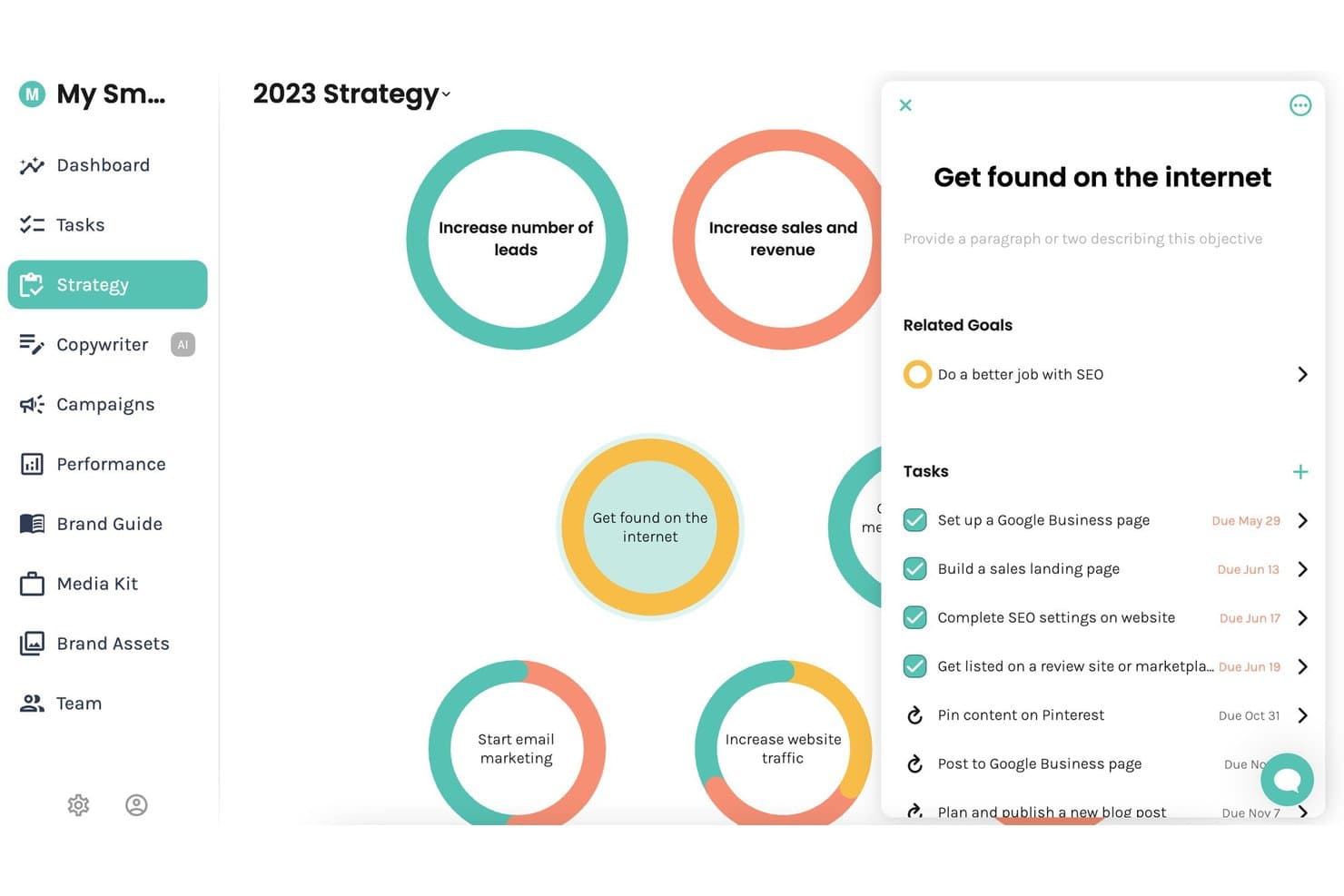
Enji offers a visual strategy board where users can manage marketing objectives, related goals, and tasks with due dates in one centralized view. Enji is an all-in-one marketing planning tool that combines strategy generation, a marketing calendar, AI-powered content creation, social media scheduling, and performance analytics.
Who Is Enji Best For?
Enji is a strong fit for solopreneurs and freelancers who manage their own marketing without a dedicated team or agency behind them.
Why I Picked Enji
Enji earns its spot on my shortlist because its strategy-to-calendar workflow is built specifically for one person running everything alone. I love that answering a 20-question questionnaire produces a personalized marketing plan that auto-populates a calendar as a prioritized to-do list. The AI Copywriter, trained on your specific brand voice, then drafts social captions and blog posts tied directly to those planned tasks.
Enji Key Features
- AI content repurposing tool: Instantly transforms a single piece of content into multiple social posts for different platforms.
- Brand management suite: Centralizes brand voice settings, style guides, media kits, and core brand assets in one place.
- KPI dashboard integration: Pulls website and social analytics directly into your marketing dashboard for quick performance checks.
- Canva integration: Allows you to access and use your Canva designs directly within Enji without reuploading.
Enji Integrations
Enji offers native integrations with Instagram, Facebook, LinkedIn, Pinterest, Threads, TikTok, YouTube, Canva, and Google Analytics 4.
Pros and Cons
Pros:
- All-in-one strategy, calendar, and publishing tool
- AI copywriter trained on your brand
- Questionnaire generates a full marketing calendar
Cons:
- Lacks native SEO keyword research tools
- No multi-user team collaboration supported
Learn more about Enji: Best for collaborative social post scheduling
- Free plan + trial available
- From $65/month
Visit WebsiteCustomer Rating:4.6/5
Loomly plans social posts, schedules content, approvals, and team workflows. Loomly is a social media management platform built around a content calendar, with tools for post creation, multi-channel scheduling, team collaboration, approval workflows, and AI-assisted content generation.
Who Is Loomly Best For?
Loomly is a natural fit for small to mid-size marketing teams and social media managers who need a shared workspace for planning and approving social content.
Why I Picked Loomly
Loomly earns its spot on my shortlist because the approval workflow is genuinely one of the clearest I've used for social content. My team can move a post through multiple review stages, from draft to pending approval to scheduled, without any back-and-forth outside the platform. I also like the post preview feature, which renders how content will look on each specific channel before it goes live. That catches formatting issues early, which saves a lot of last-minute edits.
Loomly Key Features
- Content calendar: A central calendar view for visualizing scheduled posts across all connected social channels by day, week, or month.
- Post ideas: Loomly surfaces content ideas based on trending topics, RSS feeds, and upcoming events to help fill your calendar.
- Asset library: A built-in media library for storing, organizing, and reusing images and videos across multiple posts.
- Analytics dashboard: Track post performance metrics like reach, clicks, and engagement directly within the platform.
Loomly Integrations
Loomly offers native integrations with Slack, Microsoft Teams, Canva, Google Drive, Unsplash, and Giphy, along with social channel connections to Instagram, Facebook, LinkedIn, TikTok, YouTube, Pinterest, Snapchat, Threads, and Google Business Profile. It also connects with Zapier, though a public API for custom integrations is not clearly documented.
Pros and Cons
Pros:
- Approval workflows built for agency-client teams
- Drag-and-drop calendar for quick rescheduling
- Customize post copy per social channel
Cons:
- Analytics lack depth for advanced reporting
- Limited built-in image editing tools
Learn more about Loomly: Best for AI-powered content strategy insights
- Free plan available
- Pricing upon request
Visit WebsiteCustomer Rating:4.6/5
MarketMuse maps content gaps, topic authority, competitors, and roadmaps. MarketMuse is an AI-powered content strategy and planning platform that analyzes your existing content inventory, identifies topic authority gaps, and generates personalized content roadmaps based on competitor analysis and keyword difficulty.
Who Is MarketMuse Best For?
MarketMuse is a strong fit for SEO and content teams at mid-size to enterprise companies that produce high volumes of content and need a data-driven approach to topic prioritization.
Why I Picked MarketMuse
I've included MarketMuse in my top picks because its AI-powered content strategy insights go deeper than standard keyword tools. The Topic Model feature identifies every related subtopic my content needs to rank, while the Personalized Difficulty score prioritizes opportunities based on my domain's existing authority.
I also use the Content Inventory to find underperforming pages that need updating before planning anything new.
MarketMuse Key Features
- Content briefs: Auto-generates structured briefs with recommended topics, headers, and questions to cover.
- Optimize score: Grades your draft against a topic model in real time as you write or paste content.
- SERP analysis: Breaks down what top-ranking pages cover to identify gaps at the planning stage.
- Research tool: Surfaces semantically related concepts and questions for any target topic.
MarketMuse Integrations
MarketMuse offers Google Docs exports and Acrolinx integration, along with a built-in ChatGPT integration using OpenAI's API. Custom integrations are available via the API. Zapier support is not clearly documented.
Pros and Cons
Pros:
- Benchmarks content quality before you publish
- Automated topic clustering replaces manual keyword mapping
- Uncovers subtopic gaps competitors miss entirely
Cons:
- Confusing navigation between projects and plans
- No warning before credits are consumed
Learn more about MarketMuse: Best for cross-team campaign coordination
- Free plan + free trial + free demo available
- From $10.99/user/month (billed annually)
Visit WebsiteCustomer Rating:4.4/5
Asana coordinates project tracking, task assignments, timelines, and workflows. Asana is a work management platform that combines project tracking, task assignment, timeline planning, and cross-functional workflow coordination across teams.
Who Is Asana Best For?
Asana is a natural fit for mid-size to enterprise marketing teams coordinating campaigns across multiple departments, agencies, or regional teams.
Why I Picked Asana
I've included Asana in my top picks because cross-team campaign coordination is genuinely where it shines. Portfolios let you monitor every campaign project in one view, with live status and workload data across teams.
I also rely on Goals to connect campaign tasks directly to business objectives, so nothing gets worked on in isolation. Dependencies keep handoffs between design, copy, and paid media teams on track without constant check-ins.
Asana Key Features
- Timeline view: A Gantt-style visual planner for mapping out campaign schedules, deadlines, and task sequences across a project.
- Project templates: Pre-built templates for campaigns, editorial calendars, and content launches that give teams a structured starting point.
- Automation rules: Trigger-based automations that reassign tasks, update statuses, or send notifications when set conditions are met.
- Custom fields: Configurable data fields for tracking content type, channel, priority, or any other attribute your team needs on tasks.
Asana Integrations
Asana offers 300+ integrations through its built-in integrations and app directory, including Slack, Google Drive, Microsoft Teams, Salesforce, HubSpot, Jira, Google Calendar, Figma, Canva, and Adobe Creative Cloud. It also connects with Zapier and provides an API for custom integrations.
Pros and Cons
Pros:
- In-app commenting and proofing for draft reviews
- Only one assignee per task reduces ownership confusion
- Multiple project views including calendar and timeline
Cons:
- Recurring tasks only show next instance on calendar
- No built-in content performance tracking or analytics
Learn more about Asana: Best for quick branded content creation
- Free plan + 30-day free trial available
- From $7.99/user/month (billed annually)
Visit WebsiteCustomer Rating:4.5/5
Adobe Express creates branded graphics, videos, PDFs, and web pages. Adobe Express is a web and mobile content creation tool that lets marketing teams design on-brand social graphics, short videos, PDFs, and web pages using a customizable template library.
Who Is Adobe Express Best For?
Adobe Express is a strong fit for small marketing teams and solo content creators who need to produce branded visual content without a dedicated designer.
Why I Picked Adobe Express
I've included Adobe Express in my top picks because of how well its Brand Kit feature supports consistent content creation at scale. My team stores our logos, color palettes, and fonts directly in the platform, so every asset we produce stays on-brand without manual checks.
I also rely on the one-click resize tool to reformat a single piece of content into every social media dimension we need, which cuts production time significantly across campaigns.
Adobe Express Key Features
- Content scheduler: Plan, schedule, preview, and publish social media posts directly from the platform without switching tools.
- Adobe Firefly AI tools: Generate images, text effects, and templates from text prompts inside the editor.
- Animation effects: Add motion to text, images, and icons to turn static designs into animated social content.
- Adobe Stock library: Access millions of royalty-free photos, videos, and audio files directly within the editor.
Adobe Express Integrations
Adobe Express integrates natively with Adobe ecosystem apps like Creative Cloud, Acrobat, Experience Manager Assets, Workfront, Firefly Custom Models, and GenStudio for Performance Marketing. It also has native third-party integrations with Box, Miro, Slack, HubSpot, Figma, Bynder, Webflow, Google Workspace, and OpenAI's ChatGPT, along with 150+ add-ons available in its marketplace. An add-ons SDK is available for building custom extensions.
Pros and Cons
Pros:
- Brand Kit enforces visual consistency automatically
- AI-generated templates speed up content creation
- Built-in social media scheduling and publishing
Cons:
- Limited multi-user collaboration and approval workflows
- No editorial calendar for long-form content
Learn more about Adobe Express: Best for interactive content design
- Free plan + free demo available
- Pricing upon request
Visit WebsiteCustomer Rating:4.3/5
Ceros creates animated landing pages, interactive reports, and digital experiences. Ceros is a no-code interactive content creation platform that lets marketing teams design and publish animated landing pages, interactive reports, and digital experiences without developer support.
Who Is Ceros Best For?
Ceros is a strong fit for B2B marketing teams at mid-size to enterprise companies that produce high-volume content like eBooks, reports, and campaign landing pages.
Why I Picked Ceros
Ceros earns its spot on my shortlist because no other content tool I've used gives marketing teams the same freedom to design interactive experiences without touching code. I particularly like the freeform design canvas in Ceros Studio, which lets my team build animated, scrollable content like interactive reports and campaign microsites directly in the browser.
The built-in real-time analytics also mean I can see exactly how audiences engage with each piece and adjust before the next content cycle.
Ceros Key Features
- Flex AI design assistant: Generate and build interactive content directly on the canvas using AI modes for ideation, planning, building, and review.
- MarkUp feedback tool: Pin visual annotations and comments directly onto PDFs, websites, and videos to manage content review without email chains.
- Ceros Editor: Let marketers edit copy, images, and interactions in published Ceros content without designer support, using a drag-and-drop asset library.
- Shared asset library: Store, manage, and reuse branded assets across projects to maintain visual consistency across content.
Ceros Integrations
Ceros offers native integrations with Eloqua, Google Analytics, Google Tag Manager, HubSpot, Marketo, and Seismic, along with support for third-party analytics services like Adobe Analytics through its Universal Analytics integration. MarkUp, part of the Ceros suite, connects with Zapier and provides an API for custom integrations. Ceros also has an SDK for embedding interactive content into ecommerce and other external platforms.
Pros and Cons
Pros:
- Inspiration gallery sparks new content ideas
- No coding needed to publish content
- Freeform canvas for custom interactive layouts
Cons:
- Desktop-to-mobile conversion requires manual rebuilding
- Analytics exports are messy and hard to read
Learn more about Ceros: Best for advanced social media analytics
- 14-day free trial
- From $99/month (billed annually)
Visit WebsiteCustomer Rating:4.1/5
Hootsuite schedules, publishes, listens, and analyzes social media content. Hootsuite is a social media management platform that covers content scheduling, publishing, social listening, team collaboration, and analytics across multiple social networks.
Who Is Hootsuite Best For?
Hootsuite is a natural fit for mid-size to enterprise marketing teams that manage social media presence across multiple brands, channels, and regions simultaneously.
Why I Picked Hootsuite
Hootsuite earns its spot on my shortlist because its analytics depth goes well beyond what most content planning tools offer. I particularly like the competitive benchmarking feature, which lets you track up to 20 competitors' posting frequency, audience growth, and engagement rates in one dashboard.
The Advanced Analytics add-on takes things further by letting you build custom metrics with your own formulas and pulling in Google Analytics and Adobe Analytics data alongside your social performance, which gives a genuinely complete picture of content ROI.
Hootsuite Key Features
- Bulk scheduling: Upload and schedule up to 350 posts at once using a CSV file across multiple social accounts.
- Content approval workflows: Route draft posts through multi-step approval chains before publishing, with comments and feedback kept in-thread.
- Social listening streams: Monitor keywords, hashtags, and brand mentions across platforms directly inside your Hootsuite dashboard.
- AI caption writer: Generate post captions from a prompt, with tone and platform adjustments built into the editor.
Hootsuite Integrations
Hootsuite offers over 100 apps and integrations through its App Directory, including Canva, Adobe Express, Salesforce, HubSpot, Slack, Shopify, Google My Business, Dropbox, monday.com, and Wrike. It also connects with Zapier and provides an API for custom integrations.
Pros and Cons
Pros:
- Competitive benchmarking tracks up to 20 rivals
- Best Time to Publish suggests optimal slots
- Supports scheduling to nine social platforms
Cons:
- Scheduled posts occasionally fail without alerts
- Advanced analytics locked behind add-on costs
Learn more about Hootsuite: Best for AI-driven productivity planning
- Free trial available
- From $19/seat/month (billed annually)
Visit WebsiteCustomer Rating:4.2/5
Motion schedules tasks, meetings, and deadlines around priorities and workload. Motion is an AI-powered task and project management tool that automatically schedules tasks, meetings, and deadlines across your calendar based on priorities and workload.
Who Is Motion Best For?
Motion is a strong fit for individual contributors, freelancers, and small teams who manage heavy workloads across multiple projects and need automated scheduling to stay on top of priorities.
Why I Picked Motion
I picked Motion as one of the best because its AI scheduler does something no standard project management tool does: it takes every task across all your active projects and automatically time-blocks them on your calendar, adjusting the plan in real time as priorities shift.
I especially like the AI project builder, which generates a full task list with deadlines and assignees from a simple project description. The proactive deadline risk alerts are also a standout feature for content teams juggling multiple campaigns.
Motion Key Features
- AI Gantt chart: View all active projects on a live timeline that auto-updates as tasks, deadlines, and assignees change, with weekly, quarterly, and yearly views available.
- Recurring task scheduling: Set daily, weekly, monthly, or quarterly tasks and Motion automatically blocks time on your calendar to complete them.
- AI meeting notetaker: Auto-capture notes during meetings so your team can reference decisions and action items without manual note-taking.
- Kanban board view: Switch between list, Kanban, and Gantt views in one click to manage and visualize content work in the format that fits your team.
Motion Integrations
Motion offers native integrations with Google Calendar, Microsoft Outlook 365, iCloud Calendar, Gmail, Zoom, Google Meet, Microsoft Teams, and Siri. It connects with Zapier and provides an API for custom integrations.
Pros and Cons
Pros:
- Email forwarding converts messages into tasks
- Turns meeting notes into assigned tasks
- Auto-reschedules missed tasks to future slots
Cons:
- Mobile app lacks full desktop functionality
- Limited task dependencies outside of projects
Learn more about Motion: Best for influencer campaign management
- 14-day free trial + free demo available
- From $18.75/month (billed annually)

Later schedules social content and manages creator campaigns with analytics. Later is a social media management and influencer marketing platform that combines content scheduling, publishing, and analytics with a built-in creator discovery and campaign management suite.
Who Is Later Best For?
Later is a strong fit for DTC brands, ecommerce companies, and social media managers who run influencer partnerships alongside their organic content programs.
Why I Picked Later
I've included Later in my top picks because its influencer campaign management goes deeper than a simple creator directory. The Incentive Advisor feature shows actual creator pay rates across channels, so you're not guessing at budgets or overpaying.
I also like Later EdgeAI, which pulls from 16M+ analyzed creators to predict campaign outcomes before you launch—recommending creator mixes and flagging risks early. Pair that with unified paid, organic, and sales reporting, and you get a genuinely complete picture of campaign impact.
Later Key Features
- Visual content calendar: Drag-and-drop scheduling across Instagram, TikTok, Facebook, Pinterest, and LinkedIn in one calendar view.
- Media library: Centralized storage for photos and videos with labeling and search so your team can pull assets into posts quickly.
- Linkin.bio: A customizable landing page linked to your Instagram bio that turns individual posts into clickable or shoppable destinations.
- Hashtag suggestions: Auto-generated hashtag recommendations based on your caption content and category.
Later Integrations
Later offers native integrations with Canva, Adobe, Google Drive, Dropbox, Mailchimp, Bazaarvoice, Yotpo, PowerReviews, and Everflow. It supports publishing to Instagram, Facebook, TikTok, Pinterest, LinkedIn, YouTube, Threads, and Snapchat. Later Influence includes a Reporting API for exporting campaign data, but Zapier is not currently supported.
Pros and Cons
Pros:
- Built-in influencer and brand collaboration tools
- Bulk media uploads with usage tracking
- Instagram grid preview before publishing
Cons:
- Team collaboration trails competitors like Hootsuite
- Reels and carousel posts can fail during publishing
Learn more about Later: 10Best for enterprise sales and marketing enablement
Seismic
- Free trial + free demo available
- Pricing upon request

Seismic aligns sales content, buyer engagement, coaching, and GTM programs. Seismic is a sales enablement platform that centralizes content management, buyer engagement, sales coaching, and go-to-market program execution for enterprise revenue teams.
Who Is Seismic Best For?
Seismic is built for large enterprise organizations with dedicated sales and marketing teams that need a unified system for managing and distributing sales content at scale.
Why I Picked Seismic
I've included Seismic in my top picks because it's where sales and marketing content actually connects to revenue. Marketing teams can build templated content in Seismic that reps can personalize within set parameters, so the final output stays on-brand without needing a back-and-forth review cycle.
I also like the content analytics, which show which assets reps are actually using in deals and how buyers are engaging with them.
Seismic Key Features
- Digital sales rooms: Create personalized, branded microsites where reps can share curated content collections directly with buyers.
- Predictive content recommendations: AI surfaces the most relevant assets for a rep based on deal stage, industry, and buyer profile.
- Learning and coaching tools: Assign training content, track completion, and reinforce sales skills through built-in coaching workflows.
- Content governance controls: Set expiration dates and access permissions on assets to keep outdated materials out of active use.
Seismic Integrations
Seismic offers integrations through its Seismic Exchange marketplace, including Salesforce, Microsoft Teams, Google Slides, Slack, Zoom, Webex, Gong, Oracle Sales Cloud, Adobe Experience Manager, and Snowflake. An API is available for custom integrations, along with Microsoft Power Automate support for workflow automation.
Pros and Cons
Pros:
- Version control prevents outdated content sharing
- AI recommends assets by deal stage
- Tracks buyer engagement on shared content
Cons:
- Search breaks down with large libraries
- Requires dedicated admin for ongoing management
Learn more about Seismic:
Alte software-uri pentru planificarea conținutului
Iată câteva opțiuni suplimentare de software pentru planificarea conținutului care nu au ajuns pe lista mea scurtă, dar merită totuși verificate:
- 11monday.comBest for custom workflow automation
- 12WrikeBest for built-in visual whiteboarding
- 13CoScheduleBest for integrated marketing calendars
- 14TrelloBest for AI-powered to-do organization
- 15KapostBest for aligning content to customer journey
- 16WistiaBest for branded video content management
- 17AirtableBest for no-code workflow customization
- 18Google CalendarBest for shared calendar scheduling
- 19NotionBest for unified workspace and docs
- 20Content SnareBest for document collection automation
How I Evaluate Content Planning Software
I split my evaluation into two layers: the core capabilities a tool needs—editorial calendar, brief building, workflow approvals—and the differentiators that set the best options apart.
Core Functionality (Table Stakes For This List)
When I'm selecting tools for my list, I rank each one on a scale from 0 (does not offer the functionality) to 5 (excels in this area) for each core functionality listed below. Then, I calculate the tool's total score into a percentage. Each tool needs to achieve a minimum total score of 65% to be considered for inclusion.
- Editorial Calendar: I look for a visual, filterable calendar where you can drag posts between dates, toggle between channel views, and spot gaps in your publishing cadence at a glance.
- Content Briefs & Ideation: A good tool lets you build structured briefs with target keyword, audience, and outline fields—then link them to a shared idea backlog your team draws from.
- Workflow & Collaboration: I evaluate whether the platform supports assignable tasks, custom statuses, and approval steps so a draft moves from writer to editor to stakeholder without email chains.
- Strategy Mapping: Tagging content by funnel stage, persona, or campaign matters. I check whether you can filter your calendar to see, for example, only bottom-of-funnel assets tied to a Q3 launch.
- SEO & Keyword Planning: Whether native or through integrations with tools like Semrush or Ahrefs, I look for keyword data—volume, difficulty, intent—surfaced where planners make topic decisions.
- Analytics & Integrations: The tool should connect to your CMS and analytics stack so you can check how published content performs without leaving the planning environment.
Once I have a list of tools that meet this criteria, I consider what sets each platform apart.
Differentiating Factors (What Sets Vendors Apart)
Here's how I compare and contrast different vendors:
Standout Features
AI-powered brief generation is a major differentiator. Tools that can suggest outlines or draft structured briefs from a target keyword save hours of upfront planning work. I also look for topic cluster visualization, where you can map pillar pages to supporting posts and spot linking gaps across your content library. Content repurposing workflows matter for SaaS teams that need to atomize a webinar or long-form guide into blog posts, social clips, and email sequences within one planning view.
Beyond Features
Tech stack integration depth is one of the first things I evaluate. A content planning tool that syncs with your CMS, SEO suite, and marketing automation platform keeps your team from toggling between tabs to check keyword data or publish status. Scalability matters too—I check whether the tool handles multi-brand content portfolios and flexible seat structures for freelancers. Finally, time-to-value is worth considering. Tools with prebuilt editorial templates and easy migration from spreadsheets or project management platforms get teams planning faster.
Cum să alegeți software-ul pentru planificarea conținutului
Alegerea software-ului pentru planificarea conținutului depinde de cât de bine sprijină fluxul dumneavoastră editorial, planificarea campaniilor, coordonarea echipei și calendarul de publicare. Platforma potrivită ar trebui să faciliteze organizarea ideilor, atribuirea sarcinilor, urmărirea termenelor-limită și păstrarea vizibilității asupra conținutului planificat.
| Dacă prioritatea dumneavoastră este… | Căutați… |
|---|---|
| Dacă prioritatea dumneavoastră este…Gestionarea calendarelor editoriale | Căutați…Calendare vizuale de conținut și vizualizări cronologice |
| Dacă prioritatea dumneavoastră este…Coordonarea mai multor colaboratori | Căutați…Atribuiri, responsabili și urmărirea stării |
| Dacă prioritatea dumneavoastră este…Planificarea campaniilor pe mai multe canale | Căutați…Planificarea campaniilor pe mai multe canale |
| Dacă prioritatea dumneavoastră este…Organizarea ideilor de conținut | Căutați…Liste de idei, briefuri și arhive de conținut |
| Dacă prioritatea dumneavoastră este…Respectarea termenelor-limită | Căutați…Date scadente, mementouri și etape ale fluxului de lucru |
| Dacă prioritatea dumneavoastră este…Verificarea conținutului înainte de publicare | Căutați…Fluxuri de aprobare și instrumente de comentarii |
Cum să vă evaluați lista scurtă
- Creați un calendar editorial de test: Adăugați mai multe articole, campanii și postări pe rețelele sociale planificate pentru perioada următoare, pentru a vedea cât de clar afișează platforma termenele-limită, canalele, responsabilii și datele de publicare.
- Testați personalizarea fluxului de lucru: Creați etapele existente ale conținutului, precum idee, brief, schiță, verificare, aprobare și publicare, pentru a confirma că platforma se poate adapta procesului dumneavoastră actual.
- Atribuiți un ciclu complet de conținut: Creați o sarcină, desemnați un responsabil, adăugați un termen-limită, atașați un brief și mutați elementul prin etapa de verificare pentru a vedea cât de bine gestionează sistemul transferul responsabilităților.
- Planificați o campanie pe mai multe canale: Adăugați conținut pentru mai multe canale în cadrul unei singure campanii și confirmați dacă puteți vizualiza într-un singur loc dependențele, datele de publicare și responsabilitățile.
- Verificați rapoartele și vizibilitatea: Examinați volumul de lucru, sarcinile întârziate, termenele-limită următoare și rapoartele privind starea conținutului pentru a determina dacă managerii pot identifica rapid blocajele.
Ce este software-ul pentru planificarea conținutului?
Software-ul pentru planificarea conținutului este o platformă utilizată pentru organizarea ideilor de conținut, a calendarelor editoriale, a campaniilor, a sarcinilor și a calendarelor de publicare.
Aceste instrumente oferă echipelor un loc central pentru planificarea conținutului viitor, atribuirea responsabilităților, urmărirea termenelor-limită și monitorizarea progresului, de la ideea inițială până la publicare. Multe platforme includ, de asemenea, briefuri de conținut, fluxuri de aprobare, vizualizări ale campaniilor și instrumente de colaborare.
Software-ul pentru planificarea conținutului oferă echipelor o vizibilitate mai clară asupra conținutului creat, a persoanei responsabile de fiecare sarcină și a momentului în care se preconizează că acel conținut va fi publicat.
Funcții
Atunci când alegeți un software pentru planificarea conținutului, urmăriți următoarele funcții esențiale:
- Calendar editorial: Un program vizual centralizat care afișează conținutul planificat, redactat și publicat pentru săptămânile sau lunile următoare. Acesta ajută echipele să coordoneze campaniile și să evite suprapunerile de conținut.
- Atribuirea sarcinilor: Le permite managerilor să delege sarcini specifice, să stabilească termene-limită și să urmărească progresul fiecărui colaborator pe parcursul producției și aprobării conținutului.
- Gestionarea documentelor: Oferă un loc pentru stocarea, organizarea și regăsirea tuturor ciornelor, materialelor și fișierelor auxiliare, cu istoric al versiunilor și controale de acces la conținut.
- Gestionarea fluxului de lucru: Vă permite să proiectați, să impuneți și să monitorizați fiecare etapă a procesului de creare și aprobare a conținutului, asigurându-vă că nicio sarcină nu este omisă.
- Instrumente de colaborare: Le permit membrilor echipei să comenteze, să ofere feedback și să revizuiască direct conținutul în sistem, reducând schimburile repetate de mesaje prin e-mail sau chat.
- Șabloane pentru briefuri de conținut: Oferă schițe și liste de verificare reutilizabile, astfel încât fiecare material să înceapă cu obiective clare, detalii despre publicul-țintă și materiale de referință.
- Permisiuni pe baza rolurilor: Controlează ce poate vedea, edita sau aproba fiecare utilizator, astfel încât responsabilitățile și asumarea acestora să fie întotdeauna clare.
- Programator de publicare: Vă permite să stabiliți date și ore specifice de publicare direct din calendar, oferind adesea suport pentru publicarea pe mai multe canale.
- Analiză și raportare: Urmărește atât eficiența producției, cât și performanța conținutului publicat în rândul publicului, oferind informații despre ce funcționează și unde sunt necesare îmbunătățiri.
Funcții AI comune ale software-ului de planificare a conținutului
Pe lângă funcțiile standard ale software-ului de planificare a conținutului enumerate mai sus, multe dintre aceste soluții integrează inteligența artificială prin funcții precum:
- Analiza automată a conținutului: Utilizează inteligența artificială pentru a evalua ciornele din perspectiva stilului, tonului și utilizării cuvintelor-cheie, oferind sugestii aplicabile pentru îmbunătățirea clarității și eficienței înainte de publicare.
- Generarea inteligentă de idei de conținut: Analizează tendințele actuale și performanța conținutului anterior pentru a recomanda subiecte relevante și potrivite momentului, ajutând echipele să mențină un calendar editorial actualizat.
- Prognozarea interacțiunilor: Analizează datele istorice de performanță și datele din industrie pentru a anticipa cât de bine vor rezona diferite concepte de conținut cu publicul dumneavoastră înainte de creare.
- Automatizarea inteligentă a fluxului de lucru: Identifică dependențele și blocajele din fluxul dumneavoastră, apoi direcționează sau escaladează automat sarcinile pe baza întârzierilor estimate sau a schimbărilor de prioritate.
- Identificarea lacunelor de conținut: Utilizează inteligența artificială pentru a analiza conținutul propriu și pe cel al concurenților, evidențiind zonele și subiectele insuficient reprezentate în strategia dumneavoastră de conținut.
Beneficii
Implementarea unui software de planificare a conținutului oferă mai multe beneficii pentru echipa și compania dumneavoastră. Iată câteva dintre cele de care vă puteți bucura:
- Gestionarea centralizată a conținutului: Reunește toate calendarele, ciornele și aprobările într-un singur spațiu de lucru, reducând fragmentarea și pierderea fișierelor.
- Responsabilitate mai clară în cadrul echipei: Atribuie clar responsabilitatea pentru sarcini și stabilește termene-limită, facilitând urmărirea progresului și asigurând livrarea la timp a conținutului.
- Colaborare mai fluentă: Permite oferirea de feedback și aprobarea conținutului în cadrul platformei, astfel încât toată lumea să rămână la curent fără a depinde de lanțuri nesfârșite de e-mailuri.
- Publicare într-un timp mai scurt: Semnalează blocajele și automatizează etapele fluxului de lucru, menținând ritmul creării conținutului și reducând întârzierile.
- Calitate superioară a conținutului: Standardizează briefurile și procesele, ajutând fiecare material să respecte orientările organizației și standardele mărcii.
- Analize utile: Oferă informații integrate despre performanță, astfel încât să puteți vedea ce funcționează și să vă ajustați strategia pentru rezultate mai bune.
- Reducerea efortului manual: Automatizează sarcinile repetitive și se integrează cu instrumentele existente, eliberând timp pentru activități creative.
Costuri și prețuri
Alegerea unui software de planificare a conținutului necesită înțelegerea diferitelor modele de preț și planuri disponibile. Costurile variază în funcție de funcții, dimensiunea echipei, suplimente și alți factori. Tabelul de mai jos rezumă planurile comune, prețurile medii ale acestora și funcțiile incluse de obicei în soluțiile software de planificare a conținutului:
Tabel comparativ al planurilor pentru software-ul de planificare a conținutului
| Tipul planului | Preț mediu | Funcții comune |
|---|---|---|
| Tipul planuluiPlan gratuit | Preț mediu$0 | Funcții comuneCalendar de bază, urmărirea simplă a sarcinilor, număr limitat de utilizatori și asistență prin e-mail. |
| Tipul planuluiPlan personal | Preț mediu$5–$15/utilizator/lună | Funcții comuneAcces pentru un singur utilizator, ciorne nelimitate, opțiuni îmbunătățite pentru sarcini și integrări de bază. |
| Tipul planuluiPlan pentru companii | Preț mediu$15–$40/utilizator/lună | Funcții comuneMai mulți utilizatori, fluxuri de lucru colaborative, acces pe baza rolurilor, analize avansate, integrări și aprobări. |
| Tipul planuluiPlan pentru întreprinderi | Preț mediu$40–$100+/utilizator/lună | Funcții comuneUtilizatori nelimitați, integrări personalizate, securitate avansată, asistență dedicată, acces la API și instrumente pentru conformitate. |
Întrebări frecvente despre software-ul de planificare a conținutului
Iată câteva răspunsuri la întrebările frecvente despre software-ul de planificare a conținutului:
Cum îmbunătățește software-ul de planificare a conținutului coordonarea echipei?
Software-ul de planificare a conținutului centralizează calendarele, atribuirea sarcinilor și instrumentele de colaborare, astfel încât toată lumea să cunoască termenele-limită, responsabilitățile și starea proiectului. Acest lucru ajută echipa să se alinieze la obiective și să mențină proiectele pe drumul cel bun.
Poate software-ul de planificare a conținutului să accepte diferite tipuri de conținut, precum articole de blog, videoclipuri și postări pe rețelele sociale?
Da, majoritatea soluțiilor software de planificare a conținutului sunt suficient de flexibile pentru a gestiona mai multe tipuri de conținut, inclusiv articole de blog, videoclipuri, infografice și campanii pe rețelele sociale. De obicei, puteți personaliza șabloanele, fluxurile de lucru și calendarele pentru fiecare format.
Ce ar trebui să iau în considerare atunci când aleg un software de planificare a conținutului pentru o echipă numeroasă?
Căutați funcții precum gestionarea avansată a fluxurilor de lucru, permisiuni bazate pe roluri și integrări cu instrumentele existente. Asigurați-vă că platforma poate gestiona mai mulți utilizatori, lanțuri de aprobare variate și calendare complexe de conținut.
Este necesară instruirea pentru utilizarea software-ului de planificare a conținutului?
Nu, majoritatea instrumentelor sunt concepute pentru a fi ușor de utilizat și includ ghiduri de inițiere, tutoriale pas cu pas și biblioteci de șabloane. Unii furnizori oferă, de asemenea, sesiuni de inițiere live sau asistență dacă echipa dumneavoastră are nevoie de ajutor suplimentar.
Cum ajută software-ul de planificare a conținutului la măsurarea performanței conținutului?
Majoritatea platformelor includ funcții de analiză și raportare care urmăresc indicatorii producției de conținut și performanța după publicare. Aceste informații vă ajută să vedeți ce subiecte și formate generează rezultate, astfel încât să puteți optimiza planificarea viitoare.