

Il software per la cura dei contenuti ti aiuta a raccogliere, organizzare e condividere contenuti digitali pertinenti con il tuo team o il tuo pubblico. Se stai cercando le migliori piattaforme per mantenere aggiornati i tuoi feed o i canali del tuo brand, sai quanto sia difficile orientarsi in mezzo al sovraccarico di informazioni.
Scegliere lo strumento giusto per la cura dei contenuti può aiutarti a evitare di sprecare ore passando in rassegna le fonti e perdendo le tendenze del momento. In questo elenco troverai soluzioni che supportano flussi di pubblicazione reali, migliorano la collaborazione e ti aiutano a prendere decisioni più consapevoli su cosa condividere successivamente.
Perché fidarsi dei nostri consigli sui software
6,700+
Reviews
20
Industry experts
16+
Evaluation factors
14
Years
Il nostro team testa e recensisce software dal 2012. In quanto editori e operatori mediatici noi stessi, sappiamo quanto sia difficile — e importante — scegliere il software giusto.
Per questa guida, abbiamo valutato gli strumenti attraverso test pratici e ricerche indipendenti, assegnando un punteggio agli strumenti in base ai nostri criteri di selezione.
Le nostre recensioni riflettono il nostro giudizio editoriale umano, non un discorso di vendita.
Tabella comparativa dei software per la cura dei contenuti
Questa tabella comparativa riassume i dettagli sui prezzi dei miei migliori software per la cura dei contenuti:
| Tool | Best For | Trial Info | Price | ||
|---|---|---|---|---|---|
| 1 | Ideale per monitorare le tendenze di settore in un unico luogo | Prova gratuita disponibile | Da $1,600/mese (fatturato annualmente) | Website | |
| 2 | Il migliore per trovare rapidamente articoli di tendenza | Prova gratuita disponibile | Da $199/mese (fatturato annualmente) | Website | |
| 3 | Ideale per la collaborazione di team sui social media | Prova gratuita di 7 giorni disponibile | Da $19/mese (fatturati annualmente) | Website | |
| 4 | Ideale per contenuti di campagne generate dagli utenti | Demo gratuita disponibile | Da $1.249/mese | Website | |
| 5 | Ideale per raccomandazioni di contenuti basate su AI | Demo gratuita disponibile | Prezzo su richiesta | Website | |
| 6 | Ideale per la cura delle newsletter con riepiloghi generati dall'IA | Prova gratuita di 7 giorni + demo gratuita disponibile | A partire da $14.99/mese (con fatturazione annuale) | Website | |
| 7 | Ideale per condividere insight curati con team di marketing | Prova gratuita disponibile | Da $49/mese | Website | |
| 8 | Ideale per la gestione di embed social su scala enterprise | Prova gratuita di 14 giorni | Da $110/mese (fatturazione annuale) | Website | |
| 9 | Ideale per annotare contenuti web salvati | Piano gratuito disponibile | Da $5.99/mese | Website | |
| 10 | Ideale per l'aggregazione personalizzata delle notizie | Gratuito da usare, gratuito da scaricare | Gratuito | Website |


Recensioni dei migliori software per la cura dei contenuti
Di seguito trovi i miei riepiloghi dettagliati dei migliori software per la cura dei contenuti inclusi nella mia selezione. Le mie recensioni offrono uno sguardo approfondito sulle funzionalità, le capacità e le integrazioni di ciascuna piattaforma, per aiutarti a trovare quella più adatta a te.
 Ideale per monitorare le tendenze di settore in un unico luogo
- Prova gratuita disponibile
- Da $1,600/mese (fatturato annualmente)
Visit WebsiteCustomer Rating:4.5/5
Feedly filtra feed RSS, newsletter, notizie e contenuti social per argomento. Feedly è una piattaforma di aggregazione di contenuti potenziata dall'IA che consente di iscriversi a feed RSS, newsletter, fonti di notizie e account social media, per poi organizzare e filtrare tutto per argomento o parola chiave.
Per chi è più indicato Feedly?
Feedly è particolarmente adatto a team di marketing, analisti e professionisti dell’intelligence competitiva che devono monitorare più settori, concorrenti o argomenti da un’unica dashboard.
Perché ho scelto Feedly
Feedly merita il suo posto nella mia shortlist perché nessun altro strumento che abbia utilizzato uguaglia la sua capacità di raccogliere contenuti da migliaia di fonti e mostrare solo ciò che è rilevante tramite gli AI Feeds. Lo utilizzo per monitorare pubblicazioni di settore, newsletter, riviste accademiche e social media tutto da un unico posto, con modelli di IA che filtrano il rumore lasciando solo i segnali che contano davvero.
Ciò che mi fa tornare sempre è la sua Dashboard dei Trend Emergenti: individua i segnali deboli prima che diventino titoli di primo piano.
Funzionalità principali di Feedly
- Schede di insight: Visualizza metriche in tempo reale, le principali notizie e aziende o tecnologie correlate per qualsiasi trend o concorrente monitorato, tutto in una scheda.
- Bacheche: Salva articoli in raccolte nominate, aggiungi note ed evidenzia frasi per riferimento futuro.
- Newsletter automatiche: Crea newsletter personalizzate e riassunte da IA dai tuoi feed selezionati da condividere con gli stakeholder.
- Azioni IA: Esegui prompt di IA generativa su articoli selezionati per estrarre dati in tabelle, grafici o report esportabili.
Integrazioni di Feedly
Feedly offre integrazioni native con Slack, Microsoft Teams, Microsoft SharePoint, Microsoft OneNote, Buffer, Evernote, Dropbox e diverse piattaforme di threat intelligence come MISP e OpenCTI. Si collega anche con Zapier e IFTTT e fornisce un'API per integrazioni personalizzate.
Pros and Cons
Pros:
- L'assistente IA filtra il rumore dai feed
- Riunisce le principali piattaforme di notizie in un unico posto
- Supporta raccolte di feed RSS condivisi a livello di team
Cons:
- Nessuno strumento integrato per pianificazione o pubblicazione
- L'esperienza di lettura da mobile risulta ristretta
Learn more about Feedly: Il migliore per trovare rapidamente articoli di tendenza
- Prova gratuita disponibile
- Da $199/mese (fatturato annualmente)
Visit WebsiteCustomer Rating:4.5/5
BuzzSumo traccia articoli di tendenza, engagement sui social e contenuti dei concorrenti. BuzzSumo è una piattaforma di ricerca e scoperta di contenuti che ti permette di cercare articoli di tendenza, analizzare i dati di coinvolgimento sui social per argomento o dominio e monitorare le prestazioni dei contenuti dei concorrenti sul web.
A chi è più adatto BuzzSumo?
BuzzSumo è ideale per content marketer, team SEO e giornalisti che hanno bisogno di individuare argomenti di tendenza e contenuti di successo prima della pubblicazione.
Perché ho scelto BuzzSumo
Ho scelto BuzzSumo come uno dei migliori perché nessun altro strumento in questo settore individua gli articoli di tendenza in modo così rapido o accurato. La funzione 'Trending Feeds' classifica i contenuti pubblicati nelle ultime 24 ore in base al punteggio di tendenza, così puoi vedere cosa sta diventando virale proprio ora prima che raggiunga il picco. Il Content Analyzer mi permette poi di cercare nel suo archivio di 8 miliardi di articoli per argomento o dominio, filtrando per intervallo di date e tipo di contenuto, per verificare se un argomento ha potenziale prima di condividerlo.
Funzionalità principali di BuzzSumo
- Analizzatore di domande: Cerca nei forum e nei siti di domande e risposte le domande che i veri utenti stanno facendo su qualsiasi argomento.
- Avvisi sui contenuti: Invia notifiche quando viene pubblicato un nuovo contenuto per le parole chiave monitorate, nomi di brand o domini concorrenti.
- Ricerca influencer: Identifica autori e publisher rilevanti per l'argomento, classificati per autorità e coinvolgimento.
- Report sui domini: Analizza i contenuti di maggior successo di qualsiasi sito web per condivisioni, coinvolgimento e tipologia di contenuto.
Integrazioni di BuzzSumo
BuzzSumo offre un insieme ristretto di integrazioni native. Puoi condividere i contenuti direttamente sui principali social network o tramite strumenti di programmazione come Buffer. Supporta anche i feed RSS dagli Avvisi di monitoraggio e dai Trending Feeds, che possono essere inviati a strumenti come Slack o tramite connettori di terze parti come Zapier e IFTTT. È disponibile un'API per integrazioni personalizzate, inclusa la possibilità di interrogare gli archivi dei contenuti, estrarre dati dagli avvisi e creare dashboard.
Pros and Cons
Pros:
- I dati di engagement permettono di validare i contenuti prima di condividerli
- Analisi dei domini concorrenti che rivela le pagine di maggior successo
- Tracciamento dei backlink e delle condivisioni su più piattaforme
Cons:
- I risultati delle ricerche di contenuti possono sembrare ripetitivi
- Copertura limitata di piattaforme di nicchia o emergenti
Learn more about BuzzSumo: Ideale per la collaborazione di team sui social media
- Prova gratuita di 7 giorni disponibile
- Da $19/mese (fatturati annualmente)
Visit WebsiteCustomer Rating:4.6/5
ContentStudio scopre, programma e crea contenuti social attraverso i canali. ContentStudio è una piattaforma di gestione dei social media e di curazione dei contenuti che combina la scoperta di feed RSS, la programmazione dei post, la collaborazione di squadra e la creazione di contenuti assistita da AI su tutti i principali canali social.
Per chi è ideale ContentStudio?
ContentStudio è la scelta naturale per i social media manager e i piccoli team marketing che si occupano di curazione e pubblicazione di contenuti su più account di brand.
Perché ho scelto ContentStudio
Ho scelto ContentStudio tra i migliori perché il suo flusso di approvazione è pensato appositamente per la collaborazione tra team su contenuti curati. Puoi assegnare più responsabili per l'approvazione di ogni post, lasciare commenti direttamente sull'anteprima live del post e monitorare lo stato delle approvazioni in tempo reale. I clienti possono rivedere e approvare i contenuti programmati tramite un magic link, senza bisogno di accedere.
Questo tipo di ciclo di revisione integrato rende ContentStudio una scelta solida per i team che gestiscono contenuti su più account di brand.
Funzionalità chiave di ContentStudio
- Feed di scoperta dei contenuti: Cerca e iscriviti a feed RSS tematici, parole chiave o fonti specifiche per trovare contenuti rilevanti da curare.
- Calendario social media: Visualizza e gestisci tutti i post programmati e pubblicati sui vari canali tramite una visualizzazione drag-and-drop del calendario.
- Assistente di scrittura AI: Genera o riscrivi didascalie, titoli e copy dei post direttamente all'interno dell'editor dei contenuti.
- Riciclo di contenuti evergreen: Rimetti automaticamente in coda i post con migliori performance secondo una programmazione prestabilita per mantenere attivi i contenuti curati.
Integrazioni di ContentStudio
ContentStudio offre integrazioni native con Google Drive, Dropbox, Canva, Vista Create, Bit.ly, Replug, Google Data Studio e Feedly, oltre ai collegamenti di pubblicazione con le principali piattaforme social come Facebook, Instagram, LinkedIn, TikTok, YouTube, Pinterest e Bluesky. Si collega anche con Zapier, Make e n8n per flussi di lavoro automatizzati e mette a disposizione un'API per integrazioni personalizzate.
Pros and Cons
Pros:
- Scoperta per argomento che mette in evidenza contenuti curati di tendenza
- Post automatizzati da RSS ai social tramite ricette
- Separazione degli spazi di lavoro per la gestione multi-cliente
Cons:
- Report e analisi poco approfonditi
- I risultati della scoperta possono sembrare a volte datati
Learn more about ContentStudio: Ideale per contenuti di campagne generate dagli utenti
- Demo gratuita disponibile
- Da $1.249/mese
Visit WebsiteCustomer Rating:4.4/5
Pixlee cura, gestisce i diritti e pubblica UGC su tutti i canali di marketing. Pixlee, ora parte di Emplifi, è una piattaforma UGC che consente ai brand di raccogliere, curare, gestire i diritti e pubblicare foto, video e contenuti social dei clienti attraverso i canali di marketing e le pagine di ecommerce.
Per chi è più indicato Pixlee?
Pixlee è ideale per brand ecommerce e retail che gestiscono campagne social continue e hanno bisogno di un modo strutturato per reperire e riutilizzare i contenuti degli utenti su larga scala.
Perché ho scelto Pixlee
Pixlee si guadagna un posto nella mia shortlist per la sua gestione completa del ciclo di curazione UGC, dalla scoperta alla gestione dei diritti fino alla pubblicazione. Trovo particolarmente valido il flusso di lavoro relativo ai permessi, che consente di contattare direttamente i creator tramite la piattaforma usando messaggi predefiniti per richiedere i diritti sui contenuti. Una volta approvato, il contenuto può essere etichettato per campagna, tipologia di prodotto o argomento, facilitando la selezione delle risorse giuste quando si crea una nuova campagna. Il livello di moderazione dei contenuti alimentato dall'intelligenza artificiale svolge inoltre il lavoro più impegnativo di filtrare ciò che è in linea con il brand prima che raggiunga le gallerie o i canali.
Funzionalità principali di Pixlee
- Creazione di gallerie acquistabili: Crea e incorpora gallerie UGC in linea con il brand sulle pagine prodotto dell'ecommerce, collegando direttamente i contenuti dei clienti agli articoli acquistabili.
- Raccolta contenuti multipiattaforma: Raccoglie UGC da Instagram, TikTok, X, Facebook e invii diretti in un'unica libreria di contenuti.
- Analisi delle performance UGC: Monitora metriche di coinvolgimento come like, condivisioni, commenti e tassi di conversione collegati a specifiche campagne alimentate da UGC.
- Integrazione con Publisher: Pianifica e distribuisci UGC approvati tramite un calendario condiviso con raccomandazioni di pubblicazione supportate dall'intelligenza artificiale.
Integrazioni di Pixlee
Pixlee offre integrazioni native con Shopify, Klaviyo, Attentive, Salesforce, Magento, Emarsys e Movable Ink, oltre che con BigCommerce. È disponibile un'API per integrazioni personalizzate.
Pros and Cons
Pros:
- Workflow integrato per la richiesta dei permessi sui diritti
- Gallerie UGC acquistabili sulle pagine prodotto
- Raccoglie contenuti da più piattaforme social
Cons:
- L'interfaccia può risultare inizialmente complessa
- Nessuna configurazione self-service o prova gratuita
Learn more about Emplifi (formerly Pixlee): Ideale per raccomandazioni di contenuti basate su AI
- Demo gratuita disponibile
- Prezzo su richiesta
Visit WebsiteCustomer Rating:4.5/5
Curata scopre, organizza, annota e pubblica contenuti curati. Curata è una piattaforma di content curation e marketing che permette ai marketer di trovare, organizzare, annotare e pubblicare contenuti rilevanti utilizzando un motore di scoperta AI auto-apprendente.
Per chi è ideale Curata?
Curata è ideale per i team di content marketing B2B di aziende di medie e grandi dimensioni che pubblicano regolarmente elevati volumi di contenuti curati.
Perché ho scelto Curata
Ho scelto Curata come uno dei migliori perché il suo motore di scoperta auto-apprendente è davvero diverso dalla maggior parte degli strumenti di curation. L'AI diventa più precisa nel tempo, adattando le raccomandazioni in base alle tue preferenze sui temi e alle selezioni passate, invece di offrire solo corrispondenze statiche di parole chiave.
Apprezzo anche il fatto che filtra automaticamente contenuti duplicati, obsoleti e in lingua straniera, così il mio team non perde tempo a gestire feed troppo rumorosi. Inoltre, il sistema di punteggio interno di Curata classifica gli articoli per rilevanza, rendendo semplice dare priorità a ciò che è più interessante da pubblicare.
Funzionalità principali di Curata
- Plugin per browser: Cura i contenuti direttamente da qualsiasi pagina web durante la navigazione, senza dover tornare alla dashboard.
- Builder per newsletter email: Crea newsletter con moduli di acquisizione lead, segmentazione delle liste e programmazione automatica integrata.
- Classificazione basata su tassonomia: Curata apprende nel tempo la tua tassonomia personalizzata e raggruppa automaticamente i nuovi contenuti nelle categorie corrette.
- Arricchimento dei contenuti: Importa automaticamente metadati rilevanti, immagini royalty-free, citazioni e video per arricchire i post curati.
Integrazioni di Curata
Curata offre 21 integrazioni, tra cui WordPress, Joomla, Drupal, Marketo, Salesforce Sales Cloud, HubSpot Marketing Hub, Oracle Eloqua, Pardot, Google Analytics, Mailchimp e Buffer. Si collega anche con Zapier e fornisce un'API per integrazioni personalizzate.
Pros and Cons
Pros:
- L'AI di scoperta migliora automaticamente nel tempo
- Flussi di approvazione editoriale integrati per i team
- Monitora l'impatto sui ricavi dei contenuti curati
Cons:
- Richiede un setup e una fase di onboarding significativi
- L'interfaccia sembra datata e talvolta presenta bug
Learn more about Curata: Ideale per la cura delle newsletter con riepiloghi generati dall'IA
- Prova gratuita di 7 giorni + demo gratuita disponibile
- A partire da $14.99/mese (con fatturazione annuale)
Visit WebsiteCustomer Rating:4.5/5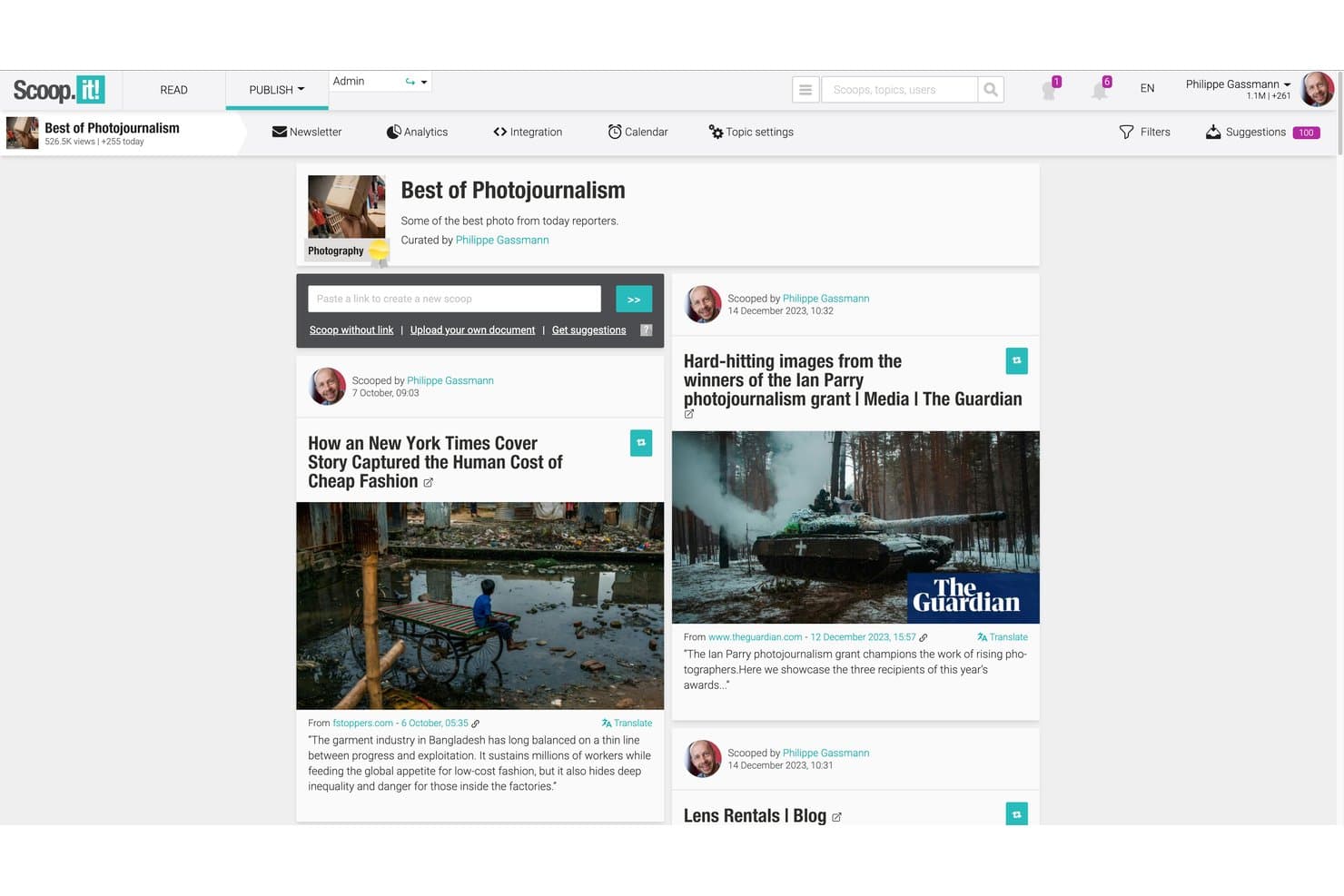
Scoop.it trasforma i contenuti provenienti dall'IA in centri, newsletter e post sui social. Scoop.it è una piattaforma di cura dei contenuti che combina la scoperta di contenuti assistita dall'IA, centri di contenuti basati su argomenti, pubblicazione sui social e un generatore nativo di newsletter con riepiloghi generati dall'IA.
Per chi è più adatto Scoop.it?
Scoop.it è ideale per i professionisti del marketing dei contenuti e per chi gestisce newsletter e desidera trasformare contenuti di settore curati in campagne email personalizzate senza dover creare una serie separata di strumenti.
Perché ho scelto Scoop.it
Ho incluso Scoop.it tra le mie scelte migliori perché il suo generatore nativo di newsletter offre una funzione che la maggior parte degli strumenti di cura dei contenuti non include: utilizza l'IA per generare automaticamente riepiloghi degli articoli con un solo clic, permettendoti di inviare una newsletter curata e ricca di contesto direttamente dal tuo flusso di contenuti curati. Apprezzo anche il fatto che la piattaforma consenta di creare pagine tematiche personalizzate che alimentano direttamente queste campagne, mantenendo scoperta e distribuzione in un unico luogo invece di dover collegare strumenti separati.
Funzionalità principali di Scoop.it
- Segnalibro del navigatore: Cura qualsiasi articolo web direttamente dalla sua pagina di origine con un solo clic, senza tornare alla dashboard di Scoop.it.
- Pagine tematiche: Crea centri di contenuti tematici e personalizzati che possono essere incorporati nel tuo sito web, blog o intranet come libreria di contenuti aggiornata in tempo reale.
- Pubblicazione social programmata: Metti in coda i contenuti curati per distribuirli a orari prestabiliti sugli account Twitter/X, LinkedIn e Facebook collegati.
- Analisi delle prestazioni dei contenuti: Monitora il coinvolgimento del pubblico, i tassi di apertura delle newsletter e le statistiche sulle prestazioni dei singoli articoli direttamente dalla piattaforma.
Integrazioni di Scoop.it
Scoop.it si integra con WordPress, Microsoft Teams, Slack, Meltwater Explore e Radarly. Supporta inoltre i feed RSS, le mappe del sito, un'API aperta per le integrazioni personalizzate e una connessione a Zapier.
Pros and Cons
Pros:
- I riepiloghi delle newsletter generati dall'IA riducono la necessità di scrittura manuale
- I centri di contenuti si incorporano facilmente in qualsiasi sito web
- Il segnalibro consente di curare istantaneamente i contenuti da qualsiasi pagina
Cons:
- I flussi di approvazione richiedono il costoso piano aziendale
- L'invio delle newsletter è limitato per gli utenti dei piani di fascia inferiore
Learn more about Scoop.it: Ideale per condividere insight curati con team di marketing
- Prova gratuita disponibile
- Da $49/mese
Visit WebsiteCustomer Rating:4.4/5
UpContent cura articoli di terze parti per revisione, annotazione e distribuzione. UpContent è una piattaforma di content curation che scopre e organizza articoli di terze parti provenienti dal web, consentendo ai team di marketing di rivedere, annotare e distribuire contenuti curati tramite social, email e altri canali.
Per chi è ideale UpContent?
UpContent è particolarmente adatto ai team di marketing di aziende di servizi finanziari, dove la condivisione di contenuti conforme e guidata dai consulenti è parte integrante del processo di vendita.
Perché ho scelto UpContent
Ho scelto UpContent tra i migliori perché è pensato appositamente per i team di marketing che devono condividere contenuti curati su più canali senza perdere il controllo del messaggio. Il flusso di lavoro collaborativo consente ai manager di rivedere e approvare gli articoli prima della pubblicazione, aspetto fondamentale quando consulenti o rappresentanti pubblicano post in autonomia.
Apprezzo anche la funzione Smart Seller, che sovrappone un banner CTA personalizzato su qualsiasi articolo condiviso, mantenendo intatto il brand e il percorso di conversione anche quando si linka a contenuti di terze parti.
Funzionalità principali di UpContent
- Scoperta di contenuti basata su argomenti: Crea raccolte tematiche che aggiornano continuamente gli articoli in base alle parole chiave e alle fonti scelte.
- Filtri per i contenuti: Ordina gli articoli trovati per attualità, condivisibilità, influenza o fonte per individuare più rapidamente i contenuti più rilevanti.
- Tracciamento UTM: Aggiunge automaticamente i parametri UTM ai link degli articoli condivisi per tracciare l'engagement derivante dall'attività di content curation.
- Widget gallery: Incorpora un feed di contenuti curati direttamente sul tuo sito web, così i visitatori possono vedere le ultime raccolte tematiche senza uscire dal sito.
Integrazioni di UpContent
UpContent offre integrazioni native con Hootsuite, HubSpot, Salesforce Marketing Cloud, Mailchimp, Buffer, Seismic LiveSocial, Proofpoint, Yext, EveryoneSocial e SOCXO. Supporta inoltre feed RSS da qualsiasi raccolta tematica, si collega con Zapier e dispone di un'API per integrazioni personalizzate.
Pros and Cons
Pros:
- Workflow di approvazione pensati per la revisione di team
- Seleziona articoli per condivisibilità e influenza
- Incorpora feed curati direttamente nei siti web
Cons:
- L'ottimizzazione delle parole chiave degli argomenti richiede tentativi ed errori
- Nessun filtro geografico per contenuti localizzati
Learn more about UpContent: Ideale per la gestione di embed social su scala enterprise
- Prova gratuita di 14 giorni
- Da $110/mese (fatturazione annuale)
Visit WebsiteCustomer Rating:4.7/5
Flockler aggrega, modera e incorpora contenuti social attraverso canali digitali. Costruito attorno all'aggregazione dei social media, Flockler ti permette di raccogliere, moderare e incorporare contenuti da piattaforme come Instagram, TikTok e YouTube in siti web, app e schermi digitali.
Per chi è pensato Flockler?
Flockler è una scelta naturale per brand nel settore retail, dell'ospitalità e degli eventi che hanno bisogno di mostrare contenuti social in tempo reale su molteplici punti di contatto fisici e digitali.
Perché ho scelto Flockler
Ho scelto Flockler tra i migliori per la gestione efficace della distribuzione degli embed su più punti di contatto a partire da un'unica fonte. Il mio team può pubblicare un unico feed social curato su un sito del brand, uno schermo per eventi live e un chiosco digitale senza dover ricreare la configurazione ogni volta.
L'uscita nativa per digital signage è una funzione che raramente vedo in altri strumenti di content curation, ed è particolarmente utile per campagne che si svolgono contemporaneamente su spazi fisici e digitali.
Funzionalità chiave di Flockler
- Gestione dei diritti: Invia messaggi di richiesta dei diritti direttamente ai creatori di contenuti per ottenere il permesso prima di mostrarli.
- Feed shoppable: Tagga i prodotti direttamente nei post social per trasformare i feed curati in esperienze di shopping cliccabili.
- Editor CSS personalizzato: Applica stili personalizzati a qualsiasi feed incorporato per rispettare le linee guida visive del tuo brand.
- Dashboard di analisi: Monitora impression, clic e coinvolgimento sui feed incorporati su tutti i canali attivi.
Integrazioni di Flockler
Flockler aggrega contenuti da Instagram, Facebook, X, YouTube, LinkedIn, TikTok, Pinterest, Bluesky, Google Reviews, feed RSS, SoundCloud e Flickr in feed unificati. Funziona con Shopify, Webflow, WordPress e altri principali CMS, e può essere integrato in SharePoint e portali interni.
Pros and Cons
Pros:
- Testo alternativo generato tramite AI per immagini social
- I contenuti archiviati restano disponibili dopo la fine delle campagne
- Incorpora i feed su schermi per digital signage
Cons:
- Fonti di contenuto limitate nei piani base
- I report di analisi non forniscono dati di coinvolgimento approfonditi
Learn more about Flockler: Ideale per annotare contenuti web salvati
- Piano gratuito disponibile
- Da $5.99/mese
Visit WebsiteCustomer Rating:4.4/5
Instapaper salva, evidenzia e organizza gli articoli per la lettura successiva. Progettato per salvare e leggere contenuti web, Instapaper è uno strumento per leggere più tardi che offre evidenziazioni, note private e organizzazione in cartelle per gestire articoli e ricerche online.
Per chi è ideale Instapaper?
Instapaper è l’ideale per professionisti singoli e creatori di contenuti che desiderano una biblioteca personale di lettura e ricerca da costruire e consultare nel tempo.
Perché ho scelto Instapaper
Ho selezionato Instapaper tra i migliori perché il suo livello di annotazione è più avanzato rispetto a molti altri strumenti per leggere più tardi. Posso evidenziare passaggi in quattro colori e aggiungere note private a righe specifiche in qualsiasi articolo salvato. Quando torno su un articolo dopo alcune settimane, quei segni colorati mi aiutano a estrarre citazioni e idee per i miei contenuti senza dover rileggere tutto da capo.
Caratteristiche principali di Instapaper
- Organizzazione in cartelle: Ordina gli articoli salvati in cartelle personalizzate per mantenere separati e facilmente consultabili gli argomenti di ricerca.
- Ricerca full-text: Cerca tra tutti gli articoli salvati per parola chiave, così da trovare rapidamente contenuti specifici nella tua libreria.
- Modalità lettura rapida: Leggi gli articoli salvati parola per parola a un ritmo impostato, per scorrere rapidamente i contenuti.
- Estensione browser: Salva qualsiasi pagina web nella tua libreria Instapaper direttamente dal browser con un solo clic.
Integrazioni Instapaper
Instapaper offre un set limitato di integrazioni native, incluse Notion, Kindle e Rakuten Kobo. È disponibile anche su Zapier e IFTTT e dispone di un’API per integrazioni personalizzate.
Pros and Cons
Pros:
- Lettura senza distrazioni elimina pubblicità e elementi superflui
- Evidenziature e note sincronizzate su tutti i dispositivi
- Sintesi vocale pulita per gli articoli salvati
Cons:
- Aggiornamenti dell'app rari e assistenza lenta
- Le note vengono mostrate come voci separate e frammentate
Learn more about Instapaper: Ideale per l'aggregazione personalizzata delle notizie
- Gratuito da usare, gratuito da scaricare
- Gratuito
Visit WebsiteCustomer Rating:4/5
Flipboard seleziona notizie, storie e contenuti web personalizzati per argomento. Flipboard è un'app di aggregazione delle notizie e selezione dei contenuti che raccoglie articoli, storie e contenuti web in feed personalizzati in stile rivista, organizzati per argomento o interesse.
A chi è più adatto Flipboard?
Flipboard è particolarmente adatto a professionisti, giornalisti e creatori di contenuti che necessitano di un feed personale di notizie organizzato attorno a specifici argomenti o settori.
Perché ho scelto Flipboard
Flipboard si è guadagnato un posto nella mia selezione perché nessun altro strumento organizza l'aggregazione delle notizie attorno a una personalizzazione così dettagliata per argomento. Il feed 'Per te' utilizza un algoritmo che apprende dai contenuti che apprezzi con un cuore, segui e aggiungi, rendendo i contenuti più pertinenti nel tempo senza bisogno di regolazioni manuali.
Apprezzo anche la funzione Riviste intelligenti, che inizia con le storie più popolari su un argomento prima di restringere la selezione alle storie corrispondenti alle tue specifiche abitudini di lettura. L'e-mail quotidiana FlipDigest attinge dallo stesso algoritmo e offre una sintesi delle principali storie relative agli argomenti che segui, senza dover accedere nuovamente all'app.
Funzionalità principali di Flipboard
- Riviste personalizzate: Crea riviste tematiche sempre aggiornate aggiungendo articoli, video e podcast da qualsiasi fonte a una raccolta condivisibile.
- Tavole delle storie: Organizza un insieme definito di link selezionati in raccolte strutturate e suddivise in sezioni, con testi personalizzati, tag tematici e incorporamenti condivisibili.
- Riviste di gruppo: Invita altri curatori a contribuire con contenuti a una rivista condivisa, rendendo possibile la selezione collaborativa dei contenuti all'interno di un team.
- Analisi dei contenuti: Monitora aperture, impressioni, tasso di clic e coinvolgimento nelle tue riviste e tavole delle storie dalla dashboard di Flipboard.
Integrazioni di Flipboard
Flipboard consente di collegare gli account dei social media su Twitter, LinkedIn, Tumblr, SoundCloud, YouTube, Flickr e 500px per recuperare e condividere contenuti all'interno dell'app. Supporta inoltre Mastodon e il fediverso più ampio tramite ActivityPub e importa contenuti da qualsiasi feed RSS. Il supporto di Zapier e delle API non è documentato in modo chiaro.
Pros and Cons
Pros:
- Il layout in stile rivista rende piacevole consultare i contenuti visivi
- Filtraggio per argomento tramite hashtag e selezione delle categorie
- L'algoritmo apprende dalle interazioni per personalizzare i feed
Cons:
- Per accedere ad alcuni articoli sono necessari account esterni
- Le analisi per i curatori sono piuttosto essenziali
Learn more about Flipboard :
Altri software per la cura dei contenuti
Ecco alcune ulteriori opzioni di software per la cura dei contenuti che non sono entrate nella mia selezione, ma che vale comunque la pena esaminare:
- 11ListlyIdeale per creare elenchi collaborativi
- 12MediumIdeale per pubblicare approfondimenti di leadership nel pensiero in formato lungo
- 13PinterestIdeale per la scoperta visiva e il salvataggio di segnalibri
- 14ContentGemsIdeale per avvisi quotidiani sui contenuti via email
- 15eLinkIdeale per la cura di newsletter in più formati
- 16QuuuIdeale per l'automazione dei post sui social sottoposti a verifica umana
Come Valuto il Software di Content Curation
Valuto questi strumenti su due livelli: le capacità imprescindibili—come l'aggregazione delle fonti e la programmazione della distribuzione—e i fattori differenzianti che separano le opzioni migliori dalle altre.
Funzionalità di Base (Requisiti Fondamentali per Questa Lista)
Quando seleziono gli strumenti per la mia lista, valuto ognuno su una scala da 0 (non offre la funzionalità) a 5 (eccelle in quest'area) per ciascuna funzionalità di base elencata di seguito. Poi, calcolo il punteggio totale dello strumento come percentuale. Ogni strumento deve raggiungere un punteggio totale minimo del 65% per essere considerato nell'inclusione.
- Scoperta e Aggregazione dei Contenuti: Verifico se uno strumento può attingere da feed RSS, blog, piattaforme social e siti di notizie in un unico feed—così non devi saltare da una fonte all'altra.
- Filtraggio per Argomento e Parola Chiave: Un buon filtraggio ti permette di focalizzarti su argomenti rilevanti per il SaaS usando ricerche salvate, query booleane o regole basate su tag senza dover scorrere una mole di contenuti irrilevanti.
- Classifica di Rilevanza Basata su AI: Valuto quanto bene ogni strumento evidenzi automaticamente contenuti di alto valore—strumenti come Curata e Feedly, ad esempio, usano l'intelligenza artificiale per dare priorità agli articoli più rilevanti.
- Distribuzione Multicanale: Cerco la possibilità di inviare contenuti selezionati direttamente su profili social, newsletter, canali Slack o su un blog senza dover passare da uno strumento all’altro.
- Organizzazione e Tagging dei Contenuti: Una libreria facilmente utilizzabile con tag, collezioni o board è fondamentale quando il tuo team cura contenuti su più linee di prodotto o campagne e ha bisogno di recuperare asset rapidamente.
- Collaborazione e Approvazioni di Team: Valuto se lo strumento supporta spazi di lavoro condivisi, commenti e flussi di approvazione così che un responsabile dei contenuti possa rivedere le selezioni prima della pubblicazione.
Una volta ottenuta una lista di strumenti che soddisfano questi criteri, considero ciò che distingue ogni piattaforma dalle altre.
Fattori di Differenziazione (Cosa Distingue i Fornitori)
Ecco come confronto e valuto i diversi fornitori:
Funzionalità Distintive
Cerco analisi integrate che mostrino come si comportano i post curati sui vari canali—i click, le condivisioni e le tendenze di engagement aiutano a rafforzare i temi che coinvolgono maggiormente il tuo pubblico. Le sintesi generate da AI sono un ulteriore elemento distintivo, perché permettono di aggiungere un commento originale a un articolo condiviso senza dover scrivere tutto da zero. Valuto anche il monitoraggio della concorrenza e delle tendenze, utile per i team SaaS che tengono traccia in tempo reale dei lanci dei rivali o delle conversazioni emergenti nel settore.
Oltre le Funzionalità
Le integrazioni qui sono molto importanti. Verifico se uno strumento si connette nativamente alle piattaforme già in uso dai team SaaS—ad esempio HubSpot, Slack, Buffer o WordPress—così che i contenuti selezionati fluiscano nei flussi di lavoro esistenti. La struttura dei prezzi è un altro fattore chiave; valuto se i piani sono scalabili in modo ragionevole con la crescita del team o l’aumento dei volumi di contenuti. Anche la gestione del copyright e delle attribuzioni merita attenzione, poiché la condivisione di contenuti di terze parti senza un opportuno collegamento alla fonte o senza rispettare le regole di citazione può esporre il tuo brand a rischi legali.
Come scegliere il software per la cura dei contenuti
La scelta del software per la cura dei contenuti dipende dalla sua capacità di trovare contenuti pertinenti, organizzare le fonti, supportare i flussi di pubblicazione e distribuire i materiali selezionati sui canali utilizzati dal tuo team.
| Se la tua priorità è… | Cerca… |
|---|---|
| Se la tua priorità è…Trovare più rapidamente contenuti pertinenti | Cerca…Ricerca assistita dall'intelligenza artificiale e filtraggio per argomento |
| Se la tua priorità è…Organizzare grandi librerie di contenuti | Cerca…Tag, cartelle, raccolte e hub tematici |
| Se la tua priorità è…Pubblicare contenuti selezionati | Cerca…Strumenti integrati per la pubblicazione e la programmazione |
| Se la tua priorità è…Condividere contenuti su più canali | Cerca…Distribuzione sui social, tramite newsletter e sul sito web |
| Se la tua priorità è…Mantenere elevata la qualità dei contenuti | Cerca…Controlli sulle fonti e filtri di pertinenza |
| Se la tua priorità è…Supportare i flussi di lavoro del team | Cerca…Collaborazione, approvazioni e librerie condivise |
Come valutare la tua selezione
- Verifica la scoperta dei contenuti: Crea un feed basato su un argomento o una parola chiave e verifica se la piattaforma propone costantemente contenuti pertinenti e aggiornati provenienti da fonti affidabili.
- Controlla i filtri: Verifica se puoi affinare i suggerimenti per argomento, fonte, lingua, data o altri criteri senza dover ordinare manualmente risultati non pertinenti.
- Crea una raccolta di contenuti selezionati: Salva diversi contenuti e organizzali in cartelle, argomenti o raccolte per capire quanto sia semplice gestire una libreria in crescita.
- Verifica i flussi di pubblicazione: Crea un post o una newsletter di esempio con contenuti selezionati e valuta come la piattaforma gestisce la modifica, l'attribuzione, la programmazione e la distribuzione.
- Valuta la collaborazione del team: Aggiungi un altro utente o prova i controlli del flusso di lavoro disponibili per verificare se il tuo team può esaminare, approvare, organizzare e pubblicare contenuti senza duplicare il lavoro.
Che cos'è il software per la cura dei contenuti?
Il software per la cura dei contenuti è una piattaforma utilizzata per scoprire, raccogliere, organizzare e condividere contenuti pertinenti di terze parti o di proprietà dell'utente su argomenti specifici.
Questi strumenti possono individuare articoli, report, video, post sui social e altre risorse in base a parole chiave, interessi o fonti selezionate. I team possono quindi organizzare questi contenuti in raccolte, newsletter, post sui social, siti web o raccolte interne.
Il software per la cura dei contenuti riduce il lavoro manuale necessario per trovare materiale utile, offrendo al contempo ai team un maggiore controllo su ciò che condividono e sulle modalità di distribuzione.
Funzionalità
Quando scegli un software per la cura dei contenuti, presta attenzione alle seguenti funzionalità chiave:
- Acquisizione di contenuti dal web: consente di salvare intere pagine web o articoli direttamente dal browser, facilitando la creazione di una raccolta personalizzata di risorse utili.
- Organizzazione tramite cartelle e tag: consente di ordinare e classificare i contenuti salvati utilizzando cartelle o tag personalizzati, così da trovare, raggruppare o dare priorità rapidamente agli elementi per un utilizzo futuro.
- Ricerca nel testo completo: consente di effettuare ricerche all'interno di tutti i contenuti salvati, inclusi i testi e i titoli degli articoli, permettendo di accedere alle risorse esatte di cui hai bisogno senza dover scorrere manualmente.
- Annotazioni ed evidenziazioni: offre strumenti per evidenziare passaggi e aggiungere note adesive o commenti, favorendo la ricerca, la collaborazione e un'analisi più approfondita dei contenuti.
- Accesso offline: consente agli utenti di leggere e interagire con i contenuti archiviati anche in assenza di una connessione Internet, una funzione utile durante i viaggi o in condizioni di rete instabile.
- Estensioni del browser: offre componenti aggiuntivi per Chrome, Firefox o altri browser, rendendo pratico salvare contenuti da qualsiasi luogo online con un solo clic.
- Condivisione dei contenuti: consente agli utenti di condividere articoli, cartelle o annotazioni salvati con altre persone tramite link, e-mail o autorizzazioni per i collaboratori.
- Disponibilità di un'app mobile: supporta la cura, la lettura e l'annotazione dei contenuti sui dispositivi mobili, per accedere ai contenuti e lavorare in modo produttivo anche in movimento.
- Importazione ed esportazione in blocco: consente agli utenti di trasferire grandi raccolte di contenuti dentro o fuori dalla piattaforma, semplificando, quando necessario, l'inserimento degli utenti o l'archiviazione.
- Ottimizzazione della leggibilità: rimuove annunci e altri elementi superflui dalle pagine salvate, offrendo ambienti di lettura puliti e privi di distrazioni per una maggiore concentrazione.
Funzionalità comuni di IA del software per la cura dei contenuti
Oltre alle funzionalità standard del software per la cura dei contenuti elencate sopra, molte di queste soluzioni stanno integrando l'IA con funzionalità come:
- Consigli automatici sui contenuti: utilizza l'intelligenza artificiale per analizzare i tuoi interessi e le tue abitudini di lettura, proponendoti poi articoli o fonti pertinenti che potresti non trovare autonomamente.
- Riepiloghi generati dall'IA: crea riepiloghi concisi di articoli o pagine web lunghi, consentendoti di esaminare rapidamente i punti principali senza leggere l'intero contenuto.
- Organizzazione e assegnazione intelligente dei tag: aggiunge automaticamente tag, categorie o cartelle ai nuovi contenuti in base all'argomento, facendoti risparmiare tempo e garantendo un'organizzazione ordinata.
- Analisi del sentiment: analizza il tono e l'umore degli articoli, aiutandoti a valutare come potrebbero essere accolti i contenuti o a filtrare rapidamente prospettive specifiche.
- Rilevamento dei duplicati: identifica e rimuove gli articoli ripetuti o molto simili presenti nella raccolta, garantendo che i contenuti selezionati rimangano unici e privi di elementi superflui.
Vantaggi
L'implementazione di un software per la cura dei contenuti offre diversi vantaggi al tuo team e alla tua azienda. Eccone alcuni di cui potrai beneficiare:
- Gestione centralizzata delle informazioni: raccogli e organizza articoli, ricerche e approfondimenti provenienti da più fonti in un unico spazio ricercabile.
- Condivisione della conoscenza semplificata: condividi contenuti selezionati e annotazioni con le parti interessate o i membri della squadra, migliorando l'allineamento, la collaborazione e l'apprendimento collettivo.
- Recupero più rapido dei contenuti: trova rapidamente le risorse salvate tramite la ricerca a testo integrale, l'etichettatura intelligente e le cartelle organizzate.
- Maggiore profondità della ricerca: annota, evidenzia e commenta gli elementi salvati per rendere più semplice ritrovare e riutilizzare spunti e riferimenti.
- Qualità dei contenuti uniforme: filtra, assegna etichette ed elimina i duplicati per mantenere una raccolta ordinata e affidabile di materiali di alta qualità.
- Maggiore efficienza del flusso di lavoro: utilizza estensioni del browser, app mobili e strumenti di importazione/esportazione per salvare e organizzare i contenuti senza interrompere le attività quotidiane.
- Maggiore mobilità e accessibilità: accedi ai contenuti salvati e organizzati da qualsiasi dispositivo, anche offline, ogni volta che la ricerca o l'ispirazione lo richiedono.
Costi e prezzi
La scelta di un software per la selezione e la gestione dei contenuti richiede la comprensione dei vari modelli di prezzo e dei piani disponibili. I costi variano in base alle funzionalità, alle dimensioni del team, ai componenti aggiuntivi e ad altri fattori. La tabella seguente riassume i piani più comuni, i relativi prezzi medi e le funzionalità tipicamente incluse nelle soluzioni software per la selezione e la gestione dei contenuti:
Tabella comparativa dei piani per i software di selezione e gestione dei contenuti
| Tipo di piano | Prezzo medio | Funzionalità comuni |
|---|---|---|
| Tipo di pianoPiano gratuito | Prezzo medio$0 | Funzionalità comuniAcquisizione di base dei contenuti dal Web, cartelle o etichette limitate, sincronizzazione limitata dei dispositivi e funzionalità di ricerca essenziali. |
| Tipo di pianoPiano personale | Prezzo medio$5-$10/utente/mese | Funzionalità comuniSalvataggi illimitati, organizzazione avanzata, evidenziazioni e annotazioni e supporto prioritario. |
| Tipo di pianoPiano aziendale | Prezzo medio$10-$25/utente/mese | Funzionalità comuniCollaborazione della squadra, controlli amministrativi, cartelle o raccolte condivise, analisi e opzioni di integrazione. |
| Tipo di pianoPiano aziendale avanzato | Prezzo medio$25-$50/utente/mese | Funzionalità comuniIntegrazioni personalizzate, sicurezza avanzata, funzionalità di conformità, provisioning degli utenti e supporto dedicato. |
Domande frequenti sui software di selezione e gestione dei contenuti
Ecco alcune risposte alle domande comuni sui software di selezione e gestione dei contenuti:
Posso migrare i segnalibri esistenti o gli articoli salvati in un software di selezione e gestione dei contenuti?
Sì, la maggior parte dei software di selezione e gestione dei contenuti consente di importare segnalibri o elementi salvati dai browser e da altre piattaforme. Cerca opzioni di importazione che supportino file HTML o CSV per semplificare l’avvio e centralizzare la tua base di conoscenza.
In che modo i software di selezione e gestione dei contenuti supportano la collaborazione della squadra?
I software di selezione e gestione dei contenuti supportano la collaborazione consentendo l’utilizzo di cartelle condivise, annotazioni di gruppo e autorizzazioni per la modifica o la visualizzazione. Questo facilita la raccolta, la discussione e la valorizzazione condivisa delle risorse selezionate da parte delle squadre.
È possibile utilizzare offline un software di selezione e gestione dei contenuti?
Sì, molte soluzioni offrono l’accesso offline tramite app desktop o mobili. Puoi leggere, annotare e organizzare i contenuti salvati senza una connessione Internet, una funzione utile per il lavoro da remoto o durante i viaggi.
Quali misure di sicurezza dovrei aspettarmi dagli strumenti di selezione e gestione dei contenuti?
Aspettati misure di protezione essenziali come l’archiviazione dei dati crittografata, l’autenticazione degli utenti e strumenti amministrativi per limitare l’accesso. Se gestisci informazioni sensibili, verifica la presenza di certificazioni di conformità o impostazioni di sicurezza avanzate prima di scegliere una piattaforma.
Gli strumenti di selezione e gestione dei contenuti si integrano con altre app per la produttività o la ricerca?
Sì, molti strumenti si connettono nativamente o tramite API a piattaforme come Notion, Slack o sistemi di gestione dei progetti. Questo aiuta a semplificare i flussi di lavoro, centralizzare la ricerca e ridurre i passaggi manuali tra gli strumenti.