

Il software per il marketing dei contenuti ti aiuta a pianificare, creare, pubblicare e analizzare i tuoi contenuti digitali su più canali da un unico luogo. Se stai confrontando i migliori software per il marketing dei contenuti, probabilmente senti la pressione di gestire un'elevata quantità di contenuti, più parti interessate e strumenti frammentati.
Scegliere la piattaforma giusta può rendere più chiaro il tuo flusso di lavoro, aiutarti a rispettare le scadenze, mantenere il team allineato e mostrare l'impatto dei tuoi contenuti sull'azienda. In questa guida troverai un'analisi pratica delle principali soluzioni, così potrai abbinare le esigenze del tuo team al software in grado di offrire un valore concreto.
Perché fidarsi dei nostri consigli sui software
6,700+
Reviews
20
Industry experts
16+
Evaluation factors
14
Years
Il nostro team testa e recensisce software dal 2012. In quanto editori e operatori mediatici noi stessi, sappiamo quanto sia difficile — e importante — scegliere il software giusto.
Per questa guida, abbiamo valutato gli strumenti attraverso test pratici e ricerche indipendenti, assegnando un punteggio agli strumenti in base ai nostri criteri di selezione.
Le nostre recensioni riflettono il nostro giudizio editoriale umano, non un discorso di vendita.
Tabella di confronto dei software per il marketing dei contenuti
Questa tabella di confronto riassume i dettagli sui prezzi dei miei migliori software per il marketing dei contenuti:
| Tool | Best For | Trial Info | Price | ||
|---|---|---|---|---|---|
| 1 | Ideale per piccoli team | Prova gratuita di 14 giorni | Da $29/mese | Website | |
| 2 | Ideale per l'ottimizzazione dei contenuti con intelligenza artificiale | Piano gratuito + prova gratuita di 7 giorni + demo gratuita disponibile | Da $117.33/mese (fatturazione annuale) | Website | |
| 3 | Ideale per la programmazione di contenuti multicanale | Piano gratuito + prova gratuita disponibili | Da $5/mese (fatturato annualmente) | Website | |
| 4 | Ideale per creare esperienze interattive | Piano gratuito + demo gratuita disponibili | Prezzo su richiesta | Website | |
| 5 | Ideale per la cura di contenuti generati dagli utenti | Demo gratuita disponibile | Da $1.249/mese | Website | |
| 6 | Ideale per l'integrazione dei dati di marketing | Demo gratuita disponibile | Da $200/mese (fatturati annualmente) | Website | |
| 7 | Ideale per il governo dei dati lead | Demo gratuita disponibile | Prezzi su richiesta | Website | |
| 8 | Ideale per contenuti interattivi generati dall'IA | Prova gratuita di 14 giorni | Prezzo su richiesta | Website | |
| 9 | Ideale per la pianificazione di progetti guidata da modelli | Piano gratuito + demo gratuita disponibile | A partire da $5/utente/mese | Website | |
| 10 | Ideale con l'allocazione delle risorse basata sull'intelligenza artificiale | Piano gratuito disponibile | A partire da $9/utente/mese (fatturato annualmente) | Website |


Recensioni dei migliori software per il marketing dei contenuti
Di seguito trovi i miei riepiloghi dettagliati dei migliori software per il marketing dei contenuti inclusi nel mio elenco. Le mie recensioni offrono un’analisi approfondita delle funzionalità, dei casi d’uso migliori e delle integrazioni di ciascuna piattaforma, per aiutarti a trovare quella più adatta a te.
 1Ideale per piccoli team
Enji
- Prova gratuita di 14 giorni
- Da $29/mese
Visit WebsiteCustomer Rating:4.9/5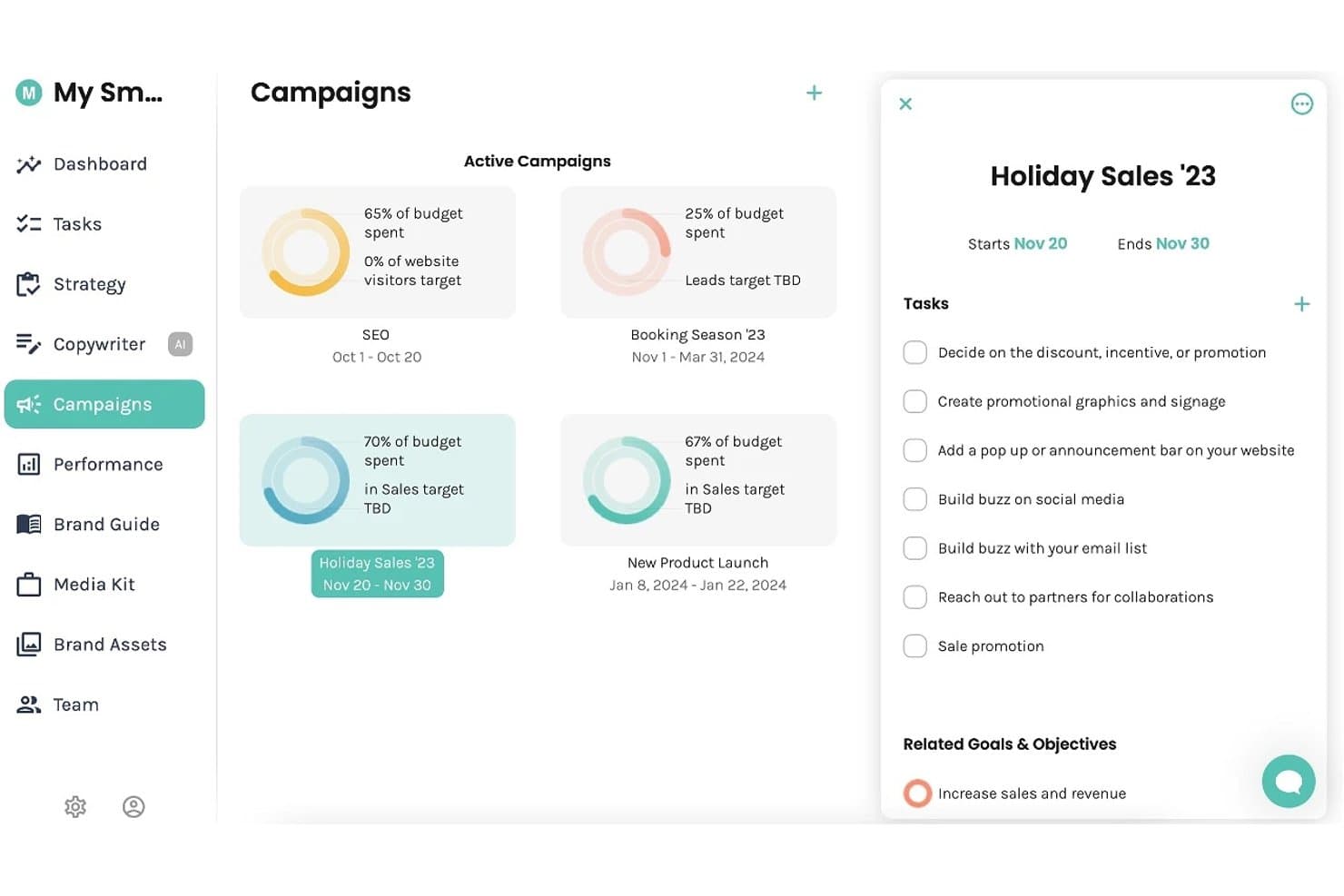
Enji offre una dashboard delle campagne in cui gli utenti possono monitorare le campagne attive, la spesa del budget e gestire compiti e obiettivi. Enji è una piattaforma di pianificazione ed esecuzione del marketing per piccole imprese che combina la creazione di contenuti tramite intelligenza artificiale, un calendario marketing, la programmazione dei social media e il monitoraggio delle prestazioni.
Per chi è ideale Enji?
Enji è particolarmente adatto a lavoratori autonomi e freelance che gestiscono il proprio marketing senza un team dedicato o una formazione specifica in marketing.
Perché ho scelto Enji
Ho scelto Enji come una delle migliori soluzioni perché unisce la generazione di strategie, la scrittura di testi automatica tramite IA e la programmazione sui social in un'unica piattaforma pensata appositamente per team composti da una o due persone. Trovo fantastico come il Generatore di Strategie di Marketing costruisca un piano personalizzato partendo da un breve questionario, così i piccoli team non devono partire da zero. Lo strumento di riproposizione dei contenuti trasforma poi un singolo post sul blog o una didascalia in un intero mese di pubblicazioni sui social.
Caratteristiche principali di Enji
- Dashboard KPI: Centralizza le analisi dei social e del sito web per accedere rapidamente alle metriche di performance.
- Template per campagne di marketing: Offre schemi di campagna pronti all'uso con compiti e tempistiche preimpostati.
- Libreria del brand: Organizza il tono di voce del brand, gli asset visivi e le linee guida di comunicazione in un unico luogo.
- Integrazione con Canva: Permette agli utenti di importare i design direttamente nei flussi di lavoro dei contenuti senza caricamenti manuali.
Integrazioni di Enji
Enji offre integrazioni native con Canva, Google Analytics, Facebook, Instagram, Pinterest, YouTube, LinkedIn, TikTok e Threads.
Pros and Cons
Pros:
- L’intelligenza artificiale integrata genera contenuti da zero
- Il generatore di strategie elimina i dubbi per i solopreneur
- Programmazione e pianificazione dei social in un unico posto
Cons:
- Strumenti SEO e di ricerca parole chiave limitati
- Nessuna collaborazione multiutente o flussi di approvazione
Learn more about Enji: Ideale per l'ottimizzazione dei contenuti con intelligenza artificiale
- Piano gratuito + prova gratuita di 7 giorni + demo gratuita disponibile
- Da $117.33/mese (fatturazione annuale)
Visit WebsiteCustomer Rating:4.5/5
Semrush analizza parole chiave, concorrenti, performance dei contenuti e salute del sito. Semrush è una piattaforma di SEO e content marketing con strumenti per la ricerca di parole chiave, ideazione di argomenti, ottimizzazione dei contenuti on-page, analisi competitiva dei contenuti e auditing tecnico del sito.
Per chi è più adatto Semrush?
Semrush è particolarmente indicato per content marketer focalizzati sulla SEO, team di marketing interni e agenzie digitali che gestiscono strategie di contenuto e performance di ricerca su larga scala.
Perché ho scelto Semrush
Ho incluso Semrush tra le mie scelte preferite perché i suoi strumenti di ottimizzazione dei contenuti con intelligenza artificiale vanno più in profondità rispetto alla maggior parte degli altri. L'SEO Writing Assistant valuta in tempo reale i tuoi contenuti rispetto alle pagine in cima ai risultati, per tono, leggibilità e uso delle parole chiave mentre scrivi.
Mi affido inoltre a ContentShake AI per generare brief e bozzetti di articoli direttamente dai dati di ricerca. Questa combinazione di valutazione in diretta e redazione tramite IA su un'unica piattaforma è ciò che la distingue dalle altre.
Caratteristiche principali di Semrush
- Keyword Magic Tool: Cerca una parola chiave di partenza per generare migliaia di idee correlate con volume di ricerca, punteggi di difficoltà e filtri per l'intento.
- Ricerca degli argomenti: Inserisci un argomento per scoprire sottotemi di tendenza, idee per titoli e domande correlate estratte dai contenuti con le migliori prestazioni.
- Audit dei contenuti: Collega la tua sitemap per analizzare le pagine esistenti in base al traffico, ai backlink e alla qualità dei contenuti, per identificare cosa aggiornare o rimuovere.
- On-page SEO checker: Ricevi una lista prioritaria di raccomandazioni di ottimizzazione per URL specifici basata sulle tue keyword target e i principali concorrenti.
Integrazioni Semrush
Semrush offre integrazioni con Google Analytics, Google Search Console, Google Ads, Google Docs, Google Sheets, Looker Studio, WordPress, Trello e piattaforme social tra cui Facebook, Instagram, LinkedIn, Pinterest e YouTube. Propone inoltre integrazioni con partner come monday.com, Wix, AIOSEO, Zoho Analytics e Scalenut. Semrush si collega a Zapier ed è disponibile una API per integrazioni personalizzate.
Pros and Cons
Pros:
- Il più grande database di keyword con 25 miliardi di termini
- Monitora la visibilità del brand nella ricerca AI
- Analisi integrata del gap di contenuto dei concorrenti
Cons:
- I costi aggiuntivi possono aumentare inaspettatamente
- Il piano gratuito ha un numero giornaliero di query molto limitato
Learn more about Semrush: Ideale per la programmazione di contenuti multicanale
- Piano gratuito + prova gratuita disponibili
- Da $5/mese (fatturato annualmente)
Visit WebsiteCustomer Rating:4.4/5
Buffer programma, pubblica e analizza i contenuti social su diversi canali. Buffer è una piattaforma di gestione dei social media che ti permette di programmare, pubblicare e analizzare i contenuti su canali come Instagram, LinkedIn, TikTok, X e altri ancora, con strumenti integrati per la creazione dei contenuti, la collaborazione in team e il coinvolgimento del pubblico.
Per chi è Buffer?
Buffer è adatto a piccole imprese, freelance e creatori indipendenti che gestiscono contenuti social su più piattaforme senza avere un grande team.
Perché ho scelto Buffer
Buffer merita il suo posto nella mia shortlist per l'efficacia con cui gestisce la programmazione dei contenuti su 11 piattaforme, tra cui TikTok, LinkedIn, Instagram, YouTube e Bluesky.
Mi piace il fatto che tu possa creare un post una sola volta e pubblicarlo ovunque, con anteprime specifiche per ogni canale così puoi vedere come apparirà prima che venga pubblicato. La funzione Queue mantiene il calendario di pubblicazione sempre pieno, senza che tu debba programmare manualmente ogni singolo post.
Funzionalità principali di Buffer
- Assistente AI: Genera didascalie per i post, ripropone i contenuti già esistenti e offre suggerimenti per toni diversi direttamente nell'editor dei post.
- Cruscotto di analisi: Monitora le prestazioni dei post per ciascun canale, inclusa la copertura, i clic e il coinvolgimento, con report esportabili.
- Posta in arrivo per il coinvolgimento: Visualizza e rispondi a commenti e menzioni su tutti i canali social collegati da un'unica casella di posta.
- Idee per i contenuti: Annota e archivia idee per i contenuti in Buffer prima che siano pronti per la programmazione, così nulla viene perso tra una sessione creativa e l'altra.
Integrazioni di Buffer
Buffer offre 24 integrazioni, tra cui Canva, Bitly, Dropbox, Google Drive, Feedly, WordPress, OneDrive, Unsplash, IFTTT e Make. Si collega inoltre con Zapier per ulteriori flussi di automazione.
Pros and Cons
Pros:
- Supporta la programmazione su oltre 11 canali social
- L'AI ripropone i contenuti per ogni singolo canale
- Salva gruppi di hashtag riutilizzabili per i post
Cons:
- Le analisi sono basilari nei piani meno costosi
- Collaborazione di team limitata per i gruppi più numerosi
Learn more about Buffer: Ideale per creare esperienze interattive
- Piano gratuito + demo gratuita disponibili
- Prezzo su richiesta
Visit WebsiteCustomer Rating:4.3/5
Ceros crea infografiche, micrositi, lookbook e landing page interattive. Ceros è una piattaforma di design no-code per la creazione di contenuti digitali interattivi, tra cui infografiche, micrositi, lookbook e landing page con animazioni e media incorporati.
Per chi è Ceros?
Ceros è particolarmente indicato per i team di contenuti e creativi nelle aziende B2B che producono asset di marketing in grande quantità e hanno bisogno di pubblicarli senza dipendere dagli sviluppatori.
Perché ho scelto Ceros
Ceros si guadagna un posto nella mia lista perché il suo editor Studio permette al mio team di realizzare animazioni attivate dallo scorrimento, aree cliccabili e stati interattivi a livelli senza scrivere nemmeno una riga di codice.
Apprezzo in particolare le analisi di coinvolgimento integrate, che mostrano esattamente dove i lettori cliccano e dove abbandonano l’esperienza pubblicata. Questo tipo di dati comportamentali a livello di contenuto è qualcosa che PDF statici e post di blog semplicemente non possono offrire.
Funzionalità principali di Ceros
- Libreria di template: Esplora e personalizza template predefiniti per i formati di contenuto più comuni come infografiche, pitch deck e report interattivi.
- Collaborazione in tempo reale: Più membri del team possono lavorare contemporaneamente allo stesso progetto Studio, con modifiche visibili in tempo reale a tutti.
- Pubblicazione incorporabile: Pubblica le esperienze finite come snippet di codice da incorporare in qualsiasi CMS, sito web o landing page.
- Brand kit: Conserva e applica font, colori e loghi condivisi tra i progetti, mantenendo i contenuti coerenti con il brand.
Integrazioni di Ceros
Ceros offre un insieme ristretto di integrazioni focalizzate su automazione del marketing e analitiche, tra cui Google Analytics, Google Tag Manager, HubSpot, Marketo, Eloqua e Adobe Analytics. Il suo strumento di collaborazione MarkUp si integra con Microsoft Teams e Slack ed è collegabile tramite Zapier. Ceros mette inoltre a disposizione un SDK per lo sviluppo di plugin ed estensioni personalizzate.
Pros and Cons
Pros:
- Animazioni no-code familiari per chi usa Adobe
- Studio può bloccarsi su progetti complessi
- Piccoli team possono creare asset senza sviluppatori
Cons:
- Studio può bloccarsi su progetti complessi a più livelli
- I contenuti ospitati potrebbero limitare il controllo SEO
Learn more about Ceros: Ideale per la cura di contenuti generati dagli utenti
- Demo gratuita disponibile
- Da $1.249/mese
Visit WebsiteCustomer Rating:4.4/5
Pixlee seleziona contenuti di clienti e influencer attraverso ecommerce e canali social. Pixlee è una piattaforma UGC, ora parte di Emplifi, che consente ai brand di raccogliere, curare e pubblicare contenuti creati da clienti e influencer sulle pagine ecommerce, sui canali social e nelle campagne di marketing.
Per chi è ideale Pixlee?
Pixlee è la soluzione ideale per i marchi ecommerce e retail che si affidano alla riprova sociale e ai contenuti dei clienti per aumentare le conversioni sulle pagine prodotto.
Perché ho scelto Pixlee
Ho inserito Pixlee tra le mie migliori scelte perché il suo workflow di gestione dei diritti è qualcosa che non ho visto svolto così bene altrove. Quando il mio team trova foto di clienti su Instagram o TikTok, il sistema di contatto automatico di Pixlee invia direttamente le richieste di approvazione dei diritti ai creatori dei contenuti, quindi non dobbiamo mai scrivere manualmente a decine di persone.
Apprezzo anche il fatto che il riconoscimento immagini basato su IA tagghi automaticamente i prodotti presenti nelle foto UGC, facilitando la trasformazione di un selfie cliente in una galleria acquistabile su una pagina prodotto.
Funzionalità principali di Pixlee
- Visualizzazione personalizzabile: Crea gallerie e caroselli UGC dinamici, che puoi incorporare direttamente su pagine prodotto, homepage o landing page di campagne.
- Raccolta di valutazioni & recensioni: Raccogli e mostra recensioni di prodotto, domande e risposte e valutazioni dei venditori su tutto il sito, con strumenti di moderazione per il filtraggio linguistico e il tagging dei contenuti.
- Integrazione con i publisher: Pianifica e distribuisci contenuti UGC su canali digitali direttamente dalla stessa piattaforma con cui li raccogli e li curi.
- Scoperta di influencer: Cerca in un database di oltre 30 milioni di influencer utilizzando il matching basato su IA per trovare creatori in linea con il tuo brand, poi gestisci le campagne e monitora il ROI in un unico luogo.
Integrazioni Pixlee
Pixlee offre integrazioni ecommerce con Shopify, BigCommerce, Magento, Adobe Commerce e Salesforce Commerce Cloud, oltre a integrazioni con piattaforme di marketing come Klaviyo, Attentive, Emarsys e Movable Ink. Supporta inoltre Google Tag Manager, fornisce SDK per iOS e Android, e dispone di un'API per integrazioni personalizzate.
Pros and Cons
Pros:
- Automatizza la scoperta di contenuti tramite hashtag e posizione
- La ricerca influencer filtra per numero di follower e hashtag
- I widget UGC si aggiornano in tempo reale sul sito
Cons:
- I widget incorporati possono aumentare il tempo di caricamento della pagina
- L’elevato volume di contenuti rende la moderazione dispendiosa in termini di tempo
Learn more about Emplifi (formerly Pixlee): Ideale per l'integrazione dei dati di marketing
- Demo gratuita disponibile
- Da $200/mese (fatturati annualmente)
Visit WebsiteCustomer Rating:4.5/5
Funnel unifica dati di marketing, attribuzione, modellazione e reporting automatizzato. Funnel è una piattaforma di marketing intelligence che raccoglie, unifica e organizza dati da oltre 600 fonti di marketing, con strumenti integrati per l'attribuzione multi-touch, la modellazione del marketing mix e la reportistica automatizzata.
Per chi è più adatto Funnel?
Funnel è particolarmente indicato per i team di marketing delle performance in aziende di medie e grandi dimensioni che gestiscono investimenti pubblicitari su più canali e necessitano di dati puliti e centralizzati per la reportistica.
Perché ho scelto Funnel
Ho inserito Funnel tra le mie scelte principali perché nessun altro strumento in questo ambito gestisce la normalizzazione dei dati cross-canale in modo così pulito. Quando il mio team importa dati da social a pagamento, search e programmatic contemporaneamente, il livello di mapping dei dati di Funnel riconcilia automaticamente i nomi dei campi e delle metriche non corrispondenti.
Apprezzo inoltre il fatto che invii dati puliti pronti per l'analisi direttamente a strumenti a valle come Looker Studio e BigQuery senza bisogno di esportazioni manuali.
Funzionalità chiave di Funnel
- Modellazione dell'attribuzione multi-touch: Assegna il merito della conversione a molteplici punti di contatto, sia a pagamento che organici, utilizzando modelli di attribuzione configurabili.
- Monitoraggio del pacing del budget: Monitora la spesa effettiva rispetto ai budget pianificati in tempo reale su tutte le campagne e i canali attivi.
- Costruttore di metriche personalizzate: Crea metriche calcolate combinando campi di dati grezzi provenienti da diverse fonti in una singola misura unificata.
- Pianificazione automatica dei report: Imposta la generazione e la consegna dei report ai responsabili a intervalli regolari senza intervento manuale.
Integrazioni di Funnel
Funnel offre 635 connettori di dati nativi per acquisire dati di marketing da fonti come Google Ads, Facebook Ads, LinkedIn, TikTok Ads, Microsoft Advertising, Instagram e Pinterest, oltre a 44 connettori di destinazione per esportare dati verso strumenti come Google Sheets, Looker Studio, BigQuery, Tableau, Microsoft Power BI e Amazon S3. Supporta anche webhook per importare file tramite Zapier e fornisce un'API per integrazioni personalizzate.
Pros and Cons
Pros:
- Unifica automaticamente i dati di marketing cross-canale
- Supporta oltre 500 connettori per piattaforme pubblicitarie
- Tracciamento storico dei dati su tutte le fonti
Cons:
- Visualizzazione e dashboard integrate limitate
- Aggiornamenti dei dati solo ogni 2-4 ore
Learn more about Funnel: Ideale per il governo dei dati lead
- Demo gratuita disponibile
- Prezzi su richiesta

Integrate valida, deduplica e instrada i lead B2B provenienti da fonti di domanda. Integrate è una piattaforma di gestione lead B2B progettata per i team marketing aziendali che centralizza l'acquisizione dei lead da fonti di domanda multicanale e automatizza la validazione, la deduplicazione, i controlli di conformità e la consegna dei dati a MAP e CRM.
A chi si rivolge Integrate?
Integrate è particolarmente adatto ai team di generazione domanda aziendali che acquistano lead da più fornitori terzi e che necessitano di un sistema centrale per validare e normalizzare quei dati prima che raggiungano il loro CRM.
Perché ho scelto Integrate
Ho scelto Integrate tra i migliori perché il suo motore di governance dei lead fa qualcosa che nessuna MAP di base può replicare. Ogni lead in entrata, indipendentemente dalla fonte, attraversa una validazione automatica, deduplicazione, standardizzazione dei campi e controlli di conformità alla privacy prima di raggiungere il tuo CRM.
Mi piace in particolare il reporting pronto all’uso per la syndication dei contenuti, che consente al mio team di vedere esattamente quali partner stanno consegnando lead di qualità contro chi invece brucia budget. Questo livello di controllo sui dati rende Integrate la scelta giusta per i team che gestiscono programmi di domanda ad alto volume e provenienti da più fonti.
Funzionalità principali di Integrate
- Tracciamento del coinvolgimento dei gruppi d’acquisto: Monitora come gruppi di stakeholder dello stesso account interagiscono con le tue campagne su più canali.
- Automazione della conformità alla privacy: Sottoponi automaticamente ogni nuovo lead ai controlli sulle normative globali sulla privacy come il GDPR prima che raggiunga il tuo MAP o CRM.
- Dashboard sulle prestazioni di canali e partner: Utilizza report predefiniti per confrontare qualità e volume dei lead tra i tuoi partner di syndication dei contenuti e i canali di domanda.
- Trasformazione dei campi lead: Mappa e riformatta i campi dati dei lead in entrata per adattarli esattamente allo schema dati di CRM o MAP al momento dell’acquisizione.
Integrazioni di Integrate
Integrate offre integrazioni preconfigurate con Salesforce, Marketo, 6sense e HubSpot, insieme a una API universale e un connettore inbound per integrazioni personalizzate con qualsiasi tecnologia o fonte dati. La piattaforma si collega anche agli strumenti di acquisizione lead per eventi tramite la partnership con Captello e supporta l’importazione di file CSV per i canali non integrati. Il supporto per Zapier non è chiaramente documentato.
Pros and Cons
Pros:
- Validazione automatica dei lead che intercetta dati errati prima del CRM
- Screening GDPR integrato al momento dell’acquisizione
- Reportistica in tempo reale sulle performance delle campagne per fonte
Cons:
- La configurazione iniziale delle campagne richiede un onboarding significativo
- L’aggiornamento delle fonti in massa richiede modifiche manuali ripetitive
Learn more about Integrate:

Dot crea quiz, product finder, video e campagne gamificate senza codice. Dot è una piattaforma di contenuti interattivi alimentata dall'IA che ti permette di creare quiz, product finder, video interattivi, flipbook, valutazioni, esperienze di vendita guidata e campagne gamificate senza scrivere una riga di codice.
A chi è consigliato Dot?
Dot è particolarmente indicato per i team marketing di aziende di medie e grandi dimensioni che producono grandi volumi di contenuti per campagne e vogliono andare oltre i formati statici.
Perché ho scelto Dot
Ho scelto Dot come uno dei migliori perché il suo AI Interactive Builder è uno strumento su cui il mio team fa davvero affidamento per trasformare rapidamente i brief delle campagne in contenuti online. Posso digitare un prompt come 'crea un product finder di cinque domande per un brand di skincare' e Dot genera in pochi minuti tutta la logica, i trigger e il layout.
Apprezzo anche che ogni componente generato dall'IA venga salvato come blocco riutilizzabile all'interno di Dot.vu Studio, così il mio team può riutilizzare formati di quiz o strutture di calcolatori in più campagne senza ricominciare da zero.
Funzionalità principali di Dot
- Costruttore di video ramificati: Aggiungi punti decisionali ai video in modo che gli spettatori possano scegliere il proprio percorso, creando un'esperienza di visione diversa in base alle loro risposte.
- Motore di gamification: Aggiungi distintivi, punti, classifiche e meccaniche di referral a qualsiasi esperienza interattiva, inclusi quiz e flipbook.
- Controlli di lead gating: Proteggi un'esperienza intera o specifiche sezioni tramite un modulo di acquisizione lead, scegliendo esattamente quando raccogliere i dati dei visitatori.
- A/B testing: Imposta regole condizionali all'interno di qualsiasi progetto per testare diverse varianti di contenuto e identificare cosa genera maggiore coinvolgimento.
Integrazioni Dot
Dot offre integrazioni con Salesforce, HubSpot, Mailchimp, Google Analytics, Google Tag Manager, Adobe Marketo Engage, Pardot, LinkedIn, Facebook e YouTube. Si connette anche con Zapier e supporta JavaScript personalizzato tramite il suo addon per codice, per ulteriori connessioni a terze parti.
Pros and Cons
Pros:
- Oltre 200 modelli di contenuto interattivo pronti da personalizzare
- Gamification integrata per quiz e campagne
- Editor senza codice per esperienze video ramificate
Cons:
- La navigazione nell'editor può risultare poco intuitiva inizialmente
- Modifica di azioni in massa tra le slide non disponibile
Learn more about Dot: Ideale per la pianificazione di progetti guidata da modelli
- Piano gratuito + demo gratuita disponibile
- A partire da $5/utente/mese

Hive for Marketers coordina campagne, pianificazioni dei contenuti, approvazioni e lavoro di squadra. Hive for Marketers è una piattaforma di project management creata per i team di marketing, con strumenti per la pianificazione delle campagne, la programmazione dei contenuti, la revisione e approvazione dei materiali, e la collaborazione tra team attraverso diverse visualizzazioni di progetto.
A chi si rivolge principalmente Hive for Marketers?
Hive for Marketers è ideale per team di marketing interni in aziende di piccole e medie dimensioni che gestiscono più campagne contemporaneamente.
Perché ho scelto Hive for Marketers
Ho scelto Hive for Marketers tra i migliori perché la sua libreria di modelli è pensata appositamente per i flussi di lavoro di marketing. Ci sono modelli pronti per calendari editoriali, campagne a pagamento, attività di media relation e lanci di prodotto, ognuno pre-caricato con attività suddivise in fasi, stati di avanzamento e asset di esempio.
Mi piace anche il fatto che si possa passare da un modello all'altro tra le visualizzazioni Gantt, Kanban e tabella senza dover ricostruire la struttura del progetto. Questa flessibilità permette di avviare una nuova campagna da zero in pochi minuti, non in ore.
Funzionalità principali di Hive for Marketers
- Revisione e approvazione: annota e approva file direttamente in Hive, con revisori interni o esterni collegati a specifici compiti.
- Raccolta tramite moduli: crea moduli di raccolta che inoltrano direttamente le richieste di contenuto ricevute nelle tue bacheche di progetto come nuove schede di azione.
- Gestione delle risorse: assegna i membri del team ai progetti e visualizza la loro disponibilità attraverso tutte le campagne attive in un'unica timeline.
- Hive Notes: crea documenti collaborativi da collegare direttamente ai compiti, utili per bozze di brief, note riunione o scalette di contenuto.
Integrazioni disponibili con Hive for Marketers
Hive offre oltre 1.000 integrazioni in totale, tra cui integrazioni native come Google Drive, Google Calendar, Dropbox, Slack, Zoom, Jira, GitHub, Microsoft OneDrive, Microsoft Teams e Bynder. Inoltre si connette con Zapier e fornisce un'API per integrazioni personalizzate.
Pros and Cons
Pros:
- Le chat integrate tengono organizzato il feedback sui contenuti
- I revisori esterni partecipano senza necessità di licenze a pagamento
- La revisione supporta marcature e confronto tra versioni
Cons:
- L'app mobile non offre tutte le funzionalità della versione desktop
- Le funzionalità chiave come la revisione sono componenti aggiuntivi a pagamento
Learn more about Hive for Marketers: Ideale con l'allocazione delle risorse basata sull'intelligenza artificiale
- Piano gratuito disponibile
- A partire da $9/utente/mese (fatturato annualmente)
Visit WebsiteCustomer Rating:4.6/5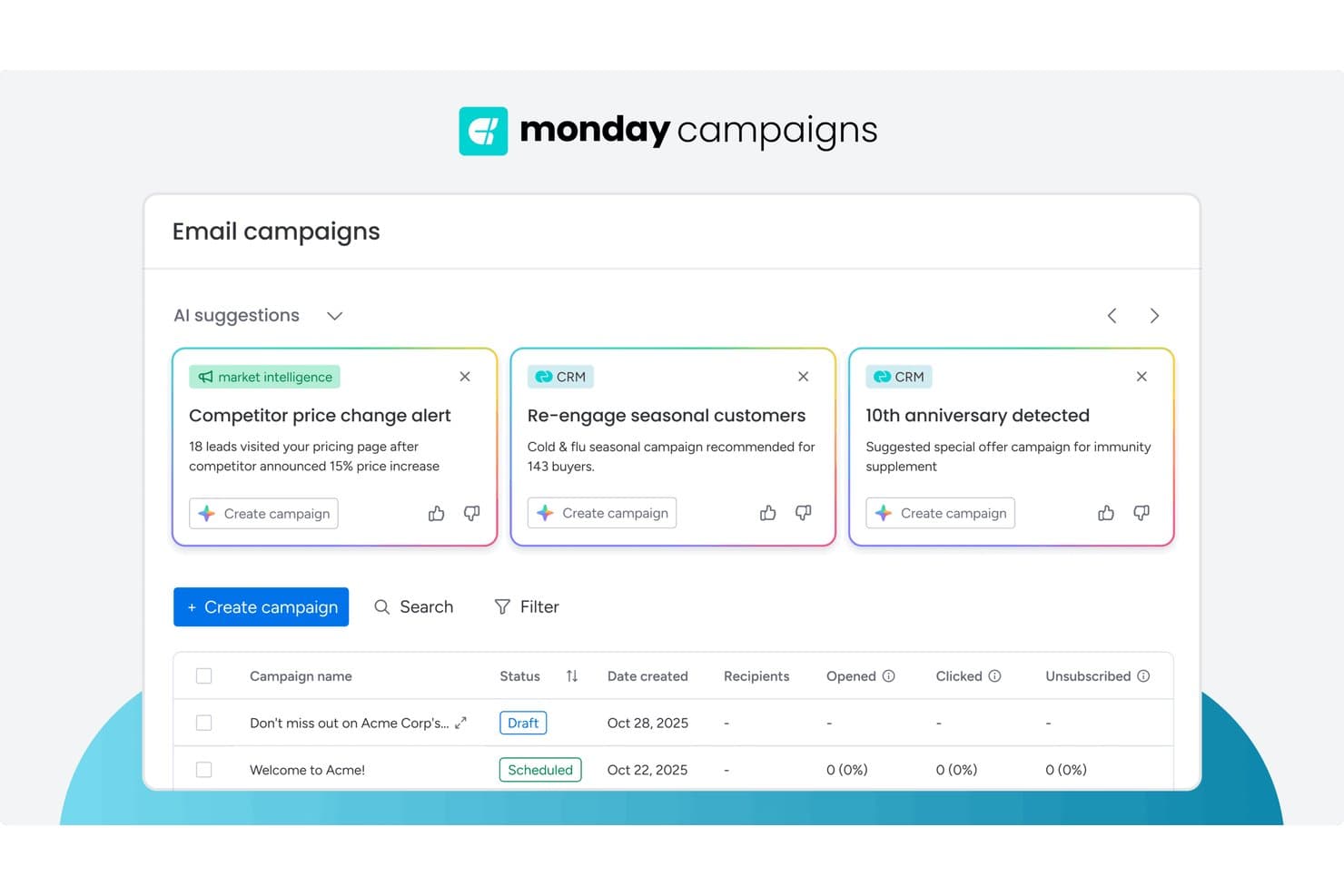
monday AI Workspace offre suggerimenti per le campagne basati sull'intelligenza artificiale, attingendo ai dati del CRM e alle informazioni di mercato per aiutare i professionisti del marketing a creare più rapidamente campagne email mirate. monday AI Workspace è una piattaforma di gestione del lavoro basata sull'intelligenza artificiale che combina pianificazione editoriale, gestione del flusso dei contenuti, automazione dei flussi di lavoro interfunzionali e strumenti di collaborazione tra più team in un unico spazio di lavoro.
Per chi è più indicato monday AI Workspace?
È particolarmente adatto ai team di marketing che gestiscono operazioni sui contenuti complesse e interfunzionali e hanno bisogno di uno spazio di lavoro flessibile, assistito dall'intelligenza artificiale, per coordinare più interlocutori.
Perché ho scelto monday AI Workspace
monday AI Workspace si è guadagnato un posto nella mia lista ristretta perché la sua allocazione delle risorse basata sull'intelligenza artificiale cambia concretamente il modo in cui i team dei contenuti operano su larga scala. Utilizzo il generatore di flussi di lavoro basato sull'intelligenza artificiale per instradare automaticamente le nuove richieste di contenuti allo scrittore o designer più adatto in base al carico di lavoro attuale, invece di controllare manualmente chi ha disponibilità. La funzionalità Blocchi AI va oltre, attivando assegnazioni automatiche di etichette e passaggi di consegne quando un contenuto passa tra le fasi di stesura, revisione e approvazione.
Funzionalità principali di monday AI Workspace
- Calendario editoriale con visualizzazioni multiple: Visualizza i piani dei contenuti con viste a scheda, temporale, Gantt e calendario per diversi livelli di dettaglio nella pianificazione.
- Documento di lavoro con modifica in tempo reale: Redigi, condividi e modifica documenti in collaborazione, con cronologia delle versioni e commenti nello stesso spazio di lavoro.
- Schede per la gestione delle campagne: Tieni traccia dei brief creativi, delle approvazioni e dei flussi di produzione con colonne e automazioni personalizzabili.
- Hub di integrazione nativo: Collegati a HubSpot, Salesforce, Google Drive, WordPress, Slack e altri strumenti per passaggi di consegne fluidi nell'ecosistema martech.
Integrazioni di monday AI Workspace
monday AI Workspace offre centinaia di integrazioni native tramite le integrazioni integrate e il marketplace, tra cui Slack, Salesforce, HubSpot, Google Drive, Microsoft 365, Outlook, Gmail, Mailchimp, Adobe Creative Cloud e Canva. Supporta inoltre Zapier e mette a disposizione un'API per integrazioni personalizzate.
Pros and Cons
Pros:
- Bilanciamento del carico di lavoro basato sull'intelligenza artificiale per i team dei contenuti
- Viste del calendario editoriale altamente flessibili
- Passaggi di consegne automatizzati e attivazione automatica delle etichette nelle campagne
Cons:
- Nessuna ottimizzazione dei contenuti integrata per la SEO
- Il processo di approvazione non dispone di impostazioni granulari per le autorizzazioni
Learn more about monday AI Workspace:
Altri software per il marketing dei contenuti
Ecco alcune opzioni aggiuntive di software per il marketing dei contenuti che non sono state incluse nel mio elenco, ma che vale comunque la pena valutare:
- 11HootsuiteIdeale per la profondità delle analisi social
- 12FoleonIdeale per la creazione di contenuti interattivi su larga scala
- 13ClearVoiceIdeale per la collaborazione completa tra freelance
- 14MyAdBoxIdeale per il controllo distribuito degli asset del marchio
Come Valuto i Software di Content Marketing
Divido la mia valutazione tra i requisiti di base di cui ogni team di content SaaS ha bisogno—flussi di lavoro editoriali, SEO, analytics—e i fattori di differenziazione che distinguono gli strumenti fra loro.
Funzionalità Core (Requisiti Minimi per Questa Lista)
Quando seleziono gli strumenti per la mia lista, ne valuto ciascuno su una scala da 0 (funzionalità assente) a 5 (eccellente in quest'area) per ogni funzionalità core elencata di seguito. Successivamente, calcolo il punteggio totale dello strumento in percentuale. Ogni strumento deve raggiungere un punteggio minimo totale del 75% per essere preso in considerazione.
- Pianificazione Editoriale & Calendario: Verifico se il calendario supporta raggruppamenti per campagna, assegnazione di responsabili e scadenze—come la pianificazione di un lancio di prodotto SaaS su blog, email e social.
- Creazione di Contenuti & Collaborazione: I team devono poter redigere, revisionare e approvare contenuti nello stesso luogo, quindi cerco commenti inline, workflow di approvazione e storico delle versioni.
- SEO & Ottimizzazione dei Contenuti: Dalla ricerca delle parole chiave alla valutazione on-page, analizzo quanto bene uno strumento aiuta i copywriter a creare brief ottimizzati per la ricerca e coprire i topic target.
- Pubblicazione & Distribuzione Multicanale: Cerco la pubblicazione nativa su CMS, social ed email così che un unico post del blog possa essere programmato su WordPress, LinkedIn e HubSpot.
- Analytics sulle Prestazioni dei Contenuti: Traffico ed engagement sono solo un inizio; valuto se lo strumento collega i contenuti a conversioni, MQL e pipeline—non solo alle visualizzazioni di pagina.
- Automazione dei Workflow & Integrazioni: Uno strumento di content deve integrarsi nel tuo martech stack, quindi verifico le connessioni native con piattaforme come HubSpot, Salesforce, GA4 e Slack.
Dopo aver stilato una lista degli strumenti che soddisfano questi criteri, considero cosa distingue ciascuna piattaforma.
Fattori di Differenziazione (Cosa Distingue i Fornitori)
Ecco come confronto e metto a confronto i diversi fornitori:
Funzionalità Distintive
La generazione di contenuti basata su AI è un forte fattore di differenziazione. Valuto se uno strumento può redigere brief, scalette o post completi adattati al tono di voce del tuo brand invece di produrre output generici. Importante anche l’intelligence competitiva sui contenuti—conoscere gli argomenti per cui i tuoi competitor SaaS si posizionano ti aiuta a individuare gap più velocemente che con un’analisi manuale dei SERP. Guardo anche al reporting personalizzato sull’attribuzione, per vedere se lo strumento collega i contenuti a prove, iscrizioni e pipeline invece di fermarsi ai dashboard sul traffico.
Oltre le Funzionalità
La compatibilità con il martech stack è una delle prime cose che valuto. Uno strumento di content che non si sincronizza con il tuo CRM, analytics o piattaforma di automazione crea silos di dati che rendono impossibile l’attribuzione. Anche il tempo per ottenere valore pesa molto—verifico se un fornitore offre template e risorse di onboarding specifici per SaaS, così che un team di content di due persone non debba passare settimane a configurare i workflow. Conta anche l’impatto sulla pipeline. Cerco case study di aziende SaaS che dimostrano come lo strumento ha permesso di collegare i contenuti ai risultati di fatturato, non solo a metriche di vanità.
Come scegliere il software per il marketing dei contenuti
È facile perdersi in lunghi elenchi di funzionalità e strutture tariffarie complesse. Per aiutarti a rimanere concentrato mentre affronti il tuo specifico processo di selezione del software, ecco una lista di controllo dei fattori da tenere a mente:
| Fattore | Cosa considerare |
|---|---|
| FattoreScalabilità | Cosa considerareLo strumento supporterà la crescita del volume dei contenuti, del numero di utenti e dei nuovi canali senza costi aggiuntivi elevati? |
| FattoreIntegrazioni | Cosa considerareSi connette in modo nativo al tuo CMS, agli strumenti di analisi, al CRM e alle piattaforme sociali per evitare importazioni o esportazioni manuali? |
| FattorePersonalizzazione | Cosa considerarePuoi modificare i flussi di lavoro, i processi di approvazione o le linee guida del marchio per adattarli alla realtà quotidiana del tuo team? |
| FattoreSemplicità d'uso | Cosa considerareGli utenti si adatteranno rapidamente oppure potrebbe esserci resistenza a causa della complessità o di modalità d'interazione poco familiari? |
| FattoreImplementazione e inserimento | Cosa considerareQuali risorse richiede la configurazione iniziale? Verifica la necessità del coinvolgimento dell'IT, del supporto alla migrazione e di strumenti per l'apprendimento. |
| FattoreCosto | Cosa considerareTutte le funzionalità indispensabili sono disponibili entro il tuo budget? Controlla la presenza di costi nascosti o di prezzi aggiuntivi che incidono sul costo totale di possesso. |
| FattoreMisure di sicurezza | Cosa considerareIl software soddisfa i requisiti della tua organizzazione in materia di protezione dei dati, controlli degli accessi e conformità? |
| FattoreDisponibilità dell'assistenza | Cosa considerareQuando si verificano problemi, l'assistenza è disponibile nel fuso orario del tuo team? Inoltre, è limitata alla chat o è disponibile su più canali? |
Che cos'è il software per il marketing dei contenuti?
Il software per il marketing dei contenuti è una piattaforma digitale progettata per aiutare i team a pianificare, creare, organizzare, distribuire e analizzare i contenuti di marketing su più canali.
Questi strumenti centralizzano i flussi di lavoro dei contenuti, supportano la collaborazione tra i membri del team e offrono il monitoraggio delle prestazioni delle campagne, facilitando l'allineamento dei contenuti prodotti agli obiettivi aziendali e alle esigenze del pubblico.
Funzionalità
Quando selezioni un software per il marketing dei contenuti, presta attenzione alle seguenti funzionalità principali:
- Calendario dei contenuti: organizza i programmi di pubblicazione, le scadenze e le tempistiche delle campagne, consentendo al team di visualizzare a colpo d'occhio i contenuti in arrivo e coordinare le attività.
- Gestione del flusso di lavoro: consente di configurare fasi come stesura, revisione, approvazione e pubblicazione, così che tutti conoscano le proprie responsabilità e le attività procedano senza colli di bottiglia.
- Distribuzione multicanale: consente di pubblicare o programmare contenuti su blog, social media, email e altri canali da un'unica piattaforma, risparmiando tempo e garantendo coerenza.
- Strumenti di collaborazione: supportano commenti nell'app, condivisione di file e assegnazione di attività, affinché scrittori, designer ed editor possano lavorare insieme senza problemi in tempo reale.
- Gestione delle risorse digitali: centralizza immagini del marchio, video, modelli e documenti, garantendo che le persone giuste possano trovare, aggiornare o riutilizzare rapidamente le risorse.
- Analisi dei contenuti: monitora metriche come portata, coinvolgimento e conversioni per aiutare il team a capire quali contenuti ottengono i risultati migliori e a definire la strategia futura.
- Controllo delle versioni: conserva un registro delle modifiche e delle bozze precedenti, consentendo agli utenti di ripristinare versioni antecedenti e monitorare i cambiamenti per garantire la responsabilità.
- Autorizzazioni e ruoli: consente di definire chi può creare, modificare, approvare o pubblicare contenuti, prevenendo gli errori e mantenendo la sicurezza.
- Libreria di modelli: offre strutture predefinite e schemi di contenuto che velocizzano la produzione e contribuiscono a mantenere la coerenza del marchio nelle diverse campagne.
Funzionalità comuni di IA nei software per il marketing dei contenuti
Oltre alle funzionalità standard dei software per il marketing dei contenuti elencate sopra, molte di queste soluzioni stanno integrando l'IA con funzionalità come:
- Suggerimenti automatizzati per i contenuti: l'IA esamina il calendario dei contenuti e la strategia di marketing per proporre nuove idee per gli argomenti, schemi di bozza o titoli adattati alle preferenze del pubblico e alle tendenze del momento.
- Generazione del linguaggio naturale: l'IA crea interi articoli, post per i social o riepiloghi a partire da parole chiave o brief, producendo rapidamente prime bozze e facendo risparmiare molto tempo di scrittura ai team.
- Previsione delle prestazioni dei contenuti: l'IA analizza i dati storici e il coinvolgimento del pubblico per prevedere le prestazioni di una bozza o di un post programmato, guidando i team prima della pubblicazione.
- Miglioramento di immagini e video: l'IA ottimizza automaticamente gli elementi visivi regolando la luminosità, ritagliando le immagini o persino generando immagini del marchio e brevi video in linea con gli obiettivi dei contenuti.
- Analisi del sentiment: l'IA esamina commenti, recensioni e interazioni sui social per valutare il tono emotivo associato ai contenuti, offrendo indicazioni utili per modificare il messaggio o la tempistica.
Vantaggi
L'implementazione di un software per il marketing dei contenuti offre diversi vantaggi al team e all'azienda. Ecco alcuni dei vantaggi che puoi aspettarti:
- Maggiore coerenza dei contenuti: calendari e modelli centralizzati contribuiscono a mantenere la voce del marchio e il ritmo di pubblicazione coerenti su tutti i canali.
- Esecuzione più rapida delle campagne: flussi di lavoro semplificati e strumenti collaborativi riducono i cicli di approvazione e consentono di apportare rapidamente modifiche alle campagne.
- Maggiore allineamento del team: dashboard condivise e autorizzazioni basate sui ruoli tengono tutti informati e consentono a ogni collaboratore di concentrarsi sulla propria parte.
- Approfondimenti più dettagliati sul pubblico: gli strumenti integrati di analisi e reportistica offrono feedback in tempo reale che chiariscono cosa suscita maggiore interesse e dove è possibile migliorare.
- Gestione multicanale semplificata: distribuisci e monitora i contenuti per siti web, blog, email e social media da un unico luogo, riducendo il lavoro manuale.
- Maggiore conformità e sicurezza: i controlli delle autorizzazioni e il monitoraggio delle versioni riducono il rischio di modifiche non autorizzate o di messaggi non coerenti con il marchio.
Costi e prezzi
La scelta di un software per il marketing dei contenuti richiede la comprensione dei vari modelli e piani tariffari disponibili. I costi variano in base alle funzionalità, alle dimensioni del team, agli extra e ad altri fattori. La tabella seguente riassume i piani più comuni, i relativi prezzi medi e le funzionalità tipicamente incluse nelle soluzioni software per il marketing dei contenuti:
Tabella comparativa dei piani per i software di marketing dei contenuti
| Tipo di piano | Prezzo medio | Funzionalità comuni |
|---|---|---|
| Tipo di pianoPiano gratuito | Prezzo medio$0-$15/utente/mese | Funzionalità comuniCalendario dei contenuti di base, accesso per un singolo utente, modelli limitati, analisi di base e assistenza della community. |
| Tipo di pianoPiano personale | Prezzo medio$10-$35/utente/mese | Funzionalità comuniPubblicazione multicanale, semplici strumenti per i flussi di lavoro, gestione delle risorse, reportistica standard e assistenza via email. |
| Tipo di pianoPiano aziendale | Prezzo medio$30-$80/utente/mese | Funzionalità comuniCollaborazione tra team, controllo delle autorizzazioni, flussi di lavoro per l'approvazione, analisi delle campagne, integrazioni e assistenza prioritaria. |
| Tipo di pianoPiano per grandi imprese | Prezzo medio$70-$200+/utente/mese | Funzionalità comuniSicurezza avanzata, flussi di lavoro personalizzati, inserimento iniziale dedicato, integrazioni di fascia alta, strumenti per la conformità e assistenza coperta da SLA. |
Domande frequenti sul software di marketing dei contenuti
Ecco alcune risposte alle domande comuni sul software di marketing dei contenuti:
In che modo il software di marketing dei contenuti aiuta a gestire i team numerosi?
Il software di marketing dei contenuti centralizza calendari, assegnazioni delle attività e feedback in un’unica piattaforma. In questo modo, i team numerosi possono gestire più facilmente le campagne, coordinare le approvazioni e monitorare le responsabilità senza ricorrere a email o fogli di calcolo.
Posso integrare il software di marketing dei contenuti con gli strumenti che già utilizzo?
Sì, la maggior parte delle piattaforme offre integrazioni con CMS, CRM, strumenti di analisi e social media. Verifica sempre che i tuoi sistemi essenziali siano supportati in modo nativo o che non richiedano software intermedi per garantire flussi di lavoro fluidi.
Il software di marketing dei contenuti è adatto alle piccole imprese?
Sì, molte soluzioni offrono piani e funzionalità flessibili per i piccoli team. Cerca piattaforme con prezzi d’ingresso accessibili, inserimento iniziale semplice e opzioni di collaborazione essenziali, adatte a pochi utenti.
Quanto sono sicuri i dati archiviati nel software di marketing dei contenuti?
La maggior parte dei fornitori offre misure di sicurezza standard, come accesso basato sui ruoli, crittografia dei dati e backup regolari. Esamina le certificazioni di conformità e le informative sulla privacy di ogni strumento per verificare che soddisfino i requisiti della tua organizzazione.
Quali risorse per l'inserimento iniziale sono disponibili con la maggior parte dei software di marketing dei contenuti?
Molte piattaforme includono esercitazioni per la configurazione, video di formazione, webinar introduttivi, modelli iniziali e tour guidati del prodotto nell’app. Alcune offrono anche chat dal vivo o specialisti dedicati all’inserimento iniziale, a seconda del livello di abbonamento.
Il software di marketing dei contenuti offre analisi sui contenuti pubblicati?
Sì, le funzionalità di monitoraggio e analisi sono standard. In genere sono disponibili pannelli delle prestazioni, report delle campagne e metriche sul coinvolgimento che aiutano ad analizzare ciò che porta risultati o richiede miglioramenti.