

Programvare for innholdsplanlegging hjelper teamet ditt med å organisere, planlegge og administrere innholdsprosjekter fra idé til publisering. Hvis du ser etter den beste programvaren for innholdsplanlegging, trenger du verktøy som holder kampanjene på sporet, støtter samarbeid og knytter innsatsen din til konkrete forretningsresultater.
Etter hvert som behovet for innhold øker, er det riktig plattform som utgjør forskjellen mellom tapte tidsfrister og trygg, koordinert gjennomføring. I denne listen går jeg gjennom de beste alternativene, slik at du kan sammenligne funksjoner og velge programvaren som passer måten teamet ditt jobber på – enten du planlegger blogginnlegg, lanserer kampanjer på tvers av kanaler eller håndterer flere bidragsytere.
Why Trust Our Software Recommendations
6,700+
Reviews
20
Industry experts
16+
Evaluation factors
14
Years
Our team has been testing and reviewing software since 2012. As publishers and media operators ourselves, we know how difficult—and important—it is to choose the right software.
For this guide, we evaluated tools using hands-on testing and independent research, scoring tools using our selection criteria.
Our reviews reflect our human editorial judgment, not a sales pitch.
Sammenligningstabell: Programvare for innholdsplanlegging
Denne sammenligningstabellen oppsummerer prisdetaljene for mine beste utvalgte programmer for innholdsplanlegging.
| Tool | Best For | Trial Info | Price | ||
|---|---|---|---|---|---|
| 1 | Best for solo creators | 14-day free trial | From $29/month | Website | |
| 2 | Best for collaborative social post scheduling | Free trial available | From $49/month (billed annually) | Website | |
| 3 | Best for quick branded content creation | Free plan available | From $7.99/user/month (billed annually) | Website | |
| 4 | Best for AI-powered content strategy insights | Free plan available | Pricing upon request | Website | |
| 5 | Best for cross-team campaign coordination | Free plan available | From $10.99/user/month (billed annually) | Website | |
| 6 | Best for interactive content design | Free plan + free demo available | Pricing upon request | Website | |
| 7 | Best for advanced social media analytics | 14-day free trial | From $99/month (billed annually) | Website | |
| 8 | Best for AI-driven productivity planning | Free trial available | From $19/seat/month (billed annually) | Website | |
| 9 | Best for influencer campaign management | 14-day free trial + free demo available | From $18.75/month (billed annually) | Website | |
| 10 | Best for enterprise sales and marketing enablement | Free demo available | Pricing upon request | Website |


Anmeldelser av den beste programvaren for innholdsplanlegging
Nedenfor finner du mine detaljerte sammendrag av den beste programvaren for innholdsplanlegging som kom med på kortlisten. Anmeldelsene mine gir en detaljert gjennomgang av funksjonene, de beste bruksområdene og integrasjonene til hver plattform, slik at du kan finne den som passer best for deg.

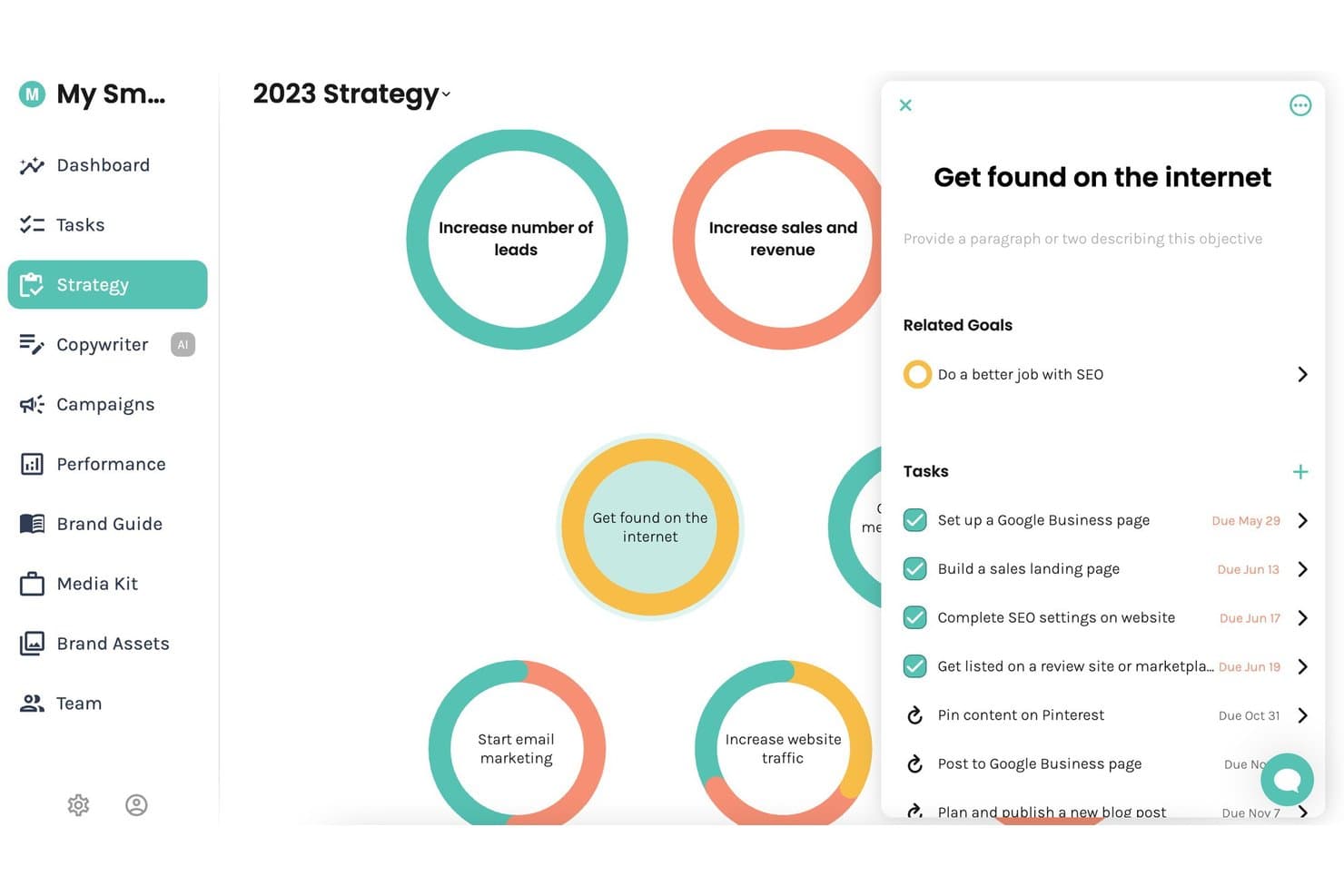
Enji offers a visual strategy board where users can manage marketing objectives, related goals, and tasks with due dates in one centralized view. Enji is an all-in-one marketing planning tool that combines strategy generation, a marketing calendar, AI-powered content creation, social media scheduling, and performance analytics.
Who Is Enji Best For?
Enji is a strong fit for solopreneurs and freelancers who manage their own marketing without a dedicated team or agency behind them.
Why I Picked Enji
Enji earns its spot on my shortlist because its strategy-to-calendar workflow is built specifically for one person running everything alone. I love that answering a 20-question questionnaire produces a personalized marketing plan that auto-populates a calendar as a prioritized to-do list. The AI Copywriter, trained on your specific brand voice, then drafts social captions and blog posts tied directly to those planned tasks.
Enji Key Features
- AI content repurposing tool: Instantly transforms a single piece of content into multiple social posts for different platforms.
- Brand management suite: Centralizes brand voice settings, style guides, media kits, and core brand assets in one place.
- KPI dashboard integration: Pulls website and social analytics directly into your marketing dashboard for quick performance checks.
- Canva integration: Allows you to access and use your Canva designs directly within Enji without reuploading.
Enji Integrations
Enji offers native integrations with Instagram, Facebook, LinkedIn, Pinterest, Threads, TikTok, YouTube, Canva, and Google Analytics 4.
Pros and Cons
Pros:
- All-in-one strategy, calendar, and publishing tool
- AI copywriter trained on your brand
- Questionnaire generates a full marketing calendar
Cons:
- Lacks native SEO keyword research tools
- No multi-user team collaboration supported
Learn more about Enji: Best for collaborative social post scheduling
- Free trial available
- From $49/month (billed annually)
Visit WebsiteCustomer Rating:4.6/5
Loomly plans social posts, schedules content, approvals, and team workflows. Loomly is a social media management platform built around a content calendar, with tools for post creation, multi-channel scheduling, team collaboration, approval workflows, and AI-assisted content generation.
Who Is Loomly Best For?
Loomly is a natural fit for small to mid-size marketing teams and social media managers who need a shared workspace for planning and approving social content.
Why I Picked Loomly
Loomly earns its spot on my shortlist because the approval workflow is genuinely one of the clearest I've used for social content. My team can move a post through multiple review stages, from draft to pending approval to scheduled, without any back-and-forth outside the platform. I also like the post preview feature, which renders how content will look on each specific channel before it goes live. That catches formatting issues early, which saves a lot of last-minute edits.
Loomly Key Features
- Content calendar: A central calendar view for visualizing scheduled posts across all connected social channels by day, week, or month.
- Post ideas: Loomly surfaces content ideas based on trending topics, RSS feeds, and upcoming events to help fill your calendar.
- Asset library: A built-in media library for storing, organizing, and reusing images and videos across multiple posts.
- Analytics dashboard: Track post performance metrics like reach, clicks, and engagement directly within the platform.
Loomly Integrations
Loomly offers native integrations with Slack, Microsoft Teams, Canva, Google Drive, Unsplash, and Giphy, along with social channel connections to Instagram, Facebook, LinkedIn, TikTok, YouTube, Pinterest, Snapchat, Threads, and Google Business Profile. It also connects with Zapier, though a public API for custom integrations is not clearly documented.
Pros and Cons
Pros:
- Approval workflows built for agency-client teams
- Drag-and-drop calendar for quick rescheduling
- Customize post copy per social channel
Cons:
- Analytics lack depth for advanced reporting
- Limited built-in image editing tools
Learn more about Loomly: Best for quick branded content creation
- Free plan available
- From $7.99/user/month (billed annually)
Visit WebsiteCustomer Rating:4.7/5
Adobe Express creates branded graphics, videos, PDFs, and web pages. Adobe Express is a web and mobile content creation tool that lets marketing teams design on-brand social graphics, short videos, PDFs, and web pages using a customizable template library.
Who Is Adobe Express Best For?
Adobe Express is a strong fit for small marketing teams and solo content creators who need to produce branded visual content without a dedicated designer.
Why I Picked Adobe Express
I've included Adobe Express in my top picks because of how well its Brand Kit feature supports consistent content creation at scale. My team stores our logos, color palettes, and fonts directly in the platform, so every asset we produce stays on-brand without manual checks.
I also rely on the one-click resize tool to reformat a single piece of content into every social media dimension we need, which cuts production time significantly across campaigns.
Adobe Express Key Features
- Content scheduler: Plan, schedule, preview, and publish social media posts directly from the platform without switching tools.
- Adobe Firefly AI tools: Generate images, text effects, and templates from text prompts inside the editor.
- Animation effects: Add motion to text, images, and icons to turn static designs into animated social content.
- Adobe Stock library: Access millions of royalty-free photos, videos, and audio files directly within the editor.
Adobe Express Integrations
Adobe Express integrates natively with Adobe ecosystem apps like Creative Cloud, Acrobat, Experience Manager Assets, Workfront, Firefly Custom Models, and GenStudio for Performance Marketing. It also has native third-party integrations with Box, Miro, Slack, HubSpot, Figma, Bynder, Webflow, Google Workspace, and OpenAI's ChatGPT, along with 150+ add-ons available in its marketplace. An add-ons SDK is available for building custom extensions.
Pros and Cons
Pros:
- Brand Kit enforces visual consistency automatically
- AI-generated templates speed up content creation
- Built-in social media scheduling and publishing
Cons:
- Limited multi-user collaboration and approval workflows
- No editorial calendar for long-form content
Learn more about Adobe Express: Best for AI-powered content strategy insights
- Free plan available
- Pricing upon request
Visit WebsiteCustomer Rating:4.6/5
MarketMuse maps content gaps, topic authority, competitors, and roadmaps. MarketMuse is an AI-powered content strategy and planning platform that analyzes your existing content inventory, identifies topic authority gaps, and generates personalized content roadmaps based on competitor analysis and keyword difficulty.
Who Is MarketMuse Best For?
MarketMuse is a strong fit for SEO and content teams at mid-size to enterprise companies that produce high volumes of content and need a data-driven approach to topic prioritization.
Why I Picked MarketMuse
I've included MarketMuse in my top picks because its AI-powered content strategy insights go deeper than standard keyword tools. The Topic Model feature identifies every related subtopic my content needs to rank, while the Personalized Difficulty score prioritizes opportunities based on my domain's existing authority.
I also use the Content Inventory to find underperforming pages that need updating before planning anything new.
MarketMuse Key Features
- Content briefs: Auto-generates structured briefs with recommended topics, headers, and questions to cover.
- Optimize score: Grades your draft against a topic model in real time as you write or paste content.
- SERP analysis: Breaks down what top-ranking pages cover to identify gaps at the planning stage.
- Research tool: Surfaces semantically related concepts and questions for any target topic.
MarketMuse Integrations
MarketMuse offers Google Docs exports and Acrolinx integration, along with a built-in ChatGPT integration using OpenAI's API. Custom integrations are available via the API. Zapier support is not clearly documented.
Pros and Cons
Pros:
- Benchmarks content quality before you publish
- Automated topic clustering replaces manual keyword mapping
- Uncovers subtopic gaps competitors miss entirely
Cons:
- Confusing navigation between projects and plans
- No warning before credits are consumed
Learn more about MarketMuse: Best for cross-team campaign coordination
- Free plan available
- From $10.99/user/month (billed annually)
Visit WebsiteCustomer Rating:4.4/5
Asana coordinates project tracking, task assignments, timelines, and workflows. Asana is a work management platform that combines project tracking, task assignment, timeline planning, and cross-functional workflow coordination across teams.
Who Is Asana Best For?
Asana is a natural fit for mid-size to enterprise marketing teams coordinating campaigns across multiple departments, agencies, or regional teams.
Why I Picked Asana
I've included Asana in my top picks because cross-team campaign coordination is genuinely where it shines. Portfolios let you monitor every campaign project in one view, with live status and workload data across teams.
I also rely on Goals to connect campaign tasks directly to business objectives, so nothing gets worked on in isolation. Dependencies keep handoffs between design, copy, and paid media teams on track without constant check-ins.
Asana Key Features
- Timeline view: A Gantt-style visual planner for mapping out campaign schedules, deadlines, and task sequences across a project.
- Project templates: Pre-built templates for campaigns, editorial calendars, and content launches that give teams a structured starting point.
- Automation rules: Trigger-based automations that reassign tasks, update statuses, or send notifications when set conditions are met.
- Custom fields: Configurable data fields for tracking content type, channel, priority, or any other attribute your team needs on tasks.
Asana Integrations
Asana offers 300+ integrations through its built-in integrations and app directory, including Slack, Google Drive, Microsoft Teams, Salesforce, HubSpot, Jira, Google Calendar, Figma, Canva, and Adobe Creative Cloud. It also connects with Zapier and provides an API for custom integrations.
Pros and Cons
Pros:
- In-app commenting and proofing for draft reviews
- Only one assignee per task reduces ownership confusion
- Multiple project views including calendar and timeline
Cons:
- Recurring tasks only show next instance on calendar
- No built-in content performance tracking or analytics
Learn more about Asana: Best for interactive content design
- Free plan + free demo available
- Pricing upon request
Visit WebsiteCustomer Rating:4.3/5
Ceros creates animated landing pages, interactive reports, and digital experiences. Ceros is a no-code interactive content creation platform that lets marketing teams design and publish animated landing pages, interactive reports, and digital experiences without developer support.
Who Is Ceros Best For?
Ceros is a strong fit for B2B marketing teams at mid-size to enterprise companies that produce high-volume content like eBooks, reports, and campaign landing pages.
Why I Picked Ceros
Ceros earns its spot on my shortlist because no other content tool I've used gives marketing teams the same freedom to design interactive experiences without touching code. I particularly like the freeform design canvas in Ceros Studio, which lets my team build animated, scrollable content like interactive reports and campaign microsites directly in the browser.
The built-in real-time analytics also mean I can see exactly how audiences engage with each piece and adjust before the next content cycle.
Ceros Key Features
- Flex AI design assistant: Generate and build interactive content directly on the canvas using AI modes for ideation, planning, building, and review.
- MarkUp feedback tool: Pin visual annotations and comments directly onto PDFs, websites, and videos to manage content review without email chains.
- Ceros Editor: Let marketers edit copy, images, and interactions in published Ceros content without designer support, using a drag-and-drop asset library.
- Shared asset library: Store, manage, and reuse branded assets across projects to maintain visual consistency across content.
Ceros Integrations
Ceros offers native integrations with Eloqua, Google Analytics, Google Tag Manager, HubSpot, Marketo, and Seismic, along with support for third-party analytics services like Adobe Analytics through its Universal Analytics integration. MarkUp, part of the Ceros suite, connects with Zapier and provides an API for custom integrations. Ceros also has an SDK for embedding interactive content into ecommerce and other external platforms.
Pros and Cons
Pros:
- Inspiration gallery sparks new content ideas
- No coding needed to publish content
- Freeform canvas for custom interactive layouts
Cons:
- Desktop-to-mobile conversion requires manual rebuilding
- Analytics exports are messy and hard to read
Learn more about Ceros: Best for advanced social media analytics
- 14-day free trial
- From $99/month (billed annually)
Visit WebsiteCustomer Rating:4.1/5
Hootsuite schedules, publishes, listens, and analyzes social media content. Hootsuite is a social media management platform that covers content scheduling, publishing, social listening, team collaboration, and analytics across multiple social networks.
Who Is Hootsuite Best For?
Hootsuite is a natural fit for mid-size to enterprise marketing teams that manage social media presence across multiple brands, channels, and regions simultaneously.
Why I Picked Hootsuite
Hootsuite earns its spot on my shortlist because its analytics depth goes well beyond what most content planning tools offer. I particularly like the competitive benchmarking feature, which lets you track up to 20 competitors' posting frequency, audience growth, and engagement rates in one dashboard.
The Advanced Analytics add-on takes things further by letting you build custom metrics with your own formulas and pulling in Google Analytics and Adobe Analytics data alongside your social performance, which gives a genuinely complete picture of content ROI.
Hootsuite Key Features
- Bulk scheduling: Upload and schedule up to 350 posts at once using a CSV file across multiple social accounts.
- Content approval workflows: Route draft posts through multi-step approval chains before publishing, with comments and feedback kept in-thread.
- Social listening streams: Monitor keywords, hashtags, and brand mentions across platforms directly inside your Hootsuite dashboard.
- AI caption writer: Generate post captions from a prompt, with tone and platform adjustments built into the editor.
Hootsuite Integrations
Hootsuite offers over 100 apps and integrations through its App Directory, including Canva, Adobe Express, Salesforce, HubSpot, Slack, Shopify, Google My Business, Dropbox, monday.com, and Wrike. It also connects with Zapier and provides an API for custom integrations.
Pros and Cons
Pros:
- Competitive benchmarking tracks up to 20 rivals
- Best Time to Publish suggests optimal slots
- Supports scheduling to nine social platforms
Cons:
- Scheduled posts occasionally fail without alerts
- Advanced analytics locked behind add-on costs
Learn more about Hootsuite: Best for AI-driven productivity planning
- Free trial available
- From $19/seat/month (billed annually)
Visit WebsiteCustomer Rating:4.2/5
Motion schedules tasks, meetings, and deadlines around priorities and workload. Motion is an AI-powered task and project management tool that automatically schedules tasks, meetings, and deadlines across your calendar based on priorities and workload.
Who Is Motion Best For?
Motion is a strong fit for individual contributors, freelancers, and small teams who manage heavy workloads across multiple projects and need automated scheduling to stay on top of priorities.
Why I Picked Motion
I picked Motion as one of the best because its AI scheduler does something no standard project management tool does: it takes every task across all your active projects and automatically time-blocks them on your calendar, adjusting the plan in real time as priorities shift.
I especially like the AI project builder, which generates a full task list with deadlines and assignees from a simple project description. The proactive deadline risk alerts are also a standout feature for content teams juggling multiple campaigns.
Motion Key Features
- AI Gantt chart: View all active projects on a live timeline that auto-updates as tasks, deadlines, and assignees change, with weekly, quarterly, and yearly views available.
- Recurring task scheduling: Set daily, weekly, monthly, or quarterly tasks and Motion automatically blocks time on your calendar to complete them.
- AI meeting notetaker: Auto-capture notes during meetings so your team can reference decisions and action items without manual note-taking.
- Kanban board view: Switch between list, Kanban, and Gantt views in one click to manage and visualize content work in the format that fits your team.
Motion Integrations
Motion offers native integrations with Google Calendar, Microsoft Outlook 365, iCloud Calendar, Gmail, Zoom, Google Meet, Microsoft Teams, and Siri. It connects with Zapier and provides an API for custom integrations.
Pros and Cons
Pros:
- Email forwarding converts messages into tasks
- Turns meeting notes into assigned tasks
- Auto-reschedules missed tasks to future slots
Cons:
- Mobile app lacks full desktop functionality
- Limited task dependencies outside of projects
Learn more about Motion: Best for influencer campaign management
- 14-day free trial + free demo available
- From $18.75/month (billed annually)

Later schedules social content and manages creator campaigns with analytics. Later is a social media management and influencer marketing platform that combines content scheduling, publishing, and analytics with a built-in creator discovery and campaign management suite.
Who Is Later Best For?
Later is a strong fit for DTC brands, ecommerce companies, and social media managers who run influencer partnerships alongside their organic content programs.
Why I Picked Later
I've included Later in my top picks because its influencer campaign management goes deeper than a simple creator directory. The Incentive Advisor feature shows actual creator pay rates across channels, so you're not guessing at budgets or overpaying.
I also like Later EdgeAI, which pulls from 16M+ analyzed creators to predict campaign outcomes before you launch—recommending creator mixes and flagging risks early. Pair that with unified paid, organic, and sales reporting, and you get a genuinely complete picture of campaign impact.
Later Key Features
- Visual content calendar: Drag-and-drop scheduling across Instagram, TikTok, Facebook, Pinterest, and LinkedIn in one calendar view.
- Media library: Centralized storage for photos and videos with labeling and search so your team can pull assets into posts quickly.
- Linkin.bio: A customizable landing page linked to your Instagram bio that turns individual posts into clickable or shoppable destinations.
- Hashtag suggestions: Auto-generated hashtag recommendations based on your caption content and category.
Later Integrations
Later offers native integrations with Canva, Adobe, Google Drive, Dropbox, Mailchimp, Bazaarvoice, Yotpo, PowerReviews, and Everflow. It supports publishing to Instagram, Facebook, TikTok, Pinterest, LinkedIn, YouTube, Threads, and Snapchat. Later Influence includes a Reporting API for exporting campaign data, but Zapier is not currently supported.
Pros and Cons
Pros:
- Built-in influencer and brand collaboration tools
- Bulk media uploads with usage tracking
- Instagram grid preview before publishing
Cons:
- Team collaboration trails competitors like Hootsuite
- Reels and carousel posts can fail during publishing
Learn more about Later:

Seismic aligns sales content, buyer engagement, coaching, and GTM programs. Seismic is a sales enablement platform that centralizes content management, buyer engagement, sales coaching, and go-to-market program execution for enterprise revenue teams.
Who Is Seismic Best For?
Seismic is built for large enterprise organizations with dedicated sales and marketing teams that need a unified system for managing and distributing sales content at scale.
Why I Picked Seismic
I've included Seismic in my top picks because it's where sales and marketing content actually connects to revenue. Marketing teams can build templated content in Seismic that reps can personalize within set parameters, so the final output stays on-brand without needing a back-and-forth review cycle.
I also like the content analytics, which show which assets reps are actually using in deals and how buyers are engaging with them.
Seismic Key Features
- Digital sales rooms: Create personalized, branded microsites where reps can share curated content collections directly with buyers.
- Predictive content recommendations: AI surfaces the most relevant assets for a rep based on deal stage, industry, and buyer profile.
- Learning and coaching tools: Assign training content, track completion, and reinforce sales skills through built-in coaching workflows.
- Content governance controls: Set expiration dates and access permissions on assets to keep outdated materials out of active use.
Seismic Integrations
Seismic offers integrations through its Seismic Exchange marketplace, including Salesforce, Microsoft Teams, Google Slides, Slack, Zoom, Webex, Gong, Oracle Sales Cloud, Adobe Experience Manager, and Snowflake. An API is available for custom integrations, along with Microsoft Power Automate support for workflow automation.
Pros and Cons
Pros:
- Version control prevents outdated content sharing
- AI recommends assets by deal stage
- Tracks buyer engagement on shared content
Cons:
- Search breaks down with large libraries
- Requires dedicated admin for ongoing management
Learn more about Seismic:
Annen programvare for innholdsplanlegging
Her er noen flere alternativer for programvare for innholdsplanlegging som ikke kom med på kortlisten min, men som likevel er verdt å sjekke ut:
- 11monday.comBest for custom workflow automation
- 12WrikeBest for built-in visual whiteboarding
- 13CoScheduleBest for integrated marketing calendars
- 14TrelloBest for AI-powered to-do organization
- 15KapostBest for aligning content to customer journey
- 16WistiaBest for branded video content management
- 17AirtableBest for no-code workflow customization
- 18Google CalendarBest for shared calendar scheduling
- 19NotionBest for unified workspace and docs
- 20Content SnareBest for document collection automation
How I Evaluate Content Planning Software
I split my evaluation into two layers: the core capabilities a tool needs—editorial calendar, brief building, workflow approvals—and the differentiators that set the best options apart.
Core Functionality (Table Stakes For This List)
When I'm selecting tools for my list, I rank each one on a scale from 0 (does not offer the functionality) to 5 (excels in this area) for each core functionality listed below. Then, I calculate the tool's total score into a percentage. Each tool needs to achieve a minimum total score of 65% to be considered for inclusion.
- Editorial Calendar: I look for a visual, filterable calendar where you can drag posts between dates, toggle between channel views, and spot gaps in your publishing cadence at a glance.
- Content Briefs & Ideation: A good tool lets you build structured briefs with target keyword, audience, and outline fields—then link them to a shared idea backlog your team draws from.
- Workflow & Collaboration: I evaluate whether the platform supports assignable tasks, custom statuses, and approval steps so a draft moves from writer to editor to stakeholder without email chains.
- Strategy Mapping: Tagging content by funnel stage, persona, or campaign matters. I check whether you can filter your calendar to see, for example, only bottom-of-funnel assets tied to a Q3 launch.
- SEO & Keyword Planning: Whether native or through integrations with tools like Semrush or Ahrefs, I look for keyword data—volume, difficulty, intent—surfaced where planners make topic decisions.
- Analytics & Integrations: The tool should connect to your CMS and analytics stack so you can check how published content performs without leaving the planning environment.
Once I have a list of tools that meet this criteria, I consider what sets each platform apart.
Differentiating Factors (What Sets Vendors Apart)
Here's how I compare and contrast different vendors:
Standout Features
AI-powered brief generation is a major differentiator. Tools that can suggest outlines or draft structured briefs from a target keyword save hours of upfront planning work. I also look for topic cluster visualization, where you can map pillar pages to supporting posts and spot linking gaps across your content library. Content repurposing workflows matter for SaaS teams that need to atomize a webinar or long-form guide into blog posts, social clips, and email sequences within one planning view.
Beyond Features
Tech stack integration depth is one of the first things I evaluate. A content planning tool that syncs with your CMS, SEO suite, and marketing automation platform keeps your team from toggling between tabs to check keyword data or publish status. Scalability matters too—I check whether the tool handles multi-brand content portfolios and flexible seat structures for freelancers. Finally, time-to-value is worth considering. Tools with prebuilt editorial templates and easy migration from spreadsheets or project management platforms get teams planning faster.
Slik velger du programvare for innholdsplanlegging
Valg av programvare for innholdsplanlegging handler om hvor godt den støtter den redaksjonelle arbeidsflyten, kampanjeplanleggingen, teamsamarbeidet og publiseringsplanen din. Riktig plattform bør gjøre det enklere å organisere ideer, tildele oppgaver, følge opp tidsfrister og ha oversikt over kommende innhold.
| Hvis prioriteten din er … | Se etter … |
|---|---|
| Hvis prioriteten din er …Administrere redaksjonelle tidsplaner | Se etter …Visuelle innholdskalendere og tidslinjevisninger |
| Hvis prioriteten din er …Koordinere flere bidragsytere | Se etter …Oppgaver, ansvar og statussporing |
| Hvis prioriteten din er …Planlegge kampanjer på tvers av kanaler | Se etter …Kampanjeplanlegging på tvers av kanaler |
| Hvis prioriteten din er …Organisere innholdsideer | Se etter …Idéetterslep, innholdsbeskrivelser og innholdsarkiver |
| Hvis prioriteten din er …Holde tidsfristene på sporet | Se etter …Forfallsdatoer, påminnelser og arbeidsflytstadier |
| Hvis prioriteten din er …Gjennomgå innhold før publisering | Se etter …Godkjenningsarbeidsflyter og kommenteringsverktøy |
Slik vurderer du kortlisten din
- Lag en eksempelbasert redaksjonell kalender: Legg til flere kommende artikler, kampanjer og innlegg i sosiale medier for å se hvor tydelig plattformen viser frister, kanaler, ansvarlige og publiseringsdatoer.
- Test tilpasning av arbeidsflyten: Opprett de eksisterende innholdsfasene dine, for eksempel idé, brief, utkast, gjennomgang, godkjent og publisert, for å bekrefte at plattformen kan tilpasses den nåværende prosessen din.
- Tildel en komplett innholdssyklus: Opprett en oppgave, tildel en ansvarlig, legg til en frist, vedlegg en brief og flytt elementet gjennom gjennomgangen for å kontrollere hvor godt systemet håndterer overleveringer.
- Planlegg en kampanje i flere kanaler: Legg til innhold for flere kanaler under én kampanje, og bekreft om du kan se avhengigheter, publiseringsdatoer og ansvarsområder på ett sted.
- Kontroller rapportering og oversikt: Gå gjennom arbeidsmengde, forfalte oppgaver, kommende frister og rapporter om innholdsstatus for å avgjøre om ledere raskt kan identifisere flaskehalser.
Hva er programvare for innholdsplanlegging?
Programvare for innholdsplanlegging er en plattform som brukes til å organisere innholdsideer, redaksjonelle kalendere, kampanjer, oppgaver og publiseringsplaner.
Disse verktøyene gir team et sentralt sted for å planlegge kommende innhold, fordele ansvar, følge opp frister og overvåke fremdriften fra den første ideen til publisering. Mange plattformer inkluderer også innholdsbriefinger, arbeidsflyter for godkjenning, kampanjevisninger og samarbeidsverktøy.
Programvare for innholdsplanlegging gir team bedre oversikt over hva som blir laget, hvem som er ansvarlig for hver oppgave, og når innholdet forventes å bli publisert.
Funksjoner
Når du velger programvare for innholdsplanlegging, bør du se etter følgende viktige funksjoner:
- Redaksjonell kalender: En sentralisert, visuell plan som viser planlagt, utarbeidet og publisert innhold for de kommende ukene eller månedene. Dette hjelper team med å koordinere kampanjer og unngå overlappende innhold.
- Oppgavetildeling: Gjør det mulig for ledere å delegere bestemte oppgaver, sette frister og følge fremdriften til hver bidragsyter gjennom hele produksjons- og godkjenningsprosessen.
- Dokumenthåndtering: Gir et sted for lagring, organisering og gjenfinning av alle utkast, ressurser og støttende filer, med versjonshistorikk og tilgangskontroller for innhold.
- Arbeidsflythåndtering: Lar deg utforme, håndheve og overvåke hvert trinn i prosessen for innholdsproduksjon og godkjenning, slik at ingen oppgaver blir glemt.
- Samarbeidsverktøy: Gjør det mulig for teammedlemmer å kommentere, gi tilbakemeldinger og gjennomgå innhold direkte i systemet, noe som reduserer frem-og-tilbake-kommunikasjon via e-post eller chat.
- Maler for innholdsbriefinger: Tilbyr gjenbrukbare disposisjoner og sjekklister, slik at hvert innholdselement starter med tydelige mål, informasjon om målgruppen og referansemateriale.
- Rollebaserte tillatelser: Styrer hva hver bruker kan se, redigere eller godkjenne, slik at ansvar og forpliktelse alltid er tydelig.
- Publiseringsplanlegger: Gjør det mulig å angi bestemte publiseringsdatoer og -tidspunkter direkte fra kalenderen, ofte med støtte for publisering i flere kanaler.
- Analyse og rapportering: Følger både produksjonseffektiviteten og målgruppens respons på publisert innhold, og gir innsikt i hva som fungerer, og hvor det er rom for forbedring.
Vanlige KI-funksjoner i programvare for innholdsplanlegging
I tillegg til standardfunksjonene i programvare for innholdsplanlegging som er nevnt ovenfor, tar mange av disse løsningene i bruk KI med funksjoner som:
- Automatisert innholdsanalyse: Bruker KI til å vurdere utkast med hensyn til stil, tone og bruk av nøkkelord, og gir konkrete forslag for å forbedre klarhet og effektivitet før publisering.
- Intelligent innholdsidémyldring: Skanner aktuelle trender og resultatene fra tidligere innhold for å anbefale tidsriktige og relevante emner, slik at team kan holde den redaksjonelle kalenderen oppdatert.
- Prediktiv prognose for engasjement: Analyserer historiske analyser og bransjedata for å forutsi hvor godt ulike innholdskonsepter vil treffe målgruppen før de blir utformet.
- Smart automatisering av arbeidsflyt: Identifiserer avhengigheter og flaskehalser i arbeidsflyten din, og videresender eller eskalerer deretter oppgaver automatisk basert på forventede forsinkelser eller endringer i prioriteringer.
- Identifisering av innholdshull: Bruker KI til å analysere eget innhold og konkurrentenes innhold, og avdekker områder og emner som er underrepresentert i innholdsstrategien din.
Fordeler
Implementering av programvare for innholdsplanlegging gir flere fordeler for teamet og virksomheten din. Her er noen av fordelene du kan se frem til:
- Sentralisert innholdsadministrasjon: Samler alle tidsplaner, utkast og godkjenninger i ett arbeidsområde, noe som reduserer fragmentering og tapte filer.
- Større ansvarlighet i teamet: Tildeler tydelig oppgaveansvar og setter frister, slik at det blir enkelt å følge fremdriften og sikre at innholdet leveres i tide.
- Smidigere samarbeid: Støtter tilbakemeldinger og godkjenninger i plattformen, slik at alle er på samme side uten å være avhengige av endeløse e-posttråder.
- Raskere publisering: Identifiserer flaskehalser og automatiserer trinn i arbeidsflyten, slik at innholdsproduksjonen holdes i gang og forsinkelser reduseres.
- Høyere innholdskvalitet: Standardiserer beskrivelser og prosesser, slik at hvert innholdselement oppfyller organisasjonens retningslinjer og merkevarestandarder.
- Handlingsrettet analyse: Gir innebygd innsikt i resultater, slik at du kan se hva som fungerer og justere strategien for å oppnå bedre resultater.
- Mindre manuelt arbeid: Automatiserer repetitive oppgaver og integreres med verktøyene du allerede bruker, slik at du får mer tid til kreativt arbeid.
Kostnader og priser
Valg av programvare for innholdsplanlegging krever en forståelse av de ulike prismodellene og abonnementene som er tilgjengelige. Kostnadene varierer basert på funksjoner, teamstørrelse, tillegg og mer. Tabellen nedenfor oppsummerer vanlige abonnementer, gjennomsnittsprisene deres og typiske funksjoner som er inkludert i programvareløsninger for innholdsplanlegging:
Sammenligningstabell for abonnementer på programvare for innholdsplanlegging
| Abonnementstype | Gjennomsnittspris | Vanlige funksjoner |
|---|---|---|
| AbonnementstypeGratisabonnement | Gjennomsnittspris$0 | Vanlige funksjonerGrunnleggende kalender, enkel oppfølging av oppgaver, begrenset antall brukere og e-poststøtte. |
| AbonnementstypePersonlig abonnement | Gjennomsnittspris$5–$15/bruker/måned | Vanlige funksjonerTilgang for én bruker, ubegrensede utkast, utvidede oppgavealternativer og grunnleggende integrasjoner. |
| AbonnementstypeBedriftsabonnement | Gjennomsnittspris$15–$40/bruker/måned | Vanlige funksjonerFlere brukere, samarbeidende arbeidsflyter, rollebasert tilgang, avansert analyse, integrasjoner og godkjenninger. |
| AbonnementstypeStorbedriftsabonnement | Gjennomsnittspris$40–$100+/bruker/måned | Vanlige funksjonerUbegrenset antall brukere, tilpassede integrasjoner, avansert sikkerhet, dedikert støtte, API-tilgang og verktøy for samsvar. |
Vanlige spørsmål om programvare for innholdsplanlegging
Her er noen svar på vanlige spørsmål om programvare for innholdsplanlegging:
Hvordan forbedrer programvare for innholdsplanlegging koordineringen i teamet?
Programvare for innholdsplanlegging sentraliserer tidsplaner, oppgavetildelinger og samarbeidsverktøy, slik at alle kjenner frister, ansvarsområder og prosjektstatus. Dette hjelper teamet med å samordne seg om målene og holde prosjektene på rett spor.
Kan programvare for innholdsplanlegging støtte ulike typer innhold, som blogger, videoer og innlegg i sosiale medier?
Ja, det meste av programvaren for innholdsplanlegging er fleksibel nok til å håndtere flere innholdstyper, inkludert blogger, videoer, infografikk og kampanjer i sosiale medier. Du kan vanligvis tilpasse maler, arbeidsflyter og kalendere for hvert format.
Hva bør jeg vurdere når jeg velger programvare for innholdsplanlegging for et stort team?
Se etter funksjoner som avansert arbeidsflytstyring, rollebaserte tillatelser og integrasjoner med eksisterende verktøy. Sørg for at plattformen kan håndtere flere brukere, ulike godkjenningskjeder og komplekse innholdsplaner.
Kreves det opplæring for å bruke programvare for innholdsplanlegging?
Nei, de fleste verktøy er utviklet for å være brukervennlige og inkluderer veiledninger for oppstart, trinnvise opplæringsprogrammer og malbiblioteker. Noen leverandører tilbyr også direkte hjelp med oppstart eller brukerstøtte hvis teamet trenger ekstra hjelp.
Hvordan bidrar programvare for innholdsplanlegging til å måle innholdets resultater?
De fleste plattformer inkluderer funksjoner for analyse og rapportering som følger med på måltall for innholdsproduksjon og resultater etter publisering. Denne innsikten hjelper deg med å se hvilke emner og formater som gir resultater, slik at du kan optimalisere den fremtidige planleggingen.