

Programvare for innholdsutvelgelse hjelper deg med å samle inn, organisere og dele relevant digitalt innhold med teamet eller målgruppen din. Hvis du leter etter de beste plattformene for å holde innholdsstrømmene oppdaterte eller merkevarekanalene dine relevante, vet du hvor utfordrende det er å finne frem i informasjonsflommen.
Ved å velge riktig verktøy for innholdsutvelgelse kan du unngå å kaste bort timer på å gå gjennom kilder og gå glipp av trender. I denne listen finner du løsninger som støtter reelle publiseringsprosesser, styrker samarbeidet og hjelper deg med å ta smartere beslutninger om hva du bør dele videre.
Why Trust Our Software Recommendations
6,700+
Reviews
20
Industry experts
16+
Evaluation factors
14
Years
Our team has been testing and reviewing software since 2012. As publishers and media operators ourselves, we know how difficult—and important—it is to choose the right software.
For this guide, we evaluated tools using hands-on testing and independent research, scoring tools using our selection criteria.
Our reviews reflect our human editorial judgment, not a sales pitch.
Sammenligningstabell for programvare for innholdsutvelgelse
Denne sammenligningstabellen oppsummerer prisopplysningene for min oversikt over den beste programvaren for innholdsutvelgelse:
| Tool | Best For | Trial Info | Price | ||
|---|---|---|---|---|---|
| 1 | Best for tracking industry trends in one place | Free trial available | From $1,600/month (billed annually) | Website | |
| 2 | Best for finding trending articles quickly | Free trial available | From $199/month (billed annually) | Website | |
| 3 | Best for social media team collaboration | 7-day free trial available | From $19/month (billed annually) | Website | |
| 4 | Best for user-generated campaign content | Free demo available | From $1,249/month | Website | |
| 5 | Best for AI-powered content recommendations | Free demo available | Pricing upon request | Website | |
| 6 | Best for newsletter curation with AI summaries | 7-day fee trial + free demo available | From $14.99/month (billed annually) | Website | |
| 7 | Best for sharing curated insights with marketing teams | Free trial available | From $49/month | Website | |
| 8 | Best for enterprise-scale social embed management | 14-day free trial | From $110/month (billed annually) | Website | |
| 9 | Best for annotating saved web content | Free plan available | From $5.99/month | Website | |
| 10 | Best for personalized news aggregation | Free plan available | Pricing upon request | Website |


Anmeldelser av den beste programvaren for innholdsutvelgelse
Nedenfor finner du mine detaljerte sammendrag av den beste programvaren for innholdsutvelgelse som kom med på kortlisten min. Anmeldelsene mine gir en detaljert gjennomgang av funksjonene, mulighetene og integrasjonene til hver plattform, slik at du kan finne den beste løsningen for deg.
 Best for tracking industry trends in one place
- Free trial available
- From $1,600/month (billed annually)
Visit WebsiteCustomer Rating:4.5/5
Feedly filters RSS feeds, newsletters, news, and social content by topic. Feedly is an AI-powered content aggregation platform that lets you subscribe to RSS feeds, newsletters, news sources, and social media accounts, then organize and filter everything by topic or keyword.
Who Is Feedly Best For?
Feedly is a strong fit for marketing teams, analysts, and competitive intelligence professionals who need to monitor multiple industries, competitors, or topics from a single dashboard.
Why I Picked Feedly
Feedly earns its spot on my shortlist because no other tool I've used matches its ability to pull from thousands of sources and surface only what's relevant through AI Feeds. I use it to monitor trade publications, newsletters, research journals, and social media all from one place, with AI models filtering the noise down to signals that actually matter.
Its Emerging Trends Dashboard is what keeps me coming back—it catches weak signals before they become obvious headlines.
Feedly Key Features
- Insights cards: View real-time metrics, top stories, and related companies or technologies for any tracked trend or competitor in one card.
- Boards: Save articles to named collections, add notes, and highlight sentences for future reference.
- Automated newsletters: Build branded, AI-summarized newsletters from your curated feeds to share with stakeholders.
- AI Actions: Run generative AI prompts across selected articles to extract data into tables, graphs, or exportable reports.
Feedly Integrations
Feedly offers native integrations with Slack, Microsoft Teams, Microsoft SharePoint, Microsoft OneNote, Buffer, Evernote, Dropbox, and several threat intelligence platforms like MISP and OpenCTI. It also connects with Zapier and IFTTT, and provides an API for custom integrations.
Pros and Cons
Pros:
- Supports team-wide shared RSS feed sets
- Aggregates major news platforms in one place
- AI assistant filters noise from feeds
Cons:
- Mobile reading experience feels cramped
- No built-in scheduling or publishing tools
Learn more about Feedly: Best for finding trending articles quickly
- Free trial available
- From $199/month (billed annually)
Visit WebsiteCustomer Rating:4.5/5
BuzzSumo tracks trending articles, social engagement, and competitor content. BuzzSumo is a content research and discovery platform that lets you search for trending articles, analyze social engagement data by topic or domain, and monitor competitor content performance across the web.
Who Is BuzzSumo Best For?
BuzzSumo is a strong fit for content marketers, SEO teams, and journalists who need to identify trending topics and high-performing content before publishing.
Why I Picked BuzzSumo
I picked BuzzSumo as one of the best because no other tool in this space surfaces trending articles as fast or as accurately. Its Trending Feeds feature ranks content published in the past 24 hours by trending score, so you can see what's going viral right now before it peaks. The Content Analyzer then lets me search its archive of 8 billion articles by topic or domain, filtered by date range and content type, to validate whether a topic has legs before I share it.
BuzzSumo Key Features
- Question analyzer: Searches forums and Q&A sites to surface the questions real audiences are asking about any topic.
- Content alerts: Sends notifications when new content is published for tracked keywords, brand names, or competitor domains.
- Influencer search: Identifies topic-relevant authors and publishers ranked by authority and engagement.
- Domain reports: Breaks down any website's top-performing content by shares, engagement, and content type.
BuzzSumo Integrations
BuzzSumo offers a smaller set of native integrations. You can share content directly to major social networks or via scheduling tools like Buffer. It also supports RSS feeds from Monitoring Alerts and Trending Feeds, which can be sent to tools like Slack or via third-party connectors like Zapier and IFTTT. An API is available for custom integrations, including querying content archives, pulling alert data, and building dashboards.
Pros and Cons
Pros:
- Backlink and share tracking across platforms
- Competitor domain analysis reveals top-performing pages
- Engagement data validates content before sharing
Cons:
- Limited coverage of niche or emerging platforms
- Content search results can feel repetitive
Learn more about BuzzSumo: Best for social media team collaboration
- 7-day free trial available
- From $19/month (billed annually)
Visit WebsiteCustomer Rating:4.6/5
ContentStudio discovers, schedules, and creates social content across channels. ContentStudio is a social media management and content curation platform that combines RSS feed discovery, post scheduling, team collaboration, and AI-assisted content creation across major social channels.
Who Is ContentStudio Best For?
ContentStudio is a natural fit for social media managers and small marketing teams who handle content curation and publishing across multiple brand accounts.
Why I Picked ContentStudio
I picked ContentStudio as one of the best because its approval workflow is built specifically for team collaboration on curated content. You can assign multiple approvers to individual posts, leave comments directly on a live post preview, and track approval status in real time. Clients can review and approve planned content via a magic link, no login needed.
That kind of built-in review loop is what makes ContentStudio a strong pick for teams managing content across multiple brand accounts.
ContentStudio Key Features
- Content discovery feeds: Search and subscribe to topic-based RSS feeds, keywords, or specific sources to surface relevant content for curation.
- Social media calendar: View and manage all scheduled and published posts across channels in a drag-and-drop calendar layout.
- AI writing assistant: Generate or rewrite captions, headlines, and post copy directly inside the content composer.
- Evergreen content recycling: Automatically re-queue top-performing posts on a set schedule to keep curated content active.
ContentStudio Integrations
ContentStudio offers native integrations with Google Drive, Dropbox, Canva, Vista Create, Bit.ly, Replug, Google Data Studio, and Feedly, along with publishing connections to major social networks like Facebook, Instagram, LinkedIn, TikTok, YouTube, Pinterest, and Bluesky. It connects with Zapier, Make, and n8n for automation workflows, and provides an API for custom integrations.
Pros and Cons
Pros:
- Workspace separation for multi-client management
- Automated RSS-to-social posting via recipes
- Topic-based discovery surfaces trending curated content
Cons:
- Discover results can feel outdated at times
- Reporting and analytics lack depth
Learn more about ContentStudio: Best for user-generated campaign content
- Free demo available
- From $1,249/month
Visit WebsiteCustomer Rating:4.4/5
Pixlee curates, rights-manages, and publishes UGC across marketing channels. Pixlee, now part of Emplifi, is a UGC platform that lets brands collect, curate, rights-manage, and publish customer photos, videos, and social content across marketing channels and ecommerce pages.
Who Is Pixlee Best For?
Pixlee is a strong fit for ecommerce and retail brands that run ongoing social campaigns and need a structured way to source and repurpose customer content at scale.
Why I Picked Pixlee
Pixlee earns its spot on my shortlist because of how well it handles the full UGC curation loop, from discovery to rights management to publishing. I particularly like the permissions workflow, which lets you contact creators directly through the platform using pre-built outreach messages to request content rights. Once approved, that content can be tagged by campaign, product type, or topic, making it easy to pull the right assets when you're building out a new campaign. The AI-powered content moderation layer also does the heavy lifting of filtering what's on-brand before anything reaches your galleries or channels.
Pixlee Key Features
- Shoppable gallery creation: Build and embed on-brand UGC galleries on ecommerce product pages, tying customer content directly to purchasable items.
- Multi-platform content collection: Pull UGC from Instagram, TikTok, X, Facebook, and direct submissions into a single content library.
- UGC performance analytics: Track engagement metrics like likes, shares, comments, and conversion rates tied to specific UGC-driven campaigns.
- Publisher integration: Schedule and distribute approved UGC through a shared content calendar with AI-powered posting recommendations.
Pixlee Integrations
Pixlee offers native integrations with Shopify, Klaviyo, Attentive, Salesforce, Magento, Emarsys, and Movable Ink, as well as BigCommerce. An API is available for custom integrations.
Pros and Cons
Pros:
- Collects content across multiple social platforms
- Shoppable UGC galleries on product pages
- Built-in rights permission request workflow
Cons:
- No self-serve setup or free trial
- Interface can feel complex initially
Learn more about Emplifi (formerly Pixlee): Best for AI-powered content recommendations
- Free demo available
- Pricing upon request
Visit WebsiteCustomer Rating:4.5/5
Curata discovers, organizes, annotates, and publishes curated content. Curata is a content curation and marketing platform that lets marketers find, organize, annotate, and publish relevant content using a self-learning AI discovery engine.
Who Is Curata Best For?
Curata is a good fit for B2B content marketing teams at mid-size to enterprise companies that publish high volumes of curated content regularly.
Why I Picked Curata
I picked Curata as one of the best because its self-learning discovery engine is genuinely unlike what most curation tools offer. The AI gets more accurate over time, adjusting recommendations based on your topic preferences and past selections rather than serving up static keyword matches.
I also like that it automatically filters out duplicate, outdated, and foreign-language content, so my team isn't wasting time triaging a noisy feed. On top of that, Curata's built-in content scoring ranks articles by relevance, which makes it easy to prioritize what's worth publishing next.
Curata Key Features
- Browser plugin: Curate content directly from any webpage as you browse, without returning to the dashboard.
- Email newsletter builder: Create newsletters with lead capture forms, list segmentation, and automated scheduling built in.
- Taxonomy-based categorization: Curata learns your custom taxonomy over time and automatically groups incoming content into the right categories.
- Content enrichment: Automatically pulls in relevant metadata, royalty-free images, quotes, and video to populate curated posts.
Curata Integrations
Curata offers 21 integrations, including WordPress, Joomla, Drupal, Marketo, Salesforce Sales Cloud, HubSpot Marketing Hub, Oracle Eloqua, Pardot, Google Analytics, Mailchimp, and Buffer. It also connects with Zapier and provides an API for custom integrations.
Pros and Cons
Pros:
- Tracks curated content's revenue impact
- Built-in editorial approval workflows for teams
- AI discovery improves over time automatically
Cons:
- Interface feels dated and occasionally glitchy
- Requires significant setup and onboarding time
Learn more about Curata: Best for newsletter curation with AI summaries
- 7-day fee trial + free demo available
- From $14.99/month (billed annually)
Visit WebsiteCustomer Rating:4.5/5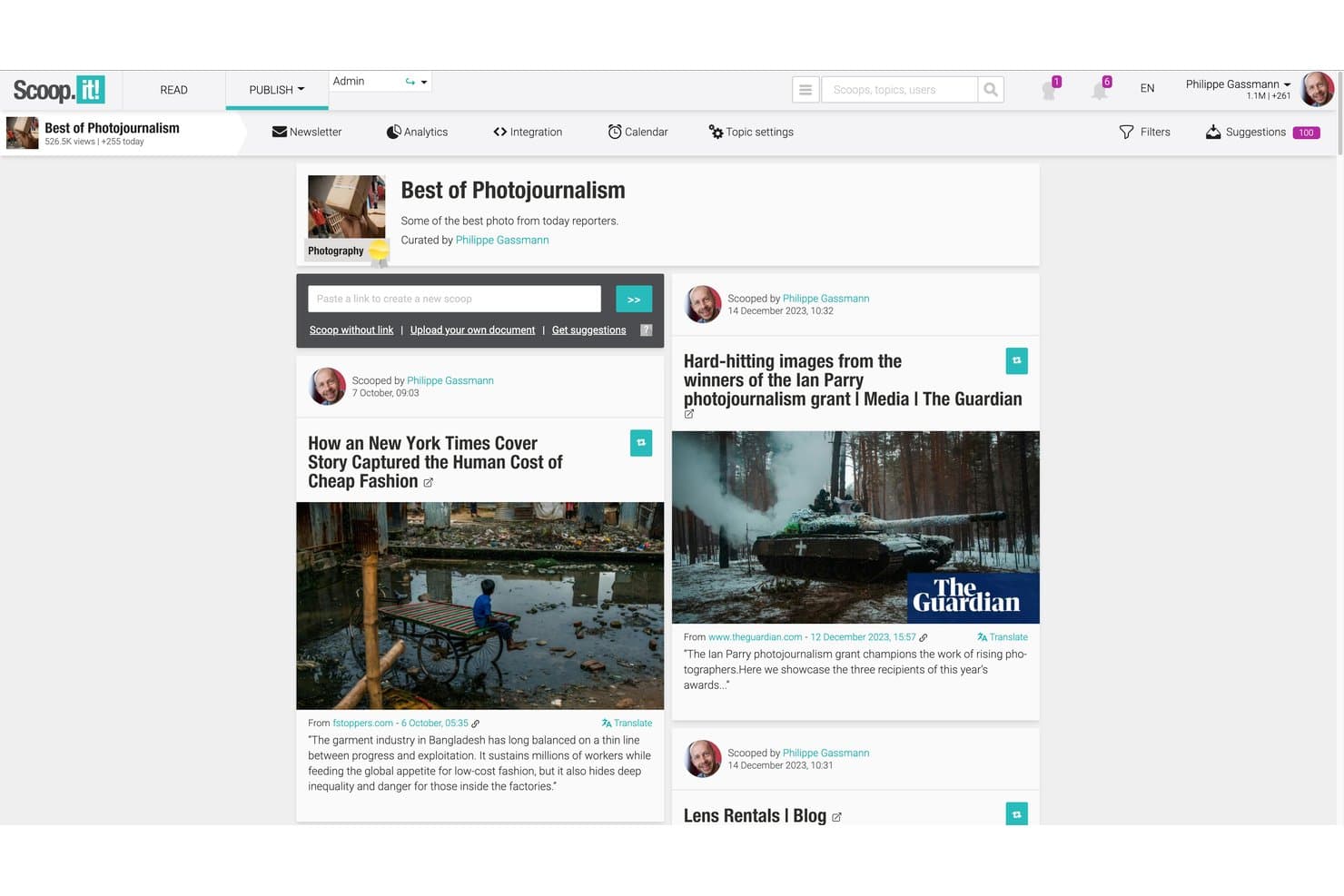
Scoop.it curates AI-sourced content into hubs, newsletters, and social posts. Scoop.it is a content curation platform that combines AI-assisted content discovery, topic-based content hubs, social publishing, and a native newsletter builder with AI-generated summaries.
Who Is Scoop.it Best For?
Scoop.it is a strong fit for content marketers and newsletter operators who want to turn curated industry content into branded email campaigns without building a separate tool stack.
Why I Picked Scoop.it
I've included Scoop.it in my top picks because its native newsletter builder does something most curation tools skip: it uses AI to auto-generate article summaries in a single click, so you can send a polished, context-rich newsletter straight from your curated feed. I also like that the platform lets you build branded topic pages that feed directly into those campaigns, keeping discovery and distribution in one place rather than stitching together separate tools.
Scoop.it Key Features
- Browser bookmarklet: Curate any web article directly from its source page in one click, without returning to the Scoop.it dashboard.
- Topic pages: Create themed, branded content hubs that can be embedded on your website, blog, or intranet as a live content library.
- Scheduled social publishing: Queue curated content for timed distribution across connected Twitter/X, LinkedIn, and Facebook accounts.
- Content performance analytics: Track audience engagement, newsletter open rates, and per-article performance stats from within the platform.
Scoop.it Integrations
Scoop.it integrates with WordPress, Microsoft Teams, Slack, Meltwater Explore, and Radarly. It also supports RSS feeds, Sitemaps, an Open API for custom integrations, and a Zapier connection.
Pros and Cons
Pros:
- Bookmarklet enables instant curation from any page
- Content hubs embed easily on any website
- AI-generated newsletter summaries save manual writing
Cons:
- Newsletter sends capped for lower-tier users
- Approval workflows require high-priced enterprise plan
Learn more about Scoop.it: Best for sharing curated insights with marketing teams
- Free trial available
- From $49/month
Visit WebsiteCustomer Rating:4.4/5
UpContent curates third-party articles for review, annotation, and distribution. UpContent is a content curation platform that discovers and organizes third-party articles from across the web, letting marketing teams review, annotate, and distribute curated content through social, email, and other channels.
Who Is UpContent Best For?
UpContent is a natural fit for marketing teams at financial services firms, where compliant, advisor-led content sharing is a core part of the sales process.
Why I Picked UpContent
I picked UpContent as one of the best because it's purpose-built for marketing teams that need to share curated content across multiple channels without losing control of the message. Its team collaboration workflow lets managers review and approve articles before they go out, which matters a lot when advisors or reps are posting independently.
I also like the Smart Seller feature, which overlays a custom CTA banner on any article you share, keeping your brand and conversion path intact even when you're linking to third-party content.
UpContent Key Features
- Topic-based content discovery: Build topic collections that continuously pull in new articles matching your chosen keywords and sources.
- Content filters: Sort discovered articles by recency, shareability, influence, or source to surface the most relevant pieces faster.
- UTM tracking: Automatically appends UTM parameters to shared article links for tracking engagement back to your curation activity.
- Gallery widget: Embed a curated content feed directly onto your website so visitors see your latest topic collections without leaving your site.
UpContent Integrations
UpContent offers native integrations with Hootsuite, HubSpot, Salesforce Marketing Cloud, Mailchimp, Buffer, Seismic LiveSocial, Proofpoint, Yext, EveryoneSocial, and SOCXO. It also supports RSS feeds from any topic collection, connects with Zapier, and has an API for custom integrations.
Pros and Cons
Pros:
- Embeds curated feeds directly on websites
- Surfaces articles by shareability and influence
- Approval workflows built for team review
Cons:
- No geographic filtering for localized content
- Topic keyword tuning requires trial and error
Learn more about UpContent: Best for enterprise-scale social embed management
- 14-day free trial
- From $110/month (billed annually)
Visit WebsiteCustomer Rating:4.7/5
Flockler aggregates, moderates, and embeds social content across digital channels. Built around social media aggregation, Flockler lets you collect, moderate, and embed content from platforms like Instagram, TikTok, and YouTube into websites, apps, and digital screens.
Who Is Flockler Best For?
Flockler is a natural fit for brands in retail, hospitality, and events that need to display live social content across multiple physical and digital touchpoints.
Why I Picked Flockler
I picked Flockler as one of the best because of how well it handles embed distribution across multiple touchpoints from a single source. My team can deploy one curated social feed to a brand website, a live event screen, and a digital kiosk without rebuilding the configuration each time.
The native digital signage output is something I rarely see in other content curation tools, and it's especially useful for campaigns that run across physical and digital spaces simultaneously.
Flockler Key Features
- Rights management: Send rights request messages directly to content creators to get permission before featuring their posts.
- Shoppable feed: Tag products directly on social posts to turn curated feeds into clickable shopping experiences.
- Custom CSS editor: Apply custom styling to any feed embed to match your brand's visual guidelines.
- Analytics dashboard: Track impressions, clicks, and engagement on embedded feeds across all active channels.
Flockler Integrations
Flockler aggregates content from Instagram, Facebook, X, YouTube, LinkedIn, TikTok, Pinterest, Bluesky, Google Reviews, RSS feeds, SoundCloud, and Flickr into unified feeds. It works with Shopify, Webflow, WordPress, and other major CMS platforms, and can embed in SharePoint and internal portals.
Pros and Cons
Pros:
- Embed feeds on digital signage screens
- Archived content persists after campaigns end
- AI-generated alt text for social images
Cons:
- Analytics reporting lacks deeper engagement data
- Limited content sources on lower plans
Learn more about Flockler: Best for annotating saved web content
- Free plan available
- From $5.99/month
Visit WebsiteCustomer Rating:4.4/5
Instapaper saves, highlights, and organizes articles for later reading. Built for saving and reading web content, Instapaper is a read-later tool with highlighting, private notes, and folder-based organization for managing articles and online research.
Who Is Instapaper Best For?
Instapaper works best for solo professionals and content creators who need a personal reading and research library they can build and reference over time.
Why I Picked Instapaper
I picked Instapaper as one of the best because its annotation layer goes deeper than most read-later tools. I highlight passages in four colors and attach private notes to specific lines in any saved article. When I revisit a piece weeks later, those color-coded marks help me pull quotes and ideas into my content without re-reading from scratch.
Instapaper Key Features
- Folder organization: Sort saved articles into custom folders to keep research topics separated and easy to browse.
- Full-text search: Search across all saved articles by keyword to locate specific content in your library.
- Speed read mode: Read saved articles word by word at a set pace to move through content quickly.
- Browser extension: Save any web page to your Instapaper library directly from your browser with one click.
Instapaper Integrations
Instapaper offers a smaller set of native integrations, including Notion, Kindle, and Rakuten Kobo. It's available on Zapier and IFTTT, and has an API for custom integrations.
Pros and Cons
Pros:
- Clean text-to-speech for saved articles
- Highlights and notes sync across devices
- Distraction-free reading strips ads and clutter
Cons:
- Notes display as separate fragmented entries
- Infrequent app updates and slow support
Learn more about Instapaper: Best for personalized news aggregation
- Free plan available
- Pricing upon request
Visit WebsiteCustomer Rating:4/5
Flipboard curates personalized news, stories, and web content by topic. Flipboard is a news aggregation and content curation app that collects articles, stories, and web content into personalized, magazine-style feeds organized by topic or interest.
Who Is Flipboard Best For?
Flipboard is a strong fit for individual professionals, journalists, and content creators who need a personal news feed organized around specific topics or industries.
Why I Picked Flipboard
Flipboard earns its spot on my shortlist because no other tool packages news aggregation around topic-level personalization quite like this. Its "For You" feed uses an algorithm that learns from what you heart, follow, and add, so the content gets sharper over time without manual adjustments.
I also like its Smart Magazines feature, which opens with broadly trending stories on a topic before narrowing to stories matched to your specific reading habits. The daily FlipDigest email pulls from the same algorithm, giving you a digest of top stories across your followed topics without logging back into the app.
Flipboard Key Features
- Custom magazines: Create ongoing, topic-specific magazines by flipping articles, videos, and podcasts from any source into a shareable collection.
- Storyboards: Package a finite set of curated links into structured, sectioned roundups with custom copy, topic tags, and shareable embeds.
- Group magazines: Invite other curators to contribute content into a shared magazine, making collaborative curation across a team possible.
- Content analytics: Track opens, impressions, click-through rate, and engagement across your magazines and storyboards from the Flipboard dashboard.
Flipboard Integrations
Flipboard lets you connect social media accounts on Twitter, LinkedIn, Tumblr, SoundCloud, YouTube, Flickr, and 500px to pull and share content within the app. It also supports Mastodon and the broader fediverse through ActivityPub, and ingests content from any RSS feed. Zapier and API support are not clearly documented.
Pros and Cons
Pros:
- Algorithm learns from interactions to personalize feeds
- Topic filtering via hashtags and category selection
- Magazine-style layout makes browsing visual content enjoyable
Cons:
- Analytics for curators are barebones
- Accessing some articles requires external logins
Learn more about Flipboard :
Annen programvare for innholdsutvelgelse
Her er noen flere alternativer for programvare for innholdsutvelgelse som ikke kom med på kortlisten min, men som likevel er verdt å undersøke:
- 11ListlyBest for creating collaborative listicles
- 12DrumUpBest for scheduling curated social posts
- 13MediumBest for publishing long-form thought leadership
- 14PinterestBest for visual discovery and bookmarking
- 15ContentGemsBest for daily email content alerts
- 16InoReaderBest for custom automation with rules
- 17MyCuratorBest for WordPress content capturing
- 18Paper.liBest for automated newsletter creation
- 19eLinkBest for multi-format newsletter curation
- 20QuuuBest for human-vetted social post automation
How I Evaluate Content Curation Software
I evaluate these tools in two layers: the non-negotiable capabilities—like aggregating sources and scheduling distribution—and the differentiators that separate the strongest options from the rest.
Core Functionality (Table Stakes For This List)
When I'm selecting tools for my list, I rank each one on a scale from 0 (does not offer the functionality) to 5 (excels in this area) for each core functionality listed below. Then, I calculate the tool's total score into a percentage. Each tool needs to achieve a minimum total score of 65% to be considered for inclusion.
- Content Discovery & Aggregation: I check whether a tool can pull from RSS feeds, blogs, social platforms, and news sites into a single feed—so you're not tab-hopping across dozens of sources.
- Topic & Keyword Filtering: Strong filtering lets you zero in on SaaS-relevant subjects using saved searches, Boolean queries, or tag-based rules rather than scrolling through noise.
- AI-Powered Relevance Ranking: I evaluate how well each tool surfaces high-value content automatically—tools like Curata and Feedly, for example, both use AI to prioritize articles by relevance.
- Multi-Channel Distribution: I look for the ability to push curated content directly to social profiles, newsletters, Slack channels, or a blog without switching between separate tools.
- Content Organization & Tagging: A usable library with tags, collections, or boards matters when your team curates across multiple product lines or campaign themes and needs to retrieve assets fast.
- Team Collaboration & Approvals: I evaluate whether the tool supports shared workspaces, commenting, and approval workflows so a content lead can review curated picks before they go live.
Once I have a list of tools that meet this criteria, I consider what sets each platform apart.
Differentiating Factors (What Sets Vendors Apart)
Here's how I compare and contrast different vendors:
Standout Features
I look for built-in analytics that show how curated posts perform across channels—click-throughs, shares, and engagement trends help you double down on topics your audience responds to. AI-generated summaries are another differentiator, letting you add original commentary to a shared article without writing from scratch. I also evaluate competitor and trend monitoring, which is valuable for SaaS teams tracking rival launches or emerging industry conversations in real time.
Beyond Features
Integrations matter a lot here. I check whether a tool connects natively to the platforms SaaS teams already use—think HubSpot, Slack, Buffer, or WordPress—so curated content flows into existing workflows. Pricing structure is another key factor; I evaluate whether plans scale reasonably as teams grow or content volume increases. Copyright and attribution handling also deserves attention, since sharing third-party content without proper source linking or excerpting safeguards can create legal exposure for your brand.
Slik velger du programvare for innholdsutvelgelse
Valget av programvare for innholdsutvelgelse handler om hvor effektivt den kan finne relevant innhold, organisere kilder, støtte publiseringsprosesser og distribuere kuratert materiale på tvers av kanalene teamet ditt bruker.
| Hvis prioriteten din er … | Se etter … |
|---|---|
| Hvis prioriteten din er …Å finne relevant innhold raskere | Se etter …KI-assistert innholdsoppdagelse og emnefiltrering |
| Hvis prioriteten din er …Å organisere store innholdsbiblioteker | Se etter …Tagger, mapper, samlinger og emneknutepunkter |
| Hvis prioriteten din er …Å publisere kuratert innhold | Se etter …Innebygde verktøy for publisering og planlegging |
| Hvis prioriteten din er …Å dele innhold på tvers av kanaler | Se etter …Distribusjon i sosiale medier, nyhetsbrev og på nettsteder |
| Hvis prioriteten din er …Å opprettholde innholdskvaliteten | Se etter …Kildekontroller og relevansfiltre |
| Hvis prioriteten din er …Å støtte teamets arbeidsprosesser | Se etter …Samarbeid, godkjenninger og delte biblioteker |
Slik vurderer du kortlisten din
- Test innholdsoppdagelsen: Opprett en emne- eller søkeordstrøm, og vurder om plattformen konsekvent finner relevant og tidsriktig innhold fra troverdige kilder.
- Kontroller filtreringsmulighetene: Test om du kan avgrense anbefalingene etter emne, kilde, språk, dato eller andre kriterier uten å måtte sortere manuelt gjennom irrelevante resultater.
- Opprett en kuratert samling: Lagre flere innholdselementer og organiser dem i mapper, emner eller samlinger for å se hvor enkelt det er å administrere et voksende bibliotek.
- Test publiseringsprosessene: Opprett et eksempel på et kuratert innlegg eller nyhetsbrev, og vurder hvordan plattformen håndterer redigering, kildeangivelse, planlegging og distribusjon.
- Vurder teamsamarbeidet: Legg til en annen bruker, eller test tilgjengelige arbeidsflytkontroller for å bekrefte at teamet ditt kan gjennomgå, godkjenne, organisere og publisere innhold uten dobbeltarbeid.
Hva er programvare for innholdskuratering?
Programvare for innholdskuratering er en plattform som brukes til å oppdage, samle inn, organisere og dele relevant innhold fra tredjeparter eller eget innhold om bestemte temaer.
Disse verktøyene kan finne frem artikler, rapporter, videoer, innlegg i sosiale medier og andre ressurser basert på nøkkelord, interesser eller utvalgte kilder. Team kan deretter organisere dette innholdet i samlinger, nyhetsbrev, innlegg i sosiale medier, nettsteder eller interne biblioteker.
Programvare for innholdskuratering reduserer det manuelle arbeidet med å finne nyttig materiale, samtidig som teamene får bedre kontroll over hva de deler, og hvordan de distribuerer det.
Funksjoner
Når du velger programvare for innholdskuratering, bør du se etter følgende viktige funksjoner:
- Klipping fra nettet: Gjør det mulig å lagre hele nettsider eller artikler direkte fra nettleseren, slik at det blir enkelt å bygge et personlig bibliotek med nyttige ressurser.
- Organisering med mapper og tagger: Lar deg sortere og kategorisere lagret innhold ved hjelp av mapper eller egendefinerte tagger, slik at du raskt kan finne, gruppere eller prioritere elementer for fremtidig bruk.
- Fulltekstsøk: Gjør det mulig å søke i alt lagret innhold – inkludert artikkeltekster og titler – slik at du får tilgang til de nøyaktige ressursene du trenger, uten manuell gjennomgang.
- Merknader og uthevinger: Gir verktøy for å utheve avsnitt og legge til notislapper eller kommentarer, noe som støtter forskning, samarbeid og grundigere innholdsanalyse.
- Frakoblet tilgang: Lar brukere lese og samhandle med lagret innhold selv når det ikke finnes internettforbindelse, noe som er nyttig på reise eller ved ustabile nettverksforhold.
- Nettleserutvidelser: Tilbyr tillegg for Chrome, Firefox eller andre nettlesere, slik at det blir enkelt å lagre innhold fra hvor som helst på nettet med ett enkelt klikk.
- Deling av innhold: Gjør det mulig for brukere å dele lagrede artikler, mapper eller merknader med andre via lenker, e-post eller samarbeidstillatelser.
- Tilgjengelig mobilapp: Støtter kuratering, lesing og merknader på mobile enheter, slik at du får tilgang til innhold og kan være produktiv på farten.
- Import og eksport i bulk: Lar brukere flytte store innholdssamlinger inn i eller ut av plattformen, noe som effektiviserer oppstart eller arkivering etter behov.
- Optimalisering av lesbarhet: Fjerner annonser og rot fra lagrede sider og gir et ryddig lesemiljø uten forstyrrelser, slik at du kan konsentrere deg bedre.
Vanlige AI-funksjoner i programvare for innholdskuratering
I tillegg til standardfunksjonene i programvare for innholdskuratering som er nevnt ovenfor, tar mange av disse løsningene i bruk AI med funksjoner som:
- Automatiske innholdsanbefalinger: Bruker kunstig intelligens til å analysere interessene og lesevanene dine, og viser deretter relevante artikler eller kilder du kanskje ikke ville funnet på egen hånd.
- AI-drevet oppsummering: Lager korte sammendrag av lange artikler eller nettsider, slik at du raskt kan gjennomgå hovedpunktene uten å lese hele innholdet.
- Smart merking og organisering: Legger automatisk til tagger, kategorier eller mapper for nytt innhold basert på emnet, slik at du sparer tid og sikrer at alt er ryddig organisert.
- Sentimentanalyse: Analyserer tonen og stemningen i artikler, slik at du kan vurdere hvordan innholdet kan bli mottatt, eller raskt filtrere etter bestemte perspektiver.
- Gjenkjenning av duplikater: Identifiserer og fjerner gjentatte eller svært like artikler i biblioteket ditt, slik at det kuraterte innholdet forblir unikt og fritt for rot.
Fordeler
Implementering av programvare for innholdskuratering gir flere fordeler for teamet og virksomheten din. Her er noen av fordelene du kan se frem til:
- Sentralisert informasjonsforvaltning: Samle og organiser artikler, forskning og innsikt fra flere kilder på ett søkbart sted.
- Effektiv kunnskapsdeling: Del kuratert innhold og merknader med interessenter eller teammedlemmer – og forbedre samkjøring, samarbeid og kollektiv læring.
- Raskere innhenting av innhold: Finn raskt lagrede ressurser gjennom fulltekstsøk, smart tagging og organiserte mapper.
- Fordypet forskning: Legg til merknader, fremhev og kommenter lagrede elementer, slik at innsikt og referanser blir enkle å finne igjen og bruke på nytt.
- Jevn innholdskvalitet: Filtrer, tagg og fjern duplikater for å opprettholde et ryddig og pålitelig bibliotek med materialer av høy kvalitet.
- Mer effektiv arbeidsflyt: Bruk nettleserutvidelser, mobilapper og verktøy for import og eksport til å lagre og organisere innhold uten å forstyrre de daglige rutinene.
- Økt mobilitet og tilgang: Få tilgang til lagret og organisert innhold på alle enheter – også uten nett – når du trenger det i forbindelse med forskning eller inspirasjon.
Kostnader og priser
Valg av programvare for innholdskuratering krever en forståelse av de ulike prismodellene og abonnementene som er tilgjengelige. Kostnadene varierer basert på funksjoner, teamstørrelse, tillegg og mer. Tabellen nedenfor oppsummerer vanlige abonnementer, gjennomsnittsprisene deres og typiske funksjoner som er inkludert i programvareløsninger for innholdskuratering:
Sammenligningstabell for programvare for innholdskuratering
| Abonnementstype | Gjennomsnittspris | Vanlige funksjoner |
|---|---|---|
| AbonnementstypeGratisabonnement | Gjennomsnittspris$0 | Vanlige funksjonerGrunnleggende nettklipping, begrenset antall mapper eller tagger, begrenset synkronisering mellom enheter og grunnleggende søkefunksjonalitet. |
| AbonnementstypePrivat abonnement | Gjennomsnittspris$5-$10 per bruker per måned | Vanlige funksjonerUbegrenset lagring, avansert organisering, fremheving og merknader samt prioritert kundestøtte. |
| AbonnementstypeBedriftsabonnement | Gjennomsnittspris$10-$25 per bruker per måned | Vanlige funksjonerTeamsamarbeid, administratorkontroller, delte mapper eller biblioteker, analyser og integrasjonsalternativer. |
| AbonnementstypeEnterprise-abonnement | Gjennomsnittspris$25-$50 per bruker per måned | Vanlige funksjonerTilpassede integrasjoner, forbedret sikkerhet, funksjoner for samsvar, klargjøring av brukere og dedikert kundestøtte. |
Vanlige spørsmål om programvare for innholdskuratering
Her er noen svar på vanlige spørsmål om programvare for innholdskuratering:
Kan jeg migrere eksisterende bokmerker eller lagrede artikler til programvare for innholdskuratering?
Ja, de fleste programmer for innholdskuratering lar deg importere bokmerker eller lagrede elementer fra nettlesere og andre plattformer. Se etter importalternativer som støtter HTML- eller CSV-filer, slik at innføringen blir enklere og kunnskapsbasen sentraliseres.
Hvordan støtter programvare for innholdskuratering teamsamarbeid?
Programvare for innholdskuratering støtter samarbeid ved å tilby delte mapper, gruppemerknader og tillatelser for redigering eller visning. Dette gjør det enklere for team å samle inn, diskutere og dra nytte av kuraterte ressurser sammen.
Er det mulig å bruke programvare for innholdskuratering uten nett?
Ja, mange løsninger tilbyr tilgang uten nett gjennom apper for datamaskin eller mobil. Du kan lese, legge til merknader i og organisere lagret innhold uten internettilkobling, noe som er nyttig ved fjernarbeid eller reiser.
Hvilke sikkerhetstiltak bør jeg forvente i verktøy for innholdskuratering?
Forvent grunnleggende sikkerhetstiltak som kryptert datalagring, brukerautentisering og administratorverktøy for å begrense tilgang. Hvis du håndterer sensitiv informasjon, bør du undersøke sertifiseringer for samsvar eller avanserte sikkerhetsinnstillinger før du velger en plattform.
Integreres verktøy for innholdskuratering med andre produktivitets- eller forskningsapper?
Ja, mange verktøy kobles til plattformer som Notion, Slack eller prosjektstyringssystemer direkte eller via API-er. Dette bidrar til å effektivisere arbeidsflyter, sentralisere forskning og redusere manuelle trinn på tvers av verktøyene dine.