

Programvare for annonsering i sosiale medier gir deg verktøy til å planlegge, starte og følge med på annonsekampanjer på populære sosiale plattformer fra ett og samme kontrollpanel. Hvis du administrerer flere annonsekontoer, analyserer forbruk eller håndterer kampanjer på tvers av plattformer, kan det å finne riktig programvare hjelpe deg med å holde alt organisert og oppdage muligheter for bedre ROI. I denne veiledningen finner du de beste plattformene for annonsering i sosiale medier i 2026, sammen med en gjennomgang av deres unike funksjoner, slik at du kan velge verktøyet som passer teamets behov og mål.
Why Trust Our Software Recommendations
6,700+
Reviews
20
Industry experts
16+
Evaluation factors
14
Years
Our team has been testing and reviewing software since 2012. As publishers and media operators ourselves, we know how difficult—and important—it is to choose the right software.
For this guide, we evaluated tools using hands-on testing and independent research, scoring tools using our selection criteria.
Our reviews reflect our human editorial judgment, not a sales pitch.
Sammenligningstabell for programvare for annonsering i sosiale medier
Denne sammenligningstabellen oppsummerer prisopplysningene for mine beste utvalgte programmer for annonsering i sosiale medier:
| Tool | Best For | Trial Info | Price | ||
|---|---|---|---|---|---|
| 1 | Best for Meta ad automation at scale | 7-day free trial | From $45/month | Website | |
| 2 | Best for omnichannel media planning with agentic AI | Not available | Pricing upon request | Website | |
| 3 | Best for CRM-driven ad audience targeting | Free plan available | From $7/user/month (billed annually) | Website | |
| 4 | Best for cross-channel paid media optimization | Free demo available | From $114,000/year | Website | |
| 5 | Best for B2B account-based ad targeting | Not available | Pricing upon request | Website | |
| 6 | Best for AI-driven budget reallocation at scale | Free demo available | Pricing upon request | Website | |
| 7 | Best for retargeting across Meta, TikTok, and Pinterest | Not available | Pricing upon request | Website | |
| 8 | Best for AI across Facebook and Instagram | Free plan available | From $1/day | Website | |
| 9 | Best for B2B pipeline-driven ad optimization | Free demo available | Pricing upon request | Website | |
| 10 | Best for AI-driven creative and media unification | Free demo available | Pricing upon request | Website |


Anmeldelser av den beste programvaren for annonsering i sosiale medier
Nedenfor finner du mine detaljerte sammendrag av den beste programvaren for annonsering i sosiale medier som kom med på kortlisten min. Anmeldelsene mine gir en detaljert gjennomgang av funksjonene, egenskapene og integrasjonene til hver plattform, slik at du kan finne den beste for deg.
 Best for Meta ad automation at scale
- 7-day free trial
- From $45/month
Visit WebsiteCustomer Rating:4.6/5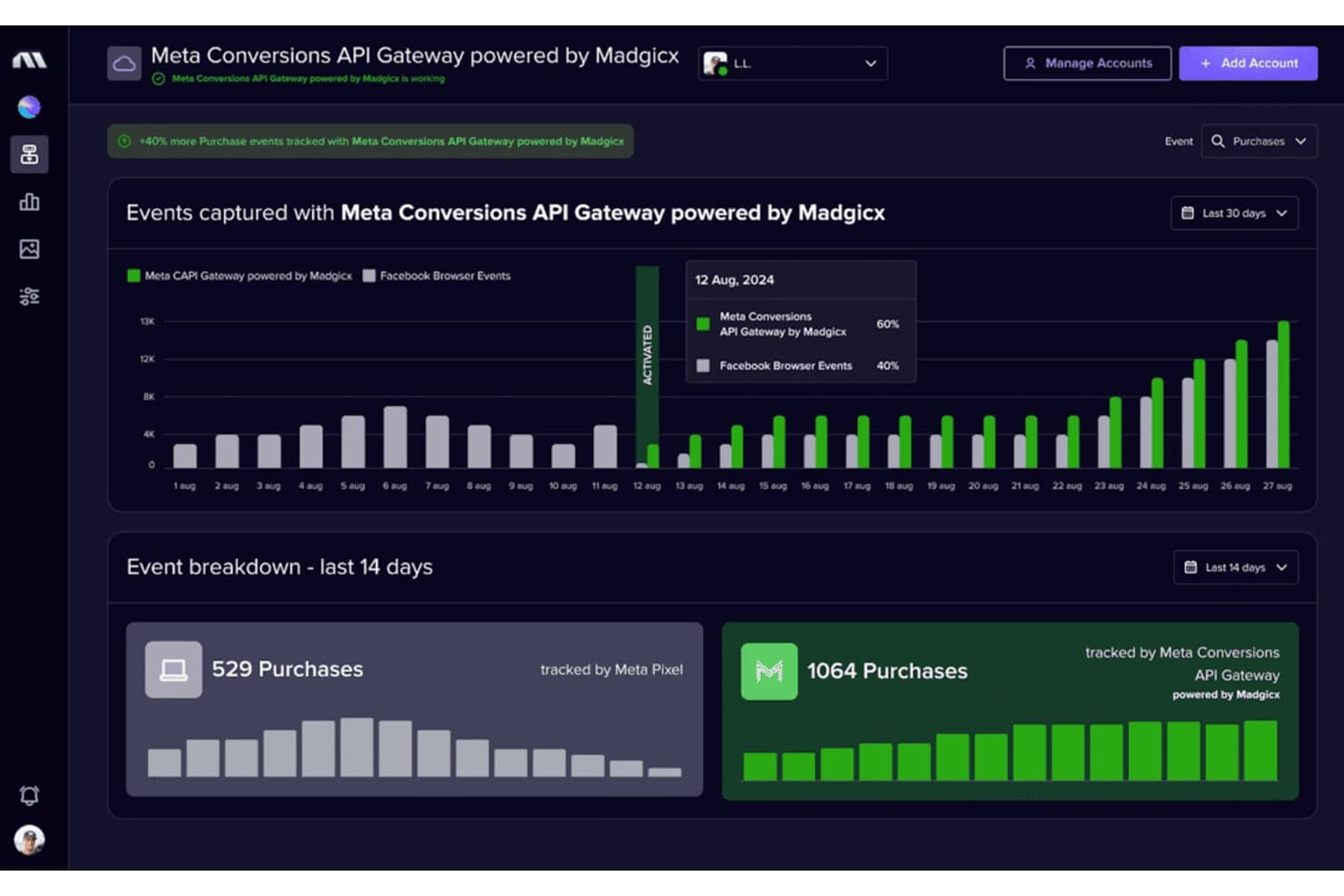
Madgicx tracks 40% more purchases via Meta Conversions API Gateway. Madgicx is a Meta-focused ad management and automation platform that combines AI-driven campaign optimization, audience building, creative intelligence, and cross-channel reporting.
Who Is Madgicx Best For?
Madgicx is a strong fit for performance marketing agencies and Meta-heavy advertisers spending at least $3,000/month who want to automate campaign optimization at scale.
Why I Picked Madgicx
Madgicx earns its spot on my shortlist because no other tool matches its depth of Meta ad automation. I'm particularly impressed by the Autonomous Budget Optimizer, which redistributes daily budgets across ad sets in real time based on ROAS or CPA targets, and the AI Marketer, which audits your account daily and surfaces prioritized one-click fixes. Pair those with Creative Insights, which uses computer vision to tag and analyze creatives at scale and flag ad fatigue before it costs you, and you've got a genuinely mature Meta automation stack.
Madgicx Key Features
- Audience Studio: A library of prebuilt Meta audiences organized by funnel stage, with tools to build, test, and monitor custom, lookalike, and retargeting segments.
- Ads Manager 2.0: A unified Meta campaign interface with bulk editing, AI bidding, performance trend tracking, and change history built in.
- One-Click Report: A drag-and-drop reporting tool that aggregates data from Meta, Google Ads, TikTok, GA4, Shopify, and Klaviyo into shareable, white-labeled PDFs.
- Madgicx Cloud Tracking: A server-side Meta Conversions API integration that recovers attribution data lost to browser privacy restrictions and iOS changes.
Madgicx Integrations
Madgicx integrates with Meta for campaign management and optimization, plus Google Ads, TikTok Ads, GA4, Shopify, and Klaviyo for reporting. It also supports Meta Conversions API and AI assistants through Madgicx MCP; Google Ads and TikTok Ads are reporting-only.
Pros and Cons
Pros:
- White-label reporting for multiple Meta accounts
- Creative fatigue detection with AI insights
- AI-driven Meta budget and ad optimization
Cons:
- No CRM or BI tool connections
- No ad management outside Meta platforms
Learn more about Madgicx: Best for omnichannel media planning with agentic AI
- Not available
- Pricing upon request
Visit WebsiteCustomer Rating:4.4/5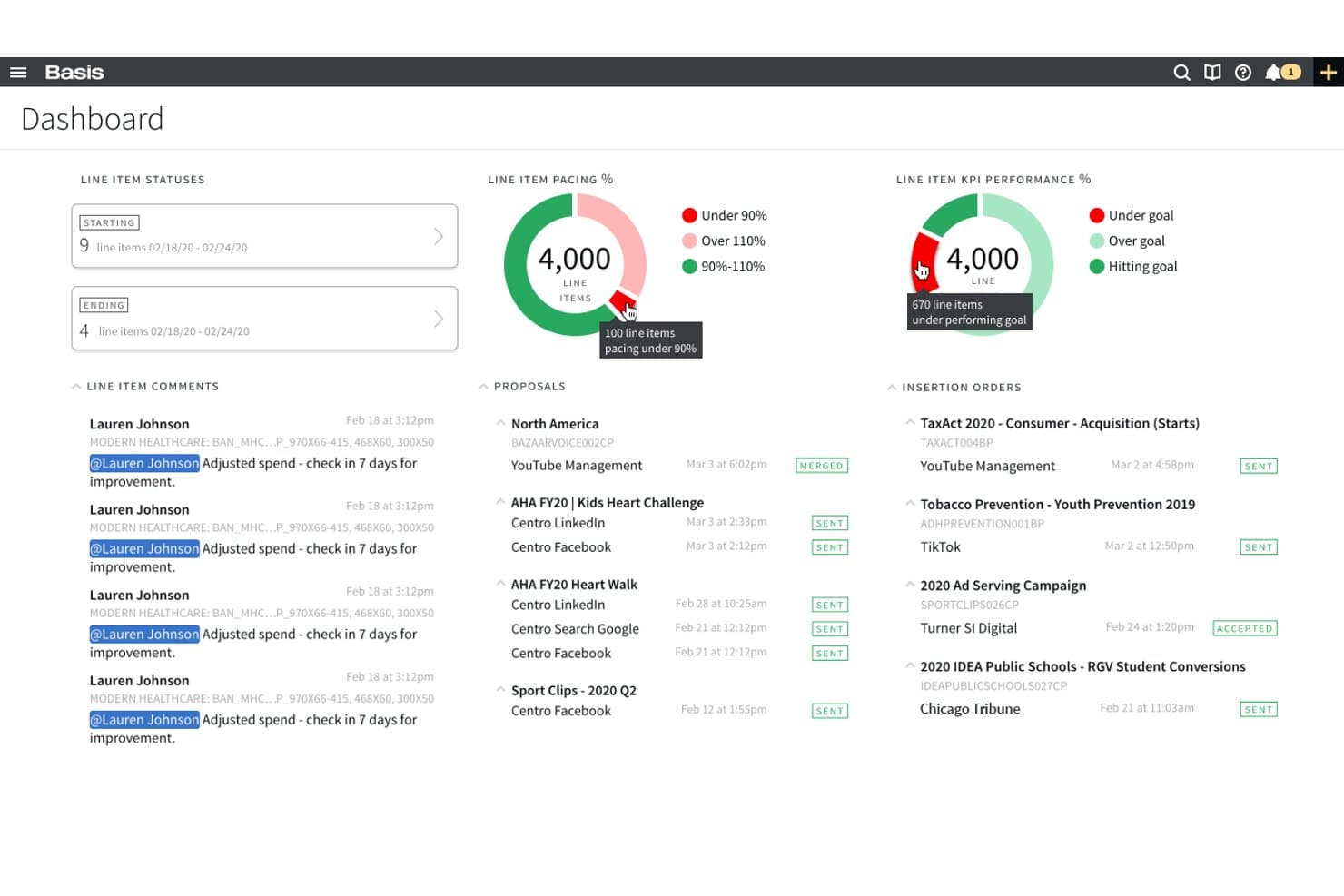
Basis offers a centralized dashboard displaying line item statuses, pacing percentages, KPI performance, proposals, and insertion orders for simplified media buying management. Basis is an omnichannel advertising platform that unifies programmatic, paid social, search, direct, and CTV campaign management and reporting across a single interface.
Who Is Basis Best For?
Basis is a strong fit for agencies and enterprise teams running omnichannel campaigns across programmatic, CTV, and paid social from a single platform.
Why I Picked Basis
Basis earns its spot on my shortlist because its Compass agentic AI can turn a campaign brief into a fully activation-ready omnichannel media plan in minutes, spanning programmatic, paid social, CTV, and search in one pass. I'm also a fan of how SmartBid continuously reallocates budget across all seven connected social platforms (Meta, LinkedIn, TikTok, Reddit, Snapchat, Pinterest, and YouTube) in real time, so spend naturally shifts toward what's actually performing. The cross-channel dashboards, powered by Snowflake and ThoughtSpot, pull daily data from every connected social network into one view without manual exports.
Basis Key Features
- BasisConnect+ cookieless conversion tracking: Tracks post-click site conversions across connected networks without relying on third-party cookies.
- Basis DataBridge: Pipes cross-channel performance data directly into external BI tools like Looker, Datorama, Tapclicks, and Funnel.
- Private marketplace deal library: Gives you access to 2,000+ curated PMP deals with premium publishers, built directly into the platform.
- LiveRamp CRM audience activation: Converts uploaded CRM records into targetable audience segments, typically available within hours of upload.
Basis Integrations
Basis offers 170+ integrations, including Meta, LinkedIn, TikTok, Reddit, Snapchat, Pinterest, Google Ads, Microsoft Ads, LiveRamp, Looker, and Funnel. It connects with seven social platforms through APIs and supports custom connectivity.
Pros and Cons
Pros:
- Supports privacy-friendly cookieless conversion tracking
- AI-driven media planning and budget optimization
- Enables unified reporting across seven social networks
Cons:
- No native A/B or DCO creative testing
- Social ad creatives managed outside the platform
Learn more about Basis: Best for CRM-driven ad audience targeting
- Free plan available
- From $7/user/month (billed annually)
Visit WebsiteCustomer Rating:4.4/5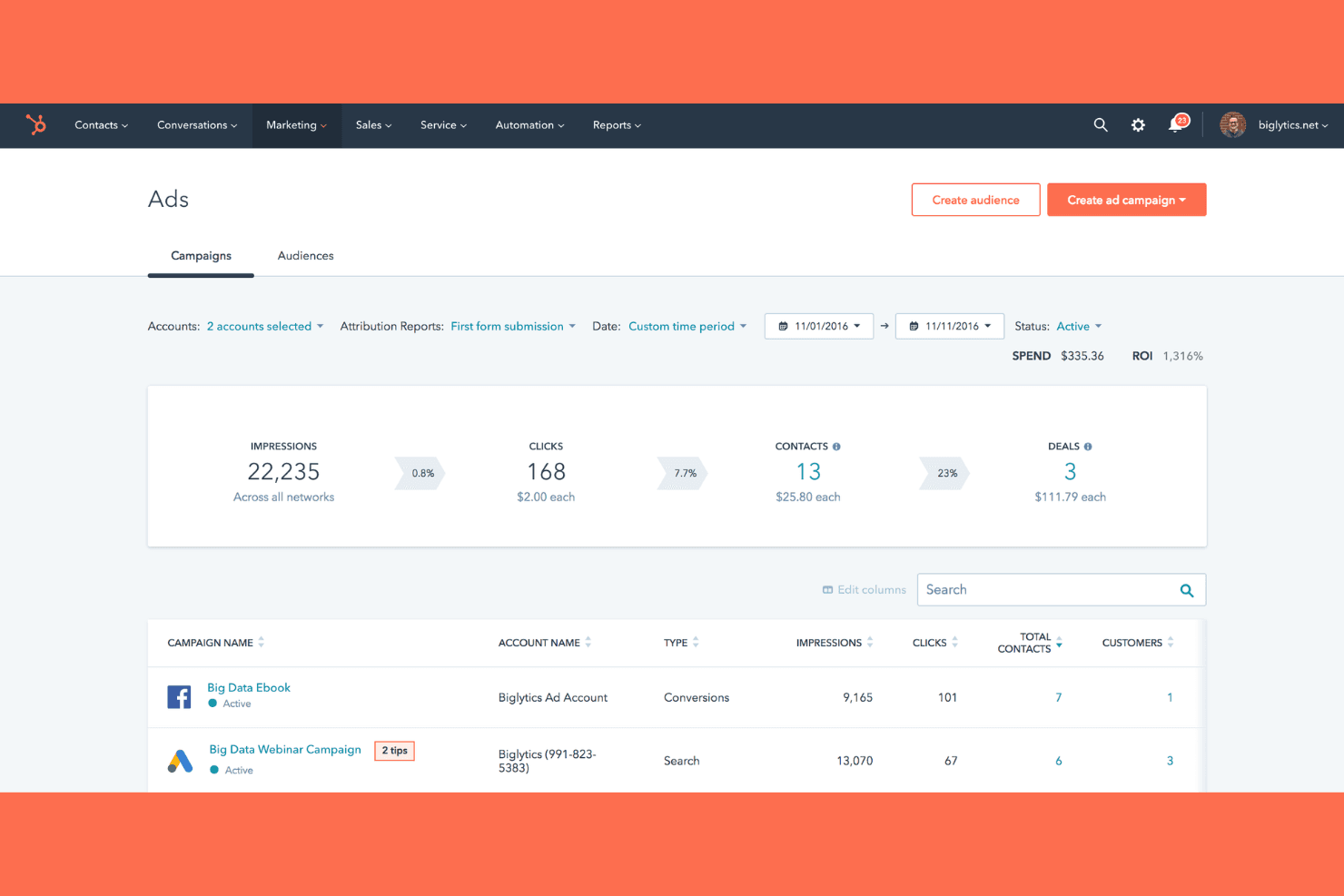
HubSpot Marketing Hub tracks ad spend, ROI, and campaign performance. HubSpot Marketing Hub is an all-in-one marketing platform that combines paid ad management across Meta, LinkedIn, TikTok, Google, Reddit, and Microsoft with CRM-powered audience targeting, multi-touch attribution, and social media publishing.
Who Is HubSpot Marketing Hub Best For?
HubSpot Marketing Hub is a strong fit for B2B and SaaS marketing teams that want to run paid ads across multiple networks using the same CRM data that drives their sales pipeline.
Why I Picked HubSpot Marketing Hub
HubSpot Marketing Hub earns its spot on my shortlist because no other tool in this category lets you build ad audiences directly from CRM data the way it does. I can target Meta, LinkedIn, and TikTok campaigns using lifecycle stage, deal history, or purchase behaviour pulled straight from the CRM, then track each interaction back to closed-won revenue through multi-touch attribution. That closed loop, from ad click to signed contract, is what makes it genuinely useful for B2B and SaaS demand generation teams.
HubSpot Marketing Hub Key Features
- Ad sequence builder: Automatically triggers follow-up workflows—like email nurture or sales routing—after a contact interacts with an ad.
- LinkedIn Lead Gen Forms: Captures lead data from native LinkedIn forms and syncs it directly to HubSpot CRM contacts.
- Pixel management: Deploys and manages TikTok and Meta tracking pixels from within HubSpot to sync conversion data back to CRM records.
- Customizable attribution dashboards: Connects ad interactions to pipeline and closed-won revenue using time decay, U-shaped, and W-shaped attribution models.
HubSpot Marketing Hub Integrations
HubSpot Marketing Hub offers native integrations with Meta, LinkedIn, Google Ads, TikTok, Microsoft Ads, Reddit Ads, Salesforce, and Google Analytics 4. Its App Marketplace adds 2,000+ marketplace integrations, and an API supports custom connections.
Pros and Cons
Pros:
- Multi-touch attribution links ads to revenue
- Multi-network campaigns managed in one place
- CRM-powered audience targeting for paid ads
Cons:
- No AI-driven bid or budget optimization
- No native ad A/B testing feature
Learn more about HubSpot Marketing Hub:
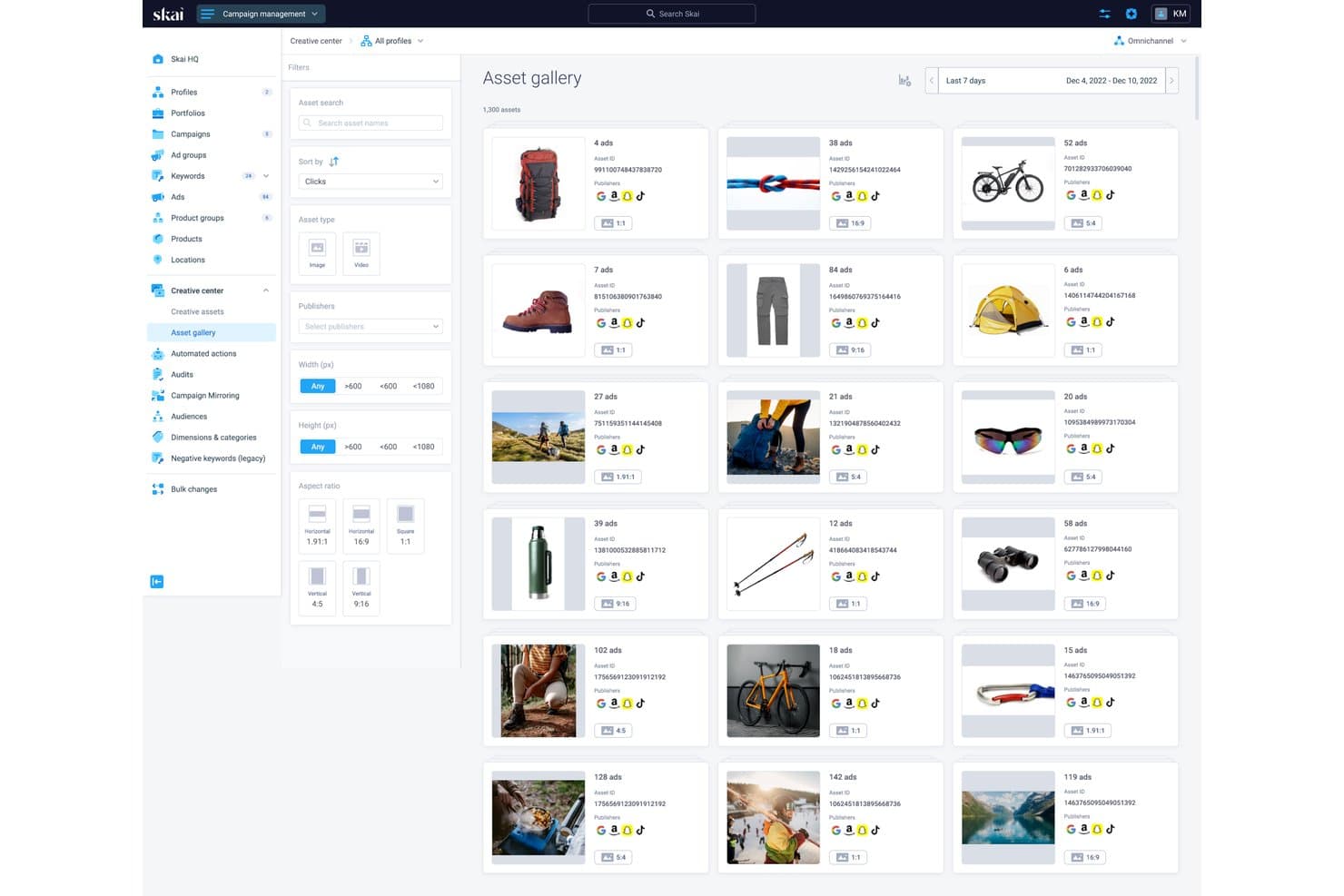
Skai's asset gallery centralizes creative assets across publishers. Skai is an enterprise paid media platform that unifies campaign management, AI-driven optimization, and cross-channel reporting across social, search, and retail media networks from a single interface.
Who Is Skai Best For?
Skai is a strong fit for enterprise performance marketing teams running paid campaigns across social, search, and retail media simultaneously.
Why I Picked Skai
I've included Skai in my top picks because it's the strongest option I've found for running paid campaigns across social, search, and retail media from a single platform without losing performance visibility. Its Budget Navigator and algorithmic optimization engine automatically shift spend across channels based on live ROAS signals, which means less manual reallocation when performance shifts mid-flight. Celeste AI adds conversational reporting on top of that, so you can query cross-channel performance in plain language and get actionable insights in under a minute.
Skai Key Features
- Build Your Own Algorithm: A custom algorithm builder that lets you train optimization logic against your own business goals, beyond standard bid strategies.
- Celeste AI conversational queries: A natural-language interface that lets you ask performance questions and get cross-channel insights returned in under a minute.
- Third-party audience marketplace: Access to 1,000+ behavioural audience segments from Experian, Oracle, and Epsilon for targeting on Meta's family of apps.
- Competitive Insights: A benchmarking tool available on Advanced and higher tiers for monitoring and analyzing competitor landscape data across channels.
Skai Integrations
Skai connects with 300+ publishers, including Meta, TikTok, Snapchat, Pinterest, LinkedIn, Google, and Amazon Ads, plus Salesforce, Google Analytics, Adobe Analytics, AppsFlyer, and Adjust. It also supports custom integrations through its open framework, Amazon S3, BigQuery, and Zapier.
Pros and Cons
Pros:
- True omnichannel reporting for social, retail, and search
- Conversational AI delivers instant performance insights
- Cross-channel budget reallocation with live ROAS signals
Cons:
- Full Reddit Ads support still rolling out
- Annual contracts with high minimum spend required
Learn more about Skai:
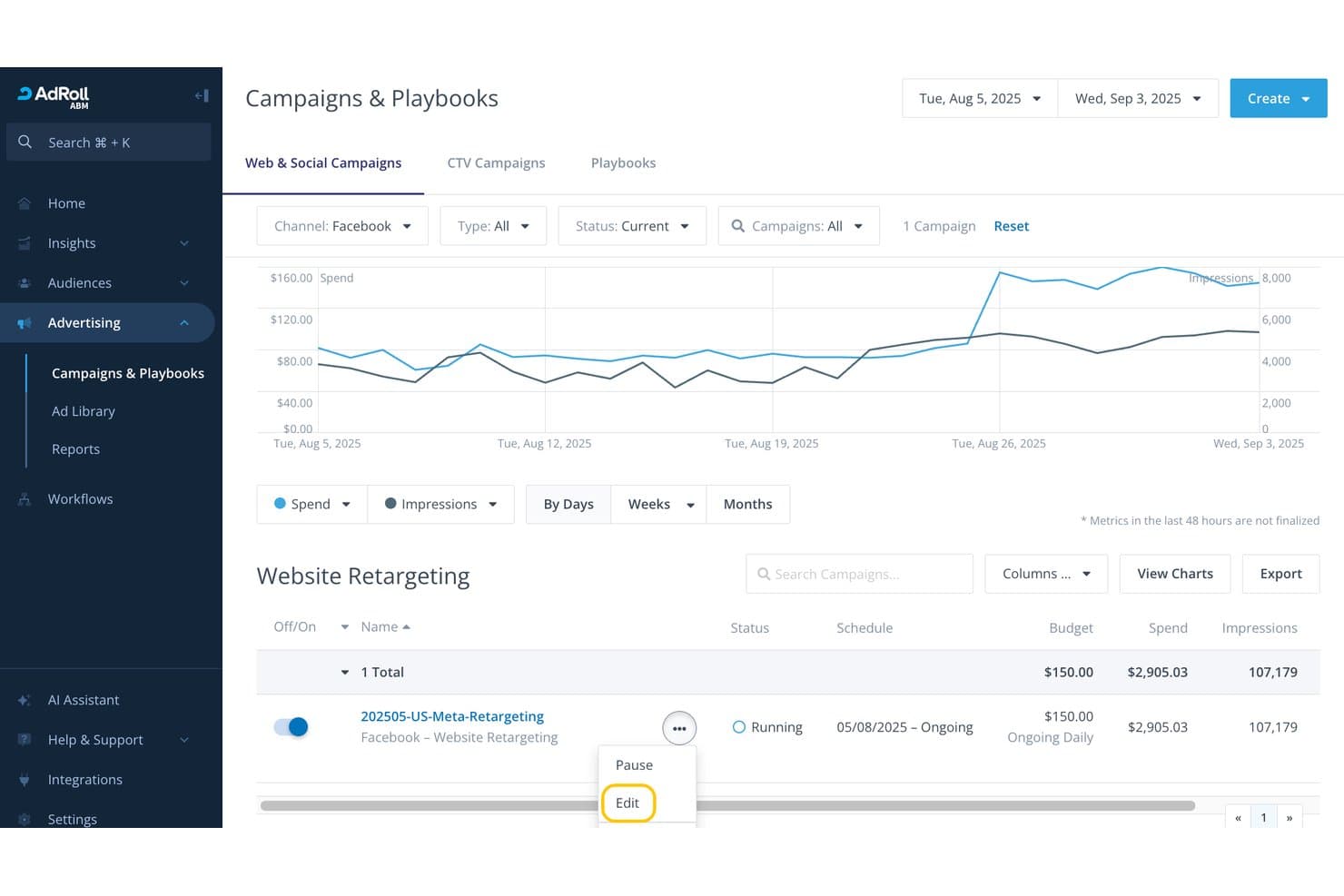
RollWorks lets users edit and manage Facebook retargeting campaigns easily. RollWorks is a B2B-focused advertising platform that combines account-based audience targeting, AI-driven bid optimization, and cross-channel campaign management across LinkedIn, Meta, TikTok, and Pinterest.
Who Is RollWorks Best For?
RollWorks is built for B2B SaaS demand generation and growth marketing teams that need account-level ad targeting tied directly to pipeline and revenue reporting.
Why I Picked RollWorks
I picked RollWorks as one of the best because its ICP Fit Scoring and BidIQ AI engine make B2B account-based ad targeting genuinely precise. Rather than broad audience sprays, I can build dynamic account lists graded by firmographic and intent data from Bombora and G2, then let BidIQ optimize bids across LinkedIn and Meta using 80+ signals per impression. The Revenue Impact Report then ties those campaigns directly to pipeline and closed-won revenue, not just clicks.
RollWorks Key Features
- ICP Fit Scoring: Grades target accounts A–D based on firmographic, technographic, and intent data to prioritize ad spend on your best-fit accounts.
- LinkedIn Lead Gen Forms: Supports native LinkedIn Lead Gen Forms, Carousel, Conversation, and Event ad formats directly within the platform.
- Journey Prediction: Uses CRM and intent data to flag accounts 4X–25X more likely to convert, triggering automated marketing-to-sales handoffs.
- Revenue Impact Report: Compares ad-influenced vs. non-influenced deals across pipeline, deal size, sales cycle length, and win rate.
RollWorks Integrations
RollWorks offers native integrations with Salesforce, HubSpot, LinkedIn Marketing Solutions, Facebook, Instagram, TikTok, Pinterest, Bombora, G2, and Google Analytics. Its Reporting API supports custom data connections.
Pros and Cons
Pros:
- Automated bid optimization with AI engine
- Revenue reporting ties campaigns to pipeline
- Best-in-class B2B audience targeting tools
Cons:
- No generative AI or native A/B testing
- Social ads limited to four networks
Learn more about RollWorks: Best for AI-driven budget reallocation at scale
- Free demo available
- Pricing upon request
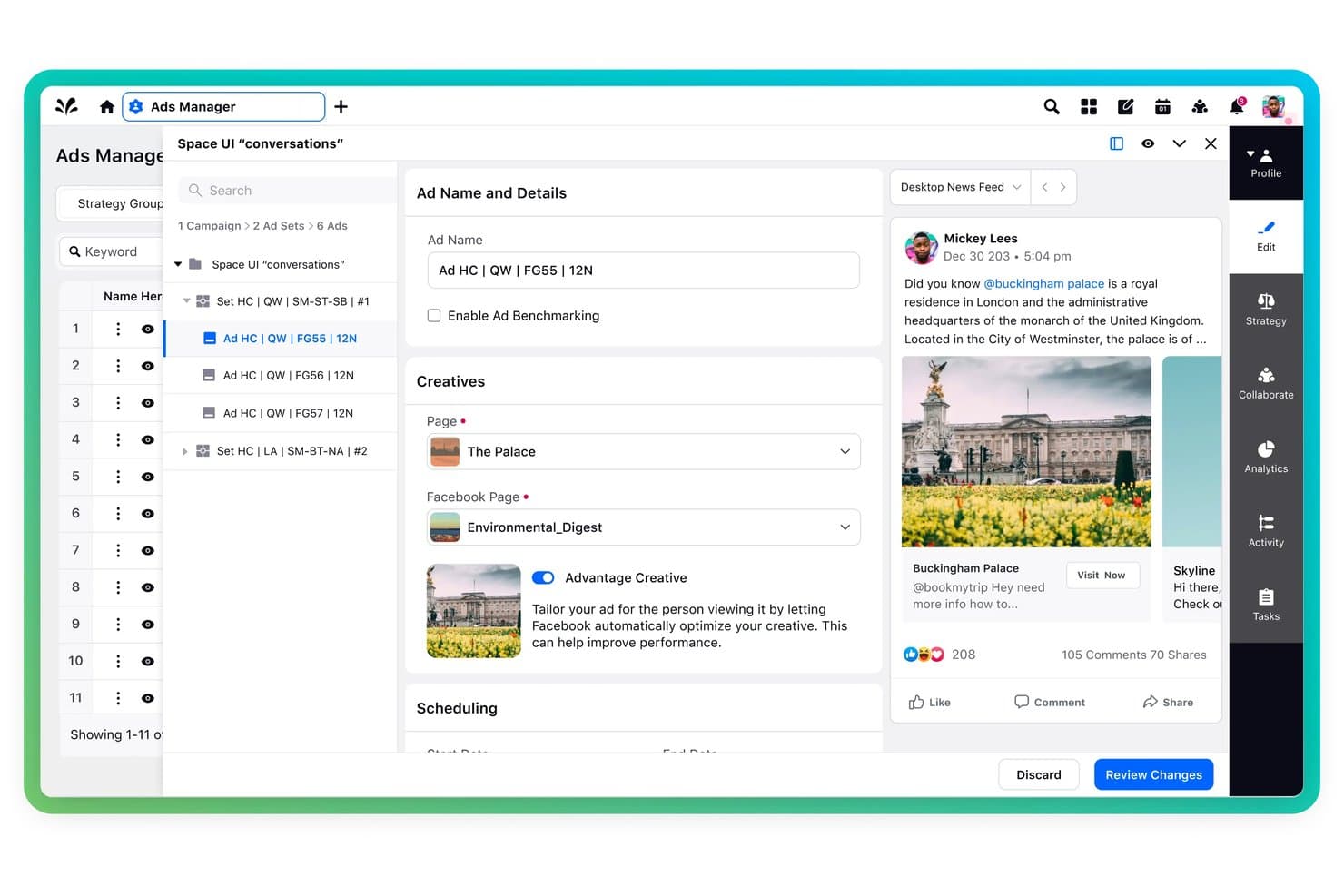
Sprinklr Marketing lets users build and preview social ads with creative controls. Sprinklr Marketing is an enterprise social media advertising platform that manages paid campaigns across 10+ ad networks—including Meta, LinkedIn, TikTok, Reddit, and Snapchat—with AI-driven budget allocation, creative optimization, and unified cross-channel reporting.
Who Is Sprinklr Marketing Best For?
Sprinklr Marketing is built for enterprise paid social teams managing high-volume campaigns across 10+ networks who need AI-driven budget decisions, not manual channel-by-channel adjustments.
Why I Picked Sprinklr Marketing
I picked Sprinklr Marketing as one of the best because its Smart Budget Allocation does something I rarely see done well: it automatically shifts spend across 10+ ad networks in real time based on live performance signals. If LinkedIn is underperforming against Meta on a given day, the AI rebalances without manual intervention. The Anomaly Copilot layer catches spend deviations before they compound, which makes it genuinely useful at enterprise scale.
Sprinklr Marketing Key Features
- Dynamic Creative Optimization: Automatically tests and selects winning combinations of ad elements across creatives to improve ad performance.
- Approval workflows: Built-in, tiered review and approval flows with role-based access controls and email-based approvals for enterprise ad governance.
- AI Creative Insights: Analyzes ad content elements—including CTA placement, colour, and logo position—to surface high-performing creative patterns.
- Unified cross-channel reporting: Combines paid, organic, and earned media data into a single customizable dashboard with BI tool integrations.
Sprinklr Marketing Integrations
Sprinklr Marketing offers 100+ integrations, including Salesforce, Adobe Marketo Engage, Google Analytics 4, Adobe Analytics, Tableau, Power BI, AppsFlyer, and Adobe Firefly. Native ad-network integrations include Meta, LinkedIn, TikTok, Reddit, Pinterest, and Amazon Ads.
Pros and Cons
Pros:
- Paid, organic, and earned data in one dashboard
- Deep campaign approval and governance controls
- AI shifts budget across 10+ networks automatically
Cons:
- Platform can feel overwhelming for smaller teams
- Requires annual enterprise contract to purchase
Learn more about Sprinklr Marketing: Best for retargeting across Meta, TikTok, and Pinterest
- Not available
- Pricing upon request
Visit WebsiteCustomer Rating:3.9/5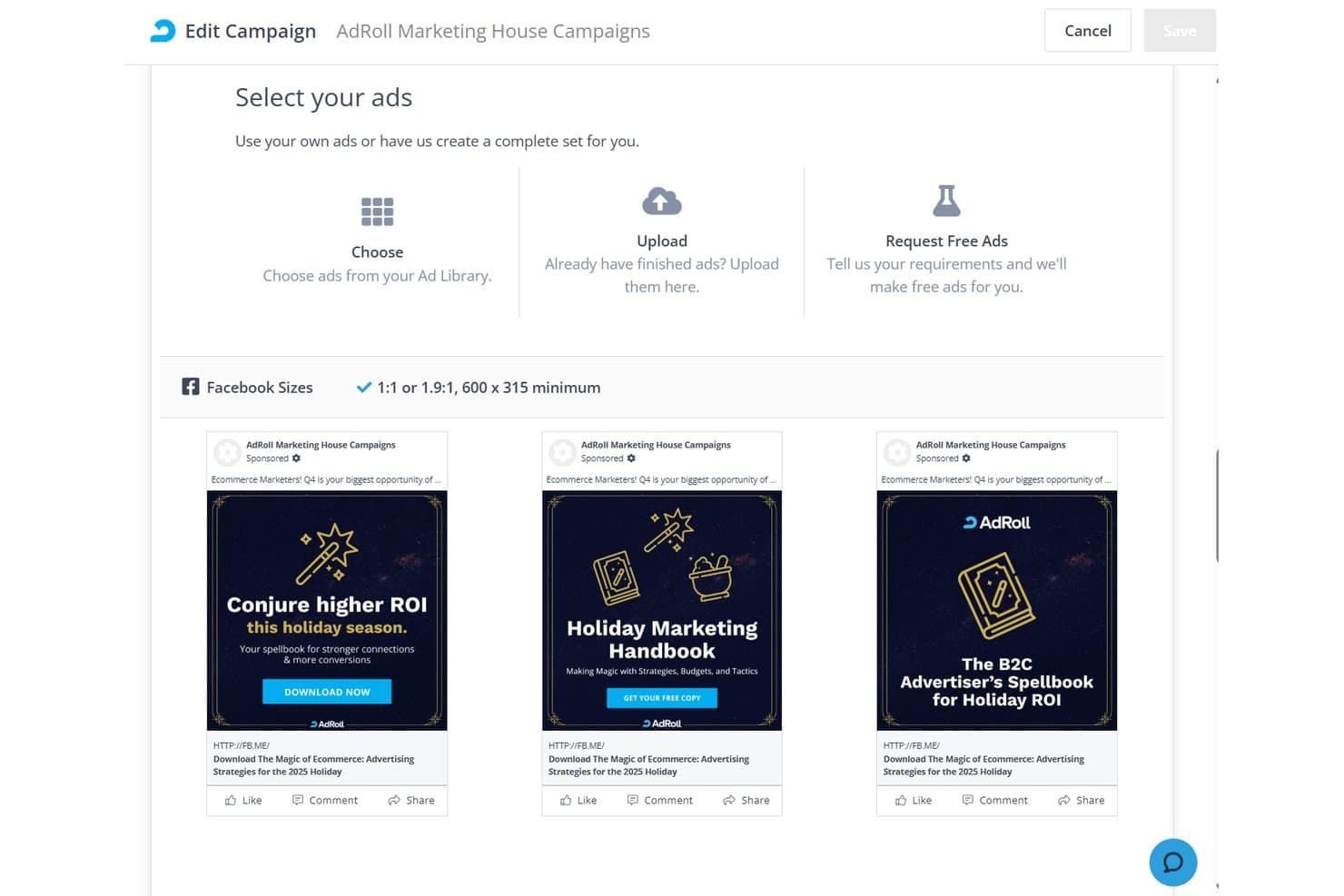
AdRoll lets users select and preview Facebook ads within a campaign. AdRoll is a multi-channel digital advertising platform that manages retargeting, prospecting, and full-funnel ad campaigns across social networks, display, native, video, and CTV from a single dashboard.
Who Is AdRoll Best For?
AdRoll suits ecommerce brands and performance marketers who want to manage retargeting campaigns across Meta, TikTok, and Pinterest from a single platform.
Why I Picked AdRoll
AdRoll earns its spot on my shortlist because it's one of the few platforms that lets you run and manage retargeting campaigns across Meta, TikTok, and Pinterest from a single dashboard without juggling three native ad managers. I'm particularly impressed by its Dynamic CPM bidding, which uses over 17 years of ML training data to automatically adjust bids based on real performance signals across all three networks simultaneously. The Recipes automation feature is also genuinely useful, letting you coordinate cross-channel social campaigns in one workflow rather than rebuilding logic in each platform separately.
AdRoll Key Features
- Cross-Channel Attribution add-on: Tracks conversions across channels using pixel, UTM, and API integrations, then visualizes the full funnel in Pathways reports with assisted conversion analysis.
- AI lookalike targeting: Builds new audiences by analyzing existing customer data with machine learning to find users most likely to convert across supported networks.
- Centralized Ad Library: Stores and organizes all creative assets in one place, letting you swap images, video, and HTML5 ads across campaigns without re-uploading.
- Peer benchmarking: Compares your CTR, CPC, and CPM performance against industry averages so you can gauge where campaigns stand relative to similar advertisers.
AdRoll Integrations
AdRoll offers 70+ integrations, including Salesforce, HubSpot, Google Analytics, Shopify, WooCommerce, Meta, TikTok, and Pinterest. It also provides 8+ public APIs for custom integrations and reporting.
Pros and Cons
Pros:
- Peer benchmarking for social ad campaign metrics
- Full-funnel retargeting with 17+ years ML data
- AI-driven dynamic bidding optimization across channels
Cons:
- No native A/B or multivariate ad testing
- Lacks LinkedIn and X campaign management
Learn more about AdRoll: Best for AI across Facebook and Instagram
- Free plan available
- From $1/day
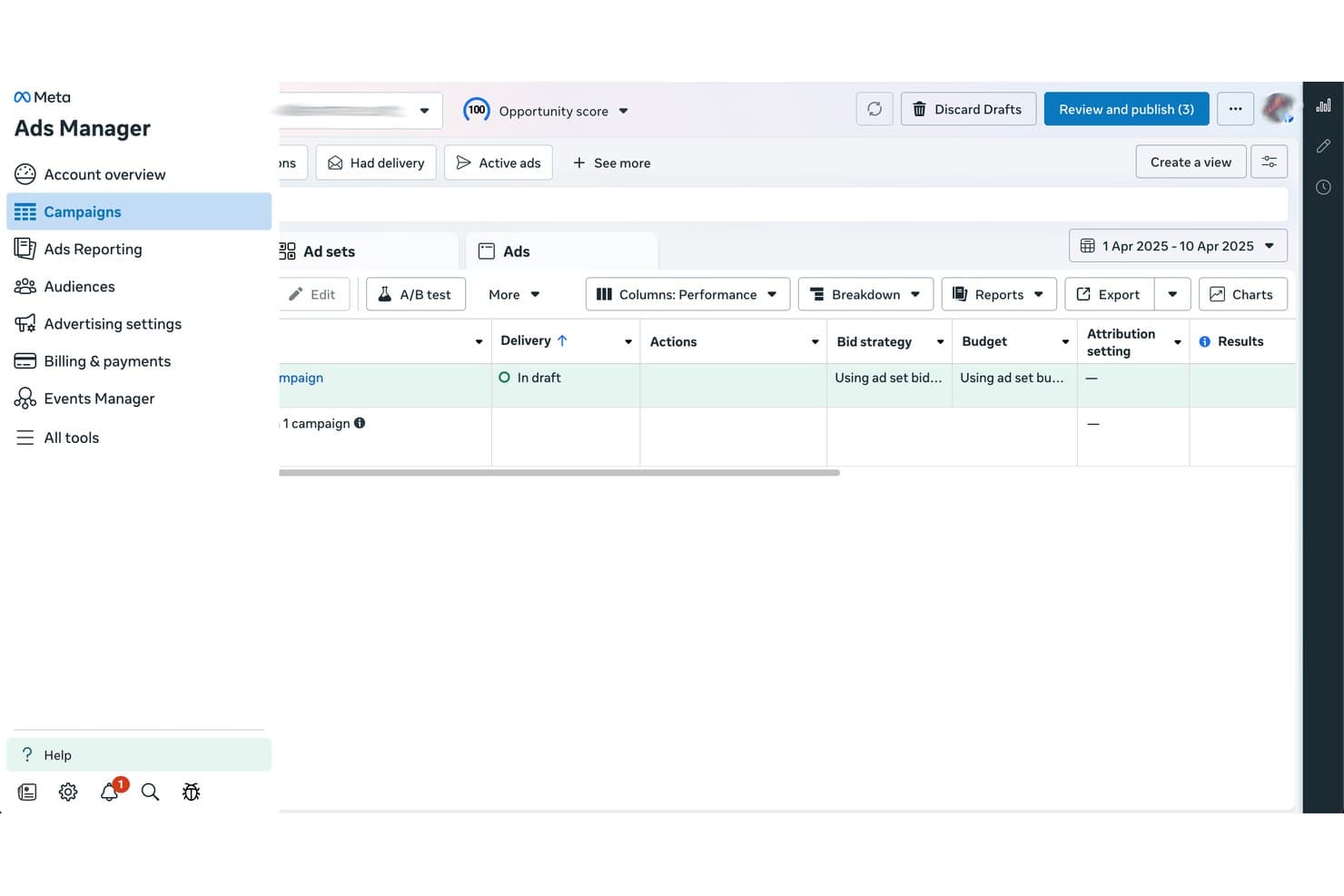
Meta Ads Manager lets users review and publish draft campaigns. Meta Ads Manager is Meta's native ad management platform for creating, running, and optimizing paid campaigns across Facebook, Instagram, Messenger, WhatsApp, and the Meta Audience Network, with AI-driven automation, audience targeting, creative testing, and conversion tracking built in.
Who Is Meta Ads Manager Best For?
Meta Ads Manager is the go-to tool for performance marketers and paid social specialists who run campaigns primarily on Facebook and Instagram and want deep AI-driven automation through the Advantage+ suite.
Why I Picked Meta Ads Manager
Meta Ads Manager earns its spot on my shortlist because no other platform comes close to what Advantage+ AI delivers across Facebook and Instagram at scale. I'm particularly impressed by Advantage+ Audience, which uses Meta's AI to discover high-converting audiences beyond your manual inputs, and Advantage+ Creative, which auto-generates and tests multiple ad variants using your brand assets. On top of that, Incremental Attribution uses holdout testing to measure true ad-driven conversions, not just last-click credit.
Meta Ads Manager Key Features
- Advantage+ Campaign Budget: Meta's AI automatically allocates your total campaign budget across ad sets in real time to maximize results.
- Conversions API (CAPI): Server-side tracking sends conversion data directly from your server to Meta, bypassing browser restrictions and iOS privacy limits.
- Automated rules: Rule-based triggers that pause, activate, or adjust bids and budgets when campaigns hit defined performance thresholds.
- Instant Forms: Native lead capture forms that collect contact info within Facebook and Instagram without redirecting users to an external landing page.
Meta Ads Manager Integrations
Meta Ads Manager integrates with HubSpot, Salesforce, Shopify, Google Analytics 4, Google Looker Studio, and Zapier. It also supports the Conversions API for custom CRM, server-side tracking, and data integrations.
Pros and Cons
Pros:
- Incremental attribution measures true ad-driven lift
- Deep audience targeting with Advantage+ features
- Industry-leading AI automation for ad campaigns
Cons:
- Account suspensions and bans happen with little warning
- Only supports Meta-owned social platforms
Learn more about Meta Ads Manager: Best for B2B pipeline-driven ad optimization
- Free demo available
- Pricing upon request
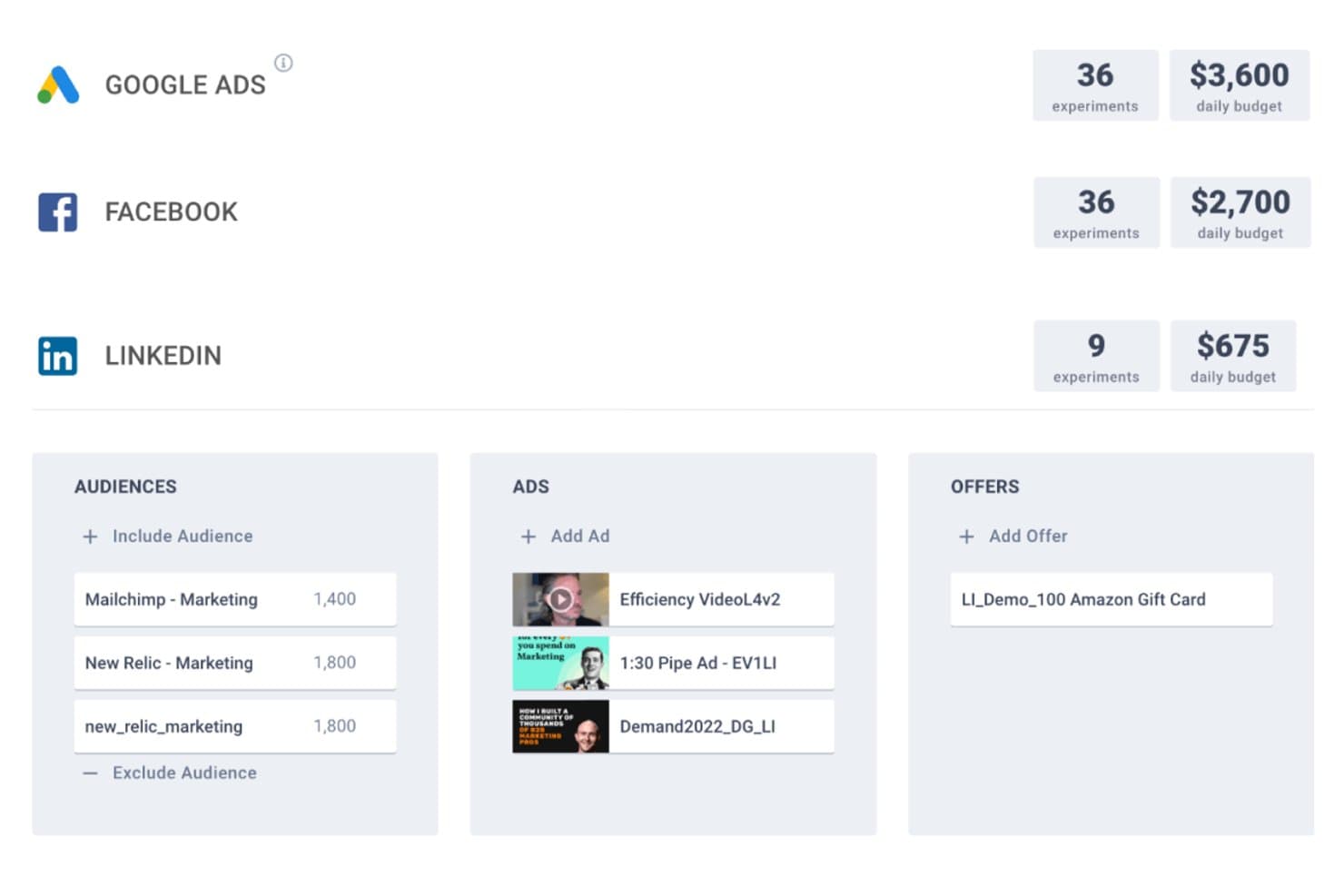
Metadata manages ad experiments across Google, Facebook, and LinkedIn from one place. Metadata is a B2B-focused paid social advertising platform that manages campaigns across LinkedIn, Meta, X, Reddit, Google, Bing, and ChatGPT, with AI-driven audience targeting, automated multivariate experimentation, and closed-loop revenue attribution built in.
Who Is Metadata Best For?
Metadata is built for B2B SaaS demand generation teams at mid-market and enterprise companies that run high-volume paid campaigns and need to tie ad spend directly to pipeline.
Why I Picked Metadata
I picked Metadata as one of the best because it's the only platform I've seen that optimizes paid social spend directly to pipeline, not just clicks or leads. Its Bid Agent negotiates bids up to 50 times per day across LinkedIn, Meta, and Google, while the Optimization Agent runs multivariate experiments across audiences, creatives, and offers simultaneously. What seals it for me is the MetaMatch identity graph, which maps 500M+ B2B profiles onto consumer platforms like Meta, so you're reaching the right accounts even off LinkedIn.
Metadata Key Features
- MetaMatch identity graph: Maps 500M+ B2B profiles from 15+ data sources onto consumer ad platforms so you can target business buyers on Meta and Reddit, not just LinkedIn.
- Seven specialized AI agents: Dedicated agents handle each campaign stage—from audience building and creative generation to bid management, analytics, and operations.
- Website visitor deanonymization: Identifies anonymous site visitors at the contact level in real time, before any form fill, and syncs that data back to Salesforce.
- MetadataONE MCP server: Exposes 160 tools via an open Model Context Protocol server, letting any compatible LLM generate fully configured campaigns from a single natural language prompt.
Metadata Integrations
Metadata integrates with Salesforce, HubSpot, Marketo, LinkedIn Ads, Meta, Google Ads, Microsoft Advertising, Bombora, G2, and Google Analytics 4. It also offers an open API, a 160-tool MetadataONE MCP server, and Zapier.
Pros and Cons
Pros:
- B2B identity graph unlocks new targeting options
- Ties ad spend directly to pipeline revenue
- Automates multivariate ad experiments across networks
Cons:
- Limited support for newer creative ad formats
- Only suited for high-volume B2B advertisers
Learn more about Metadata: Best for AI-driven creative and media unification
- Free demo available
- Pricing upon request
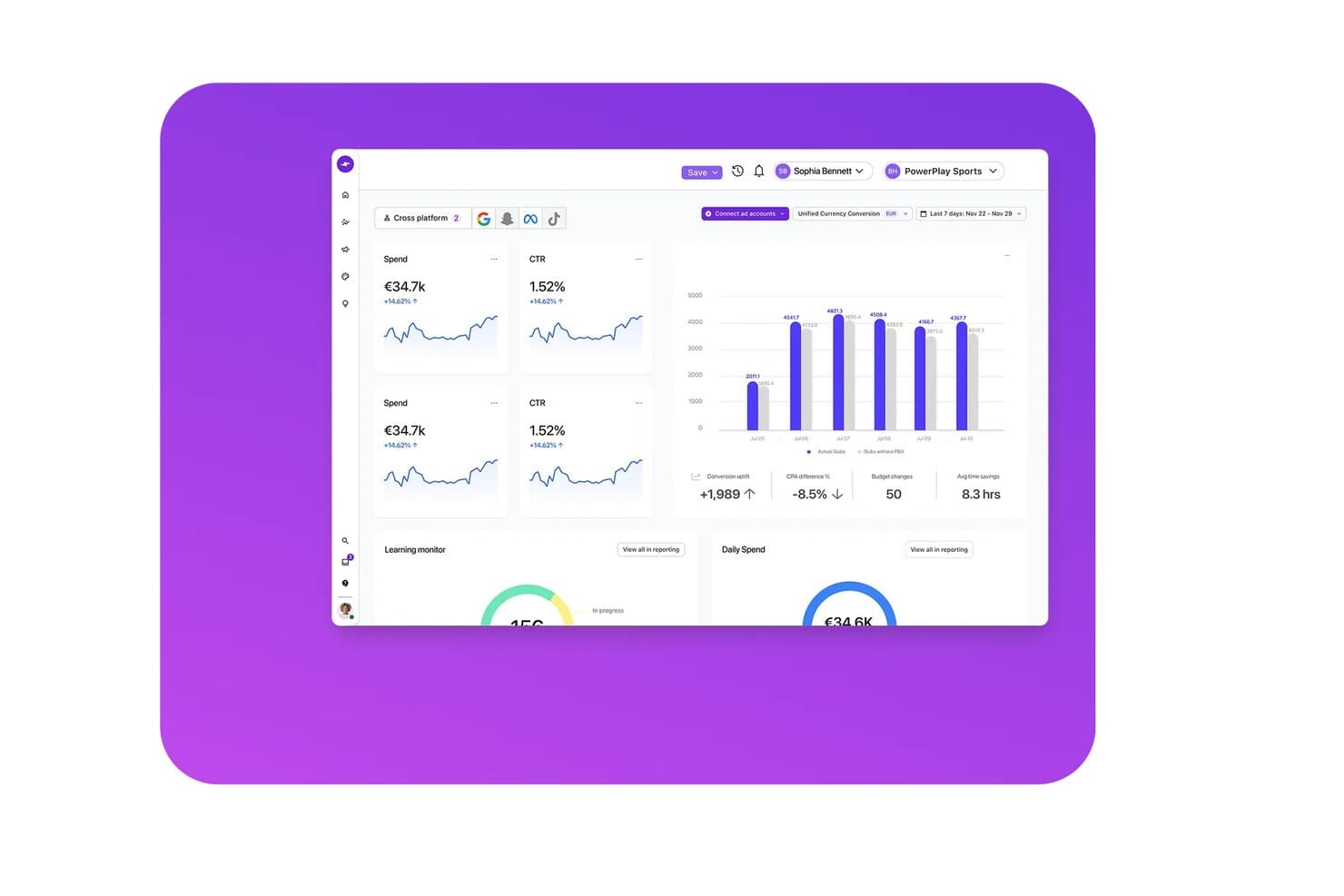
Smartly.io unifies cross-platform ad performance in one dashboard. Smartly.io is a social media advertising platform that unifies AI-driven creative production, multi-network campaign management, and performance analytics across Meta, TikTok, Pinterest, Snapchat, Reddit, and other major ad networks.
Who Is Smartly.io Best For?
Smartly.io fits enterprise brands and agencies running high-volume paid social campaigns across multiple networks, particularly in e-commerce, retail, and consumer verticals.
Why I Picked Smartly.io
Smartly.io earns its spot on my shortlist because it's one of the only platforms that genuinely unifies creative production and media execution in a single workflow. I love that AI Studio can generate 50+ on-brand creative variants from one template in under 10 minutes, adapting copy, visuals, and formats across Meta, TikTok, Pinterest, and more without rebuilding from scratch. Paired with Creative Predictive Potential, I can see projected attention scores before a campaign ever goes live.
Smartly.io Key Features
- Predictive Budget Allocation: AI-driven feature that shifts spend in real time toward the highest-performing channels and campaigns across your entire portfolio.
- Optimization Triggers: Rules-based automation that pauses underperforming ads, scales budgets for top performers, and rotates creatives to prevent fatigue.
- Brand Pulse: Cross-channel reach and frequency measurement tool that deduplicates audience exposure in real time for upper-funnel brand campaigns.
- Dynamic Product Ads: AI-enhanced video and image templates that automate and scale catalogue-based ad campaigns across Meta, TikTok, Snapchat, and Pinterest.
Smartly.io Integrations
Smartly.io supports 10+ native ad network integrations, including Meta, TikTok, Google Ads, Pinterest, Snapchat, Reddit, Spotify, Roku, The Trade Desk, and Yahoo DSP. It also connects with Salesforce, HubSpot, Adobe After Effects, Adobe Photoshop, Figma, and Google Web Designer.
Pros and Cons
Pros:
- Supports real-time cross-channel budget allocation
- AI predicts creative performance pre-launch
- Unifies creative production and media management
Cons:
- Enterprise pricing excludes smaller advertisers
- No LinkedIn ad management included
Learn more about Smartly.io:
Annen programvare for annonsering i sosiale medier
Her er noen flere alternativer for programvare for annonsering i sosiale medier som ikke kom med på kortlisten min, men som likevel er verdt å se nærmere på:
- 11LinkedIn Marketing SolutionsBest for B2B ads on professional attributes
- 12MediaoceanBest for omnichannel ad campaign orchestration
- 13HootsuiteBest for unified organic and paid ad management
- 14AdEspressoBest for Meta A/B testing across agencies
- 15BrandwatchBest for AI-powered social listening insights
- 16OptmyzrBest for rule-based automation across Meta and LinkedIn
How I Evaluate Social Media Advertising Software
I split my evaluation into two layers: the core capabilities a tool must have—like running Meta and LinkedIn campaigns from one place—and the differentiators that separate good from great.
Core Functionality (Table Stakes For This List)
When I'm selecting tools for my list, I rank each one on a scale from 0 (does not offer the functionality) to 5 (excels in this area) for each core functionality listed below. Then, I calculate the tool's total score into a percentage. Each tool needs to achieve a minimum total score of 75% to be considered for inclusion.
- Multi-Network Ad Management: I check whether you can build and manage campaigns across Meta, LinkedIn, TikTok, and other major networks from a single dashboard.
- Audience Targeting & Segmentation: Custom audiences, lookalikes, and retargeting lists should be manageable across networks—like syncing a CRM list to both Meta and LinkedIn.
- Campaign Automation & Optimization: I evaluate whether the platform offers rules-based or AI-driven automation for bids and budgets, such as auto-pausing underperforming ad sets.
- Creative Testing & Management: The tool should let you run A/B or multivariate tests on ad variants and organize assets in a shared creative library.
- Performance Analytics & Reporting: Cross-network dashboards that aggregate KPIs like CPC, CPA, and ROAS matter here, along with scheduled or exportable reports.
- Conversion Tracking & Attribution: I look for pixel and server-side tracking support tied to downstream outcomes, like connecting ad clicks to demo requests in your CRM.
Once I have a list of tools that meet this criteria, I consider what sets each platform apart.
Differentiating Factors (What Sets Vendors Apart)
Here's how I compare and contrast different vendors:
Standout Features
Cross-channel budget reallocation is a big differentiator—I look for platforms that can automatically shift spend toward the best-performing network mid-campaign. Competitor ad intelligence adds real value too, especially when you need to benchmark creative strategies against other SaaS brands in your vertical. Approval workflows matter for teams where campaigns pass through multiple stakeholders before launch, cutting down on messy email threads and version confusion.
Beyond Features
I evaluate how well each platform connects to the broader SaaS tech stack—specifically CRM and marketing automation tools like Salesforce and HubSpot—because closed-loop reporting from ad click to closed deal is essential for proving ROI. Pricing structure matters too; I check whether costs scale predictably as ad budgets grow or if surprise fees kick in. Data security rounds out my evaluation, where I look for SOC 2 compliance, role-based access controls, and first-party data handling that keeps pace with evolving privacy requirements.
Slik velger du programvare for annonsering i sosiale medier
Det er lett å gå seg vill i lange funksjonslister og kompliserte prisstrukturer. For å hjelpe deg med å holde fokus mens du arbeider deg gjennom den unike prosessen med å velge programvare, får du her en sjekkliste over faktorer du bør ha i bakhodet:
| Faktor | Hva bør du vurdere? |
|---|---|
| FaktorSkalerbarhet | Hva bør du vurdere?Kan plattformen håndtere økning i annonsevolum, kanaler og brukere etter hvert som virksomheten vokser? |
| FaktorIntegrasjoner | Hva bør du vurdere?Hvilke verktøy for markedsføring, analyse eller netthandel kobler den seg til direkte for å unngå manuelt arbeid? |
| FaktorTilpasningsmuligheter | Hva bør du vurdere?Kan du tilpasse kampanjearbeidsflyter, visninger av kontrollpanelet og rapportering til organisasjonens struktur? |
| FaktorBrukervennlighet | Hva bør du vurdere?Er det enkelt for nye teammedlemmer å lære? Kan ikke-tekniske brukere trygt kjøre kampanjer? |
| FaktorImplementering og innføring | Hva bør du vurdere?Hvor raskt kan du starte kampanjer etter kjøpet? Finnes det ressurser for innføring eller støtte ved migrering? |
| FaktorKostnad | Hva bør du vurdere?Hvordan samsvarer abonnementsavgiftene med kampanjebudsjettene eller byråprisingen din? Finnes det skjulte kostnader for tillegg? |
| FaktorSikkerhetstiltak | Hva bør du vurdere?Tilbyr programvaren kontroller for flere brukere, rollebaserte tillatelser og samsvar med personvernkrav? |
| FaktorTilgjengelig kundestøtte | Hva bør du vurdere?Er direkte kundestøtte tilgjengelig i tidssonen eller på språket ditt, og hvilke kanaler kan du nå dem gjennom? |
Hva er programvare for annonsering i sosiale medier?
Programvare for annonsering i sosiale medier er plattformer som hjelper deg med å planlegge, starte og analysere betalte kampanjer på sosiale nettverk fra ett enkelt kontrollpanel. Med disse verktøyene kan du planlegge annonser, administrere budsjetter, målrette mot bestemte målgrupper og måle avkastning på ett sted. Ved å sentralisere annonseadministrasjon, rapportering og optimalisering hjelper disse plattformene virksomheter med å maksimere rekkevidden, spare tid og forbedre strategien uten å måtte bytte mellom individuelle sosiale kanaler.
Funksjoner i programvare for annonsering i sosiale medier
Når du velger programvare for annonsering i sosiale medier, bør du se etter følgende viktige funksjoner:
- Kampanjeplanlegging: Sett opp annonsekampanjer på forhånd slik at de automatisk starter og stopper på bestemte datoer eller tidspunkter, noe som sikrer jevn promotering og rettidig levering av innhold på tvers av plattformer.
- Målgruppemålretting: Velg og finjuster demografiske kjennetegn, interesser og atferd for personene som skal se annonsene dine, slik at du kan tilpasse budskapet nøyaktig og oppnå bedre annonseytelse.
- Administrasjon av flere kanaler: Styr og overvåk annonsekampanjer på tvers av flere sosiale nettverk fra ett enkelt kontrollpanel, slik at du slipper å logge inn på hver enkelt plattform.
- Budsjettkontroll: Sett grenser for forbruket, fordel budsjetter til ulike kampanjer og overvåk annonseforbruket i sanntid for å unngå overforbruk og optimalisere ressursfordelingen.
- Administrasjon av kreativt materiell: Lagre, organiser og gjenbruk bilder, videoer og tekst for å gjøre det enkelt å lage nye annonser og samarbeide effektivt med kreative team.
- Ytelsesanalyse: Få tilgang til detaljerte rapporter som fremhever kampanjenes rekkevidde, konverteringer, kostnader og engasjement, slik at du kan følge med på resultatene og ta bedre beslutninger.
- Automatisert rapportering: Generer og planlegg regelmessige ytelsesrapporter som leveres til innboksen din eller interessenter, slik at du sparer tid på manuell sporing og holder alle samkjørte.
- Verktøy for teamsamarbeid: Tildel oppgaver, legg til kommentarer og administrer brukertillatelser i plattformen, slik at det blir enklere å koordinere kampanjer mellom teammedlemmer.
- A/B-testing av annonser: Kjør flere annonsevarianter for å finne ut hvilken som gir best resultater, og bruk data til kontinuerlig å forbedre strategier for kreativt innhold og målretting.
- Godkjenningsprosesser: Sett opp trinnvise godkjenningsprosesser for annonsemateriell, budskap eller budsjetter, slik at kampanjene oppfyller kvalitetsstandarder og krav før de publiseres.
Vanlige AI-funksjoner i programvare for annonsering i sosiale medier
I tillegg til standardfunksjonene i programvare for annonsering i sosiale medier som er nevnt ovenfor, innlemmer mange av disse løsningene AI med funksjoner som:
- Automatisk generering av annonsemateriell: Bruker AI til å produsere tekst-, bilde- eller videoannonsevarianter som er tilpasset målene og målgruppen din, noe som fremskynder kreativ testing og personalisering av annonser i stor skala.
- Prediktiv ytelsesmodellering: Analyserer historiske data og aktuelle trender for å forutsi hvilke kampanjer, kreative innslag eller målrettingsinnstillinger som mest sannsynlig vil nå målene dine før du bruker budsjett.
- Smart målgruppesegmentering: Identifiserer nye målgruppesegmenter, lignende målgrupper eller grupper med høy sannsynlighet for konvertering ved hjelp av maskinlæring, slik at du kan oppdage potensielle kunder eller finjustere hvem som ser annonsene dine.
- Sanntidsoppdagelse av avvik: Overvåker kampanjeytelsen i sanntid og varsler deg om økninger, fall eller problemer med budsjettforbruket ved hjelp av AI-modeller, slik at du kan oppdage problemer før de påvirker forbruket.
- Automatisk optimalisering av bud: Justerer annonsebud dynamisk på tvers av plattformer og kampanjer basert på aktuelle ytelsesdata, slik at resultatene maksimeres innenfor de nødvendige budsjettrammene uten konstant manuell overvåking.
Fordeler med programvare for annonsering i sosiale medier
Implementering av programvare for annonsering i sosiale medier gir flere fordeler for teamet og virksomheten din. Her er noen av fordelene du kan se frem til:
- Sentralisert kampanjeadministrasjon: Administrer annonser på flere sosiale kanaler fra én plattform for å spare tid og unngå å bytte mellom verktøy.
- Forbedret målgruppemålretting: Nå de rette personene med presise filtre for demografi, interesser og atferd for å oppnå høyere engasjement og bedre resultater.
- Handlingsrettet ytelsesanalyse: Følg med på, sammenlign og lær av detaljerte rapporter for å optimalisere kampanjene med sikte på bedre ROI og større forretningsmessig effekt.
- Bedre samarbeid: Samarbeid med teammedlemmer ved hjelp av innebygde arbeidsflyter, tillatelser og deling av kreativt materiell for å sikre at kampanjene forblir organiserte.
- Kontroll over budsjett og forbruk: Sett, overvåk og juster annonsebudsjetter i sanntid for å forhindre overforbruk og maksimere annonseringseffektiviteten.
- Raskere kreativ testing: Test og forbedre annonsemateriell eller strategier raskt ved hjelp av funksjoner som A/B-testing og automatiserte verktøy for kreativt innhold.
- Bedre samsvar og godkjenningsprosesser: Bruk tilpassede godkjenningsprosesser og tilgangskontroller basert på roller for å beskytte merkevaren din og sikre at kampanjene oppfyller standardene.
Kostnader og priser for programvare for annonsering i sosiale medier
Når du velger programvare for annonsering i sosiale medier, må du ha en forståelse av de ulike prismodellene og abonnementene som er tilgjengelige. Kostnadene varierer basert på funksjoner, teamstørrelse, tillegg og mer. Tabellen nedenfor oppsummerer vanlige abonnementer, gjennomsnittsprisene deres og typiske funksjoner som er inkludert i programvareløsninger for annonsering i sosiale medier:
Sammenligningstabell for programvare for annonsering i sosiale medier
| Abonnementstype | Gjennomsnittspris | Vanlige funksjoner |
|---|---|---|
| AbonnementstypeGratisabonnement | Gjennomsnittspris$0 | Vanlige funksjonerGrunnleggende planlegging, begrenset analyse, én bruker, begrensede kanaler og standard brukerstøtte via supportsaker. |
| AbonnementstypePersonlig abonnement | Gjennomsnittspris$10-$30/user/month | Vanlige funksjonerAdministrasjon av flere kanaler, forbedrede rapporter, direkte publisering, begrensede kreative verktøy og brukerstøtte via e-post. |
| AbonnementstypeBedriftsabonnement | Gjennomsnittspris$50-$200/user/month | Vanlige funksjonerTeamsamarbeid, avansert målretting, budsjettkontroller, automatiserte rapporter og arbeidsflyter for godkjenning. |
| AbonnementstypeAbonnement for store virksomheter | Gjennomsnittspris$300-$1,000+/month | Vanlige funksjonerTilpassede integrasjoner, prioritert brukerstøtte, ubegrenset antall brukere, avansert sikkerhet, dedikert oppstart og funksjoner for overholdelse av regelverk. |
Vanlige spørsmål om programvare for annonsering i sosiale medier
Her er noen svar på vanlige spørsmål om programvare for annonsering i sosiale medier:
Hvordan velger jeg riktig programvare for annonsering i sosiale medier for virksomheten min?
Begynn med å kartlegge de viktigste annonseringsmålene dine, teamstørrelsen og de vanlige arbeidsflytene dine. Sammenlign alternativer basert på integrasjonsbehov, brukervennlighet, tilgjengelig brukerstøtte og om prisnivået passer budsjettet ditt. En gratis prøveperiode kan hjelpe deg med å vurdere hvor godt løsningen fungerer i praksis.
Kan jeg administrere annonser for flere merkevarer eller kunder med én plattform?
Ja, mange løsninger tilbyr funksjoner for administrasjon av flere kontoer eller merkevarer. Se etter kontobytte, separate kontrollpaneler og tillatelseskontroller, slik at du enkelt kan administrere og rapportere om flere merkevarer eller kundekontoer.
Finnes det skjulte kostnader med programvare for annonsering i sosiale medier?
Noen plattformer tar ekstra betalt for avansert analyse, flere brukere eller tilkobling av flere annonsekontoer. Gå alltid nøye gjennom prissiden, spør om gebyrer ved overskridelse eller nødvendige tillegg, og vær oppmerksom på kontraktslengden før du inngår avtale.
Er dataene mine sikre med programvare for annonsering i sosiale medier?
Ja, anerkjente leverandører bruker datakryptering og flerfaktorautentisering og tilbyr rollebaserte tillatelser for å beskytte kampanjene og målgruppedataene dine. Se alltid etter publiserte opplysninger om regelverksetterlevelse og sikkerhetssertifiseringer på leverandørens nettsted.
Hvor raskt kan jeg lansere min første kampanje etter kjøpet?
De fleste plattformer tilbyr rask konfigurering, opplæringsressurser og importfunksjoner som hjelper nye brukere med å lansere en kampanje i løpet av noen dager. Den nøyaktige tidsrammen avhenger av hvor godt teamet ditt er forberedt, hvor komplekse kampanjene er, og hvor mye støtte du trenger under oppstarten.