

Programvare for innholdskalendere hjelper teamet ditt med å organisere, planlegge og følge opp innholdsproduksjon på tvers av markedsførings-, sosiale medier- og redaksjonelle kanaler. Hvis du leter etter den beste programvaren for innholdskalendere, håndterer du sannsynligvis stramme tidsfrister, spredte filer og presset med å samkjøre teamene gjennom hele året.
Den riktige plattformen holder alle oppdatert, slik at du kan planlegge med trygghet og aldri miste oversikten over hva som står for tur. I denne listen går jeg gjennom de beste tilgjengelige alternativene, fremhever hvor hvert verktøy utmerker seg, og hjelper deg med å velge en løsning som passer din unike arbeidsflyt i 2026.
Why Trust Our Software Recommendations
6,700+
Reviews
20
Industry experts
16+
Evaluation factors
14
Years
Our team has been testing and reviewing software since 2012. As publishers and media operators ourselves, we know how difficult—and important—it is to choose the right software.
For this guide, we evaluated tools using hands-on testing and independent research, scoring tools using our selection criteria.
Our reviews reflect our human editorial judgment, not a sales pitch.
Sammenligningstabell for programvare for innholdskalendere
Tabellen nedenfor sammenligner prisdetaljer for mine beste utvalg av programvare for innholdskalendere.
| Tool | Best For | Trial Info | Price | ||
|---|---|---|---|---|---|
| 1 | Best for solo creators | 14-day free trial | From $29/month | Website | |
| 2 | Best for scalable, AI-powered data collaboration | Free plan available; 14-day free trial | From $20/user/month (billed annually) | Website | |
| 3 | Best for AI-assisted social media content scheduling | Free trial available | From $49/month (billed annually) | Website | |
| 4 | Best for campaign and editorial planning at scale | Free plan available | From $10.99/user/month (billed annually) | Website | |
| 5 | Best for managing cross-channel brand experiences | 30-day free trial | Pricing upon request | Website | |
| 6 | Best for centralizing all project work in one hub | Free plan available | From $10/user/month | Website | |
| 7 | Best for agencies managing multi-channel media plans | Free demo available | Pricing upon request | Website | |
| 8 | Best for structured content approval workflows | Free demo available | Pricing upon request | Website | |
| 9 | Best for integrated marketing campaign planning | 7-day free trial | From $117.33/month (billed annually) | Website | |
| 10 | Best for teams needing advanced automation | 14-day free trial | From $10/user/month (billed annually) | Website |


Anmeldelser av den beste programvaren for innholdskalendere
Nedenfor finner du mine detaljerte sammendrag av den beste programvaren for innholdskalendere som kom med på kortlisten min. Anmeldelsene mine gir et detaljert innblikk i funksjonene, de beste bruksområdene og integrasjonene for hver plattform, slik at du kan finne den beste løsningen for deg.

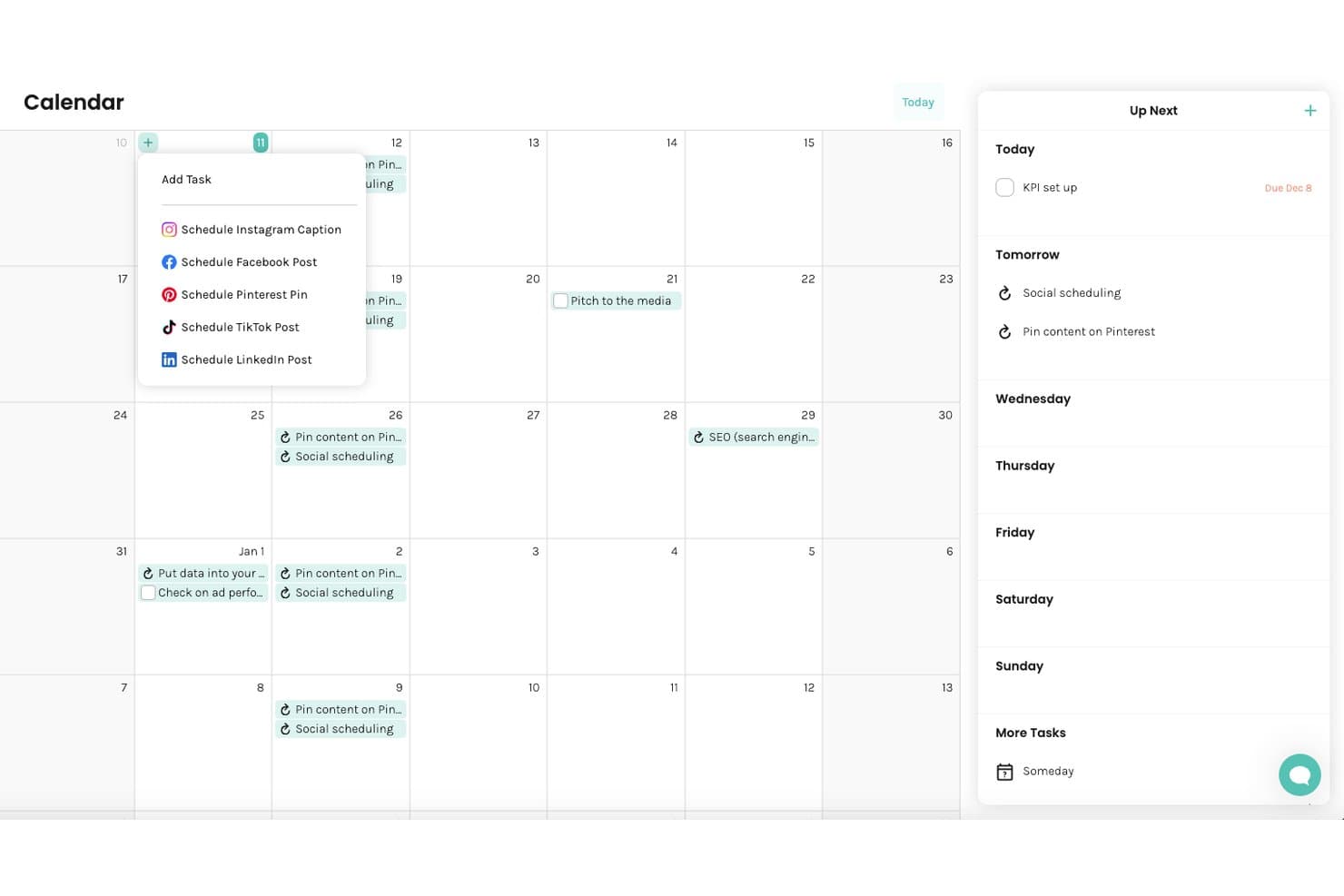
Enji offers a calendar view with social media post scheduling options, recurring tasks, and a sidebar showing daily and weekly task breakdowns. Enji is a small business marketing platform that combines a guided strategy generator, marketing calendar, AI copywriter, and social media scheduler into a single tool.
Who Is Enji Best For?
Enji is built for solopreneurs and small business owners who handle their own marketing without a dedicated team or marketing background.
Why I Picked Enji
I picked Enji as one of the best because its Marketing Strategy Generator does something most content calendar tools skip entirely. Answer a short questionnaire, and Enji auto-builds a personalized marketing plan with tasks that land directly on your calendar. I also like the pre-built two-week campaign templates, which come with mapped tasks, timing, and metrics so a solopreneur can launch a campaign without building the strategy from scratch.
Enji Key Features
- AI copywriter: Generates social media captions, blog drafts, newsletters, and more in your brand voice.
- Content repurposing tool: Quickly turns one piece of content into multiple new assets for different channels.
- KPI dashboard: Displays analytics from social channels and Google Analytics 4 within the platform.
- Brand management storage: Stores and organizes your brand voice, visuals, and key brand details for easy reference.
Enji Integrations
Enji offers native integrations with Instagram, Facebook, LinkedIn, TikTok, YouTube, Pinterest, Threads, Google Analytics 4, and Canva.
Pros and Cons
Pros:
- AI copywriter covers blogs, social, and newsletters
- Pre-built templates include mapped content tasks
- Auto-populates your marketing calendar
Cons:
- Reporting limited compared to dedicated tools
- Not designed for multi-person team workflows
Learn more about Enji: Best for scalable, AI-powered data collaboration
- Free plan available; 14-day free trial
- From $20/user/month (billed annually)
Visit WebsiteCustomer Rating:4.6/5
Airtable organizes content workflows, custom views, databases, and AI agents. Airtable is a no-code database and app-building platform where teams can plan, organize, and manage content workflows using customizable views like calendar, grid, Kanban, and Gantt, with AI agents built directly into the data layer.
Who Is Airtable Best For?
It's a strong fit for mid-size to enterprise content and marketing teams that manage high volumes of content across multiple contributors and need structured, customizable workflows.
Why I Picked Airtable
Airtable earns its spot on my shortlist because no other content calendar tool handles data at this scale. Field Agents let you deploy AI across thousands of records at once, so your team can analyze content performance, categorize assets, or generate briefs across an entire content library without manual effort.
HyperDB supports up to 100 million records per table, which means the platform doesn't break as your content operation grows. I also like that every team works from the same shared data layer, so campaign updates sync in real time across every view and workflow.
Airtable Key Features
- Calendar view: Visualize scheduled content by date across any table, with drag-and-drop rescheduling directly on the calendar.
- Automations: Set trigger-based workflows to notify team members, update records, or move content through approval stages without manual input.
- Interface designer: Build custom dashboards and intake portals that surface only the fields and views each contributor or stakeholder needs.
- Content intake forms: Collect content requests through shareable forms that feed directly into your base as structured records.
Airtable Integrations
Airtable offers native integrations with Google Drive, Google Calendar, Slack, Salesforce, Jira, GitHub, Gmail, Box, Dropbox, and Tableau, among others listed on its integrations page. It's available on Zapier and provides an API for custom integrations.
Pros and Cons
Pros:
- Custom automations match your exact workflows
- Multiple calendar and Kanban views included free
- Linked records connect content across tables
Cons:
- Calendar view limited to one table only
- No built-in approval workflows for content
Learn more about Airtable: Best for AI-assisted social media content scheduling
- Free trial available
- From $49/month (billed annually)
Visit WebsiteCustomer Rating:4.6/5
Loomly orchestrates AI post creation, scheduling, approvals, and targeting. Loomly is a social media content calendar platform that combines AI-assisted post creation, multi-channel scheduling, approval workflows, and audience targeting across major social networks.
Who Is Loomly Best For?
Loomly is a good fit for small to mid-sized social media teams and freelance managers handling content across multiple brand accounts.
Why I Picked Loomly
Loomly earns its spot on my shortlist because of how its AI-assisted post creation actually works in practice. When I'm scheduling content, the Post Ideas feature surfaces topic suggestions pulled from trending hashtags, RSS feeds, and date-based events.
I also like that the AI generates caption variations per platform, so the same campaign message doesn't read identically across LinkedIn and Instagram.
Loomly Key Features
- Post optimization tips: Loomly surfaces channel-specific recommendations on each post draft, flagging character count, image size, and timing suggestions before you publish.
- Labels and campaign categorization: Assign color-coded labels to posts so you can filter, group, and track content by campaign, content type, or client across the calendar.
- Unified community inbox: Manage comments, mentions, and direct messages from all connected social channels in one inbox, with the option to assign conversations to specific team members.
- UTM parameter tracking: Add UTM parameters directly to post links within Loomly to track click-through performance in your analytics platform without leaving the tool.
Loomly Integrations
Loomly offers native integrations with Slack, Microsoft Teams, Canva, Giphy, Google Drive, and Unsplash, along with direct publishing connections to Instagram, Facebook, LinkedIn, TikTok, YouTube, Threads, Pinterest, Snapchat, and Google Business Profile. It also connects with Zapier. A public API for custom integrations is not clearly documented.
Pros and Cons
Pros:
- Post mockups preview content before publishing
- Built-in approval workflows with role assignments
- AI generates per-channel captions and visuals
Cons:
- Steep pricing jumps between plan tiers
- Limited video scheduling for Reels and TikTok
Learn more about Loomly: Best for campaign and editorial planning at scale
- Free plan available
- From $10.99/user/month (billed annually)
Visit WebsiteCustomer Rating:4.4/5
Asana organizes task tracking, project timelines, workflows, and team collaboration. Asana is a work management platform that combines task tracking, project timelines, workflow automation, and team collaboration tools for planning and executing campaigns and editorial projects.
Who Is Asana Best For?
Asana is well-suited to mid-size and enterprise marketing teams that run multiple campaigns or editorial programs simultaneously and need structured coordination across departments.
Why I Picked Asana
Asana earns its spot on my shortlist for how well it handles editorial and campaign planning across multiple teams simultaneously. I use the Portfolios feature to track every active campaign in a single view, with status, progress, and deadlines visible at a glance.
The Timeline view lets my team map content dependencies so nothing gets published out of sequence, and Workload shows where capacity is stretched before it becomes a scheduling problem.
Asana Key Features
- Custom fields: Tag tasks with content type, channel, or campaign stage to filter and sort your editorial pipeline.
- Rules and triggers: Automatically assign tasks, update statuses, or move content to the next stage based on set conditions.
- Goals: Link individual content tasks directly to broader campaign or business objectives.
- Calendar view: See all scheduled content by due date across multiple projects in one calendar layout.
Asana Integrations
Asana offers 300+ integrations through its built-in app directory, including Slack, Google Drive, Google Calendar, Microsoft Teams, HubSpot, Salesforce, Jira, Figma, Adobe Creative Cloud, and Hootsuite. It also connects with Zapier and provides an API for custom integrations.
Pros and Cons
Pros:
- Workflow automation moves content through approval stages
- Cross-project task tracking avoids duplicate work
- Multiple project views including calendar and timeline
Cons:
- No built-in content publishing or scheduling
- Reporting dashboards locked behind higher-tier plans
Learn more about Asana: Best for managing cross-channel brand experiences
- 30-day free trial
- Pricing upon request
Visit WebsiteCustomer Rating:4/5
Sprinklr centralizes content scheduling, campaign planning, and publishing. Sprinklr is an enterprise social media and content management platform that centralizes content scheduling, campaign planning, and publishing across 30+ social and digital channels.
Who Is Sprinklr Best For?
It's a strong fit for large enterprises and global brands with distributed marketing teams managing content across multiple regions and channels simultaneously.
Why I Picked Sprinklr
I've included Sprinklr in my top picks because no other platform gives content teams the same level of cross-channel control at enterprise scale. I like that Sprinklr's AI flags off-brand or non-compliant content before it goes live, so distributed teams across regions and business units can publish without a manual review bottleneck.
I also use the custom workflow builder to route content through brand-specific approval chains, which is something most content calendar tools can't match at this depth.
Sprinklr Key Features
- Unified content calendar: View and manage scheduled posts across 30+ channels in a single, filterable calendar.
- Campaign planning: Group content by campaign, theme, or initiative and track publishing timelines across teams.
- Digital asset library: Store, tag, and retrieve brand-approved images, videos, and copy directly within the platform.
- Publishing rules: Set channel-specific rules that automatically format and adapt content for each platform before it goes live.
Sprinklr Integrations
Sprinklr offers a marketplace of integrations with details for each app, including tools like Salesforce, Adobe, Snowflake, and Jira. It has 90+ available integrations across categories like analytics, CRM, digital asset management, and content management, including Google Analytics, HubSpot, Slack, Microsoft Teams, Google Drive, Shutterstock, WordPress, Power BI, Tableau, and Zendesk.
Pros and Cons
Pros:
- Built-in analytics with customizable campaign metrics
- Filter calendar by account, channel, and status
- Paid, owned, and earned content in one calendar
Cons:
- No visual grid preview for social feeds
- Slow load times with large data volumes
Learn more about Sprinklr: Best for centralizing all project work in one hub
- Free plan available
- From $10/user/month

ClickUp manages tasks, docs, calendars, goals, and content production. ClickUp is an all-in-one productivity platform where content teams can manage tasks, write docs, schedule publishing calendars, and track goals across every stage of content production.
Who Is ClickUp Best For?
ClickUp is a strong fit for small to mid-size teams that manage content production alongside broader project work and don't want to juggle multiple tools.
Why I Picked ClickUp
I picked ClickUp as one of the best because it keeps content briefs, tasks, and publishing timelines in the same workspace. I like that ClickUp Docs lives directly inside a project, so writers can draft content right next to the task that tracks its status and deadline.
My team can also switch between calendar, list, and board views on the same content plan without rebuilding anything, which means editors and strategists see the same work in whichever format makes sense for their role.
ClickUp Key Features
- Custom statuses: Define content-specific workflow stages like Draft, In Review, and Scheduled to match your team's publishing process.
- Recurring tasks: Set tasks to repeat on a schedule so regular publishing commitments like weekly newsletters auto-generate without manual setup.
- Automation builder: Trigger status changes, task assignments, or notifications automatically when content moves through defined workflow stages.
- Time tracking: Log time directly on content tasks to monitor how long briefs, drafts, and revisions actually take.
ClickUp Integrations
ClickUp offers 40+ native integrations, including Slack, Google Drive, Google Calendar, HubSpot, Microsoft Teams, Figma, Zoom, Dropbox, GitHub, and Calendly, and it connects with Zapier. An API and webhooks are available for custom integrations.
Pros and Cons
Pros:
- Over 100 pre-built workflow automations
- Docs embedded inside tasks for inline drafting
- Multiple view types for content scheduling
Cons:
- Slow load times in larger workspaces
- Calendar event colors too similar to distinguish
Learn more about ClickUp: Best for agencies managing multi-channel media plans
- Free demo available
- Pricing upon request

Mediatool plans media budgets, campaigns, performance, and activation. Mediatool, now Camphouse, is a media planning and campaign management platform that covers budget allocation, multi-channel media planning, performance reporting, and campaign activation across global teams.
Who Is Mediatool Best For?
Mediatool is a strong fit for media agencies and in-house marketing teams running paid campaigns across multiple channels, regions, or brands simultaneously.
Why I Picked Mediatool
I picked Mediatool as one of the best because of how it handles multi-channel media planning at the agency level. The Allocation module lets me distribute global budgets across regions and brands while enforcing hard caps to prevent overspend.
Planning happens in a dynamic Sheet View with automated naming conventions and multi-level approval workflows, so client plans stay consistent across every market. For agencies juggling dozens of clients and channels, that structure removes the manual collation work that eats into margins.
Mediatool Key Features
- Activation module: Automatically push approved campaign structures, UTMs, and placement identifiers directly to buying platforms via API or middleware.
- Real-time reporting dashboards: Consolidate planning, budget, and performance data into unified dashboards with formula-based custom metrics and pacing across global markets.
- AI Co-Pilot: Generate complete media plans from a brief using historical performance data and industry benchmarks, with scenario comparison built in.
- Outlier detection: Automatically flag performance deviations mid-flight so you can rebalance budgets before a campaign ends.
Mediatool Integrations
Mediatool offers native integrations with Google Analytics, Google Ads, Google Campaign Manager, Google Display & Video 360, Google Search Ads 360, Google Search Console, Google Sheets, Facebook Ads, Facebook Pages, Instagram Pages, LinkedIn Ads, LinkedIn Pages, X (Twitter) Ads, Adform, Pinterest Ads, TikTok Ads, The Trade Desk, and Outbrain Amplify.
Pros and Cons
Pros:
- Automated naming conventions and UTM generation
- Custom calendar view per user role
- Planned vs. actual budget tracking built in
Cons:
- Onboarding requires lengthy initial campaign setup
- Sheet view row ordering can be inconsistent
Learn more about Mediatool: Best for structured content approval workflows
- Free demo available
- Pricing upon request

GatherContent guides content creation, approvals, and CMS publishing. Content Workflow by Bynder, formerly GatherContent, is a content workflow and planning platform that covers template-based content creation, multi-stage approval workflows, and direct CMS publishing for editorial and marketing teams.
Who Is GatherContent Best For?
GatherContent is well-suited to content managers and editors at digital agencies or in-house publishing teams who coordinate content production across large contributor groups.
Why I Picked GatherContent
I've included GatherContent in my top picks because its multi-stage workflow engine is built specifically for approval-heavy content pipelines. Each content item moves through named stages, with specific team members assigned at each step and a clear status visible across the whole team.
I like that you can configure as many stages as your process requires, whether that's a legal review, a brand check, or a final sign-off before publishing.
GatherContent Key Features
- Calendar view: Visualize all scheduled content items by due date across a shared team calendar.
- Inline commenting: Leave feedback directly on specific content sections for contextual, in-context review.
- Content templates: Build reusable templates with structured fields and guidance text to standardize content creation.
- Content inventory dashboard: Track every content item, its owner, and current workflow stage from one central view.
GatherContent Integrations
GatherContent offers native integrations with WordPress, Sitecore, Drupal, Craft CMS, and Umbraco for direct content migration to your CMS. It also integrates with Gatsby, Vercel, and Netlify for headless publishing workflows. GatherContent connects with Zapier and has an API for custom integrations.
Pros and Cons
Pros:
- Exports content directly to your CMS
- Multi-step approval workflows with audit trails
- Reusable content templates enforce consistency
Cons:
- No built-in change tracking for edits
- Notification emails trigger on every update
Learn more about GatherContent: Best for integrated marketing campaign planning
- 7-day free trial
- From $117.33/month (billed annually)

Semrush Marketing Calendar organizes campaigns, content plans, and SEO tracking. Semrush Marketing Calendar is a content planning and campaign scheduling tool built inside the Semrush platform, where you can plan, organize, and track content across campaigns alongside built-in SEO, keyword research, and topic tracking data.
Who Is Semrush Marketing Calendar Best For?
It's a natural fit for digital marketing teams already working inside Semrush who want to tie content scheduling directly to SEO research and campaign data.
Why I Picked Semrush Marketing Calendar
I picked Semrush Marketing Calendar because it's the only content calendar that lives inside a full marketing intelligence suite. I can pull keyword data from the Keyword Magic Tool, map it to a campaign, and schedule content in the same workflow.
Campaign tags let me group related content pieces so I can see how a product launch maps across channels and timelines, all without leaving Semrush.
Semrush Marketing Calendar Key Features
- Campaign templates: Save any existing campaign as a reusable template, with activities automatically rescheduled relative to the new campaign's start date.
- Post-publish performance tracking: Monitor page views, engagement metrics, and other KPIs for published content directly inside the calendar.
- Real-time deadline notifications: Get alerts on content deadlines, publication dates, and task progress as they update.
- Social publishing scheduler: Plan, schedule, and publish content across Facebook, Instagram, LinkedIn, Google Business Profile, Pinterest, and TikTok from inside the platform.
Semrush Marketing Calendar Integrations
Semrush offers native integrations with Google Analytics, Google Search Console, Google Ads, Google Docs, Looker Studio, WordPress, Trello, and you can link your Google Analytics account to track campaign results and import Outlook, Google, and Apple calendars into the Marketing Calendar. It's available on Zapier and has an API for custom integrations.
Pros and Cons
Pros:
- Reusable campaign templates with auto-rescheduling
- Campaign-level tagging groups cross-channel content
- SEO data feeds directly into content planning
Cons:
- Only one user seat included per plan
- Shared calendar links are static snapshots
Learn more about Semrush Marketing Calendar: 10Best for teams needing advanced automation
Wrike
- 14-day free trial
- From $10/user/month (billed annually)
Visit WebsiteCustomer Rating:4.3/5
Wrike coordinates campaigns, editorial workflows, tasks, and approvals. Wrike is a project and work management platform that lets marketing and content teams plan campaigns, build editorial workflows, track tasks, and manage approvals across multiple projects in one place.
Who Is Wrike Best For?
Wrike is a strong fit for mid-size to enterprise marketing teams managing high-volume content production across multiple departments or regions.
Why I Picked Wrike
I picked Wrike as one of the best because its automation depth goes well beyond what most content calendar tools offer. I particularly like the automated approval workflows, where content pieces can trigger review requests, notify stakeholders, and update statuses automatically without anyone manually moving tasks along.
Wrike also lets you apply automation rules across multiple projects simultaneously, so if your team runs several content programs at once, a single rule set can govern all of them.
Wrike Key Features
- Custom request forms: Capture content briefs from stakeholders through structured intake forms that auto-generate tasks on your editorial board.
- Interactive Gantt charts: Drag and drop content deadlines across a timeline view to see how publishing schedules overlap across campaigns.
- Proofing and markup tools: Review and annotate images, videos, and documents directly inside Wrike without exporting files.
- Blueprints: Save repeatable content campaign structures as templates and launch them with pre-set tasks, assignees, and due dates.
Wrike Integrations
Wrike offers 50+ native integrations and marketplace apps, including Salesforce, Microsoft Teams, Google Drive, Adobe Creative Cloud, Slack, Zoom, Power BI, Tableau, QuickBooks, and Google Sheets.
Pros and Cons
Pros:
- Workload charts show team capacity at a glance
- Custom request forms for content intake
- Cross-project calendar views for deadline tracking
Cons:
- Notification overload without careful configuration
- Calendar view locked to higher-tier plans
Learn more about Wrike:
Annen programvare for innholdskalendere
Her er noen flere alternativer for programvare for innholdskalendere som ikke kom med på kortlisten min, men som likevel er verdt å se nærmere på:
- 11monday.comBest for building custom workflows with no code
- 12BufferBest for publishing to multiple social platforms
- 13CoScheduleBest for AI writing and content optimization tools
- 14MeisterTaskBest for GDPR-compliant task management
- 15TrelloBest for customizable visual planning boards
- 16KapostBest for aligning content to buyer journeys
- 17ContentCalBest for social post planning with visual drag-and-drop
- 18StoryChiefBest for agency-style campaign collaboration
- 19NinjaContentBest for in-app content brief generation
- 20HootsuiteBest for monitoring brand reputation in real time
- 21WordPress Editorial CalendarBest for managing multi-author WordPress blogs
How I Evaluate Content Calendar Software
I split my evaluation into baseline criteria—multi-channel scheduling, editorial workflows, visual calendars—and differentiators that set apart tools for lean SaaS teams vs. scaled demand gen orgs.
Core Functionality (Table Stakes For This List)
When I'm selecting tools for my list, I rank each one on a scale from 0 (does not offer the functionality) to 5 (excels in this area) for each core functionality listed below. Then, I calculate the tool's total score into a percentage. Each tool needs to achieve a minimum total score of 75% to be considered for inclusion.
- Visual Calendar View: I check whether the calendar supports drag-and-drop rescheduling, multiple views (weekly, monthly, timeline), and filtering by channel or content status.
- Multi-Channel Scheduling: Each tool should let you plan blog posts, social updates, emails, and paid campaigns from one calendar rather than toggling between separate platforms.
- Editorial Workflow Management: I look for custom content statuses (draft, in review, approved), assignee fields, due dates, and approval stages that mirror how SaaS marketing teams actually move content from brief to publish.
- Collaboration & Commenting: Teams need to leave feedback directly on calendar items, so I evaluate whether the tool supports @mentions, threaded comments, and reviewer notifications.
- Content Asset Storage: I check whether you can attach briefs, images, and drafts to each entry and tag them by campaign, persona, or funnel stage for easy retrieval later.
- Integrations & Publishing: The tool should connect to the platforms your team already uses—WordPress, HubSpot, or social networks—with native publishing or two-way sync rather than manual copy-paste.
Once I have a list of tools that meet this criteria, I consider what sets each platform apart.
Differentiating Factors (What Sets Vendors Apart)
Here's how I compare and contrast different vendors:
Standout Features
I look for campaign and funnel mapping that lets you group calendar items by product launch, persona, or funnel stage—essential when you're coordinating a SaaS feature release across blog, email, and social simultaneously. Built-in analytics that tie post-level performance data back to calendar entries also matter, since they help teams spot what's working without jumping into a separate dashboard. AI content assistance is another differentiator worth evaluating, especially for smaller teams that need to generate briefs or repurpose content quickly.
Beyond Features
Integration with the broader SaaS marketing stack is one of the first things I evaluate—whether a tool natively connects to your CMS, marketing automation platform, and project management tools determines how much manual work your team inherits. Pricing model matters too, particularly how per-seat costs scale as you add freelancers or cross-functional collaborators. I also consider time-to-value: does the platform offer pre-built content workflow templates, or will your team spend weeks configuring statuses and approval chains from scratch?
Slik velger du programvare for innholdskalendere
Det er lett å gå seg vill i lange funksjonslister og komplekse prismodeller. For å hjelpe deg med å holde fokus mens du går gjennom den unike prosessen med å velge programvare, får du her en sjekkliste over faktorer du bør ha i tankene:
| Faktor | Hva du bør vurdere |
|---|---|
| FaktorSkalerbarhet | Hva du bør vurdereVil verktøyet fortsatt passe hvis markedsføringsteamet ditt dobler seg, eller hvis du tar i bruk flere kanaler? Sjekk om brukerbegrensninger eller abonnementsstrukturen snart vil kreve oppgraderinger. |
| FaktorIntegrasjoner | Hva du bør vurdereKan det kobles direkte til de viktigste sosiale nettverkene, prosjektstyringssystemene eller DAM-systemene dine? Unngå manuelle løsninger og ekstra eksporttrinn. |
| FaktorTilpasningsmuligheter | Hva du bør vurdereKan du tilpasse kalendere, felt, godkjenninger eller innholdstyper slik at de passer teamets unike arbeidsflyter eller krav til merkevarebygging? |
| FaktorBrukervennlighet | Hva du bør vurdereEr det enkelt å bruke for teammedlemmer på alle tekniske nivåer? Prøv før du kjøper, og legg merke til ekstra navigering, skjulte handlinger eller områder som laster sakte. |
| FaktorImplementering og innføring | Hva du bør vurdereHvor vanskelig er det å komme i gang? Finnes det hurtigstartsmaler eller direkte støtte ved innføring for en raskere overgang? |
| FaktorKostnad | Hva du bør vurdereVurder løpende programvarekostnader, modeller for brukerlisenser og ekstra kostnader for lagring, brukere eller avansert analyse. Sett opp et budsjett for både innledende bruk og bruk i større skala. |
| FaktorSikkerhetstiltak | Hva du bør vurdereVil plattformen beskytte innholdet, utkastene, kundedataene og kontotilgangen din? Se etter SOC2, SSO, MFA og tillatelseskontroller etter behov. |
| FaktorTilgjengelig brukerstøtte | Hva du bør vurdereKan du få hjelp raskt hvis teamet ditt møter et hinder? Legg merke til åpningstider, kontaktkanaler, selvbetjeningsressurser og regionale begrensninger for brukerstøtte. |
Hva er programvare for innholdskalendere?
Programvare for innholdskalendere er digitale verktøy som hjelper team med å planlegge, tidsstyre, organisere og følge opp markedsføringsinnhold på tvers av kanaler i en sentral kalendervisning.
Disse plattformene støtter vanligvis oppgavetildeling, godkjenningsarbeidsflyter og håndtering av tidsfrister, noe som gjør det enklere å koordinere kampanjer, administrere samarbeid og opprettholde innholdets synlighet gjennom hele produksjonsprosessen.
Funksjoner
Når du velger programvare for innholdskalendere, bør du se etter følgende nøkkelfunksjoner:
- Kalendervisning: Viser alt kommende og tidligere innhold i et fargekodet, tidsbasert format, slik at team raskt kan oppdage tidsfrister og mangler.
- Oppgavetildeling: Gjør det mulig å tildele spesifikke oppgaver, tidsfrister og ansvarsområder til individuelle teammedlemmer for hvert innholdselement eller hver kampanje.
- Planlegging på tvers av kanaler: Gjør det mulig å planlegge og tidsstyre innhold for flere plattformer – som e-post, blogger og sosiale medier – direkte fra et samlet kontrollpanel.
- Godkjenningsarbeidsflyter: Støtter tilpassede godkjenningsprosesser i flere trinn, som varsler interessenter om gjennomganger og godkjenninger før innhold publiseres.
- Innholdsbibliotek: Lagrer alle utkast, ressurser, maler og publisert innhold i et organisert arkiv for å effektivisere gjenbruk og samarbeid.
- Redigering med dra og slipp: Lar brukere raskt flytte, endre tidspunkt for eller oppdatere innhold ved å dra kalenderelementer eller blokker, slik at justeringer blir enkle og visuelle.
- Samarbeidsverktøy: Tilbyr kommentartråder, varsler og delte redigeringsområder for kommunikasjon i sanntid rundt hvert innholdselement.
- Versjonssporing: Bevarer en historisk logg over redigeringer og oppdateringer av innhold, slik at team kan gjenopprette tidligere utkast og spore endringer.
- Automatisert publisering: Kobler seg til støttede kanaler og publiserer innhold automatisk basert på planlagte tidspunkter, noe som reduserer behovet for manuell publisering.
- Analysedashboard: Tilbyr rapportering om publiseringsaktivitet, overholdte tidsfrister og teamets produktivitet for å hjelpe med å håndtere arbeidsmengder og måle kampanjeytelse.
Vanlige AI-funksjoner i programvare for innholdskalendere
I tillegg til standardfunksjonene i programvare for innholdskalendere som er nevnt ovenfor, tar mange av disse løsningene i bruk AI med funksjoner som:
- Innholdsforslag: Analyserer data om publikumsengasjement og populære emner for å anbefale nye innholdsideer som samsvarer med merkevarens innholdsstrategi.
- Generering av bildetekster: Oppretter automatisk forslag til bildetekster ved hjelp av naturlig språkbehandling, slik at team raskt kan utarbeide innlegg uten å begynne helt fra grunnen av.
- Analyse av optimalt publiseringstidspunkt: Undersøker tidligere innholdsresultater og engasjementsanalyser for å anbefale de beste dagene og tidspunktene for å planlegge innlegg på hver plattform.
- AI-drevne hashtag-anbefalinger: Foreslår relevante og populære hashtag-er for å øke innleggets synlighet og engasjement, og tilpasser forslagene til hvert innleggs innhold og målgruppe.
- Sentimentanalyse: Bruker AI til å skanne planlagt innhold for tone og sentiment, og flagger innlegg som kan misforstås eller som faller utenfor merkevarens retningslinjer.
Fordeler
Implementering av programvare for innholdskalendere gir flere fordeler for teamet og virksomheten din. Her er noen av fordelene du kan se frem til:
- Sentralisert planlegging: Holder alle kampanjeplaner, tidsfrister, oppgaver og innholdsressurser organisert i én lett tilgjengelig kalendervisning.
- Effektivisert samarbeid: Gjør det mulig for team å tildele oppgaver, dele tilbakemeldinger og håndtere godkjenninger i ett enkelt arbeidsområde, noe som reduserer frem-og-tilbake-kommunikasjon på e-post.
- Konsekvent publisering: Støtter rettidig og pålitelig publisering i alle kanaler takket være innebygd planlegging, påminnelser og automatisert publisering.
- Tydelig ansvar: Tildeler eierskap og godkjenningstrinn for hvert prosjekt, slik at det blir enkelt å se hvem som har ansvar for hvert element, og reduserer risikoen for oversittede tidsfrister.
- Bedre oversikt: Tilbyr kalenderanalyser og versjonssporing for å hjelpe team med å oppdage mangler, måle innholdets effekt og optimalisere fremtidige kampanjer.
- Raskere innholdsproduksjon: Bruker dra-og-slipp-verktøy, maler og ofte AI-assisterte forslag for å hjelpe teamet med å utvikle og organisere innholdsideer effektivt.
- Sikker håndtering av ressurser: Beskytter kampanjeutkast og publisert innhold gjennom brukertillatelser og revisjonsspor, og støtter dermed samsvar med regelverk og merkevaresikkerhet.
Kostnader og priser
Valg av programvare for innholdskalendere krever en forståelse av de ulike prismodellene og abonnementene som er tilgjengelige. Kostnadene varierer basert på funksjoner, teamstørrelse, tillegg og mer. Tabellen nedenfor oppsummerer vanlige abonnementer, gjennomsnittsprisene deres og typiske funksjoner som er inkludert i løsninger for programvare for innholdskalendere:
Sammenligningstabell for programvare for innholdskalender
| Plantype | Gjennomsnittspris | Vanlige funksjoner |
|---|---|---|
| PlantypeGratisplan | Gjennomsnittspris$0 | Vanlige funksjonerGrunnleggende kalendervisninger, begrenset antall brukere, publisering i én kanal, grunnleggende oppgavetildeling og enkle planleggingsverktøy. |
| PlantypePersonlig plan | Gjennomsnittspris$5-$15/user/month | Vanlige funksjonerPlanlegging på flere kanaler, grunnleggende rapportering, innleggsmaler, begrensede godkjenningsprosesser og lagring av ressurser for enkeltpersoner. |
| PlantypeForretningsplan | Gjennomsnittspris$20-$50/user/month | Vanlige funksjonerTeamsamarbeid, tillatelser for flere brukere, avanserte godkjenningsprosesser, analyseoversikter og flere integrasjonsmuligheter. |
| PlantypeEnterprise-plan | Gjennomsnittspris$60-$150/user/month | Vanlige funksjonerTilpassede arbeidsprosesser, prioritert brukerstøtte, forbedret sikkerhet, avansert analyse, brukeroppretting og dedikert kontoadministrasjon. |
Vanlige spørsmål om programvare for innholdskalendere
Her er vanlige spørsmål om programvare for innholdskalendere:
Kan programvare for innholdskalendere støtte flere kanaler?
Ja, mange verktøy støtter blogger, sosiale medier, e-postkampanjer, nyhetsbrev, videoer og betalte kampanjer, slik at teamene får ett sted å administrere publiseringsplaner.
Kan programvare for innholdskalendere administrere godkjenningsprosesser?
Ja, mange plattformer inkluderer gjennomgangstrinn for utkast, redigeringer, kreative ressurser og endelige godkjenninger før innholdet publiseres.
Forbedrer programvare for innholdskalendere teamsamarbeidet?
Ja, det gir skribenter, redaktører, designere og ledere felles oversikt over tidsfrister, oppgaveansvar og innholdsstatus.
Kan programvare for innholdskalendere spore fremdriften i kampanjer?
Ja, mange verktøy bruker oversikter, statusetiketter og kalendervisninger for å vise om innholdet er planlagt, under arbeid, til gjennomgang, godkjent eller publisert.
Tilbyr programvare for innholdskalendere rollebaserte tillatelser?
Ja, mange verktøy lar team kontrollere hvem som kan vise, redigere, godkjenne eller publisere innhold, noe som er nyttig når man samarbeider med frilansere, kunder eller eksterne korrekturlesere.