

Software voor contentmarketing helpt je om je digitale content vanuit één plek op meerdere kanalen te plannen, creëren, publiceren en analyseren. Als je de beste software voor contentmarketing vergelijkt, voel je waarschijnlijk de druk om grote hoeveelheden content, meerdere belanghebbenden en versnipperde tools te beheren.
Het kiezen van het juiste platform kan je workflow verduidelijken, je helpen deadlines te halen, je team op één lijn houden en laten zien welke impact je content op je bedrijf heeft. In deze gids krijg je een praktische uiteenzetting van de beste oplossingen, zodat je de behoeften van je team kunt afstemmen op software die daadwerkelijk waarde levert.
Waarom u onze softwareaanbevelingen kunt vertrouwen
6,700+
Reviews
20
Industry experts
16+
Evaluation factors
14
Years
Ons team test en beoordeelt software sinds 2012. Als uitgevers en media-exploitanten weten we zelf hoe moeilijk — en belangrijk — het is om de juiste software te kiezen.
Voor deze gids hebben we tools geëvalueerd met behulp van praktijktests en onafhankelijk onderzoek, waarbij we tools beoordeelden aan de hand van onze selectiecriteria.
Onze reviews weerspiegelen ons menselijke redactionele oordeel, geen verkooppraatje.
Vergelijkingstabel voor software voor contentmarketing
Deze vergelijkingstabel vat de prijsdetails samen van mijn beste software voor contentmarketing:
| Tool | Best For | Trial Info | Price | ||
|---|---|---|---|---|---|
| 1 | Het beste voor kleine teams | 14-daagse gratis proefperiode | Vanaf $29/maand | Website | |
| 2 | Het beste voor AI-aangedreven contentoptimalisatie | Gratis abonnement + gratis proefperiode van 7 dagen + gratis demo | Vanaf $117.33/maand (jaarlijks gefactureerd) | Website | |
| 3 | Het beste voor contentplanning via meerdere kanalen | Gratis abonnement + gratis proefperiode beschikbaar | Vanaf $5/maand (jaarlijks gefactureerd) | Website | |
| 4 | Het meest geschikt voor het creëren van interactieve ervaringen | Gratis abonnement + gratis demo beschikbaar | Prijzen op aanvraag | Website | |
| 5 | Het beste voor het samenstellen van door gebruikers gegenereerde content | Gratis demo beschikbaar | Vanaf $1,249/maand | Website | |
| 6 | Het beste voor integratie van marketinggegevens | Gratis demo beschikbaar | Vanaf $200/maand (jaarlijks gefactureerd) | Website | |
| 7 | Beste voor beheer van leadgegevens | Gratis demo beschikbaar | Prijs op aanvraag | Website | |
| 8 | Het beste voor door AI gegenereerde interactieve content | 14 dagen gratis proefperiode | Prijs op aanvraag | Website | |
| 9 | Beste voor projectplanning op basis van sjablonen | Gratis abonnement + gratis demo beschikbaar | Vanaf $5/gebruiker/maand | Website | |
| 10 | Het beste met door AI aangedreven toewijzing van middelen | Gratis abonnement beschikbaar | Vanaf $9/gebruiker/maand (jaarlijks gefactureerd) | Website |


Beoordelingen van de beste software voor contentmarketing
Hieronder vind je mijn uitgebreide samenvattingen van de beste software voor contentmarketing die op mijn shortlist staat. Mijn beoordelingen bieden een gedetailleerd overzicht van de functies, beste gebruiksscenario’s en integraties van elk platform, zodat je de beste optie voor jou kunt vinden.
 1Het beste voor kleine teams
Enji
- 14-daagse gratis proefperiode
- Vanaf $29/maand
Visit WebsiteCustomer Rating:4.9/5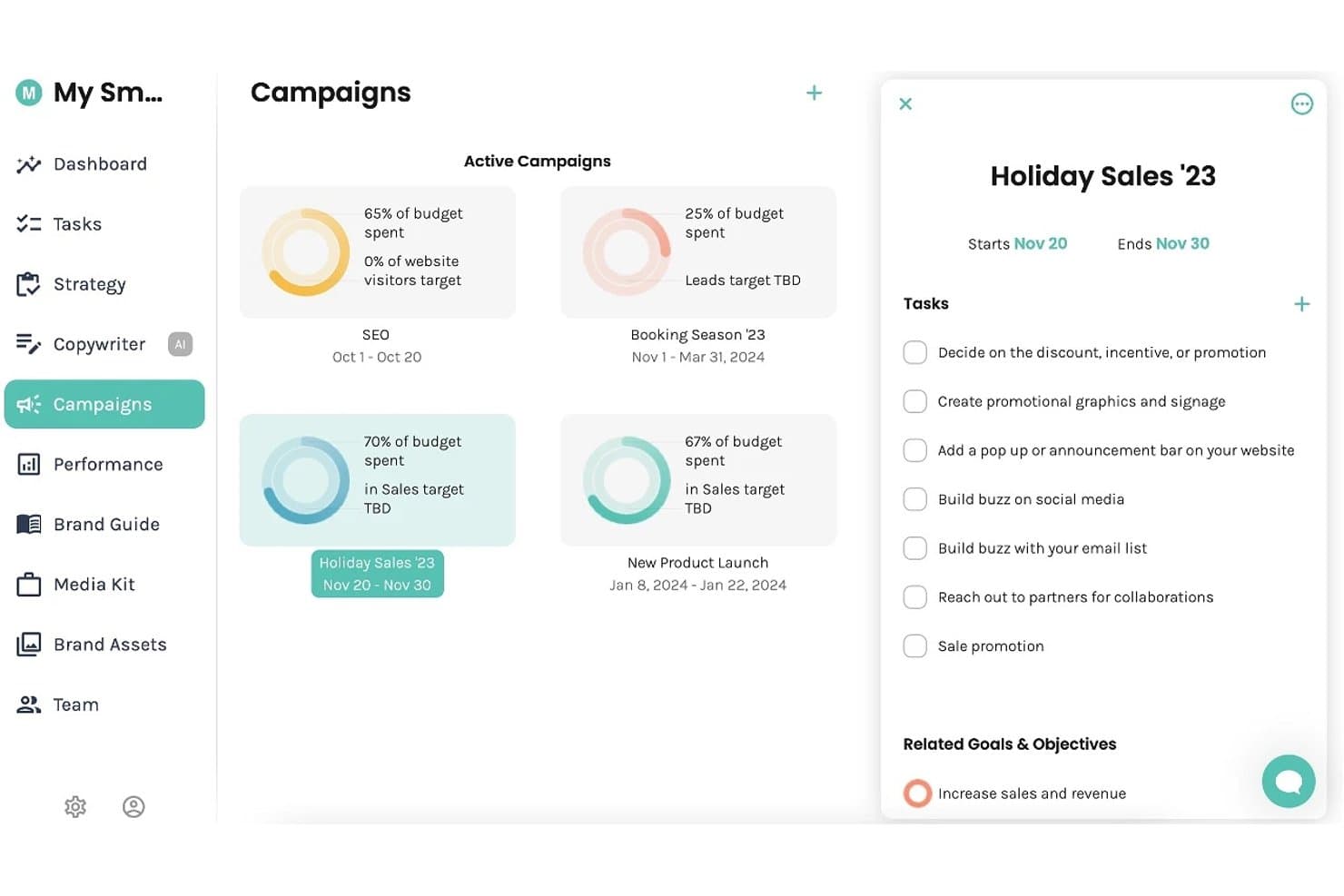
Enji biedt een campagneoverzicht waar gebruikers actieve campagnes en budgetuitgaven kunnen volgen en taken en doelen kunnen beheren. Enji is een platform voor marketingplanning en -uitvoering voor kleine bedrijven dat door AI aangedreven contentcreatie, een marketingkalender, het inplannen van sociale media en het bijhouden van prestaties combineert.
Voor wie is Enji het meest geschikt?
Enji is zeer geschikt voor zelfstandige ondernemers en freelancers die hun eigen marketing beheren zonder een toegewijd team of een achtergrond in marketing.
Waarom ik voor Enji koos
Ik koos Enji als een van de beste opties omdat het strategieontwikkeling, AI-copywriting en het inplannen van sociale media bundelt in één platform dat speciaal is gebouwd voor teams van één of twee personen. Ik vind het geweldig dat de generator voor marketingstrategieën op basis van een korte vragenlijst een persoonlijk plan opstelt, zodat kleine teams niet vanaf een lege pagina hoeven te beginnen. De tool voor het hergebruiken van content zet vervolgens één blogbericht of bijschrift om in een volledige maand aan content voor sociale media.
Belangrijkste functies van Enji
- KPI-dashboard: Centraliseert analyses van sociale media en websites voor snelle toegang tot prestatiegegevens.
- Sjablonen voor marketingcampagnes: Biedt kant-en-klare campagneoverzichten met ingebouwde taken en timing.
- Merkbibliotheek: Organiseert merkstem, visuele middelen en richtlijnen voor berichtgeving op één locatie.
- Canva-integratie: Hiermee kunnen gebruikers ontwerpen rechtstreeks in contentprocessen opnemen zonder ze handmatig te uploaden.
Integraties van Enji
Enji biedt ingebouwde integraties met Canva, Google Analytics, Facebook, Instagram, Pinterest, YouTube, LinkedIn, TikTok en Threads.
Pros and Cons
Pros:
- Ingebouwde AI genereert content vanaf nul
- Strategiebouwer neemt giswerk weg voor zelfstandige ondernemers
- Planning en het inplannen van sociale media op één plek
Cons:
- Beperkte tools voor SEO en zoekwoordonderzoek
- Geen samenwerking tussen meerdere gebruikers of goedkeuringsworkflows
Learn more about Enji: Het beste voor AI-aangedreven contentoptimalisatie
- Gratis abonnement + gratis proefperiode van 7 dagen + gratis demo
- Vanaf $117.33/maand (jaarlijks gefactureerd)
Visit WebsiteCustomer Rating:4.5/5
Semrush analyseert zoekwoorden, concurrenten, contentprestaties en de gezondheid van websites. Semrush is een SEO- en contentmarketingplatform met tools voor zoekwoordonderzoek, het bedenken van onderwerpen, contentoptimalisatie op de pagina, concurrentieanalyse van content en technische site-audits.
Voor wie is Semrush het meest geschikt?
Semrush is zeer geschikt voor contentmarketeers die zich richten op SEO, interne marketingteams en digitale bureaus die contentstrategieën en zoekprestaties op grote schaal beheren.
Waarom ik voor Semrush heb gekozen
Ik heb Semrush opgenomen in mijn topkeuzes omdat de AI-tools voor contentoptimalisatie verder gaan dan die van de meeste andere platforms. De SEO Writing Assistant beoordeelt je content tijdens het schrijven in realtime aan de hand van pagina's met een hoge ranking, op het gebied van toon, leesbaarheid en zoekwoordgebruik.
Ik gebruik ContentShake AI ook om rechtstreeks op basis van zoekgegevens briefings en conceptartikelen te genereren. Die combinatie van realtimebeoordeling en AI-ondersteund schrijven binnen één platform onderscheidt Semrush.
Belangrijkste functies van Semrush
- Keyword Magic Tool: Zoek op een basiszoekwoord om duizenden gerelateerde zoekwoordideeën te genereren, inclusief zoekvolume, moeilijkheidsscores en intentiefilters.
- Onderzoek naar onderwerpen: Voer een onderwerp in om trending subonderwerpen, ideeën voor koppen en gerelateerde vragen uit goed presterende content te vinden.
- Contentaudit: Koppel je sitemap om bestaande pagina's te analyseren op basis van verkeer, backlinks en contentkwaliteit, zodat je kunt bepalen wat moet worden bijgewerkt of verwijderd.
- On-page SEO-controle: Ontvang een geprioriteerde lijst met optimalisatieaanbevelingen voor specifieke URL's, gebaseerd op je doelzoekwoorden en belangrijkste concurrenten.
Integraties van Semrush
Semrush biedt integraties met Google Analytics, Google Search Console, Google Ads, Google Docs, Google Sheets, Looker Studio, WordPress, Trello en sociale platforms zoals Facebook, Instagram, LinkedIn, Pinterest en YouTube. Het platform heeft ook partnerintegraties met tools zoals monday.com, Wix, AIOSEO, Zoho Analytics en Scalenut. Semrush kan worden gekoppeld aan Zapier en er is een API beschikbaar voor aangepaste integraties.
Pros and Cons
Pros:
- Grootste zoekwoorddatabase met 25 miljard termen
- Houdt de zichtbaarheid van merken in AI-zoekopdrachten bij
- Ingebouwde analyse van contenthiaten bij concurrenten
Cons:
- Kosten voor aanvullende functies kunnen onverwacht oplopen
- Het gratis abonnement heeft zeer beperkte dagelijkse zoekopdrachten
Learn more about Semrush: Het beste voor contentplanning via meerdere kanalen
- Gratis abonnement + gratis proefperiode beschikbaar
- Vanaf $5/maand (jaarlijks gefactureerd)
Visit WebsiteCustomer Rating:4.4/5
Buffer plant, publiceert en analyseert content voor sociale media op verschillende kanalen. Buffer is een platform voor beheer van sociale media waarmee je content op kanalen zoals Instagram, LinkedIn, TikTok, X en meer kunt plannen, publiceren en analyseren, met ingebouwde tools voor contentcreatie, teamsamenwerking en publieksinteractie.
Voor wie is Buffer het meest geschikt?
Buffer is een goede keuze voor kleine bedrijven, freelancers en zelfstandige makers die content voor sociale media op meerdere platforms beheren zonder een groot team.
Waarom ik Buffer heb gekozen
Buffer staat op mijn shortlist vanwege de uitstekende ondersteuning voor contentplanning via meerdere kanalen op 11 platforms, waaronder TikTok, LinkedIn, Instagram, YouTube en Bluesky.
Ik vind het geweldig dat je één bericht kunt maken en het overal kunt plaatsen, met voorbeelden per kanaal zodat je precies kunt zien hoe het wordt weergegeven voordat het live gaat. De wachtrij zorgt ervoor dat je publicatiekalender voortdurend gevuld blijft, zonder dat je elk afzonderlijk bericht handmatig hoeft in te plannen.
Belangrijkste functies van Buffer
- AI-assistent: Genereer bijschriften voor berichten, hergebruik bestaande content en krijg suggesties voor verschillende toonzettingen rechtstreeks in de berichteditor.
- Analysedashboard: Volg de prestaties van berichten per kanaal, waaronder bereik, klikken en interactie, met exporteerbare rapporten.
- Interactieberichtenbox: Bekijk en beantwoord reacties en vermeldingen op gekoppelde socialemediakanalen vanuit één berichtenbox.
- Contentideeën: Leg contentideeën vast en bewaar ze in Buffer voordat ze klaar zijn om in te plannen, zodat er niets verloren gaat tussen brainstormsessies.
Integraties van Buffer
Buffer biedt 24 integraties, waaronder Canva, Bitly, Dropbox, Google Drive, Feedly, WordPress, OneDrive, Unsplash, IFTTT en Make. Het maakt ook verbinding met Zapier voor aanvullende geautomatiseerde werkstromen.
Pros and Cons
Pros:
- Ondersteunt planning voor 11+ socialemediakanalen
- AI past content aan voor elk afzonderlijk kanaal
- Bewaart herbruikbare hashtag-groepen voor berichten
Cons:
- Analyses zijn beperkt bij abonnementen van lagere niveaus
- Beperkte teamsamenwerking voor grotere groepen
Learn more about Buffer: Het meest geschikt voor het creëren van interactieve ervaringen
- Gratis abonnement + gratis demo beschikbaar
- Prijzen op aanvraag
Visit WebsiteCustomer Rating:4.3/5
Ceros bouwt interactieve infographics, microsites, lookbooks en landingspagina's. Ceros is een ontwerpplatform zonder code voor het bouwen van interactieve digitale content, waaronder infographics, microsites, lookbooks en landingspagina's met animatie en ingesloten media.
Voor wie is Ceros het meest geschikt?
Ceros is zeer geschikt voor content- en creatieve teams bij B2B-bedrijven die grote hoeveelheden marketingmiddelen produceren en deze willen publiceren zonder afhankelijk te zijn van ontwikkelaars.
Waarom ik voor Ceros heb gekozen
Ceros staat op mijn shortlist omdat de Studio-editor mijn team in staat stelt om animaties te maken die door scrollen worden geactiveerd, klikbare hotspots toe te voegen en gelaagde interactieve toestanden te creëren zonder ook maar één regel code te schrijven.
Ik ben vooral enthousiast over de ingebouwde betrokkenheidsanalyses, die precies laten zien waar lezers klikken en afhaken binnen een gepubliceerde ervaring. Dit soort gedragsgegevens op contentniveau kunnen statische pdf's en blogposts eenvoudigweg niet bieden.
Belangrijkste functies van Ceros
- Sjablonenbibliotheek: Blader door vooraf gebouwde sjablonen voor veelgebruikte contentformaten, zoals infographics, pitchdecks en interactieve rapporten, en pas ze aan.
- Realtime samenwerking: Meerdere teamleden kunnen tegelijkertijd in hetzelfde Studio-project werken, waarbij live bewerkingen voor iedereen zichtbaar zijn.
- Publicatie via insluiting: Publiceer voltooide ervaringen als insluitbare codefragmenten die in elk CMS, elke website of elke landingspagina kunnen worden geplaatst.
- Merkkit: Sla gedeelde lettertypen, kleuren en logo's op en pas ze toe in projecten om content consistent met het merk te houden.
Integraties van Ceros
Ceros biedt een kleine set integraties gericht op marketingautomatisering en analyses, waaronder Google Analytics, Google Tag Manager, HubSpot, Marketo, Eloqua en Adobe Analytics. De samenwerkingstool MarkUp kan worden geïntegreerd met Microsoft Teams en Slack en maakt verbinding met Zapier. Ceros biedt ook een SDK voor het bouwen van aangepaste plug-ins en uitbreidingen.
Pros and Cons
Pros:
- Animatie zonder code is vertrouwd voor Adobe-gebruikers
- Studio kan vastlopen bij complexe projecten
- Kleine teams kunnen middelen creëren zonder ontwikkelaars
Cons:
- Studio kan vastlopen bij complexe gelaagde projecten
- Gehoste content kan de controle over SEO beperken
Learn more about Ceros: Het beste voor het samenstellen van door gebruikers gegenereerde content
- Gratis demo beschikbaar
- Vanaf $1,249/maand
Visit WebsiteCustomer Rating:4.4/5
Pixlee stelt klant- en influencercontent samen op e-commerce- en sociale kanalen. Pixlee is een UGC-platform, nu onderdeel van Emplifi, waarmee merken klant- en influencercontent kunnen verzamelen, samenstellen en publiceren op e-commercepagina's, sociale kanalen en in marketingcampagnes.
Voor wie is Pixlee het meest geschikt?
Pixlee is een natuurlijke keuze voor e-commerce- en retailmerken die afhankelijk zijn van social proof en klantcontent om conversies op productpagina's te verhogen.
Waarom ik voor Pixlee heb gekozen
Ik heb Pixlee opgenomen in mijn topkeuzes omdat het werkproces voor rechtenbeheer iets is wat ik elders nog niet zo gestroomlijnd heb gezien. Wanneer mijn team klantfoto's op Instagram of TikTok vindt, verstuurt de geautomatiseerde benadering van Pixlee rechtstreeks verzoeken om goedkeuring van de rechten naar de contentmakers, waardoor we niet handmatig tientallen mensen een DM hoeven te sturen.
Ik vind het ook prettig dat de AI-beeldherkenning automatisch producten in UGC-foto's tagt, waardoor het eenvoudig wordt om van een selfie van een klant een shopbare galerij op een productpagina te maken.
Belangrijkste functies van Pixlee
- Aanpasbare weergave: Bouw dynamische UGC-galerijen en carrousels die je rechtstreeks kunt insluiten op productpagina's, startpagina's of landingspagina's van campagnes.
- Verzamelen van beoordelingen en reviews: Verzamel en toon productreviews, vragen en antwoorden en verkopersbeoordelingen op je hele website, met moderatietools voor taalfiltering en contenttagging.
- Uitgeversintegratie: Plan en verspreid UGC over digitale kanalen vanuit hetzelfde platform waarin je de content verzamelt en samenstelt.
- Influencerontdekking: Zoek in een database met meer dan 30 miljoen influencers met behulp van AI-koppeling om makers te vinden die bij je merk passen, en beheer vervolgens campagnes en houd ROI op één plek bij.
Integraties van Pixlee
Pixlee biedt e-commerce-integraties met Shopify, BigCommerce, Magento, Adobe Commerce en Salesforce Commerce Cloud, evenals integraties met marketingplatforms zoals Klaviyo, Attentive, Emarsys en Movable Ink. Het ondersteunt ook Google Tag Manager, biedt SDK's voor iOS en Android en heeft een API voor aangepaste integraties.
Pros and Cons
Pros:
- Automatiseert het ontdekken van content op basis van hashtags en locaties
- Zoeken naar influencers kan worden gefilterd op aantal volgers en hashtags
- UGC-widgets worden op de website in realtime bijgewerkt
Cons:
- Ingesloten widgets kunnen de laadtijd van pagina's verhogen
- Een grote hoeveelheid content maakt moderatie tijdrovend
Learn more about Emplifi (formerly Pixlee): Het beste voor integratie van marketinggegevens
- Gratis demo beschikbaar
- Vanaf $200/maand (jaarlijks gefactureerd)
Visit WebsiteCustomer Rating:4.5/5
Funnel verenigt marketinggegevens, attributie, modellering en geautomatiseerde rapportage. Funnel is een marketingintelligentieplatform dat gegevens uit meer dan 600 marketingbronnen verzamelt, verenigt en organiseert, met ingebouwde tools voor attributie over meerdere contactmomenten, modellering van de marketingmix en geautomatiseerde rapportage.
Voor wie is Funnel het meest geschikt?
Funnel is zeer geschikt voor performance-marketingteams bij middelgrote tot grote ondernemingen die betaalde uitgaven via meerdere kanalen beheren en behoefte hebben aan schone, gecentraliseerde gegevens voor rapportage.
Waarom ik voor Funnel koos
Ik heb Funnel opgenomen in mijn topkeuzes omdat geen andere tool in deze sector gegevensnormalisatie over meerdere kanalen zo nauwkeurig afhandelt. Wanneer mijn team tegelijkertijd gegevens uit betaalde sociale media, zoekadvertenties en programmatic advertising binnenhaalt, stemt de datamappinglaag van Funnel niet-overeenkomende veldnamen en statistieken automatisch op elkaar af.
Ik vind het ook prettig dat het schone, analyseklare gegevens rechtstreeks naar downstreamtools zoals Looker Studio en BigQuery stuurt, zonder handmatige exports.
Belangrijkste functies van Funnel
- Modellering van attributie over meerdere contactmomenten: Wijs conversiekrediet toe aan meerdere betaalde en organische contactmomenten met behulp van configureerbare attributiemodellen.
- Tracker voor budgettempo: Houd de werkelijke uitgaven ten opzichte van geplande budgetten in realtime bij voor alle actieve campagnes en kanalen.
- Bouwer voor aangepaste statistieken: Maak berekende statistieken door onbewerkte gegevensvelden uit verschillende bronnen te combineren tot één uniforme meetwaarde.
- Geautomatiseerde rapportplanning: Stel rapporten zo in dat ze volgens een terugkerend schema worden gegenereerd en aan belanghebbenden worden bezorgd, zonder handmatige tussenkomst.
Funnel-integraties
Funnel biedt 635 native gegevensconnectoren voor het ophalen van marketinggegevens uit bronnen zoals Google Ads, Facebook Ads, LinkedIn, TikTok Ads, Microsoft Advertising, Instagram en Pinterest, plus 44 bestemmingsconnectoren voor het doorsturen van gegevens naar tools zoals Google Sheets, Looker Studio, BigQuery, Tableau, Microsoft Power BI en Amazon S3. Het ondersteunt ook webhooks voor het importeren van bestanden via Zapier en biedt een API voor aangepaste integraties.
Pros and Cons
Pros:
- Verenigt marketinggegevens over meerdere kanalen automatisch
- Ondersteunt meer dan 500 connectoren voor advertentieplatforms
- Historische gegevens bijhouden voor alle bronnen
Cons:
- Beperkte ingebouwde visualisatie- en dashboardfuncties
- Gegevens worden slechts elke 2-4 uur vernieuwd
Learn more about Funnel:

Integrate valideert, ontdubbelt en routeert B2B-leads uit vraagbronnen. Integrate is een B2B-platform voor leadbeheer, ontwikkeld voor zakelijke marketingteams. Het centraliseert de intake van leads uit vraagbronnen via meerdere kanalen en automatiseert leadvalidatie, deduplicatie, nalevingscontroles en gegevenslevering aan MAP's en CRM's.
Voor wie is Integrate het meest geschikt?
Integrate is zeer geschikt voor zakelijke teams voor vraaggeneratie die leads inkopen bij meerdere externe leveranciers en een centraal systeem nodig hebben om die gegevens te valideren en te normaliseren voordat ze in hun CRM terechtkomen.
Waarom ik voor Integrate heb gekozen
Ik heb Integrate geselecteerd als een van de beste oplossingen, omdat de motor voor leadbeheer iets doet wat geen enkel basis-MAP kan evenaren. Elke inkomende lead, ongeacht de bron, wordt automatisch gevalideerd, ontdubbeld, gestandaardiseerd en gecontroleerd op privacy-naleving voordat deze ooit je CRM bereikt.
Ik ben vooral te spreken over de kant-en-klare rapportage voor contentsyndicatie, waarmee mijn team precies kan zien welke partners kwalitatieve leads aanleveren en welke alleen budget verspillen. Dat niveau van gegevensbeheer maakt Integrate de juiste keuze voor teams die vraagprogramma's met een groot volume en meerdere bronnen beheren.
Belangrijkste functies van Integrate
- Tracking van betrokkenheid van koopgroepen: Houd bij hoe groepen belanghebbenden van hetzelfde account via verschillende kanalen interactie hebben met je campagnes.
- Automatisering van privacy-naleving: Controleer elke binnenkomende lead automatisch aan de hand van wereldwijde privacyregelgeving, zoals de AVG, voordat deze je MAP of CRM bereikt.
- Dashboards voor kanaal- en partnerprestaties: Gebruik kant-en-klare rapporten om de kwaliteit en het volume van leads van je contentsyndicatiepartners en vraagkanalen te vergelijken.
- Transformatie van leadvelden: Koppel binnenkomende leadgegevensvelden en pas de opmaak ervan aan, zodat ze bij opname exact overeenkomen met het gegevensschema van je CRM of MAP.
Integraties van Integrate
Integrate biedt vooraf gemaakte integraties met Salesforce, Marketo, 6sense en HubSpot, samen met een universele API en een connector voor inkomende gegevens voor aangepaste integraties met elke technologie of gegevensbron. Het platform maakt via de samenwerking met Captello ook verbinding met tools voor het vastleggen van leads bij evenementen en ondersteunt CSV-bestandsimport voor niet-geïntegreerde kanalen. Ondersteuning voor Zapier is niet duidelijk gedocumenteerd.
Pros and Cons
Pros:
- Geautomatiseerde leadvalidatie detecteert slechte gegevens vóór het CRM
- Ingebouwde controle op AVG-naleving bij opname
- Realtime rapportage van campagneprestaties per bron
Cons:
- De eerste campagne-inrichting vereist aanzienlijke inwerktijd
- Updates van meerdere bronnen vereisen herhaaldelijk handmatig bewerken
Learn more about Integrate: 8Het beste voor door AI gegenereerde interactieve content
Dot
- 14 dagen gratis proefperiode
- Prijs op aanvraag

Dot maakt quizzen, productzoekers, video's en gegamificeerde campagnes zonder code. Dot is een door AI aangedreven interactief contentplatform waarmee je quizzen, productzoekers, interactieve video's, bladerboeken, beoordelingen, begeleide verkoopervaringen en gegamificeerde campagnes kunt bouwen zonder code te schrijven.
Voor wie is Dot het meest geschikt?
Dot is zeer geschikt voor marketingteams bij middelgrote tot grote ondernemingen die grote hoeveelheden campagnecontent produceren en verder willen gaan dan statische formats.
Waarom ik voor Dot heb gekozen
Ik heb Dot gekozen als een van de beste opties, omdat de AI-bouwer voor interactieve content iets is waarop mijn team echt vertrouwt om campagnebriefings snel om te zetten in live content. Ik typ een prompt zoals 'maak een productzoeker met vijf vragen voor een huidverzorgingsmerk' en Dot genereert binnen enkele minuten de volledige logica, triggers en lay-out.
Ik vind het ook prettig dat elk door AI gegenereerd onderdeel wordt opgeslagen als een herbruikbaar bouwblok in Dot.vu Studio, zodat mijn team quizformats of calculatorstructuren voor meerdere campagnes opnieuw kan gebruiken zonder helemaal opnieuw te beginnen.
Belangrijkste functies van Dot
- Bouwer voor video's met vertakkingen: Voeg beslispunten toe aan video's, zodat kijkers hun eigen pad kunnen kiezen en op basis van hun antwoorden een andere kijkervaring krijgen.
- Gamificatie-engine: Voeg badges, punten, klassementen en verwijzingsmechanismen toe aan elke interactieve ervaring, waaronder quizzen en bladerboeken.
- Beheer voor het afschermen van leads: Scherm een volledige ervaring of specifieke secties af met een leadformulier, zodat je precies kunt bepalen wanneer je bezoekersgegevens verzamelt.
- A/B-testen: Stel voorwaardelijke regels in binnen elk project om verschillende contentvarianten te testen en vast te stellen wat de meeste betrokkenheid oplevert.
Integraties van Dot
Dot biedt integraties met Salesforce, HubSpot, Mailchimp, Google Analytics, Google Tag Manager, Adobe Marketo Engage, Pardot, LinkedIn, Facebook en YouTube. Het maakt ook verbinding met Zapier en ondersteunt aangepaste JavaScript via de code-add-on voor aanvullende verbindingen met externe diensten.
Pros and Cons
Pros:
- Meer dan 200 kant-en-klare sjablonen voor interactieve content die je kunt aanpassen
- Ingebouwde gamificatie voor quizzen en campagnes
- Editor zonder code voor video-ervaringen met vertakkingen
Cons:
- De navigatie in de editor voelt in het begin onintuïtief aan
- Bewerking van bulkacties voor meerdere dia's is niet beschikbaar
Learn more about Dot: Beste voor projectplanning op basis van sjablonen
- Gratis abonnement + gratis demo beschikbaar
- Vanaf $5/gebruiker/maand

Hive voor marketeers coördineert campagnes, contentplanningen, goedkeuringen en teamwerk. Hive voor marketeers is een projectmanagementplatform voor marketingteams, met tools voor campagneplanning, contentplanning, proeflezen en goedkeuringen, en teamsamenwerking via meerdere projectweergaven.
Voor wie is Hive voor marketeers het meest geschikt?
Hive voor marketeers is zeer geschikt voor interne marketingteams bij kleine tot middelgrote bedrijven die meerdere gelijktijdige campagnes uitvoeren.
Waarom ik Hive voor marketeers heb gekozen
Ik heb Hive voor marketeers gekozen als een van de beste opties, omdat de sjabloonbibliotheek specifiek is ontwikkeld voor marketingworkflows. Er zijn kant-en-klare sjablonen voor contentkalenders, betaalde campagnes, PR-benadering en productlanceringen, en elk sjabloon is vooraf gevuld met gefaseerde taken, statusfasen en voorbeeldmiddelen.
Ik vind het ook prettig dat je elk sjabloon kunt wisselen tussen Gantt-, Kanban- en tabelweergaven zonder de projectstructuur opnieuw op te bouwen. Dankzij die flexibiliteit kun je in enkele minuten en niet in uren een nieuwe campagne vanaf nul starten.
Belangrijkste functies van Hive voor marketeers
- Proeflezen en goedkeuringen: Voorzie bestanden rechtstreeks in Hive van annotaties en keur ze goed, met interne of externe beoordelaars die aan specifieke taken zijn gekoppeld.
- Intakeformulieren: Maak intakeformulieren die binnenkomende contentaanvragen rechtstreeks als nieuwe actiekaarten naar je projectborden sturen.
- Middelenplanning: Wijs teamleden toe aan projecten en bekijk hun beschikbaarheid voor actieve campagnes in één tijdlijn.
- Hive-notities: Maak samenwerkingsdocumenten die rechtstreeks met taken worden verbonden, handig voor het opstellen van briefings, vergadernotities of contentoverzichten.
Integraties van Hive voor marketeers
Hive biedt in totaal meer dan 1.000 integraties, waaronder native integraties met Google Drive, Google Calendar, Dropbox, Slack, Zoom, Jira, GitHub, Microsoft OneDrive, Microsoft Teams en Bynder. Het maakt ook verbinding met Zapier en biedt een API voor aangepaste integraties.
Pros and Cons
Pros:
- Ingebouwde chatthreads houden feedback op content georganiseerd
- Externe beoordelaars kunnen deelnemen zonder betaalde licenties
- Proeflezen ondersteunt markeringen en versievergelijking
Cons:
- De mobiele app beschikt niet over alle functionaliteiten van de desktopversie
- Belangrijke functies zoals proeflezen zijn betaalde uitbreidingen
Learn more about Hive for Marketers: Het beste met door AI aangedreven toewijzing van middelen
- Gratis abonnement beschikbaar
- Vanaf $9/gebruiker/maand (jaarlijks gefactureerd)
Visit WebsiteCustomer Rating:4.6/5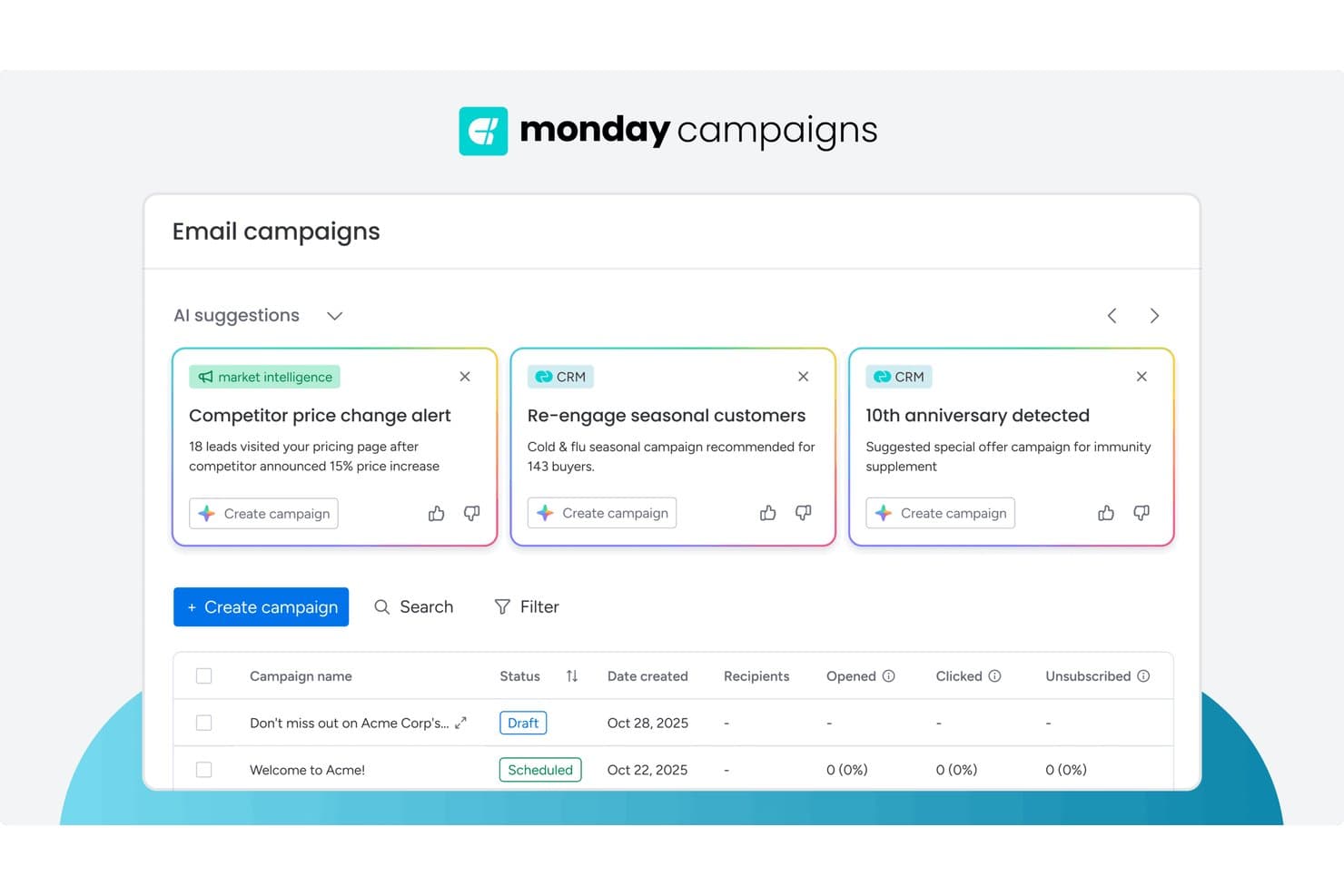
monday AI Workspace biedt door AI aangedreven campagnesuggesties op basis van CRM- en marktinformatie, zodat marketeers sneller gerichte e-mailcampagnes kunnen maken. monday AI Workspace is een door AI aangedreven platform voor werkbeheer dat redactionele planning, beheer van contentpijplijnen, cross-functionele workflowautomatisering en samenwerkingstools voor meerdere teams combineert in één werkruimte.
Voor wie is monday AI Workspace het meest geschikt?
Het is zeer geschikt voor marketingteams die complexe, cross-functionele contentactiviteiten beheren en een flexibele, door AI ondersteunde werkruimte nodig hebben om meerdere belanghebbenden te coördineren.
Waarom ik voor monday AI Workspace heb gekozen
monday AI Workspace staat op mijn shortlist omdat de door AI aangedreven toewijzing van middelen daadwerkelijk verandert hoe contentteams op schaal werken. Ik gebruik de AI-workflowbouwer om nieuwe contentaanvragen automatisch door te sturen naar de juiste schrijver of ontwerper op basis van de huidige werklast, in plaats van handmatig te controleren wie capaciteit heeft. De functie AI-blokken gaat nog verder en activeert automatische labeltoewijzingen en overdrachten wanneer een item tussen de fasen voor opstellen, beoordeling en goedkeuring beweegt.
Belangrijkste functies van monday AI Workspace
- Redactionele kalender met meerdere weergaven: Visualiseer contentplannen met bord-, tijdlijn-, Gantt- en kalenderweergaven voor verschillende niveaus van planningsdetail.
- Werkdocumenten met realtimebewerking: Stel documenten op, deel ze en bewerk ze samen met versiegeschiedenis en opmerkingen in dezelfde werkruimte.
- Borden voor campagnebeheer: Houd creatieve briefings, goedkeuringen en productieprocessen bij met aanpasbare kolommen en automatiseringen.
- Ingebouwde integratiehub: Maak verbinding met HubSpot, Salesforce, Google Drive, WordPress, Slack en meer voor naadloze overdrachten binnen de marketingtechnologiestack.
Integraties van monday AI Workspace
monday AI Workspace biedt honderden ingebouwde integraties via de integratiebibliotheek en marktplaats, waaronder Slack, Salesforce, HubSpot, Google Drive, Microsoft 365, Outlook, Gmail, Mailchimp, Adobe Creative Cloud en Canva. Het ondersteunt ook Zapier en biedt een API voor aangepaste integraties.
Pros and Cons
Pros:
- Door AI aangedreven werkdrukverdeling voor contentteams
- Uiterst flexibele weergaven van de redactionele kalender
- Geautomatiseerde campagneoverdrachten en labeltriggers
Cons:
- Geen ingebouwde contentoptimalisatie voor SEO
- Het goedkeuringsproces heeft geen gedetailleerde toestemmingsinstellingen
Learn more about monday AI Workspace:
Andere software voor contentmarketing
Hier zijn enkele aanvullende opties voor software voor contentmarketing die mijn shortlist niet hebben gehaald, maar die toch de moeite waard zijn om te bekijken:
- 11HootsuiteBeste voor diepgaande analyses van sociale media
- 12FoleonIdeaal voor interactieve contentcreatie op schaal
- 13ClearVoiceIdeaal voor samenwerking met freelancers van begin tot eind
Hoe ik software voor contentmarketing evalueer
Ik splits mijn evaluatie op in basiseisen die elk SaaS-contentteam nodig heeft—redactionele workflows, SEO en analyses—en de onderscheidende factoren die tools van elkaar onderscheiden.
Basisfunctionaliteit (vereisten voor deze lijst)
Wanneer ik tools voor mijn lijst selecteer, beoordeel ik elke tool op een schaal van 0 (biedt de functionaliteit niet) tot 5 (blink uit op dit gebied) voor elke hieronder vermelde kernfunctionaliteit. Vervolgens zet ik de totaalscore van de tool om in een percentage. Elke tool moet een minimale totaalscore van 75% behalen om in aanmerking te komen voor opname.
- Redactionele planning en kalender: Ik controleer of de kalender ondersteuning biedt voor het groeperen van campagnes, toegewezen personen en deadlines—zoals het plannen van een SaaS-productlancering via blog, e-mail en social media.
- Contentcreatie en samenwerking: Teams moeten contentmiddelen op één plek kunnen opstellen, beoordelen en goedkeuren. Daarom let ik op inline-opmerkingen, goedkeuringsworkflows en versiegeschiedenis.
- SEO en contentoptimalisatie: Van zoekwoordonderzoek tot scores voor pagina's beoordeel ik hoe goed een tool schrijvers helpt bij het maken van voor zoekmachines geoptimaliseerde briefings en het behandelen van doelonderwerpen.
- Publicatie en distributie via meerdere kanalen: Ik zoek naar ingebouwde publicatiemogelijkheden voor CMS, social media en e-mail, zodat één blogbericht kan worden ingepland op WordPress, LinkedIn en HubSpot.
- Analyses van contentprestaties: Verkeer en betrokkenheid zijn een begin, maar ik beoordeel of de tool content koppelt aan conversies, MQL's en de pipeline—en niet alleen aan paginaweergaven.
- Workflowautomatisering en integraties: Een contenttool moet passen binnen je marketingtechnologiestack. Daarom controleer ik op native koppelingen met platforms zoals HubSpot, Salesforce, GA4 en Slack.
Nadat ik een lijst heb samengesteld met tools die aan deze criteria voldoen, kijk ik naar wat elk platform onderscheidt.
Onderscheidende factoren (wat leveranciers van elkaar onderscheidt)
Zo vergelijk ik verschillende leveranciers:
Opvallende functies
Door AI aangedreven contentgeneratie is een belangrijke onderscheidende factor. Ik beoordeel of een tool briefings, structuurschetsen of volledige berichten kan opstellen die zijn afgestemd op je merkstem, in plaats van generieke output te produceren. Informatie over content van concurrenten is ook belangrijk—weten voor welke onderwerpen je SaaS-concurrenten ranken helpt je sneller hiaten te ontdekken dan handmatige SERP-analyse. Ik kijk ook naar aangepaste attributierapportage om te zien of de tool contentmiddelen koppelt aan proefversies, aanmeldingen en de pipeline, in plaats van te stoppen bij verkeersdashboards.
Meer dan functies
De aansluiting op de marketingtechnologiestack is een van de eerste dingen die ik evalueer. Een contenttool die niet synchroniseert met je CRM, analyses of automatiseringsplatform creëert datasilo's die attributie onmogelijk maken. Ook de tijd tot waarde weegt zwaar mee—ik controleer of een leverancier SaaS-specifieke sjablonen en inwerkbronnen biedt, zodat een contentteam van twee personen geen weken bezig is met het configureren van workflows. De impact op de pipeline is eveneens belangrijk. Ik zoek naar casestudy's van SaaS-bedrijven die laten zien dat de tool heeft geholpen content aan omzetresultaten te koppelen, en niet alleen aan ijdelheidsstatistieken.
Zo kies je software voor contentmarketing
Het is gemakkelijk om te verdwalen in lange functielijsten en complexe prijsstructuren. Om je te helpen gefocust te blijven terwijl je je unieke selectieproces voor software doorloopt, volgt hier een checklist met factoren om rekening mee te houden:
| Factor | Waar je op moet letten |
|---|---|
| FactorSchaalbaarheid | Waar je op moet lettenOndersteunt de tool je groei in contentvolume, gebruikerslicenties en nieuwe kanalen zonder hoge extra kosten? |
| FactorIntegraties | Waar je op moet lettenMaakt de tool rechtstreeks verbinding met je CMS, analysetools, CRM en sociale platforms om handmatige importen of exports te voorkomen? |
| FactorAanpasbaarheid | Waar je op moet lettenKun je workflows, goedkeuringsprocessen of merkrichtlijnen aanpassen aan de dagelijkse praktijk van je team? |
| FactorGebruiksgemak | Waar je op moet lettenKunnen gebruikers zich snel aanpassen, of bestaat er mogelijk weerstand door complexiteit of onbekende UX-patronen? |
| FactorImplementatie en inwerken | Waar je op moet lettenWelke middelen vraagt de eerste installatie? Let op de benodigde betrokkenheid van IT, ondersteuning bij migratie en hulpmiddelen om te leren. |
| FactorKosten | Waar je op moet lettenZijn alle onmisbare functies beschikbaar binnen je budget? Controleer op verborgen kosten of prijzen voor uitbreidingen die de totale eigendomskosten beïnvloeden. |
| FactorBeveiligingsmaatregelen | Waar je op moet lettenVoldoet de software aan de vereisten van je organisatie op het gebied van gegevensbescherming, toegangsbeheer en naleving? |
| FactorBeschikbaarheid van ondersteuning | Waar je op moet lettenIs er hulp beschikbaar in de tijdzone van je team wanneer er problemen optreden — en is ondersteuning beperkt tot chat, of zijn er meerdere kanalen? |
Wat is software voor contentmarketing?
Software voor contentmarketing is een digitaal platform dat teams helpt om marketingcontent voor meerdere kanalen te plannen, creëren, organiseren, verspreiden en analyseren.
Deze tools centraliseren contentworkflows, ondersteunen samenwerking tussen teamleden en bieden inzicht in campagneprestaties. Zo wordt het gemakkelijker om de productie van content af te stemmen op bedrijfsdoelen en de behoeften van je doelgroep.
Functies
Let bij het selecteren van contentmarketingsoftware op de volgende belangrijke functies:
- Contentkalender: Organiseert publicatieschema’s, deadlines en campagnetijdlijnen, zodat je team in één oogopslag aankomende content kan zien en inspanningen kan coördineren.
- Workflowbeheer: Hiermee kun je fasen instellen zoals opstellen, controleren, goedkeuren en publiceren, zodat iedereen zijn verantwoordelijkheden kent en taken zonder knelpunten kunnen worden uitgevoerd.
- Distributie via meerdere kanalen: Hiermee kun je content vanuit één platform publiceren of inplannen op blogs, sociale media, e-mail en meer. Dat bespaart tijd en zorgt voor consistentie.
- Samenwerkingstools: Ondersteunen opmerkingen in de app, het delen van bestanden en het toewijzen van taken, zodat schrijvers, ontwerpers en redacteuren in realtime naadloos kunnen samenwerken.
- Beheer van digitale middelen: Centraliseert merkimagery, video’s, sjablonen en documenten, zodat de juiste mensen snel bronnen kunnen vinden, bijwerken of opnieuw gebruiken.
- Contentanalyse: Houdt statistieken zoals bereik, betrokkenheid en conversies bij, zodat je team begrijpt welke content het beste presteert en de toekomstige strategie daarop kan afstemmen.
- Versiebeheer: Houdt bewerkingen en eerdere concepten bij, zodat gebruikers kunnen terugkeren naar eerdere versies en wijzigingen kunnen volgen voor meer verantwoordelijkheid.
- Rechten en rollen: Hiermee kun je bepalen wie content mag maken, bewerken, goedkeuren of publiceren, waardoor fouten worden voorkomen en de beveiliging behouden blijft.
- Sjabloonbibliotheek: Biedt vooraf gemaakte lay-outs en contentoverzichten die de productie versnellen en helpen de merkconsistentie tussen campagnes te behouden.
Veelvoorkomende AI-functies van contentmarketingsoftware
Naast de hierboven genoemde standaardfuncties van contentmarketingsoftware integreren veel van deze oplossingen AI met functies zoals:
- Geautomatiseerde contentsuggesties: AI beoordeelt je contentkalender en marketingstrategie om nieuwe onderwerpideeën, conceptopzetten of koppen voor te stellen die zijn afgestemd op de voorkeuren van je doelgroep en actuele thema’s.
- Generatie van natuurlijke taal: AI maakt volledige artikelen, berichten voor sociale media of samenvattingen op basis van zoekwoorden of briefings, waardoor snel eerste versies worden geproduceerd en teams aanzienlijk minder tijd aan copywriting kwijt zijn.
- Voorspelling van contentprestaties: AI analyseert historische gegevens en de betrokkenheid van het publiek om te voorspellen hoe goed een concept of ingepland bericht zal presteren, zodat teams vóór publicatie beter geïnformeerde beslissingen kunnen nemen.
- Verbetering van afbeeldingen en video’s: AI optimaliseert visuele content automatisch door helderheid aan te passen, afbeeldingen bij te snijden of zelfs merkimagery en korte clips te genereren die aansluiten bij de doelen van je content.
- Sentimentanalyse: AI scant opmerkingen, beoordelingen en interacties op sociale media om de emotionele toon rond je content te beoordelen en bruikbare feedback te bieden voor het aanpassen van boodschap of timing.
Voordelen
Het implementeren van contentmarketingsoftware biedt verschillende voordelen voor je team en je bedrijf. Hier zijn enkele voordelen waar je naar kunt uitkijken:
- Meer consistentie in content: Gecentraliseerde kalenders en sjablonen helpen de merkstem en het publicatieritme op verschillende kanalen te behouden.
- Snellere uitvoering van campagnes: Gestroomlijnde workflows en samenwerkingstools verkorten goedkeuringscycli en maken snelle koerswijzigingen in campagnes mogelijk.
- Betere afstemming binnen het team: Gedeelde dashboards en rolgebaseerde rechten houden iedereen op de hoogte en stellen elke medewerker in staat zich op zijn of haar onderdeel te richten.
- Diepgaandere inzichten in het publiek: Ingebouwde analyse- en rapportagetools bieden realtime feedback die duidelijk maakt wat aanslaat en waar verbetering nodig is.
- Eenvoudiger beheer via meerdere kanalen: Verspreid en monitor content voor websites, blogs, e-mail en sociale media op één plek, waardoor handmatig werk wordt verminderd.
- Verbeterde naleving en beveiliging: Rechtenbeheer en versiebeheer verkleinen het risico op onbevoegde wijzigingen of communicatie die niet bij het merk past.
Kosten en prijzen
Bij het selecteren van contentmarketingsoftware is inzicht in de verschillende beschikbare prijsmodellen en abonnementen vereist. De kosten variëren op basis van functies, teamgrootte, uitbreidingen en meer. In de onderstaande tabel worden veelvoorkomende abonnementen, hun gemiddelde prijzen en de gebruikelijke inbegrepen functies van contentmarketingsoftwareoplossingen samengevat:
Vergelijkingstabel van abonnementen voor contentmarketingsoftware
| Plantype | Gemiddelde prijs | Veelvoorkomende functies |
|---|---|---|
| PlantypeGratis abonnement | Gemiddelde prijs$0-$15/gebruiker/maand | Veelvoorkomende functiesBasiskalender voor content, toegang voor één gebruiker, beperkte sjablonen, basisanalyses en communityondersteuning. |
| PlantypePersoonlijk abonnement | Gemiddelde prijs$10-$35/gebruiker/maand | Veelvoorkomende functiesPublicatie via meerdere kanalen, eenvoudige workflowhulpmiddelen, middelenbeheer, standaardrapportage en e-mailondersteuning. |
| PlantypeZakelijk abonnement | Gemiddelde prijs$30-$80/gebruiker/maand | Veelvoorkomende functiesSamenwerking binnen teams, beheer van toegangsrechten, goedkeuringsworkflows, campagneanalyses, integraties en prioriteitsondersteuning. |
| PlantypeAbonnement voor ondernemingen | Gemiddelde prijs$70-$200+/gebruiker/maand | Veelvoorkomende functiesGeavanceerde beveiliging, aangepaste workflows, speciale onboarding, premiumintegraties, compliancehulpmiddelen en ondersteuning met SLA. |
Veelgestelde vragen over contentmarketingsoftware
Hier vindt u antwoorden op veelgestelde vragen over contentmarketingsoftware:
Hoe helpt contentmarketingsoftware bij het beheren van grote teams?
Contentmarketingsoftware centraliseert kalenders, taaktoewijzingen en feedback op één platform. Hierdoor kunnen grote teams campagnes eenvoudiger beheren, goedkeuringen coördineren en verantwoordelijkheden bijhouden zonder e-mails of spreadsheets.
Kan ik contentmarketingsoftware integreren met mijn bestaande hulpmiddelen?
Ja, de meeste platforms bieden integraties met CMS-, CRM-, analyse- en socialemediatools. Controleer altijd of uw essentiële systemen standaard worden ondersteund of dat middleware nodig is voor soepele workflows.
Is contentmarketingsoftware geschikt voor kleine bedrijven?
Ja, veel oplossingen bieden flexibele abonnementen en functies voor kleine teams. Zoek naar platforms met instapprijzen, eenvoudige onboarding en eenvoudige samenwerkingsopties die geschikt zijn voor enkele gebruikers.
Hoe veilig zijn de gegevens die in contentmarketingsoftware worden opgeslagen?
De meeste leveranciers bieden standaardbeveiligingsmaatregelen, zoals op rollen gebaseerde toegang, gegevensversleuteling en regelmatige back-ups. Bekijk de nalevingscertificeringen en het privacybeleid van elke tool om aan te sluiten op de vereisten van uw organisatie.
Welke onboardingbronnen zijn beschikbaar bij de meeste contentmarketingsoftware?
Veel platforms bevatten installatiehandleidingen, trainingsvideo’s, onboardingwebinars, startsjablonen en productrondleidingen in de app. Sommige bieden ook livechat of onboardingexperts, afhankelijk van uw abonnementsniveau.
Biedt contentmarketingsoftware analyses van gepubliceerde content?
Ja, functies voor tracking en analyses zijn standaard. Verwacht prestatiedashboards, campagnerapporten en betrokkenheidsstatistieken waarmee u kunt analyseren wat resultaten oplevert of verbetering nodig heeft.