

O software de curadoria de conteúdos ajuda-o a recolher, organizar e partilhar conteúdos digitais relevantes com a sua equipa ou audiência. Se procura as melhores plataformas para manter os seus fluxos atualizados ou os canais da sua marca sempre alinhados, sabe como pode ser difícil filtrar o excesso de informação.
Escolher a ferramenta de curadoria de conteúdos certa pode ajudá-lo a evitar perder horas a analisar fontes e a não acompanhar tendências. Nesta lista, encontrará soluções que suportam fluxos de trabalho de publicação reais, promovem a colaboração e ajudam-no a tomar decisões mais informadas sobre o que partilhar a seguir.
Why Trust Our Software Recommendations
6,700+
Reviews
20
Industry experts
16+
Evaluation factors
14
Years
Our team has been testing and reviewing software since 2012. As publishers and media operators ourselves, we know how difficult—and important—it is to choose the right software.
For this guide, we evaluated tools using hands-on testing and independent research, scoring tools using our selection criteria.
Our reviews reflect our human editorial judgment, not a sales pitch.
Tabela comparativa de software de curadoria de conteúdos
Esta tabela comparativa resume os detalhes de preços do meu melhor software de curadoria de conteúdos:
| Tool | Best For | Trial Info | Price | ||
|---|---|---|---|---|---|
| 1 | Best for tracking industry trends in one place | Free trial available | From $1,600/month (billed annually) | Website | |
| 2 | Best for finding trending articles quickly | Free trial available | From $199/month (billed annually) | Website | |
| 3 | Best for social media team collaboration | 7-day free trial available | From $19/month (billed annually) | Website | |
| 4 | Best for user-generated campaign content | Free demo available | From $1,249/month | Website | |
| 5 | Best for AI-powered content recommendations | Free demo available | Pricing upon request | Website | |
| 6 | Best for newsletter curation with AI summaries | 7-day fee trial + free demo available | From $14.99/month (billed annually) | Website | |
| 7 | Best for sharing curated insights with marketing teams | Free trial available | From $49/month | Website | |
| 8 | Best for enterprise-scale social embed management | 14-day free trial | From $110/month (billed annually) | Website | |
| 9 | Best for annotating saved web content | Free plan available | From $5.99/month | Website | |
| 10 | Best for personalized news aggregation | Free plan available | Pricing upon request | Website |


Avaliações do melhor software de curadoria de conteúdos
Apresentamos abaixo os meus resumos detalhados do melhor software de curadoria de conteúdos incluído na minha lista final. As minhas avaliações analisam detalhadamente as funcionalidades, capacidades e integrações de cada plataforma para o ajudar a encontrar a melhor opção para si.
 Best for tracking industry trends in one place
- Free trial available
- From $1,600/month (billed annually)
Visit WebsiteCustomer Rating:4.5/5
Feedly filters RSS feeds, newsletters, news, and social content by topic. Feedly is an AI-powered content aggregation platform that lets you subscribe to RSS feeds, newsletters, news sources, and social media accounts, then organize and filter everything by topic or keyword.
Who Is Feedly Best For?
Feedly is a strong fit for marketing teams, analysts, and competitive intelligence professionals who need to monitor multiple industries, competitors, or topics from a single dashboard.
Why I Picked Feedly
Feedly earns its spot on my shortlist because no other tool I've used matches its ability to pull from thousands of sources and surface only what's relevant through AI Feeds. I use it to monitor trade publications, newsletters, research journals, and social media all from one place, with AI models filtering the noise down to signals that actually matter.
Its Emerging Trends Dashboard is what keeps me coming back—it catches weak signals before they become obvious headlines.
Feedly Key Features
- Insights cards: View real-time metrics, top stories, and related companies or technologies for any tracked trend or competitor in one card.
- Boards: Save articles to named collections, add notes, and highlight sentences for future reference.
- Automated newsletters: Build branded, AI-summarized newsletters from your curated feeds to share with stakeholders.
- AI Actions: Run generative AI prompts across selected articles to extract data into tables, graphs, or exportable reports.
Feedly Integrations
Feedly offers native integrations with Slack, Microsoft Teams, Microsoft SharePoint, Microsoft OneNote, Buffer, Evernote, Dropbox, and several threat intelligence platforms like MISP and OpenCTI. It also connects with Zapier and IFTTT, and provides an API for custom integrations.
Pros and Cons
Pros:
- Supports team-wide shared RSS feed sets
- Aggregates major news platforms in one place
- AI assistant filters noise from feeds
Cons:
- Mobile reading experience feels cramped
- No built-in scheduling or publishing tools
Learn more about Feedly: Best for finding trending articles quickly
- Free trial available
- From $199/month (billed annually)
Visit WebsiteCustomer Rating:4.5/5
BuzzSumo tracks trending articles, social engagement, and competitor content. BuzzSumo is a content research and discovery platform that lets you search for trending articles, analyze social engagement data by topic or domain, and monitor competitor content performance across the web.
Who Is BuzzSumo Best For?
BuzzSumo is a strong fit for content marketers, SEO teams, and journalists who need to identify trending topics and high-performing content before publishing.
Why I Picked BuzzSumo
I picked BuzzSumo as one of the best because no other tool in this space surfaces trending articles as fast or as accurately. Its Trending Feeds feature ranks content published in the past 24 hours by trending score, so you can see what's going viral right now before it peaks. The Content Analyzer then lets me search its archive of 8 billion articles by topic or domain, filtered by date range and content type, to validate whether a topic has legs before I share it.
BuzzSumo Key Features
- Question analyzer: Searches forums and Q&A sites to surface the questions real audiences are asking about any topic.
- Content alerts: Sends notifications when new content is published for tracked keywords, brand names, or competitor domains.
- Influencer search: Identifies topic-relevant authors and publishers ranked by authority and engagement.
- Domain reports: Breaks down any website's top-performing content by shares, engagement, and content type.
BuzzSumo Integrations
BuzzSumo offers a smaller set of native integrations. You can share content directly to major social networks or via scheduling tools like Buffer. It also supports RSS feeds from Monitoring Alerts and Trending Feeds, which can be sent to tools like Slack or via third-party connectors like Zapier and IFTTT. An API is available for custom integrations, including querying content archives, pulling alert data, and building dashboards.
Pros and Cons
Pros:
- Backlink and share tracking across platforms
- Competitor domain analysis reveals top-performing pages
- Engagement data validates content before sharing
Cons:
- Limited coverage of niche or emerging platforms
- Content search results can feel repetitive
Learn more about BuzzSumo: Best for social media team collaboration
- 7-day free trial available
- From $19/month (billed annually)
Visit WebsiteCustomer Rating:4.6/5
ContentStudio discovers, schedules, and creates social content across channels. ContentStudio is a social media management and content curation platform that combines RSS feed discovery, post scheduling, team collaboration, and AI-assisted content creation across major social channels.
Who Is ContentStudio Best For?
ContentStudio is a natural fit for social media managers and small marketing teams who handle content curation and publishing across multiple brand accounts.
Why I Picked ContentStudio
I picked ContentStudio as one of the best because its approval workflow is built specifically for team collaboration on curated content. You can assign multiple approvers to individual posts, leave comments directly on a live post preview, and track approval status in real time. Clients can review and approve planned content via a magic link, no login needed.
That kind of built-in review loop is what makes ContentStudio a strong pick for teams managing content across multiple brand accounts.
ContentStudio Key Features
- Content discovery feeds: Search and subscribe to topic-based RSS feeds, keywords, or specific sources to surface relevant content for curation.
- Social media calendar: View and manage all scheduled and published posts across channels in a drag-and-drop calendar layout.
- AI writing assistant: Generate or rewrite captions, headlines, and post copy directly inside the content composer.
- Evergreen content recycling: Automatically re-queue top-performing posts on a set schedule to keep curated content active.
ContentStudio Integrations
ContentStudio offers native integrations with Google Drive, Dropbox, Canva, Vista Create, Bit.ly, Replug, Google Data Studio, and Feedly, along with publishing connections to major social networks like Facebook, Instagram, LinkedIn, TikTok, YouTube, Pinterest, and Bluesky. It connects with Zapier, Make, and n8n for automation workflows, and provides an API for custom integrations.
Pros and Cons
Pros:
- Workspace separation for multi-client management
- Automated RSS-to-social posting via recipes
- Topic-based discovery surfaces trending curated content
Cons:
- Discover results can feel outdated at times
- Reporting and analytics lack depth
Learn more about ContentStudio: Best for user-generated campaign content
- Free demo available
- From $1,249/month
Visit WebsiteCustomer Rating:4.4/5
Pixlee curates, rights-manages, and publishes UGC across marketing channels. Pixlee, now part of Emplifi, is a UGC platform that lets brands collect, curate, rights-manage, and publish customer photos, videos, and social content across marketing channels and ecommerce pages.
Who Is Pixlee Best For?
Pixlee is a strong fit for ecommerce and retail brands that run ongoing social campaigns and need a structured way to source and repurpose customer content at scale.
Why I Picked Pixlee
Pixlee earns its spot on my shortlist because of how well it handles the full UGC curation loop, from discovery to rights management to publishing. I particularly like the permissions workflow, which lets you contact creators directly through the platform using pre-built outreach messages to request content rights. Once approved, that content can be tagged by campaign, product type, or topic, making it easy to pull the right assets when you're building out a new campaign. The AI-powered content moderation layer also does the heavy lifting of filtering what's on-brand before anything reaches your galleries or channels.
Pixlee Key Features
- Shoppable gallery creation: Build and embed on-brand UGC galleries on ecommerce product pages, tying customer content directly to purchasable items.
- Multi-platform content collection: Pull UGC from Instagram, TikTok, X, Facebook, and direct submissions into a single content library.
- UGC performance analytics: Track engagement metrics like likes, shares, comments, and conversion rates tied to specific UGC-driven campaigns.
- Publisher integration: Schedule and distribute approved UGC through a shared content calendar with AI-powered posting recommendations.
Pixlee Integrations
Pixlee offers native integrations with Shopify, Klaviyo, Attentive, Salesforce, Magento, Emarsys, and Movable Ink, as well as BigCommerce. An API is available for custom integrations.
Pros and Cons
Pros:
- Collects content across multiple social platforms
- Shoppable UGC galleries on product pages
- Built-in rights permission request workflow
Cons:
- No self-serve setup or free trial
- Interface can feel complex initially
Learn more about Emplifi (formerly Pixlee): Best for AI-powered content recommendations
- Free demo available
- Pricing upon request
Visit WebsiteCustomer Rating:4.5/5
Curata discovers, organizes, annotates, and publishes curated content. Curata is a content curation and marketing platform that lets marketers find, organize, annotate, and publish relevant content using a self-learning AI discovery engine.
Who Is Curata Best For?
Curata is a good fit for B2B content marketing teams at mid-size to enterprise companies that publish high volumes of curated content regularly.
Why I Picked Curata
I picked Curata as one of the best because its self-learning discovery engine is genuinely unlike what most curation tools offer. The AI gets more accurate over time, adjusting recommendations based on your topic preferences and past selections rather than serving up static keyword matches.
I also like that it automatically filters out duplicate, outdated, and foreign-language content, so my team isn't wasting time triaging a noisy feed. On top of that, Curata's built-in content scoring ranks articles by relevance, which makes it easy to prioritize what's worth publishing next.
Curata Key Features
- Browser plugin: Curate content directly from any webpage as you browse, without returning to the dashboard.
- Email newsletter builder: Create newsletters with lead capture forms, list segmentation, and automated scheduling built in.
- Taxonomy-based categorization: Curata learns your custom taxonomy over time and automatically groups incoming content into the right categories.
- Content enrichment: Automatically pulls in relevant metadata, royalty-free images, quotes, and video to populate curated posts.
Curata Integrations
Curata offers 21 integrations, including WordPress, Joomla, Drupal, Marketo, Salesforce Sales Cloud, HubSpot Marketing Hub, Oracle Eloqua, Pardot, Google Analytics, Mailchimp, and Buffer. It also connects with Zapier and provides an API for custom integrations.
Pros and Cons
Pros:
- Tracks curated content's revenue impact
- Built-in editorial approval workflows for teams
- AI discovery improves over time automatically
Cons:
- Interface feels dated and occasionally glitchy
- Requires significant setup and onboarding time
Learn more about Curata: Best for newsletter curation with AI summaries
- 7-day fee trial + free demo available
- From $14.99/month (billed annually)
Visit WebsiteCustomer Rating:4.5/5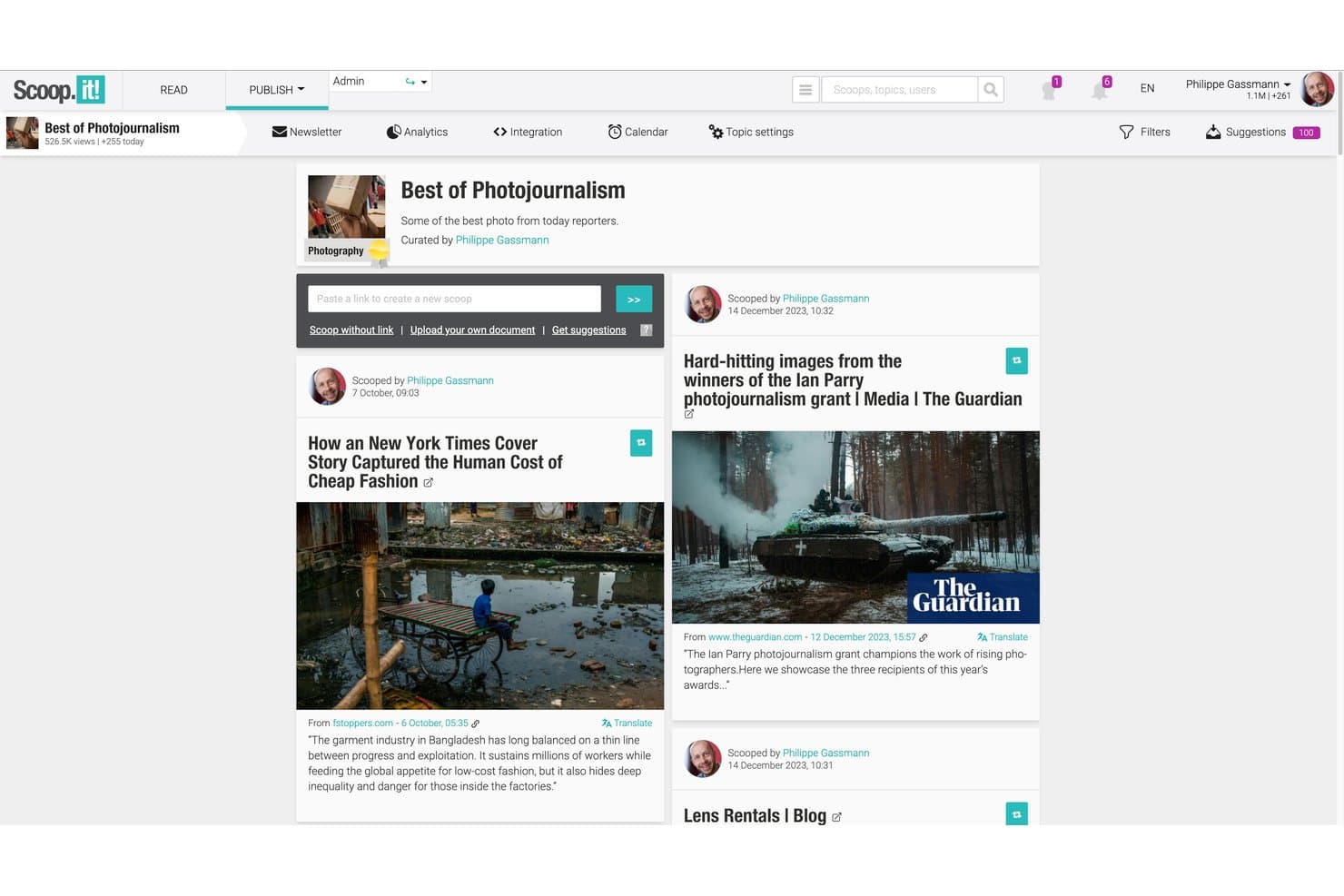
Scoop.it curates AI-sourced content into hubs, newsletters, and social posts. Scoop.it is a content curation platform that combines AI-assisted content discovery, topic-based content hubs, social publishing, and a native newsletter builder with AI-generated summaries.
Who Is Scoop.it Best For?
Scoop.it is a strong fit for content marketers and newsletter operators who want to turn curated industry content into branded email campaigns without building a separate tool stack.
Why I Picked Scoop.it
I've included Scoop.it in my top picks because its native newsletter builder does something most curation tools skip: it uses AI to auto-generate article summaries in a single click, so you can send a polished, context-rich newsletter straight from your curated feed. I also like that the platform lets you build branded topic pages that feed directly into those campaigns, keeping discovery and distribution in one place rather than stitching together separate tools.
Scoop.it Key Features
- Browser bookmarklet: Curate any web article directly from its source page in one click, without returning to the Scoop.it dashboard.
- Topic pages: Create themed, branded content hubs that can be embedded on your website, blog, or intranet as a live content library.
- Scheduled social publishing: Queue curated content for timed distribution across connected Twitter/X, LinkedIn, and Facebook accounts.
- Content performance analytics: Track audience engagement, newsletter open rates, and per-article performance stats from within the platform.
Scoop.it Integrations
Scoop.it integrates with WordPress, Microsoft Teams, Slack, Meltwater Explore, and Radarly. It also supports RSS feeds, Sitemaps, an Open API for custom integrations, and a Zapier connection.
Pros and Cons
Pros:
- Bookmarklet enables instant curation from any page
- Content hubs embed easily on any website
- AI-generated newsletter summaries save manual writing
Cons:
- Newsletter sends capped for lower-tier users
- Approval workflows require high-priced enterprise plan
Learn more about Scoop.it: Best for sharing curated insights with marketing teams
- Free trial available
- From $49/month
Visit WebsiteCustomer Rating:4.4/5
UpContent curates third-party articles for review, annotation, and distribution. UpContent is a content curation platform that discovers and organizes third-party articles from across the web, letting marketing teams review, annotate, and distribute curated content through social, email, and other channels.
Who Is UpContent Best For?
UpContent is a natural fit for marketing teams at financial services firms, where compliant, advisor-led content sharing is a core part of the sales process.
Why I Picked UpContent
I picked UpContent as one of the best because it's purpose-built for marketing teams that need to share curated content across multiple channels without losing control of the message. Its team collaboration workflow lets managers review and approve articles before they go out, which matters a lot when advisors or reps are posting independently.
I also like the Smart Seller feature, which overlays a custom CTA banner on any article you share, keeping your brand and conversion path intact even when you're linking to third-party content.
UpContent Key Features
- Topic-based content discovery: Build topic collections that continuously pull in new articles matching your chosen keywords and sources.
- Content filters: Sort discovered articles by recency, shareability, influence, or source to surface the most relevant pieces faster.
- UTM tracking: Automatically appends UTM parameters to shared article links for tracking engagement back to your curation activity.
- Gallery widget: Embed a curated content feed directly onto your website so visitors see your latest topic collections without leaving your site.
UpContent Integrations
UpContent offers native integrations with Hootsuite, HubSpot, Salesforce Marketing Cloud, Mailchimp, Buffer, Seismic LiveSocial, Proofpoint, Yext, EveryoneSocial, and SOCXO. It also supports RSS feeds from any topic collection, connects with Zapier, and has an API for custom integrations.
Pros and Cons
Pros:
- Embeds curated feeds directly on websites
- Surfaces articles by shareability and influence
- Approval workflows built for team review
Cons:
- No geographic filtering for localized content
- Topic keyword tuning requires trial and error
Learn more about UpContent: Best for enterprise-scale social embed management
- 14-day free trial
- From $110/month (billed annually)
Visit WebsiteCustomer Rating:4.7/5
Flockler aggregates, moderates, and embeds social content across digital channels. Built around social media aggregation, Flockler lets you collect, moderate, and embed content from platforms like Instagram, TikTok, and YouTube into websites, apps, and digital screens.
Who Is Flockler Best For?
Flockler is a natural fit for brands in retail, hospitality, and events that need to display live social content across multiple physical and digital touchpoints.
Why I Picked Flockler
I picked Flockler as one of the best because of how well it handles embed distribution across multiple touchpoints from a single source. My team can deploy one curated social feed to a brand website, a live event screen, and a digital kiosk without rebuilding the configuration each time.
The native digital signage output is something I rarely see in other content curation tools, and it's especially useful for campaigns that run across physical and digital spaces simultaneously.
Flockler Key Features
- Rights management: Send rights request messages directly to content creators to get permission before featuring their posts.
- Shoppable feed: Tag products directly on social posts to turn curated feeds into clickable shopping experiences.
- Custom CSS editor: Apply custom styling to any feed embed to match your brand's visual guidelines.
- Analytics dashboard: Track impressions, clicks, and engagement on embedded feeds across all active channels.
Flockler Integrations
Flockler aggregates content from Instagram, Facebook, X, YouTube, LinkedIn, TikTok, Pinterest, Bluesky, Google Reviews, RSS feeds, SoundCloud, and Flickr into unified feeds. It works with Shopify, Webflow, WordPress, and other major CMS platforms, and can embed in SharePoint and internal portals.
Pros and Cons
Pros:
- Embed feeds on digital signage screens
- Archived content persists after campaigns end
- AI-generated alt text for social images
Cons:
- Analytics reporting lacks deeper engagement data
- Limited content sources on lower plans
Learn more about Flockler: Best for annotating saved web content
- Free plan available
- From $5.99/month
Visit WebsiteCustomer Rating:4.4/5
Instapaper saves, highlights, and organizes articles for later reading. Built for saving and reading web content, Instapaper is a read-later tool with highlighting, private notes, and folder-based organization for managing articles and online research.
Who Is Instapaper Best For?
Instapaper works best for solo professionals and content creators who need a personal reading and research library they can build and reference over time.
Why I Picked Instapaper
I picked Instapaper as one of the best because its annotation layer goes deeper than most read-later tools. I highlight passages in four colors and attach private notes to specific lines in any saved article. When I revisit a piece weeks later, those color-coded marks help me pull quotes and ideas into my content without re-reading from scratch.
Instapaper Key Features
- Folder organization: Sort saved articles into custom folders to keep research topics separated and easy to browse.
- Full-text search: Search across all saved articles by keyword to locate specific content in your library.
- Speed read mode: Read saved articles word by word at a set pace to move through content quickly.
- Browser extension: Save any web page to your Instapaper library directly from your browser with one click.
Instapaper Integrations
Instapaper offers a smaller set of native integrations, including Notion, Kindle, and Rakuten Kobo. It's available on Zapier and IFTTT, and has an API for custom integrations.
Pros and Cons
Pros:
- Clean text-to-speech for saved articles
- Highlights and notes sync across devices
- Distraction-free reading strips ads and clutter
Cons:
- Notes display as separate fragmented entries
- Infrequent app updates and slow support
Learn more about Instapaper: Best for personalized news aggregation
- Free plan available
- Pricing upon request
Visit WebsiteCustomer Rating:4/5
Flipboard curates personalized news, stories, and web content by topic. Flipboard is a news aggregation and content curation app that collects articles, stories, and web content into personalized, magazine-style feeds organized by topic or interest.
Who Is Flipboard Best For?
Flipboard is a strong fit for individual professionals, journalists, and content creators who need a personal news feed organized around specific topics or industries.
Why I Picked Flipboard
Flipboard earns its spot on my shortlist because no other tool packages news aggregation around topic-level personalization quite like this. Its "For You" feed uses an algorithm that learns from what you heart, follow, and add, so the content gets sharper over time without manual adjustments.
I also like its Smart Magazines feature, which opens with broadly trending stories on a topic before narrowing to stories matched to your specific reading habits. The daily FlipDigest email pulls from the same algorithm, giving you a digest of top stories across your followed topics without logging back into the app.
Flipboard Key Features
- Custom magazines: Create ongoing, topic-specific magazines by flipping articles, videos, and podcasts from any source into a shareable collection.
- Storyboards: Package a finite set of curated links into structured, sectioned roundups with custom copy, topic tags, and shareable embeds.
- Group magazines: Invite other curators to contribute content into a shared magazine, making collaborative curation across a team possible.
- Content analytics: Track opens, impressions, click-through rate, and engagement across your magazines and storyboards from the Flipboard dashboard.
Flipboard Integrations
Flipboard lets you connect social media accounts on Twitter, LinkedIn, Tumblr, SoundCloud, YouTube, Flickr, and 500px to pull and share content within the app. It also supports Mastodon and the broader fediverse through ActivityPub, and ingests content from any RSS feed. Zapier and API support are not clearly documented.
Pros and Cons
Pros:
- Algorithm learns from interactions to personalize feeds
- Topic filtering via hashtags and category selection
- Magazine-style layout makes browsing visual content enjoyable
Cons:
- Analytics for curators are barebones
- Accessing some articles requires external logins
Learn more about Flipboard :
Outro software de curadoria de conteúdos
Eis algumas opções adicionais de software de curadoria de conteúdos que não entraram na minha lista final, mas que ainda vale a pena conhecer:
- 11ListlyBest for creating collaborative listicles
- 12DrumUpBest for scheduling curated social posts
- 13MediumBest for publishing long-form thought leadership
- 14PinterestBest for visual discovery and bookmarking
- 15ContentGemsBest for daily email content alerts
- 16InoReaderBest for custom automation with rules
- 17MyCuratorBest for WordPress content capturing
- 18Paper.liBest for automated newsletter creation
- 19eLinkBest for multi-format newsletter curation
- 20QuuuBest for human-vetted social post automation
How I Evaluate Content Curation Software
I evaluate these tools in two layers: the non-negotiable capabilities—like aggregating sources and scheduling distribution—and the differentiators that separate the strongest options from the rest.
Core Functionality (Table Stakes For This List)
When I'm selecting tools for my list, I rank each one on a scale from 0 (does not offer the functionality) to 5 (excels in this area) for each core functionality listed below. Then, I calculate the tool's total score into a percentage. Each tool needs to achieve a minimum total score of 65% to be considered for inclusion.
- Content Discovery & Aggregation: I check whether a tool can pull from RSS feeds, blogs, social platforms, and news sites into a single feed—so you're not tab-hopping across dozens of sources.
- Topic & Keyword Filtering: Strong filtering lets you zero in on SaaS-relevant subjects using saved searches, Boolean queries, or tag-based rules rather than scrolling through noise.
- AI-Powered Relevance Ranking: I evaluate how well each tool surfaces high-value content automatically—tools like Curata and Feedly, for example, both use AI to prioritize articles by relevance.
- Multi-Channel Distribution: I look for the ability to push curated content directly to social profiles, newsletters, Slack channels, or a blog without switching between separate tools.
- Content Organization & Tagging: A usable library with tags, collections, or boards matters when your team curates across multiple product lines or campaign themes and needs to retrieve assets fast.
- Team Collaboration & Approvals: I evaluate whether the tool supports shared workspaces, commenting, and approval workflows so a content lead can review curated picks before they go live.
Once I have a list of tools that meet this criteria, I consider what sets each platform apart.
Differentiating Factors (What Sets Vendors Apart)
Here's how I compare and contrast different vendors:
Standout Features
I look for built-in analytics that show how curated posts perform across channels—click-throughs, shares, and engagement trends help you double down on topics your audience responds to. AI-generated summaries are another differentiator, letting you add original commentary to a shared article without writing from scratch. I also evaluate competitor and trend monitoring, which is valuable for SaaS teams tracking rival launches or emerging industry conversations in real time.
Beyond Features
Integrations matter a lot here. I check whether a tool connects natively to the platforms SaaS teams already use—think HubSpot, Slack, Buffer, or WordPress—so curated content flows into existing workflows. Pricing structure is another key factor; I evaluate whether plans scale reasonably as teams grow or content volume increases. Copyright and attribution handling also deserves attention, since sharing third-party content without proper source linking or excerpting safeguards can create legal exposure for your brand.
Como escolher software de curadoria de conteúdos
A escolha de software de curadoria de conteúdos depende da eficácia com que este consegue descobrir conteúdos relevantes, organizar fontes, suportar fluxos de trabalho de publicação e distribuir conteúdos selecionados pelos canais utilizados pela sua equipa.
| Se a sua prioridade for… | Procure… |
|---|---|
| Se a sua prioridade for…Encontrar conteúdos relevantes mais rapidamente | Procure…Descoberta assistida por IA e filtragem por tópico |
| Se a sua prioridade for…Organizar grandes bibliotecas de conteúdos | Procure…Etiquetas, pastas, coleções e centros temáticos |
| Se a sua prioridade for…Publicar conteúdos selecionados | Procure…Ferramentas integradas de publicação e agendamento |
| Se a sua prioridade for…Partilhar conteúdos em vários canais | Procure…Distribuição nas redes sociais, em boletins informativos e em sítios Web |
| Se a sua prioridade for…Manter a qualidade dos conteúdos | Procure…Controlos de fontes e filtros de relevância |
| Se a sua prioridade for…Suportar fluxos de trabalho de equipa | Procure…Colaboração, aprovações e bibliotecas partilhadas |
Como avaliar a sua lista final
- Teste a descoberta de conteúdos: Crie um fluxo de tópicos ou palavras-chave e verifique se a plataforma apresenta consistentemente conteúdos relevantes e atuais de fontes credíveis.
- Verifique os controlos de filtragem: Teste se pode aperfeiçoar as recomendações por tópico, fonte, idioma, data ou outros critérios sem ter de ordenar manualmente resultados irrelevantes.
- Crie uma coleção selecionada: Guarde vários conteúdos e organize-os em pastas, tópicos ou coleções para verificar como é fácil gerir uma biblioteca em crescimento.
- Teste os fluxos de trabalho de publicação: Crie uma publicação selecionada ou um boletim informativo de exemplo e analise como a plataforma gere a edição, a atribuição de autoria, o agendamento e a distribuição.
- Avalie a colaboração da equipa: Adicione outro utilizador ou teste os controlos de fluxo de trabalho disponíveis para confirmar se a sua equipa consegue rever, aprovar, organizar e publicar conteúdos sem duplicar trabalho.
O que é um software de curadoria de conteúdos?
O software de curadoria de conteúdos é uma plataforma utilizada para descobrir, recolher, organizar e partilhar conteúdos relevantes de terceiros ou próprios sobre temas específicos.
Estas ferramentas podem apresentar artigos, relatórios, vídeos, publicações nas redes sociais e outros recursos com base em palavras-chave, interesses ou fontes selecionadas. As equipas podem depois organizar esses conteúdos em coleções, newsletters, publicações nas redes sociais, websites ou bibliotecas internas.
O software de curadoria de conteúdos reduz o trabalho manual envolvido na procura de material útil, dando simultaneamente às equipas mais controlo sobre o que partilham e a forma como o distribuem.
Funcionalidades
Ao selecionar um software de curadoria de conteúdos, procure as seguintes funcionalidades essenciais:
- Captura de conteúdos da Web: Permite guardar páginas Web ou artigos completos diretamente a partir do navegador, facilitando a criação de uma biblioteca personalizada de recursos úteis.
- Organização por pastas e etiquetas: Permite ordenar e categorizar os conteúdos guardados utilizando pastas ou etiquetas personalizadas, para que possa encontrar, agrupar ou priorizar rapidamente itens para utilização futura.
- Pesquisa em texto integral: Permite pesquisar em todos os conteúdos guardados — incluindo o corpo e os títulos dos artigos — para que possa aceder exatamente aos recursos de que precisa sem percorrer manualmente o conteúdo.
- Anotações e destaques: Disponibiliza ferramentas para destacar passagens e adicionar notas autocolantes ou comentários, apoiando a investigação, a colaboração e uma análise mais aprofundada dos conteúdos.
- Acesso offline: Permite aos utilizadores ler e interagir com os conteúdos armazenados mesmo quando não existe ligação à Internet, o que é útil durante viagens ou em condições de rede instáveis.
- Extensões do navegador: Disponibiliza complementos para o Chrome, Firefox ou outros navegadores, tornando conveniente guardar conteúdos de qualquer local online com um único clique.
- Partilha de conteúdos: Permite aos utilizadores partilhar artigos, pastas ou anotações guardados com outras pessoas através de ligações, e-mail ou permissões de colaboradores.
- Disponibilidade de aplicação móvel: Permite fazer curadoria, ler e adicionar anotações em dispositivos móveis, para aceder aos conteúdos e manter a produtividade em qualquer lugar.
- Importação e exportação em massa: Permite aos utilizadores migrar grandes coleções de conteúdos para dentro ou para fora da plataforma, simplificando a integração ou o arquivo conforme necessário.
- Otimização da legibilidade: Remove anúncios e elementos desnecessários das páginas guardadas, apresentando ambientes de leitura limpos e sem distrações para uma maior concentração.
Funcionalidades comuns de IA dos softwares de curadoria de conteúdos
Para além das funcionalidades padrão dos softwares de curadoria de conteúdos acima indicadas, muitas destas soluções estão a integrar IA com funcionalidades como:
- Recomendações automáticas de conteúdos: Utiliza inteligência artificial para analisar os seus interesses e hábitos de leitura e, em seguida, apresentar artigos ou fontes relevantes que talvez não encontrasse por si próprio.
- Resumo com recurso a IA: Gera resumos concisos de artigos ou páginas Web longos, permitindo-lhe consultar rapidamente os pontos principais sem ler todo o conteúdo.
- Etiquetagem e organização inteligentes: Adiciona automaticamente etiquetas, categorias ou pastas aos novos conteúdos com base no respetivo tema, poupando tempo e garantindo que tudo fica devidamente organizado.
- Análise de sentimento: Analisa o tom e o estado de espírito dos artigos, ajudando-o a avaliar a forma como os conteúdos poderão ser recebidos ou a filtrar rapidamente perspetivas específicas.
- Deteção de duplicados: Identifica e remove artigos repetidos ou muito semelhantes em toda a sua biblioteca, garantindo que os conteúdos selecionados permanecem únicos e sem elementos desnecessários.
Benefícios
A implementação de um software de curadoria de conteúdos proporciona vários benefícios à sua equipa e à sua empresa. Eis alguns dos benefícios que pode esperar:
- Gestão centralizada da informação: Reúna e organize artigos, pesquisas e informações provenientes de várias fontes num único espaço pesquisável.
- Partilha simplificada de conhecimento: Partilhe conteúdos selecionados e anotações com partes interessadas ou membros da equipa, melhorando o alinhamento, a colaboração e a aprendizagem coletiva.
- Recuperação mais rápida de conteúdos: Encontre rapidamente recursos guardados através da pesquisa de texto integral, da etiquetagem inteligente e de pastas organizadas.
- Maior profundidade da pesquisa: Adicione anotações, realce e comente os itens guardados para que seja fácil consultar e reutilizar informações e referências.
- Qualidade consistente dos conteúdos: Filtre, atribua etiquetas e elimine duplicados para manter uma biblioteca limpa e fiável de materiais de elevada qualidade.
- Maior eficiência do fluxo de trabalho: Utilize extensões de navegador, aplicações móveis e ferramentas de importação/exportação para guardar e organizar conteúdos sem perturbar as rotinas diárias.
- Maior mobilidade e acesso: Aceda a conteúdos guardados e organizados em qualquer dispositivo, mesmo offline, sempre que precisar de pesquisar ou encontrar inspiração.
Custos e preços
A seleção de software de curadoria de conteúdos requer uma compreensão dos vários modelos de preços e planos disponíveis. Os custos variam consoante as funcionalidades, o tamanho da equipa, os complementos, entre outros fatores. A tabela abaixo resume os planos comuns, os respetivos preços médios e as funcionalidades normalmente incluídas nas soluções de software de curadoria de conteúdos:
Tabela de comparação de planos de software de curadoria de conteúdos
| Tipo de plano | Preço médio | Funcionalidades comuns |
|---|---|---|
| Tipo de planoPlano gratuito | Preço médio$0 | Funcionalidades comunsRecorte básico da Web, número limitado de pastas ou etiquetas, sincronização limitada entre dispositivos e funcionalidades essenciais de pesquisa. |
| Tipo de planoPlano pessoal | Preço médio$5-$10/utilizador/mês | Funcionalidades comunsGuardados ilimitados, organização avançada, realces e anotações e suporte prioritário. |
| Tipo de planoPlano empresarial | Preço médio$10-$25/utilizador/mês | Funcionalidades comunsColaboração em equipa, controlos de administração, pastas ou bibliotecas partilhadas, análise e opções de integração. |
| Tipo de planoPlano empresarial de grande dimensão | Preço médio$25-$50/utilizador/mês | Funcionalidades comunsIntegrações personalizadas, segurança reforçada, funcionalidades de conformidade, aprovisionamento de utilizadores e suporte dedicado. |
Perguntas frequentes sobre software de curadoria de conteúdos
Eis algumas respostas a perguntas frequentes sobre software de curadoria de conteúdos:
Posso migrar marcadores ou artigos guardados existentes para um software de curadoria de conteúdos?
Sim, a maioria dos softwares de curadoria de conteúdos permite importar marcadores ou itens guardados de navegadores e outras plataformas. Procure opções de importação compatíveis com ficheiros HTML ou CSV para simplificar a integração e centralizar a sua base de conhecimento.
Como é que o software de curadoria de conteúdos apoia a colaboração em equipa?
O software de curadoria de conteúdos apoia a colaboração ao permitir pastas partilhadas, anotações de grupo e permissões de edição ou visualização. Isto facilita a recolha, a discussão e o aproveitamento conjunto de recursos selecionados pelas equipas.
É possível utilizar software de curadoria de conteúdos offline?
Sim, muitas soluções oferecem acesso offline através de aplicações para computador ou dispositivos móveis. Pode ler, anotar e organizar conteúdos guardados sem ligação à Internet, o que é útil para o trabalho remoto ou para viajar.
Que medidas de segurança devo esperar das ferramentas de curadoria de conteúdos?
Espere salvaguardas essenciais, como armazenamento de dados encriptado, autenticação de utilizadores e ferramentas de administração para restringir o acesso. Se gerir informações sensíveis, verifique as certificações de conformidade ou as definições de segurança avançadas antes de selecionar uma plataforma.
As ferramentas de curadoria de conteúdos integram-se com outras aplicações de produtividade ou pesquisa?
Sim, muitas ferramentas ligam-se nativamente ou através de APIs a plataformas como o Notion, o Slack ou sistemas de gestão de projetos. Isto ajuda a simplificar os fluxos de trabalho, centralizar a pesquisa e reduzir os passos manuais entre as suas ferramentas.