

O software de conteúdos inclui ferramentas digitais que ajudam a sua equipa a criar, organizar, publicar e gerir conteúdos escritos, visuais ou em vídeo em grande escala. Se procura o melhor software de conteúdos, precisa de opções que se adaptem ao seu fluxo de trabalho, reduzam as tarefas repetitivas e apoiem uma verdadeira colaboração — porque gerir conteúdos é muito mais do que redigir alguns ficheiros.
Este guia apresenta as principais soluções lado a lado, para que possa comparar rapidamente o que importa: em que áreas se destacam, para quem foram concebidas e de que forma se integrarão com o seu conjunto de ferramentas digitais.
Why Trust Our Software Recommendations
6,700+
Reviews
20
Industry experts
16+
Evaluation factors
14
Years
Our team has been testing and reviewing software since 2012. As publishers and media operators ourselves, we know how difficult—and important—it is to choose the right software.
For this guide, we evaluated tools using hands-on testing and independent research, scoring tools using our selection criteria.
Our reviews reflect our human editorial judgment, not a sales pitch.
Tabela comparativa de software de conteúdos
A tabela abaixo compara os detalhes de preços das minhas principais escolhas de software de conteúdos.
| Tool | Best For | Trial Info | Price | ||
|---|---|---|---|---|---|
| 1 | Best for automated marketing plan creation | 14-day free trial | From $29/month | Website | |
| 2 | Best for content optimization recommendations | 14-day free trial | From $129/month | Website | |
| 3 | Best for real-time team document editing | Free plan + trial available | From $7/user/month (billed annually) | Website | |
| 4 | Best for easy collaborative design creation | Free trial + free plan available | From $144/user/year (billed annually) | Website | |
| 5 | Best for customizable website publishing | Free plan available | From $9/month | Website | |
| 6 | Best for live streaming video content | Free to use | Free to use | Website | |
| 7 | Best for AI-driven content research | Free plan available | Pricing upon request | Website | |
| 8 | Best for content discovery and insights | Free trial available | From $199/month (billed annually) | Website | |
| 9 | Best for creative project organization | Free plan + free trial + free demo available | From $9.99/user/month (billed annually) | Website | |
| 10 | Best for user-generated content management | Free demo available | From $1,249/month | Website |


Avaliações do melhor software de conteúdos
Seguem-se os meus resumos detalhados do melhor software de conteúdos que entrou na minha lista restrita. As minhas avaliações analisam em detalhe as funcionalidades, os melhores casos de utilização e as integrações de cada plataforma, para o ajudar a encontrar a melhor opção para si.
 1Best for automated marketing plan creation
Enji
- 14-day free trial
- From $29/month
Visit WebsiteCustomer Rating:4.3/5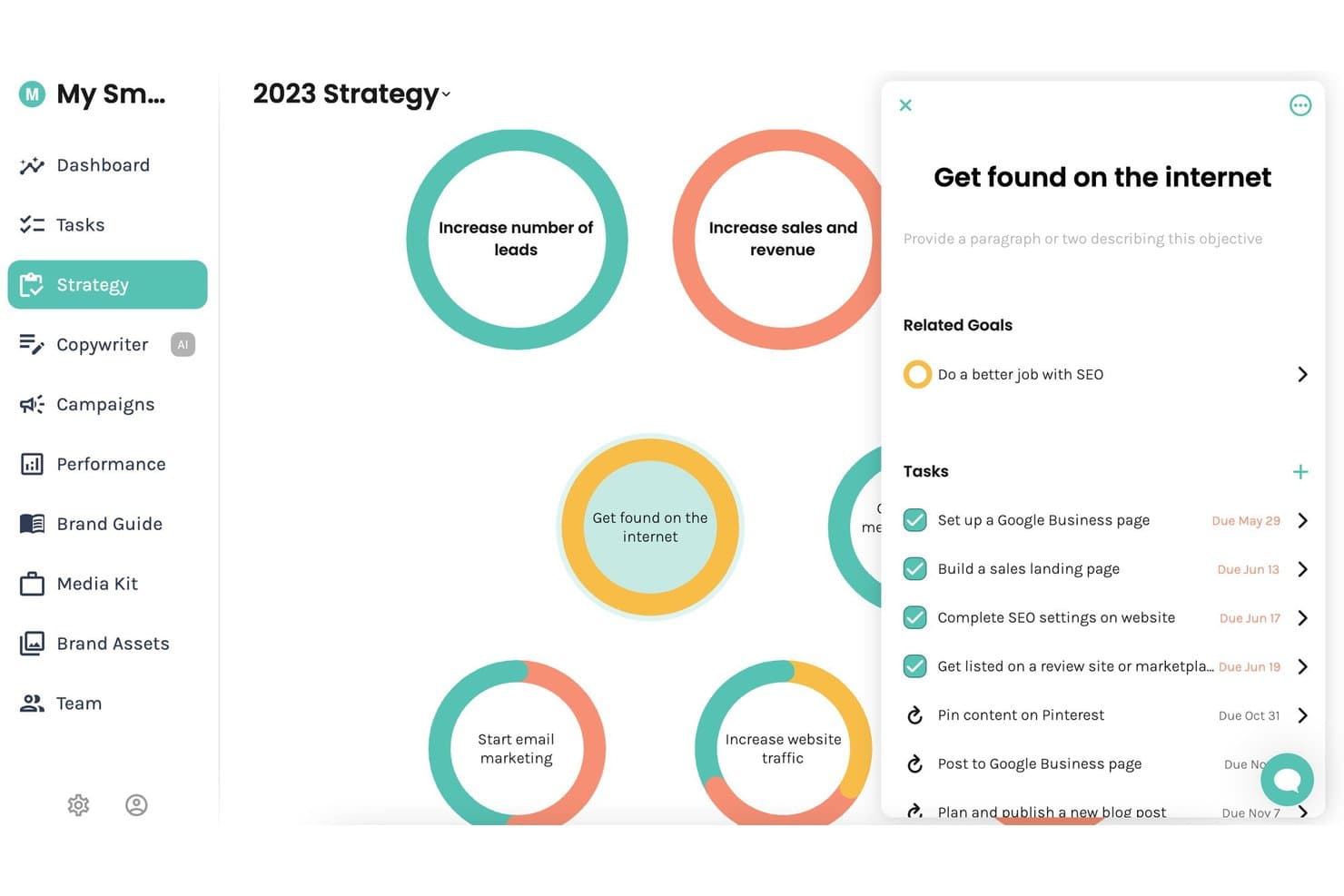
Enji offers a visual strategy board where users can manage marketing objectives, related goals, and tasks with due dates in one centralized view. Enji is an all-in-one marketing platform for small businesses that combines AI-driven marketing plan generation, content calendar management, AI copywriting, social media scheduling, and KPI tracking.
Who Is Enji Best For?
Enji is a strong fit for solopreneurs and micro-business owners who handle all of their own marketing without a dedicated team.
Why I Picked Enji
Enji earns its spot on my shortlist because its Marketing Strategy Generator builds a personalized marketing plan from a short questionnaire, with tasks that auto-populate your calendar automatically. I also like the pre-built campaign templates, which map out two-week focused pushes with timing, tasks, and metrics already in place. That means I can move from zero plan to active execution without building a content strategy from scratch.
Enji Key Features
- AI copywriter: Instantly generates captions, blog posts, newsletters, and show notes in your brand voice.
- Social media scheduler: Publishes content automatically across Instagram, Facebook, LinkedIn, Pinterest, Threads, TikTok, and YouTube.
- KPI dashboard: Aggregates marketing performance data from multiple channels, including GA4 and social analytics.
- Brand voice generator: Centralizes and stores your brand’s key messaging, visuals, and voice for consistent content creation.
Enji Integrations
Enji offers native integrations with Google Analytics 4, Canva, Instagram, Facebook, LinkedIn, Pinterest, Threads, TikTok, and YouTube.
Pros and Cons
Pros:
- AI copywriter covers multiple content formats
- Campaign templates include tasks and publication timelines
- Auto-generates a personalized marketing plan quickly
Cons:
- Limited built-in SEO content optimization tools
- Built for small teams
Learn more about Enji: Best for content optimization recommendations
- 14-day free trial
- From $129/month
Visit WebsiteCustomer Rating:4.9/5
Clearscope improves SEO content with term recommendations and content grades. Clearscope is an SEO content optimization platform that uses NLP to analyze top-ranking pages and generate term recommendations, content grades, and readability scores for your articles.
Who Is Clearscope Best For?
Clearscope is a strong fit for SEO writers, content strategists, and in-house content teams at B2B companies focused on organic search growth.
Why I Picked Clearscope
I've included Clearscope in my top picks because its content optimization recommendations are grounded in NLP-driven term suggestions pulled directly from top-ranking pages for any keyword. When I run a report, I get a real-time content grade that updates as I write, so I can see exactly which terms I'm missing before I publish.
I also rely on its search intent analysis, which breaks down the "why" behind a query so my content structure matches what readers actually expect to find.
Clearscope Key Features
- Topic exploration: Map out content clusters and spot keyword opportunities across an entire subject area, not just individual search terms.
- AI drafting assistant: Generate and edit content drafts directly inside the Clearscope editor using built-in AI writing tools.
- LLM visibility tracking: Monitor which sources ChatGPT and Gemini pull from so you can see where your content is being cited by AI platforms.
- Content performance monitoring: Track traffic and engagement across published pages using pre-built or custom content views.
Clearscope Integrations
Clearscope offers a small set of native integrations with Google Docs, WordPress, and Microsoft Word, allowing you to access its optimization scoring directly inside those editors. It also connects with Google Search Console to pull performance data into its Content Inventory feature. API and Zapier support are not clearly documented.
Pros and Cons
Pros:
- All plans include unlimited user seats
- Supports five languages with locale selection
- Semantic term analysis beyond basic keywords
Cons:
- Low report credit limits on lower-tier plans
- Keyword research lacks depth versus Ahrefs or Semrush
Learn more about Clearscope: Best for real-time team document editing
- Free plan + trial available
- From $7/user/month (billed annually)
Visit WebsiteCustomer Rating:4.7/5
Google Docs enables real-time document editing, comments, and team collaboration. Google Docs is a cloud-based document editor from Google that lets teams create, edit, comment on, and collaborate on text-based content in real time across any device.
Who Is Google Docs Best For?
Google Docs is a natural fit for teams of any size that are already working within the Google Workspace ecosystem and need a no-setup document collaboration tool.
Why I Picked Google Docs
Google Docs earns its spot on my shortlist because real-time co-editing is where it genuinely excels. I've worked on content briefs and drafts with multiple people simultaneously, and the live cursor tracking and inline commenting make it easy to catch edits and give feedback without sending a single email.
Suggesting mode is particularly useful—my team can propose copy changes that writers review and accept or reject, keeping the revision trail clean and transparent.
Google Docs Key Features
- Version history: Browse and restore any prior version of a document, with timestamps and editor attribution attached to each change.
- Voice typing: Dictate content directly into a document using your device's microphone, without any third-party tool.
- Document templates: Start from pre-built layouts for content types like reports, meeting notes, and newsletters.
- Add-ons: Extend Google Docs with third-party tools like grammar checkers, citation managers, and e-signature apps.
Google Docs Integrations
Google Docs is tightly connected to the broader Google Workspace ecosystem, including Google Drive, Google Sheets, Google Slides, Gmail, and Google Meet. Thousands of additional apps are available through the Google Workspace Marketplace, including tools like Slack, Salesforce, Asana, Lucidchart, Canva, Box, and HubSpot, and it also connects with Zapier. An API is available for custom integrations.
Pros and Cons
Pros:
- Generous free tier for individual users
- Accessible from any device or browser
- Simultaneous multi-user editing works flawlessly
Cons:
- Limited formatting options for complex documents
- No built-in content workflow or approvals
Learn more about Google Docs: Best for easy collaborative design creation
- Free trial + free plan available
- From $144/user/year (billed annually)
Visit WebsiteCustomer Rating:4.6/5
Canva simplifies visual content creation with templates and drag-and-drop tools. Canva is a browser-based graphic design platform for creating visual content like social media graphics, presentations, marketing materials, and branded documents using drag-and-drop tools and a template library.
Who Is Canva Best For?
Canva is a strong fit for marketing and content teams that need to produce visual assets regularly without relying on dedicated graphic designers.
Why I Picked Canva
Canva earns its spot on my shortlist because collaborative design here actually works in practice. My team shares a Brand Kit that keeps logos, fonts, and color palettes consistent across every asset we create together. I use the comments feature to leave feedback directly on designs, and shared team folders mean nobody's hunting for the latest version of a file.
Canva Key Features
- Template library: Browse and customize thousands of pre-built templates for formats like social posts, presentations, email headers, and print materials.
- Magic Resize: Instantly resize any design to fit different platform dimensions, like switching a Facebook post to an Instagram Story.
- Content planner: Schedule and publish social media designs directly from Canva to connected social accounts.
- Magic Write: Generate on-canvas text copy using Canva's built-in AI writing tool.
Canva Integrations
Canva offers integrations with collaboration and productivity tools like Slack, Asana, Microsoft Teams, Salesforce, and Google Workspace, as well as advertising platform integrations with Google, Meta, and Amazon. It also connects with Zapier, and Canva's Connect APIs and Apps SDK let you build custom integrations, with over 300 apps available in the Canva Apps Marketplace.
Pros and Cons
Pros:
- Built-in AI tools for copy generation
- Real-time co-editing on shared designs
- Massive template library for every format
Cons:
- Brand Kit restricted to paid plans
- Limited advanced photo editing capabilities
Learn more about Canva: Best for customizable website publishing
- Free plan available
- From $9/month
Visit WebsiteCustomer Rating:4.6/5
WordPress manages website publishing, design, content editing, themes, and plugins. WordPress is a website publishing and content management platform that lets you build, design, and manage websites using a block-based editor, customizable themes, and a library of plugins.
Who Is WordPress Best For?
WordPress is a strong fit for bloggers, publishers, and small to mid-sized businesses that want full control over their site's design and content structure.
Why I Picked WordPress
WordPress earns its spot on my shortlist because the block editor gives me granular control over every page layout without touching code. I can build custom templates using Full Site Editing, which lets me modify headers, footers, and reusable patterns across my entire site from one interface.
The theme system pairs well with custom CSS controls, so I can push a design further than most out-of-the-box website builders allow.
WordPress Key Features
- Post scheduling: Set a specific publish date and time for any post or page so content goes live automatically.
- Revision history: Access a full log of edits made to any post or page and restore any previous version.
- Media library: Upload, organize, and reuse images, videos, and documents across your site from a centralized file manager.
- Built-in SEO tools: Edit meta titles, descriptions, and URL slugs directly within the post editor for each piece of content.
WordPress Integrations
WordPress connects to thousands of tools through its plugin directory, which lists 879+ integration plugins, including options for Google Analytics, Google Workspace, Google Docs, Google Photos, Mailchimp, WooCommerce, and MailerLite. It also connects with Zapier and offers a REST API for custom integrations.
Pros and Cons
Pros:
- Thousands of free and paid themes available
- Full control over content and SEO settings
- Thousands of plugins extend site functionality
Cons:
- Advanced customization locked behind higher-tier plans
- Plugin vulnerabilities create ongoing security risks
Learn more about WordPress:

OBS captures, mixes, records, and broadcasts live video from multiple sources. OBS is a free, open-source video recording and live streaming application that lets you capture, mix, and broadcast content from multiple audio and video sources in real time.
Who Is OBS Best For?
OBS is a natural fit for content creators, streamers, and educators who need professional-grade broadcasting without the cost of proprietary software.
Why I Picked OBS
I've included OBS in my top picks because no other free tool gives you this level of control over a live broadcast. I use Scene Collections to build out multiple fully configured layouts and switch between them mid-stream with zero interruption.
Studio Mode is what makes that practical in real-time: I can preview my next scene and transition only when I'm ready. The multi-track audio mixing also lets me separately control mic input, desktop audio, and application sound during a live session.
OBS Key Features
- Virtual camera output: Route your OBS feed into video conferencing tools like Zoom or Google Meet as a camera source.
- Replay buffer: Capture a rolling window of recent footage so you can save highlights without recording an entire session.
- Audio and video filters: Apply effects like noise suppression, chroma key, and color correction directly within OBS without third-party software.
- Hotkey controls: Assign keyboard shortcuts to trigger scene switches, mute audio, or start and stop recordings hands-free.
OBS Integrations
OBS doesn't have native integrations in the traditional sense, but it has built-in streaming support for platforms like Twitch, YouTube, and Kick, and it can output to any custom RTMP destination.
Its open plugin architecture allows community-built plugins like Streamlabs, StreamElements, and Elgato Stream Deck to extend its functionality, and an API with Lua and Python scripting support is available for custom integrations. Zapier connectivity is possible through community workarounds but is not officially supported.
Pros and Cons
Pros:
- Supports multiple simultaneous audio tracks
- Highly extensible through community plugins
- Completely free with no feature restrictions
Cons:
- Interface feels dated for new users
- No built-in video editing tools
Learn more about OBS Studio: Best for AI-driven content research
- Free plan available
- Pricing upon request
Visit WebsiteCustomer Rating:4.6/5
MarketMuse guides content planning and optimization with AI briefs and topic models. MarketMuse is an AI-driven content intelligence platform that uses topic modeling, competitive content analysis, and automated content briefs to help teams plan and optimize content at scale.
Who Is MarketMuse Best For?
MarketMuse is a strong fit for content strategists and SEO leads at mid-size to enterprise B2B companies managing large content libraries.
Why I Picked MarketMuse
MarketMuse earns its spot on my shortlist because its AI-driven content research goes deeper than surface-level keyword suggestions. I rely on its topic model to surface related subtopics I'd otherwise miss, and its Content Score benchmarks my pages against the top 20 ranking URLs for any given query. I also use its automated briefs, which pre-populate target topics, questions, and internal link suggestions before I write a single word.
MarketMuse Key Features
- Heatmap: Visualize topic coverage across the top 20 SERP results using a color-coded grid to spot gaps in competitor content.
- Personalized difficulty scoring: Measures how hard it will be for your specific domain to rank for a topic, rather than using generic difficulty scores.
- Content plan documents: Generate a full structured content plan covering what to create or update, cluster details, and competitive overviews for a given topic.
- Content decay tracking: Monitor ranking drops and content performance changes over time so you can prioritize updates before traffic loss compounds.
MarketMuse Integrations
MarketMuse offers a small set of integrations, including Google Docs exports, Google Search Console data connections, and an Acrolinx integration. It doesn't support native CMS publishing to platforms like WordPress. An API is available for custom integrations, but Zapier support is not clearly documented.
Pros and Cons
Pros:
- Automated briefs include subtopics and questions
- Personalized difficulty scores tailored to your domain
- Topic clustering maps content gaps automatically
Cons:
- No warnings before report credits are consumed
- Keyword research lacks depth versus Ahrefs or Semrush
Learn more about MarketMuse: Best for content discovery and insights
- Free trial available
- From $199/month (billed annually)
Visit WebsiteCustomer Rating:4.5/5
BuzzSumo tracks trending topics, content performance, mentions, and creators. Buzzsumo is a content research platform that surfaces trending topics, analyzes content performance across social platforms, monitors brand mentions, and identifies influential creators in any niche.
Who Is Buzzsumo Best For?
Buzzsumo is a strong fit for content marketers, SEO strategists, and PR teams at mid-sized to enterprise companies who need data to guide their content planning.
Why I Picked Buzzsumo
Buzzsumo earns its spot on my shortlist because its Content Analyzer lets me see exactly which articles on any topic are getting the most shares across Facebook, X, Pinterest, and Reddit. I also rely on the Question Analyzer, which pulls real questions people are asking across forums and Q&A sites, so I can shape content around actual search intent.
The trending feeds surface what's gaining traction right now, which I find useful for staying ahead of content cycles.
Buzzsumo Key Features
- Influencer search: Find and filter creators and journalists by topic, authority score, and social following.
- Brand monitoring alerts: Set up alerts for your brand name, competitors, or keywords to track new mentions across the web.
- Backlink analysis: See which sites are linking to any piece of content, including competitor articles.
- Domain content analysis: Pull performance data on all published content from any domain to assess competitor output.
Buzzsumo Integrations
Buzzsumo offers a small set of integrations, primarily through social sharing to networks and scheduling tools like Buffer. Users can also create RSS feeds from monitoring alerts and trending feeds, which can be sent to tools like Slack or connected through Zapier and IFTTT
Pros and Cons
Pros:
- Surfaces competitors' best-performing content
- Tracks trends across Facebook, X, and Pinterest
- Massive social engagement data index
Cons:
- Limited sentiment analysis versus competitors
- No coverage for TikTok or Instagram Reels
Learn more about BuzzSumo: Best for creative project organization
- Free plan + free trial + free demo available
- From $9.99/user/month (billed annually)
Visit WebsiteCustomer Rating:4.7/5
Milanote organizes creative ideas, notes, images, tasks, and project boards. Milanote is a visual workspace for creative projects, letting teams build flexible boards that combine notes, images, links, tasks, and sketches to organize content ideas and project plans.
Who Is Milanote Best For?
Milanote is a natural fit for creative professionals like designers, art directors, and copywriters who organize work visually rather than through traditional task lists.
Why I Picked Milanote
Milanote earns its spot on my shortlist because its freeform boards let me arrange content briefs, reference images, and draft copy together in one view the way I'd lay things out on a studio wall. I find the nested boards feature particularly useful for content projects:
I keep a top-level campaign board, then drill into individual boards per channel. The web clipper also lets my team pull in inspiration and reference material directly into a board without leaving the browser.
Milanote Key Features
- Built-in templates: Access ready-made layouts for mood boards, creative briefs, storyboards, and shot lists to start content projects faster.
- Real-time collaboration: Multiple team members can work on the same board simultaneously on an infinite canvas.
- To-do lists: Add task checklists directly onto any board to track action items alongside your visual content.
- Mind mapping: Build linked idea maps inside boards to map out content strategy and narrative structure visually.
Milanote Integrations
Milanote offers a smaller set of native integrations, primarily through link card embeds that pull in content from YouTube, Vimeo, TED, SoundCloud, Google Maps, CodePen, Instagram, Dribbble, Flickr, Slideshare, Prezi, Marvel, and Airtable. A public API is listed as a top-voted feature request on Milanote's product roadmap, meaning it isn't available yet. Zapier support is not clearly documented.
Pros and Cons
Pros:
- Nested boards keep complex projects organized
- Web clipper saves references directly to boards
- Drag-and-drop canvas mixes text and visuals
Cons:
- Very few third-party integrations available
- Mobile app lacks full board editing
Learn more about Milanote: Best for user-generated content management
- Free demo available
- From $1,249/month
Visit WebsiteCustomer Rating:4.4/5
Pixlee curates customer photos, videos, and reviews for social commerce. Pixlee (now part of Emplifi) is a UGC and social commerce platform that lets brands collect, curate, and publish customer photos, videos, and reviews across their digital channels.
Who Is Pixlee Best For?
Pixlee is a strong fit for ecommerce and retail brands that rely on social proof and community-driven visual content to support product marketing.
Why I Picked Pixlee
I've included Pixlee in my top picks because its UGC content curation and rights management workflow is genuinely purpose-built in a way most content tools aren't. I can use automated workflows to request rights approval directly from content creators, so my team always has a cleared library of brand-ready visuals.
The AI image recognition also handles automatic product tagging across that library, which makes it easy to connect customer photos directly to the products featured in them.
Pixlee Key Features
- Publisher integration: Schedule and distribute UGC across digital channels directly from within the platform.
- Customizable display: Build dynamic galleries, carousels, and interactive UGC experiences for your website and other digital properties.
- Ratings and reviews collection: Collect, moderate, and display product reviews, Q&As, and seller ratings across your site and other touchpoints.
- Influencer discovery: Search a database of over 30 million influencers using AI to find creators that match your brand criteria.
Pixlee Integrations
Pixlee integrates with ecommerce platforms including Shopify, Magento (Adobe Commerce), Salesforce Commerce Cloud, and BigCommerce. The Emplifi Ratings & Reviews module also connects with CrowdTwist, Movable Ink, and Reputation.com. An API is available for custom integrations, and Zapier support is not clearly documented.
Pros and Cons
Pros:
- Geo-fencing support for location-based campaigns
- Combines UGC, reviews, and influencer tools
- Built-in content rights management workflow
Cons:
- Reporting and analytics need improvement
- Filtering scraped content can be time-consuming
Learn more about Emplifi (formerly Pixlee):
Outro software de conteúdos
Eis algumas opções adicionais de software de conteúdos que não entraram na minha lista restrita, mas que vale a pena conhecer:
- 11Adobe Marketo EngageBest for marketing automation integration
- 12MailchimpBest for email campaign management
- 13monday.comBest for visual workflow content planning
How I Evaluate Content Software
I split my evaluation into baseline must-haves—like editorial calendars and SEO tooling—and differentiators that separate the best fits for SaaS content teams from the rest.
Core Functionality (Table Stakes For This List)
When I'm selecting tools for my list, I rank each one on a scale from 0 (does not offer the functionality) to 5 (excels in this area) for each core functionality listed below. Then, I calculate the tool's total score into a percentage. Each tool needs to achieve a minimum total score of 65% to be considered for inclusion.
- Content Planning & Calendar: I look for editorial calendars that let teams map out a full quarter of SaaS blog posts, landing pages, and campaign assets with clear assignments and statuses.
- Collaborative Authoring & Workflow: Multi-stage workflows matter here—I evaluate how a tool handles the brief-to-draft-to-review-to-publish cycle, especially with multiple writers and approvers.
- SEO & Optimization Tooling: Whether it's built-in keyword research or SERP-based content briefs, I check that the tool gives writers concrete optimization guidance before and during drafting.
- Centralized Content Repository: A searchable, organized library for briefs, drafts, images, and published pieces helps teams avoid duplicated work and lost assets across campaigns.
- CMS & Marketing Stack Integrations: I evaluate connections to platforms like WordPress, Webflow, HubSpot, Google Search Console, and Slack to confirm content moves through the stack without manual exports.
- Performance Analytics & Reporting: I look for content-level dashboards that go beyond pageviews to show engagement, conversions, or pipeline impact tied to individual posts or campaigns.
Once I have a list of tools that meet this criteria, I consider what sets each platform apart.
Differentiating Factors (What Sets Vendors Apart)
Here's how I compare and contrast different vendors:
Standout Features
AI-powered drafting tools can cut production time when a SaaS team needs to scale from four blog posts a month to twelve. I also evaluate topic cluster mapping, since visually organizing pillar pages and supporting articles around core themes makes internal linking strategies much easier to plan. Content scoring is another differentiator I consider. Real-time grading against SERP competitors gives writers a clear optimization target before they submit a draft for review.
Beyond Features
Pricing structure matters because SaaS content teams often scale output seasonally. I check whether a tool charges per seat, per article, or by usage to make sure costs stay predictable as the team grows. Time-to-value is equally important. A three-person marketing team can't afford weeks of setup, so I look for platforms with ready-made templates and workflows that get teams producing content within days. I also evaluate how well each tool supports freelancers and contractors, since most SaaS teams rely on external writers for at least part of their pipeline.
Como escolher software de conteúdos
É fácil ficar perdido entre listas extensas de funcionalidades e estruturas de preços complexas. Para o ajudar a manter o foco enquanto percorre o seu processo exclusivo de seleção de software, eis uma lista de verificação dos fatores a ter em conta:
| Fator | O que considerar |
|---|---|
| FatorEscalabilidade | O que considerarA plataforma continuará a responder às suas necessidades à medida que aumentarem os volumes de conteúdos, o número de utilizadores e os fluxos de trabalho de aprovação? |
| FatorIntegrações | O que considerarA ferramenta liga-se às suas aplicações essenciais de armazenamento de ficheiros, marketing ou comunicação, ou terá de recorrer a soluções alternativas e exportações manuais? |
| FatorPersonalização | O que considerarPode ajustar as permissões, os modelos e os processos à sua equipa, ou está limitado a predefinições rígidas que não correspondem aos seus fluxos de trabalho atuais? |
| FatorFacilidade de utilização | O que considerarOs novos membros da equipa conseguem navegar e contribuir desde o primeiro momento, ou a adoção será dificultada por menus complexos e opções de interface confusas? |
| FatorImplementação e integração inicial | O que considerarDe que configuração inicial, formação de utilizadores ou migração necessita, e terá apoio ou recursos do fornecedor durante a implementação e posteriormente? |
| FatorCusto | O que considerarOs preços, as taxas recorrentes, os limites de armazenamento ou de lugares e as atualizações necessárias estão claramente definidos com base no seu orçamento e nos seus padrões de utilização? |
| FatorMedidas de segurança | O que considerarO software disponibiliza permissões de utilizador claras, políticas de retenção de dados, encriptação e conformidade alinhadas com as necessidades de privacidade dos conteúdos da sua empresa? |
| FatorDisponibilidade do apoio | O que considerarPode aceder atempadamente a assistência ao cliente especializada — especialmente durante a implementação, campanhas de grande importância ou problemas inesperados de acesso? |
O que é software de conteúdos?
O software de conteúdos é uma plataforma digital que ajuda as equipas a planear, organizar, colaborar em e gerir materiais digitais e projetos criativos. Estas ferramentas estruturam os fluxos de trabalho de criação de conteúdos, centralizando documentos, recursos e comunicações.
Ao simplificar as aprovações, o controlo de versões e a gestão de projetos, o software de conteúdos permite que as equipas produzam e entreguem consistentemente trabalho de elevada qualidade em iniciativas de marketing, publicação ou design.
Funcionalidades
Ao selecionar software de conteúdos, tenha em atenção as seguintes funcionalidades principais:
- Calendário de conteúdos: Organiza prazos e calendários de publicação, para que as equipas possam planear, acompanhar e gerir a produção de conteúdos do início ao fim numa única vista.
- Organização por arrastar e largar: Permite organizar visualmente documentos, imagens e notas, facilitando a estruturação de projetos e a criação flexível de ideias.
- Ferramentas de colaboração: Permitem que vários utilizadores editem, comentem e forneçam feedback no mesmo projeto, mantendo todos alinhados e melhorando a comunicação da equipa.
- Atribuição de tarefas: Disponibiliza ferramentas para atribuir tarefas, definir prazos e acompanhar responsabilidades ao longo de cada fase do fluxo de trabalho de conteúdos.
- Histórico de versões: Regista todas as alterações e atualizações, permitindo aos utilizadores restaurar versões anteriores e ver quem fez cada alteração, garantindo uma responsabilização completa.
- Biblioteca de modelos: Disponibiliza estruturas e formatos reutilizáveis para briefings, esquemas de conteúdos ou pedidos de recursos, poupando tempo e uniformizando a configuração dos projetos.
- Gestão de ficheiros e recursos: Centraliza o armazenamento de todos os ficheiros, documentos e recursos multimédia do projeto, incluindo funcionalidades de pesquisa e etiquetagem para um acesso fácil.
- Permissões e controlos de acesso: Restringe ou concede o acesso dos utilizadores a determinados painéis, pastas ou projetos, para manter o controlo sobre conteúdos sensíveis.
- Fluxo de publicação: Orienta os conteúdos através de um processo de revisão e aprovação passo a passo antes da publicação, reduzindo estrangulamentos e assegurando o controlo de qualidade.
Funcionalidades comuns de IA do software de conteúdos
Para além das funcionalidades padrão de software de conteúdos indicadas acima, muitas destas soluções estão a incorporar IA com funcionalidades como:
- Sugestões automatizadas de conteúdos: Utiliza IA para gerar ideias, títulos ou esquemas com base nas necessidades do seu projeto e no desempenho anterior, acelerando o processo de planeamento e melhorando a relevância dos conteúdos.
- Resumo inteligente: Condensa artigos extensos, notas ou materiais de investigação em resumos concisos e fáceis de ler, ajudando as equipas a processar informação mais rapidamente e a tomar decisões fundamentadas.
- Etiquetagem de imagens orientada por IA: Analisa e etiqueta automaticamente imagens ou gráficos, tornando mais rápidas as pesquisas de recursos e melhorando a organização da biblioteca para as equipas criativas.
- Otimização contextual de conteúdos: Analisa rascunhos e sugere melhorias em tempo real relativamente à clareza, ao tom ou à estrutura, adaptando as recomendações à voz da sua marca ou ao tipo de conteúdo.
- Assistência preditiva ao fluxo de trabalho: Identifica etapas que podem causar estrangulamentos e recomenda ações seguintes ou automatiza transferências, ajudando as equipas a cumprir prazos com menos supervisão manual.
Benefícios
A implementação de software de conteúdos proporciona vários benefícios à sua equipa e à sua empresa. Eis alguns dos que pode esperar:
- Espaço de trabalho centralizado: Os conteúdos, o feedback e as discussões são armazenados num único local, reduzindo a confusão e melhorando a organização.
- Melhoria da colaboração da equipa: A edição e os comentários em tempo real, bem como as ferramentas partilhadas, facilitam a criação, revisão e entrega conjunta de projetos pelos membros da equipa.
- Fluxos de trabalho simplificados: As atribuições de tarefas, os calendários de conteúdos e o acompanhamento do fluxo de trabalho mantêm os projetos em movimento de forma eficiente, desde o conceito até à publicação.
- Melhor supervisão dos conteúdos: O histórico de versões, as permissões e os processos de aprovação ajudam a gerir rascunhos e a manter o controlo sobre a qualidade.
- Integração mais rápida: Os recursos orientados, os modelos e uma interface intuitiva permitem que os novos membros da equipa contribuam rapidamente.
- Maior segurança: As permissões e os controlos de acesso protegem materiais sensíveis e apoiam a conformidade com os requisitos da empresa ou do setor.
- Flexibilidade para crescer: A arquitetura escalável e os fluxos de trabalho personalizáveis adaptam-se à expansão da equipa ou da biblioteca de conteúdos.
Custos e preços
A seleção de software de conteúdos exige uma compreensão dos vários modelos de preços e planos disponíveis. Os custos variam consoante as funcionalidades, a dimensão da equipa, os complementos, entre outros fatores. A tabela abaixo resume os planos comuns, os respetivos preços médios e as funcionalidades normalmente incluídas nas soluções de software de conteúdos:
Tabela de comparação de planos de software de conteúdos
| Tipo de plano | Preço médio | Funcionalidades comuns |
|---|---|---|
| Tipo de planoPlano gratuito | Preço médio$0 | Funcionalidades comunsGestão básica de documentos, ferramentas de colaboração limitadas, armazenamento limitado e suporte padrão. |
| Tipo de planoPlano pessoal | Preço médio$5-$15/utilizador/mês | Funcionalidades comunsMais armazenamento, calendário de conteúdos pessoal, modelos personalizados e suporte prioritário. |
| Tipo de planoPlano empresarial | Preço médio$15-$35/utilizador/mês | Funcionalidades comunsColaboração em equipa, automatização de fluxos de trabalho, controlos de permissões, integrações, relatórios e acompanhamento avançado de conteúdos. |
| Tipo de planoPlano empresarial de grande dimensão | Preço médio$35-$80/utilizador/mês | Funcionalidades comunsSegurança avançada, integração inicial dedicada, funções de utilizador flexíveis, ferramentas de conformidade, acesso à API e suporte premium. |
Perguntas frequentes sobre software de conteúdos
Eis algumas respostas a perguntas comuns sobre software de conteúdos:
Que tipos de equipas utilizam software de conteúdos?
As equipas de marketing, publicação, design, educação e comunicação interna utilizam software de conteúdos para gerir projetos, recursos e esforços de colaboração. Qualquer grupo que crie, reveja ou armazene regularmente conteúdos digitais pode beneficiar desta solução.
O software de conteúdos pode funcionar com ferramentas existentes?
Sim, a maioria dos softwares de conteúdos suporta integrações com armazenamento na nuvem, ferramentas de gestão de projetos, plataformas de design e aplicações de comunicação. Isto facilita a consolidação dos fluxos de trabalho sem interromper as ferramentas que a sua equipa já utiliza.
É difícil configurar um software de conteúdos?
Não, a maioria dos softwares de conteúdos oferece uma integração inicial simples, com configuração orientada, modelos e recursos de suporte. Normalmente, as equipas podem começar a trabalhar em poucas horas, adicionando projetos e convidando colaboradores de imediato.
O que devo procurar ao escolher um software de conteúdos?
Concentre-se nas funcionalidades que correspondem ao seu fluxo de trabalho, como colaboração, controlo de versões, automatização de fluxos de trabalho e opções de integração. Considere também as medidas de segurança, as opções de suporte e a escalabilidade para responder às suas necessidades futuras.
O software de conteúdos ajuda no controlo de versões?
Sim, o histórico de versões e o acompanhamento de documentos são funcionalidades comuns. Permitem ver as edições, restaurar rascunhos anteriores e gerir aprovações — para manter o controlo sobre os seus recursos de conteúdo.