

O software de publicidade nas redes sociais fornece ferramentas para planear, lançar e acompanhar campanhas publicitárias nas plataformas sociais mais populares a partir de um único painel. Se gere várias contas publicitárias, analisa despesas ou coordena campanhas em várias plataformas, encontrar o software certo pode ajudá-lo a manter tudo organizado e a identificar oportunidades para obter um melhor ROI. Neste guia, encontrará as principais plataformas de publicidade nas redes sociais para 2026, juntamente com uma análise das suas funcionalidades exclusivas, para que possa escolher a ferramenta que melhor se adapta às necessidades e aos objetivos da sua equipa.
Why Trust Our Software Recommendations
6,700+
Reviews
20
Industry experts
16+
Evaluation factors
14
Years
Our team has been testing and reviewing software since 2012. As publishers and media operators ourselves, we know how difficult—and important—it is to choose the right software.
For this guide, we evaluated tools using hands-on testing and independent research, scoring tools using our selection criteria.
Our reviews reflect our human editorial judgment, not a sales pitch.
Tabela comparativa de software de publicidade nas redes sociais
Esta tabela comparativa resume os detalhes de preços das minhas principais seleções de software de publicidade nas redes sociais:
| Tool | Best For | Trial Info | Price | ||
|---|---|---|---|---|---|
| 1 | Best for Meta ad automation at scale | 7-day free trial | From $45/month | Website | |
| 2 | Best for omnichannel media planning with agentic AI | Not available | Pricing upon request | Website | |
| 3 | Best for CRM-driven ad audience targeting | Free plan available | From $7/user/month (billed annually) | Website | |
| 4 | Best for cross-channel paid media optimization | Free demo available | From $114,000/year | Website | |
| 5 | Best for B2B account-based ad targeting | Not available | Pricing upon request | Website | |
| 6 | Best for AI-driven budget reallocation at scale | Free demo available | Pricing upon request | Website | |
| 7 | Best for retargeting across Meta, TikTok, and Pinterest | Free demo available | Pricing upon request | Website | |
| 8 | Best for AI across Facebook and Instagram | Free plan available | From $1/day | Website | |
| 9 | Best for B2B pipeline-driven ad optimization | Free demo available | Pricing upon request | Website | |
| 10 | Best for AI-driven creative and media unification | Free demo available | Pricing upon request | Website |


Análises do melhor software de publicidade nas redes sociais
Abaixo encontram-se os meus resumos detalhados dos melhores softwares de publicidade nas redes sociais que entraram na minha seleção. As minhas análises apresentam uma visão detalhada das funcionalidades, capacidades e integrações de cada plataforma, para ajudá-lo a encontrar a melhor opção para si.
 Best for Meta ad automation at scale
- 7-day free trial
- From $45/month
Visit WebsiteCustomer Rating:4.6/5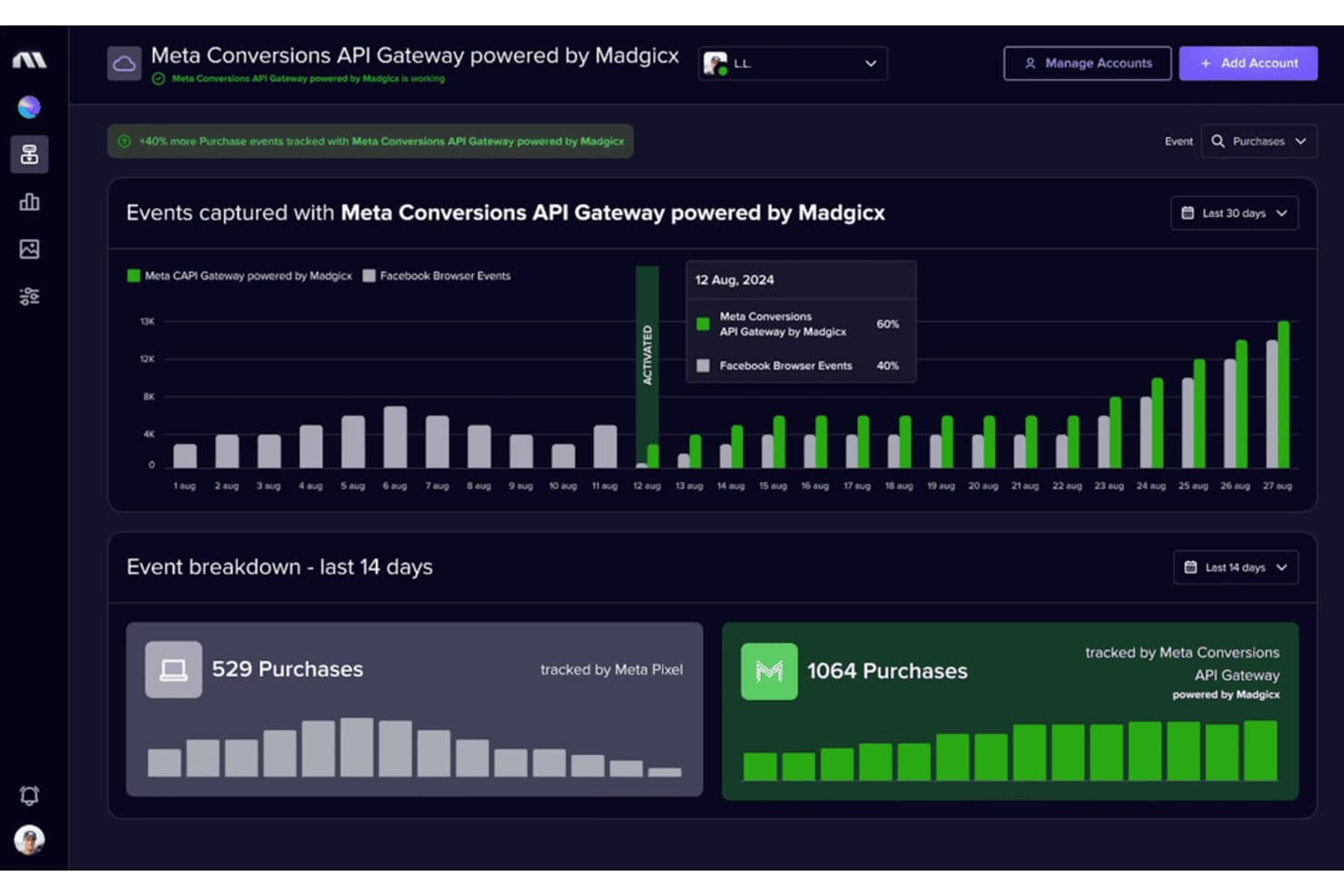
Madgicx tracks 40% more purchases via Meta Conversions API Gateway. Madgicx is a Meta-focused ad management and automation platform that combines AI-driven campaign optimization, audience building, creative intelligence, and cross-channel reporting.
Who Is Madgicx Best For?
Madgicx is a strong fit for performance marketing agencies and Meta-heavy advertisers spending at least $3,000/month who want to automate campaign optimization at scale.
Why I Picked Madgicx
Madgicx earns its spot on my shortlist because no other tool matches its depth of Meta ad automation. I'm particularly impressed by the Autonomous Budget Optimizer, which redistributes daily budgets across ad sets in real time based on ROAS or CPA targets, and the AI Marketer, which audits your account daily and surfaces prioritized one-click fixes. Pair those with Creative Insights, which uses computer vision to tag and analyze creatives at scale and flag ad fatigue before it costs you, and you've got a genuinely mature Meta automation stack.
Madgicx Key Features
- Audience Studio: A library of prebuilt Meta audiences organized by funnel stage, with tools to build, test, and monitor custom, lookalike, and retargeting segments.
- Ads Manager 2.0: A unified Meta campaign interface with bulk editing, AI bidding, performance trend tracking, and change history built in.
- One-Click Report: A drag-and-drop reporting tool that aggregates data from Meta, Google Ads, TikTok, GA4, Shopify, and Klaviyo into shareable, white-labeled PDFs.
- Madgicx Cloud Tracking: A server-side Meta Conversions API integration that recovers attribution data lost to browser privacy restrictions and iOS changes.
Madgicx Integrations
Madgicx integrates with Meta for campaign management and optimization, plus Google Ads, TikTok Ads, GA4, Shopify, and Klaviyo for reporting. It also supports Meta Conversions API and AI assistants through Madgicx MCP; Google Ads and TikTok Ads are reporting-only.
Pros and Cons
Pros:
- White-label reporting for multiple Meta accounts
- Creative fatigue detection with AI insights
- AI-driven Meta budget and ad optimization
Cons:
- No CRM or BI tool connections
- No ad management outside Meta platforms
Learn more about Madgicx: Best for omnichannel media planning with agentic AI
- Not available
- Pricing upon request
Visit WebsiteCustomer Rating:4.4/5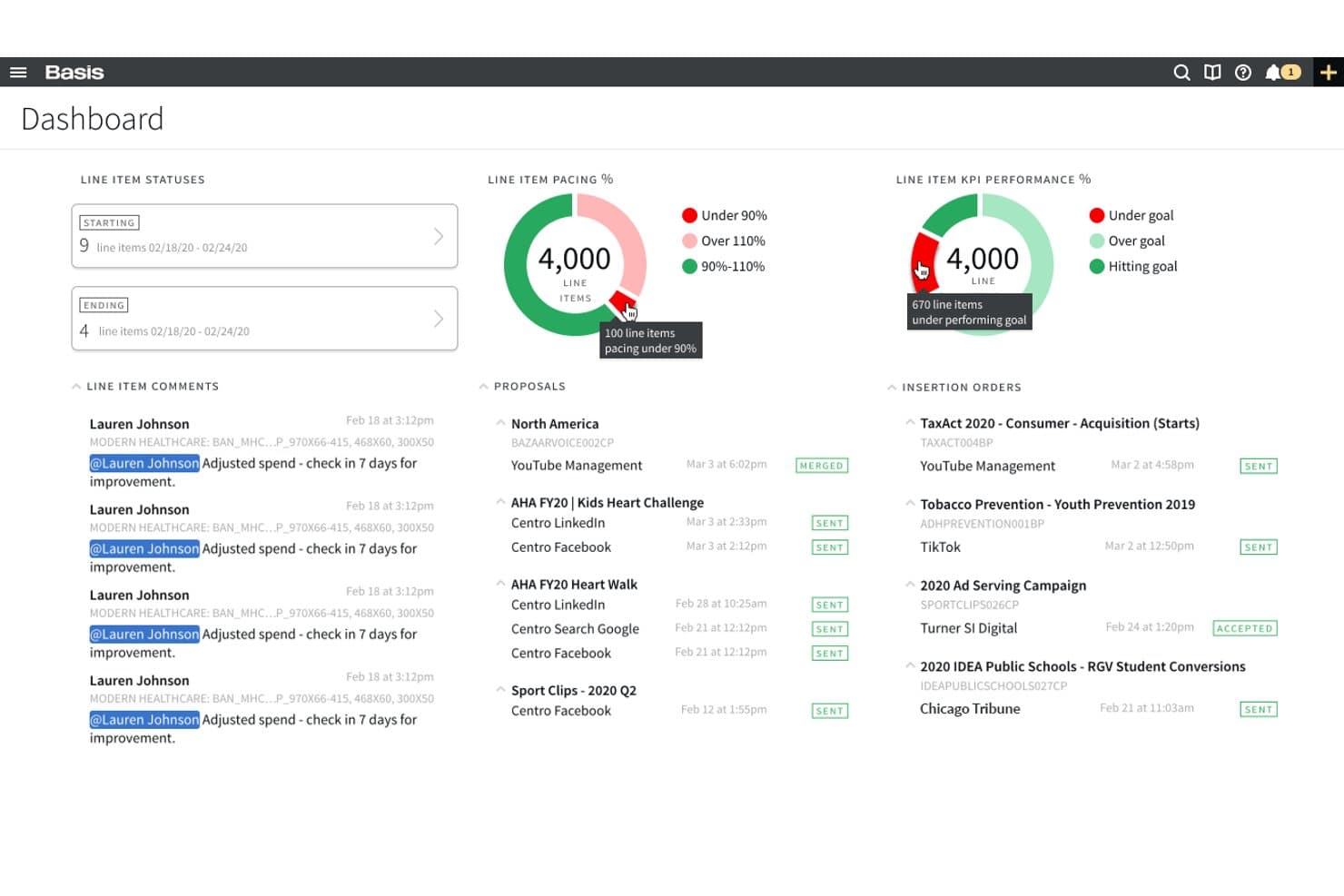
Basis offers a centralized dashboard displaying line item statuses, pacing percentages, KPI performance, proposals, and insertion orders for simplified media buying management. Basis is an omnichannel advertising platform that unifies programmatic, paid social, search, direct, and CTV campaign management and reporting across a single interface.
Who Is Basis Best For?
Basis is a strong fit for agencies and enterprise teams running omnichannel campaigns across programmatic, CTV, and paid social from a single platform.
Why I Picked Basis
Basis earns its spot on my shortlist because its Compass agentic AI can turn a campaign brief into a fully activation-ready omnichannel media plan in minutes, spanning programmatic, paid social, CTV, and search in one pass. I'm also a fan of how SmartBid continuously reallocates budget across all seven connected social platforms (Meta, LinkedIn, TikTok, Reddit, Snapchat, Pinterest, and YouTube) in real time, so spend naturally shifts toward what's actually performing. The cross-channel dashboards, powered by Snowflake and ThoughtSpot, pull daily data from every connected social network into one view without manual exports.
Basis Key Features
- BasisConnect+ cookieless conversion tracking: Tracks post-click site conversions across connected networks without relying on third-party cookies.
- Basis DataBridge: Pipes cross-channel performance data directly into external BI tools like Looker, Datorama, Tapclicks, and Funnel.
- Private marketplace deal library: Gives you access to 2,000+ curated PMP deals with premium publishers, built directly into the platform.
- LiveRamp CRM audience activation: Converts uploaded CRM records into targetable audience segments, typically available within hours of upload.
Basis Integrations
Basis offers 170+ integrations, including Meta, LinkedIn, TikTok, Reddit, Snapchat, Pinterest, Google Ads, Microsoft Ads, LiveRamp, Looker, and Funnel. It connects with seven social platforms through APIs and supports custom connectivity.
Pros and Cons
Pros:
- Supports privacy-friendly cookieless conversion tracking
- AI-driven media planning and budget optimization
- Enables unified reporting across seven social networks
Cons:
- No native A/B or DCO creative testing
- Social ad creatives managed outside the platform
Learn more about Basis: Best for CRM-driven ad audience targeting
- Free plan available
- From $7/user/month (billed annually)
Visit WebsiteCustomer Rating:4.4/5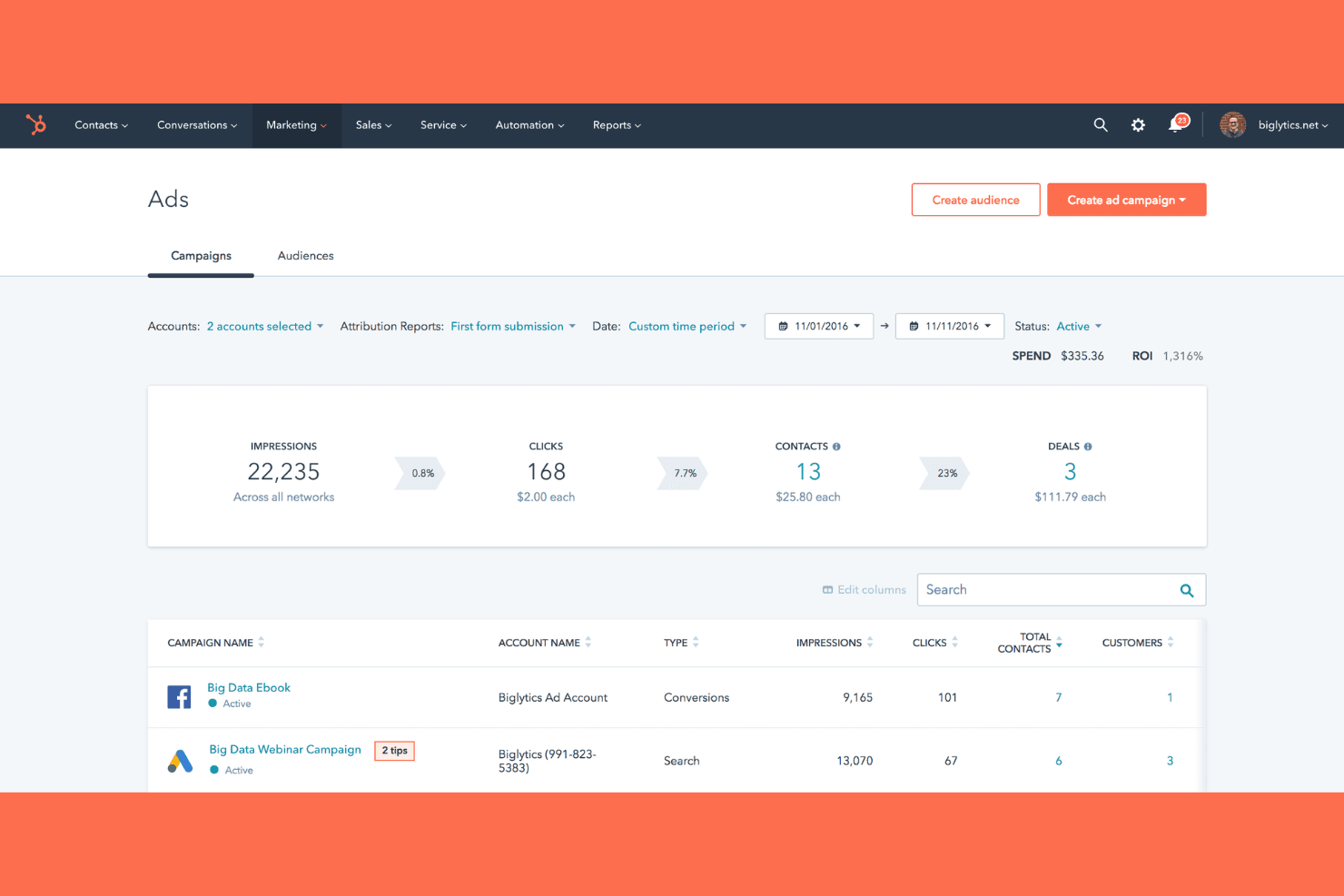
HubSpot Marketing Hub tracks ad spend, ROI, and campaign performance. HubSpot Marketing Hub is an all-in-one marketing platform that combines paid ad management across Meta, LinkedIn, TikTok, Google, Reddit, and Microsoft with CRM-powered audience targeting, multi-touch attribution, and social media publishing.
Who Is HubSpot Marketing Hub Best For?
HubSpot Marketing Hub is a strong fit for B2B and SaaS marketing teams that want to run paid ads across multiple networks using the same CRM data that drives their sales pipeline.
Why I Picked HubSpot Marketing Hub
HubSpot Marketing Hub earns its spot on my shortlist because no other tool in this category lets you build ad audiences directly from CRM data the way it does. I can target Meta, LinkedIn, and TikTok campaigns using lifecycle stage, deal history, or purchase behaviour pulled straight from the CRM, then track each interaction back to closed-won revenue through multi-touch attribution. That closed loop, from ad click to signed contract, is what makes it genuinely useful for B2B and SaaS demand generation teams.
HubSpot Marketing Hub Key Features
- Ad sequence builder: Automatically triggers follow-up workflows—like email nurture or sales routing—after a contact interacts with an ad.
- LinkedIn Lead Gen Forms: Captures lead data from native LinkedIn forms and syncs it directly to HubSpot CRM contacts.
- Pixel management: Deploys and manages TikTok and Meta tracking pixels from within HubSpot to sync conversion data back to CRM records.
- Customizable attribution dashboards: Connects ad interactions to pipeline and closed-won revenue using time decay, U-shaped, and W-shaped attribution models.
HubSpot Marketing Hub Integrations
HubSpot Marketing Hub offers native integrations with Meta, LinkedIn, Google Ads, TikTok, Microsoft Ads, Reddit Ads, Salesforce, and Google Analytics 4. Its App Marketplace adds 2,000+ marketplace integrations, and an API supports custom connections.
Pros and Cons
Pros:
- Multi-touch attribution links ads to revenue
- Multi-network campaigns managed in one place
- CRM-powered audience targeting for paid ads
Cons:
- No AI-driven bid or budget optimization
- No native ad A/B testing feature
Learn more about HubSpot Marketing Hub:
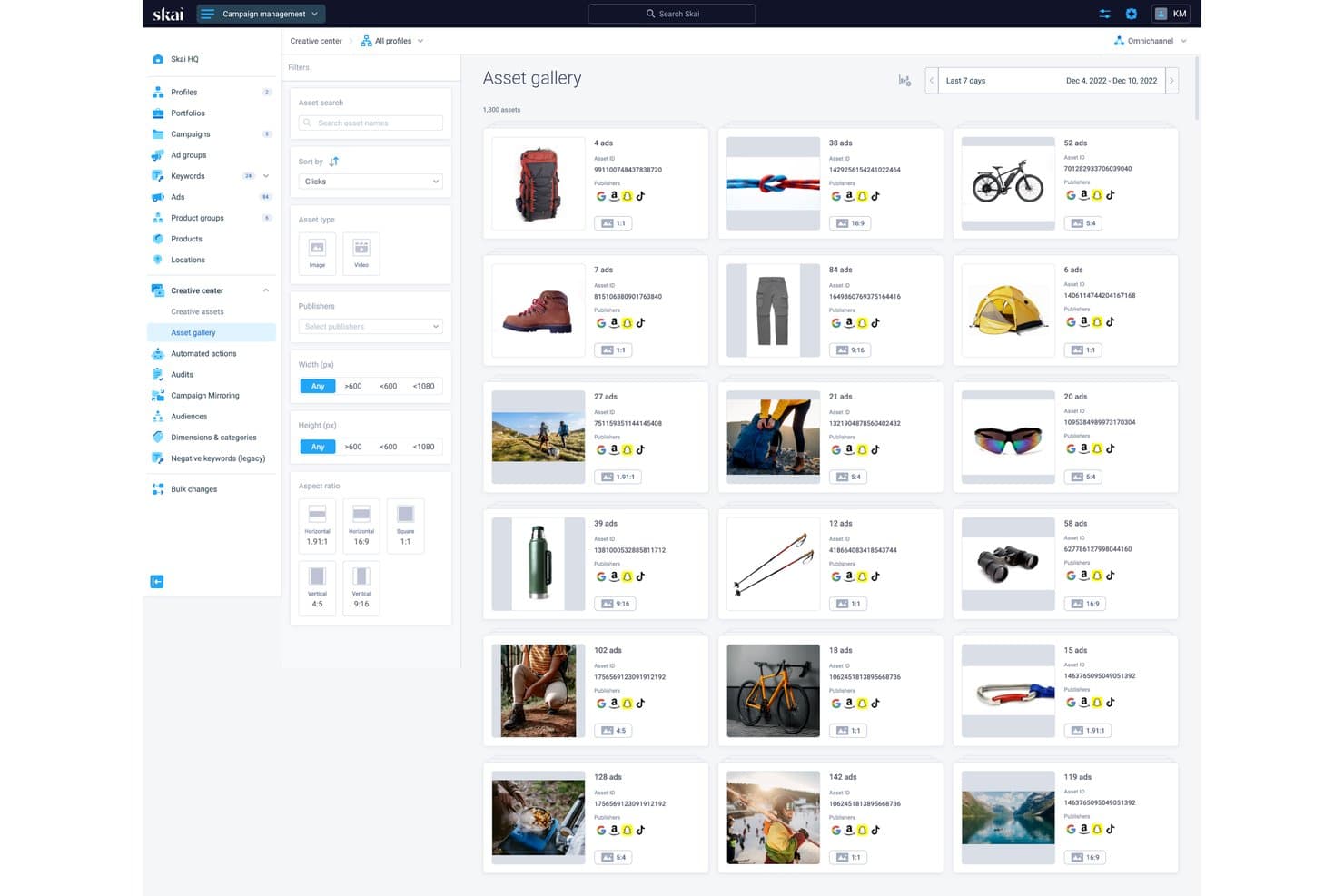
Skai's asset gallery centralizes creative assets across publishers. Skai is an enterprise paid media platform that unifies campaign management, AI-driven optimization, and cross-channel reporting across social, search, and retail media networks from a single interface.
Who Is Skai Best For?
Skai is a strong fit for enterprise performance marketing teams running paid campaigns across social, search, and retail media simultaneously.
Why I Picked Skai
I've included Skai in my top picks because it's the strongest option I've found for running paid campaigns across social, search, and retail media from a single platform without losing performance visibility. Its Budget Navigator and algorithmic optimization engine automatically shift spend across channels based on live ROAS signals, which means less manual reallocation when performance shifts mid-flight. Celeste AI adds conversational reporting on top of that, so you can query cross-channel performance in plain language and get actionable insights in under a minute.
Skai Key Features
- Build Your Own Algorithm: A custom algorithm builder that lets you train optimization logic against your own business goals, beyond standard bid strategies.
- Celeste AI conversational queries: A natural-language interface that lets you ask performance questions and get cross-channel insights returned in under a minute.
- Third-party audience marketplace: Access to 1,000+ behavioural audience segments from Experian, Oracle, and Epsilon for targeting on Meta's family of apps.
- Competitive Insights: A benchmarking tool available on Advanced and higher tiers for monitoring and analyzing competitor landscape data across channels.
Skai Integrations
Skai connects with 300+ publishers, including Meta, TikTok, Snapchat, Pinterest, LinkedIn, Google, and Amazon Ads, plus Salesforce, Google Analytics, Adobe Analytics, AppsFlyer, and Adjust. It also supports custom integrations through its open framework, Amazon S3, BigQuery, and Zapier.
Pros and Cons
Pros:
- True omnichannel reporting for social, retail, and search
- Conversational AI delivers instant performance insights
- Cross-channel budget reallocation with live ROAS signals
Cons:
- Full Reddit Ads support still rolling out
- Annual contracts with high minimum spend required
Learn more about Skai:
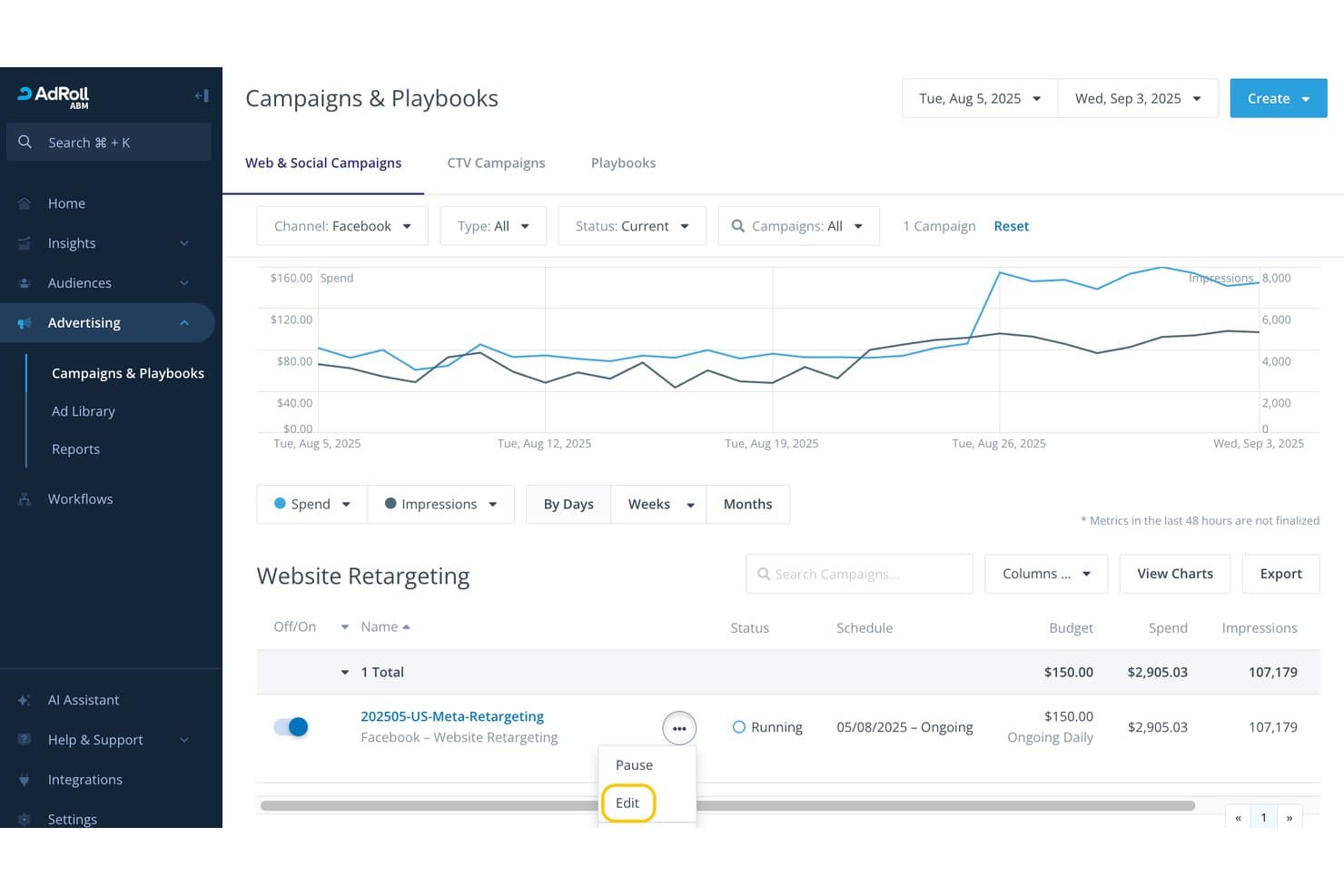
RollWorks lets users edit and manage Facebook retargeting campaigns easily. RollWorks is a B2B-focused advertising platform that combines account-based audience targeting, AI-driven bid optimization, and cross-channel campaign management across LinkedIn, Meta, TikTok, and Pinterest.
Who Is RollWorks Best For?
RollWorks is built for B2B SaaS demand generation and growth marketing teams that need account-level ad targeting tied directly to pipeline and revenue reporting.
Why I Picked RollWorks
I picked RollWorks as one of the best because its ICP Fit Scoring and BidIQ AI engine make B2B account-based ad targeting genuinely precise. Rather than broad audience sprays, I can build dynamic account lists graded by firmographic and intent data from Bombora and G2, then let BidIQ optimize bids across LinkedIn and Meta using 80+ signals per impression. The Revenue Impact Report then ties those campaigns directly to pipeline and closed-won revenue, not just clicks.
RollWorks Key Features
- ICP Fit Scoring: Grades target accounts A–D based on firmographic, technographic, and intent data to prioritize ad spend on your best-fit accounts.
- LinkedIn Lead Gen Forms: Supports native LinkedIn Lead Gen Forms, Carousel, Conversation, and Event ad formats directly within the platform.
- Journey Prediction: Uses CRM and intent data to flag accounts 4X–25X more likely to convert, triggering automated marketing-to-sales handoffs.
- Revenue Impact Report: Compares ad-influenced vs. non-influenced deals across pipeline, deal size, sales cycle length, and win rate.
RollWorks Integrations
RollWorks offers native integrations with Salesforce, HubSpot, LinkedIn Marketing Solutions, Facebook, Instagram, TikTok, Pinterest, Bombora, G2, and Google Analytics. Its Reporting API supports custom data connections.
Pros and Cons
Pros:
- Automated bid optimization with AI engine
- Revenue reporting ties campaigns to pipeline
- Best-in-class B2B audience targeting tools
Cons:
- No generative AI or native A/B testing
- Social ads limited to four networks
Learn more about RollWorks: Best for AI-driven budget reallocation at scale
- Free demo available
- Pricing upon request
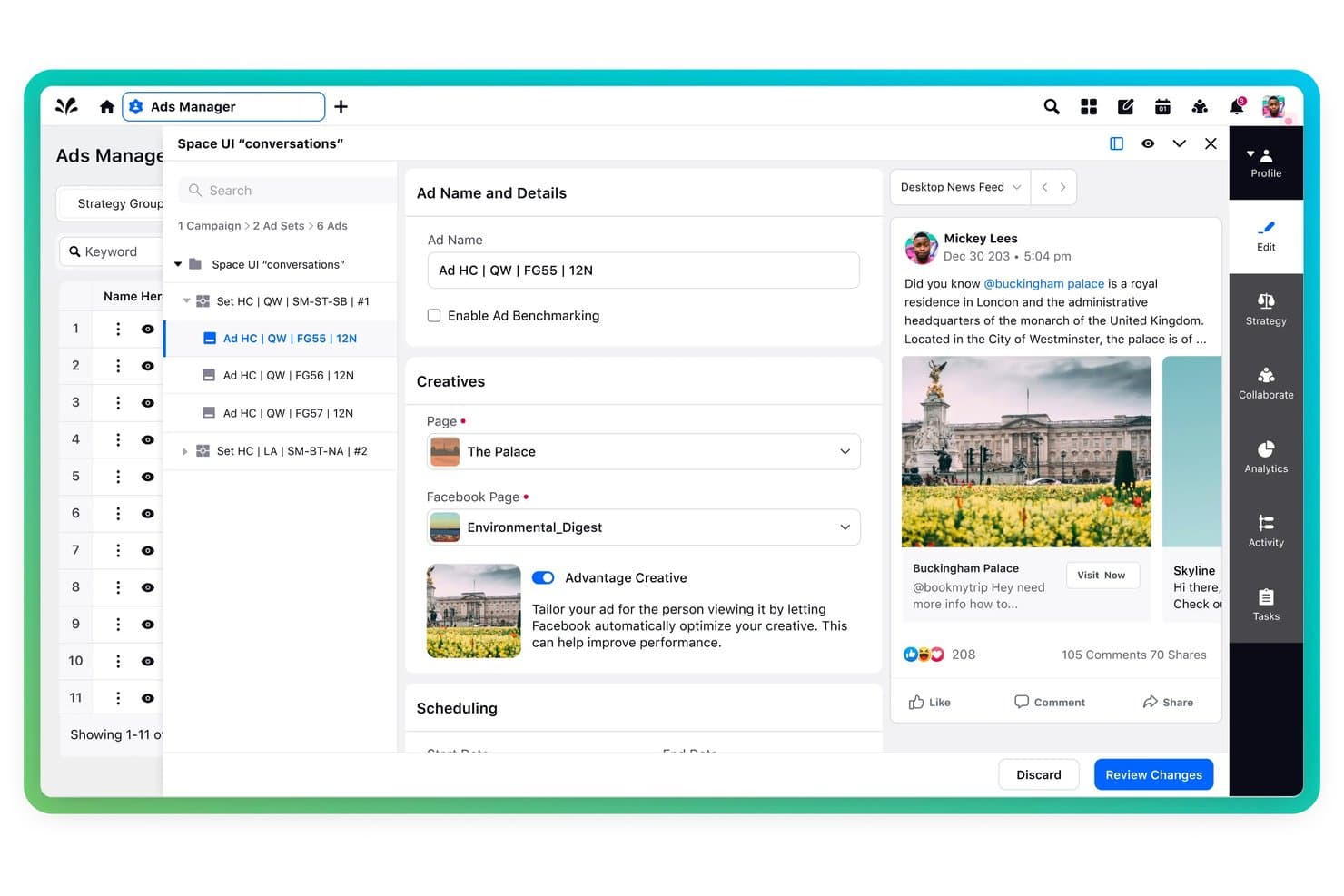
Sprinklr Marketing lets users build and preview social ads with creative controls. Sprinklr Marketing is an enterprise social media advertising platform that manages paid campaigns across 10+ ad networks—including Meta, LinkedIn, TikTok, Reddit, and Snapchat—with AI-driven budget allocation, creative optimization, and unified cross-channel reporting.
Who Is Sprinklr Marketing Best For?
Sprinklr Marketing is built for enterprise paid social teams managing high-volume campaigns across 10+ networks who need AI-driven budget decisions, not manual channel-by-channel adjustments.
Why I Picked Sprinklr Marketing
I picked Sprinklr Marketing as one of the best because its Smart Budget Allocation does something I rarely see done well: it automatically shifts spend across 10+ ad networks in real time based on live performance signals. If LinkedIn is underperforming against Meta on a given day, the AI rebalances without manual intervention. The Anomaly Copilot layer catches spend deviations before they compound, which makes it genuinely useful at enterprise scale.
Sprinklr Marketing Key Features
- Dynamic Creative Optimization: Automatically tests and selects winning combinations of ad elements across creatives to improve ad performance.
- Approval workflows: Built-in, tiered review and approval flows with role-based access controls and email-based approvals for enterprise ad governance.
- AI Creative Insights: Analyzes ad content elements—including CTA placement, colour, and logo position—to surface high-performing creative patterns.
- Unified cross-channel reporting: Combines paid, organic, and earned media data into a single customizable dashboard with BI tool integrations.
Sprinklr Marketing Integrations
Sprinklr Marketing offers 100+ integrations, including Salesforce, Adobe Marketo Engage, Google Analytics 4, Adobe Analytics, Tableau, Power BI, AppsFlyer, and Adobe Firefly. Native ad-network integrations include Meta, LinkedIn, TikTok, Reddit, Pinterest, and Amazon Ads.
Pros and Cons
Pros:
- Paid, organic, and earned data in one dashboard
- Deep campaign approval and governance controls
- AI shifts budget across 10+ networks automatically
Cons:
- Platform can feel overwhelming for smaller teams
- Requires annual enterprise contract to purchase
Learn more about Sprinklr Marketing: Best for retargeting across Meta, TikTok, and Pinterest
- Free demo available
- Pricing upon request
Visit WebsiteCustomer Rating:3.9/5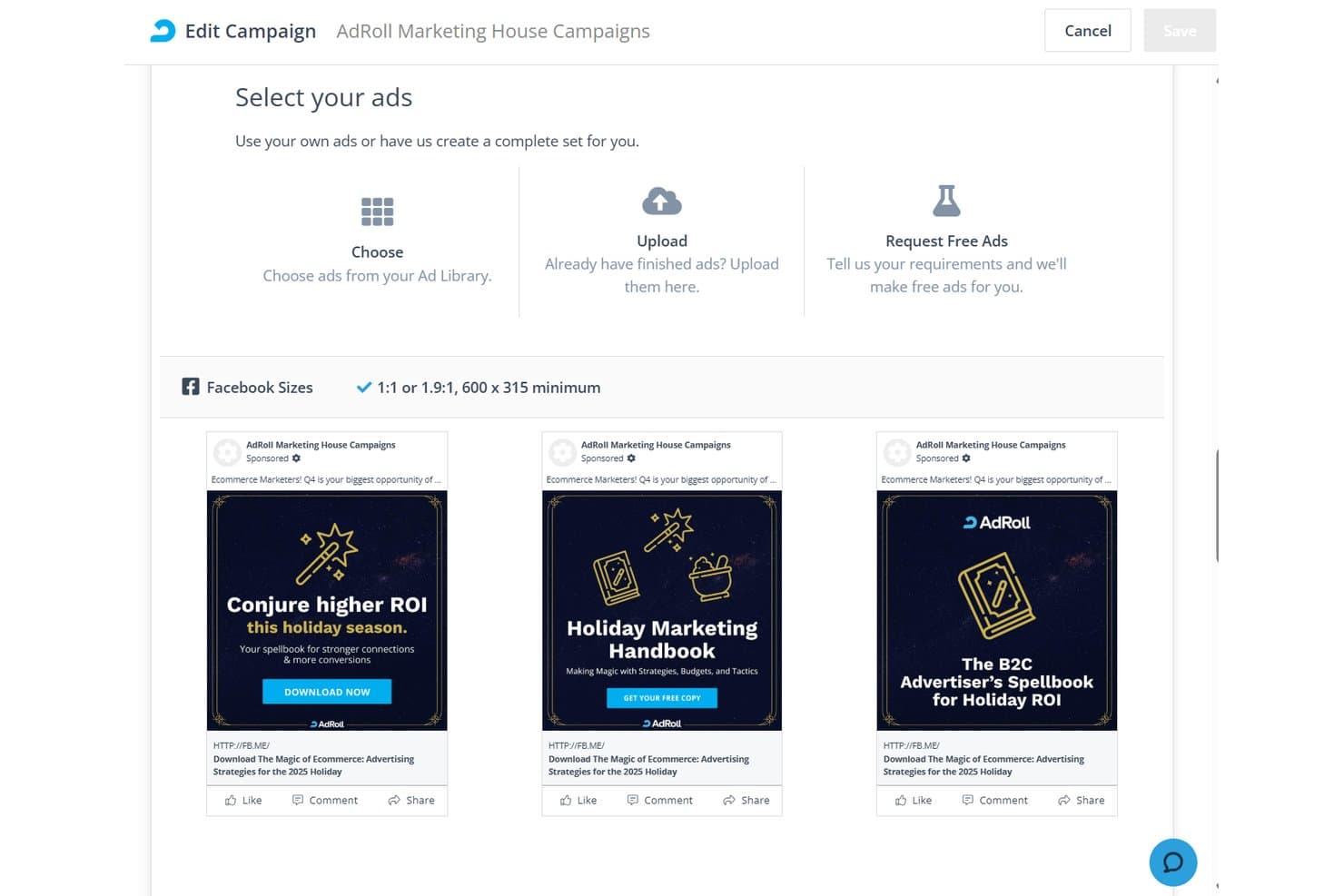
AdRoll lets users select and preview Facebook ads within a campaign. AdRoll is a multi-channel digital advertising platform that manages retargeting, prospecting, and full-funnel ad campaigns across social networks, display, native, video, and CTV from a single dashboard.
Who Is AdRoll Best For?
AdRoll suits ecommerce brands and performance marketers who want to manage retargeting campaigns across Meta, TikTok, and Pinterest from a single platform.
Why I Picked AdRoll
AdRoll earns its spot on my shortlist because it's one of the few platforms that lets you run and manage retargeting campaigns across Meta, TikTok, and Pinterest from a single dashboard without juggling three native ad managers. I'm particularly impressed by its Dynamic CPM bidding, which uses over 17 years of ML training data to automatically adjust bids based on real performance signals across all three networks simultaneously. The Recipes automation feature is also genuinely useful, letting you coordinate cross-channel social campaigns in one workflow rather than rebuilding logic in each platform separately.
AdRoll Key Features
- Cross-Channel Attribution add-on: Tracks conversions across channels using pixel, UTM, and API integrations, then visualizes the full funnel in Pathways reports with assisted conversion analysis.
- AI lookalike targeting: Builds new audiences by analyzing existing customer data with machine learning to find users most likely to convert across supported networks.
- Centralized Ad Library: Stores and organizes all creative assets in one place, letting you swap images, video, and HTML5 ads across campaigns without re-uploading.
- Peer benchmarking: Compares your CTR, CPC, and CPM performance against industry averages so you can gauge where campaigns stand relative to similar advertisers.
AdRoll Integrations
AdRoll offers 70+ integrations, including Salesforce, HubSpot, Google Analytics, Shopify, WooCommerce, Meta, TikTok, and Pinterest. It also provides 8+ public APIs for custom integrations and reporting.
Pros and Cons
Pros:
- Peer benchmarking for social ad campaign metrics
- Full-funnel retargeting with 17+ years ML data
- AI-driven dynamic bidding optimization across channels
Cons:
- No native A/B or multivariate ad testing
- Lacks LinkedIn and X campaign management
Learn more about AdRoll: Best for AI across Facebook and Instagram
- Free plan available
- From $1/day
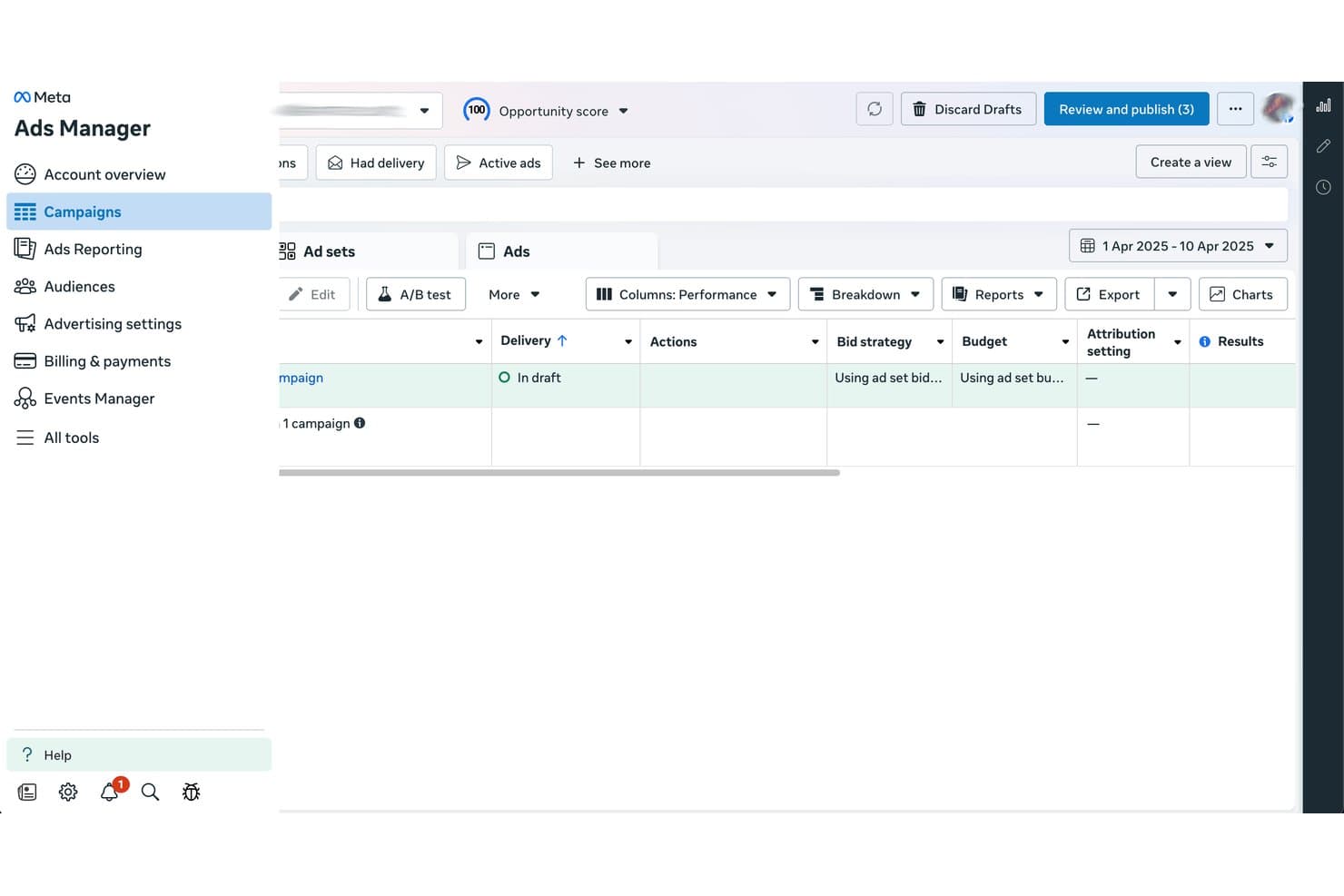
Meta Ads Manager lets users review and publish draft campaigns. Meta Ads Manager is Meta's native ad management platform for creating, running, and optimizing paid campaigns across Facebook, Instagram, Messenger, WhatsApp, and the Meta Audience Network, with AI-driven automation, audience targeting, creative testing, and conversion tracking built in.
Who Is Meta Ads Manager Best For?
Meta Ads Manager is the go-to tool for performance marketers and paid social specialists who run campaigns primarily on Facebook and Instagram and want deep AI-driven automation through the Advantage+ suite.
Why I Picked Meta Ads Manager
Meta Ads Manager earns its spot on my shortlist because no other platform comes close to what Advantage+ AI delivers across Facebook and Instagram at scale. I'm particularly impressed by Advantage+ Audience, which uses Meta's AI to discover high-converting audiences beyond your manual inputs, and Advantage+ Creative, which auto-generates and tests multiple ad variants using your brand assets. On top of that, Incremental Attribution uses holdout testing to measure true ad-driven conversions, not just last-click credit.
Meta Ads Manager Key Features
- Advantage+ Campaign Budget: Meta's AI automatically allocates your total campaign budget across ad sets in real time to maximize results.
- Conversions API (CAPI): Server-side tracking sends conversion data directly from your server to Meta, bypassing browser restrictions and iOS privacy limits.
- Automated rules: Rule-based triggers that pause, activate, or adjust bids and budgets when campaigns hit defined performance thresholds.
- Instant Forms: Native lead capture forms that collect contact info within Facebook and Instagram without redirecting users to an external landing page.
Meta Ads Manager Integrations
Meta Ads Manager integrates with HubSpot, Salesforce, Shopify, Google Analytics 4, Google Looker Studio, and Zapier. It also supports the Conversions API for custom CRM, server-side tracking, and data integrations.
Pros and Cons
Pros:
- Incremental attribution measures true ad-driven lift
- Deep audience targeting with Advantage+ features
- Industry-leading AI automation for ad campaigns
Cons:
- Account suspensions and bans happen with little warning
- Only supports Meta-owned social platforms
Learn more about Meta Ads Manager: Best for B2B pipeline-driven ad optimization
- Free demo available
- Pricing upon request
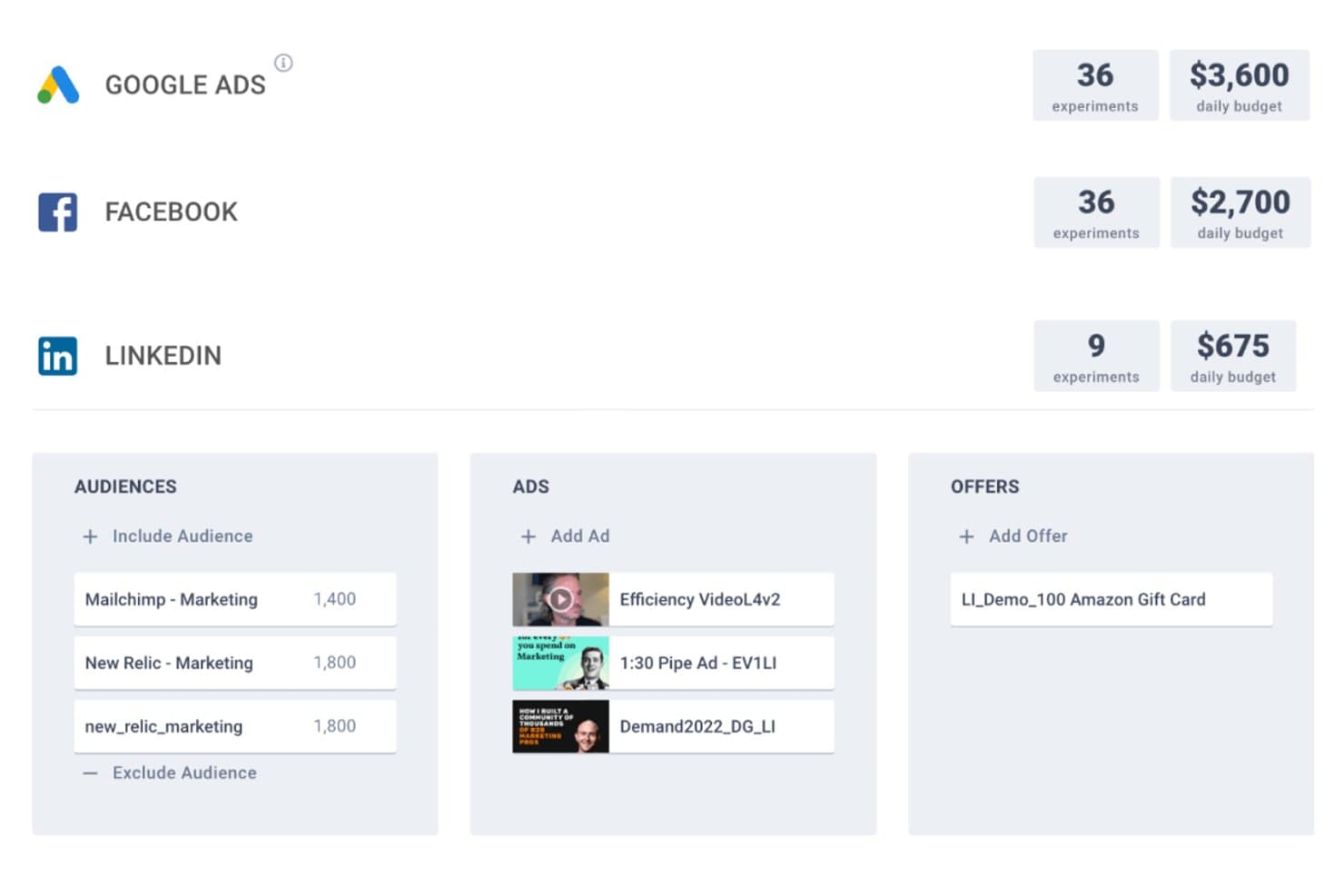
Metadata manages ad experiments across Google, Facebook, and LinkedIn from one place. Metadata is a B2B-focused paid social advertising platform that manages campaigns across LinkedIn, Meta, X, Reddit, Google, Bing, and ChatGPT, with AI-driven audience targeting, automated multivariate experimentation, and closed-loop revenue attribution built in.
Who Is Metadata Best For?
Metadata is built for B2B SaaS demand generation teams at mid-market and enterprise companies that run high-volume paid campaigns and need to tie ad spend directly to pipeline.
Why I Picked Metadata
I picked Metadata as one of the best because it's the only platform I've seen that optimizes paid social spend directly to pipeline, not just clicks or leads. Its Bid Agent negotiates bids up to 50 times per day across LinkedIn, Meta, and Google, while the Optimization Agent runs multivariate experiments across audiences, creatives, and offers simultaneously. What seals it for me is the MetaMatch identity graph, which maps 500M+ B2B profiles onto consumer platforms like Meta, so you're reaching the right accounts even off LinkedIn.
Metadata Key Features
- MetaMatch identity graph: Maps 500M+ B2B profiles from 15+ data sources onto consumer ad platforms so you can target business buyers on Meta and Reddit, not just LinkedIn.
- Seven specialized AI agents: Dedicated agents handle each campaign stage—from audience building and creative generation to bid management, analytics, and operations.
- Website visitor deanonymization: Identifies anonymous site visitors at the contact level in real time, before any form fill, and syncs that data back to Salesforce.
- MetadataONE MCP server: Exposes 160 tools via an open Model Context Protocol server, letting any compatible LLM generate fully configured campaigns from a single natural language prompt.
Metadata Integrations
Metadata integrates with Salesforce, HubSpot, Marketo, LinkedIn Ads, Meta, Google Ads, Microsoft Advertising, Bombora, G2, and Google Analytics 4. It also offers an open API, a 160-tool MetadataONE MCP server, and Zapier.
Pros and Cons
Pros:
- B2B identity graph unlocks new targeting options
- Ties ad spend directly to pipeline revenue
- Automates multivariate ad experiments across networks
Cons:
- Limited support for newer creative ad formats
- Only suited for high-volume B2B advertisers
Learn more about Metadata: Best for AI-driven creative and media unification
- Free demo available
- Pricing upon request
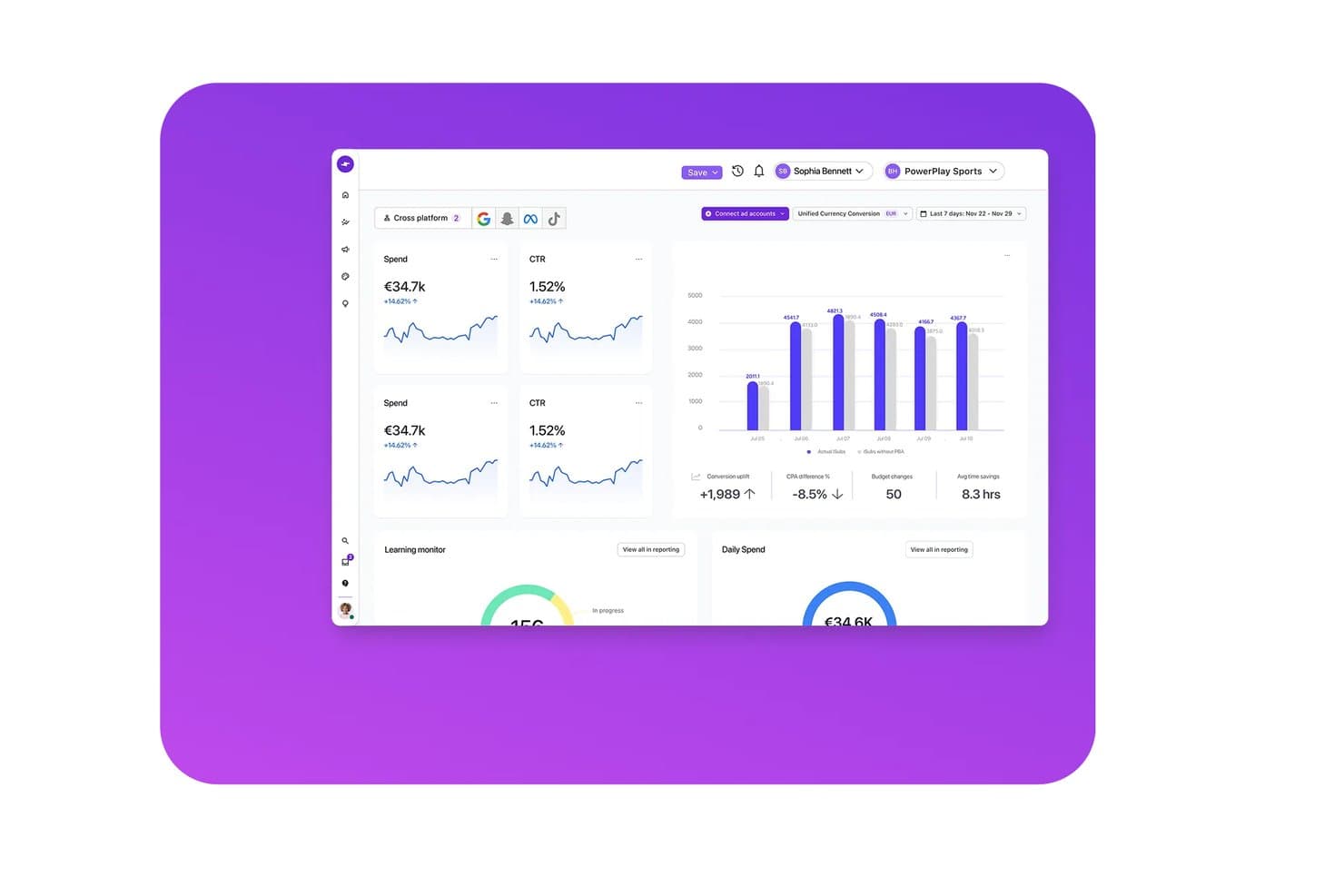
Smartly.io unifies cross-platform ad performance in one dashboard. Smartly.io is a social media advertising platform that unifies AI-driven creative production, multi-network campaign management, and performance analytics across Meta, TikTok, Pinterest, Snapchat, Reddit, and other major ad networks.
Who Is Smartly.io Best For?
Smartly.io fits enterprise brands and agencies running high-volume paid social campaigns across multiple networks, particularly in e-commerce, retail, and consumer verticals.
Why I Picked Smartly.io
Smartly.io earns its spot on my shortlist because it's one of the only platforms that genuinely unifies creative production and media execution in a single workflow. I love that AI Studio can generate 50+ on-brand creative variants from one template in under 10 minutes, adapting copy, visuals, and formats across Meta, TikTok, Pinterest, and more without rebuilding from scratch. Paired with Creative Predictive Potential, I can see projected attention scores before a campaign ever goes live.
Smartly.io Key Features
- Predictive Budget Allocation: AI-driven feature that shifts spend in real time toward the highest-performing channels and campaigns across your entire portfolio.
- Optimization Triggers: Rules-based automation that pauses underperforming ads, scales budgets for top performers, and rotates creatives to prevent fatigue.
- Brand Pulse: Cross-channel reach and frequency measurement tool that deduplicates audience exposure in real time for upper-funnel brand campaigns.
- Dynamic Product Ads: AI-enhanced video and image templates that automate and scale catalogue-based ad campaigns across Meta, TikTok, Snapchat, and Pinterest.
Smartly.io Integrations
Smartly.io supports 10+ native ad network integrations, including Meta, TikTok, Google Ads, Pinterest, Snapchat, Reddit, Spotify, Roku, The Trade Desk, and Yahoo DSP. It also connects with Salesforce, HubSpot, Adobe After Effects, Adobe Photoshop, Figma, and Google Web Designer.
Pros and Cons
Pros:
- Supports real-time cross-channel budget allocation
- AI predicts creative performance pre-launch
- Unifies creative production and media management
Cons:
- Enterprise pricing excludes smaller advertisers
- No LinkedIn ad management included
Learn more about Smartly.io:
Outro software de publicidade nas redes sociais
Eis algumas opções adicionais de software de publicidade nas redes sociais que não entraram na minha seleção, mas que ainda vale a pena consultar:
- 11LinkedIn Marketing SolutionsBest for B2B ads on professional attributes
- 12MediaoceanBest for omnichannel ad campaign orchestration
- 13HootsuiteBest for unified organic and paid ad management
- 14AdEspressoBest for Meta A/B testing across agencies
- 15BrandwatchBest for AI-powered social listening insights
- 16OptmyzrBest for rule-based automation across Meta and LinkedIn
How I Evaluate Social Media Advertising Software
I split my evaluation into two layers: the core capabilities a tool must have—like running Meta and LinkedIn campaigns from one place—and the differentiators that separate good from great.
Core Functionality (Table Stakes For This List)
When I'm selecting tools for my list, I rank each one on a scale from 0 (does not offer the functionality) to 5 (excels in this area) for each core functionality listed below. Then, I calculate the tool's total score into a percentage. Each tool needs to achieve a minimum total score of 75% to be considered for inclusion.
- Multi-Network Ad Management: I check whether you can build and manage campaigns across Meta, LinkedIn, TikTok, and other major networks from a single dashboard.
- Audience Targeting & Segmentation: Custom audiences, lookalikes, and retargeting lists should be manageable across networks—like syncing a CRM list to both Meta and LinkedIn.
- Campaign Automation & Optimization: I evaluate whether the platform offers rules-based or AI-driven automation for bids and budgets, such as auto-pausing underperforming ad sets.
- Creative Testing & Management: The tool should let you run A/B or multivariate tests on ad variants and organize assets in a shared creative library.
- Performance Analytics & Reporting: Cross-network dashboards that aggregate KPIs like CPC, CPA, and ROAS matter here, along with scheduled or exportable reports.
- Conversion Tracking & Attribution: I look for pixel and server-side tracking support tied to downstream outcomes, like connecting ad clicks to demo requests in your CRM.
Once I have a list of tools that meet this criteria, I consider what sets each platform apart.
Differentiating Factors (What Sets Vendors Apart)
Here's how I compare and contrast different vendors:
Standout Features
Cross-channel budget reallocation is a big differentiator—I look for platforms that can automatically shift spend toward the best-performing network mid-campaign. Competitor ad intelligence adds real value too, especially when you need to benchmark creative strategies against other SaaS brands in your vertical. Approval workflows matter for teams where campaigns pass through multiple stakeholders before launch, cutting down on messy email threads and version confusion.
Beyond Features
I evaluate how well each platform connects to the broader SaaS tech stack—specifically CRM and marketing automation tools like Salesforce and HubSpot—because closed-loop reporting from ad click to closed deal is essential for proving ROI. Pricing structure matters too; I check whether costs scale predictably as ad budgets grow or if surprise fees kick in. Data security rounds out my evaluation, where I look for SOC 2 compliance, role-based access controls, and first-party data handling that keeps pace with evolving privacy requirements.
Como escolher um software de publicidade nas redes sociais
É fácil perder-se em listas extensas de funcionalidades e estruturas de preços complexas. Para o ajudar a manter-se concentrado enquanto percorre o seu processo específico de seleção de software, eis uma lista de verificação dos fatores a ter em conta:
| Fator | O que considerar |
|---|---|
| FatorEscalabilidade | O que considerarA plataforma acomoda o crescimento do volume de anúncios, dos canais e dos utilizadores à medida que a sua empresa cresce? |
| FatorIntegrações | O que considerarA que ferramentas de marketing, análise ou comércio eletrónico se liga nativamente para evitar trabalho manual? |
| FatorPersonalização | O que considerarPode adaptar os fluxos de trabalho das campanhas, as vistas do painel e os relatórios à estrutura da sua organização? |
| FatorFacilidade de utilização | O que considerarÉ simples de aprender para os novos membros da equipa? Os utilizadores não técnicos conseguem gerir campanhas com confiança? |
| FatorImplementação e integração inicial | O que considerarCom que rapidez pode lançar campanhas após a compra? Existem recursos de integração inicial ou apoio à migração? |
| FatorCusto | O que considerarComo se alinham as taxas de subscrição com os orçamentos das suas campanhas ou com os preços da agência? Existem custos adicionais ocultos? |
| FatorMedidas de segurança | O que considerarO software oferece controlos multiutilizador, permissões baseadas em funções e conformidade com a privacidade dos dados? |
| FatorDisponibilidade do apoio | O que considerarExiste apoio em direto disponível no seu fuso horário ou idioma e através de que canais pode contactá-lo? |
O que é um software de publicidade nas redes sociais?
Os softwares de publicidade nas redes sociais são plataformas que ajudam a planear, lançar e analisar campanhas pagas em várias redes sociais a partir de um único painel. Estas ferramentas permitem agendar anúncios, gerir orçamentos, segmentar públicos específicos e medir os resultados num só lugar. Ao centralizarem a gestão de anúncios, os relatórios e a otimização, estas plataformas ajudam as empresas a maximizar o alcance, poupar tempo e aperfeiçoar a estratégia sem terem de alternar entre canais sociais individuais.
Funcionalidades do software de publicidade nas redes sociais
Ao selecionar software de publicidade nas redes sociais, preste atenção às seguintes funcionalidades principais:
- Agendamento de campanhas: Configure campanhas publicitárias antecipadamente para serem lançadas e interrompidas automaticamente em datas ou horas específicas, garantindo uma promoção consistente e a entrega atempada de conteúdos em todas as plataformas.
- Segmentação do público: Selecione e refine os dados demográficos, os interesses e os comportamentos das pessoas que irão ver os seus anúncios, permitindo uma comunicação precisa e um melhor desempenho publicitário.
- Gestão multicanal: Controle e acompanhe campanhas publicitárias em várias redes sociais a partir de um único painel, eliminando a necessidade de iniciar sessão em cada plataforma individualmente.
- Controlo do orçamento: Defina limites de despesa, atribua orçamentos a diferentes campanhas e acompanhe os gastos com publicidade em tempo real para evitar gastos excessivos e otimizar a afetação de recursos.
- Gestão de recursos criativos: Armazene, organize e reutilize imagens, vídeos e textos publicitários para facilitar a criação de novos anúncios e a colaboração com as equipas criativas.
- Análise do desempenho: Aceda a relatórios detalhados que destacam o alcance, as conversões, os custos e o envolvimento das campanhas, para acompanhar os resultados e tomar melhores decisões.
- Relatórios automatizados: Gere e agende relatórios regulares de desempenho, enviados para a sua caixa de entrada ou para as partes interessadas, poupando tempo de acompanhamento manual e mantendo todos alinhados.
- Ferramentas de colaboração em equipa: Atribua tarefas, adicione comentários e gira as permissões dos utilizadores dentro da plataforma, facilitando a coordenação das campanhas entre os membros da equipa.
- Testes A/B para anúncios: Execute várias versões dos anúncios para determinar qual tem melhor desempenho, utilizando dados para aperfeiçoar continuamente as estratégias criativas e de segmentação.
- Fluxos de aprovação: Configure processos de aprovação passo a passo para elementos criativos, mensagens ou orçamentos publicitários, garantindo que as campanhas cumprem os padrões de qualidade e conformidade antes de serem publicadas.
Funcionalidades comuns de IA do software de publicidade nas redes sociais
Para além das funcionalidades padrão do software de publicidade nas redes sociais acima indicadas, muitas destas soluções estão a incorporar IA com funcionalidades como:
- Geração automatizada de elementos criativos para anúncios: Utiliza IA para produzir variações de texto, imagem ou vídeo publicitário adaptadas aos seus objetivos e ao público-alvo, acelerando os testes criativos e a personalização de anúncios em grande escala.
- Modelação preditiva do desempenho: Analisa dados históricos e tendências atuais para prever quais as campanhas, os elementos criativos ou as definições de segmentação com maior probabilidade de atingir os seus objetivos antes de investir o orçamento.
- Segmentação inteligente do público: Identifica novos segmentos de público, públicos semelhantes ou grupos com elevada propensão através de aprendizagem automática, ajudando-o a descobrir potenciais clientes ou a aperfeiçoar quem vê os seus anúncios.
- Deteção de anomalias em tempo real: Acompanha o desempenho das campanhas em tempo real e alerta-o para picos, quedas ou problemas relacionados com o ritmo de utilização do orçamento através de modelos de IA, para que possa detetar problemas antes de estes afetarem os gastos.
- Otimização automatizada das licitações: Ajusta dinamicamente as licitações dos anúncios em várias plataformas e campanhas com base em dados de desempenho em tempo real, maximizando os resultados dentro das restrições orçamentais necessárias sem monitorização manual constante.
Vantagens do software de publicidade nas redes sociais
A implementação de software de publicidade nas redes sociais proporciona várias vantagens para a sua equipa e para a sua empresa. Eis algumas que pode esperar:
- Gestão centralizada de campanhas: Gira anúncios em vários canais sociais a partir de uma única plataforma para poupar tempo e evitar alternar entre ferramentas.
- Melhoria da segmentação do público: Alcance as pessoas certas com filtros precisos de dados demográficos, interesses e comportamentos, obtendo um maior envolvimento e melhores resultados.
- Análise de desempenho acionável: Acompanhe, compare e aprenda com relatórios detalhados para otimizar as campanhas e obter um melhor ROI e impacto comercial.
- Colaboração melhorada: Colabore com os membros da equipa utilizando fluxos de trabalho, permissões e partilha de recursos criativos integrados, garantindo que as campanhas se mantêm organizadas.
- Controlo do orçamento e dos gastos: Defina, acompanhe e ajuste os orçamentos publicitários em tempo real para evitar gastos excessivos e maximizar a eficiência da publicidade.
- Testes criativos mais rápidos: Teste e aperfeiçoe rapidamente elementos criativos ou estratégias publicitárias utilizando funcionalidades como testes A/B e ferramentas criativas automatizadas.
- Processos de conformidade e aprovação mais robustos: Utilize fluxos de aprovação personalizados e controlos de acesso baseados em funções para proteger a sua marca e garantir que as campanhas cumprem as normas.
Custos e preços do software de publicidade nas redes sociais
A seleção de software de publicidade nas redes sociais requer uma compreensão dos vários modelos de preços e planos disponíveis. Os custos variam consoante as funcionalidades, o tamanho da equipa, os complementos e muito mais. A tabela abaixo resume os planos comuns, os respetivos preços médios e as funcionalidades normalmente incluídas nas soluções de software de publicidade nas redes sociais:
Tabela de comparação de planos para software de publicidade nas redes sociais
| Tipo de plano | Preço médio | Funcionalidades comuns |
|---|---|---|
| Tipo de planoPlano gratuito | Preço médio$0 | Funcionalidades comunsAgendamento básico, análise limitada, um único utilizador, canais restritos e suporte padrão por tickets. |
| Tipo de planoPlano pessoal | Preço médio$10-$30/utilizador/mês | Funcionalidades comunsGestão multicanal, relatórios melhorados, publicação direta, ferramentas criativas limitadas e suporte por e-mail. |
| Tipo de planoPlano empresarial | Preço médio$50-$200/utilizador/mês | Funcionalidades comunsColaboração em equipa, segmentação avançada, controlos orçamentais, relatórios automatizados e fluxos de trabalho de aprovação. |
| Tipo de planoPlano empresarial avançado | Preço médio$300-$1,000+/mês | Funcionalidades comunsIntegrações personalizadas, suporte premium, utilizadores ilimitados, segurança avançada, integração inicial dedicada e funcionalidades de conformidade. |
Perguntas frequentes sobre software de publicidade nas redes sociais
Eis algumas respostas a perguntas frequentes sobre software de publicidade nas redes sociais:
Como escolher o software de publicidade nas redes sociais adequado para a minha empresa?
Comece por definir os seus principais objetivos publicitários, o tamanho da sua equipa e os seus fluxos de trabalho habituais. Compare as opções com base nas necessidades de integração, na facilidade de utilização, no suporte disponível e na adequação do nível de preços ao seu orçamento. Um período de avaliação gratuito pode ajudá-lo a avaliar a adequação à sua realidade.
Posso gerir anúncios de várias marcas ou clientes com uma única plataforma?
Sim, muitas soluções oferecem funcionalidades de gestão de várias contas ou marcas. Procure opções de mudança de conta, painéis separados e controlos de permissões para garantir que consegue gerir e elaborar relatórios facilmente sobre várias marcas ou contas de clientes.
Existem custos ocultos associados ao software de publicidade nas redes sociais?
Algumas plataformas cobram custos adicionais por análises avançadas, utilizadores adicionais ou ligação de mais contas de publicidade. Reveja sempre cuidadosamente a página de preços, pergunte sobre taxas por excedentes ou complementos obrigatórios e preste atenção à duração do contrato antes de assumir um compromisso.
Os meus dados estarão seguros com o software de publicidade nas redes sociais?
Sim, os fornecedores reputados utilizam encriptação de dados e autenticação multifator, além de oferecerem permissões baseadas em funções para manter protegidos os seus dados de campanhas e de audiência. Procure sempre informações publicadas sobre conformidade e certificações de segurança no site do fornecedor.
Com que rapidez posso lançar a minha primeira campanha depois de efetuar a compra?
A maioria das plataformas oferece uma configuração rápida, recursos de formação e importações para ajudar os novos utilizadores a lançar uma campanha no prazo de alguns dias. O prazo exato depende da preparação da sua equipa, da complexidade das campanhas e do nível de suporte necessário durante a integração inicial.