

Il software per contenuti comprende strumenti digitali che aiutano il tuo team a creare, organizzare, pubblicare e gestire contenuti scritti, visivi o video su larga scala. Se stai cercando il miglior software per contenuti, hai bisogno di opzioni adatte al tuo flusso di lavoro, che riducano le attività ripetitive e favoriscano una collaborazione efficace, perché gestire i contenuti significa fare molto più che preparare qualche file.
Questa guida mette a confronto le principali soluzioni, una accanto all’altra, così puoi confrontare rapidamente ciò che conta: i loro punti di forza, a chi sono destinate e come si integreranno con il tuo kit di strumenti digitali.
Perché fidarsi dei nostri consigli sui software
6,700+
Reviews
20
Industry experts
16+
Evaluation factors
14
Years
Il nostro team testa e recensisce software dal 2012. In quanto editori e operatori mediatici noi stessi, sappiamo quanto sia difficile — e importante — scegliere il software giusto.
Per questa guida, abbiamo valutato gli strumenti attraverso test pratici e ricerche indipendenti, assegnando un punteggio agli strumenti in base ai nostri criteri di selezione.
Le nostre recensioni riflettono il nostro giudizio editoriale umano, non un discorso di vendita.
Tabella di confronto dei software per contenuti
La tabella seguente confronta i dettagli dei prezzi delle mie migliori selezioni di software per contenuti.
| Tool | Best For | Trial Info | Price | ||
|---|---|---|---|---|---|
| 1 | Ideale per la creazione automatica di piani di marketing | Prova gratuita di 14 giorni | A partire da $29/mese | Website | |
| 2 | Ideale per le raccomandazioni di ottimizzazione dei contenuti | Demo gratuita disponibile | Da $129/mese | Website | |
| 3 | Ideale per la creazione collaborativa e semplice di progetti grafici | Piano gratuito disponibile | Da $12/mese (fatturazione annuale) | Website | |
| 4 | Ideale per la pubblicazione di siti web personalizzabili | Piano gratuito disponibile | Da $4/mese (fatturati annualmente) | Website | |
| 5 | Ideale per lo streaming video in diretta | Gratis per sempre | Gratis per sempre | Website | |
| 6 | Ideale per la modifica collaborativa di documenti in tempo reale | Piano gratuito + prova disponibile | Da $7/utente/mese (fatturazione annuale) | Website | |
| 7 | Ideale per la ricerca di contenuti avanzata tramite IA | Piano gratuito + demo gratuita disponibile | Prezzo su richiesta | Website | |
| 8 | Ideale per la scoperta di contenuti e approfondimenti | Prova gratuita disponibile | Da $199/mese (fatturazione annuale) | Website | |
| 9 | Ideale per organizzare progetti creativi | Piano gratuito disponibile | A partire da $9.99/utente/mese (con fatturazione annuale) | Website | |
| 10 | Ideale per la gestione dei contenuti generati dagli utenti | Demo gratuita disponibile | A partire da $1,249/mese | Website |


Recensioni dei migliori software per contenuti
Di seguito sono riportati i miei riepiloghi dettagliati dei migliori software per contenuti inclusi nel mio elenco ristretto. Le mie recensioni offrono una panoramica dettagliata delle funzionalità, dei casi d’uso migliori e delle integrazioni di ciascuna piattaforma, per aiutarti a trovare quella più adatta a te.
 1Ideale per la creazione automatica di piani di marketing
Enji
- Prova gratuita di 14 giorni
- A partire da $29/mese
Visit WebsiteCustomer Rating:4.9/5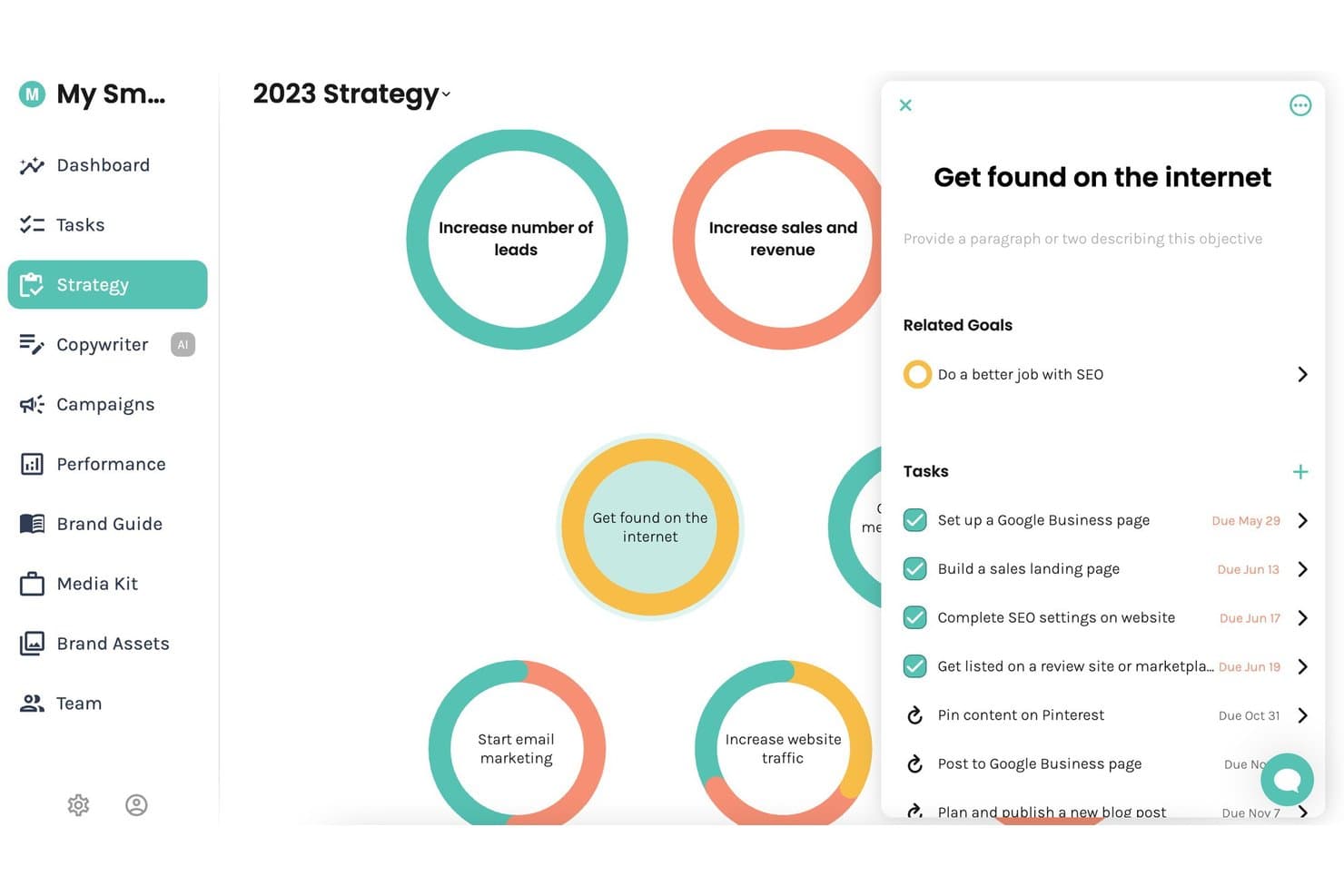
Enji offre un pannello strategico visivo dove gli utenti possono gestire obiettivi di marketing, traguardi correlati e attività con scadenze in un'unica vista centralizzata. Enji è una piattaforma di marketing tutto-in-uno per le piccole imprese che combina la generazione di piani di marketing guidata dall'IA, la gestione del calendario dei contenuti, la scrittura di testi tramite IA, la programmazione dei post sui social media e il monitoraggio dei KPI.
Per chi è più adatto Enji?
Enji è particolarmente adatto a solopreneur e titolari di micro-imprese che gestiscono autonomamente tutto il proprio marketing senza un team dedicato.
Perché ho scelto Enji
Enji merita un posto nella mia lista perché il suo Generatore di Strategie di Marketing crea un piano di marketing personalizzato a partire da un breve questionario, con attività che si inseriscono automaticamente nel calendario. Apprezzo anche i modelli di campagne predefiniti, che delineano promozioni mirate di due settimane con tempistiche, attività e metriche già impostate. Significa che posso passare velocemente da nessun piano all'esecuzione attiva senza dover creare una strategia di contenuti da zero.
Funzionalità chiave di Enji
- Copywriter basato su IA: Genera istantaneamente didascalie, post per blog, newsletter e note in linea con il tono del tuo brand.
- Programmatore social media: Pubblica automaticamente contenuti su Instagram, Facebook, LinkedIn, Pinterest, Threads, TikTok e YouTube.
- Cruscotto KPI: Aggrega i dati sulle performance di marketing da diversi canali, inclusi GA4 e le analisi dei social media.
- Generatore della voce del brand: Centralizza e archivia i messaggi chiave, i materiali visivi e la voce del tuo brand per una creazione di contenuti coerente.
Integrazioni Enji
Enji offre integrazioni native con Google Analytics 4, Canva, Instagram, Facebook, LinkedIn, Pinterest, Threads, TikTok e YouTube.
Pros and Cons
Pros:
- Genera rapidamente un piano di marketing personalizzato
- I modelli di campagna includono attività e tempistiche di pubblicazione
- Il copywriter IA copre diversi formati di contenuto
Cons:
- Pensato per piccoli team
- Strumenti SEO integrati per l'ottimizzazione dei contenuti limitati
Learn more about Enji: Ideale per le raccomandazioni di ottimizzazione dei contenuti
- Demo gratuita disponibile
- Da $129/mese
Visit WebsiteCustomer Rating:4.9/5
Clearscope migliora i contenuti SEO con raccomandazioni sui termini e valutazioni dei contenuti. Clearscope è una piattaforma di ottimizzazione dei contenuti SEO che utilizza l'elaborazione del linguaggio naturale (NLP) per analizzare le pagine con il miglior posizionamento e generare raccomandazioni sui termini, valutazioni dei contenuti e punteggi di leggibilità per i tuoi articoli.
A chi è più adatto Clearscope?
Clearscope è particolarmente indicato per copywriter SEO, strateghi dei contenuti e team interni di content marketing presso aziende B2B che puntano sulla crescita tramite ricerca organica.
Perché ho scelto Clearscope
Ho incluso Clearscope tra le mie scelte principali perché le sue raccomandazioni per l’ottimizzazione dei contenuti si basano su suggerimenti di termini fondati sull’NLP, estratti direttamente dalle pagine con il miglior posizionamento per ogni parola chiave. Quando eseguo un report, ricevo una valutazione del contenuto in tempo reale che si aggiorna mentre scrivo, così posso vedere esattamente quali termini mi mancano prima della pubblicazione.
Mi affido anche alla sua analisi dell'intento di ricerca, che scompone il 'perché' dietro una query, consentendo alla struttura dei miei contenuti di rispecchiare ciò che i lettori si aspettano effettivamente di trovare.
Funzionalità principali di Clearscope
- Esplorazione degli argomenti: Mappa cluster di contenuti e individua opportunità di parole chiave su un intero argomento, non solo su singoli termini di ricerca.
- Assistente AI per la stesura: Genera e modifica bozze di contenuti direttamente nell’editor di Clearscope utilizzando strumenti di scrittura AI integrati.
- Tracciamento visibilità LLM: Monitora le fonti utilizzate da ChatGPT e Gemini per vedere dove i tuoi contenuti vengono citati dalle piattaforme AI.
- Monitoraggio delle prestazioni dei contenuti: Tieni traccia di traffico e coinvolgimento sulle pagine pubblicate usando visualizzazioni preimpostate o personalizzate dei contenuti.
Integrazioni di Clearscope
Clearscope offre un piccolo insieme di integrazioni native con Google Docs, WordPress e Microsoft Word, permettendoti di accedere al punteggio di ottimizzazione direttamente in questi editor. Si collega anche a Google Search Console per importare i dati di performance nella funzionalità Content Inventory. Il supporto per API e Zapier non è chiaramente documentato.
Pros and Cons
Pros:
- Analisi semantica dei termini oltre le semplici parole chiave
- Supporta cinque lingue con selezione della lingua
- Tutti i piani includono utenti illimitati
Cons:
- La ricerca di parole chiave è meno approfondita rispetto a Ahrefs o Semrush
- Limiti bassi di crediti per report nei piani base
Learn more about Clearscope: Ideale per la creazione collaborativa e semplice di progetti grafici
- Piano gratuito disponibile
- Da $12/mese (fatturazione annuale)
Visit WebsiteCustomer Rating:4.7/5
Canva semplifica la creazione di contenuti visivi grazie a modelli e strumenti drag-and-drop. Canva è una piattaforma di progettazione grafica basata su browser per creare contenuti visivi come grafiche per i social media, presentazioni, materiali di marketing e documenti con marchio utilizzando strumenti drag-and-drop e una libreria di modelli.
Per chi è più indicato Canva?
Canva è particolarmente indicato per team di marketing e content creator che devono produrre regolarmente risorse grafiche senza dover ricorrere a designer grafici dedicati.
Perché ho scelto Canva
Canva si è guadagnato un posto nella mia shortlist perché la progettazione collaborativa qui funziona davvero. Il mio team condivide un Kit del Marchio che mantiene loghi, font e palette di colori coerenti su ogni risorsa che creiamo insieme. Uso la funzione dei commenti per lasciare feedback direttamente sui design, e le cartelle condivise in team evitano che qualcuno cerchi di continuo l’ultima versione di un file.
Caratteristiche principali di Canva
- Libreria di modelli: Esplora e personalizza migliaia di modelli già pronti per formati come post social, presentazioni, header per email e materiali stampati.
- Magic Resize: Ridimensiona istantaneamente qualsiasi progetto per adattarlo alle diverse dimensioni delle piattaforme, ad esempio passando da un post Facebook a una Storia Instagram.
- Content planner: Pianifica e pubblica le grafiche per i social media direttamente da Canva verso gli account social collegati.
- Magic Write: Genera testo direttamente sul progetto con lo strumento di scrittura AI integrato in Canva.
Integrazioni di Canva
Canva offre integrazioni con strumenti di collaborazione e produttività come Slack, Asana, Microsoft Teams, Salesforce e Google Workspace, oltre a integrazioni con piattaforme pubblicitarie come Google, Meta e Amazon. Si collega anche con Zapier, e le Connect API e l’Apps SDK di Canva permettono di creare integrazioni personalizzate, con oltre 300 app disponibili nel Canva Apps Marketplace.
Pros and Cons
Pros:
- Imponente libreria di modelli per ogni formato
- Co-editing in tempo reale su progetti condivisi
- Strumenti AI integrati per la generazione di testi
Cons:
- Capacità limitate di fotoritocco avanzato
- Kit del Marchio disponibile solo nei piani a pagamento
Learn more about Canva: Ideale per la pubblicazione di siti web personalizzabili
- Piano gratuito disponibile
- Da $4/mese (fatturati annualmente)
Visit WebsiteCustomer Rating:4.6/5
WordPress gestisce la pubblicazione del sito, il design, la modifica dei contenuti, i temi e i plugin. WordPress è una piattaforma di pubblicazione e gestione dei contenuti che consente di creare, progettare e gestire siti web utilizzando un editor a blocchi, temi personalizzabili e una vasta libreria di plugin.
Per chi è ideale WordPress?
WordPress è particolarmente adatto a blogger, editori e piccole e medie imprese che desiderano avere il pieno controllo sul design e sulla struttura dei contenuti del proprio sito.
Perché ho scelto WordPress
WordPress merita un posto nella mia lista perché l'editor a blocchi mi dà un controllo dettagliato su ogni layout di pagina senza dover toccare il codice. Posso creare template personalizzati grazie alla funzione Full Site Editing, che mi permette di modificare intestazioni, piè di pagina e pattern riutilizzabili in tutto il sito da un'unica interfaccia.
Il sistema di temi si integra bene con i controlli CSS personalizzati, così posso spingere il design oltre i limiti dei classici website builder preconfezionati.
Funzionalità principali di WordPress
- Programmazione dei post: Imposta una data e un'ora specifica di pubblicazione per qualsiasi post o pagina, così che i contenuti vengano pubblicati automaticamente.
- Storico delle revisioni: Accedi a un registro completo di tutte le modifiche apportate a ogni post o pagina e ripristina qualsiasi versione precedente.
- Libreria multimediale: Carica, organizza e riutilizza immagini, video e documenti in tutto il sito da un gestore di file centralizzato.
- Strumenti SEO integrati: Modifica meta titoli, descrizioni e slug degli URL direttamente nell'editor dei post per ciascun contenuto.
Integrazioni di WordPress
WordPress si collega a migliaia di strumenti tramite la directory dei plugin, che elenca oltre 879 plugin di integrazione, inclusi Google Analytics, Google Workspace, Google Docs, Google Photos, Mailchimp, WooCommerce e MailerLite. Si integra anche con Zapier e offre una REST API per integrazioni personalizzate.
Pros and Cons
Pros:
- Migliaia di plugin estendono la funzionalità del sito
- Pieno controllo su contenuti e impostazioni SEO
- Migliaia di temi gratuiti e a pagamento disponibili
Cons:
- Le vulnerabilità dei plugin rappresentano un rischio continuo per la sicurezza
- Personalizzazioni avanzate disponibili solo nei piani superiori
Learn more about WordPress: Ideale per lo streaming video in diretta
- Gratis per sempre
- Gratis per sempre
Visit WebsiteCustomer Rating:4.7/5
OBS cattura, mixa, registra e trasmette video live da più fonti. OBS è un'applicazione gratuita e open source per la registrazione video e lo streaming live che ti permette di catturare, mixare e trasmettere contenuti da più fonti audio e video in tempo reale.
Per chi è ideale OBS?
OBS è la soluzione ideale per creatori di contenuti, streamer ed educatori che hanno bisogno di trasmissioni di livello professionale senza i costi dei software proprietari.
Perché ho scelto OBS
Ho incluso OBS tra le mie scelte migliori perché nessun altro strumento gratuito offre questo livello di controllo su una trasmissione live. Uso le Collezioni di Scene per creare più layout completamente configurati e passare da uno all'altro durante la diretta senza alcuna interruzione.
La Modalità Studio rende tutto ciò pratico in tempo reale: posso visualizzare in anteprima la prossima scena e fare la transizione solo quando sono pronto. Il missaggio audio multitraccia consente inoltre di controllare separatamente l'ingresso del microfono, l'audio del desktop e il suono delle applicazioni durante una sessione live.
Caratteristiche principali di OBS
- Output come videocamera virtuale: Invia il tuo flusso OBS a strumenti di videoconferenza come Zoom o Google Meet come sorgente videocamera.
- Buffer di replay: Cattura una finestra temporale delle registrazioni recenti per salvare i momenti salienti senza dover registrare l'intera sessione.
- Filtri audio e video: Applica effetti come soppressione del rumore, chroma key e correzione del colore direttamente in OBS senza software di terze parti.
- Controlli con tasti di scelta rapida: Assegna scorciatoie da tastiera per cambiare scena, disattivare l'audio o avviare e interrompere le registrazioni senza mani.
Integrazioni di OBS
OBS non dispone di integrazioni native in senso tradizionale, ma offre supporto integrato per lo streaming su piattaforme come Twitch, YouTube e Kick, ed è in grado di trasmettere verso qualsiasi destinazione RTMP personalizzata.
La sua architettura open plugin permette l'estensione delle funzionalità tramite plugin sviluppati dalla community come Streamlabs, StreamElements ed Elgato Stream Deck, e un'API con supporto a script Lua e Python è disponibile per integrazioni personalizzate. La connessione a Zapier è possibile tramite soluzioni alternative della community ma non è supportata ufficialmente.
Pros and Cons
Pros:
- Completamente gratuito senza limitazioni di funzionalità
- Altamente estensibile tramite plugin della community
- Supporta più tracce audio simultanee
Cons:
- Nessun strumento di editing video integrato
- L'interfaccia può sembrare datata per i nuovi utenti
Learn more about OBS Studio: Ideale per la modifica collaborativa di documenti in tempo reale
- Piano gratuito + prova disponibile
- Da $7/utente/mese (fatturazione annuale)
Visit WebsiteCustomer Rating:4.5/5
Google Docs permette la modifica dei documenti in tempo reale, l'aggiunta di commenti e la collaborazione tra i membri del team. Google Docs è un editor di documenti basato su cloud di Google che consente ai team di creare, modificare, commentare e collaborare su contenuti testuali in tempo reale, da qualsiasi dispositivo.
A chi è più indicato Google Docs?
Google Docs è la scelta ideale per team di qualsiasi dimensione che già lavorano nell’ecosistema Google Workspace e necessitano di uno strumento di collaborazione documentale senza alcuna configurazione.
Perché ho scelto Google Docs
Google Docs merita il suo posto nella mia shortlist perché la co-modifica in tempo reale è il suo vero punto di forza. Ho lavorato su briefing di contenuti e bozze con più persone contemporaneamente, e il tracciamento dei cursori live e i commenti in linea facilitano l’individuazione delle modifiche e il rilascio di feedback senza dover inviare email.
La modalità Suggerisci è particolarmente utile: il mio team può proporre modifiche al testo che i redattori possono accettare o rifiutare, mantenendo la cronologia delle revisioni ordinata e trasparente.
Funzionalità principali di Google Docs
- Cronologia delle versioni: Consulta e ripristina qualsiasi versione precedente di un documento, con data, ora e attribuzione dell’autore per ogni modifica.
- Digitazione vocale: Detta i contenuti direttamente in un documento utilizzando il microfono del proprio dispositivo, senza strumenti di terze parti.
- Modelli di documento: Parti da layout preimpostati per tipologie di contenuti come report, verbali e newsletter.
- Componenti aggiuntivi: Estendi Google Docs con strumenti di terze parti come correttori grammaticali, gestori di citazioni e app per la firma elettronica.
Integrazioni con Google Docs
Google Docs è strettamente integrato nell’ecosistema Google Workspace, compresi Google Drive, Google Sheets, Google Slides, Gmail e Google Meet. Migliaia di app aggiuntive sono disponibili tramite il Google Workspace Marketplace, con strumenti come Slack, Salesforce, Asana, Lucidchart, Canva, Box e HubSpot, e si collega anche con Zapier. È inoltre disponibile un’API per integrazioni personalizzate.
Pros and Cons
Pros:
- Modifica simultanea tra più utenti senza problemi
- Accessibile da qualsiasi dispositivo o browser
- Generoso piano gratuito per utenti singoli
Cons:
- Nessun flusso di lavoro o approvazione dei contenuti integrato
- Opzioni di formattazione limitate per documenti complessi
Learn more about Google Docs: Ideale per la ricerca di contenuti avanzata tramite IA
- Piano gratuito + demo gratuita disponibile
- Prezzo su richiesta
Visit WebsiteCustomer Rating:4.6/5
MarketMuse guida la pianificazione e l’ottimizzazione dei contenuti con briefing IA e modelli tematici. MarketMuse è una piattaforma di content intelligence basata sull’IA che utilizza il topic modeling, analisi competitiva dei contenuti e briefing automatizzati per aiutare i team a pianificare e ottimizzare i contenuti su larga scala.
A chi è più adatto MarketMuse?
MarketMuse è una soluzione ideale per content strategist e responsabili SEO di aziende B2B di medie o grandi dimensioni che gestiscono ampie librerie di contenuti.
Perché ho scelto MarketMuse
MarketMuse si è guadagnato un posto nella mia shortlist perché la sua ricerca dei contenuti tramite IA va oltre i semplici suggerimenti di parole chiave superficiali. Mi affido al suo modello tematico per individuare sottotemi correlati che altrimenti sfuggirebbero e il suo Content Score confronta le mie pagine con le prime 20 URL posizionate per ciascuna query. Uso anche i suoi brief automatizzati, che precompilano argomenti target, domande e suggerimenti per i link interni prima ancora di scrivere una sola parola.
Caratteristiche principali di MarketMuse
- Heatmap: Visualizza la copertura degli argomenti tra i primi 20 risultati SERP tramite una griglia a colori per individuare facilmente le lacune nei contenuti dei concorrenti.
- Valutazione personalizzata della difficoltà: Misura quanto sarà difficile per il tuo dominio posizionarsi su un tema specifico, invece di affidarsi a punteggi di difficoltà generici.
- Documenti per la pianificazione dei contenuti: Genera un piano strutturato completo che indica cosa creare o aggiornare, i dettagli dei cluster e le panoramiche competitive per un determinato argomento.
- Monitoraggio della decadenza dei contenuti: Tieni traccia delle perdite di posizionamento e dei cambiamenti delle performance nel tempo, così puoi dare priorità agli aggiornamenti prima di perdere traffico.
Integrazioni di MarketMuse
MarketMuse offre un numero limitato di integrazioni, compresi l’export su Google Docs, la connessione con Google Search Console e un’integrazione con Acrolinx. Non supporta la pubblicazione nativa su CMS come WordPress. È disponibile una API per integrazioni personalizzate, ma il supporto per Zapier non è chiaramente documentato.
Pros and Cons
Pros:
- Il clustering tematico individua automaticamente le lacune nei contenuti
- Valutazioni personalizzate della difficoltà su misura per il tuo dominio
- I brief automatizzati includono sottotemi e domande
Cons:
- La ricerca per parola chiave è meno approfondita rispetto a Ahrefs o Semrush
- Nessun avviso prima del consumo dei crediti dei report
Learn more about MarketMuse: Ideale per la scoperta di contenuti e approfondimenti
- Prova gratuita disponibile
- Da $199/mese (fatturazione annuale)
Visit WebsiteCustomer Rating:4.5/5
BuzzSumo traccia argomenti di tendenza, prestazioni dei contenuti, menzioni e creatori. Buzzsumo è una piattaforma di ricerca sui contenuti che evidenzia gli argomenti di tendenza, analizza le prestazioni dei contenuti sui social, monitora le menzioni del marchio e identifica i creatori influenti in qualsiasi nicchia.
Per chi è più indicato Buzzsumo?
Buzzsumo è particolarmente adatto a content marketer, strateghi SEO e team PR di aziende di medie e grandi dimensioni che hanno bisogno di dati per guidare la pianificazione dei contenuti.
Perché ho scelto Buzzsumo
Buzzsumo merita un posto nella mia lista perché il suo Content Analyzer mi permette di vedere esattamente quali articoli su qualsiasi argomento stanno ricevendo più condivisioni su Facebook, X, Pinterest e Reddit. Mi affido anche al Question Analyzer, che raccoglie le vere domande poste dalle persone su forum e siti di Q&A, così posso modellare i contenuti sull’intento di ricerca reale.
I feed di tendenza mostrano ciò che sta guadagnando popolarità in questo momento, che trovo utile per rimanere al passo con i cicli dei contenuti.
Funzionalità principali di Buzzsumo
- Ricerca influencer: Trova e filtra creatori e giornalisti per argomento, punteggio di autorità e seguito sui social.
- Avvisi di monitoraggio del marchio: Imposta avvisi per il nome del tuo marchio, concorrenti o parole chiave per tracciare nuove menzioni sul web.
- Analisi dei backlink: Scopri quali siti stanno linkando a qualsiasi contenuto, inclusi gli articoli dei concorrenti.
- Analisi dei contenuti di dominio: Estrai dati sulle prestazioni di tutti i contenuti pubblicati da qualsiasi dominio per valutare la produzione dei concorrenti.
Integrazioni di Buzzsumo
Buzzsumo offre un set ristretto di integrazioni, principalmente tramite la condivisione sui social e strumenti di programmazione come Buffer. Gli utenti possono anche creare feed RSS dagli avvisi di monitoraggio e dai feed di tendenza, che possono essere inviati a strumenti come Slack o connessi tramite Zapier e IFTTT
Pros and Cons
Pros:
- Grande indice di dati sull'engagement social
- Monitora le tendenze su Facebook, X e Pinterest
- Mette in evidenza i contenuti con le migliori prestazioni dei concorrenti
Cons:
- Nessuna copertura per TikTok o Instagram Reels
- Analisi del sentiment limitata rispetto ai concorrenti
Learn more about BuzzSumo: Ideale per organizzare progetti creativi
- Piano gratuito disponibile
- A partire da $9.99/utente/mese (con fatturazione annuale)
Visit WebsiteCustomer Rating:4.7/5
Milanote organizza idee creative, note, immagini, attività e bacheche di progetto. Milanote è uno spazio di lavoro visivo per progetti creativi, che consente ai team di creare bacheche flessibili combinando note, immagini, link, attività e schizzi per organizzare idee di contenuti e piani di progetto.
A chi è più adatto Milanote?
Milanote è particolarmente adatto a professionisti creativi come designer, direttori artistici e copywriter, che organizzano il lavoro visivamente anziché attraverso i tradizionali elenchi di attività.
Perché ho scelto Milanote
Milanote si è guadagnato un posto nella mia lista ristretta perché le sue bacheche a formato libero mi permettono di disporre insieme brief di contenuto, immagini di riferimento e bozze di testi in un'unica vista, proprio come farei su una parete dello studio. Trovo particolarmente utile la funzionalità delle bacheche nidificate per i progetti di contenuto:
Mantengo una bacheca della campagna di livello superiore, quindi apro bacheche individuali per ogni canale. Il clipper web consente inoltre al mio team di inserire direttamente in una bacheca spunti e materiali di riferimento senza uscire dal browser.
Funzionalità principali di Milanote
- Modelli integrati: Accedi a layout già pronti per moodboard, brief creativi, storyboard ed elenchi di inquadrature per avviare più rapidamente i progetti di contenuto.
- Collaborazione in tempo reale: Più membri del team possono lavorare contemporaneamente sulla stessa bacheca su una tela infinita.
- Elenchi di attività: Aggiungi checklist di attività direttamente a qualsiasi bacheca per tenere traccia delle azioni da completare insieme ai contenuti visivi.
- Mappe mentali: Crea mappe di idee collegate all'interno delle bacheche per delineare visivamente la strategia dei contenuti e la struttura narrativa.
Integrazioni di Milanote
Milanote offre un numero più limitato di integrazioni native, principalmente tramite incorporamenti di schede di link che importano contenuti da YouTube, Vimeo, TED, SoundCloud, Google Maps, CodePen, Instagram, Dribbble, Flickr, Slideshare, Prezi, Marvel e Airtable. Un'API pubblica è indicata come richiesta di funzionalità con il maggior numero di voti nella roadmap del prodotto di Milanote, il che significa che non è ancora disponibile. Il supporto per Zapier non è documentato chiaramente.
Pros and Cons
Pros:
- La tela con funzionalità di trascinamento combina testo e contenuti visivi
- Il clipper web salva i riferimenti direttamente nelle bacheche
- Le bacheche nidificate mantengono organizzati i progetti complessi
Cons:
- L'app mobile non consente di modificare completamente le bacheche
- Sono disponibili pochissime integrazioni di terze parti
Learn more about Milanote: Ideale per la gestione dei contenuti generati dagli utenti
- Demo gratuita disponibile
- A partire da $1,249/mese
Visit WebsiteCustomer Rating:4.4/5
Pixlee cura foto, video e recensioni dei clienti per il commercio social. Pixlee (ora parte di Emplifi) è una piattaforma per i contenuti generati dagli utenti e il commercio social che consente ai brand di raccogliere, curare e pubblicare foto, video e recensioni dei clienti sui propri canali digitali.
Per chi è più indicato Pixlee?
Pixlee è particolarmente adatto ai brand di e-commerce e retail che si affidano alla riprova sociale e ai contenuti visivi creati dalla community per supportare il marketing dei prodotti.
Perché ho scelto Pixlee
Ho incluso Pixlee tra le mie scelte migliori perché la sua gestione e curatela dei contenuti generati dagli utenti, così come il flusso di lavoro per la gestione dei diritti, sono realmente progettati ad hoc, a differenza di quanto avviene con la maggior parte degli strumenti per i contenuti. Posso utilizzare flussi di lavoro automatizzati per richiedere direttamente l'autorizzazione all'utilizzo dei contenuti ai loro creatori, così il mio team dispone sempre di una libreria di elementi visivi approvati e pronti per il brand.
Il riconoscimento delle immagini basato sull'IA gestisce inoltre l'assegnazione automatica dei tag dei prodotti all'interno della libreria, facilitando il collegamento diretto delle foto dei clienti ai prodotti che vi sono raffigurati.
Funzionalità principali di Pixlee
- Integrazione con gli strumenti di pubblicazione: Pianifica e distribuisci i contenuti generati dagli utenti sui canali digitali direttamente dalla piattaforma.
- Visualizzazione personalizzabile: Crea gallerie dinamiche, caroselli ed esperienze interattive basate sui contenuti generati dagli utenti per il tuo sito web e altre proprietà digitali.
- Raccolta di valutazioni e recensioni: Raccogli, modera e mostra recensioni dei prodotti, domande e risposte e valutazioni dei venditori sul tuo sito e in altri punti di contatto.
- Ricerca di influencer: Cerca in un database di oltre 30 milioni di influencer utilizzando l'IA per trovare creatori che corrispondono ai criteri del tuo brand.
Integrazioni di Pixlee
Pixlee si integra con piattaforme di e-commerce tra cui Shopify, Magento (Adobe Commerce), Salesforce Commerce Cloud e BigCommerce. Il modulo Emplifi Ratings & Reviews si collega anche a CrowdTwist, Movable Ink e Reputation.com. È disponibile un'API per le integrazioni personalizzate, mentre il supporto per Zapier non è documentato in modo chiaro.
Pros and Cons
Pros:
- Flusso di lavoro integrato per la gestione dei diritti sui contenuti
- Combina strumenti per contenuti generati dagli utenti, recensioni e influencer
- Supporto per il geo-fencing nelle campagne basate sulla posizione
Cons:
- Il filtraggio dei contenuti estratti può richiedere molto tempo
- I report e le analisi devono essere migliorati
Learn more about Emplifi (formerly Pixlee):
Altri software per contenuti
Ecco alcune ulteriori opzioni di software per contenuti che non sono state incluse nel mio elenco ristretto, ma che vale comunque la pena prendere in considerazione:
- 11Adobe Marketo EngageIdeale per l’integrazione dell’automazione marketing
- 12MailchimpIdeale per la gestione delle campagne email
- 13monday.comIdeale per la pianificazione visiva dei flussi di lavoro dei contenuti
Come valuto i software per i contenuti
Scompongo la mia valutazione in requisiti di base imprescindibili—come calendari editoriali e strumenti SEO—e fattori differenzianti che distinguono le soluzioni migliori per i team di content SaaS dal resto.
Funzionalità di base (requisiti minimi per questa lista)
Quando seleziono gli strumenti per la mia lista, valuto ciascuno su una scala da 0 (non offre la funzionalità) a 5 (eccelle in quest’area) per ogni funzionalità di base elencata qui sotto. Dopodiché, calcolo il punteggio totale trasformandolo in una percentuale. Ogni strumento deve raggiungere un punteggio minimo totale del 65% per essere preso in considerazione.
- Pianificazione dei contenuti & calendario: Cerco calendari editoriali che permettano ai team di pianificare un intero trimestre di articoli per blog SaaS, landing page e materiali di campagna con assegnazioni e stati chiari.
- Collaborazione alla redazione & workflow: I workflow a più fasi sono fondamentali—valuto come uno strumento gestisce il ciclo da brief a bozza, a revisione, a pubblicazione, soprattutto con più autori e approvatori.
- Strumenti SEO & ottimizzazione: Che si tratti di ricerca parole chiave integrata o briefing basati sui risultati di ricerca, verifico che lo strumento fornisca agli autori indicazioni concrete di ottimizzazione prima e durante la stesura.
- Archivio centralizzato dei contenuti: Una libreria organizzata e ricercabile di brief, bozze, immagini e contenuti pubblicati aiuta i team a evitare lavori duplicati e la perdita di asset tra campagne diverse.
- Integrazioni con CMS & stack marketing: Valuto i collegamenti con piattaforme come WordPress, Webflow, HubSpot, Google Search Console e Slack per assicurarmi che i contenuti fluiscano nello stack senza esportazioni manuali.
- Analisi delle prestazioni & reporting: Cerco dashboard sul contenuto che vadano oltre le visualizzazioni di pagina, mostrando coinvolgimento, conversioni o impatto sulla pipeline collegato a singoli post o campagne.
Una volta che ho una lista di strumenti che soddisfano questi criteri, considero cosa differenzia ciascuna piattaforma.
Fattori differenzianti (cosa distingue i fornitori)
Ecco come confronto e metto a confronto i diversi fornitori:
Funzionalità distintive
Gli strumenti di redazione basati su intelligenza artificiale possono ridurre i tempi di produzione quando un team SaaS deve passare da quattro a dodici articoli al mese. Valuto anche la mappatura dei cluster tematici, poiché organizzare visivamente pagine pilastro e articoli di approfondimento attorno ai temi principali facilita la pianificazione delle strategie di linking interno. Anche il punteggio dei contenuti è un elemento differenziante che considero. Una valutazione in tempo reale rispetto ai concorrenti nelle SERP offre agli autori un obiettivo di ottimizzazione chiaro prima di sottoporre una bozza alla revisione.
Oltre le funzionalità
La struttura dei prezzi è importante perché i team di content SaaS spesso aumentano la produzione in modo stagionale. Verifico se uno strumento addebita per utente, per articolo o in base all’utilizzo per garantire che i costi rimangano prevedibili durante la crescita del team. Anche il time-to-value è fondamentale. Un team marketing di tre persone non può permettersi settimane di configurazione, quindi cerco piattaforme con template e workflow pronti all’uso che permettano di produrre contenuti in pochi giorni. Inoltre, valuto quanto ogni strumento supporta freelance e collaboratori esterni, visto che la maggior parte dei team SaaS si affida a scrittori esterni almeno per una parte del proprio flusso di lavoro.
Come scegliere il software per contenuti
È facile perdersi in lunghi elenchi di funzionalità e strutture di prezzo complesse. Per aiutarti a rimanere concentrato mentre affronti il tuo esclusivo processo di selezione del software, ecco un elenco di fattori da tenere a mente:
| Fattore | Cosa considerare |
|---|---|
| FattoreScalabilità | Cosa considerareLa piattaforma continuerà a soddisfare le tue esigenze man mano che aumentano i volumi di contenuti, il numero di utenti e i flussi di lavoro di approvazione? |
| FattoreIntegrazioni | Cosa considerareLo strumento si collega alle tue app principali per l'archiviazione dei file, il marketing o la comunicazione, oppure saranno necessarie soluzioni alternative ed esportazioni manuali? |
| FattorePersonalizzazione | Cosa considerarePuoi modificare autorizzazioni, modelli e processi per il tuo team, oppure sei limitato a impostazioni predefinite rigide che non corrispondono ai tuoi flussi di lavoro attuali? |
| FattoreFacilità d'uso | Cosa considerareI nuovi membri del team possono orientarsi e contribuire fin da subito, oppure l'adozione sarà ostacolata da menu complessi e scelte dell'interfaccia poco chiare? |
| FattoreImplementazione e inserimento | Cosa considerareQuanto lavoro iniziale di configurazione, formazione degli utenti o migrazione è necessario e avrai il supporto o le risorse del fornitore durante il lancio e anche in seguito? |
| FattoreCosto | Cosa considerareI prezzi, i costi ricorrenti, i limiti di archiviazione o di postazioni e gli aggiornamenti necessari sono chiaramente compresi in base al tuo budget e ai tuoi modelli di utilizzo? |
| FattoreMisure di sicurezza | Cosa considerareIl software offre autorizzazioni utente chiare, criteri di conservazione dei dati, crittografia e conformità in linea con le esigenze di privacy dei contenuti della tua azienda? |
| FattoreDisponibilità dell'assistenza | Cosa considerarePuoi accedere tempestivamente a un'assistenza clienti competente, soprattutto durante l'implementazione, le campagne ad alta priorità o problemi di accesso imprevisti? |
Che cos'è il software per contenuti?
Il software per contenuti è una piattaforma digitale che aiuta i team a pianificare, organizzare, collaborare alla realizzazione e gestire materiali digitali e progetti creativi. Questi strumenti danno struttura ai flussi di lavoro per la creazione dei contenuti, centralizzando documenti, risorse e comunicazioni.
Semplificando le approvazioni, il controllo delle versioni e la gestione dei progetti, il software per contenuti consente ai team di produrre e distribuire con costanza lavori di alta qualità per iniziative di marketing, pubblicazione o design.
Caratteristiche
Quando selezioni un software per contenuti, presta attenzione alle seguenti caratteristiche chiave:
- Calendario dei contenuti: Organizza le scadenze e i calendari di pubblicazione, consentendo ai team di pianificare, monitorare e gestire la produzione dei contenuti dall'inizio alla fine in un'unica visualizzazione.
- Organizzazione tramite trascinamento: Consente di disporre visivamente documenti, immagini e note, semplificando la strutturazione dei progetti e il brainstorming delle idee con la massima flessibilità.
- Strumenti di collaborazione: Consentono a più utenti di modificare, commentare e fornire feedback all'interno dello stesso progetto, mantenendo tutti allineati e migliorando la comunicazione del team.
- Assegnazione delle attività: Fornisce strumenti per assegnare attività, impostare scadenze e monitorare le responsabilità durante ogni fase del flusso di lavoro dei contenuti.
- Cronologia delle versioni: Registra ogni modifica e aggiornamento, consentendo agli utenti di ripristinare versioni precedenti e vedere chi ha apportato quali modifiche, per una piena responsabilità.
- Libreria di modelli: Offre strutture e formati riutilizzabili per brief, scalette dei contenuti o richieste di risorse, risparmiando tempo e standardizzando la configurazione dei progetti.
- Gestione di file e risorse: Centralizza l'archiviazione di tutti i file, documenti e risorse multimediali del progetto, con funzioni di ricerca e applicazione di tag per un accesso semplificato.
- Autorizzazioni e controlli degli accessi: Limita o concede agli utenti l'accesso a determinate bacheche, cartelle o progetti, mantenendo il controllo sui contenuti sensibili.
- Flusso di lavoro per la pubblicazione: Guida i contenuti attraverso un processo di revisione e approvazione articolato in fasi prima della pubblicazione, riducendo i colli di bottiglia e garantendo il controllo della qualità.
Funzionalità comuni dell'intelligenza artificiale nei software per contenuti
Oltre alle funzionalità standard dei software per contenuti elencate sopra, molte di queste soluzioni stanno integrando l'intelligenza artificiale con funzionalità come:
- Suggerimenti automatizzati per i contenuti: Utilizza l'intelligenza artificiale per generare idee, titoli o scalette in base alle esigenze del progetto e alle prestazioni passate, accelerando il processo di pianificazione e migliorando la pertinenza dei contenuti.
- Riepilogo intelligente: Condensa articoli, note o materiali di ricerca lunghi in riepiloghi concisi e leggibili, aiutando i team a elaborare più rapidamente le informazioni e a prendere decisioni informate.
- Tag delle immagini basato sull'intelligenza artificiale: Analizza e assegna automaticamente tag a immagini o elementi grafici, rendendo più rapide le ricerche delle risorse e migliorando l'organizzazione della libreria per i team creativi.
- Ottimizzazione contestuale dei contenuti: Analizza le bozze e suggerisce miglioramenti in tempo reale per chiarezza, tono o struttura, adattando le raccomandazioni alla voce del marchio o al tipo di contenuto.
- Assistenza predittiva al flusso di lavoro: Identifica i passaggi che potrebbero causare colli di bottiglia e consiglia le azioni successive o automatizza i passaggi di consegne, aiutando i team a rispettare le scadenze con una supervisione manuale ridotta.
Vantaggi
L'implementazione di un software per contenuti offre diversi vantaggi al tuo team e alla tua azienda. Eccone alcuni che puoi aspettarti:
- Spazio di lavoro centralizzato: Contenuti, feedback e discussioni sono archiviati in un unico luogo, riducendo la confusione e migliorando l'organizzazione.
- Migliore collaborazione del team: La modifica e i commenti in tempo reale, insieme agli strumenti condivisi, facilitano la creazione, la revisione e la consegna collaborativa dei progetti.
- Flussi di lavoro ottimizzati: Le assegnazioni delle attività, i calendari dei contenuti e il monitoraggio dei flussi di lavoro mantengono i progetti efficienti, dall'ideazione alla pubblicazione.
- Maggiore supervisione dei contenuti: La cronologia delle versioni, le autorizzazioni e i processi di approvazione aiutano a gestire le bozze e a mantenere il controllo sulla qualità.
- Inserimento più rapido: Risorse guidate, modelli e un'interfaccia intuitiva consentono ai nuovi membri del team di contribuire rapidamente.
- Maggiore sicurezza: Le autorizzazioni e i controlli degli accessi proteggono i materiali sensibili e favoriscono la conformità ai requisiti aziendali o di settore.
- Flessibilità per la crescita: Un'architettura scalabile e flussi di lavoro personalizzabili si adattano all'espansione del team o della libreria di contenuti.
Costi e prezzi
La scelta di un software per contenuti richiede la comprensione dei vari modelli e piani tariffari disponibili. I costi variano in base alle funzionalità, alle dimensioni del team, agli extra e ad altri fattori. La tabella seguente riepiloga i piani più comuni, i relativi prezzi medi e le funzionalità normalmente incluse nelle soluzioni software per contenuti:
Tabella comparativa dei piani per software per contenuti
| Tipo di piano | Prezzo medio | Caratteristiche comuni |
|---|---|---|
| Tipo di pianoPiano gratuito | Prezzo medio$0 | Caratteristiche comuniGestione di base dei documenti, strumenti di collaborazione limitati, spazio di archiviazione limitato e supporto standard. |
| Tipo di pianoPiano personale | Prezzo medio$5-$15/utente/mese | Caratteristiche comuniMaggiore spazio di archiviazione, calendario personale dei contenuti, modelli personalizzati e supporto prioritario. |
| Tipo di pianoPiano aziendale | Prezzo medio$15-$35/utente/mese | Caratteristiche comuniCollaborazione tra team, automazione dei flussi di lavoro, controlli delle autorizzazioni, integrazioni, reportistica e monitoraggio avanzato dei contenuti. |
| Tipo di pianoPiano aziendale | Prezzo medio$35-$80/utente/mese | Caratteristiche comuniSicurezza avanzata, configurazione iniziale dedicata, ruoli utente flessibili, strumenti per la conformità, accesso API e supporto premium. |
Domande frequenti sul software per contenuti
Ecco alcune risposte alle domande comuni sul software per contenuti:
Quali tipi di team utilizzano il software per contenuti?
I team di marketing, editoria, design, istruzione e comunicazione interna utilizzano il software per contenuti per gestire progetti, risorse e attività collaborative. Qualsiasi gruppo che crea, revisiona o archivia regolarmente contenuti digitali può trarne vantaggio.
Il software per contenuti può funzionare con gli strumenti esistenti?
Sì, la maggior parte dei software per contenuti supporta integrazioni con servizi di archiviazione cloud, strumenti di gestione dei progetti, piattaforme di design e app di comunicazione. Ciò facilita il consolidamento dei flussi di lavoro senza interrompere l’utilizzo degli strumenti già adottati dal team.
È difficile configurare il software per contenuti?
No, la maggior parte dei software per contenuti offre una configurazione iniziale semplice, con procedure guidate, modelli e risorse di supporto. In genere i team possono iniziare a lavorare nel giro di poche ore, aggiungendo progetti e invitando subito i collaboratori.
Cosa devo cercare quando scelgo un software per contenuti?
Concentrati sulle funzionalità che si adattano al tuo flusso di lavoro, come collaborazione, controllo delle versioni, automazione dei flussi di lavoro e opzioni di integrazione. Considera inoltre le misure di sicurezza, le opzioni di supporto e la scalabilità necessaria per soddisfare le tue esigenze future.
Il software per contenuti aiuta a controllare le versioni?
Sì, la cronologia delle versioni e il monitoraggio dei documenti sono funzionalità comuni. Consentono di visualizzare le modifiche, ripristinare bozze precedenti e gestire le approvazioni, mantenendo così il controllo sulle risorse dei contenuti.