

I software per la scrittura di contenuti offrono strumenti digitali per redigere, modificare e ottimizzare più rapidamente i contenuti scritti. Se stai cercando il miglior software per la scrittura di contenuti, probabilmente vuoi ridurre le distrazioni e aumentare il livello qualitativo, senza rallentare.
Scegliere la soluzione giusta è importante perché la differenza tra contenuti mediocri ed eccellenti spesso dipende da precisione, chiarezza ed efficienza. In questo elenco scoprirai quali strumenti meritano il tempo del tuo team, cosa li distingue e come si integrano nei flussi di lavoro reali.
Perché fidarsi dei nostri consigli sui software
6,700+
Reviews
20
Industry experts
16+
Evaluation factors
14
Years
Il nostro team testa e recensisce software dal 2012. In quanto editori e operatori mediatici noi stessi, sappiamo quanto sia difficile — e importante — scegliere il software giusto.
Per questa guida, abbiamo valutato gli strumenti attraverso test pratici e ricerche indipendenti, assegnando un punteggio agli strumenti in base ai nostri criteri di selezione.
Le nostre recensioni riflettono il nostro giudizio editoriale umano, non un discorso di vendita.
Tabella comparativa dei software per la scrittura di contenuti
La tabella seguente confronta i dettagli dei prezzi delle mie migliori selezioni di software per la scrittura di contenuti.
| Tool | Best For | Trial Info | Price | ||
|---|---|---|---|---|---|
| 1 | Ideale per autori indipendenti | Prova gratuita di 14 giorni | A partire da $29/mese | Website | |
| 2 | Ideale per la collaborazione in tempo reale tra team | Piano gratuito + prova disponibile | Da $7/utente/mese (fatturazione annuale) | Website | |
| 3 | Ideale per l'automazione dei flussi di lavoro di contenuti marketing Prezzo 1-liner: | Prova gratuita di 7 giorni + demo gratuita disponibile | Da $59/mese (fatturazione annuale) | Website | |
| 4 | Ideale per la creazione di testi ottimizzati sulle performance | Prova gratuita di 7 giorni + demo gratuita disponibile | A partire da $39/mese (fatturazione annuale) | Website | |
| 5 | Ideale per AI rispettose del brand su misura per la tua azienda | Prova gratuita di 14 giorni | Prezzo su richiesta | Website | |
| 6 | Ideale per semplificare testi complessi | Prova gratuita di 14 giorni | Da $8.33/mese (fatturato annualmente) | Website | |
| 7 | Ideale per la replica personalizzata della voce | Piano gratuito disponibile | Da $7,50/mese (fatturazione annuale) | Website | |
| 8 | Ideale per opzioni di riscrittura contestuale | Piano gratuito disponibile | Da $6.99/mese (fatturazione annuale) | Website | |
| 9 | Ideale per la generazione di contenuti multilingue | Prova gratuita di 1.000 parole disponibile | Da $19/mese (fatturazione annuale) | Website | |
| 10 | Ideale per l'analisi approfondita di storie e manoscritti | Piano gratuito disponibile | Da $10/mese (fatturazione annuale) | Website |


Recensioni dei migliori software per la scrittura di contenuti
Di seguito sono riportati i miei riepiloghi dettagliati dei migliori software per la scrittura di contenuti inclusi nel mio elenco. Le mie recensioni offrono un’analisi approfondita delle funzionalità, dei migliori casi d’uso e dei prezzi di ciascun software, per aiutarti a trovare quello più adatto a te.
 1Ideale per autori indipendenti
Enji
- Prova gratuita di 14 giorni
- A partire da $29/mese
Visit WebsiteCustomer Rating:4.9/5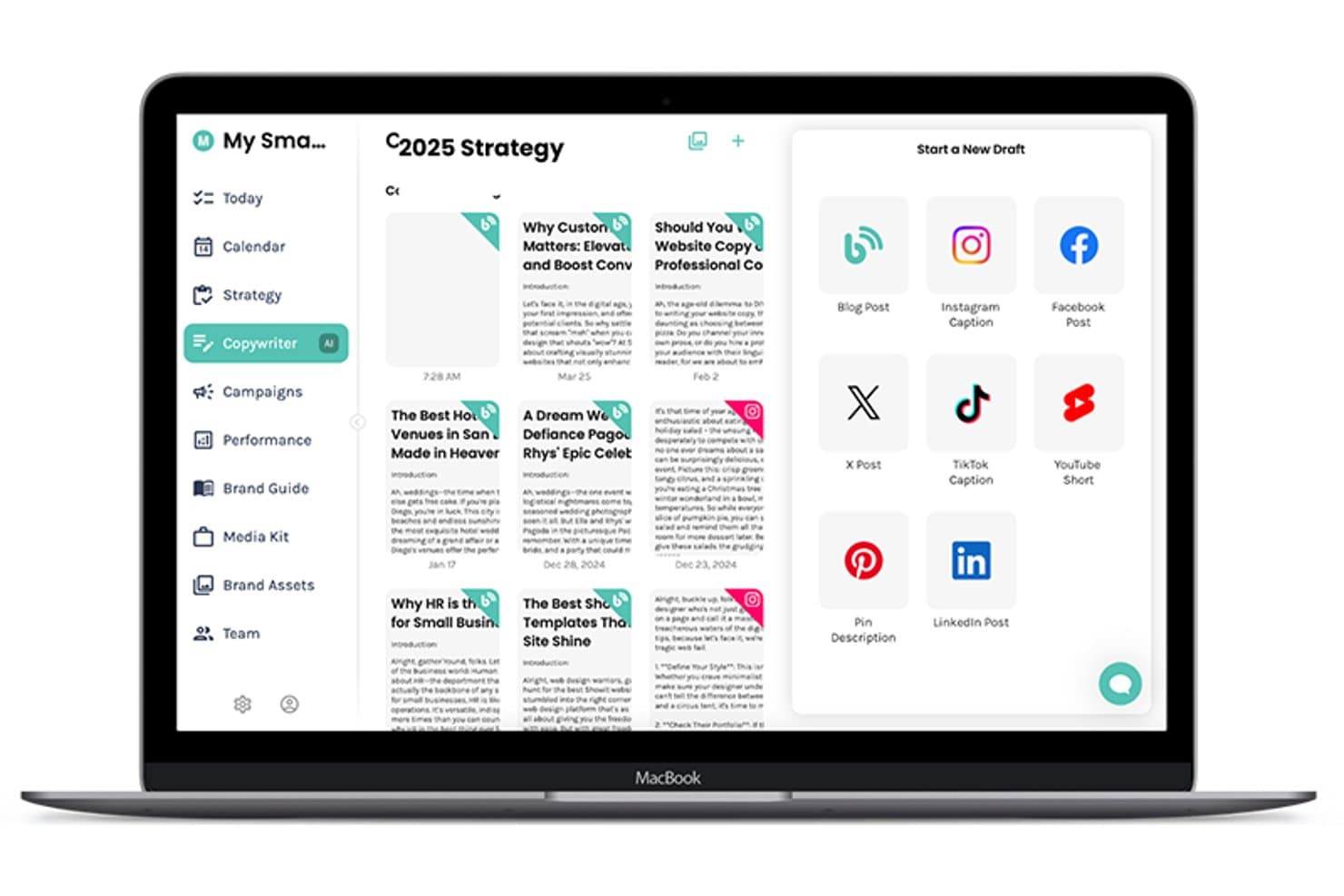
Enji offre uno strumento di scrittura basato sull'IA che consente agli utenti di creare bozze di post di blog, didascalie per Instagram, didascalie per TikTok e altro ancora da un'unica dashboard. Enji è una piattaforma di marketing per piccole imprese che abbina uno strumento di scrittura basato sull'IA per post di blog, didascalie e newsletter a un generatore di strategie integrato, uno strumento per programmare i contenuti e un pannello di controllo delle prestazioni.
Per chi è più adatto Enji?
Enji è adatto agli imprenditori individuali e alle attività gestite da una sola persona che si occupano autonomamente di tutto il proprio marketing, senza un team dedicato o un'agenzia alle spalle.
Perché ho scelto Enji
Enji si è guadagnato un posto nella mia rosa ristretta perché è l'unico strumento di scrittura di contenuti che ho trovato ad abbinare la stesura tramite IA a un livello strategico integrato, progettato intorno al flusso di lavoro di una sola persona. Mi piace il modo in cui il Generatore della voce del marchio cattura il tuo tono e lo applica in modo coerente a post di blog, didascalie e newsletter. La funzione di riutilizzo dei contenuti è particolarmente utile: le fornisci un contenuto e questa elabora un intero mese di contenuti derivati, esattamente ciò di cui ha bisogno un autore indipendente.
Funzionalità principali di Enji
- Generatore di strategie di marketing: Crea un piano di marketing personalizzato e attività a partire da un semplice questionario iniziale.
- Pannello di controllo dei KPI: Tiene traccia delle prestazioni sui canali social e su Google Analytics 4 in un unico posto.
- Modelli per le campagne: Offre campagne pronte all'uso e preimpostate, con attività dettagliate e tempistiche suggerite.
- Integrazione con Canva: Consente agli utenti di accedere ai progetti grafici e inserirli direttamente da Canva senza scaricare o ricaricare i file.
Integrazioni di Enji
Enji offre integrazioni native con Instagram, Facebook, LinkedIn, Pinterest, Threads, TikTok, YouTube, Canva e Google Analytics 4.
Pros and Cons
Pros:
- Livello strategico integrato per le decisioni sulla creazione dei contenuti
- La voce del marchio viene applicata in modo coerente a diversi tipi di contenuti
- Il riutilizzo dei contenuti trasforma un contenuto in molti altri
Cons:
- Funzionalità di ottimizzazione SEO limitate
- Non è progettato per flussi di lavoro di gruppo o collaborativi
Learn more about Enji: Ideale per la collaborazione in tempo reale tra team
- Piano gratuito + prova disponibile
- Da $7/utente/mese (fatturazione annuale)
Visit WebsiteCustomer Rating:4.7/5
Google Docs consente di creare, modificare, formattare, commentare e monitorare le versioni dei documenti. Google Docs è uno strumento di elaborazione testi basato su cloud di Google che consente di creare, modificare e formattare documenti con funzioni integrate di commenti, cronologia delle versioni e modifica in tempo reale da parte di più utenti.
Per chi è più indicato Google Docs?
Google Docs è la soluzione ideale per team di qualsiasi dimensione che necessitano di un ambiente di scrittura semplice e accessibile, senza la complessità di un software desktop.
Perché ho scelto Google Docs
Google Docs si guadagna un posto tra i migliori della mia lista perché la co-modifica in tempo reale è davvero il suo punto di forza. Posso vedere i cursori dei miei colleghi muoversi in diretta sullo stesso documento, lasciare commenti in linea con @menzioni e utilizzare la modalità di suggerimento per proporre modifiche senza sovrascrivere il lavoro di nessuno.
Il mio team usa la modalità suggerimento in particolare durante le revisioni dei contenuti per tracciare ogni modifica prima che venga accettata.
Funzionalità principali di Google Docs
- Cronologia delle versioni: Salva automaticamente ogni modifica così puoi visualizzare, nominare e ripristinare qualsiasi versione precedente di un documento.
- Digitazione vocale: Ti permette di dettare i contenuti direttamente in un documento utilizzando il microfono del dispositivo.
- Struttura del documento: Genera automaticamente una struttura navigabile dai tuoi titoli per aiutarti a organizzare contenuti estesi.
- Strumento conteggio parole: Mostra in tempo reale il conteggio di parole e caratteri, inclusi conteggi solo per il testo selezionato.
Integrazioni di Google Docs
Google Docs si integra nativamente con le app di Google Workspace come Google Sheets, Google Slides, Google Drive, Gmail e Google Meet. Si estende inoltre tramite il Marketplace di Google Workspace, dove puoi trovare componenti aggiuntivi da strumenti come Grammarly, Lucidchart, DocuSign e Canva che funzionano direttamente all'interno di Docs.
Pros and Cons
Pros:
- Modifica simultanea con più collaboratori
- Accessibile da qualsiasi dispositivo o browser
- Il salvataggio automatico previene la perdita del lavoro
Cons:
- Nessuna funzione integrata per SEO o ottimizzazione dei contenuti
- Formattazione limitata per documenti complessi
Learn more about Google Docs: Ideale per l'automazione dei flussi di lavoro di contenuti marketing Prezzo 1-liner:
- Prova gratuita di 7 giorni + demo gratuita disponibile
- Da $59/mese (fatturazione annuale)
Visit WebsiteCustomer Rating:4.8/5
Jasper produce contenuti di marketing, testi pubblicitari, post social e campagne email. Jasper è una piattaforma di scrittura AI creata per i team di marketing, con strumenti per generare contenuti long-form, testi pubblicitari, post per i social media e campagne email attraverso flussi di lavoro multi-step.
Per chi è più indicato Jasper?
Jasper è particolarmente adatto a team di marketing di medie e grandi dimensioni che producono grandi volumi di contenuti per campagne su diversi canali.
Perché ho scelto Jasper
Ho incluso Jasper tra le mie scelte migliori perché la sua funzione Campagne cambia realmente il modo in cui il mio team gestisce la produzione di contenuti multi-canale. Inserisco un unico brief creativo e Jasper genera asset coerenti tra post del blog, didascalie social e testi email in un'unica soluzione. Il suo builder di workflow consente inoltre di collegare i prompt in sequenze ripetibili, così tipologie di campagne ricorrenti non richiedono di essere ricostruite da zero ogni volta.
Funzionalità chiave di Jasper
- Voce del brand: Conserva il tono, lo stile e la terminologia del tuo marchio affinché ogni output resti coerente tra i vari autori e tipi di contenuto.
- Template: Scegli tra oltre 50 modelli di contenuti predefiniti che coprono descrizioni di prodotto, comunicati stampa, scalette di blog e altro ancora.
- Jasper Chat: Un'interfaccia di chat AI interattiva per lavorare sulle bozze, generare idee o riformulare sezioni in tempo reale.
- Knowledge base: Carica documenti aziendali, specifiche di prodotto o guide di stile così Jasper utilizza le tue fonti interne per generare i contenuti.
Integrazioni di Jasper
Jasper offre integrazioni native con Slack, Google Drive, Google Docs, Google Sheets, Google BigQuery, Microsoft SharePoint, Microsoft Word, Salesforce, Semrush, Adobe Workfront, Box e Webflow. Si collega anche con Zapier, Make e Pabbly Connect, e offre un'API per integrazioni personalizzate.
Pros and Cons
Pros:
- Generazione di contenuti a livello di campagna da un solo brief
- Oltre 50 template specifici per il marketing inclusi
- Supporta la creazione di contenuti in oltre 29 lingue
Cons:
- L'output long-form fatica su argomenti di nicchia
- La scrittura di copie brevi eccelle rispetto agli articoli di blog
Learn more about Jasper AI: Ideale per la creazione di testi ottimizzati sulle performance
- Prova gratuita di 7 giorni + demo gratuita disponibile
- A partire da $39/mese (fatturazione annuale)
Visit WebsiteCustomer Rating:4.8/5
Anyword prevede le performance dei testi per annunci, email, post, blog e landing page. Anyword è una piattaforma di scrittura di contenuti AI che genera e valuta testi per annunci, email, post social, articoli blog e landing page utilizzando dati di previsione delle performance.
Per chi è ideale Anyword?
Anyword è particolarmente indicato per i marketer orientati alle performance e per i team di crescita che scrivono e testano testi su larga scala su canali a pagamento e organici.
Perché ho scelto Anyword
Anyword merita un posto nella mia shortlist perché il suo motore di previsione delle performance fa qualcosa che la maggior parte degli strumenti di scrittura AI non fa: valuta le varianti di testo prima della pubblicazione. L'editor guidato dai dati utilizza dati di marketing da test A/B per identificare quale titolo, annuncio o oggetto email ha maggiori probabilità di convertire.
Apprezzo anche la funzione di intelligenza dei contenuti, che confronta i tuoi contenuti pubblicati con quel dataset per segnalare i contenuti meno performanti e suggerire miglioramenti.
Caratteristiche principali di Anyword
- Editor di blog: Genera articoli completi partendo da una parola chiave o argomento, con output strutturato con intestazioni, corpo del testo e formattazione SEO-friendly.
- Automazione per siti web: Personalizza i messaggi onsite per diversi segmenti di pubblico su larga scala senza riscrivere i testi manualmente.
- Tono di voce del brand: Conserva tono di voce, profili di pubblico e linee guida di comunicazione in un unico posto così ogni output rimane coerente su tutti i canali.
- Estensione Chrome: Accedi alla valutazione delle performance e alla generazione di testi di Anyword in qualsiasi ambiente di scrittura in browser.
Integrazioni Anyword
Anyword offre integrazioni native con piattaforme di marketing, CRM, CMS e advertising, tra cui Salesforce, HubSpot, Google Ads, Meta Ads, LinkedIn Ads, Marketo, Drupal, Sitecore, Wrike e Braze. Si connette anche con Zapier ed è disponibile un'API per integrazioni personalizzate.
Pros and Cons
Pros:
- Valutazione predittiva integrata per ogni variante
- Oltre 100 template di scrittura pensati per il marketing
- Genera contenuti in oltre 30 lingue
Cons:
- Gli articoli lunghi richiedono modifica manuale
- Nessuna connessione diretta di pubblicazione su WordPress
Learn more about Anyword: Ideale per AI rispettose del brand su misura per la tua azienda
- Prova gratuita di 14 giorni
- Prezzo su richiesta
Visit WebsiteCustomer Rating:4.4/5
Writer genera contenuti AI in linea con il brand e applica le linee guida aziendali di stile. Writer è una piattaforma AI di scrittura aziendale che combina contenuti generati dall'intelligenza artificiale, applicazione delle linee guida del brand e un modello AI personalizzato addestrato sulla terminologia e sulle linee guida specifiche della tua azienda.
Per chi è ideale Writer?
Writer è particolarmente adatto a team aziendali di marketing e contenuti che hanno bisogno che i risultati generati dall'AI siano coerenti con il tono di voce, la terminologia e i requisiti di conformità già stabiliti dal brand.
Perché ho scelto Writer
Writer si guadagna un posto nella mia shortlist perché nessun altro strumento di scrittura AI che ho utilizzato permette di addestrare l'intelligenza artificiale sulle reali linee guida del proprio brand come fa Writer. Utilizzo la funzione Knowledge Graph per fornire all'AI la terminologia specifica dell'azienda, i messaggi approvati e i nomi dei prodotti, così ogni output riflette davvero il modo in cui comunica il mio marchio.
Il verificatore integrato delle linee guida segnala in tempo reale le deviazioni, quindi non devo rileggere manualmente ogni contenuto per individuare linguaggi fuori brand.
Funzionalità principali di Writer
- Playbook: crea flussi di lavoro di contenuto ripetibili e multi-step che il tuo team può avviare su richiesta, senza dover ripartire ogni volta da zero con i prompt.
- Profili di voce: crea profili vocali associati a persone o toni specifici, come l'Amministratore Delegato o il tono del brand, così i contenuti generati dall'AI rispettano sempre la voce giusta.
- Skills: acquisisci e codifica una volta per tutte le competenze specialistiche del tuo team, quindi rendile disponibili in tutti gli output AI e a tutti i membri del team.
- Presentazioni generate dall'AI: genera presentazioni coerenti col brand direttamente da un prompt, includendo automaticamente i temi del tuo marchio.
Integrazioni Writer
Writer offre oltre 20 connettori nativi tramite il suo gateway proprietario MCP, tra cui Google Workspace, Microsoft 365, Slack, HubSpot, Salesforce, Atlassian (Jira e Confluence), Asana, Gong, Snowflake, Databricks, Figma, Contentful e Adobe Experience Manager. Si integra inoltre con Zapier e offre un'API per integrazioni personalizzate.
Pros and Cons
Pros:
- AI personalizzata addestrata sui dati specifici del tuo brand
- Gli output sembrano scritti da umani, non generati dall'AI
- Applicazione in tempo reale delle linee guida di stile integrata
Cons:
- Funzionalità sovrapposte creano confusione iniziale
- La generazione di contenuti per i social media è carente
Learn more about Writer: Ideale per semplificare testi complessi
- Prova gratuita di 14 giorni
- Da $8.33/mese (fatturato annualmente)

Hemingway App evidenzia frasi difficili da leggere e migliora la scrittura diretta. Hemingway App è un editor di scrittura che evidenzia frasi difficili da leggere, la forma passiva e l'uso eccessivo di avverbi per aiutare gli scrittori a produrre testi più chiari e diretti.
Per chi è più adatta Hemingway App?
Hemingway App è una scelta naturale per blogger, giornalisti e redattori tecnici che devono rendere comprensibili per il vasto pubblico contenuti densi o complessi.
Perché ho scelto Hemingway App
Hemingway App si è guadagnata un posto nella mia selezione perché il suo editor a colori rende impossibile ignorare i problemi di leggibilità. Copio una bozza e vedo subito le frasi evidenziate in rosso troppo dense per essere comprese e quelle in giallo che necessitano di essere snellite.
Il punteggio relativo al livello scolastico in alto mi aiuta a restare onesto: punto all’ottava classe o meno per la maggior parte dei contenuti e Hemingway App mi mostra esattamente dove sto mancando l’obiettivo.
Caratteristiche principali di Hemingway App
- Modalità scrittura: Un editor senza distrazioni che ti permette di redigere contenuti senza mostrare i feedback sulla leggibilità, finché non passi in modalità modifica.
- Pubblicazione diretta: Consente di pubblicare i contenuti direttamente su WordPress o Medium dall'interno dell'app.
- Rilevamento del passivo: Segnala le costruzioni passive in verde, così da poterle riscrivere in forma attiva.
- App desktop: Disponibile come applicazione desktop scaricabile per Mac e PC, ti consente di lavorare offline senza browser.
Integrazioni di Hemingway App
Hemingway App offre integrazioni one-click con Medium e WordPress per la pubblicazione diretta. Non offre un'API né altre opzioni di integrazione con altri software, risultando così uno strumento piuttosto indipendente rispetto ad altri software per la scrittura presenti sul mercato.
Pros and Cons
Pros:
- Punteggio istantaneo di leggibilità su ogni bozza
- Suggerisce alternative più semplici per parole complesse
- Versione browser gratuita con tutte le funzioni di editing
Cons:
- Non rileva errori di ortografia o grammatica
- Segnala ogni frase lunga come un problema
Learn more about Hemingway Editor: 7Ideale per la replica personalizzata della voce
Rytr
- Piano gratuito disponibile
- Da $7,50/mese (fatturazione annuale)

Rytr crea post per blog, email e copy pubblicitari con profili di tono personalizzati. Rytr è un assistente di scrittura AI che ti permette di generare contenuti per oltre 40 casi d'uso — da post sul blog ed email a testi pubblicitari — utilizzando profili di tono personalizzati e una funzione integrata di training sulla voce.
Per chi è Rytr?
Rytr è perfetto per scrittori freelance, creatori di contenuti indipendenti e piccoli team di marketing che hanno bisogno di produrre testi coerenti e in linea con il brand senza un grande budget.
Perché ho scelto Rytr
Ho incluso Rytr tra le mie migliori scelte perché la funzione 'My Voice' offre qualcosa di veramente utile: analizza un campione di scrittura fornito da te e poi replica quel tono in tutto ciò che genera. I freelance che gestiscono più clienti possono creare profili vocali separati per ciascuno, mantenendo distinti i risultati senza dover ricominciare da capo ogni volta.
Mi piace anche che questi profili di tono personalizzati ti seguano tramite l'estensione Chrome di Rytr, così la coerenza della voce non si limita solo all'app.
Caratteristiche principali di Rytr
- Oltre 40 modelli di casi d'uso: Scegli tra modelli predefiniti per tipi di contenuto come email, call to action, titoli SEO, didascalie social e paragrafi per blog.
- Controllo antiplagio integrato: Esegui controlli antiplagio direttamente in Rytr senza dover cambiare strumento.
- Generatore di comandi AI: Scrivi un'istruzione in linguaggio semplice e Rytr genera il testo in base a ciò che descrivi.
- Scrittura multilingue: Genera contenuti in oltre 30 lingue, disponibile con il piano Premium.
Integrazioni Rytr
Rytr non dispone di integrazioni native con CRM, CMS o strumenti di project management. La sua principale connettività avviene tramite un'estensione per Chrome che ti consente di usare Rytr ovunque scrivi nel browser.
Pros and Cons
Pros:
- Ottimo per testi brevi come annunci
- Analizzatore SERP integrato e strumento per parole chiave
- Modelli di casi d'uso personalizzati nei piani a pagamento
Cons:
- Gli output diventano ripetitivi nelle bozze lunghe
- Nessuna verifica o reperimento dati in tempo reale
Learn more about Rytr: Ideale per opzioni di riscrittura contestuale
- Piano gratuito disponibile
- Da $6.99/mese (fatturazione annuale)

Wordtune riscrive le frasi, affina il tono e migliora la chiarezza nelle bozze. Wordtune è un assistente alla scrittura basato su intelligenza artificiale che offre strumenti per la riscrittura a livello di frase, la parafrasi e l'espansione del testo, pensati per aiutare gli scrittori a perfezionare tono, chiarezza e scelta delle parole durante la stesura dei testi.
Per Chi è Ideale Wordtune?
Wordtune è particolarmente indicato per content writer, marketer e persone non madrelingua inglese che necessitano di opzioni di riscrittura a livello di frase per affinare chiarezza e tono nei contenuti brevi.
Perché Ho Scelto Wordtune
Ho scelto Wordtune tra i migliori perché nessun altro strumento che ho utilizzato offre opzioni di riscrittura come questo. Quando evidenzio una frase, Wordtune genera più riscritture contestualizzate che rispettano il mio tono e l’argomento trattato, anziché sostituire completamente la mia voce.
Utilizzo anche spesso l’interruttore del tono, passando tra registro informale e formale in pochi secondi quando riadatto i contenuti su diversi canali. Il generatore di Sinonimi Intelligenti aggiunge un ulteriore livello, suggerendo opzioni di vocabolario adatte al contesto invece che solo in ordine alfabetico.
Funzionalità Principali di Wordtune
- Correzione di bozze con IA: Analizza il testo per eventuali errori di ortografia, grammatica e formulazione, proponendo correzioni suggerite.
- Continua a scrivere: Genera una continuazione del testo esistente quando si rimane bloccati a metà stesura.
- Riassunto del testo: Sintetizza documenti, articoli, pagine web e video YouTube in punti chiave.
- Smart Translate: Converte il testo scritto in 10 lingue, tra cui spagnolo, arabo e mandarino, in un inglese naturale.
Integrazioni di Wordtune
Wordtune funziona tramite le sue estensioni browser per Chrome e Microsoft Edge, invece che attraverso le tipiche integrazioni native. L’estensione browser porta le funzionalità di Wordtune su piattaforme come Google Docs e altri strumenti di scrittura basati sul web. Attualmente Wordtune non offre un’API e non è compatibile con Zapier.
Pros and Cons
Pros:
- Più opzioni di riscrittura per ogni frase
- Modula il tono tra informale e formale
- Traduce da 10 lingue verso l'inglese
Cons:
- I suggerimenti popup possono interrompere il flusso di scrittura
- Il piano gratuito limita a 10 riscritture giornaliere
Learn more about Wordtune: Ideale per la generazione di contenuti multilingue
- Prova gratuita di 1.000 parole disponibile
- Da $19/mese (fatturazione annuale)

Copymatic genera blog, annunci, descrizioni di prodotti e contenuti social. Copymatic è uno strumento di scrittura AI che genera articoli per blog, testi pubblicitari, copy per landing page, descrizioni di prodotti ecommerce e contenuti per i social media in oltre 25 lingue.
A chi è più adatto Copymatic?
Copymatic è particolarmente indicato per content marketer e freelance che hanno necessità di produrre contenuti scritti in più lingue senza dover creare un team di autori madrelingua.
Perché ho scelto Copymatic
Ho scelto Copymatic tra i migliori perché il supporto alle lingue è davvero ampio. Genera contenuti in oltre 25 lingue e posso cambiare la lingua di output direttamente all’interno di qualsiasi strumento di scrittura senza uscire dall’editor.
Apprezzo anche i controlli su tono di voce e livello di creatività, che permettono di regolare gli output per diversi pubblici regionali in una singola sessione invece che gestire prompt separati per ogni mercato.
Funzionalità principali di Copymatic
- Scrittore di articoli long-form: Genera post per blog di oltre 1.000 parole producendo titoli, scalette, introduzioni e paragrafi completi in sequenza.
- Correttore grammaticale e riscrittore: Rivedi e riscrivi contenuti esistenti per correggere errori grammaticali e riformulare le frasi.
- Estensione Chrome: Accedi a oltre 80 strumenti di scrittura AI direttamente dal browser senza cambiare scheda o applicazione.
- Plugin WordPress: Importa articoli creati in Copymatic direttamente su WordPress con un solo clic.
Integrazioni di Copymatic
Copymatic offre un set ridotto di integrazioni native, tra cui un plugin per WordPress per importare articoli con un clic e un’estensione Chrome per scrivere direttamente dal browser. È disponibile un’API per integrazioni personalizzate, ma il supporto a Zapier non è chiaramente documentato.
Pros and Cons
Pros:
- Punteggio SEO integrato per gli articoli generati
- Oltre 80 strumenti di scrittura nell'estensione Chrome
- Genera contenuti in oltre 25 lingue
Cons:
- Gli articoli lunghi spesso richiedono revisione manuale
- Frasi ripetitive nei contenuti generati
Learn more about Copymatic: Ideale per l'analisi approfondita di storie e manoscritti
- Piano gratuito disponibile
- Da $10/mese (fatturazione annuale)

ProWritingAid analizza grammatica, stile, ritmo, ripetizioni e leggibilità. ProWritingAid è uno strumento di analisi della scrittura che controlla grammatica, stile, ritmo, ripetizioni e leggibilità su documenti lunghi, con report dedicati pensati appositamente per manoscritti di narrativa e progetti di scrittura creativa.
Per chi è più adatto ProWritingAid?
ProWritingAid è ideale per scrittori di narrativa, romanzieri e autori che necessitano di un riscontro strutturale dettagliato sui testi creativi lunghi.
Perché ho scelto ProWritingAid
Ho scelto ProWritingAid tra i migliori perché nessun altro strumento offre agli scrittori di narrativa questo livello di analisi strutturale su un intero manoscritto. Adoro il report sul ritmo, che visualizza la tensione e il flusso capitolo per capitolo permettendoti di individuare dove la storia rallenta troppo. Anche il report sui dialoghi e la rilevazione delle frasi ripetute sono molto precisi, scoprendo quei tipi di schemi che emergono solo su una bozza completa.
Funzionalità principali di ProWritingAid
- Controllo di grammatica e stile: Analizza il tuo testo per individuare errori di grammatica, punteggiatura, ortografia e struttura della frase in un unico passaggio.
- Report sulla leggibilità: Valuta il testo usando vari indici di leggibilità per aiutarti ad adattare la scrittura al pubblico di riferimento.
- Esploratore di parole: Propone sinonimi, collocazioni e suggerimenti contestuali direttamente nell’editor.
- Controllo antiplagio: Confronta il testo con fonti online per segnalare duplicazioni involontarie prima della pubblicazione.
Integrazioni di ProWritingAid
ProWritingAid funziona tramite applicazioni desktop ed estensioni browser piuttosto che integrazioni native tradizionali. L’app Desktop Everywhere per Windows e Mac offre suggerimenti di editing direttamente in Microsoft Word, Scrivener e altre app di scrittura desktop. Le estensioni per i browser Chrome, Edge e Firefox portano le funzionalità di ProWritingAid su Google Docs, Notion, Atticus, Campfire e centinaia di altri siti web. ProWritingAid non offre più un'API per integrazioni personalizzate e non è disponibile il supporto a Zapier.
Pros and Cons
Pros:
- Oltre 25 report specializzati per un’analisi approfondita della scrittura
- Gestisce manoscritti e bozze di libri completi
- La funzione Echoes rileva parole ripetute su più documenti
Cons:
- Può rallentare con documenti molto lunghi
- A volte suggerisce correzioni di stile non pertinenti
Learn more about ProWritingAid:
- 11GrammarlyIdeale per suggerimenti su tono e chiarezza
Come Valuto i Software di Scrittura di Contenuti
Divido ogni valutazione in due livelli: se uno strumento può effettivamente produrre post per blog e landing page pronti per la pubblicazione, e cosa lo distingue da tutte le altre opzioni sul mercato.
Funzionalità Principali (Requisiti Minimi per Questa Lista)
Quando seleziono gli strumenti per la mia lista, valuto ognuno su una scala da 0 (non offre la funzionalità) a 5 (eccelle in quest'area) per ciascuna delle funzionalità principali elencate qui sotto. Poi, calcolo il punteggio totale dello strumento in percentuale. Ogni strumento deve raggiungere un punteggio totale minimo del 65% per essere preso in considerazione.
- Generazione di Contenuti con l’IA: Valuto se lo strumento può produrre bozze complete di blog, testi per landing page e descrizioni di prodotto partendo da un prompt o da un brief, non solo brevi estratti o suggerimenti di una riga.
- Strumenti di Ottimizzazione SEO: Ogni strumento dovrebbe mostrare raccomandazioni per le parole chiave, un punteggio della pagina o indicazioni basate sui risultati di ricerca, così che gli autori possano ottimizzare un post per i motori di ricerca senza uscire dall’area di lavoro.
- Editing di Grammatica e Stile: Cerco suggerimenti in tempo reale su grammatica, leggibilità e chiarezza che vadano oltre il semplice controllo ortografico, come segnalare la voce passiva o frasi troppo complesse in una bozza.
- Controlli di Voce e Tono del Brand: I migliori strumenti permettono di salvare un profilo di voce personalizzato, così ogni post o pagina creata dal team resta coerente con le linee guida del brand.
- Workflow Editoriale e Collaborazione: Verifico se più membri del team possono commentare, assegnare fasi di revisione e tracciare la cronologia delle versioni, soprattutto per i team che si passano le bozze tra autori ed editor.
- Template e Formati di Contenuto: Una solida libreria di template che copre formati rilevanti per il SaaS, come pagine di confronto, annunci di nuove funzioni e sequenze email, fa davvero risparmiare tempo nella pianificazione dei contenuti.
Una volta che ho una lista di strumenti che soddisfano questi criteri, considero cosa rende unica ciascuna piattaforma.
Fattori di Differenziazione (Cosa Distingue i Fornitori)
Ecco come confronto e metto in contrasto i diversi fornitori:
Funzionalità Distintive
Cerco strumenti per il riutilizzo dei contenuti che permettano di trasformare un singolo articolo in estratti per i social, testi per email e varianti per annunci senza dover ricominciare da zero. L’analisi SERP in tempo reale è un altro elemento che fa la differenza, perché fornisce dati aggiornati sui competitor mentre scrivi, non dopo. Anche la personalizzazione dell’addestramento dell’IA conta: gli strumenti che assimilano i tuoi documenti prodotto o la tua libreria di contenuti esistente producono bozze che suonano davvero come il tuo brand fin dalla prima uscita.
Oltre le Funzionalità
Le integrazioni sono importanti perché il tuo strumento di contenuti deve collegarsi dove già lavora il tuo team — pubblicando su WordPress o HubSpot, recuperando dati sulle keyword da Ahrefs o Semrush e sincronizzando attività su Asana o Notion. Valuto anche le politiche sulla sicurezza dei dati, soprattutto riguardo la proprietà dei contenuti e se i tuoi input vengono usati per addestrare i modelli. Vale la pena controllare anche la qualità dell’output: uno strumento che consente di passare da un LLM all’altro o di inserire URL di riferimento tende a generare bozze più accurate e aderenti alla realtà per argomenti SaaS tecnici.
Come scegliere un software per la scrittura di contenuti
È facile perdersi tra lunghi elenchi di funzionalità e strutture di prezzo complesse. Per aiutarti a rimanere concentrato mentre affronti il tuo processo unico di selezione del software, ecco un elenco di fattori da tenere a mente:
| Fattore | Cosa considerare |
|---|---|
| FattoreScalabilità | Cosa considerareLo strumento sarà in grado di gestire un volume maggiore di contenuti o utenti man mano che il team cresce? Verifica il numero massimo di postazioni utente e i limiti di utilizzo dell'API. |
| FattoreIntegrazioni | Cosa considerareSi connette nativamente agli strumenti su cui fa affidamento il tuo team, come piattaforme CMS, Google Drive o software per la gestione dei progetti? |
| FattorePersonalizzazione | Cosa considerarePuoi configurare modelli, stili di scrittura o flussi di lavoro personalizzati che rispecchino la strategia dei contenuti del tuo marchio? |
| FattoreFacilità d'uso | Cosa considerareGli utenti non tecnici possono adottarlo rapidamente senza dover affrontare una curva di apprendimento ripida? Testa la navigazione e i flussi delle attività prima dell'acquisto. |
| FattoreImplementazione e inserimento | Cosa considerareQuanto tempo impiegherà il tuo team a iniziare a produrre valore? Considera la durata della configurazione, i passaggi di migrazione e il supporto disponibile per l'inserimento. |
| FattoreCosto | Cosa considerareI livelli di prezzo sono in linea con le tue esigenze e il tuo budget? Cerca limiti nascosti, sconti annuali o requisiti minimi sul numero di postazioni. |
| FattoreMisure di sicurezza | Cosa considerareLo strumento è conforme agli standard sulla privacy dei dati? Esamina le politiche relative alla conservazione dei dati, alle autorizzazioni degli utenti e alla conformità al GDPR. |
| FattoreDisponibilità dell'assistenza | Cosa considerareL'aiuto è disponibile quando ne hai bisogno, soprattutto per i problemi urgenti? Verifica la presenza di chat dal vivo, assistenza via e-mail o persino copertura 24 ore su 24, 7 giorni su 7. |
Che cosa sono i software per la scrittura di contenuti?
I software per la scrittura di contenuti sono strumenti digitali progettati per aiutare singoli utenti e team a creare, modificare e ottimizzare materiali scritti per blog, marketing, siti web e pubblicazioni digitali.
Queste piattaforme spesso combinano la generazione di testi basata sull'intelligenza artificiale, la correzione grammaticale e le funzionalità di formattazione per favorire coerenza e rapidità. Centralizzando il processo di scrittura, semplificano la produzione di grandi volumi di contenuti scritti di livello professionale per esigenze aziendali o creative.
Funzionalità
Quando selezioni un software per la scrittura di contenuti, presta attenzione alle seguenti funzionalità chiave:
- Controllo grammaticale e ortografico: Garantisce che i tuoi contenuti siano privi di refusi, errori grammaticali e formulazioni poco naturali, evidenziando automaticamente gli errori e suggerendo correzioni durante la modifica.
- Modelli di contenuto: Fornisce formati prestrutturati per i tipi di testo più comuni, come articoli di blog, e-mail, descrizioni di prodotti e aggiornamenti sui social media, per velocizzare la creazione dei contenuti e mantenere la coerenza.
- Rilevamento del plagio: Analizza ed evidenzia i testi duplicati per contribuire a mantenere l'originalità dei contenuti ed evitare problemi accidentali di copyright prima della pubblicazione o della consegna.
- Cronologia delle versioni: Tiene traccia delle modifiche e le salva nel tempo, consentendo di esaminare, ripristinare o confrontare le bozze precedenti, supportando la modifica collaborativa e il recupero dagli errori.
- Strumenti di collaborazione: Consente a più utenti di lavorare contemporaneamente sullo stesso documento, lasciare commenti, assegnare attività e risolvere i suggerimenti in tempo reale.
- Opzioni di esportazione: Permette di salvare o esportare i contenuti in diversi formati, come PDF, DOCX o HTML, facilitandone la pubblicazione o la condivisione su piattaforme differenti.
- Editor di formattazione e stile: Consente di applicare titoli, elenchi, link ed elementi grafici per migliorare la struttura, la leggibilità e l'aspetto visivo dei tuoi testi.
- Conteggio di parole e caratteri: Fornisce un conteggio in tempo reale, così puoi rispettare i requisiti di lunghezza per piattaforme, brief o standard editoriali specifici.
Funzionalità comuni dell'intelligenza artificiale nei software di scrittura dei contenuti
Oltre alle funzionalità standard dei software di scrittura dei contenuti elencate sopra, molte di queste soluzioni integrano l'intelligenza artificiale con funzionalità come:
- Generazione automatica dei contenuti: Utilizza modelli di intelligenza artificiale per creare istantaneamente articoli, e-mail o testi pubblicitari sulla base di brevi prompt o argomenti, aiutando gli utenti a creare rapidamente testi di qualità su larga scala.
- Riepilogo intelligente dei testi: Condensa articoli o rapporti lunghi in riepiloghi concisi, rendendo più accessibili e rapidi da assimilare grandi volumi di informazioni.
- Riscrittura e parafrasi contestuali: Riformula automaticamente frasi e paragrafi preservandone il significato e il tono, una funzione utile per rinnovare i contenuti esistenti o evitare ripetizioni.
- Regolazione del tono basata sull'intelligenza artificiale: Consente agli utenti di modificare il tono emotivo o lo stile di scrittura (formale, amichevole, persuasivo) per adattarlo meglio alle linee guida del marchio o alle aspettative del pubblico di riferimento.
- Miglioramento dei contenuti in tempo reale: Fornisce suggerimenti basati sull'intelligenza artificiale per migliorare chiarezza, coinvolgimento e leggibilità, perfezionando le bozze con un intervento manuale minimo.
Vantaggi
L'implementazione di un software di scrittura dei contenuti offre diversi vantaggi al tuo team e alla tua azienda. Eccone alcuni:
- Produzione più rapida dei contenuti: Gli strumenti automatizzati, i modelli e la generazione basata sull'intelligenza artificiale aiutano il tuo team a creare articoli, e-mail e annunci più rapidamente rispetto alla stesura manuale.
- Qualità e stile coerenti: I correttori grammaticali integrati, la formattazione e le impostazioni della voce del marchio garantiscono che i contenuti rispettino i tuoi standard ogni volta.
- Collaborazione migliorata: Le funzionalità di modifica e commento in tempo reale e la cronologia delle versioni rendono il lavoro di squadra e la scrittura a più mani semplici e trasparenti.
- Riduzione del rischio di plagio: Il rilevamento integrato del plagio contribuisce a mantenere l'originalità dei contenuti e protegge la tua azienda da violazioni accidentali del copyright.
- Flussi di lavoro di pubblicazione fluidi: Le opzioni di esportazione e le integrazioni con altre piattaforme consentono di trasferire facilmente i contenuti dalla bozza alla pubblicazione.
- Maggiore efficacia dei contenuti: I miglioramenti basati sull'intelligenza artificiale e le funzionalità di regolazione del tono contribuiscono a rendere i tuoi testi più coinvolgenti e adatti alle esigenze del pubblico.
Costi e prezzi
La scelta di un software di scrittura dei contenuti richiede la comprensione dei vari modelli e piani tariffari disponibili. I costi variano in base alle funzionalità, alle dimensioni del team, agli elementi aggiuntivi e ad altri fattori. La tabella seguente riassume i piani più comuni, i relativi prezzi medi e le funzionalità tipicamente incluse nelle soluzioni software per la scrittura dei contenuti:
Tabella di confronto dei piani dei software di scrittura dei contenuti
| Tipo di piano | Prezzo medio | Caratteristiche comuni |
|---|---|---|
| Tipo di pianoPiano gratuito | Prezzo medio$0 | Caratteristiche comuniModelli di contenuti di base, numero limitato di parole o caratteri, controlli grammaticali e opzioni di esportazione di base. |
| Tipo di pianoPiano personale | Prezzo medio$10-$20/utente/mese | Caratteristiche comuniAccesso completo ai modelli, numero di parole maggiore, controlli antiplagio di base, strumenti di stile e assistenza per un singolo utente. |
| Tipo di pianoPiano aziendale | Prezzo medio$25-$50/utente/mese | Caratteristiche comuniFunzionalità di collaborazione, opzioni di esportazione avanzate, cronologia delle versioni, gestione del team e integrazioni. |
| Tipo di pianoPiano aziendale avanzato | Prezzo medio$60-$120/utente/mese | Caratteristiche comuniOnboarding personalizzato, assistenza prioritaria, accesso API, sicurezza avanzata, modelli personalizzati e funzionalità di conformità. |
Domande frequenti sul software di scrittura dei contenuti
Ecco alcune risposte alle domande comuni sul software di scrittura dei contenuti:
In che modo il software di scrittura dei contenuti è diverso dai programmi di videoscrittura di base?
Il software di scrittura dei contenuti va oltre la semplice modifica dei documenti, aggiungendo modelli, rilevamento del plagio, strumenti di collaborazione, cronologia delle versioni e talvolta generazione di contenuti tramite IA. Queste funzionalità aiutano i team a gestire, monitorare e ottimizzare i progetti di scrittura in modo più efficiente rispetto ai programmi di videoscrittura standard.
Il software di scrittura dei contenuti può migliorare la collaborazione del team?
Sì, la maggior parte dei software di scrittura dei contenuti offre collaborazione in tempo reale, commenti e monitoraggio delle versioni. Queste funzionalità consentono a più utenti di modificare simultaneamente i documenti, assegnare attività di scrittura e rivedere facilmente le modifiche, rendendo molto più fluido lo sviluppo dei contenuti di gruppo.
Esistono rischi per la sicurezza quando si utilizza un software di scrittura dei contenuti?
Sì, soprattutto se lavori con informazioni sensibili. Controlla sempre le pratiche di sicurezza del fornitore, come la crittografia dei dati, i controlli degli accessi e le certificazioni di conformità, per assicurarti che i tuoi documenti e i tuoi dati siano protetti.
Gli strumenti software per la scrittura dei contenuti supportano più lingue?
Molti strumenti software per la scrittura dei contenuti supportano la creazione e la modifica di contenuti multilingue. Tuttavia, le lingue disponibili e la qualità possono variare, quindi verifica il supporto linguistico e testa la qualità dei risultati per le lingue di destinazione.
Qual è la curva di apprendimento tipica per i nuovi utenti?
La maggior parte dei software di scrittura dei contenuti è progettata per un onboarding rapido, con tutorial, modelli e visite guidate. Tuttavia, le funzionalità avanzate o le piattaforme altamente personalizzabili possono richiedere una formazione aggiuntiva affinché il team possa ottenere il massimo valore.