

Il software per la pianificazione dei contenuti aiuta il tuo team a organizzare, programmare e gestire i progetti di contenuto, dall'idea alla pubblicazione. Se cerchi il miglior software per la pianificazione dei contenuti, hai bisogno di strumenti che mantengano le campagne sulla buona strada, favoriscano la collaborazione e colleghino il tuo lavoro a risultati aziendali concreti.
Con l'aumento delle esigenze relative ai contenuti, scegliere la piattaforma giusta fa la differenza tra scadenze mancate e un'esecuzione coordinata e sicura. In questo elenco, ti illustrerò le migliori opzioni, così potrai confrontare le funzionalità e scegliere il software più adatto al modo in cui lavora il tuo team, che tu stia organizzando i post del blog, lanciando campagne multicanale o coordinando numerosi collaboratori.
Perché fidarsi dei nostri consigli sui software
6,700+
Reviews
20
Industry experts
16+
Evaluation factors
14
Years
Il nostro team testa e recensisce software dal 2012. In quanto editori e operatori mediatici noi stessi, sappiamo quanto sia difficile — e importante — scegliere il software giusto.
Per questa guida, abbiamo valutato gli strumenti attraverso test pratici e ricerche indipendenti, assegnando un punteggio agli strumenti in base ai nostri criteri di selezione.
Le nostre recensioni riflettono il nostro giudizio editoriale umano, non un discorso di vendita.
Tabella comparativa: software per la pianificazione dei contenuti
Questa tabella comparativa riassume i dettagli sui prezzi delle mie migliori selezioni di software per la pianificazione dei contenuti.
| Tool | Best For | Trial Info | Price | ||
|---|---|---|---|---|---|
| 1 | Ideale per creatori singoli | Prova gratuita di 14 giorni | Da $29/mese | Website | |
| 2 | Ideale per la pianificazione collaborativa dei post sui social | Prova gratuita disponibile | Da $49/mese (fatturato annualmente) | Website | |
| 3 | Ideale per approfondimenti strategici sui contenuti basati sull'IA | Piano gratuito + demo gratuita disponibile | Prezzo su richiesta | Website | |
| 4 | Ideale per il coordinamento di campagne tra team | Piano gratuito + demo gratuita disponibile | Da $10.99/utente/mese (fatturazione annuale) | Website | |
| 5 | Ideale per la creazione rapida di contenuti brandizzati | Prova gratuita di 30 giorni + piano gratuito disponibile | Da $9.99/mese | Website | |
| 6 | Ideale per il design di contenuti interattivi | Piano gratuito + demo gratuita disponibile | Prezzo su richiesta | Website | |
| 7 | Ideale per analisi avanzate sui social media | Prova gratuita di 14 giorni + demo gratuita disponibile | Da $99/utente/mese (fatturazione annuale) | Website | |
| 8 | Ideale per la pianificazione della produttività guidata dall'AI | Prova gratuita disponibile | A partire da $19/postazione/mese (fatturazione annuale) | Website | |
| 9 | Ideale per la gestione di campagne con influencer | Prova gratuita di 14 giorni + demo gratuita disponibile | Da $18,75/mese (fatturazione annuale) | Website | |
| 10 | Ideale per l’enablement di vendita e marketing enterprise | Demo gratuita disponibile | Prezzo su richiesta | Website |


Recensioni dei migliori software per la pianificazione dei contenuti
Di seguito trovi i miei riepiloghi dettagliati dei migliori software per la pianificazione dei contenuti inclusi nel mio elenco ristretto. Le mie recensioni offrono una panoramica dettagliata delle funzionalità, dei casi d’uso ideali e delle integrazioni di ogni piattaforma, per aiutarti a trovare quella più adatta a te.
 1Ideale per creatori singoli
Enji
- Prova gratuita di 14 giorni
- Da $29/mese
Visit WebsiteCustomer Rating:4.9/5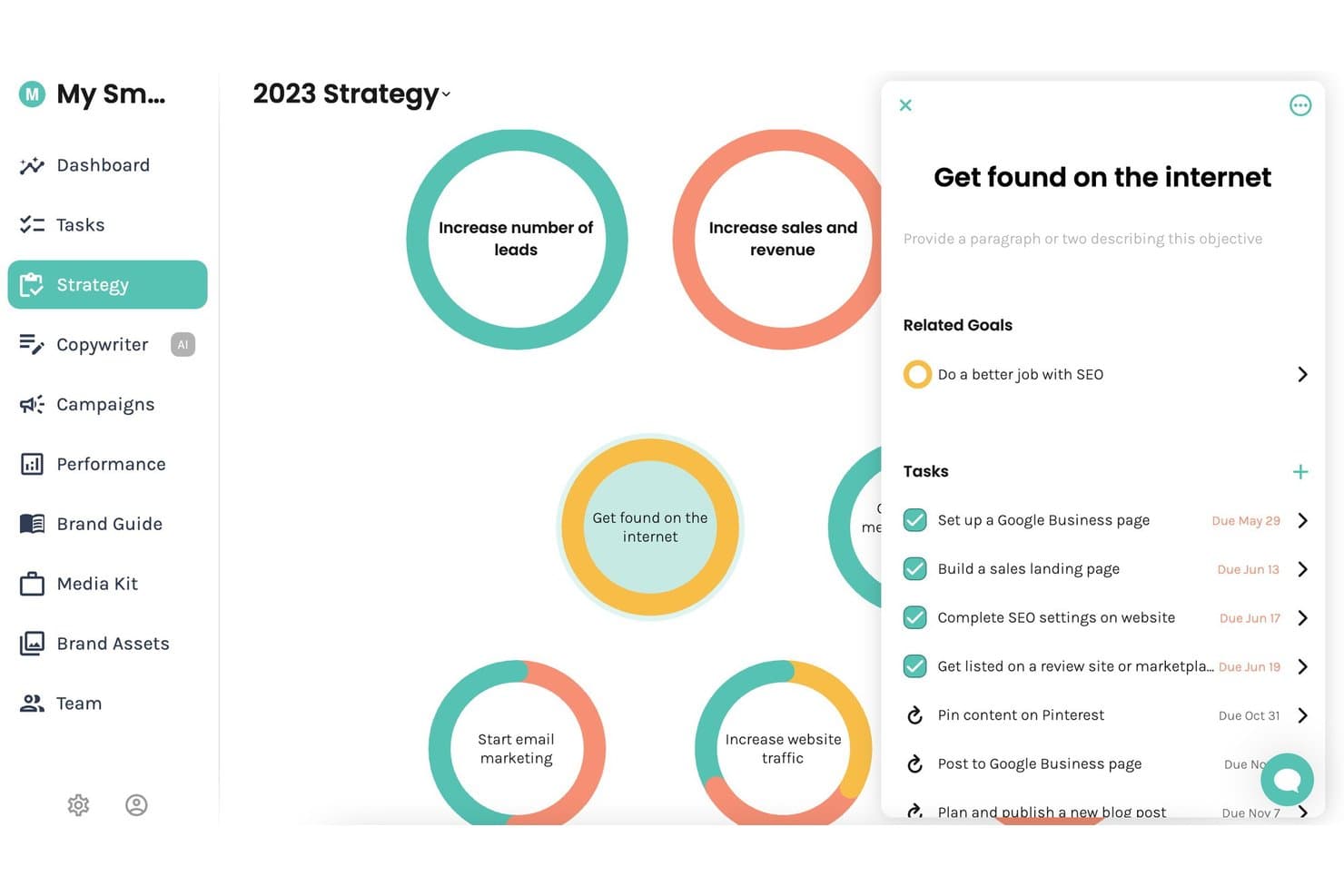
Enji offre una bacheca strategica visiva dove gli utenti possono gestire obiettivi di marketing, traguardi collegati e compiti con date di scadenza in una vista centralizzata. Enji è uno strumento tutto-in-uno per la pianificazione del marketing che unisce generazione di strategie, calendario marketing, creazione di contenuti tramite IA, programmazione dei post sui social media e analisi delle prestazioni.
Per chi è migliore Enji?
Enji è la soluzione ideale per solopreneur e liberi professionisti che gestiscono il proprio marketing senza il supporto di un team o di un'agenzia.
Perché ho scelto Enji
Enji si guadagna il suo posto nella mia lista ristretta perché il suo flusso di lavoro dalla strategia al calendario è progettato specificamente per chi deve gestire tutto da solo. Mi piace il fatto che, rispondendo a un questionario di 20 domande, si ottenga un piano di marketing personalizzato che popola automaticamente il calendario come una lista di cose da fare prioritarie. Il Copywriter IA, addestrato sulla voce specifica del tuo marchio, redige poi didascalie per i social e post per il blog direttamente collegati a quei compiti pianificati.
Caratteristiche chiave di Enji
- Strumento di riproposizione contenuti IA: Trasforma istantaneamente un solo contenuto in diversi post social per piattaforme differenti.
- Suite di gestione del brand: Centralizza impostazioni di voce del marchio, guide di stile, media kit e risorse principali in un unico luogo.
- Integrazione dashboard KPI: Importa le analytics del sito web e dei social direttamente nel tuo cruscotto marketing per verifiche rapide sulle prestazioni.
- Integrazione Canva: Ti permette di accedere e usare i tuoi design di Canva direttamente all'interno di Enji senza bisogno di ricaricarli.
Integrazioni di Enji
Enji offre integrazioni native con Instagram, Facebook, LinkedIn, Pinterest, Threads, TikTok, YouTube, Canva e Google Analytics 4.
Pros and Cons
Pros:
- Il questionario genera un calendario marketing completo
- Copywriter IA addestrato sulla tua voce di marca
- Tutto-in-uno: strategia, calendario e pubblicazione
Cons:
- Collaborazione multiutente non supportata
- Mancano strumenti SEO nativi per la ricerca di keyword
Learn more about Enji: Ideale per la pianificazione collaborativa dei post sui social
- Prova gratuita disponibile
- Da $49/mese (fatturato annualmente)
Visit WebsiteCustomer Rating:4.6/5
Loomly pianifica i post sui social, programma i contenuti, gestisce approvazioni e flussi di lavoro del team. Loomly è una piattaforma di gestione dei social media costruita attorno a un calendario dei contenuti, con strumenti per la creazione dei post, la pianificazione multicanale, la collaborazione del team, i flussi di lavoro per l'approvazione e la generazione di contenuti assistita dall'IA.
A Chi Si Rivolge Loomly?
Loomly è ideale per team di marketing di piccole e medie dimensioni e social media manager che necessitano di uno spazio di lavoro condiviso per pianificare e approvare i contenuti social.
Perché Ho Scelto Loomly
Loomly si guadagna un posto nella mia shortlist perché il flusso di lavoro di approvazione è davvero uno dei più chiari che abbia mai utilizzato per i contenuti social. Il mio team può far avanzare un post attraverso più fasi di revisione, dalla bozza all'approvazione in attesa fino alla programmazione, senza passaggi esterni alla piattaforma. Mi piace anche l'anteprima dei post, che mostra come apparirà il contenuto su ciascun canale specifico prima della pubblicazione. Questo aiuta a individuare in anticipo eventuali problemi di formattazione, risparmiando molte modifiche dell'ultimo minuto.
Funzionalità Principali di Loomly
- Calendario dei contenuti: Una vista centrale del calendario per visualizzare i post programmati su tutti i canali social collegati per giorno, settimana o mese.
- Idee per i post: Loomly suggerisce idee per contenuti basate su argomenti di tendenza, feed RSS e eventi imminenti per aiutarti a riempire il calendario.
- Libreria di asset: Una libreria multimediale integrata per archiviare, organizzare e riutilizzare immagini e video su più post.
- Dashboard di analisi: Monitora le metriche di performance dei post come copertura, clic e interazioni direttamente all'interno della piattaforma.
Integrazioni Loomly
Loomly offre integrazioni native con Slack, Microsoft Teams, Canva, Google Drive, Unsplash e Giphy, oltre alla connessione con i canali social Instagram, Facebook, LinkedIn, TikTok, YouTube, Pinterest, Snapchat, Threads e Google Business Profile. Si collega anche con Zapier, anche se un'API pubblica per integrazioni personalizzate non è chiaramente documentata.
Pros and Cons
Pros:
- Personalizza il testo del post per ogni canale social
- Calendario drag-and-drop per riprogrammazioni rapide
- Flussi di lavoro di approvazione pensati per team agenzia-cliente
Cons:
- Strumenti di modifica immagini integrati limitati
- Le analisi non sono approfondite per report avanzati
Learn more about Loomly: Ideale per approfondimenti strategici sui contenuti basati sull'IA
- Piano gratuito + demo gratuita disponibile
- Prezzo su richiesta
Visit WebsiteCustomer Rating:4.6/5
MarketMuse mappa le lacune nei contenuti, l'autorevolezza sui temi, i concorrenti e le roadmap. MarketMuse è una piattaforma di strategia e pianificazione dei contenuti alimentata da IA che analizza il tuo inventario di contenuti esistente, individua le lacune di autorevolezza sui temi e genera roadmap personalizzate dei contenuti basate sull'analisi della concorrenza e sulla difficoltà delle parole chiave.
Per chi è ideale MarketMuse?
MarketMuse è particolarmente adatto ai team SEO e content di aziende di medie e grandi dimensioni che pubblicano elevati volumi di contenuti e necessitano di un approccio data-driven alla definizione delle priorità tematiche.
Perché ho scelto MarketMuse
Ho incluso MarketMuse tra le mie scelte migliori perché le sue analisi strategiche dei contenuti basate sull'IA vanno oltre i classici strumenti per parole chiave. La funzione Modello Tematico individua ogni sottoargomento correlato necessario affinché i miei contenuti si posizionino, mentre il punteggio di Difficoltà Personalizzata dà priorità alle opportunità in base all'autorevolezza già raggiunta dal mio dominio.
Utilizzo anche l'Inventario dei Contenuti per trovare le pagine meno performanti che devono essere aggiornate prima di pianificare nuovi articoli.
Funzionalità principali di MarketMuse
- Sintesi dei contenuti: Genera automaticamente briefing strutturati con argomenti, intestazioni e domande consigliate da trattare.
- Punteggio di ottimizzazione: Valuta la tua bozza confrontandola in tempo reale con un modello tematico mentre scrivi o incolli il testo.
- Analisi SERP: Analizza i contenuti delle pagine meglio posizionate per individuare lacune già in fase di pianificazione.
- Strumento di ricerca: Scopre concetti e domande semanticamente correlati per ogni argomento target.
Integrazioni di MarketMuse
MarketMuse offre esportazioni per Google Docs e integrazione con Acrolinx, oltre a un’integrazione nativa con ChatGPT tramite le API di OpenAI. Integrazioni personalizzate sono disponibili tramite l’API. Il supporto Zapier non è chiaramente documentato.
Pros and Cons
Pros:
- Scopre lacune di sottoargomenti che i concorrenti non individuano
- La clusterizzazione automatica dei temi sostituisce la mappatura manuale delle parole chiave
- Valuta la qualità dei contenuti prima della pubblicazione
Cons:
- Nessun avviso prima che vengano consumati i crediti
- Navigazione confusa tra progetti e piani
Learn more about MarketMuse: Ideale per il coordinamento di campagne tra team
- Piano gratuito + demo gratuita disponibile
- Da $10.99/utente/mese (fatturazione annuale)
Visit WebsiteCustomer Rating:4.4/5
Asana coordina monitoraggio dei progetti, assegnazione delle attività, tempistiche e flussi di lavoro. Asana è una piattaforma di gestione del lavoro che combina monitoraggio dei progetti, assegnazione delle attività, pianificazione delle tempistiche e coordinamento di flussi di lavoro tra team interfunzionali.
Per chi è ideale Asana?
Asana è particolarmente adatta a team di marketing di medie e grandi dimensioni che devono coordinare campagne tra più dipartimenti, agenzie o team regionali.
Perché ho scelto Asana
Ho incluso Asana tra le mie scelte principali perché il coordinamento delle campagne tra team è realmente il suo punto di forza. I portfoli permettono di monitorare ogni progetto di campagna in un'unica vista, con dati aggiornati in tempo reale su stato e carico di lavoro tra i diversi team.
Mi affido anche a Obiettivi per collegare direttamente le attività delle campagne agli obiettivi aziendali, così che nulla venga svolto in isolamento. Le dipendenze mantengono i passaggi tra team di design, copy e paid media in linea senza continue verifiche.
Funzionalità principali di Asana
- Visualizzazione Timeline: Un pianificatore visivo in stile Gantt per mappare la programmazione delle campagne, le scadenze e la sequenza delle attività all'interno di un progetto.
- Modelli di progetto: Modelli predefiniti per campagne, calendari editoriali e lanci di contenuti che offrono al team una base strutturata di partenza.
- Regole di automazione: Automazioni basate su trigger che riassegnano attività, aggiornano stati o inviano notifiche al verificarsi di determinate condizioni.
- Campi personalizzati: Campi dati configurabili per tracciare tipo di contenuto, canale, priorità o qualsiasi altra caratteristica necessaria per le attività del team.
Integrazioni Asana
Asana offre oltre 300 integrazioni tramite il suo sistema integrato e la directory delle app, tra cui Slack, Google Drive, Microsoft Teams, Salesforce, HubSpot, Jira, Google Calendar, Figma, Canva e Adobe Creative Cloud. Si collega inoltre a Zapier e dispone di una API per integrazioni personalizzate.
Pros and Cons
Pros:
- Più viste di progetto tra cui calendario e timeline
- Un solo assegnatario per attività riduce confusione sulle responsabilità
- Commenti e revisioni in-app per le bozze
Cons:
- Nessuna funzionalità integrata per monitoraggio o analisi delle prestazioni dei contenuti
- Le attività ricorrenti mostrano solo la prossima occorrenza nel calendario
Learn more about Asana: Ideale per la creazione rapida di contenuti brandizzati
- Prova gratuita di 30 giorni + piano gratuito disponibile
- Da $9.99/mese
Visit WebsiteCustomer Rating:4.5/5
Adobe Express crea grafiche, video, PDF e pagine web con il brand aziendale. Adobe Express è uno strumento per la creazione di contenuti web e mobile che consente ai team di marketing di progettare grafiche social, brevi video, PDF e pagine web in linea con il brand utilizzando una libreria di modelli personalizzabili.
Per chi è ideale Adobe Express?
Adobe Express è particolarmente adatto a piccoli team di marketing e creatori di contenuti individuali che devono produrre contenuti visivi brandizzati senza disporre di un designer dedicato.
Perché ho scelto Adobe Express
Ho incluso Adobe Express tra i miei preferiti grazie all'efficacia della sua funzione Brand Kit, che supporta la creazione coerente di contenuti su larga scala. Il mio team archivia loghi, palette di colori e font direttamente sulla piattaforma, così ogni contenuto prodotto resta conforme al brand senza controlli manuali.
Mi affido inoltre allo strumento di ridimensionamento one-click per riformattare rapidamente un unico contenuto in tutte le dimensioni richieste dai social, riducendo notevolmente i tempi di produzione delle campagne.
Funzionalità principali di Adobe Express
- Scheduler contenuti: Pianifica, programma, visualizza l'anteprima e pubblica post sui social media direttamente dalla piattaforma senza cambiare strumento.
- Strumenti Adobe Firefly AI: Genera immagini, effetti di testo e modelli da prompt testuali direttamente nell'editor.
- Effetti di animazione: Aggiungi movimento a testi, immagini e icone per trasformare i design statici in contenuti social animati.
- Libreria Adobe Stock: Accedi a milioni di foto, video e file audio royalty-free direttamente nell'editor.
Integrazioni di Adobe Express
Adobe Express si integra nativamente con le app dell'ecosistema Adobe come Creative Cloud, Acrobat, Experience Manager Assets, Workfront, Firefly Custom Models e GenStudio for Performance Marketing. Sono inoltre disponibili integrazioni native con terze parti tra cui Box, Miro, Slack, HubSpot, Figma, Bynder, Webflow, Google Workspace e ChatGPT di OpenAI, oltre a oltre 150 componenti aggiuntivi presenti nel suo marketplace. È disponibile anche un SDK per sviluppare estensioni personalizzate.
Pros and Cons
Pros:
- Programmazione e pubblicazione social integrate
- I modelli generati dall'IA velocizzano la creazione dei contenuti
- Il Brand Kit garantisce la coerenza visiva in automatico
Cons:
- Nessun calendario editoriale per contenuti lunghi
- Collaborazione multiutente e flussi di approvazione limitati
Learn more about Adobe Express: Ideale per il design di contenuti interattivi
- Piano gratuito + demo gratuita disponibile
- Prezzo su richiesta
Visit WebsiteCustomer Rating:4.3/5
Ceros crea landing page animate, report interattivi ed esperienze digitali. Ceros è una piattaforma no-code per la creazione di contenuti interattivi che permette ai team di marketing di progettare e pubblicare landing page animate, report interattivi ed esperienze digitali senza l'aiuto di sviluppatori.
Per chi è ideale Ceros?
Ceros è particolarmente adatto ai team di marketing B2B di aziende di medie e grandi dimensioni che producono grandi volumi di contenuti come eBook, report e landing page per campagne.
Perché ho scelto Ceros
Ceros merita un posto nella mia lista perché nessun altro strumento per i contenuti che ho utilizzato offre ai team marketing la stessa libertà di progettare esperienze interattive senza scrivere codice. Mi piace in particolare la tela di design libera di Ceros Studio, che consente al mio team di creare contenuti animati e scrollabili, come report interattivi e micrositi di campagna, direttamente dal browser.
L'analisi in tempo reale integrata consente anche di vedere esattamente come il pubblico interagisce con ogni contenuto e di apportare modifiche prima del ciclo successivo.
Funzionalità principali di Ceros
- Assistente Flex AI per il design: Genera e costruisci contenuti interattivi direttamente sulla tela usando modalità AI per ideazione, pianificazione, realizzazione e revisione.
- Strumento di feedback MarkUp: Appunta annotazioni visive e commenti direttamente su PDF, siti web e video per gestire la revisione dei contenuti senza scambi di email.
- Ceros Editor: Permette ai marketer di modificare testi, immagini e interazioni nei contenuti Ceros pubblicati senza l'aiuto dei designer, grazie a una libreria drag-and-drop.
- Libreria di asset condivisa: Archivia, gestisci e riutilizza asset di brand tra diversi progetti per mantenere una coerenza visiva nei contenuti.
Integrazioni Ceros
Ceros offre integrazioni native con Eloqua, Google Analytics, Google Tag Manager, HubSpot, Marketo e Seismic, oltre al supporto per servizi di analisi di terze parti come Adobe Analytics grazie all'integrazione Universal Analytics. MarkUp, parte della suite Ceros, si collega a Zapier e fornisce un'API per integrazioni personalizzate. Ceros mette inoltre a disposizione un SDK per incorporare contenuti interattivi in ecommerce e altre piattaforme esterne.
Pros and Cons
Pros:
- Tela libera per layout interattivi personalizzati
- Non richiede codifica per pubblicare contenuti
- Galleria di ispirazione per nuove idee di contenuto
Cons:
- L'esportazione delle analisi è disordinata e difficile da leggere
- La conversione da desktop a mobile richiede una ricostruzione manuale
Learn more about Ceros: Ideale per analisi avanzate sui social media
- Prova gratuita di 14 giorni + demo gratuita disponibile
- Da $99/utente/mese (fatturazione annuale)
Visit WebsiteCustomer Rating:4.1/5
Hootsuite programma, pubblica, ascolta e analizza i contenuti dei social media. Hootsuite è una piattaforma di gestione dei social media che copre la programmazione dei contenuti, la pubblicazione, l'ascolto sociale, la collaborazione tra team e l'analisi su più reti sociali.
Per chi è ideale Hootsuite?
Hootsuite è particolarmente adatto per i team marketing di medie e grandi aziende che gestiscono la presenza sui social media di più marchi, canali e regioni contemporaneamente.
Perché ho scelto Hootsuite
Hootsuite si guadagna un posto nella mia lista perché la profondità delle sue analisi va ben oltre ciò che la maggior parte degli strumenti di pianificazione dei contenuti offre. Apprezzo in particolare la funzione di benchmarking competitivo, che permette di monitorare la frequenza di pubblicazione, la crescita del pubblico e i tassi di coinvolgimento di fino a 20 concorrenti in un'unica dashboard.
Il componente aggiuntivo Advanced Analytics spinge ancora oltre, consentendo di creare metriche personalizzate con le proprie formule e di integrare i dati di Google Analytics e Adobe Analytics insieme alle prestazioni sui social, offrendo così una visione davvero completa del ROI dei contenuti.
Funzionalità principali di Hootsuite
- Programmazione in blocco: Carica e programma fino a 350 post contemporaneamente utilizzando un file CSV su più account social.
- Flussi di approvazione dei contenuti: Invia i post in bozza attraverso catene di approvazione multistep prima della pubblicazione, con commenti e feedback mantenuti nella discussione.
- Stream di social listening: Monitora parole chiave, hashtag e menzioni del marchio sulle varie piattaforme direttamente dalla dashboard di Hootsuite.
- Scrittore di didascalie AI: Genera didascalie per i post da un prompt, con regolazioni per tono e piattaforma integrate nell'editor.
Integrazioni di Hootsuite
Hootsuite offre oltre 100 app e integrazioni tramite il suo App Directory, tra cui Canva, Adobe Express, Salesforce, HubSpot, Slack, Shopify, Google My Business, Dropbox, monday.com e Wrike. Si collega anche a Zapier e offre un'API per integrazioni personalizzate.
Pros and Cons
Pros:
- Supporta la programmazione su nove piattaforme social
- La funzione Best Time to Publish suggerisce gli orari ottimali
- Il benchmarking competitivo monitora fino a 20 concorrenti
Cons:
- Analisi avanzate disponibili solo con costi aggiuntivi
- A volte i post programmati falliscono senza avvisi
Learn more about Hootsuite: Ideale per la pianificazione della produttività guidata dall'AI
- Prova gratuita disponibile
- A partire da $19/postazione/mese (fatturazione annuale)
Visit WebsiteCustomer Rating:4.2/5
Motion pianifica attività, riunioni e scadenze in base a priorità e carico di lavoro. Motion è uno strumento di gestione delle attività e dei progetti basato sull'intelligenza artificiale che pianifica automaticamente attività, riunioni e scadenze nel tuo calendario in base a priorità e carico di lavoro.
Per chi è particolarmente indicato Motion?
Motion si adatta perfettamente a collaboratori individuali, liberi professionisti e piccoli team che gestiscono carichi di lavoro elevati su più progetti e che necessitano di una pianificazione automatizzata per rimanere al passo con le priorità.
Perché ho scelto Motion
Ho scelto Motion come uno dei migliori perché il suo pianificatore AI fa qualcosa che nessun normale strumento di project management fa: prende ogni attività da tutti i tuoi progetti attivi e le assegna automaticamente dei blocchi di tempo nel calendario, aggiustando il piano in tempo reale man mano che cambiano le priorità.
Mi piace in particolare il generatore automatico di progetti tramite AI, che crea un elenco completo di attività con scadenze e assegnatari a partire da una semplice descrizione del progetto. Anche le notifiche proattive sui rischi di scadenza sono una funzione distintiva per i team di content che gestiscono più campagne contemporaneamente.
Funzionalità principali di Motion
- Diagramma di Gantt AI: Visualizza tutti i progetti attivi su una linea temporale che si aggiorna automaticamente mentre cambiano attività, scadenze e assegnatari, con viste settimanali, trimestrali e annuali disponibili.
- Pianificazione attività ricorrenti: Imposta attività giornaliere, settimanali, mensili o trimestrali e Motion blocca automaticamente il tempo a calendario per completarle.
- Note riunione AI: Rileva automaticamente le note durante gli incontri così il team può consultare decisioni e azioni senza bisogno di prendere appunti manualmente.
- Vista Kanban: Passa tra vista elenco, Kanban e Gantt con un solo clic per gestire e visualizzare il lavoro sui contenuti nel formato più adatto al tuo team.
Integrazioni di Motion
Motion offre integrazioni native con Google Calendar, Microsoft Outlook 365, iCloud Calendar, Gmail, Zoom, Google Meet, Microsoft Teams e Siri. Si collega con Zapier e dispone di un'API per integrazioni personalizzate.
Pros and Cons
Pros:
- Ripianifica automaticamente le attività saltate in nuovi slot futuri
- Trasforma le note delle riunioni in compiti assegnati
- L'inoltro delle email converte i messaggi in attività
Cons:
- Dipendenze tra attività limitate fuori dai progetti
- L'app mobile non ha tutte le funzionalità della versione desktop
Learn more about Motion: Ideale per la gestione di campagne con influencer
- Prova gratuita di 14 giorni + demo gratuita disponibile
- Da $18,75/mese (fatturazione annuale)

Later programma i contenuti social e gestisce le campagne dei creator con analitiche. Later è una piattaforma di gestione dei social media e influencer marketing che combina pianificazione dei contenuti, pubblicazione e analisi con una suite integrata per la scoperta dei creator e la gestione delle campagne.
Per chi è ideale Later?
Later è particolarmente adatto a brand DTC, aziende ecommerce e social media manager che gestiscono collaborazioni con influencer insieme ai programmi di contenuto organico.
Perché ho scelto Later
Ho inserito Later tra le mie scelte principali perché la sua gestione delle campagne con influencer va oltre una semplice directory di creator. La funzione Incentive Advisor mostra le reali tariffe dei creator sui vari canali, così non dovrai indovinare i budget né rischiare di pagare troppo.
Apprezzo anche Later EdgeAI, che analizza dati di oltre 16 milioni di creator per prevedere i risultati delle campagne prima del lancio—raccomandando il mix di creator più adatto e segnalando eventuali rischi in anticipo. Insieme al reporting unificato per contenuti sponsorizzati, organici e vendite, ottieni una visione davvero completa dell’impatto delle campagne.
Funzionalità principali di Later
- Calendario visivo dei contenuti: Pianifica con drag and drop su Instagram, TikTok, Facebook, Pinterest e LinkedIn in una sola visualizzazione calendario.
- Libreria multimediale: Archivio centralizzato di foto e video con etichettatura e ricerca, così il tuo team può inserire velocemente gli asset nei post.
- Linkin.bio: Una landing page personalizzabile collegata alla bio Instagram che trasforma ogni post in una destinazione cliccabile o acquistabile.
- Suggerimenti hashtag: Raccomandazioni di hashtag generate automaticamente in base al contenuto della didascalia e alla categoria.
Integrazioni Later
Later offre integrazioni native con Canva, Adobe, Google Drive, Dropbox, Mailchimp, Bazaarvoice, Yotpo, PowerReviews ed Everflow. Supporta la pubblicazione su Instagram, Facebook, TikTok, Pinterest, LinkedIn, YouTube, Threads e Snapchat. Later Influence include una Reporting API per esportare i dati delle campagne, ma Zapier non è attualmente supportato.
Pros and Cons
Pros:
- Anteprima della griglia Instagram prima della pubblicazione
- Caricamenti multimediali in blocco con monitoraggio dell’utilizzo
- Strumenti integrati per collaborazioni tra influencer e brand
Cons:
- I post Reel e carosello possono non essere pubblicati correttamente
- La collaborazione del team è inferiore rispetto ai concorrenti come Hootsuite
Learn more about Later: 10Ideale per l’enablement di vendita e marketing enterprise
Seismic
- Demo gratuita disponibile
- Prezzo su richiesta

Seismic allinea contenuti di vendita, coinvolgimento degli acquirenti, coaching e programmi GTM. Seismic è una piattaforma di sales enablement che centralizza la gestione dei contenuti, il coinvolgimento degli acquirenti, la formazione alle vendite e l’esecuzione dei programmi go-to-market per i team enterprise dedicati ai ricavi.
Per chi è Seismic?
Seismic è pensato per grandi organizzazioni enterprise con team di vendita e marketing dedicati che necessitano di un sistema unificato per gestire e distribuire contenuti di vendita su larga scala.
Perché ho scelto Seismic
Ho incluso Seismic tra le mie scelte migliori perché è il punto in cui i contenuti di vendita e marketing si collegano realmente ai ricavi. I team marketing possono creare contenuti con template su Seismic che i commerciali possono personalizzare entro parametri prestabiliti, in modo che il risultato finale rimanga coerente con il brand senza bisogno di continui cicli di revisione.
Apprezzo anche l’analisi sui contenuti, che mostra quali asset vengono effettivamente utilizzati dai commerciali nelle trattative e come gli acquirenti interagiscono con essi.
Funzionalità Principali di Seismic
- Sales room digitali: Crea micrositi personalizzati e brandizzati dove i venditori possono condividere raccolte curate di contenuti direttamente con gli acquirenti.
- Raccomandazioni predittive di contenuti: L’IA suggerisce gli asset più rilevanti per un venditore in base alla fase della trattativa, al settore e al profilo dell’acquirente.
- Strumenti di formazione e coaching: Assegna contenuti formativi, monitora il completamento e rafforza le competenze di vendita tramite workflow di coaching integrati.
- Controlli di governance dei contenuti: Imposta date di scadenza e permessi di accesso sugli asset per evitare l’uso attivo di materiale obsoleto.
Integrazioni Seismic
Seismic offre integrazioni tramite il marketplace Seismic Exchange, tra cui Salesforce, Microsoft Teams, Google Slides, Slack, Zoom, Webex, Gong, Oracle Sales Cloud, Adobe Experience Manager e Snowflake. È disponibile una API per integrazioni personalizzate, insieme al supporto a Microsoft Power Automate per l’automazione dei workflow.
Pros and Cons
Pros:
- Monitora il coinvolgimento degli acquirenti sui contenuti condivisi
- L’IA raccomanda asset in base alla fase della trattativa
- Il controllo delle versioni previene la condivisione di contenuti obsoleti
Cons:
- Richiede un amministratore dedicato per la gestione continua
- La ricerca si indebolisce con librerie di grandi dimensioni
Learn more about Seismic:
Altri software per la pianificazione dei contenuti
Ecco alcune ulteriori opzioni di software per la pianificazione dei contenuti che non sono entrate nel mio elenco ristretto, ma che vale comunque la pena prendere in considerazione:
- 11monday.comIdeale per l'automazione personalizzata dei flussi di lavoro
- 12ConcuredIdeale per esplorare le tendenze sull'intelligenza artificiale
- 13GatherContentIdeale per flussi di lavoro editoriali personalizzabili
- 14DYNO MapperIdeale per l'analisi dell'inventario dei contenuti del sito web
Wie ich Online-Community-Software bewerte
Ich teile meine Bewertung in Grundkriterien – wie verschachtelte Diskussionen, SSO und Mitglieder-Moderation – sowie Unterscheidungsmerkmale, die die besten Plattformen für Community-Manager und CS-Teams auszeichnen.
Kernfunktionalitäten (Mindestanforderungen für diese Liste)
Wenn ich Tools für meine Liste auswähle, bewerte ich jedes einzelne auf einer Skala von 0 (bietet die Funktionalität nicht) bis 5 (hervorragend in diesem Bereich) hinsichtlich aller unten aufgeführten Kernfunktionen. Anschließend rechne ich die Gesamtnote des Tools in einen Prozentwert um. Jedes Tool muss eine Mindest-Gesamtbewertung von 65% erreichen, um berücksichtigt zu werden.
- Diskussionsbereiche: Ich prüfe, ob die Plattform verschiedene Bereichstypen wie Foren, Q&A-Boards und Gruppen unterstützt oder auf einen einzigen Feed beschränkt ist.
- Mitgliederprofile & -verwaltung: Hier spielen Rollen- und Berechtigungssteuerungen eine wichtige Rolle – etwa die Trennung von Moderatoren, Experten und Gratis-Nutzern in unterschiedlichen Bereichen.
- Tools zur Inhaltsmoderation: Ich achte auf Spam-Filter, Melde-Workflows und Freigabeschleifen, die es Community-Managern ermöglichen, Störungen im großen Stil zuvorzukommen.
- Engagement & Gamification: Punkte, Abzeichen und Ranglisten halten Mitglieder aktiv. Plattformen wie Khoros und Gainsight bieten gestufte Reputationssysteme, die einen Vergleich lohnen.
- SaaS-Integrationen & SSO: Ihre Community sollte an Ihr CRM und Helpdesk angebunden sein. Ich überprüfe native Anbindungen, offenen API-Zugang und SSO-Unterstützung.
- Community-Analytik: Dashboards, die Mitglieder-Aktivitäten, Content-Performance und Engagement-Trends messen, helfen Community-Managern, den Wert gegenüber der Führungsebene nachzuweisen.
Nachdem ich eine Liste von Tools habe, die diese Kriterien erfüllen, betrachte ich, was jede Plattform besonders macht.
Unterscheidungsmerkmale (Was Anbieter besonders macht)
So vergleiche und kontrastiere ich verschiedene Anbieter:
Herausragende Funktionen
Ich suche nach integrierten Wissensdatenbank-Lösungen, die es Community-Managern ermöglichen, Top-Antworten in durchsuchbare Artikel zu überführen – das schlägt eine Brücke zwischen Peer-Support und Self-Service-Dokumentation. Auch KI-basierte Funktionen sind wichtig. Automatisches Tagging, Antwortvorschläge und Thread-Zusammenfassungen sparen Stunden manueller Arbeit, wenn die Community wächst. Veranstaltungen und Live-Programme runden das Angebot ab. Plattformen wie Bettermode und Hivebrand bieten native Event-Funktionen, wodurch das Engagement innerhalb der Community bleibt, statt sich auf externe Webinar-Tools zu verteilen.
Mehr als nur Funktionen
Das Bereitstellungsmodell ist ein großer Unterschiedsfaktor. Einige Plattformen wie Bettermode und Insided bieten einbettbare Widgets, die direkt im eigenen SaaS-Produkt leben, während andere als unabhängige Portale fungieren. Ich überprüfe zudem die Preistransparenz und Skalierbarkeit – Community-Wachstum kann unvorhersehbar sein, deshalb prüfe ich, ob sich die Kosten nach Mitgliederzahl, MAUs oder Administratorenplätzen richten. Sicherheit und Compliance komplettieren meine Bewertung. SOC 2 Typ II-Zertifizierung, SAML SSO und SCIM-Provisionierung sind Grundvoraussetzungen für SaaS-Anbieter im Unternehmensumfeld, und ich bestätige diese, bevor ich eine Plattform empfehle.
Come scegliere il software per la pianificazione dei contenuti
La scelta del software per la pianificazione dei contenuti dipende da quanto supporta il tuo flusso di lavoro editoriale, la pianificazione delle campagne, il coordinamento del team e il calendario di pubblicazione. La piattaforma giusta dovrebbe semplificare l'organizzazione delle idee, l'assegnazione delle attività, il monitoraggio delle scadenze e la visibilità sui contenuti in programma.
| Se la tua priorità è… | Cerca… |
|---|---|
| Se la tua priorità è…Gestire i calendari editoriali | Cerca…Calendari dei contenuti visivi e viste della sequenza temporale |
| Se la tua priorità è…Coordinare più collaboratori | Cerca…Assegnazioni, responsabilità e monitoraggio dello stato |
| Se la tua priorità è…Pianificare campagne su più canali | Cerca…Pianificazione di campagne multicanale |
| Se la tua priorità è…Organizzare le idee per i contenuti | Cerca…Backlog di idee, brief e archivi di contenuti |
| Se la tua priorità è…Rispettare le scadenze | Cerca…Date di scadenza, promemoria e fasi del flusso di lavoro |
| Se la tua priorità è…Revisionare i contenuti prima della pubblicazione | Cerca…Flussi di approvazione e strumenti per i commenti |
Come valutare il tuo elenco ristretto
- Costruisci un calendario editoriale di esempio: aggiungi diversi articoli, campagne e post sui social imminenti per vedere con quanta chiarezza la piattaforma mostra scadenze, canali, responsabili e date di pubblicazione.
- Testa la personalizzazione del flusso di lavoro: crea le fasi dei contenuti già in uso, come idea, brief, bozza, revisione, approvato e pubblicato, per verificare che la piattaforma possa adattarsi al processo attuale.
- Assegna un ciclo completo dei contenuti: crea un'attività, assegna un responsabile, aggiungi una scadenza, allega un brief e sposta l'elemento durante la revisione per verificare quanto bene il sistema gestisca i passaggi di consegne.
- Pianifica una campagna multicanale: aggiungi contenuti per diversi canali all'interno di un'unica campagna e verifica se puoi visualizzare dipendenze, date di pubblicazione e responsabilità in un unico luogo.
- Controlla report e visibilità: esamina il carico di lavoro, le attività in ritardo, le scadenze imminenti e i report sullo stato dei contenuti per determinare se i responsabili possono individuare rapidamente le criticità.
Che cos'è il software di pianificazione dei contenuti?
Il software di pianificazione dei contenuti è una piattaforma utilizzata per organizzare idee per i contenuti, calendari editoriali, campagne, assegnazioni e programmi di pubblicazione.
Questi strumenti offrono ai team un luogo centralizzato in cui pianificare i contenuti imminenti, assegnare responsabilità, monitorare le scadenze e seguire i progressi dall'idea iniziale fino alla pubblicazione. Molte piattaforme includono anche brief per i contenuti, flussi di approvazione, visualizzazioni delle campagne e strumenti di collaborazione.
Il software di pianificazione dei contenuti offre ai team una visibilità più chiara su ciò che viene creato, su chi è responsabile di ogni attività e su quando è prevista la pubblicazione dei contenuti.
Funzionalità
Quando scegli un software di pianificazione dei contenuti, presta attenzione alle seguenti funzionalità principali:
- Calendario editoriale: un programma visivo centralizzato che mostra i contenuti pianificati, in fase di stesura e pubblicati nelle settimane o nei mesi successivi. Aiuta i team a coordinare le campagne e a evitare sovrapposizioni tra i contenuti.
- Assegnazione delle attività: consente ai responsabili di delegare attività specifiche, impostare scadenze e monitorare i progressi di ogni collaboratore durante la produzione e l'approvazione dei contenuti.
- Gestione dei documenti: offre uno spazio in cui archiviare, organizzare e recuperare tutte le bozze, le risorse e i file di supporto, con cronologia delle versioni e controlli di accesso ai contenuti.
- Gestione del flusso di lavoro: consente di progettare, applicare e monitorare ogni fase del processo di creazione e approvazione dei contenuti, assicurando che nessuna attività venga trascurata.
- Strumenti di collaborazione: permettono ai membri del team di commentare, fornire feedback e revisionare i contenuti direttamente all'interno del sistema, riducendo gli scambi avanti e indietro via email o chat.
- Modelli di brief per i contenuti: offrono schemi e checklist riutilizzabili, così che ogni contenuto inizi con obiettivi chiari, informazioni sul pubblico di riferimento e materiali di riferimento.
- Autorizzazioni basate sui ruoli: controllano ciò che ogni utente può visualizzare, modificare o approvare, mantenendo sempre chiare responsabilità e rendicontazione.
- Pianificatore delle pubblicazioni: consente di impostare date e orari di pubblicazione specifici direttamente dal calendario, spesso supportando la pubblicazione su più canali.
- Analisi e report: monitorano sia l'efficienza della produzione sia le prestazioni dei contenuti pubblicati presso il pubblico, fornendo indicazioni su ciò che funziona e su dove migliorare.
Funzionalità comuni di intelligenza artificiale nei software di pianificazione dei contenuti
Oltre alle funzionalità standard dei software di pianificazione dei contenuti elencate sopra, molte di queste soluzioni stanno integrando l'intelligenza artificiale con funzionalità come:
- Analisi automatizzata dei contenuti: utilizza l'intelligenza artificiale per valutare le bozze in base a stile, tono e uso delle parole chiave, fornendo suggerimenti concreti per migliorare chiarezza ed efficacia prima della pubblicazione.
- Ideazione intelligente dei contenuti: analizza le tendenze attuali e le prestazioni dei contenuti passati per consigliare argomenti tempestivi e pertinenti, aiutando i team a mantenere aggiornato il calendario editoriale.
- Previsione del coinvolgimento: analizza i dati storici e quelli del settore per prevedere quanto diversi concetti di contenuto potranno coinvolgere il pubblico prima della loro creazione.
- Automazione intelligente del flusso di lavoro: riconosce dipendenze e colli di bottiglia nella pipeline, quindi assegna o inoltra automaticamente le attività in base ai ritardi previsti o ai cambiamenti di priorità.
- Identificazione delle lacune nei contenuti: utilizza l'intelligenza artificiale per analizzare i contenuti proprietari e quelli dei concorrenti, evidenziando aree e argomenti poco rappresentati nella strategia dei contenuti.
Vantaggi
L'implementazione di un software di pianificazione dei contenuti offre diversi vantaggi al tuo team e alla tua azienda. Eccone alcuni di cui potrai beneficiare:
- Gestione centralizzata dei contenuti: Riunisce calendari, bozze e approvazioni in un unico spazio di lavoro, riducendo la frammentazione e la perdita di file.
- Maggiore responsabilità del team: Assegna chiaramente la responsabilità delle attività e stabilisce le scadenze, rendendo semplice monitorare i progressi e assicurarsi che i contenuti vengano consegnati in tempo.
- Collaborazione più fluida: Supporta feedback e approvazioni all'interno della piattaforma, così tutti rimangono allineati senza dover ricorrere a interminabili catene di e-mail.
- Pubblicazione più rapida: Segnala i colli di bottiglia e automatizza le fasi del flusso di lavoro, mantenendo attiva la creazione dei contenuti e riducendo i ritardi.
- Maggiore qualità dei contenuti: Standardizza brief e processi, aiutando ogni contenuto a rispettare le linee guida e gli standard del brand della tua organizzazione.
- Analisi utili per le decisioni: Fornisce informazioni integrate sulle prestazioni, permettendoti di capire cosa funziona e di adeguare la strategia per ottenere risultati migliori.
- Riduzione del lavoro manuale: Automatizza le attività ripetitive e si integra con gli strumenti che già utilizzi, liberando tempo per il lavoro creativo.
Costi e prezzi
La scelta di un software per la pianificazione dei contenuti richiede la comprensione dei vari modelli di prezzo e dei piani disponibili. I costi variano in base alle funzionalità, alle dimensioni del team, ai componenti aggiuntivi e ad altri fattori. La tabella seguente riassume i piani più comuni, i relativi prezzi medi e le funzionalità tipicamente incluse nelle soluzioni software per la pianificazione dei contenuti:
Tabella comparativa dei piani per i software di pianificazione dei contenuti
| Tipo di piano | Prezzo medio | Funzionalità comuni |
|---|---|---|
| Tipo di pianoPiano gratuito | Prezzo medio$0 | Funzionalità comuniCalendario di base, monitoraggio semplice delle attività, numero limitato di utenti e assistenza via e-mail. |
| Tipo di pianoPiano personale | Prezzo medio$5–$15/utente/mese | Funzionalità comuniAccesso per un singolo utente, bozze illimitate, opzioni avanzate per le attività e integrazioni di base. |
| Tipo di pianoPiano aziendale | Prezzo medio$15–$40/utente/mese | Funzionalità comuniPiù utenti, flussi di lavoro collaborativi, accesso basato sui ruoli, analisi avanzate, integrazioni e approvazioni. |
| Tipo di pianoPiano per grandi aziende | Prezzo medio$40–$100+/utente/mese | Funzionalità comuniUtenti illimitati, integrazioni personalizzate, sicurezza avanzata, assistenza dedicata, accesso API e strumenti per la conformità. |
Domande frequenti sui software per la pianificazione dei contenuti
Ecco alcune risposte alle domande comuni sui software per la pianificazione dei contenuti:
In che modo i software per la pianificazione dei contenuti migliorano il coordinamento del team?
I software per la pianificazione dei contenuti centralizzano calendari, assegnazioni delle attività e strumenti di collaborazione, così tutti conoscono scadenze, responsabilità e stato del progetto. Questo aiuta il team ad allinearsi sugli obiettivi e a mantenere i progetti in carreggiata.
I software per la pianificazione dei contenuti supportano diversi tipi di contenuti, come blog, video e post sui social?
Sì, la maggior parte dei software per la pianificazione dei contenuti è abbastanza flessibile da gestire diversi tipi di contenuti, tra cui blog, video, infografiche e campagne sui social. Di solito è possibile personalizzare modelli, flussi di lavoro e calendari per ogni formato.
Cosa devo considerare quando scelgo un software per la pianificazione dei contenuti per un team numeroso?
Cerca funzionalità come la gestione avanzata dei flussi di lavoro, le autorizzazioni basate sui ruoli e le integrazioni con gli strumenti esistenti. Assicurati che la piattaforma sia in grado di gestire più utenti, catene di approvazione diverse e calendari editoriali complessi.
È necessaria una formazione per utilizzare un software per la pianificazione dei contenuti?
No, la maggior parte degli strumenti è progettata per essere intuitiva e include guide introduttive, tutorial passo passo e raccolte di modelli. Alcuni fornitori offrono anche sessioni introduttive dal vivo o assistenza se il team desidera ulteriore supporto.
In che modo i software per la pianificazione dei contenuti aiutano a misurare le prestazioni dei contenuti?
La maggior parte delle piattaforme include funzionalità di analisi e reportistica che monitorano le metriche di produzione dei contenuti e le prestazioni dopo la pubblicazione. Queste informazioni aiutano a capire quali argomenti e formati producono risultati, così puoi ottimizzare la pianificazione futura.