

Contentsoftware omvat digitale hulpmiddelen waarmee je team op grote schaal geschreven, visuele of video-inhoud kan maken, organiseren, publiceren en beheren. Als je op zoek bent naar de beste contentsoftware, heb je opties nodig die bij je werkproces passen, overbodig werk beperken en echte samenwerking ondersteunen—want content beheren gaat over meer dan een paar bestanden opstellen.
Deze gids zet de toonaangevende oplossingen naast elkaar, zodat je snel kunt vergelijken wat belangrijk is: waarin ze uitblinken, voor wie ze zijn ontwikkeld en hoe ze binnen je digitale gereedschapsset passen.
Waarom u onze softwareaanbevelingen kunt vertrouwen
6,700+
Reviews
20
Industry experts
16+
Evaluation factors
14
Years
Ons team test en beoordeelt software sinds 2012. Als uitgevers en media-exploitanten weten we zelf hoe moeilijk — en belangrijk — het is om de juiste software te kiezen.
Voor deze gids hebben we tools geëvalueerd met behulp van praktijktests en onafhankelijk onderzoek, waarbij we tools beoordeelden aan de hand van onze selectiecriteria.
Onze reviews weerspiegelen ons menselijke redactionele oordeel, geen verkooppraatje.
Vergelijkingstabel voor contentsoftware
In de onderstaande tabel vergelijk ik de prijsgegevens van mijn belangrijkste keuzes voor contentsoftware.
| Tool | Best For | Trial Info | Price | ||
|---|---|---|---|---|---|
| 1 | Beste voor geautomatiseerde creatie van marketingplannen | Gratis proefperiode van 14 dagen | Vanaf $29/maand | Website | |
| 2 | Het beste voor aanbevelingen voor contentoptimalisatie | 14 dagen gratis uitproberen | Vanaf $129/maand | Website | |
| 3 | Het meest geschikt voor het in realtime bewerken van documenten in teamverband | Gratis abonnement + proefperiode beschikbaar | Vanaf $7/gebruiker/maand (jaarlijks gefactureerd) | Website | |
| 4 | Ideaal voor het eenvoudig gezamenlijk maken van ontwerpen | Gratis abonnement beschikbaar | Vanaf $15/maand (jaarlijks gefactureerd) | Website | |
| 5 | Het beste voor aanpasbare websitepublicatie | Gratis abonnement beschikbaar | Vanaf $4 per maand (jaarlijks gefactureerd) | Website | |
| 6 | Beste voor het live streamen van videocontent | Gratis te gebruiken | Gratis te gebruiken | Website | |
| 7 | Het beste voor AI-gestuurd contentonderzoek | Gratis abonnement beschikbaar | Prijs op aanvraag | Website | |
| 8 | Het beste voor contentontdekking en inzichten | Gratis proefperiode beschikbaar | Vanaf $199/maand (jaarlijks gefactureerd) | Website | |
| 9 | Het beste voor creatieve projectorganisatie | Gratis abonnement beschikbaar | Vanaf $9.99/gebruiker/maand (jaarlijks gefactureerd) | Website | |
| 10 | Het meest geschikt voor het beheren van door gebruikers gegenereerde content | Gratis demo beschikbaar | Vanaf $1,249/maand | Website |


Beoordelingen van de beste contentsoftware
Hieronder vind je mijn uitgebreide samenvattingen van de beste contentsoftware die op mijn selectie terecht is gekomen. Mijn beoordelingen geven een gedetailleerd overzicht van de functies, beste gebruikssituaties en integraties van elk platform, zodat je de beste optie voor jou kunt vinden.
 1Beste voor geautomatiseerde creatie van marketingplannen
Enji
- Gratis proefperiode van 14 dagen
- Vanaf $29/maand
Visit WebsiteCustomer Rating:4.9/5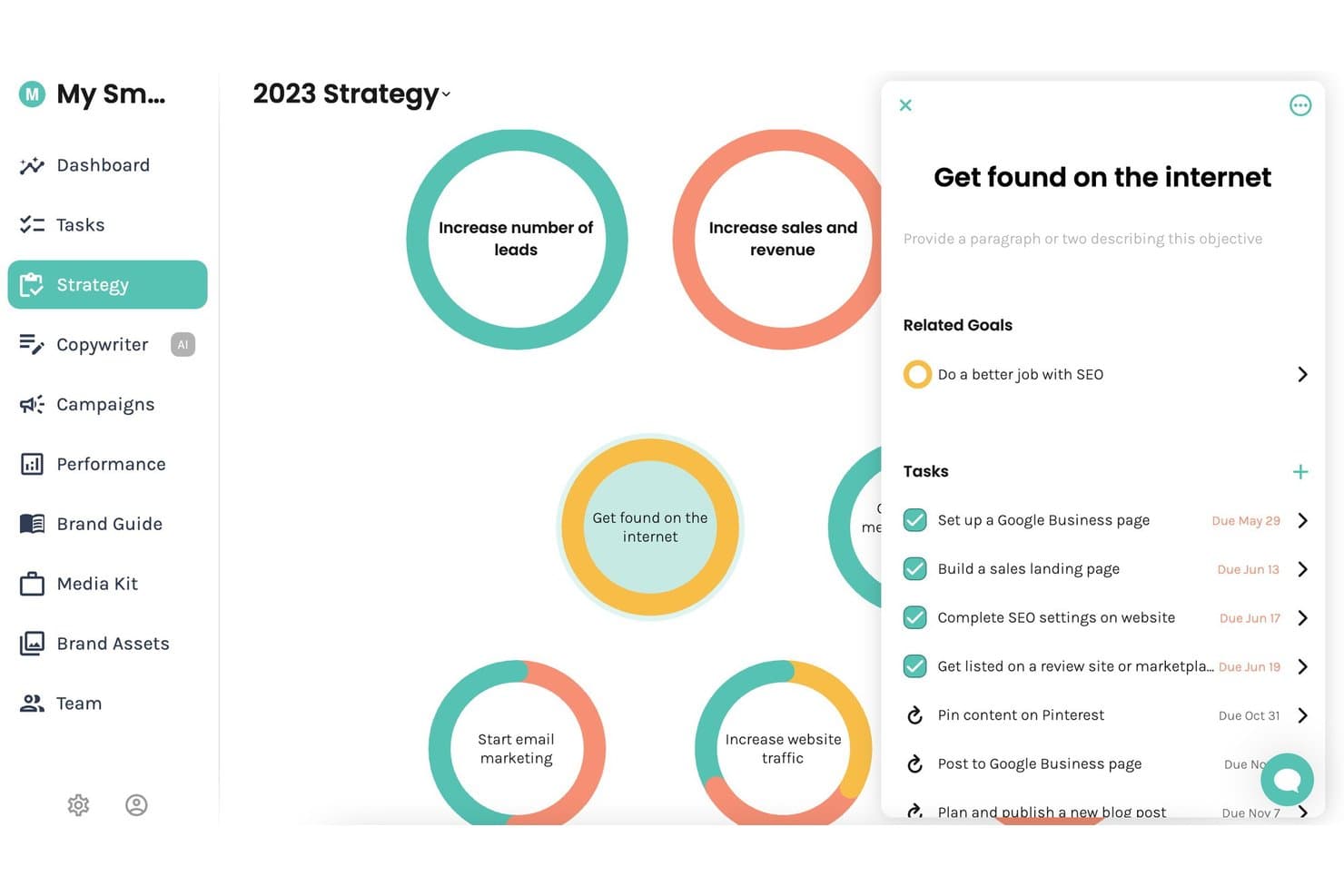
Enji biedt een visueel strategieoverzicht waarin gebruikers marketingdoelstellingen, gerelateerde doelen en taken met vervaldatums in één gecentraliseerde weergave kunnen beheren. Enji is een alles-in-één marketingplatform voor kleine bedrijven dat AI-gestuurde generatie van marketingplannen, beheer van contentkalenders, AI-tekstschrijven, planning van socialmediaberichten en KPI-bewaking combineert.
Voor wie is Enji het meest geschikt?
Enji is zeer geschikt voor solopreneurs en eigenaren van microbedrijven die al hun marketing zelf verzorgen zonder een toegewijd team.
Waarom ik voor Enji heb gekozen
Enji verdient een plek op mijn selectie omdat de generator voor marketingstrategieën op basis van een korte vragenlijst een gepersonaliseerd marketingplan opstelt, waarbij taken automatisch aan je agenda worden toegevoegd. Ik vind ook de vooraf gebouwde campagnesjablonen prettig, omdat ze gerichte campagnes van twee weken uitstippelen met timing, taken en statistieken die al zijn ingevuld. Daardoor kan ik zonder vanaf nul een contentstrategie op te bouwen van helemaal geen plan naar actieve uitvoering gaan.
Belangrijkste functies van Enji
- AI-tekstschrijver: Genereert direct bijschriften, blogberichten, nieuwsbrieven en shownotities in de stem van je merk.
- Planner voor social media: Publiceert content automatisch op Instagram, Facebook, LinkedIn, Pinterest, Threads, TikTok en YouTube.
- KPI-dashboard: Voegt marketingprestatiegegevens uit meerdere kanalen samen, waaronder GA4 en socialmedia-analyses.
- Generator voor merkstem: Centraliseert en bewaart de belangrijkste boodschappen, visuele elementen en merkstem van je merk voor consistente contentcreatie.
Integraties van Enji
Enji biedt rechtstreekse integraties met Google Analytics 4, Canva, Instagram, Facebook, LinkedIn, Pinterest, Threads, TikTok en YouTube.
Pros and Cons
Pros:
- Genereert snel automatisch een gepersonaliseerd marketingplan
- Campagnesjablonen bevatten taken en publicatietijdlijnen
- AI-tekstschrijver ondersteunt meerdere indelingen voor content
Cons:
- Ontwikkeld voor kleine teams
- Beperkte ingebouwde tools voor SEO-contentoptimalisatie
Learn more about Enji: Het beste voor aanbevelingen voor contentoptimalisatie
- 14 dagen gratis uitproberen
- Vanaf $129/maand
Visit WebsiteCustomer Rating:4.9/5
Clearscope verbetert SEO-content met termaanbevelingen en contentscores. Clearscope is een SEO-platform voor contentoptimalisatie dat NLP gebruikt om pagina's met een hoge ranking te analyseren en termaanbevelingen, contentscores en leesbaarheidsscores voor je artikelen te genereren.
Voor wie is Clearscope het meest geschikt?
Clearscope is zeer geschikt voor SEO-schrijvers, contentstrategen en interne contentteams bij B2B-bedrijven die zich richten op groei via organische zoekresultaten.
Waarom ik voor Clearscope heb gekozen
Ik heb Clearscope opgenomen in mijn belangrijkste aanbevelingen omdat de aanbevelingen voor contentoptimalisatie zijn gebaseerd op NLP-gestuurde termsuggesties die rechtstreeks afkomstig zijn van pagina's met een hoge ranking voor elk zoekwoord. Wanneer ik een rapport uitvoer, krijg ik een realtime contentscore die wordt bijgewerkt terwijl ik schrijf, zodat ik precies kan zien welke termen ontbreken voordat ik publiceer.
Ik vertrouw ook op de analyse van de zoekintentie, die de 'waarom' achter een zoekopdracht uiteenzet, zodat de structuur van mijn content aansluit bij wat lezers daadwerkelijk verwachten te vinden.
Belangrijkste functies van Clearscope
- Onderwerpverkenning: Breng contentclusters in kaart en ontdek kansen voor zoekwoorden binnen een volledig onderwerpgebied, in plaats van alleen voor afzonderlijke zoektermen.
- AI-assistent voor concepten: Genereer en bewerk contentconcepten rechtstreeks in de Clearscope-editor met behulp van ingebouwde AI-schrijftools.
- Bijhouden van zichtbaarheid in LLM's: Houd bij uit welke bronnen ChatGPT en Gemini informatie halen, zodat je kunt zien waar je content door AI-platforms wordt geciteerd.
- Bewaking van contentprestaties: Volg verkeer en betrokkenheid op gepubliceerde pagina's met vooraf gemaakte of aangepaste contentweergaven.
Integraties van Clearscope
Clearscope biedt een kleine selectie eigen integraties met Google Docs, WordPress en Microsoft Word, waarmee je de optimalisatiescore rechtstreeks in deze editors kunt bekijken. Het maakt ook verbinding met Google Search Console om prestatiegegevens naar de functie voor de contentinventaris te halen. Ondersteuning voor API en Zapier is niet duidelijk gedocumenteerd.
Pros and Cons
Pros:
- Semantische termanalyse naast eenvoudige zoekwoorden
- Ondersteunt vijf talen met selectie van een landinstelling
- Alle abonnementen bevatten een onbeperkt aantal gebruikersplaatsen
Cons:
- Zoekwoordonderzoek is minder uitgebreid dan bij Ahrefs of Semrush
- Lage rapportlimieten voor abonnementen in lagere prijsklassen
Learn more about Clearscope: Het meest geschikt voor het in realtime bewerken van documenten in teamverband
- Gratis abonnement + proefperiode beschikbaar
- Vanaf $7/gebruiker/maand (jaarlijks gefactureerd)
Visit WebsiteCustomer Rating:4.7/5
Met Google Docs kunnen documenten in realtime worden bewerkt, kunnen opmerkingen worden geplaatst en kunnen teams samenwerken. Google Docs is een cloudgebaseerde documenteditor van Google waarmee teams tekstgebaseerde inhoud op elk apparaat in realtime kunnen maken, bewerken, becommentariëren en gezamenlijk eraan kunnen werken.
Voor wie is Google Docs het meest geschikt?
Google Docs is een natuurlijke keuze voor teams van elke omvang die al binnen het Google Workspace-ecosysteem werken en behoefte hebben aan een samenwerkingstool voor documenten zonder installatie.
Waarom ik voor Google Docs heb gekozen
Google Docs verdient een plek op mijn shortlist omdat gelijktijdig bewerken in realtime de functie is waarin het echt uitblinkt. Ik heb samen met meerdere mensen tegelijk aan inhoudsbriefings en concepten gewerkt, en dankzij het live volgen van cursors en opmerkingen in de tekst is het eenvoudig om wijzigingen op te merken en feedback te geven zonder ook maar één e-mail te versturen.
De suggestiemodus is bijzonder nuttig: mijn team kan wijzigingen in teksten voorstellen die schrijvers kunnen beoordelen en accepteren of afwijzen, waardoor het revisiespoor overzichtelijk en transparant blijft.
Belangrijkste functies van Google Docs
- Versiegeschiedenis: Bekijk en herstel elke eerdere versie van een document, met tijdstempels en vermelding van de bewerker bij elke wijziging.
- Spraakgestuurd typen: Dicteer inhoud rechtstreeks in een document met de microfoon van je apparaat, zonder externe tool.
- Documentsjablonen: Begin met vooraf gemaakte indelingen voor inhoudstypen zoals rapporten, vergadernotities en nieuwsbrieven.
- Invoegtoepassingen: Breid Google Docs uit met tools van derden, zoals grammaticacontroles, citatiebeheerders en apps voor elektronische handtekeningen.
Integraties van Google Docs
Google Docs is nauw verbonden met het bredere Google Workspace-ecosysteem, waaronder Google Drive, Google Sheets, Google Slides, Gmail en Google Meet. Via de Google Workspace Marketplace zijn duizenden aanvullende apps beschikbaar, waaronder tools zoals Slack, Salesforce, Asana, Lucidchart, Canva, Box en HubSpot, en Google Docs kan ook verbinding maken met Zapier. Er is een API beschikbaar voor aangepaste integraties.
Pros and Cons
Pros:
- Gelijktijdig bewerken door meerdere gebruikers werkt probleemloos
- Toegankelijk vanaf elk apparaat of elke browser
- Ruim gratis abonnement voor individuele gebruikers
Cons:
- Geen ingebouwde workflow voor inhoud of goedkeuringen
- Beperkte opmaakmogelijkheden voor complexe documenten
Learn more about Google Docs: Ideaal voor het eenvoudig gezamenlijk maken van ontwerpen
- Gratis abonnement beschikbaar
- Vanaf $15/maand (jaarlijks gefactureerd)
Visit WebsiteCustomer Rating:4.7/5
Canva vereenvoudigt het maken van visuele content met sjablonen en tools voor slepen en neerzetten. Canva is een browsergebaseerd grafisch ontwerpplatform voor het maken van visuele content, zoals afbeeldingen voor sociale media, presentaties, marketingmateriaal en documenten met een huisstijl, met behulp van slepen-en-neerzetten-tools en een bibliotheek met sjablonen.
Voor wie is Canva het meest geschikt?
Canva is zeer geschikt voor marketing- en contentteams die regelmatig visuele middelen moeten maken zonder afhankelijk te zijn van gespecialiseerde grafisch ontwerpers.
Waarom ik voor Canva koos
Canva verdient een plek op mijn shortlist omdat gezamenlijk ontwerpen hier in de praktijk echt werkt. Mijn team deelt een merkkit die ervoor zorgt dat logo's, lettertypen en kleurenpaletten consistent blijven in elk middel dat we samen maken. Ik gebruik de functie voor opmerkingen om rechtstreeks feedback op ontwerpen achter te laten, en gedeelde teammappen zorgen ervoor dat niemand naar de nieuwste versie van een bestand hoeft te zoeken.
Belangrijkste functies van Canva
- Sjabloonbibliotheek: Blader door duizenden vooraf gemaakte sjablonen en pas ze aan voor indelingen zoals berichten op sociale media, presentaties, e-mailheaders en drukwerk.
- Magisch formaat wijzigen: Wijzig direct het formaat van elk ontwerp zodat het op verschillende platformafmetingen past, bijvoorbeeld door een Facebook-bericht om te zetten naar een Instagram-verhaal.
- Contentplanner: Plan en publiceer ontwerpen voor sociale media rechtstreeks vanuit Canva naar gekoppelde sociale accounts.
- Magisch schrijven: Genereer tekst op het canvas met de ingebouwde AI-schrijftool van Canva.
Integraties van Canva
Canva biedt integraties met samenwerkings- en productiviteitstools zoals Slack, Asana, Microsoft Teams, Salesforce en Google Workspace, evenals integraties met advertentieplatforms zoals Google, Meta en Amazon. Het maakt ook verbinding met Zapier, en met de Connect-API's en Apps SDK van Canva kun je aangepaste integraties bouwen. Er zijn meer dan 300 apps beschikbaar in de Canva Apps Marketplace.
Pros and Cons
Pros:
- Enorme sjabloonbibliotheek voor elke indeling
- Realtime samen ontwerpen in gedeelde ontwerpen
- Ingebouwde AI-tools voor het genereren van teksten
Cons:
- Beperkte geavanceerde mogelijkheden voor fotobewerking
- Merkkit beperkt tot betaalde abonnementen
Learn more about Canva: Het beste voor aanpasbare websitepublicatie
- Gratis abonnement beschikbaar
- Vanaf $4 per maand (jaarlijks gefactureerd)
Visit WebsiteCustomer Rating:4.6/5
WordPress beheert het publiceren, ontwerpen en bewerken van websites, evenals thema's en plug-ins. WordPress is een platform voor het publiceren van websites en het beheren van inhoud waarmee je websites kunt bouwen, ontwerpen en beheren met behulp van een blokgebaseerde editor, aanpasbare thema's en een bibliotheek met plug-ins.
Voor wie is WordPress het meest geschikt?
WordPress is zeer geschikt voor bloggers, uitgevers en kleine tot middelgrote bedrijven die volledige controle willen over het ontwerp en de inhoudsstructuur van hun website.
Waarom ik voor WordPress heb gekozen
WordPress staat op mijn lijst omdat de blokeditor me gedetailleerde controle geeft over de indeling van elke pagina, zonder dat ik code hoef te gebruiken. Ik kan aangepaste sjablonen maken met Volledige sitebewerking, waarmee ik kopteksten, voetteksten en herbruikbare patronen voor mijn hele website vanuit één interface kan aanpassen.
Het themasysteem werkt goed samen met aangepaste CSS-besturingselementen, waardoor ik een ontwerp verder kan uitwerken dan bij de meeste websitebouwers die direct klaar voor gebruik zijn.
Belangrijkste functies van WordPress
- Berichten inplannen: Stel voor elk bericht of elke pagina een specifieke publicatiedatum en -tijd in, zodat inhoud automatisch online komt.
- Revisiegeschiedenis: Bekijk een volledig overzicht van wijzigingen in elk bericht of elke pagina en herstel een eerdere versie.
- Mediabibliotheek: Upload, orden en hergebruik afbeeldingen, video's en documenten op je website vanuit een centrale bestandsbeheerder.
- Ingebouwde SEO-hulpmiddelen: Bewerk metatitels, beschrijvingen en URL-slugs rechtstreeks in de berichteditor voor elk stukje inhoud.
WordPress-integraties
WordPress kan via zijn plug-inbibliotheek verbinding maken met duizenden hulpmiddelen. Daarin staan meer dan 879 plug-ins voor integraties, waaronder opties voor Google Analytics, Google Workspace, Google Docs, Google Foto's, Mailchimp, WooCommerce en MailerLite. Het maakt ook verbinding met Zapier en biedt een REST API voor aangepaste integraties.
Pros and Cons
Pros:
- Duizenden plug-ins breiden de functionaliteit van je website uit
- Volledige controle over inhouds- en SEO-instellingen
- Duizenden gratis en betaalde thema's beschikbaar
Cons:
- Kwetsbaarheden in plug-ins zorgen voor aanhoudende veiligheidsrisico's
- Geavanceerde aanpassingsmogelijkheden zijn vergrendeld achter abonnementen van hogere niveaus
Learn more about WordPress: Beste voor het live streamen van videocontent
- Gratis te gebruiken
- Gratis te gebruiken
Visit WebsiteCustomer Rating:4.7/5
OBS legt livevideo van meerdere bronnen vast, mixt, neemt op en zendt deze uit. OBS is een gratis, opensourceapplicatie voor video-opnamen en livestreaming waarmee je content van meerdere audio- en videobronnen in realtime kunt vastleggen, mixen en uitzenden.
Voor wie is OBS het meest geschikt?
OBS is een natuurlijke keuze voor contentmakers, streamers en onderwijzers die professionele uitzendingen nodig hebben zonder de kosten van propriëtaire software.
Waarom ik OBS heb gekozen
Ik heb OBS opgenomen in mijn topkeuzes omdat geen enkele andere gratis tool je zoveel controle geeft over een live-uitzending. Ik gebruik scèneverzamelingen om meerdere volledig geconfigureerde lay-outs op te bouwen en er tijdens de stream zonder enige onderbreking tussen te schakelen.
De studiomodus maakt dat in realtime praktisch: ik kan mijn volgende scène bekijken en pas overgaan wanneer ik er klaar voor ben. Met de meersporige audiomixer kan ik tijdens een livesessie ook de microfooningang, bureaubladaudio en het applicatiegeluid afzonderlijk regelen.
Belangrijkste functies van OBS
- Uitvoer als virtuele camera: Leid je OBS-feed naar videoconferentietools zoals Zoom of Google Meet als camerabron.
- Herhalingsbuffer: Leg een doorlopend venster met recente beelden vast, zodat je hoogtepunten kunt opslaan zonder een hele sessie op te nemen.
- Audio- en videofilters: Pas effecten zoals ruisonderdrukking, chromakey en kleurcorrectie rechtstreeks in OBS toe, zonder software van derden.
- Sneltoetsbediening: Wijs sneltoetsen toe om scènes te wisselen, audio te dempen of opnamen handsfree te starten en stoppen.
Integraties van OBS
OBS heeft geen native integraties in de traditionele zin, maar biedt ingebouwde streamingondersteuning voor platforms zoals Twitch, YouTube en Kick, en kan uitvoer leveren aan elke aangepaste RTMP-bestemming.
Dankzij de open plug-inarchitectuur kunnen door de community gebouwde plug-ins zoals Streamlabs, StreamElements en Elgato Stream Deck de functionaliteit uitbreiden. Daarnaast is er een API met ondersteuning voor scripts in Lua en Python beschikbaar voor aangepaste integraties. Verbinding met Zapier is mogelijk via oplossingen van de community, maar wordt niet officieel ondersteund.
Pros and Cons
Pros:
- Volledig gratis, zonder functiebeperkingen
- Zeer uitbreidbaar dankzij plug-ins van de community
- Ondersteunt meerdere gelijktijdige audiotracks
Cons:
- Geen ingebouwde tools voor videobewerking
- De interface voelt verouderd aan voor nieuwe gebruikers
Learn more about OBS Studio: Het beste voor AI-gestuurd contentonderzoek
- Gratis abonnement beschikbaar
- Prijs op aanvraag
Visit WebsiteCustomer Rating:4.6/5
MarketMuse ondersteunt contentplanning en -optimalisatie met AI-gestuurde contentbriefs en topicmodellen. MarketMuse is een AI-gestuurd contentintelligentieplatform dat gebruikmaakt van topicmodellering, concurrentieanalyse van content en geautomatiseerde contentbriefs om teams te helpen content op schaal te plannen en te optimaliseren.
Voor wie is MarketMuse het meest geschikt?
MarketMuse is zeer geschikt voor contentstrategen en SEO-leads bij middelgrote tot grote B2B-bedrijven die grote contentbibliotheken beheren.
Waarom ik voor MarketMuse heb gekozen
MarketMuse staat bovenaan mijn lijst omdat het AI-gestuurde contentonderzoek verder gaat dan oppervlakkige suggesties voor zoekwoorden. Ik gebruik het topicmodel om gerelateerde subonderwerpen naar voren te brengen die ik anders zou missen, en de contentscore vergelijkt mijn pagina's met de 20 best scorende URL's voor elke zoekopdracht. Ik gebruik ook de geautomatiseerde contentbriefs, die doelonderwerpen, vragen en suggesties voor interne links vooraf invullen voordat ik ook maar één woord schrijf.
Belangrijkste functies van MarketMuse
- Warmtekaart: Visualiseer de dekking van onderwerpen in de 20 beste SERP-resultaten met behulp van een raster met kleurcodering om hiaten in content van concurrenten te ontdekken.
- Gepersonaliseerde moeilijkheidsscore: Meet hoe moeilijk het voor jouw specifieke domein zal zijn om een positie voor een onderwerp te behalen, in plaats van algemene moeilijkheidsscores te gebruiken.
- Contentplandocumenten: Genereer een volledig gestructureerd contentplan met informatie over wat je moet creëren of bijwerken, clustergegevens en concurrentieoverzichten voor een bepaald onderwerp.
- Bijhouden van contentverval: Houd dalingen in posities en veranderingen in contentprestaties in de loop van de tijd bij, zodat je bijwerkingen kunt prioriteren voordat het verkeersverlies zich opstapelt.
Integraties van MarketMuse
MarketMuse biedt een beperkt aantal integraties, waaronder exportmogelijkheden naar Google Docs, gegevensverbindingen met Google Search Console en een integratie met Acrolinx. Rechtstreekse CMS-publicatie naar platforms zoals WordPress wordt niet ondersteund. Er is een API beschikbaar voor aangepaste integraties, maar ondersteuning voor Zapier is niet duidelijk gedocumenteerd.
Pros and Cons
Pros:
- Clustering van onderwerpen brengt contenthiaten automatisch in kaart
- Gepersonaliseerde moeilijkheidsscores afgestemd op jouw domein
- Geautomatiseerde contentbriefs bevatten subonderwerpen en vragen
Cons:
- Zoekwoordonderzoek is minder diepgaand dan bij Ahrefs of Semrush
- Geen waarschuwingen voordat rapporttegoeden zijn verbruikt
Learn more about MarketMuse: Het beste voor contentontdekking en inzichten
- Gratis proefperiode beschikbaar
- Vanaf $199/maand (jaarlijks gefactureerd)
Visit WebsiteCustomer Rating:4.5/5
BuzzSumo volgt trending onderwerpen, contentprestaties, vermeldingen en makers. Buzzsumo is een platform voor contentonderzoek dat trending onderwerpen aan het licht brengt, de prestaties van content op sociale platforms analyseert, merkvermeldingen monitort en invloedrijke makers in elke niche identificeert.
Voor wie is Buzzsumo het meest geschikt?
Buzzsumo is zeer geschikt voor contentmarketeers, SEO-strategen en PR-teams bij middelgrote tot grote ondernemingen die data nodig hebben om hun contentplanning te sturen.
Waarom ik voor Buzzsumo heb gekozen
Buzzsumo verdient een plek op mijn shortlist omdat ik met de Content Analyzer precies kan zien welke artikelen over welk onderwerp de meeste shares ontvangen op Facebook, X, Pinterest en Reddit. Ik maak ook gebruik van de Question Analyzer, die echte vragen verzamelt die mensen stellen op forums en Q&A-websites, zodat ik content kan afstemmen op de werkelijke zoekintentie.
De trending feeds laten zien wat op dit moment aan populariteit wint, wat ik nuttig vind om contentcycli voor te blijven.
Belangrijkste functies van Buzzsumo
- Zoeken naar influencers: Vind en filter makers en journalisten op onderwerp, autoriteitsscore en aantal volgers op sociale media.
- Meldingen voor merkmonitoring: Stel meldingen in voor je merknaam, concurrenten of zoekwoorden om nieuwe vermeldingen op internet te volgen.
- Backlinkanalyse: Bekijk welke sites naar elk type content linken, waaronder artikelen van concurrenten.
- Contentanalyse van domeinen: Verzamel prestatiegegevens over alle gepubliceerde content van elk domein om de output van concurrenten te beoordelen.
Buzzsumo-integraties
Buzzsumo biedt een beperkte set integraties, voornamelijk via het delen op sociale netwerken en planningstools zoals Buffer. Gebruikers kunnen ook RSS-feeds maken van monitoringmeldingen en trending feeds, die naar tools zoals Slack kunnen worden gestuurd of via Zapier en IFTTT kunnen worden gekoppeld
Pros and Cons
Pros:
- Enorme index met gegevens over sociale interactie
- Volgt trends op Facebook, X en Pinterest
- Brengt de best presterende content van concurrenten aan het licht
Cons:
- Geen dekking voor TikTok of Instagram Reels
- Beperkte sentimentanalyse in vergelijking met concurrenten
Learn more about BuzzSumo: Het beste voor creatieve projectorganisatie
- Gratis abonnement beschikbaar
- Vanaf $9.99/gebruiker/maand (jaarlijks gefactureerd)
Visit WebsiteCustomer Rating:4.7/5
Milanote organiseert creatieve ideeën, notities, afbeeldingen, taken en projectborden. Milanote is een visuele werkruimte voor creatieve projecten, waarmee teams flexibele borden kunnen maken die notities, afbeeldingen, links, taken en schetsen combineren om contentideeën en projectplannen te organiseren.
Voor wie is Milanote het meest geschikt?
Milanote is zeer geschikt voor creatieve professionals zoals ontwerpers, artdirectors en copywriters die werk visueel organiseren in plaats van via traditionele takenlijsten.
Waarom ik voor Milanote heb gekozen
Milanote staat op mijn shortlist omdat ik met de vrije borden contentbriefings, referentieafbeeldingen en conceptteksten samen in één overzicht kan rangschikken, zoals ik die op een studiowand zou indelen. Vooral de functie voor geneste borden vind ik nuttig voor contentprojecten:
Ik houd een campagnebord op het hoogste niveau bij en ga vervolgens dieper naar afzonderlijke borden per kanaal. Met de webknipper kan mijn team ook inspiratie en referentiemateriaal rechtstreeks aan een bord toevoegen zonder de browser te verlaten.
Belangrijkste functies van Milanote
- Ingebouwde sjablonen: Krijg toegang tot kant-en-klare indelingen voor moodboards, creatieve briefings, storyboards en opnamelijsten om sneller aan contentprojecten te beginnen.
- Realtime samenwerking: Meerdere teamleden kunnen tegelijkertijd op hetzelfde bord werken op een oneindig canvas.
- Takenlijsten: Voeg rechtstreeks aan elk bord controlelijsten met taken toe om actiepunten naast je visuele content bij te houden.
- Mindmaps: Bouw gekoppelde ideeënkaarten binnen borden om contentstrategie en narratieve structuur visueel uit te werken.
Integraties van Milanote
Milanote biedt een kleinere verzameling ingebouwde integraties, voornamelijk via ingesloten linkkaarten die content ophalen uit YouTube, Vimeo, TED, SoundCloud, Google Maps, CodePen, Instagram, Dribbble, Flickr, Slideshare, Prezi, Marvel en Airtable. Een openbare API staat als een van de meest aangevraagde functies op de productroutekaart van Milanote, wat betekent dat deze nog niet beschikbaar is. Ondersteuning voor Zapier is niet duidelijk gedocumenteerd.
Pros and Cons
Pros:
- Het slepen-en-neerzetten-canvas combineert tekst en visuele elementen
- De webknipper slaat referenties rechtstreeks op borden op
- Geneste borden houden complexe projecten georganiseerd
Cons:
- De mobiele app biedt geen volledige bewerking van borden
- Er zijn zeer weinig integraties met externe diensten beschikbaar
Learn more about Milanote: Het meest geschikt voor het beheren van door gebruikers gegenereerde content
- Gratis demo beschikbaar
- Vanaf $1,249/maand
Visit WebsiteCustomer Rating:4.4/5
Pixlee beheert klantfoto's, video's en reviews voor social commerce. Pixlee (nu onderdeel van Emplifi) is een UGC- en socialcommerceplatform waarmee merken klantfoto's, video's en beoordelingen kunnen verzamelen, beheren en publiceren via hun digitale kanalen.
Voor wie is Pixlee het meest geschikt?
Pixlee is zeer geschikt voor e-commerce- en retailmerken die vertrouwen op sociaal bewijs en visuele content uit de community ter ondersteuning van hun productmarketing.
Waarom ik Pixlee heb gekozen
Ik heb Pixlee opgenomen in mijn topkeuzes omdat de workflow voor het beheren van UGC-content en gebruiksrechten echt doelgericht is opgezet, op een manier die de meeste contenttools niet bieden. Ik kan geautomatiseerde workflows gebruiken om rechtstreeks bij contentmakers toestemming voor gebruiksrechten aan te vragen, zodat mijn team altijd beschikt over een goedgekeurde bibliotheek met merkklaar beeldmateriaal.
De AI-beeldherkenning zorgt bovendien voor automatische producttagging in die hele bibliotheek, waardoor het eenvoudig is om klantfoto's rechtstreeks te koppelen aan de producten die erop staan.
Belangrijkste functies van Pixlee
- Integratie met publicatiekanalen: Plan en verspreid UGC rechtstreeks vanuit het platform via digitale kanalen.
- Aanpasbare weergave: Bouw dynamische galerijen, carrousels en interactieve UGC-ervaringen voor je website en andere digitale platforms.
- Verzameling van beoordelingen en reviews: Verzamel, modereer en toon productreviews, vragen en antwoorden en verkopersbeoordelingen op je website en via andere contactmomenten.
- Ontdekking van influencers: Zoek in een database met meer dan 30 miljoen influencers met behulp van AI om makers te vinden die aan je merkcriteria voldoen.
Integraties van Pixlee
Pixlee integreert met e-commerceplatforms zoals Shopify, Magento (Adobe Commerce), Salesforce Commerce Cloud en BigCommerce. De module Emplifi Ratings & Reviews maakt ook verbinding met CrowdTwist, Movable Ink en Reputation.com. Er is een API beschikbaar voor aangepaste integraties en ondersteuning voor Zapier is niet duidelijk gedocumenteerd.
Pros and Cons
Pros:
- Ingebouwde workflow voor het beheren van contentrechten
- Combineert UGC-, review- en influencertools
- Ondersteuning voor geofencing bij locatiegebaseerde campagnes
Cons:
- Het filteren van verzamelde content kan tijdrovend zijn
- Rapportage en analyses kunnen beter
Learn more about Emplifi (formerly Pixlee):
Andere contentsoftware
Hier zijn enkele aanvullende opties voor contentsoftware die mijn selectie niet hebben gehaald, maar die nog steeds de moeite waard zijn om te bekijken:
- 11Adobe Marketo EngageHet beste voor integratie van marketingautomatisering
- 12MailchimpHet beste voor het beheren van e-mailcampagnes
- 13monday.comBeste voor visuele contentplanning
Hoe ik contentsoftware beoordeel
Ik splits mijn beoordeling op in essentiële basisvereisten—zoals redactionele kalenders en SEO-hulpmiddelen—en onderscheidende factoren die de beste opties voor SaaS-contentteams onderscheiden van de rest.
Kernfunctionaliteit (basisvereisten voor deze lijst)
Wanneer ik tools voor mijn lijst selecteer, beoordeel ik elke tool op een schaal van 0 (biedt de functionaliteit niet) tot 5 (blink hierin uit) voor elke hieronder vermelde kernfunctionaliteit. Vervolgens bereken ik de totaalscore van de tool als percentage. Elke tool moet een minimale totaalscore van 65% behalen om in aanmerking te komen voor opname.
- Contentplanning & kalender: Ik zoek naar redactionele kalenders waarmee teams een volledig kwartaal aan SaaS-blogposts, landingspagina's en campagnemateriaal kunnen plannen, met duidelijke toewijzingen en statussen.
- Samenwerkend schrijven & workflow: Workflows met meerdere fasen zijn hierbij belangrijk—ik beoordeel hoe een tool omgaat met de cyclus van briefing naar concept, beoordeling en publicatie, vooral wanneer er meerdere schrijvers en goedkeurders betrokken zijn.
- SEO- en optimalisatiehulpmiddelen: Of het nu gaat om ingebouwd zoekwoordenonderzoek of op SERP's gebaseerde contentbriefings, ik controleer of de tool schrijvers vóór en tijdens het schrijven concrete optimalisatierichtlijnen biedt.
- Gecentraliseerde contentopslag: Een doorzoekbare, georganiseerde bibliotheek voor briefings, concepten, afbeeldingen en gepubliceerde content helpt teams dubbel werk en zoekgeraakte middelen in verschillende campagnes te voorkomen.
- CMS- en marketingstackintegraties: Ik beoordeel koppelingen met platforms zoals WordPress, Webflow, HubSpot, Google Search Console en Slack om te bevestigen dat content zonder handmatige exports door de stack kan bewegen.
- Prestatieanalyses & rapportage: Ik zoek naar dashboards op contentniveau die verder gaan dan paginaweergaven en betrokkenheid, conversies of pipeline-impact tonen die aan afzonderlijke posts of campagnes zijn gekoppeld.
Zodra ik een lijst met tools heb die aan deze criteria voldoen, kijk ik naar wat elk platform onderscheidt.
Onderscheidende factoren (waarmee leveranciers zich onderscheiden)
Zo vergelijk ik verschillende leveranciers:
Opvallende functies
AI-aangedreven tools voor het opstellen van content kunnen de productietijd verkorten wanneer een SaaS-team moet opschalen van vier blogposts per maand naar twaalf. Ik beoordeel ook het in kaart brengen van onderwerpclusters, omdat het visueel organiseren van pijlerpagina's en ondersteunende artikelen rond kernthema's het plannen van interne-linkstrategieën veel eenvoudiger maakt. Contentscoring is nog een onderscheidende factor die ik in overweging neem. Realtime beoordeling aan de hand van SERP-concurrenten geeft schrijvers een duidelijk optimalisatiedoel voordat ze een concept ter beoordeling indienen.
Meer dan functies
De prijsstructuur is belangrijk, omdat SaaS-contentteams hun productie vaak seizoensgebonden opschalen. Ik controleer of een tool kosten per gebruiker, per artikel of op basis van gebruik in rekening brengt, zodat de kosten voorspelbaar blijven naarmate het team groeit. De tijd tot waarde is minstens zo belangrijk. Een marketingteam van drie personen kan zich geen wekenlange installatie veroorloven, dus zoek ik naar platforms met kant-en-klare sjablonen en workflows waarmee teams binnen enkele dagen content kunnen produceren. Ik beoordeel ook hoe goed elke tool freelancers en opdrachtnemers ondersteunt, omdat de meeste SaaS-teams voor ten minste een deel van hun productieketen afhankelijk zijn van externe schrijvers.
Contentsoftware kiezen
Het is gemakkelijk om verstrikt te raken in lange functielijsten en ingewikkelde prijsstructuren. Om je te helpen gefocust te blijven terwijl je jouw unieke selectieproces voor software doorloopt, is hier een controlelijst met factoren om rekening mee te houden:
| Factor | Waar je rekening mee moet houden |
|---|---|
| FactorSchaalbaarheid | Waar je rekening mee moet houdenBlijft het platform aan je behoeften voldoen wanneer je contentvolumes, aantallen gebruikers en goedkeuringsprocessen groeien? |
| FactorIntegraties | Waar je rekening mee moet houdenMaakt de tool verbinding met je belangrijkste toepassingen voor bestandsopslag, marketing of communicatie, of heb je omwegen en handmatige exports nodig? |
| FactorAanpasbaarheid | Waar je rekening mee moet houdenKun je machtigingen, sjablonen en processen aanpassen aan je team, of ben je beperkt tot rigide voorinstellingen die niet bij je huidige werkprocessen passen? |
| FactorGebruiksgemak | Waar je rekening mee moet houdenKunnen nieuwe teamleden meteen hun weg vinden en bijdragen, of wordt de ingebruikname belemmerd door complexe menu's en verwarrende interfacekeuzes? |
| FactorImplementatie en introductie | Waar je rekening mee moet houdenHoeveel initiële configuratie, gebruikerstraining of migratie is nodig, en krijg je tijdens en na de uitrol ondersteuning of hulpmiddelen van de leverancier? |
| FactorKosten | Waar je rekening mee moet houdenZijn prijzen, terugkerende kosten, opslag- of gebruikerslimieten en vereiste upgrades duidelijk, rekening houdend met je budget en gebruikspatronen? |
| FactorBeveiligingsmaatregelen | Waar je rekening mee moet houdenBiedt de software duidelijke gebruikersmachtigingen, beleid voor gegevensbewaring, versleuteling en naleving die aansluiten bij de behoeften van je bedrijf op het gebied van contentprivacy? |
| FactorBeschikbaarheid van ondersteuning | Waar je rekening mee moet houdenHeb je toegang tot tijdige, deskundige klantenservice—vooral tijdens de implementatie, belangrijke campagnes of onverwachte toegangsproblemen? |
Wat is contentsoftware?
Contentsoftware is een digitaal platform waarmee teams digitale materialen en creatieve projecten kunnen plannen, organiseren, gezamenlijk bewerken en beheren. Deze tools brengen structuur in werkprocessen voor contentcreatie door documenten, bedrijfsmiddelen en communicatie te centraliseren.
Door goedkeuringen, versiebeheer en projectmanagement te stroomlijnen, stelt contentsoftware teams in staat om consistent kwalitatief hoogstaand werk te produceren en te leveren voor marketing-, publicatie- of ontwerpprojecten.
Functies
Let bij het selecteren van contentsoftware op de volgende belangrijke functies:
- Contentkalender: Organiseert deadlines en publicatieschema's, zodat teams de contentproductie van begin tot eind in één overzicht kunnen plannen, volgen en beheren.
- Organisatie met slepen en neerzetten: Hiermee kunt u documenten, afbeeldingen en notities visueel ordenen, waardoor het eenvoudig wordt om projecten te structureren en flexibel ideeën te brainstormen.
- Samenwerkingstools: Hiermee kunnen meerdere gebruikers binnen hetzelfde project bewerken, opmerkingen plaatsen en feedback geven, zodat iedereen op één lijn blijft en de teamcommunicatie verbetert.
- Taaktoewijzing: Biedt hulpmiddelen om taken toe te wijzen, vervaldatums in te stellen en verantwoordelijkheden in elke fase van de contentworkflow te volgen.
- Versiegeschiedenis: Legt elke wijziging en update vast, zodat gebruikers oudere versies kunnen herstellen en kunnen zien wie welke wijzigingen heeft aangebracht voor volledige verantwoording.
- Sjabloonbibliotheek: Biedt herbruikbare structuren en indelingen voor briefings, contentoverzichten of verzoeken om middelen, waardoor tijd wordt bespaard en de projectconfiguratie wordt gestandaardiseerd.
- Bestands- en middelenbeheer: Centraliseert de opslag van alle projectbestanden, documenten en mediabestanden, compleet met zoek- en tagfuncties voor eenvoudige toegang.
- Rechten en toegangsbeheer: Beperkt of verleent gebruikerstoegang tot bepaalde borden, mappen of projecten om controle over gevoelige content te behouden.
- Publicatieworkflow: Begeleidt content vóór publicatie door een stapsgewijs beoordelings- en goedkeuringsproces, waardoor knelpunten worden verminderd en kwaliteitscontrole wordt gewaarborgd.
Veelvoorkomende AI-functies van contentsoftware
Naast de hierboven genoemde standaardfuncties van contentsoftware integreren veel van deze oplossingen AI met functies zoals:
- Geautomatiseerde contentsuggesties: Gebruikt AI om ideeën, koppen of overzichten te genereren op basis van uw projectbehoeften en eerdere prestaties, waardoor het planningsproces wordt versneld en de relevantie van content verbetert.
- Intelligente samenvatting: Vat lange artikelen, notities of onderzoeksmateriaal samen in beknopte, leesbare samenvattingen, zodat teams informatie sneller kunnen verwerken en weloverwogen beslissingen kunnen nemen.
- Door AI aangestuurde afbeeldingstags: Scant en tagt afbeeldingen of grafische elementen automatisch, waardoor het zoeken naar middelen sneller verloopt en de bibliotheek beter wordt georganiseerd voor creatieve teams.
- Contextuele contentoptimalisatie: Analyseert concepten en stelt realtime verbeteringen voor op het gebied van duidelijkheid, toon of structuur, waarbij aanbevelingen worden afgestemd op uw merkstem of contenttype.
- Voorspellende workflowondersteuning: Identificeert stappen die knelpunten kunnen veroorzaken en beveelt vervolgstappen aan of automatiseert overdrachten, zodat teams deadlines met minder handmatig toezicht kunnen halen.
Voordelen
Het implementeren van contentsoftware biedt verschillende voordelen voor uw team en uw bedrijf. Hier zijn enkele voordelen waar u naar kunt uitkijken:
- Gecentraliseerde werkruimte: Content, feedback en discussies worden op één plek opgeslagen, waardoor verwarring wordt verminderd en de organisatie verbetert.
- Verbeterde teamsamenwerking: Bewerken, opmerkingen plaatsen en gedeelde hulpmiddelen in realtime maken het eenvoudiger voor teamleden om projecten gezamenlijk te creëren, beoordelen en opleveren.
- Gestroomlijnde workflows: Taaktoewijzingen, contentkalenders en workflowtracking zorgen ervoor dat projecten efficiënt van concept tot publicatie voortgang boeken.
- Beter contentoverzicht: Versiegeschiedenis, rechten en goedkeuringsprocessen helpen u concepten te beheren en controle over de kwaliteit te behouden.
- Snellere onboarding: Begeleide hulpmiddelen, sjablonen en een gebruiksvriendelijke interface zorgen ervoor dat nieuwe teamleden snel kunnen bijdragen.
- Betere beveiliging: Rechten en toegangsbeheer beschermen gevoelige materialen en ondersteunen naleving van bedrijfs- of sectorspecifieke vereisten.
- Flexibiliteit voor groei: Een schaalbare architectuur en aanpasbare workflows passen zich aan naarmate uw team of contentbibliotheek groeit.
Kosten en prijzen
Bij het selecteren van contentsoftware is inzicht in de verschillende beschikbare prijsmodellen en abonnementen noodzakelijk. De kosten variëren op basis van functies, teamgrootte, uitbreidingen en meer. De onderstaande tabel geeft een overzicht van veelvoorkomende abonnementen, hun gemiddelde prijzen en de typische functies die in contentsoftwareoplossingen zijn inbegrepen:
Vergelijkingstabel voor abonnementen van contentsoftware
| Abonnementstype | Gemiddelde prijs | Veelvoorkomende functies |
|---|---|---|
| AbonnementstypeGratis abonnement | Gemiddelde prijs$0 | Veelvoorkomende functiesBasisdocumentbeheer, beperkte samenwerkingstools, beperkte opslagruimte en standaardondersteuning. |
| AbonnementstypePersoonlijk abonnement | Gemiddelde prijs$5-$15/gebruiker/maand | Veelvoorkomende functiesMeer opslagruimte, persoonlijke contentkalender, aangepaste sjablonen en prioriteitsondersteuning. |
| AbonnementstypeZakelijk abonnement | Gemiddelde prijs$15-$35/gebruiker/maand | Veelvoorkomende functiesSamenwerking binnen teams, workflowautomatisering, machtigingsbeheer, integraties, rapportage en geavanceerde contenttracking. |
| AbonnementstypeBedrijfsabonnement | Gemiddelde prijs$35-$80/gebruiker/maand | Veelvoorkomende functiesGeavanceerde beveiliging, speciale onboarding, flexibele gebruikersrollen, nalevingstools, API-toegang en premiumondersteuning. |
Veelgestelde vragen over contentsoftware
Hier vind je antwoorden op veelgestelde vragen over contentsoftware:
Welke soorten teams gebruiken contentsoftware?
Marketing-, publicatie-, ontwerp-, onderwijs- en internecommunicatieteams gebruiken contentsoftware om projecten, middelen en samenwerkingsactiviteiten te beheren. Elke groep die regelmatig digitale content maakt, beoordeelt of opslaat, kan hiervan profiteren.
Kan contentsoftware samenwerken met bestaande tools?
Ja, de meeste contentsoftware ondersteunt integraties met cloudopslag, projectbeheertools, ontwerpplatforms en communicatie-apps. Hierdoor kun je workflows eenvoudiger samenvoegen zonder de tools die je team al gebruikt te verstoren.
Is het moeilijk om contentsoftware in te stellen?
Nee, de meeste contentsoftware biedt een eenvoudige onboarding met begeleide installatie, sjablonen en ondersteuningsbronnen. Teams kunnen meestal binnen enkele uren aan de slag, waarbij ze direct projecten toevoegen en medewerkers uitnodigen.
Waar moet ik op letten bij het kiezen van contentsoftware?
Richt je op functies die aansluiten bij je workflow, zoals samenwerking, versiebeheer, workflowautomatisering en integratiemogelijkheden. Houd ook rekening met beveiligingsmaatregelen, ondersteuningsopties en schaalbaarheid om aan je toekomstige behoeften te voldoen.
Helpt contentsoftware bij versiebeheer?
Ja, versiegeschiedenis en documenttracking zijn veelvoorkomende functies. Hiermee kun je bewerkingen bekijken, oudere concepten herstellen en goedkeuringen beheren, zodat je controle houdt over je contentmiddelen.