

Software voor het schrijven van content biedt je digitale hulpmiddelen om geschreven content sneller op te stellen, te bewerken en te optimaliseren. Als je op zoek bent naar de beste software voor het schrijven van content, wil je waarschijnlijk afleidingen beperken en de kwaliteitsnorm verhogen—zonder aan snelheid in te boeten.
De juiste oplossing kiezen is belangrijk, omdat het verschil tussen gemiddelde en uitzonderlijke content vaak neerkomt op precisie, duidelijkheid en efficiëntie. In deze lijst ontdek je welke tools de tijd van je team waard zijn, wat ze onderscheidt en hoe ze passen binnen workflows uit de praktijk.
Waarom u onze softwareaanbevelingen kunt vertrouwen
6,700+
Reviews
20
Industry experts
16+
Evaluation factors
14
Years
Ons team test en beoordeelt software sinds 2012. Als uitgevers en media-exploitanten weten we zelf hoe moeilijk — en belangrijk — het is om de juiste software te kiezen.
Voor deze gids hebben we tools geëvalueerd met behulp van praktijktests en onafhankelijk onderzoek, waarbij we tools beoordeelden aan de hand van onze selectiecriteria.
Onze reviews weerspiegelen ons menselijke redactionele oordeel, geen verkooppraatje.
Vergelijkingstabel voor software voor het schrijven van content
In de onderstaande tabel worden de prijsgegevens van mijn beste keuzes voor software voor het schrijven van content vergeleken.
| Tool | Best For | Trial Info | Price | ||
|---|---|---|---|---|---|
| 1 | Beste voor zelfstandige makers | 14 dagen gratis proefperiode | Vanaf $29/maand | Website | |
| 2 | Het beste voor automatisering van workflows voor marketingcontent Prijs in één regel: | Gratis proefperiode van 7 dagen + gratis demo beschikbaar | Vanaf $59/maand (jaarlijks gefactureerd) | Website | |
| 3 | Het beste voor het maken van teksten met prestatievoorspelling | Gratis proefperiode + gratis demo beschikbaar | Vanaf $39/maand (jaarlijks gefactureerd) | Website | |
| 4 | Het beste voor realtime teamsamenwerking | Gratis abonnement + proefperiode beschikbaar | Vanaf $7/gebruiker/maand (jaarlijks gefactureerd) | Website | |
| 5 | Het beste voor merkspecifieke AI die is afgestemd op je bedrijf | Gratis proefversie + gratis demo beschikbaar | Prijzen op aanvraag | Website | |
| 6 | Ideaal voor het vereenvoudigen van complexe teksten | 14 dagen gratis proefversie | Vanaf $8.33/maand (jaarlijks gefactureerd) | Website | |
| 7 | Het beste voor gepersonaliseerde stemreplicatie | Gratis abonnement beschikbaar | Vanaf $7.50/maand | Website | |
| 8 | Het beste voor contextuele herschrijfopties | Gratis abonnement beschikbaar | Vanaf $6.99/maand (jaarlijks gefactureerd) | Website | |
| 9 | Het beste voor meertalige contentgeneratie | Gratis proefversie van 1.000 woorden beschikbaar | Vanaf $19/maand (jaarlijks gefactureerd) | Website | |
| 10 | Beste voor diepgaande verhaal- en manuscriptanalyse | Gratis abonnement beschikbaar | Vanaf $10/maand (jaarlijks gefactureerd) | Website |


Beoordelingen van de beste software voor het schrijven van content
Hieronder vind je mijn uitgebreide samenvattingen van de beste software voor het schrijven van content die op mijn shortlist is gekomen. In mijn beoordelingen worden de functies, beste gebruiksscenario’s en prijzen van elke software uitgebreid besproken, zodat je de beste optie voor jou kunt vinden.
 1Beste voor zelfstandige makers
Enji
- 14 dagen gratis proefperiode
- Vanaf $29/maand
Visit WebsiteCustomer Rating:4.9/5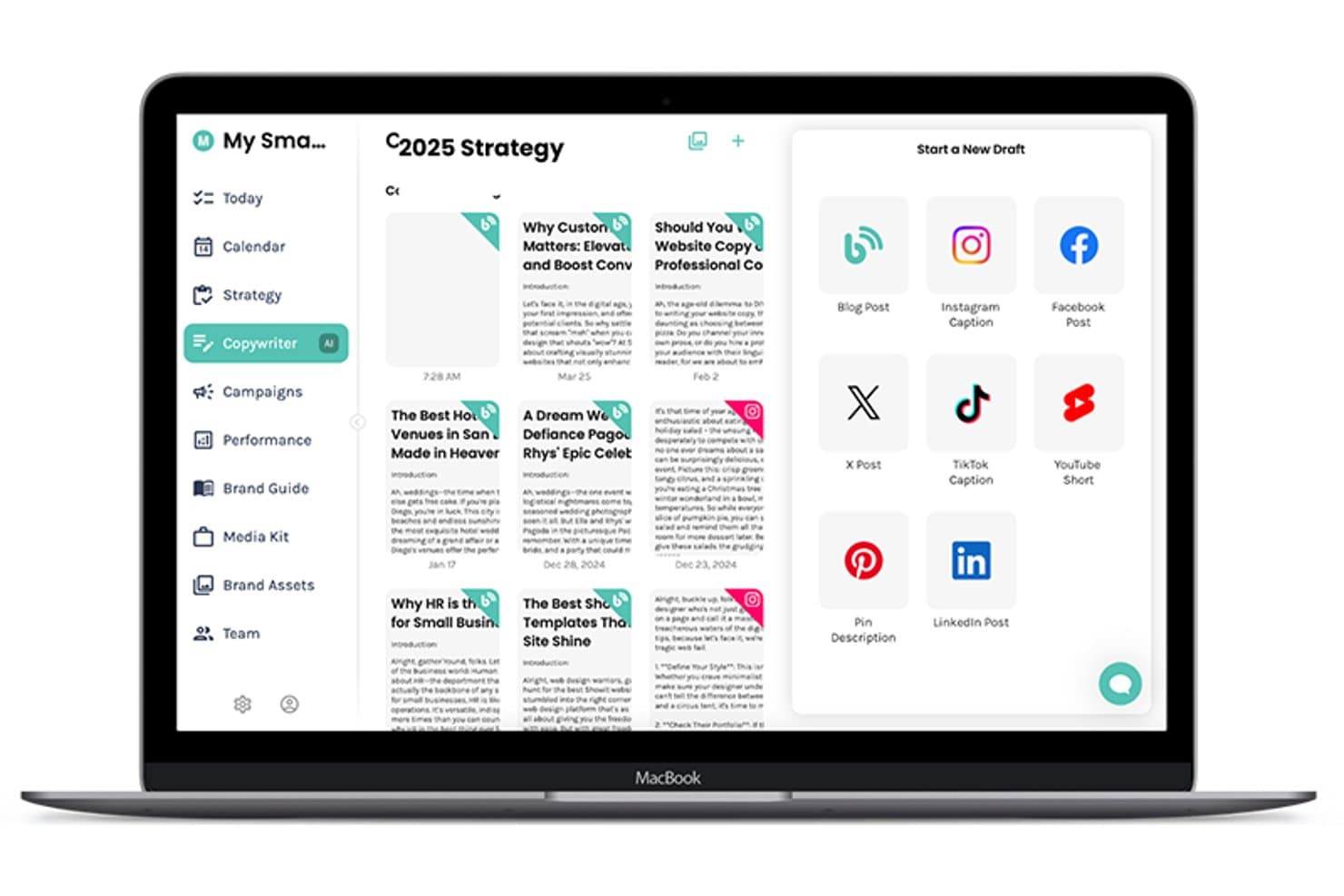
De Enji-app biedt een AI-tekstschrijver waarmee gebruikers vanuit één dashboard blogposts, Instagram-bijschriften, TikTok-bijschriften en meer kunnen opstellen. Enji is een marketingplatform voor kleine bedrijven dat een AI-tekstschrijver voor blogposts, bijschriften en nieuwsbrieven combineert met een ingebouwde strategiegenerator, contentplanner en prestatiedashboard.
Voor wie is Enji het meest geschikt?
Enji is geschikt voor solopreneurs en eenpersoonsbedrijven die al hun marketing zelf beheren zonder een toegewijd team of bureau achter zich.
Waarom ik voor Enji heb gekozen
Enji verdient een plek op mijn voorkeurslijst omdat het de enige tool voor het schrijven van content is die ik heb gevonden en die AI-teksten combineert met een ingebouwde strategielaag, ontworpen rondom het werkproces van één persoon. Ik vind het prettig hoe de merkstemgenerator je toon vastlegt en deze consequent toepast in blogposts, bijschriften en nieuwsbrieven. De functie voor het hergebruiken van content is bijzonder nuttig: je geeft de tool één stuk content en deze werkt een volledige maand aan afgeleide content uit, precies wat een zelfstandige maker nodig heeft.
Belangrijkste functies van Enji
- Marketingstrategiegenerator: Stelt op basis van een eenvoudige startquiz een gepersonaliseerd marketingplan en taken samen.
- KPI-dashboard: Volgt prestaties op socialemediakanalen en in Google Analytics 4 op één plek.
- Campagnesjablonen: Biedt kant-en-klare, vooraf uitgestippelde campagnes met gedetailleerde taken en voorgestelde timing.
- Canva-integratie: Hiermee kunnen gebruikers ontwerpen rechtstreeks vanuit Canva openen en invoegen zonder bestanden te downloaden of opnieuw te uploaden.
Integraties van Enji
Enji biedt ingebouwde integraties met Instagram, Facebook, LinkedIn, Pinterest, Threads, TikTok, YouTube, Canva en Google Analytics 4.
Pros and Cons
Pros:
- Ingebouwde strategielaag voor beslissingen over het maken van content
- De merkstem wordt consequent toegepast op verschillende contenttypen
- Met het hergebruiken van content wordt één stuk omgezet in meerdere stukken
Cons:
- Beperkte functies voor SEO-optimalisatie
- Niet ontworpen voor team- of samenwerkingsworkflows
Learn more about Enji: Het beste voor automatisering van workflows voor marketingcontent Prijs in één regel:
- Gratis proefperiode van 7 dagen + gratis demo beschikbaar
- Vanaf $59/maand (jaarlijks gefactureerd)
Visit WebsiteCustomer Rating:4.8/5
Jasper produceert marketingcontent, advertentieteksten, berichten voor sociale media en e-mailcampagnes. Jasper is een AI-schrijfplatform voor marketingteams, met tools voor het genereren van lange content, advertentieteksten, berichten voor sociale media en e-mailcampagnes binnen contentprocessen met meerdere stappen.
Voor wie is Jasper het meest geschikt?
Jasper is bij uitstek geschikt voor marketingteams van middelgrote tot grote ondernemingen die grote hoeveelheden campagnecontent voor meerdere kanalen produceren.
Waarom ik voor Jasper koos
Ik heb Jasper in mijn topkeuzes opgenomen omdat de functie Campagnes echt verandert hoe mijn team omgaat met de productie van content voor meerdere kanalen. Ik voeg één creatieve briefing toe en Jasper genereert in één keer bijpassende content voor blogposts, bijschriften voor sociale media en e-mailteksten. Met de workflowbouwer kan ik prompts ook aan elkaar koppelen tot herhaalbare reeksen, zodat terugkerende campagnetypen niet telkens helemaal opnieuw hoeven te worden opgebouwd.
Belangrijkste functies van Jasper
- Merkstem: Sla de toon, stijl en terminologie van je merk op, zodat elke uitvoer consistent blijft voor verschillende schrijvers en contenttypen.
- Sjablonen: Kies uit meer dan 50 vooraf gemaakte contentsjablonen voor onder andere productbeschrijvingen, persberichten en blogoverzichten.
- Jasper Chat: Een interactieve AI-chatinterface om concepten te verfijnen, invalshoeken te bedenken of secties in realtime te herformuleren.
- Kennisbank: Upload bedrijfsdocumenten, productspecificaties of stijlgidsen, zodat Jasper bij het genereren van content naar je eigen bronmateriaal verwijst.
Integraties van Jasper
Jasper biedt ingebouwde integraties met Slack, Google Drive, Google Docs, Google Sheets, Google BigQuery, Microsoft SharePoint, Microsoft Word, Salesforce, Semrush, Adobe Workfront, Box en Webflow. Het maakt ook verbinding met Zapier, Make en Pabbly Connect en biedt een API voor aangepaste integraties.
Pros and Cons
Pros:
- Contentgeneratie op campagneniveau vanuit één briefing
- Meer dan 50 marketingspecifieke schrijfsjablonen inbegrepen
- Ondersteunt contentcreatie in meer dan 29 talen
Cons:
- Uitvoer voor lange content heeft moeite met nicheonderwerpen
- Blinkt uit in korte teksten, meer dan in blogteksten
Learn more about Jasper AI: Het beste voor het maken van teksten met prestatievoorspelling
- Gratis proefperiode + gratis demo beschikbaar
- Vanaf $39/maand (jaarlijks gefactureerd)
Visit WebsiteCustomer Rating:4.8/5
Anyword voorspelt de prestaties van teksten voor advertenties, e-mails, berichten, blogs en landingspagina's. Anyword is een AI-platform voor het schrijven van content dat teksten voor advertenties, e-mails, socialmediaberichten, blogposts en landingspagina's genereert en beoordeelt met behulp van gegevens voor prestatievoorspelling.
Voor wie is Anyword het meest geschikt?
Anyword is zeer geschikt voor prestatiemarketeers en groeiteams die op grote schaal teksten schrijven en testen voor betaalde en organische kanalen.
Waarom ik voor Anyword koos
Anyword staat op mijn shortlist omdat de engine voor prestatievoorspelling iets doet wat de meeste AI-schrijftools niet doen: de tool beoordeelt tekstvarianten voordat je ze publiceert. De datagestuurde editor gebruikt marketinggegevens uit A/B-tests om te bepalen welke kop, advertentie of onderwerpregel voor een e-mail waarschijnlijk de meeste conversies oplevert.
Ik vind ook de functie voor contentintelligentie handig. Deze vergelijkt je gepubliceerde content met die gegevensset om slecht presterende middelen te signaleren en verbeteringen voor te stellen.
Belangrijkste functies van Anyword
- Blogassistent: Genereer volledige blogposts op basis van een zoekwoord of onderwerp, waarbij de uitvoer is gestructureerd met koppen, hoofdtekst en SEO-vriendelijke opmaak.
- Websiteautomatisering: Personaliseer berichten op je website voor verschillende doelgroepsegmenten op grote schaal, zonder handmatig teksten te herschrijven.
- Merkstem: Sla je toon en stijl, doelgroepprofielen en richtlijnen voor berichtgeving op één plek op, zodat elke uitvoer op alle kanalen bij je merk blijft passen.
- Chrome-extensie: Krijg in elke browsergebaseerde schrijfomgeving toegang tot de prestatiebeoordeling en tekstgeneratie van Anyword.
Integraties van Anyword
Anyword biedt rechtstreekse integraties met marketing-, CRM-, CMS- en advertentieplatforms, waaronder Salesforce, HubSpot, Google Ads, Meta Ads, LinkedIn Ads, Marketo, Drupal, Sitecore, Wrike en Braze. De tool kan ook worden gekoppeld aan Zapier en er is een API beschikbaar voor aangepaste integraties.
Pros and Cons
Pros:
- Ingebouwde voorspellende beoordeling voor elke variant
- Meer dan 100 schrijfsjablonen specifiek voor marketing
- Content in meer dan 30 talen genereren
Cons:
- Langere blogteksten moeten handmatig worden bewerkt
- Geen directe verbinding voor publiceren naar WordPress
Learn more about Anyword: Het beste voor realtime teamsamenwerking
- Gratis abonnement + proefperiode beschikbaar
- Vanaf $7/gebruiker/maand (jaarlijks gefactureerd)
Visit WebsiteCustomer Rating:4.5/5
Google Docs maakt documenten, bewerkt en maakt ze op, voegt opmerkingen toe en houdt documentversies bij. Google Docs is een cloudgebaseerde tekstverwerkingstool van Google waarmee je documenten kunt maken, bewerken en opmaken, met ingebouwde opmerkingen, versiegeschiedenis en realtime bewerking door meerdere gebruikers.
Voor wie is Google Docs het meest geschikt?
Google Docs is een natuurlijke keuze voor teams van elke omvang die behoefte hebben aan een eenvoudige, toegankelijke schrijfomgeving zonder de overhead van desktopsoftware.
Waarom ik voor Google Docs koos
Google Docs verdient zijn plek als een van de beste opties op mijn shortlist, omdat realtime samenwerken aan documenten echt is waar het in uitblinkt. Ik kan de cursors van mijn teamgenoten live in hetzelfde document zien bewegen, inline-opmerkingen met @mentions achterlaten en de suggestiemodus gebruiken om bewerkingen voor te stellen zonder iemands werk te overschrijven.
Mijn team gebruikt de suggestiemodus specifiek tijdens inhoudsbeoordelingen om elke wijziging te volgen voordat iets wordt geaccepteerd.
Belangrijkste functies van Google Docs
- Versiegeschiedenis: Slaat elke bewerking automatisch op, zodat je eerdere versies van een document kunt bekijken, benoemen en herstellen.
- Spraaktypen: Hiermee kun je inhoud rechtstreeks in een document dicteren met de microfoon van je apparaat.
- Documentoverzicht: Genereert automatisch een navigeerbaar overzicht op basis van je koppen, zodat je lange content beter kunt structureren.
- Woordtellingstool: Toont een live telling van woorden en tekens, inclusief tellingen voor alleen de geselecteerde tekst.
Integraties van Google Docs
Google Docs maakt native verbinding met Google Workspace-apps zoals Google Sheets, Google Slides, Google Drive, Gmail en Google Meet. Het wordt ook uitgebreid via de Google Workspace Marketplace, waar je invoegtoepassingen vindt van tools zoals Grammarly, Lucidchart, DocuSign en Canva die rechtstreeks in Docs werken.
Pros and Cons
Pros:
- Gelijktijdig bewerken met meerdere samenwerkingspartners
- Toegankelijk vanaf elk apparaat of elke browser
- Automatisch opslaan voorkomt verloren werk
Cons:
- Geen ingebouwde SEO- of contentoptimalisatie
- Beperkte opmaakmogelijkheden voor complexe documenten
Learn more about Google Docs: Het beste voor merkspecifieke AI die is afgestemd op je bedrijf
- Gratis proefversie + gratis demo beschikbaar
- Prijzen op aanvraag
Visit WebsiteCustomer Rating:4.4/5
Writer genereert AI-content in de merkstijl en handhaaft de merkrichtlijnen van het bedrijf. Writer is een AI-schrijfplatform voor ondernemingen dat door AI gegenereerde content, handhaving van merkrichtlijnen en een aangepast AI-model combineert dat is getraind op de eigen terminologie en richtlijnen van je bedrijf.
Voor wie is Writer het meest geschikt?
Writer is zeer geschikt voor marketing- en contentteams binnen ondernemingen die willen dat AI-uitvoer consistent blijft met de vastgestelde merkstem, terminologie en nalevingsvereisten.
Waarom ik voor Writer koos
Writer staat op mijn shortlist omdat geen enkele andere AI-schrijftool die ik heb gebruikt je de AI laat trainen met je daadwerkelijke merkrichtlijnen op de manier waarop Writer dat doet. Ik gebruik de functie Kennisgrafiek om bedrijfsspecifieke terminologie, goedgekeurde boodschappen en productnamen aan de AI te geven, zodat elke uitvoer weerspiegelt hoe mijn merk daadwerkelijk communiceert.
De ingebouwde controle voor merkrichtlijnen signaleert afwijkingen in realtime, waardoor ik niet elk stuk content handmatig hoef te controleren op taalgebruik dat niet bij het merk past.
Belangrijkste functies van Writer
- Werkboeken: Bouw herhaalbare contentworkflows met meerdere stappen die je team op aanvraag kan uitvoeren zonder telkens opnieuw vanaf nul prompts te schrijven.
- Stemprofielen: Maak benoemde stemprofielen die gekoppeld zijn aan specifieke persona's, zoals een CEO of een merktoon, zodat door AI gegenereerde content elke keer bij de juiste stem past.
- Vaardigheden: Leg de domeinexpertise van je team eenmalig vast en codificeer deze, zodat ze beschikbaar wordt in alle AI-uitvoer en voor alle teamleden.
- Door AI gegenereerde presentaties: Genereer rechtstreeks vanuit een prompt presentaties in de merkstijl, waarbij je merksjablonen automatisch worden toegevoegd.
Integraties van Writer
Writer biedt meer dan 20 native connectoren via de eigen MCP-gateway, waaronder Google Workspace-apps, Microsoft 365-apps, Slack, HubSpot, Salesforce, Atlassian (Jira en Confluence), Asana, Gong, Snowflake, Databricks, Figma, Contentful en Adobe Experience Manager. Het maakt ook verbinding met Zapier en biedt een API voor aangepaste integraties.
Pros and Cons
Pros:
- Aangepaste AI getraind op je merkgegevens
- De uitvoer voelt menselijk aan, niet door AI gegenereerd
- Realtime handhaving van merkrichtlijnen ingebouwd
Cons:
- Overlappende functies zorgen aanvankelijk voor verwarring
- Het genereren van content voor sociale media schiet tekort
Learn more about Writer: Ideaal voor het vereenvoudigen van complexe teksten
- 14 dagen gratis proefversie
- Vanaf $8.33/maand (jaarlijks gefactureerd)

Hemingway App markeert moeilijk leesbare zinnen en helpt om directer te schrijven. Hemingway App is een schrijfeditor die moeilijk leesbare zinnen, de lijdende vorm en overmatig gebruik van bijwoorden markeert om schrijvers te helpen helderder en directer te schrijven.
Voor wie is Hemingway App het meest geschikt?
Hemingway App is bijzonder geschikt voor bloggers, journalisten en technische schrijvers die dichte of complexe inhoud begrijpelijk moeten maken voor een algemeen publiek.
Waarom ik Hemingway App heb gekozen
Hemingway App verdient een plek op mijn selectie omdat de kleurgecodeerde editor problemen met de leesbaarheid onmogelijk over het hoofd te zien maakt. Ik plak een concept in de editor en zie direct rood gemarkeerde zinnen die te moeilijk te volgen zijn en gele zinnen die moeten worden ingekort.
De leesbaarheidsscore bovenaan houdt me scherp—voor de meeste inhoud richt ik me op leesniveau 8 of lager, en Hemingway App laat me precies zien waar ik tekortschiet.
Belangrijkste functies van Hemingway App
- Schrijfmodus: Een afleidingsvrije editor waarmee je inhoud kunt opstellen zonder dat feedback over de leesbaarheid zichtbaar is, totdat je overschakelt naar de bewerkingsmodus.
- Direct publiceren: Hiermee kun je inhoud rechtstreeks vanuit de app publiceren op WordPress of Medium.
- Detectie van de lijdende vorm: Markeert constructies in de lijdende vorm groen, zodat je ze kunt herschrijven in de actieve vorm.
- Desktopapp: Beschikbaar als downloadbare desktopapplicatie voor Mac en pc, zodat je offline kunt werken zonder browser.
Integraties van Hemingway App
Hemingway App biedt integraties met Medium en WordPress waarmee je met één klik rechtstreeks kunt publiceren. De app biedt geen API of bredere integratiemogelijkheden met andere software, waardoor het in vergelijking met andere schrijfsoftware voor inhoud op de markt een relatief zelfstandig hulpmiddel is.
Pros and Cons
Pros:
- Directe leesbaarheidsscore bij elk concept
- Stelt eenvoudigere alternatieven voor complexe woorden voor
- Gratis browserversie met volledige bewerkingsfuncties
Cons:
- Detecteert geen spelling- of grammaticafouten
- Markeert elke lange zin als een probleem
Learn more about Hemingway Editor:

Rytr maakt blogartikelen, e-mails en advertentieteksten met aangepaste toonprofielen. Rytr is een AI-schrijfassistent waarmee je inhoud kunt genereren voor meer dan 40 toepassingen—van blogartikelen en e-mails tot advertentieteksten—met behulp van aangepaste toonprofielen en een ingebouwde functie voor stemtraining.
Voor wie is Rytr het meest geschikt?
Rytr is zeer geschikt voor freelance schrijvers, zelfstandige contentmakers en kleine marketingteams die consistente teksten in hun merkstijl moeten produceren zonder een groot budget.
Waarom ik voor Rytr heb gekozen
Ik heb Rytr opgenomen in mijn topkeuzes omdat de functie 'Mijn stem' iets echt nuttigs doet: de functie analyseert een schrijfvoorbeeld dat je aanlevert en neemt die toon vervolgens over in alles wat wordt gegenereerd. Freelancers die meerdere klanten beheren, kunnen afzonderlijke stemprofielen voor elk van hen maken, zodat de uitvoer onderscheidend blijft zonder telkens opnieuw te beginnen.
Ik vind het ook prettig dat die aangepaste toonprofielen met je meegaan via de Chrome-extensie van Rytr, zodat consistent stemgebruik niet beperkt blijft tot de app zelf.
Belangrijkste functies van Rytr
- Meer dan 40 sjablonen voor toepassingen: Kies uit vooraf gemaakte sjablonen voor contenttypen zoals e-mails, CTA's, SEO-metatitels, bijschriften voor sociale media en blogparagrafen.
- Ingebouwde plagiaatcontrole: Voer plagiaatcontroles rechtstreeks in Rytr uit zonder over te schakelen naar een aparte tool.
- AI-opdrachtgenerator: Schrijf een instructie in gewone taal en Rytr genereert tekst op basis van precies wat je beschrijft.
- Meertalig schrijven: Schrijf inhoud in meer dan 30 talen, beschikbaar in het Premium-abonnement.
Rytr-integraties
Rytr heeft geen ingebouwde integraties met CRM-systemen, CMS'en of tools voor projectbeheer. De belangrijkste connectiviteit komt via een Chrome-extensie waarmee je Rytr overal kunt gebruiken waar je in de browser schrijft.
Pros and Cons
Pros:
- Uitstekend voor korte teksten zoals advertenties
- Ingebouwde SERP-analyzer en zoekwoordtool
- Aangepaste sjablonen voor toepassingen in betaalde abonnementen
Cons:
- Uitvoer wordt repetitief in langere concepten
- Geen realtime bronvermelding of verificatie van feiten
Learn more about Rytr: Het beste voor contextuele herschrijfopties
- Gratis abonnement beschikbaar
- Vanaf $6.99/maand (jaarlijks gefactureerd)

Wordtune herschrijft zinnen, verfijnt de toon en verbetert de duidelijkheid in verschillende versies. Wordtune is een AI-schrijfassistent die hulpmiddelen biedt voor herschrijven op zinsniveau, parafraseren en tekstuitbreiding, ontworpen om schrijvers te helpen de toon, duidelijkheid en woordkeuze in verschillende versies te verfijnen.
Voor wie is Wordtune het meest geschikt?
Wordtune is zeer geschikt voor contentschrijvers, marketeers en niet-moedertaalsprekers van het Engels die opties voor herschrijven op zinsniveau nodig hebben om de duidelijkheid en toon van korte content aan te scherpen.
Waarom ik voor Wordtune koos
Ik koos Wordtune als een van de beste tools omdat geen enkel ander hulpmiddel dat ik heb gebruikt herschrijfopties op precies deze manier toont. Wanneer ik een zin markeer, genereert Wordtune meerdere contextbewuste herschrijvingen die aansluiten bij mijn bestaande toon en onderwerp, in plaats van mijn schrijfstijl volledig te vervangen.
Ik gebruik de toonknop ook voortdurend en schakel bij het hergebruiken van content voor verschillende kanalen in enkele seconden tussen een informele en formele stijl. De generator voor slimme synoniemen voegt daar nog een extra laag aan toe door woordenschatopties te tonen die contextueel passen in plaats van alleen alfabetisch.
Belangrijkste functies van Wordtune
- AI-proeflezen: scant je tekst op spelling-, grammatica- en formuleringproblemen en stelt correcties voor.
- Doorgaan met schrijven: genereert een vervolg op je bestaande tekst wanneer je halverwege een versie vastloopt.
- Tekstsamenvatter: vat documenten, artikelen, webpagina's en YouTube-video's samen tot de belangrijkste punten.
- Slim vertalen: zet tekst die in 10 talen is geschreven, waaronder Spaans, Arabisch en Mandarijn, om in natuurlijk klinkend Engels.
Wordtune-integraties
Wordtune werkt via browserextensies voor Chrome en Microsoft Edge, in plaats van via traditionele ingebouwde integraties. De browserextensie brengt de functies van Wordtune naar platforms zoals Google Docs en andere webgebaseerde schrijftools. Wordtune biedt momenteel geen API en werkt niet met Zapier.
Pros and Cons
Pros:
- Meerdere herschrijfopties per zin
- Schakelt tussen een informele en formele toon
- Vertalen vanuit 10 talen naar het Engels
Cons:
- Pop-upsuggesties kunnen het schrijfproces onderbreken
- Het gratis abonnement beperkt het aantal dagelijkse herschrijvingen tot 10
Learn more about Wordtune: Het beste voor meertalige contentgeneratie
- Gratis proefversie van 1.000 woorden beschikbaar
- Vanaf $19/maand (jaarlijks gefactureerd)

Copymatic genereert blogs, advertenties, productbeschrijvingen en content voor sociale media. Copymatic is een AI-schrijftool die blogartikelen, advertentieteksten, teksten voor landingspagina's, productbeschrijvingen voor e-commerce en content voor sociale media in meer dan 25 talen genereert.
Voor wie is Copymatic het meest geschikt?
Copymatic is zeer geschikt voor contentmarketeers en freelancers die geschreven content in meerdere talen moeten produceren zonder een team van moedertaalsprekers in te schakelen.
Waarom ik voor Copymatic heb gekozen
Ik heb Copymatic als een van de beste tools gekozen omdat de taalondersteuning echt uitgebreid is. Het genereert content in meer dan 25 talen en ik kan de uitvoertaal rechtstreeks binnen elke schrijfstool wijzigen zonder de editor te verlaten.
Ik waardeer ook de instellingen voor toon en creativiteitsniveau, waarmee ik uitvoer voor verschillende regionale doelgroepen in één sessie kan verfijnen in plaats van afzonderlijke prompts per markt te beheren.
Belangrijkste functies van Copymatic
- Schrijver voor lange artikelen: Genereer blogberichten van meer dan 1.000 woorden door achtereenvolgens titels, outlines, inleidingen en volledige alinea's te produceren.
- Grammaticacontrole en herschrijver: Controleer en herschrijf bestaande content om grammaticafouten te corrigeren en zinnen te herformuleren.
- Chrome-extensie: Krijg rechtstreeks in je browser toegang tot meer dan 80 AI-schrijftools zonder tussen tabbladen of applicaties te hoeven wisselen.
- WordPress-plug-in: Importeer artikelen die in Copymatic zijn gemaakt met één klik rechtstreeks naar WordPress.
Integraties van Copymatic
Copymatic biedt een kleinere set native integraties, waaronder een WordPress-plug-in voor het importeren van artikelen met één klik en een Chrome-extensie voor schrijven in de browser. Er is een API beschikbaar voor aangepaste integraties, maar ondersteuning voor Zapier is niet duidelijk gedocumenteerd.
Pros and Cons
Pros:
- Ingebouwde SEO-score voor gegenereerde artikelen
- Meer dan 80 schrijftools in de Chrome-extensie
- Genereert content in meer dan 25 talen
Cons:
- Uitvoer voor lange teksten vereist vaak handmatige bewerking
- Herhalende formuleringen in gegenereerde content
Learn more about Copymatic: Beste voor diepgaande verhaal- en manuscriptanalyse
- Gratis abonnement beschikbaar
- Vanaf $10/maand (jaarlijks gefactureerd)

ProWritingAid analyseert grammatica, stijl, tempo, herhaling en leesbaarheid. ProWritingAid is een hulpmiddel voor schrijfanalyse dat grammatica, stijl, tempo, herhaling en leesbaarheid in lange documenten controleert, met speciale rapporten die specifiek zijn ontwikkeld voor fictiemanuscripten en creatieve schrijfprojecten.
Voor wie is ProWritingAid het meest geschikt?
ProWritingAid is bijzonder geschikt voor fictieschrijvers, romanschrijvers en auteurs die gedetailleerde structurele feedback nodig hebben op lange creatieve teksten.
Waarom ik ProWritingAid heb gekozen
Ik heb ProWritingAid gekozen als een van de beste tools, omdat geen enkel ander schrijfhulpmiddel fictieschrijvers dit niveau van structurele feedback op een volledig manuscript biedt. Ik ben dol op het tempoverslag, dat spanning en verloop per hoofdstuk visualiseert, zodat je kunt zien waar je verhaal inzakt. Het rapport over dialoogtags en de detectie van herhaalde zinnen zijn eveneens bijzonder nauwkeurig en signaleren patronen die pas in een volledige eerste versie zichtbaar worden.
Belangrijkste functies van ProWritingAid
- Grammatica- en stijlcontrole: Controleert je tekst in één keer op grammatica-, interpunctie-, spelling- en zinsstructuurproblemen.
- Leesbaarheidsrapport: Beoordeelt je tekst aan de hand van meerdere leesbaarheidsindexen, zodat je je schrijfstijl kunt afstemmen op je beoogde publiek.
- Woordverkenner: Toont synoniemen, collocaties en contextuele woordsuggesties rechtstreeks in de teksteditor.
- Plagiaatcontrole: Vergelijkt je tekst met online bronnen om onbedoelde duplicatie te signaleren voordat je publiceert.
Integraties van ProWritingAid
ProWritingAid werkt via desktopapps en browserextensies in plaats van traditionele ingebouwde integraties. De Desktop Everywhere-app voor Windows en Mac geeft rechtstreeks bewerkingssuggesties in Microsoft Word, Scrivener en andere schrijfapps voor desktop. De browserextensies voor Chrome, Edge en Firefox brengen de functies van ProWritingAid naar Google Docs, Notion, Atticus, Campfire en honderden andere websites. ProWritingAid biedt niet langer een API voor aangepaste integraties en ondersteuning voor Zapier is niet beschikbaar.
Pros and Cons
Pros:
- Meer dan 25 gespecialiseerde rapporten voor diepgaande schrijfanalyse
- Verwerkt manuscripten en boekconcepten van volledige lengte
- De functie Echoes signaleert herhaalde woorden in documenten
Cons:
- Kan trager worden bij zeer lange documenten
- Stelt soms irrelevante stijlcorrecties voor
Learn more about ProWritingAid:
- 11GrammarlyHet beste voor suggesties voor toon en duidelijkheid
Wie ich Schulungssoftware für Partner bewerte
Ich bewerte Schulungsplattformen für Partner auf zwei Ebenen: die grundlegenden Kriterien, die ein Tool erfüllen muss – etwa die Nachverfolgung von Zertifizierungen und Partnerportale – sowie die Unterscheidungsmerkmale, die zeigen, welche Lösung am besten geeignet ist.
Kernfunktionen (Grundvoraussetzungen für diese Liste)
Bei der Auswahl der Tools für meine Liste bewerte ich jedes einzelne auf einer Skala von 0 (bietet die Funktionalität nicht an) bis 5 (ist in diesem Bereich hervorragend) für jede der unten aufgeführten Kernfunktionen. Anschließend rechne ich die Gesamtpunktzahl des Tools in einen Prozentsatz um. Jedes Tool muss eine Mindestgesamtpunktzahl von 65 % erreichen, um für die Aufnahme berücksichtigt zu werden.
- Verwaltung externer Lernender: Ich prüfe, ob die Plattform Lernende nach Partnerorganisation, Stufe und Region segmentiert – sodass ein Gold-Wiederverkäufer im APAC-Raum andere Inhalte sieht als ein Silber-Wiederverkäufer.
- Kurserstellung & Inhaltsbereitstellung: Ich achte auf integrierte Kurserstellung mit SCORM-Unterstützung und strukturierten Lernpfaden, nicht nur auf eine Dateiablage, in der Partner nach Produktpräsentationen suchen müssen.
- Zertifizierung & Bewertung: Jedes Tool sollte die Ausstellung von Zertifizierungen ermöglichen, die an Kompetenzmeilensteine geknüpft sind, einschließlich Ablaufdaten und Erneuerungsprozessen für Dinge wie die jährliche Rezertifizierung von Produktkenntnissen.
- Mandantenfähige Partnerportale: Ich bewerte, ob jede Partnerorganisation ein eigenes, markenbezogenes und in sich geschlossenes Portal mit eigenen Administrationskontrollen erhält, statt einer gemeinsam genutzten Umgebung.
- Fortschrittsverfolgung & Berichterstattung: Berichte sollten sich vom individuellen Lernfortschritt bis hin zu Dashboards auf Partnerebene verdichten lassen, damit erkennbar ist, welche Partnerteams bei der Befähigung zurückfallen.
- Integrationen in den RevOps-Stack: Ich prüfe die Anbindung an CRM- und PRM-Systeme – also, ob Schulungsdaten in Salesforce- oder HubSpot-Datensätze fließen, damit Partnermanager Zertifizierungen mit Aktivitäten im Zusammenhang mit Geschäftsabschlüssen verknüpfen können.
Sobald ich eine Liste von Tools zusammengestellt habe, die die Kriterien erfüllen, prüfe ich, wodurch sich die einzelnen Plattformen voneinander abheben.
Unterscheidungsmerkmale (Was Anbieter voneinander abhebt)
So vergleiche ich verschiedene Anbieter und stelle ihre Unterschiede heraus:
Herausragende Funktionen
Gamifizierungsfunktionen wie Punkte und Bestenlisten halten Partner motiviert, insbesondere bei Zertifizierungskampagnen für Hunderte von Wiederverkäufern. Eine weitere Rolle spielt für mich die KI-gestützte Personalisierung. Adaptive Lernpfade können einen technischen Partner zu vertiefenden Produktinhalten führen, während ein vertriebsorientierter Mitarbeiter stattdessen Inhalte zum Umgang mit Einwänden erhält. Ich prüfe außerdem den mobilen Zugriff und den Offline-Zugriff, was für Außendienstmitarbeiter wichtig ist, die Schulungen zwischen Kundenterminen absolvieren müssen.
Über die Funktionen hinaus
Skalierbarkeit ist wichtig, wenn Ihr Partnerprogramm von 50 auf 500 Organisationen wächst. Ich bewerte, ob sich die Preise mit der Anzahl aktiver Lernender skalieren lassen und ob die Plattform mehrsprachige Einführungen unterstützt. Ebenso wichtig ist die Messung des ROI von Partnerprogrammen – ich suche nach Tools, die den Abschluss von Schulungen mit der von Partnern generierten Vertriebspipeline in Beziehung setzen und Vertriebsverantwortlichen damit die Daten liefern, um Investitionen in das Programm zu rechtfertigen. Sicherheit und Compliance runden die Bewertung ab. Bereits die SOC-2- und DSGVO-Bereitschaft sowie die Unterstützung von SSO gehören zu den Grundvoraussetzungen, wenn Sie externen Benutzern Zugriff auf Ihre Systeme gewähren.
Zo kies je software voor het schrijven van content
Je kunt gemakkelijk verdwalen in lange functielijsten en complexe prijsstructuren. Om je te helpen gefocust te blijven terwijl je je unieke selectieproces voor software doorloopt, vind je hier een checklist met factoren om rekening mee te houden:
| Factor | Waar je op moet letten |
|---|---|
| FactorSchaalbaarheid | Waar je op moet lettenKan de tool een grotere hoeveelheid content of meer gebruikers aan naarmate je team groeit? Controleer het maximale aantal gebruikersplaatsen en de gebruikslimieten van de API. |
| FactorIntegraties | Waar je op moet lettenMaakt de tool rechtstreeks verbinding met hulpmiddelen waarvan je team afhankelijk is, zoals CMS-platforms, Google Drive of projectmanagementsoftware? |
| FactorAanpasbaarheid | Waar je op moet lettenKun je aangepaste sjablonen, schrijfstijlen of workflows instellen die aansluiten bij de contentstrategie van je merk? |
| FactorGebruiksgemak | Waar je op moet lettenKunnen niet-technische gebruikers de tool snel gebruiken zonder een steile leercurve? Test de navigatie en taakstromen vóór aankoop. |
| FactorImplementatie en onboarding | Waar je op moet lettenHoe snel kan je team waarde gaan creëren? Houd rekening met de duur van de configuratie, migratiestappen en beschikbare ondersteuning tijdens het inwerken. |
| FactorKosten | Waar je op moet lettenSluiten de prijsniveaus aan bij je behoeften en budget? Let op verborgen limieten, jaarlijkse kortingen of vereisten voor een minimumaantal gebruikersplaatsen. |
| FactorBeveiligingsmaatregelen | Waar je op moet lettenVoldoet de tool aan de normen voor gegevensprivacy? Bekijk het beleid voor gegevensopslag, gebruikersrechten en naleving van de AVG. |
| FactorBeschikbaarheid van ondersteuning | Waar je op moet lettenIs er hulp beschikbaar wanneer je die nodig hebt—vooral bij urgente problemen? Controleer of er livechat, e-mailondersteuning of zelfs 24/7-dekking beschikbaar is. |
Wat is software voor het schrijven van content?
Software voor het schrijven van content bestaat uit digitale hulpmiddelen die zijn ontworpen om individuen en teams te helpen bij het creëren, bewerken en optimaliseren van geschreven materiaal voor blogs, marketing, websites en digitale publicaties.
Deze platforms combineren vaak AI-gestuurde tekstgeneratie, grammaticacorrectie en opmaakfuncties om consistentie en snelheid te ondersteunen. Door het schrijfproces te centraliseren, maken ze het eenvoudiger om grote hoeveelheden geschreven content van professionele kwaliteit te produceren voor zakelijke of creatieve doeleinden.
Functies
Let bij het selecteren van software voor het schrijven van content op de volgende belangrijke functies:
- Grammatica- en spellingcontrole: Zorgt ervoor dat je content vrij is van typefouten, grammaticafouten en onhandige formuleringen door tijdens het bewerken automatisch correcties te markeren en voor te stellen.
- Contentsjablonen: Biedt vooraf gestructureerde indelingen voor veelvoorkomende schrijftypen, zoals blogberichten, e-mails, productbeschrijvingen en updates voor sociale media, om het maken van content te versnellen en consistentie te behouden.
- Plagiaatdetectie: Controleert op dubbele tekst en markeert deze om originele content te behouden en onbedoelde auteursrechtproblemen vóór publicatie of indiening te voorkomen.
- Versiegeschiedenis: Houdt wijzigingen in de loop der tijd bij en slaat deze op, zodat je eerdere versies kunt bekijken, terugzetten of vergelijken. Dit ondersteunt gezamenlijk bewerken en het herstellen van fouten.
- Samenwerkingstools: Stelt meerdere gebruikers in staat om tegelijkertijd aan hetzelfde document te werken, opmerkingen achter te laten, taken toe te wijzen en suggesties in realtime op te lossen.
- Exportopties: Hiermee kun je content opslaan of exporteren in meerdere indelingen, zoals PDF, DOCX of HTML, zodat je deze eenvoudig kunt publiceren of delen op verschillende platforms.
- Opmaak- en stijleditor: Hiermee kun je koppen, lijsten, links en ontwerpelementen toepassen om de structuur, leesbaarheid en visuele aantrekkingskracht van je tekst te verbeteren.
- Woord- en tekentelling: Biedt een realtime telling, zodat je kunt voldoen aan lengtevereisten voor specifieke platforms, briefings of publicatiestandaarden.
Veelvoorkomende AI-functies van software voor het schrijven van content
Naast de hierboven genoemde standaardfuncties van software voor het schrijven van content, integreren veel van deze oplossingen AI met functies zoals:
- Geautomatiseerde contentgeneratie: Gebruikt AI-modellen om direct artikelen, e-mails of reclameteksten te maken op basis van korte prompts of onderwerpen, zodat gebruikers op grote schaal kwalitatieve teksten kunnen opstellen.
- Intelligente tekstreeksamenvatting: Vat lange artikelen of rapporten samen in beknopte samenvattingen, waardoor grote hoeveelheden informatie toegankelijker en sneller te verwerken zijn.
- Contextueel herschrijven en parafraseren: Herformuleert automatisch zinnen en alinea’s met behoud van betekenis en toon, wat handig is om bestaande content te vernieuwen of herhaling te voorkomen.
- AI-gestuurde toonaanpassing: Hiermee kunnen gebruikers de emotionele toon of schrijfstijl aanpassen (formeel, vriendelijk, overtuigend) om beter aan te sluiten bij merkrichtlijnen of de verwachtingen van de doelgroep.
- Realtime contentverbetering: Biedt AI-gestuurde suggesties voor duidelijkheid, betrokkenheid en leesbaarheid, zodat concepten met minimale handmatige bewerking kunnen worden verfijnd en de kwaliteit verbetert.
Voordelen
Het implementeren van software voor het schrijven van content biedt verschillende voordelen voor je team en je bedrijf. Hier zijn enkele voordelen waar je naar kunt uitkijken:
- Snellere contentproductie: Geautomatiseerde tools, sjablonen en AI-generatie helpen je team om artikelen, e-mails en advertenties sneller te maken dan bij handmatig opstellen.
- Consistente kwaliteit en stijl: Ingebouwde grammaticacontroles, opmaakfuncties en instellingen voor de merkstem zorgen ervoor dat content telkens aan je standaarden voldoet.
- Verbeterde samenwerking: Functies voor realtime bewerken, opmerkingen plaatsen en versiegeschiedenis maken teamwork en schrijven met meerdere auteurs eenvoudig en transparant.
- Minder risico op plagiaat: Geïntegreerde plagiaatdetectie helpt originele content te behouden en beschermt je bedrijf tegen onbedoelde auteursrechtschendingen.
- Naadloze publicatieworkflows: Met exportopties en integraties met andere platforms kun je content eenvoudig van concept naar publicatie brengen.
- Effectievere content: AI-gestuurde verbeteringen en functies voor toonaanpassing helpen om je teksten aantrekkelijker te maken en beter af te stemmen op de behoeften van je doelgroep.
Kosten en prijzen
Bij het selecteren van software voor het schrijven van content is inzicht nodig in de verschillende beschikbare prijsmodellen en abonnementen. De kosten variëren op basis van functies, teamgrootte, uitbreidingen en meer. De onderstaande tabel geeft een overzicht van veelvoorkomende abonnementen, hun gemiddelde prijzen en de gebruikelijke functies die in oplossingen voor het schrijven van content zijn inbegrepen:
Vergelijkingstabel van abonnementen voor software voor het schrijven van content
| Type abonnement | Gemiddelde prijs | Veelvoorkomende functies |
|---|---|---|
| Type abonnementGratis abonnement | Gemiddelde prijs$0 | Veelvoorkomende functiesBasissjablonen voor content, een beperkt aantal woorden of tekens, grammaticacontrole en basisopties voor export. |
| Type abonnementPersoonlijk abonnement | Gemiddelde prijs$10-$20/gebruiker/maand | Veelvoorkomende functiesVolledige toegang tot sjablonen, een hoger aantal woorden, basiscontrole op plagiaat, stijlfuncties en ondersteuning voor één gebruiker. |
| Type abonnementZakelijk abonnement | Gemiddelde prijs$25-$50/gebruiker/maand | Veelvoorkomende functiesSamenwerkingsfuncties, geavanceerde exportopties, versiegeschiedenis, teambeheer en integraties. |
| Type abonnementOndernemingsabonnement | Gemiddelde prijs$60-$120/gebruiker/maand | Veelvoorkomende functiesAangepaste introductie, prioriteitsondersteuning, API-toegang, verbeterde beveiliging, aangepaste sjablonen en nalevingsfuncties. |
Veelgestelde vragen over software voor het schrijven van content
Hier vind je antwoorden op veelgestelde vragen over software voor het schrijven van content:
Waarin verschilt software voor het schrijven van content van eenvoudige tekstverwerkers?
Software voor het schrijven van content gaat verder dan eenvoudige documentbewerking door sjablonen, plagiaatdetectie, samenwerkingstools, versiegeschiedenis en soms AI-contentgeneratie toe te voegen. Deze functies helpen teams om schrijfprojecten efficiënter te beheren, te volgen en te optimaliseren dan met standaardtekstverwerkers.
Kan software voor het schrijven van content de samenwerking binnen een team verbeteren?
Ja, de meeste software voor het schrijven van content biedt realtime samenwerking, opmerkingen en versiebeheer. Met deze functies kunnen meerdere gebruikers tegelijk documenten bewerken, schrijftaken toewijzen en wijzigingen eenvoudig beoordelen, waardoor gezamenlijke contentontwikkeling veel soepeler verloopt.
Zijn er beveiligingsrisico's bij het gebruik van software voor het schrijven van content?
Ja, vooral als je met gevoelige informatie werkt. Controleer altijd de beveiligingspraktijken van de aanbieder, zoals gegevensversleuteling, toegangsbeheer en nalevingscertificeringen, om er zeker van te zijn dat je documenten en gegevens beschermd zijn.
Ondersteunen softwaretools voor het schrijven van content meerdere talen?
Veel softwaretools voor het schrijven van content ondersteunen meertalige contentcreatie en -bewerking. De beschikbare talen en kwaliteit kunnen echter variëren. Controleer daarom de taalondersteuning en test de uitvoerkwaliteit voor je doeltalen.
Hoe steil is de leercurve doorgaans voor nieuwe gebruikers?
De meeste software voor het schrijven van content is ontworpen voor een snelle ingebruikname, met handleidingen, sjablonen en rondleidingen. Geavanceerde functies of zeer aanpasbare platforms kunnen echter extra training vereisen, zodat je team er optimaal gebruik van kan maken.