

Software voor contentcreatie geeft je team de hulpmiddelen om content in verschillende indelingen te schrijven, ontwerpen, publiceren en beheren. Als je op zoek bent naar de beste software voor contentcreatie, heb je waarschijnlijk te maken met verspreide concepten, ontwerpen die niet bij je merk passen, trage goedkeuringsprocessen of te veel hulpmiddelen voor verschillende soorten content.
Het juiste platform biedt je team een duidelijkere manier om content te produceren zonder de controle over kwaliteit, merkidentiteit, deadlines of distributie te verliezen. In deze lijst bespreek ik de beste beschikbare opties, laat ik zien waarvoor elke tool het meest geschikt is en maak ik het eenvoudiger om software te kiezen die aansluit op je workflow voor content in 2026.
Waarom u onze softwareaanbevelingen kunt vertrouwen
6,700+
Reviews
20
Industry experts
16+
Evaluation factors
14
Years
Ons team test en beoordeelt software sinds 2012. Als uitgevers en media-exploitanten weten we zelf hoe moeilijk — en belangrijk — het is om de juiste software te kiezen.
Voor deze gids hebben we tools geëvalueerd met behulp van praktijktests en onafhankelijk onderzoek, waarbij we tools beoordeelden aan de hand van onze selectiecriteria.
Onze reviews weerspiegelen ons menselijke redactionele oordeel, geen verkooppraatje.
Vergelijkingstabel voor software voor contentcreatie
In de onderstaande tabel vergelijk ik de prijzen, toegang tot proefversies en gebruikssituaties voor content van mijn beste selecties voor software voor contentcreatie.
| Tool | Best For | Trial Info | Price | ||
|---|---|---|---|---|---|
| 1 | Beste voor zelfstandige oprichters | Gratis proefperiode van 14 dagen | Vanaf $29/maand | Website | |
| 2 | Het beste voor het optimaliseren van de prestaties van LinkedIn-berichten | Gratis proefperiode + gratis demo beschikbaar | Vanaf £17/gebruiker/maand (jaarlijks gefactureerd) | Website | |
| 3 | Het beste voor SEO-gestuurde contentplanning | Gratis abonnement + gratis proefperiode van 7 dagen + gratis demo | Vanaf $117.33/maand (jaarlijks gefactureerd) | Website | |
| 4 | Ideaal voor AI-ondersteunde planning van socialmediacontent | Gratis proefperiode van 7 dagen beschikbaar | Vanaf $19/maand (jaarlijks gefactureerd) | Website | |
| 5 | Meest geschikt voor digitale tijdschriften en catalogi | Gratis demo beschikbaar | Vanaf $50/maand/account | Website | |
| 6 | Het beste voor governance van AI-content binnen ondernemingen | Gratis proefperiode + gratis demo beschikbaar | Prijzen op aanvraag | Website | |
| 7 | Beste voor professionele creatieve productie | 14 dagen gratis proefversie | Vanaf $37.99/maand (jaarlijks gefactureerd) | Website | |
| 8 | Ideaal voor vergrendelde merksjablonen | Gratis abonnement + gratis demo beschikbaar | Vanaf $10/gebruiker/maand (jaarlijks gefactureerd) | Website | |
| 9 | Beste voor interactieve verkoopcontent | Gratis demo beschikbaar | Vanaf $15/gebruiker/maand (jaarlijks gefactureerd) | Website | |
| 10 | Beste voor merkgebonden microsites | Gratis demo beschikbaar | Prijzen op aanvraag | Website |


Beoordelingen van de beste software voor contentcreatie
Hieronder vind je mijn uitgebreide samenvattingen van de beste software voor contentcreatie die op mijn shortlist terechtkwam. Deze beoordelingen behandelen de gebruikssituatie, belangrijkste functies, integraties en voor- en nadelen van elke tool.
 1Beste voor zelfstandige oprichters
Enji
- Gratis proefperiode van 14 dagen
- Vanaf $29/maand
Visit WebsiteCustomer Rating:4.9/5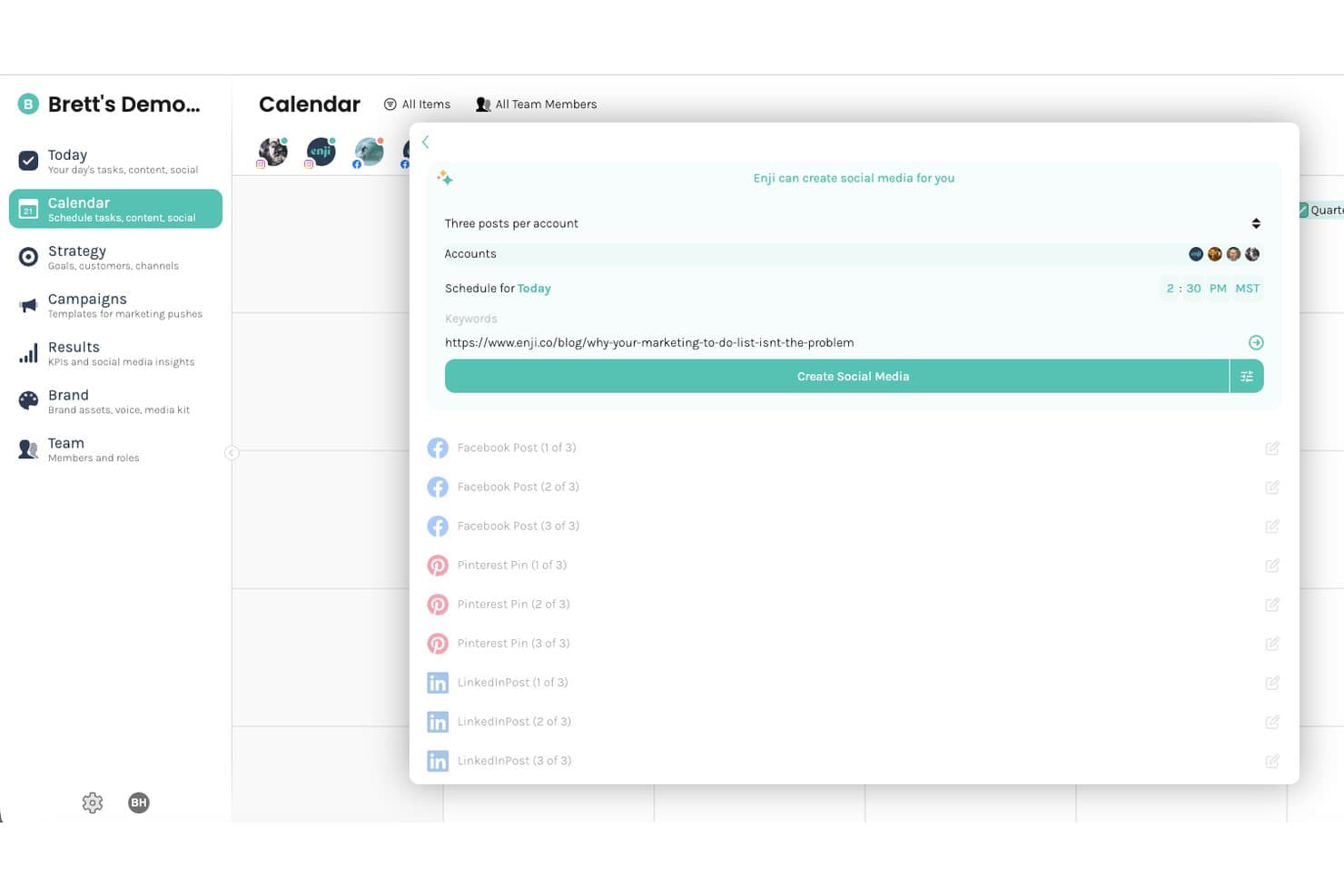
Enji biedt een door AI aangestuurde tool voor het maken van inhoud voor sociale media die meerdere berichten voor Facebook, Pinterest en LinkedIn genereert op basis van één URL-invoer. Enji is een marketingplatform voor kleine bedrijven dat door AI aangestuurde inhoudscreatie, planning van sociale media, een bouwer voor marketingstrategieën en een KPI-dashboard in één hulpmiddel combineert.
Voor wie is Enji het meest geschikt?
Enji is zeer geschikt voor zelfstandige ondernemers en eigenaars van zeer kleine bedrijven die al hun marketing zelf uitvoeren zonder een toegewijd team.
Waarom ik voor Enji heb gekozen
Ik heb Enji gekozen als een van de beste opties, omdat het de enige tool in deze lijst is die door AI aangestuurde inhoudscreatie combineert met een volledige uitvoeringslaag voor marketing, gebouwd voor één persoon. Ik vind het goed dat de AI-tekstschrijver je merkstem leert en die consequent toepast in blogposts, bijschriften en nieuwsbrieven, zodat elk resultaat klinkt alsof jij het hebt geschreven. De tool voor het hergebruiken van inhoud is waar Enji zijn plek echt verdient: één blogpost wordt een maand aan inhoud voor sociale media zonder dat je telkens opnieuw hoeft te beginnen.
Belangrijkste functies van Enji
- Marketingkalender met taakbeheer: Plan campagnes en beheer taken in één uniforme kalenderweergave met slepen-en-neerzetten.
- KPI- en analysedashboard: Houd de prestaties van marketingcampagnes en gegevens over sociale betrokkenheid op één plek in de gaten.
- Werkruimte voor merkbeheer: Bewaar merkbeelden, voorkeuren en richtlijnen voor berichtgeving voor consistente resultaten.
- Planning van sociale media: Koppel accounts om berichten op te stellen en rechtstreeks in te plannen op meerdere sociale platforms.
Integraties van Enji
Enji biedt eigen integraties met Instagram, Facebook (Meta), LinkedIn, TikTok, Pinterest, Threads, YouTube, Canva en Google Analytics 4.
Pros and Cons
Pros:
- AI-tekstschrijver past zich aan je merkstem aan
- Hergebruik van inhoud in verschillende indelingen voor sociale media ingebouwd
- Strategie en uitvoering op één plek
Cons:
- Beperkte mogelijkheden voor lange SEO-inhoud
- Niet ontworpen voor samenwerking in teams met meerdere gebruikers
Learn more about Enji: Het beste voor het optimaliseren van de prestaties van LinkedIn-berichten
- Gratis proefperiode + gratis demo beschikbaar
- Vanaf £17/gebruiker/maand (jaarlijks gefactureerd)
Visit WebsiteCustomer Rating:5/5
Vulse toont een dashboard voor het maken van berichten met een evaluatie van de inhoudsscore. Vulse is een LinkedIn-platform voor medewerkersambassadeurschap dat AI-gegenereerde berichten, inhoudsscores, planning en teamanalyses combineert voor B2B-teams die LinkedIn-inhoud op persoonlijke profielen en bedrijfspagina's willen beheren en meten.
Voor wie is Vulse het meest geschikt?
Vulse werkt goed voor B2B-marketingteams en salesprofessionals die LinkedIn-inhoud op grote schaal beheren voor meerdere teamleden of bedrijfspagina's.
Waarom ik voor Vulse heb gekozen
Ik heb Vulse gekozen als een van de beste opties vanwege de directe manier waarop het inhoudsscoresysteem aansluit bij de prestaties van berichten. Elk bericht dat je opstelt, krijgt een score voordat het live gaat. Daardoor kan ik onmiddellijk zien of inhoud de potentie heeft om goed te presteren op LinkedIn, in plaats van achteraf te moeten gissen. Combineer dat met de AI-aangedreven berichtgenerator, die de individuele schrijfstijl leert en op maat gemaakte onderwerpsuggesties voor je doelgroep aandraagt, en je team produceert voortdurend inhoud die is gemaakt om betrokkenheid te stimuleren.
Belangrijkste functies van Vulse
- Inhoudskalender: Plan en beheer LinkedIn-berichten voor personen en bedrijfspagina's vanuit één gedeelde kalenderweergave.
- Realtime analysedashboard: Volg prestatiegegevens per bericht, waaronder vertoningen, betrokkenheid en de groei van het aantal volgers, in realtime.
- Artikelsamenvatter: Genereer een LinkedIn-bericht van elk artikel door de URL ervan in Vulse te plakken.
- Teamranglijst: Bekijk welke teamleden het actiefst zijn en de meeste betrokkenheid genereren om je LinkedIn-aanwezigheid te versterken.
Integraties van Vulse
Vulse biedt ingebouwde integraties met LinkedIn. Er is een API beschikbaar voor aangepaste integraties.
Pros and Cons
Pros:
- Op elke gebruiker afgestemde AI-stijlovereenkomst
- Bevat een ranglijst voor medewerkersambassadeurschap
- Beoordeelt de kwaliteit van berichten met optimalisatie-indicatoren
Cons:
- Biedt weinig integraties met externe diensten
- Mist publicatietools voor andere B2B-netwerken
Learn more about Vulse: Het beste voor SEO-gestuurde contentplanning
- Gratis abonnement + gratis proefperiode van 7 dagen + gratis demo
- Vanaf $117.33/maand (jaarlijks gefactureerd)
Visit WebsiteCustomer Rating:4.5/5
Semrush ondersteunt SEO-onderzoek, contentplanning, zoekwoordanalyse en het volgen van merkzichtbaarheid. Semrush is een platform voor digitale zichtbaarheid op het gebied van SEO, PPC, sociale media, contentmarketing en zichtbaarheid in AI-zoekopdrachten. Het platform omvat zoekwoordenonderzoek, concurrentieanalyse, site-audits, backlinktracking en inzichten in zichtbaarheid, waardoor het nuttig is voor teams die content creëren op basis van zoekvraag en gegevens over concurrenten.
Voor wie is Semrush het meest geschikt?
Semrush is zeer geschikt voor contentmarketeers, SEO-teams en bureaus die contentcreatie willen koppelen aan zoekwoordenonderzoek, rankings, concurrentieanalyse en zichtbaarheid in zoekmachines.
Waarom ik voor Semrush heb gekozen
Ik heb voor Semrush gekozen omdat het nuttig is voordat het schrijven begint. Het biedt contentteams de onderzoekslaag die ze nodig hebben om onderwerpen te kiezen, zoekintentie te begrijpen, hiaten in zoekwoorden te identificeren en prioriteit te geven aan content op basis van de vraag.
Ik vind het vooral geschikt voor teams die niet willen dat contentcreatie uitsluitend op brainstormen is gebaseerd. Semrush biedt schrijvers en strategen een duidelijkere basis voor briefings, onderwerpclusters en optimalisatiewerk.
Belangrijkste functies van Semrush
- Zoekwoordenonderzoek: Vind ideeën voor zoekwoorden, zoekvolume, concurrentiegegevens en gerelateerde zoektermen.
- Concurrentieanalyse: Bekijk de zichtbaarheid van concurrenten, verkeersschattingen en rankingmogelijkheden.
- Contentmarketingtools: Plan en optimaliseer content met behulp van SEO- en doelgroepinzichten.
- Site-audit: Identificeer technische SEO-problemen die de prestaties van content kunnen beïnvloeden.
Integraties van Semrush
Semrush integreert met Google Analytics, Google Search Console, Google Ads, Google Business Profile, Looker Studio, Trello, WordPress en Google Docs.
Pros and Cons
Pros:
- Sterke tools voor zoekwoorden- en concurrentieonderzoek
- Zeer geschikt voor SEO-gestuurde contentplanning
- Nuttig voor briefings, optimalisatie en analyse van hiaten in content
Cons:
- De prijs kan hoog zijn voor kleine teams
- De leercurve kan steil zijn voor gebruikers zonder SEO-kennis
Learn more about Semrush: Ideaal voor AI-ondersteunde planning van socialmediacontent
- Gratis proefperiode van 7 dagen beschikbaar
- Vanaf $19/maand (jaarlijks gefactureerd)
Visit WebsiteCustomer Rating:4.6/5
ContentStudio plant, maakt, plant in, publiceert en analyseert socialmediacontent. ContentStudio is een door AI ondersteund platform voor socialmediabeheer en contentmarketing. Het biedt teams een gedeelde werkruimte om contentkalenders te plannen, berichten in te plannen, goedkeuringen te beheren, op verschillende socialmediakanalen te publiceren en prestaties vanuit één dashboard bij te houden.
Voor wie is ContentStudio het meest geschikt?
ContentStudio is geschikt voor socialmediateams, bureaus en contentmarketeers die meerdere kanalen beheren en planning, publicatie, goedkeuringen en rapportage op één plek nodig hebben.
Waarom ik voor ContentStudio heb gekozen
Ik heb voor ContentStudio gekozen omdat het contentplanning en socialmediapublicatie samenbrengt in één workflow. Teams kunnen berichten plannen in kalender-, lijst-, feed- of rasterweergave en de content vervolgens naar planning, goedkeuring en rapportage verplaatsen zonder tussen afzonderlijke tools te hoeven schakelen.
Ik vind het ook prettig dat de AI-functies ondersteuning bieden bij het maken van socialmediacontent en het analyseren van prestaties. Daardoor is het nuttig voor teams die consequent berichten op verschillende kanalen moeten maken.
Belangrijkste functies van ContentStudio
- Geïntegreerde contentkalender: Plan en bekijk content in kalender-, lijst-, feed- en rasterweergave.
- AI-contentcreatie: Genereer bijschriften voor social media en contentideeën met ingebouwde AI-tools.
- Goedkeuringsworkflows: Deel kalenders met teamleden, klanten of goedkeurders ter beoordeling.
- Analyses en rapportage: Houd campagne-, label- en concurrentprestaties op socialmediakanalen bij.
Integraties van ContentStudio
ContentStudio integreert met Facebook, Instagram, LinkedIn, X, Pinterest, YouTube, TikTok, Google Business Profile, WordPress, Medium, Tumblr, Webflow, Shopify, Canva, Bitly, Feedly, Pocket, Replug, Google Drive, Dropbox, Box en OneDrive.
Pros and Cons
Pros:
- Meerdere kalenderweergaven voor het plannen van socialmediacontent
- AI-tools voor het maken van content en inzichten in prestaties
- Ondersteunt goedkeuringen, publicatie en rapportage op één platform
Cons:
- Er staat geen permanent gratis abonnement vermeld
- Voor geavanceerde samenwerking en rapportage zijn mogelijk abonnementen van een hoger niveau nodig
Learn more about ContentStudio: Meest geschikt voor digitale tijdschriften en catalogi
- Gratis demo beschikbaar
- Vanaf $50/maand/account
Visit WebsiteCustomer Rating:4.5/5
Joomag maakt digitale tijdschriften, catalogi, brochures, rapporten en inhoudservaringen. Joomag is een platform voor inhoudservaringen voor het maken en distribueren van hoogwaardig vormgegeven digitale publicaties, zoals tijdschriften, catalogi, brochures, voorstellen en rapporten. Het ondersteunt ook gepersonaliseerde en interactieve inhoud, met tools voor AI, inhoudsautomatisering, analyses, formulieren en het verzamelen van lezersgegevens.
Voor wie is Joomag het meest geschikt?
Joomag is zeer geschikt voor teams die professioneel vormgegeven digitale publicaties maken en tools nodig hebben voor distributie, lezersbetrokkenheid en het volgen van prestaties.
Waarom ik voor Joomag koos
Ik koos voor Joomag omdat het zich richt op inhoud in publicatiestijl in plaats van algemeen projectmanagement. Het werkt goed wanneer het eindresultaat eruit moet zien als een tijdschrift, catalogus, jaarverslag, brochure of interactief document.
Ik vind het ook prettig dat het platform analyses en mogelijkheden voor het verzamelen van lezersgegevens bevat. Daardoor is het handig voor teams die willen begrijpen hoe doelgroepen omgaan met hun gepubliceerde inhoud.
Belangrijkste functies van Joomag
- Bewerker voor digitale publicaties: Maak tijdschriften, catalogi, brochures, rapporten en andere ontworpen inhoudsformaten.
- Interactieve publicaties: Voeg interactieve elementen toe om inhoud aantrekkelijker te maken dan statische PDF's.
- Lezersgegevens verzamelen: Verzamel doelgroepgegevens via interacties met publicaties en ingesloten formulieren.
- Analyses: Volg de prestaties van publicaties en het gedrag van lezers na distributie.
Joomag-integraties
Joomag integreert met Salesforce, HubSpot, Mailchimp, Google Analytics, Dropbox, Box en Constant Contact.
Pros and Cons
Pros:
- Zeer geschikt voor digitale tijdschriften en catalogi
- Ingebouwde analyses voor de prestaties van publicaties
- Ondersteunt interactieve en gepersonaliseerde inhoud
Cons:
- De prijs staat niet duidelijk vermeld op de hoofdsite
- Minder geschikt voor eenvoudige workflows voor blogs of socialmediaberichten
Learn more about Joomag: Het beste voor governance van AI-content binnen ondernemingen
- Gratis proefperiode + gratis demo beschikbaar
- Prijzen op aanvraag
Visit WebsiteCustomer Rating:4.4/5
Writer creëert beheerde AI-content, merkconforme teksten en workflows die klaar zijn voor ondernemingen. Writer is een AI-platform voor ondernemingen dat contentcreatie, automatisering, merkbeheer en conforme AI-workflows ondersteunt. Het platform omvat WRITER Agent, AI Studio, Graph RAG, Palmyra LLM's, de Kennisgrafiek en merkbeheer voor teams die willen dat door AI gegenereerd werk voldoet aan interne standaarden.
Voor wie is Writer het meest geschikt?
Writer is zeer geschikt voor zakelijke marketing-, content-, juridische en operationele teams die AI-contentcreatie nodig hebben met merk-, compliance- en kennisbeheer.
Waarom ik voor Writer koos
Ik koos voor Writer omdat het zich richt op beheerde AI-content in plaats van alleen op eenvoudig schrijven met AI. Dat is belangrijk voor grotere teams waarin content moet voldoen aan merkrichtlijnen, goedgekeurde terminologie, interne kennis, juridische normen en workflows die specifiek zijn voor bepaalde rollen.
Ik vind het vooral prettig dat Writer teams meer controle geeft over de manier waarop AI content produceert. In plaats van iedere gebruiker op een andere manier tekst te laten genereren, kunnen teams gedeelde kennis, draaiboeken en merkinstellingen gebruiken om de output consistent te houden.
Belangrijkste functies van Writer
- WRITER Agent: Gebruik één interface voor chat, automatisering en AI-ondersteund werk.
- Draaiboeken: Maak herbruikbare instructies voor terugkerende content- en workflowtaken.
- Kennisgrafiek: Baseer AI-output op goedgekeurde bedrijfsinformatie.
- Merk- en stijlbeheer: Stuur door AI gegenereerde content aan de hand van gedeelde standaarden voor toon, terminologie en compliance.
Integraties van Writer
Writer integreert via de Kennisgrafiek met Google Drive en biedt basisconnectoren in het Starter-abonnement. Het platform ondersteunt ook AI-workflows voor ondernemingen via AI Studio, WRITER Agent, Graph RAG en aangepaste instelmogelijkheden voor ondernemingen.
Pros and Cons
Pros:
- Zeer geschikt voor beheerde AI-contentcreatie
- Ondersteunt merk-, compliance- en kennisbeheer
- Gratis proefperiode van 14 dagen beschikbaar
Cons:
- Prijzen zijn niet volledig openbaar voor behoeften van ondernemingen
- Mogelijk te geavanceerd voor kleine teams die eenvoudige ondersteuning bij het schrijven nodig hebben
Learn more about Writer: Beste voor professionele creatieve productie
- 14 dagen gratis proefversie
- Vanaf $37.99/maand (jaarlijks gefactureerd)

Adobe Creative Cloud maakt afbeeldingen, video's, lay-outs, foto's, audio en creatieve merkmiddelen. Adobe Creative Cloud is een suite voor creatieve productie met 20+ apps voor ontwerp, fotografie, videobewerking, illustratie, animatie en het maken van documenten, waaronder Photoshop, Illustrator, Premiere Pro, InDesign, Acrobat Pro en Adobe Firefly.
Voor wie is Adobe Creative Cloud het meest geschikt?
Adobe Creative Cloud is zeer geschikt voor creatieve, ontwerp- en marketingteams die professionele tools nodig hebben voor het maken van hoogwaardige visuele, video-, gedrukte en digitale content.
Waarom ik Adobe Creative Cloud heb gekozen
Ik heb Adobe Creative Cloud gekozen omdat het vrijwel elk belangrijk creatief formaat omvat dat een contentteam kan produceren. In plaats van aparte apps te gebruiken voor fotobewerking, paginalay-out, videobewerking, ontwerp en het genereren van afbeeldingen, kunnen teams één creatieve suite gebruiken voor uiteenlopende productiebehoeften.
Ik vind het vooral geschikt voor teams met ervaren ontwerpers, editors of merkspecialisten die meer controle nodig hebben dan eenvoudige platforms voor het maken van content doorgaans bieden.
Belangrijkste functies van Adobe Creative Cloud
- Photoshop: Bewerk, retoucheer en maak afbeeldingen voor campagnes, webpagina's, advertenties en content voor sociale media.
- Illustrator: Maak logo's, pictogrammen, vectorafbeeldingen en merkillustraties.
- Premiere Pro: Bewerk videocontent voor campagnes, sociale kanalen en creatieve langetermijnprojecten.
- Adobe Firefly: Genereer en bewerk creatieve middelen met de generatieve AI-tools van Adobe.
Integraties van Adobe Creative Cloud
Adobe Creative Cloud kan via Adobe Exchange worden geïntegreerd met Slack, Microsoft Teams en andere apps van derden.
Pros and Cons
Pros:
- Omvat ontwerp, video, fotografie, lay-out en het maken van AI-content
- Zeer geschikt voor professionele creatieve productie
- Bevat toonaangevende apps die door ontwerpteams worden gebruikt
Cons:
- Een volledige suite kan meer bieden dan kleinere teams nodig hebben
- Steilere leercurve dan eenvoudigere tools voor het maken van content
Learn more about Adobe Creative Cloud: Ideaal voor vergrendelde merksjablonen
- Gratis abonnement + gratis demo beschikbaar
- Vanaf $10/gebruiker/maand (jaarlijks gefactureerd)

LucidPress beschermt merkmiddelen met vergrendelde sjablonen en aanpassingsmogelijkheden. LucidPress, nu Marq, is een platform voor merkactivering en ontwerp waarmee teams toegang krijgen tot merksjablonen voor materialen zoals brochures, flyers, berichten op sociale media, nieuwsbrieven en éénbladsdocumenten. Met de vergrendelingsfuncties voor sjablonen kunnen merkenteams logo's, lettertypen en kleuren beschermen, terwijl andere teams toch ruimte houden om goedgekeurde materialen aan te passen.
Voor wie is LucidPress het meest geschikt?
LucidPress is geschikt voor marketing-, verkoop- en merkenteams die niet-ontwerpers goedgekeurde inhoud willen laten maken zonder de merkrichtlijnen te overtreden.
Waarom ik LucidPress heb gekozen
Ik heb LucidPress gekozen omdat het een veelvoorkomend probleem bij het maken van inhoud oplost: te veel teams hebben marketingmaterialen nodig, maar niet elk materiaal hoeft door een ontwerper te worden gemaakt. Ik vind het prettig dat Marq creatieve teams toestaat specifieke merkelementen in sjablonen te vergrendelen, zodat lokale teams, verkoopteams of veldmarketeers goedgekeurde secties kunnen bewerken zonder het volledige ontwerp te wijzigen.
Dat maakt het nuttig voor teams die herhaaldelijk indelingen voor inhoud maken, zoals flyers, brochures, evenementenmateriaal, afbeeldingen voor sociale media of verkoopdocumenten.
Belangrijkste functies van LucidPress
- Vergrendelbare sjablonen: Bescherm merkelementen zoals logo's, kleuren, lettertypen en indelingen, terwijl gecontroleerde bewerkingen mogelijk blijven.
- Sjabloonbibliotheek: Begin met kant-en-klare sjablonen voor brochures, berichten op sociale media, flyers, nieuwsbrieven en andere merkinhoud.
- Ontwerpfunctie voor slepen en neerzetten: Maak en pas indelingen aan zonder geavanceerde ontwerpkennis.
- Beheer van merkmiddelen: Bewaar goedgekeurde lettertypen, kleuren, afbeeldingen en logo's, zodat teams vanuit hetzelfde visuele systeem werken.
Integraties van LucidPress
LucidPress kan worden geïntegreerd met Flipsnack, MediaValet, Bynder, HubSpot, Asana en PhotoShelter.
Pros and Cons
Pros:
- Sterke vergrendeling van sjablonen voor merkbeheer
- Geschikt voor herhaalbare marketingmaterialen
- Controle op merkconsistentie
Cons:
- De merkidentiteit van LucidPress is gewijzigd in Marq, wat tot verwarring bij zoekopdrachten kan leiden
- Meer gericht op merkontwerp dan op werkstromen voor langlopende inhoud
Learn more about Marq (formerly LucidPress): Beste voor interactieve verkoopcontent
- Gratis demo beschikbaar
- Vanaf $15/gebruiker/maand (jaarlijks gefactureerd)

Cleverstory maakt interactieve pagina's, contentervaringen en middelen voor verkoopondersteuning. Cleverstory van Paperflite is een interactief platform voor contentcreatie waarmee marketeers interactieve contentervaringen kunnen creëren zonder code te schrijven. De website positioneert het product voor teams die verder willen gaan dan statische documenten en contentgebruik in meer detail willen begrijpen.
Voor wie is Cleverstory het meest geschikt?
Cleverstory is geschikt voor marketing- en verkoopteams die interactieve contentervaringen nodig hebben voor campagnes, productverhalen, leadgeneratie en verkoopgesprekken.
Waarom ik voor Cleverstory koos
Ik koos voor Cleverstory omdat het content omzet in interactieve ervaringen in plaats van eenvoudige statische middelen. Dat maakt het nuttig voor teams die pitchmateriaal, verkooppagina's, productuitleg of afgeschermde content creëren die aantrekkelijker moet aanvoelen dan een standaard-pdf.
Ik vind het ook prettig dat Cleverstory contentcreatie koppelt aan het gedrag van doelgroepen, waardoor teams een duidelijker beeld krijgen van hoe mensen omgaan met de content nadat deze is gedeeld.
Belangrijkste functies van Cleverstory
- Interactieve bouwer zonder code: Maak interactieve contentpagina's zonder afhankelijk te zijn van ontwikkelaars.
- Bijhouden van contentgebruik: Bekijk hoe doelgroepen omgaan met gedeelde content.
- Maken met slepen en neerzetten: Bouw interactieve pagina's met een visuele contentbewerker.
- Contentervaringen voor verkoop: Maak contentpagina's voor kopersonderwijs, campagnes en verkoopopvolging.
Integraties van Cleverstory
Cleverstory integreert met HubSpot, Pardot, Marketo en Microsoft Azure SSO.
Pros and Cons
Pros:
- Zeer geschikt voor interactieve verkoop- en marketingcontent
- Contentcreatie zonder code vermindert de afhankelijkheid van ontwikkelaars
- Houdt bij hoe doelgroepen met content omgaan
Cons:
- Prijzen worden niet openbaar vermeld
- Minder geschikt voor eenvoudige schrijf- of ontwerptaken
Learn more about Cleverstory: Beste voor merkgebonden microsites
- Gratis demo beschikbaar
- Prijzen op aanvraag

Zoomforth maakt merkgebonden microsites, verkoopvoorstellen, klantenportalen en interne contenthubs. Zoomforth is een enterprise-micrositebouwer en contentplatform waarmee teams merkgebonden, mediarijke microsites kunnen maken zonder afhankelijk te zijn van ontwikkelingsresources. Het ondersteunt toepassingen zoals verkoopvoorstellen, marketingcampagnes, klantenportalen en interne communicatie. Op de website wordt ook verwezen naar beveiligingsfuncties voor ondernemingen, zoals SOC 2, GDPR-gereedheid en SSO.
Voor wie is Zoomforth het meest geschikt?
Zoomforth is zeer geschikt voor marketing-, verkoop- en communicatieteams binnen ondernemingen die merkgebonden microsites nodig hebben voor specifieke campagnes, klanten, accounts of interne doelgroepen.
Waarom ik voor Zoomforth koos
Ik koos voor Zoomforth omdat het zich richt op een specifiek contentformat dat veel teams lastig kunnen beheren: microsites. In plaats van eenmalige pagina's te laten bouwen via webontwikkeling, kunnen teams merkgebonden contentbestemmingen maken voor voorstellen, campagnes, klanteneducatie of interne updates.
Ik vind het ook prettig dat Zoomforth tracking bevat, wat belangrijk is wanneer teams willen zien hoe kijkers omgaan met content nadat deze is gedeeld.
Belangrijkste functies van Zoomforth
- Micrositebouwer: Maak merkgebonden microsites voor campagnes, voorstellen, portalen en interne communicatie.
- Mediarijke content: Voeg visuele en multimediale content toe om pagina's aantrekkelijker te maken.
- Betrokkenheid bijhouden: Houd bij hoe doelgroepen omgaan met content op microsites.
- Bedrijfsgerichte beheerfuncties: Gebruik beveiligings- en toegangsfuncties die geschikt zijn voor contentteams binnen ondernemingen.
Integraties van Zoomforth
Zoomforth integreert met Adobe Analytics, Azure AD, HubSpot, Google Analytics, LinkedIn, Microsoft Teams, Microsoft Word, Microsoft Excel, Salesforce, Zapier en aangepaste domeinen.
Pros and Cons
Pros:
- Zeer geschikt voor merkgebonden microsites
- Nuttig voor verkoop, marketing en interne contenthubs
- Inclusief positionering voor bedrijfsbeveiliging
Cons:
- Prijzen zijn niet openbaar vermeld
- Een jaarcontract kan te veel zijn voor kleinere teams
Learn more about Zoomforth:
Andere software voor contentcreatie
Hier zijn enkele aanvullende opties voor software voor contentcreatie die mijn shortlist niet hebben gehaald, maar die toch de moeite waard zijn om te bekijken:
- 11GatherContentHet meest geschikt voor gestructureerde redactionele workflows
- 12Ceros StudioHet beste voor interactieve content zonder code
- 13VidlabHet beste voor mobiele videobewerking
Hoe ik software voor contentcreatie beoordeel
Ik beoordeel deze tools in twee lagen: de basismogelijkheden die een SaaS-marketeer nodig heeft om blogposts en productpagina's te publiceren, en de onderscheidende factoren die bepalen waarom de ene tool beter past dan de andere.
Basisfunctionaliteit (vereist voor deze lijst)
Bij het selecteren van tools voor mijn lijst geef ik elk hulpmiddel voor elke hieronder vermelde kernfunctionaliteit een score op een schaal van 0 (biedt de functionaliteit niet) tot 5 (blink uit op dit gebied). Vervolgens zet ik de totaalscore van de tool om in een percentage. Elke tool moet een minimale totaalscore van 65% behalen om in aanmerking te komen voor opname.
- Contentcreatie in meerdere indelingen: Ik controleer of een tool tekst, afbeeldingen, video en grafische elementen ondersteunt — of slechts één indeling. SaaS-teams moeten blogposts en advertentie-uitingen vanuit één plek kunnen publiceren.
- AI-ondersteunde generatie: Van eerste versies tot teksten voor sociale media zoek ik naar AI die verder gaat dan eenvoudige sjablonen en daadwerkelijk versnelt hoe snel je team middelen produceert.
- Controles voor merkconsistentie: Merkkits met vergrendelde lettertypen en kleuren zijn basisfunctionaliteit. Ik beoordeel of een tool je in staat stelt om toon en stem te bewaken voor elk middel dat je team maakt.
- Samenwerkings- en beoordelingsworkflows: Bewerken in realtime, opmerkingen en goedkeuringsketens zijn belangrijk wanneer productmarketing en demand generation aan dezelfde lanceringspagina werken.
- SaaS-marketingintegraties: Ik zoek naar native verbindingen met tools zoals HubSpot, WordPress en Webflow — plus toegang via API of Zapier voor aangepaste workflows waarop je team vertrouwt.
- Contentexport en publicatie: Je team moet in meerdere indelingen kunnen exporteren of rechtstreeks kunnen publiceren naar een CMS, socialmediakanaal of e-mailplatform, zonder extra stappen.
Zodra ik een lijst heb met tools die aan dit criterium voldoen, kijk ik naar wat elk platform onderscheidt.
Onderscheidende factoren (wat leveranciers van elkaar onderscheidt)
Zo vergelijk ik verschillende leveranciers met elkaar:
Opvallende functies
Ingebouwde SEO-scoring is een belangrijk onderscheidend kenmerk. Ik zoek naar tools die mogelijkheden voor zoekwoorden en aanbevelingen voor pagina-optimalisatie in de editor tonen, zodat je team niet tussen platforms hoeft te wisselen. Automatisering voor het hergebruiken van content is ook belangrijk. Wanneer een tool een webinar kan opsplitsen in clips voor sociale media, fragmenten voor e-mails en samenvattingen voor blogs, bespaart dat uren handmatig herformatteren. Ik beoordeel ook of een platform je in staat stelt zijn AI te trainen op je productdocumentatie en messaging-frameworks, zodat gegenereerde output accuraat blijft en aansluit bij het merk.
Meer dan functies
Prijs en tijd tot waarde staan hoog op de agenda. Ik zoek naar transparante prijzen en een gratis proefperiode of freemium-niveau, omdat SaaS-marketeers eerst moeten kunnen valideren of een tool geschikt is voordat ze budget vastleggen. Ook het AI-databeleid verdient veel aandacht — ik controleer of een leverancier zijn modellen traint op je invoer, wat belangrijk is wanneer je nog niet uitgebrachte productboodschappen invoert. Tot slot kijk ik hoe goed een platform kan meegroeien van een marketingteam van twee personen naar een organisatie met meerdere merken, SSO en op rollen gebaseerde machtigingen.
Zo kies je software voor contentcreatie
Het is gemakkelijk om afgeleid te raken door lange lijsten met functies, vooral omdat software voor contentcreatie betrekking kan hebben op schrijven, ontwerp, video, audio, sociale media en interactieve content. Gebruik de volgende factoren bij het vergelijken van je opties om gefocust te blijven:
| Factor | Waar je op moet letten |
|---|---|
| FactorSchaalbaarheid | Waar je op moet lettenBlijft de tool geschikt wanneer je contentproductie groeit? Controleer gebruikerslimieten, opslag voor middelen, sjabloonbeheer en of grotere teams een abonnement van een hoger niveau nodig hebben. |
| FactorContentindelingen | Waar je op moet lettenOndersteunt het platform het type content dat je team het vaakst maakt, zoals blogs, berichten voor sociale media, video's, merkdocumenten, microsites, podcasts of interactieve middelen? |
| FactorAanpasbaarheid | Waar je op moet lettenKun je sjablonen, workflows, velden, merkregels, goedkeuringsfasen en exportinstellingen aanpassen aan de manier waarop je team werkt? |
| FactorGebruiksgemak | Waar je op moet lettenIs de editor eenvoudig genoeg voor dagelijks gebruik? Test hoe snel iemand content kan maken, controleren en exporteren zonder uitgebreide training. |
| FactorImplementatie en introductie | Waar je op moet lettenHoe moeilijk is het om sjablonen in te stellen, merkmiddelen te migreren, teamleden uit te nodigen en herhaalbare workflows op te bouwen? |
| FactorKosten | Waar je op moet lettenBekijk maandelijkse kosten, prijzen per gebruiker, limieten voor de opslag van middelen, limieten voor AI-gebruik en uitbreidingen voor publicatie, analyses of geavanceerde samenwerking. |
| FactorBeveiligingsmaatregelen | Waar je op moet lettenOndersteunt het platform machtigingen, SSO, MFA, auditlogboeken en toegangsbeheer voor content waar dat nodig is? Dit is belangrijk bij het beheren van bestanden van klanten, merkmiddelen of niet-gepubliceerde campagnes. |
| FactorBeschikbaarheid van ondersteuning | Waar je op moet lettenKan je team tijdig hulp krijgen tijdens de installatie of bij productieproblemen? Controleer de ondersteuningskanalen, reactietijden, introductiediensten en de diepgang van het helpcentrum. |
Wat is software voor contentcreatie?
Software voor contentcreatie bestaat uit digitale hulpmiddelen die teams helpen bij het maken, bewerken, beheren en publiceren van content in indelingen zoals geschreven tekst, afbeeldingen, video's, audio, berichten voor sociale media, digitale publicaties en interactieve ervaringen.
Deze platforms ondersteunen doorgaans sjablonen, bewerkingstools, samenwerkingsfuncties, merkbeheer, goedkeuringsworkflows en opties voor publicatie of export. Sommige tools richten zich op één indeling, zoals audiobewerking of beeldontwerp, terwijl andere bredere contentactiviteiten ondersteunen op het gebied van planning, productie, beoordeling en distributie.
Functies
Let bij het selecteren van software voor contentcreatie op de volgende belangrijke functies:
- Contenteditor: Stelt gebruikers in staat om geschreven, visuele, audio-, video- of interactieve content binnen het platform te maken en te bewerken.
- Sjablonen: Biedt vooraf gemaakte lay-outs, briefings, ontwerpen of contentstructuren die terugkerend productiewerk versnellen.
- Merkbeheer: Houdt logo's, kleuren, lettertypen, toon en goedgekeurde boodschappen consistent in alle contentitems.
- Samenwerkingstools: Ondersteunt opmerkingen, gedeelde bewerking, taaktoewijzing en feedback van het team tijdens het creatieproces.
- Goedkeuringsworkflows: Leidt content door beoordelingsfasen, zodat redacteuren, managers, juridische teams of klanten werk kunnen goedkeuren voordat het wordt gepubliceerd.
- Contentbibliotheek: Slaat afbeeldingen, video's, documenten, sjablonen en andere herbruikbare creatieve bestanden op één plek op.
- AI-schrijf- of ontwerptools: Genereert concepten, bijschriften, overzichten, visuele elementen of contentsuggesties op basis van prompts of bestaand materiaal.
- Publicatietools: Stuurt voltooide content naar websites, sociale kanalen, CMS-platforms, e-mailtools of andere distributiekanalen.
- Analyses: Houdt contentprestaties, betrokkenheid, weergaven, klikken of publieksgedrag na publicatie bij.
- Rechtenbeheer: Beperkt wie specifieke contentitems en workflows kan bekijken, bewerken, goedkeuren, publiceren of beheren.
Veelvoorkomende AI-functies van software voor contentcreatie
Naast de hierboven genoemde standaardfuncties van software voor contentcreatie voegen veel platforms AI toe met functies zoals:
- AI-schrijfhulp: Genereert overzichten, blogsecties, bijschriften, e-mails, productbeschrijvingen of campagneteksten op basis van prompts.
- Contenthergebruik: Zet één contentitem om in meerdere indelingen, bijvoorbeeld door een blogbericht om te zetten in bijschriften voor sociale media, e-mailteksten of videoscripts.
- Begeleiding voor merkstem: Controleert content vóór publicatie aan de hand van goedgekeurde toon-, terminologie- en stijlregels.
- Afbeeldingsgeneratie: Maakt visuele elementen, achtergronden of campagne-items op basis van tekstprompts.
- Suggesties voor bijschriften en hashtags: Beveelt bijschriften en hashtags voor sociale media aan op basis van campagnethema's, publieksgegevens of trends op het platform.
- SEO-aanbevelingen: Stelt zoekwoorden, koppen, hiaten in content en verbeteringen voor de leesbaarheid voor van content die op zoekmachines is gericht.
- Inzichten in contentprestaties: Gebruikt betrokkenheidsgegevens om onderwerpen, indelingen, publicatietijden of optimalisatiemogelijkheden aan te bevelen.
- Geautomatiseerde transcriptie: Zet audio- of videobestanden om in bewerkbare tekst voor podcasts, interviews, webinars en videocontent.
- Personalisatie: Past contentvarianten aan voor verschillende publiekssegmenten, sectoren, regio's of fasen in het aankoopproces.
Voordelen
Het implementeren van software voor contentcreatie biedt je team verschillende voordelen. Hier zijn enkele voordelen waar je naar kunt uitkijken:
- Snellere contentproductie: Biedt teams sjablonen, editors, AI-tools en gedeelde werkruimten die de tijd verkorten die nodig is om vanaf nul te beginnen.
- Betere merkconsistentie: Houdt logo's, kleuren, lettertypen, sjablonen en richtlijnen voor boodschappen op één plek, zodat content binnen alle teams op elkaar afgestemd blijft.
- Verbeterde samenwerking: Biedt schrijvers, ontwerpers, redacteuren, marketeers en beoordelaars een gedeelde plek om werk te becommentariëren, te herzien en goed te keuren.
- Meer dekking van contentindelingen: Ondersteunt verschillende indelingen, zoals blogs, video's, berichten op sociale media, afbeeldingen, podcasts, digitale publicaties en interactieve ervaringen.
- Duidelijkere beoordelingsprocessen: Leidt content door goedkeuringsfasen, zodat belanghebbenden concepten, ontwerpen of items kunnen controleren voordat ze live gaan.
- Eenvoudiger hergebruik van content: Slaat sjablonen, items, eerdere campagnes en goedgekeurde teksten op, zodat teams bestaand werk opnieuw kunnen gebruiken in plaats van alles opnieuw te maken.
- Betere tracking van contentprestaties: Gebruikt analyses en betrokkenheidsgegevens om te laten zien welke items weergaven, klikken, conversies of interactie met het publiek opleveren.
- Gecontroleerder AI-gebruik: Biedt teams AI-tools voor schrijven, ontwerpen en hergebruik, terwijl ondersteuning behouden blijft voor regels voor de merkstem, rechten en beoordelingsstappen.
Kosten en prijzen
Bij het selecteren van software voor contentcreatie is inzicht in de verschillende beschikbare prijsmodellen vereist. De kosten variëren op basis van contentindeling, gebruikersplaatsen, AI-gebruik, opslag, publicatiefuncties, merkbeheer, analyses en beveiligingsbehoeften van ondernemingen.
De onderstaande tabel geeft een overzicht van veelvoorkomende abonnementen, hun gemiddelde prijzen en de typische functies die zijn inbegrepen in softwareoplossingen voor contentcreatie:
Vergelijkingstabel van abonnementen voor software voor contentcreatie
| Type abonnement | Gemiddelde prijs | Veelvoorkomende functies |
|---|---|---|
| Type abonnementGratis abonnement | Gemiddelde prijs$0 | Veelvoorkomende functiesBasisbewerkingsfuncties, beperkte sjablonen, eenvoudige exports, beperkte opslag en basisfuncties voor samenwerking. |
| Type abonnementPersoonlijk abonnement | Gemiddelde prijs$5-$20/gebruiker/maand | Veelvoorkomende functiesMeer sjablonen, standaardexports, beperkte AI-ondersteuning, persoonlijke opslag voor bestanden en basisopties voor publicatie. |
| Type abonnementZakelijk abonnement | Gemiddelde prijs$20-$100/gebruiker/maand | Veelvoorkomende functiesTeamwerkomgevingen, goedkeuringsprocessen, merkbeheer, gedeelde bestandsbibliotheken, analyses, publicatietools en uitgebreide opslag. |
| Type abonnementBedrijfsabonnement | Gemiddelde prijsAangepaste prijsstelling | Veelvoorkomende functiesSSO, auditlogboeken, geavanceerde machtigingen, aangepaste integraties, beheerde AI, speciale ondersteuning en strengere beveiligingsinstellingen. |
Veelgestelde vragen over software voor contentcreatie
Hier vindt u antwoorden op veelgestelde vragen over software voor contentcreatie:
Kan software voor contentcreatie meerdere contentindelingen ondersteunen?
Ja, veel tools ondersteunen verschillende indelingen, waaronder blogartikelen, afbeeldingen, video’s, berichten voor sociale media, audiobestanden, digitale publicaties en interactieve content. Sommige platforms richten zich op één indeling, terwijl andere bredere productieworkflows ondersteunen.
Kan software voor contentcreatie de consistentie van een merk verbeteren?
Ja, veel platforms bevatten merksets, vergrendelde sjablonen, goedgekeurde bestandsbibliotheken, stijlgidsen en machtigingsinstellingen om content binnen teams en kanalen op één lijn te houden.
Ondersteunt software voor contentcreatie samenwerking binnen teams?
Ja, de meeste tools voor contentcreatie bevatten opmerkingen, gedeelde bewerking, taaktoewijzingen, beoordelingsfasen en goedkeuringsprocessen, zodat schrijvers, ontwerpers, redacteuren en belanghebbenden in dezelfde omgeving kunnen werken.
Kan software voor contentcreatie AI-functies bevatten?
Ja, veel platforms bieden tegenwoordig AI-ondersteuning bij het schrijven, het genereren van afbeeldingen, suggesties voor bijschriften, het hergebruiken van content, transcriptie, SEO-aanbevelingen en controles van de merkstem.
Vervangt software voor contentcreatie ontwerpers of schrijvers?
Nee. De software kan de productie versnellen en repetitief werk verminderen, maar goede content vereist nog steeds planning, redactie, creatief inzicht en kwaliteitscontrole door het team.