

Software voor contentcuratie helpt je relevante digitale content te verzamelen, te organiseren en te delen met je team of doelgroep. Als je op zoek bent naar de beste platforms om je feeds actueel of de kanalen van je merk relevant te houden, weet je hoe lastig het is om door de overvloed aan informatie heen te komen.
Met de juiste tool voor contentcuratie voorkom je dat je uren verspilt aan het doorzoeken van bronnen en trends mist. In deze lijst vind je oplossingen die echte publicatieworkflows ondersteunen, de samenwerking verbeteren en je helpen slimmere beslissingen te nemen over wat je vervolgens wilt delen.
Waarom u onze softwareaanbevelingen kunt vertrouwen
6,700+
Reviews
20
Industry experts
16+
Evaluation factors
14
Years
Ons team test en beoordeelt software sinds 2012. Als uitgevers en media-exploitanten weten we zelf hoe moeilijk — en belangrijk — het is om de juiste software te kiezen.
Voor deze gids hebben we tools geëvalueerd met behulp van praktijktests en onafhankelijk onderzoek, waarbij we tools beoordeelden aan de hand van onze selectiecriteria.
Onze reviews weerspiegelen ons menselijke redactionele oordeel, geen verkooppraatje.
Vergelijkingstabel voor software voor contentcuratie
Deze vergelijkingstabel geeft een overzicht van de prijsgegevens van mijn beste software voor contentcuratie:
| Tool | Best For | Trial Info | Price | ||
|---|---|---|---|---|---|
| 1 | Het beste voor het op één plek volgen van trends in de branche | Gratis proefversie beschikbaar | Vanaf $1,600/maand (jaarlijks gefactureerd) | Website | |
| 2 | Het beste voor het snel vinden van trending artikelen | Gratis proefperiode beschikbaar | Vanaf $199/maand (jaarlijks gefactureerd) | Website | |
| 3 | Het beste voor teamsamenwerking op sociale media | Gratis proefperiode van 7 dagen beschikbaar | Vanaf $19/maand (jaarlijks gefactureerd) | Website | |
| 4 | Het meest geschikt voor campagnecontent van gebruikers | Gratis demo beschikbaar | Vanaf $1,249/maand | Website | |
| 5 | Het beste voor AI-aangedreven inhoudsaanbevelingen | Gratis demo beschikbaar | Prijzen op aanvraag | Website | |
| 6 | Het beste voor nieuwsbriefcuratie met AI-samenvattingen | 7-daagse betaalde proefperiode + gratis demo beschikbaar | Vanaf $14.99/maand (jaarlijks gefactureerd) | Website | |
| 7 | Het beste voor het delen van samengestelde inzichten met marketingteams | Gratis proefversie beschikbaar | Vanaf $49/maand | Website | |
| 8 | Beste voor beheer van sociale insluitingen op ondernemingsschaal | 14 dagen gratis proefperiode | Vanaf $110/maand (jaarlijks gefactureerd) | Website | |
| 9 | Ideaal voor het annoteren van opgeslagen webinhoud | Gratis abonnement beschikbaar | Vanaf $5.99/maand | Website | |
| 10 | Het beste voor gepersonaliseerde nieuwsaggregatie | Gratis te gebruiken, gratis te downloaden | Gratis | Website |


Beoordelingen van de beste software voor contentcuratie
Hieronder vind je mijn gedetailleerde samenvattingen van de beste software voor contentcuratie die op mijn shortlist terecht is gekomen. In mijn beoordelingen bespreek ik uitgebreid de functies, mogelijkheden en integraties van elk platform, zodat je de beste optie voor jou kunt vinden.
 Het beste voor het op één plek volgen van trends in de branche
- Gratis proefversie beschikbaar
- Vanaf $1,600/maand (jaarlijks gefactureerd)
Visit WebsiteCustomer Rating:4.5/5
Feedly filtert RSS-feeds, nieuwsbrieven, nieuws en sociale content op onderwerp. Feedly is een door AI aangedreven platform voor contentaggregatie waarmee je je kunt abonneren op RSS-feeds, nieuwsbrieven, nieuwsbronnen en socialemedia-accounts, en vervolgens alles op onderwerp of trefwoord kunt organiseren en filteren.
Voor wie is Feedly het meest geschikt?
Feedly is zeer geschikt voor marketingteams, analisten en professionals op het gebied van concurrentie-inlichtingen die meerdere bedrijfstakken, concurrenten of onderwerpen vanuit één dashboard moeten monitoren.
Waarom ik voor Feedly koos
Feedly staat op mijn shortlist omdat geen enkele andere tool die ik heb gebruikt kan tippen aan de mogelijkheid om informatie uit duizenden bronnen te verzamelen en via AI-feeds alleen datgene naar voren te halen wat relevant is. Ik gebruik het om vakbladen, nieuwsbrieven, wetenschappelijke tijdschriften en sociale media allemaal vanuit één plek te monitoren, waarbij AI-modellen de ruis filteren tot signalen die er daadwerkelijk toe doen.
Het dashboard voor opkomende trends zorgt ervoor dat ik Feedly steeds opnieuw gebruik: het vangt zwakke signalen op voordat ze voor de hand liggende krantenkoppen worden.
Belangrijkste functies van Feedly
- Inzichtkaarten: Bekijk realtime statistieken, topverhalen en gerelateerde bedrijven of technologieën voor elke gevolgde trend of concurrent in één kaart.
- Borden: Sla artikelen op in benoemde verzamelingen, voeg notities toe en markeer zinnen voor toekomstig gebruik.
- Geautomatiseerde nieuwsbrieven: Stel merkgebonden, door AI samengevatte nieuwsbrieven samen vanuit je samengestelde feeds om ze met belanghebbenden te delen.
- AI-acties: Voer generatieve AI-prompts uit op geselecteerde artikelen om gegevens te extraheren naar tabellen, grafieken of exporteerbare rapporten.
Integraties van Feedly
Feedly biedt native integraties met Slack, Microsoft Teams, Microsoft SharePoint, Microsoft OneNote, Buffer, Evernote, Dropbox en verschillende platforms voor dreigingsinformatie, zoals MISP en OpenCTI. Het maakt ook verbinding met Zapier en IFTTT en biedt een API voor aangepaste integraties.
Pros and Cons
Pros:
- AI-assistent filtert ruis uit feeds
- Verzamelt grote nieuwsplatforms op één plek
- Ondersteunt gedeelde RSS-feedsets voor het hele team
Cons:
- Geen ingebouwde tools voor planning of publicatie
- De leeservaring op mobiel voelt krap aan
Learn more about Feedly: Het beste voor het snel vinden van trending artikelen
- Gratis proefperiode beschikbaar
- Vanaf $199/maand (jaarlijks gefactureerd)
Visit WebsiteCustomer Rating:4.5/5
BuzzSumo houdt trending artikelen, sociale betrokkenheid en content van concurrenten bij. BuzzSumo is een platform voor contentonderzoek en -ontdekking waarmee je kunt zoeken naar trending artikelen, gegevens over sociale betrokkenheid per onderwerp of domein kunt analyseren en de prestaties van content van concurrenten op het web kunt volgen.
Voor wie is BuzzSumo het meest geschikt?
BuzzSumo is zeer geschikt voor contentmarketeers, SEO-teams en journalisten die trending onderwerpen en goed presterende content willen identificeren voordat ze publiceren.
Waarom ik voor BuzzSumo heb gekozen
Ik heb BuzzSumo gekozen als een van de beste tools, omdat geen enkele andere tool in deze categorie trending artikelen zo snel of nauwkeurig naar boven haalt. De functie Trendingfeeds rangschikt content die in de afgelopen 24 uur is gepubliceerd op basis van een trendscore, zodat je kunt zien wat er op dit moment viraal gaat voordat het zijn hoogtepunt bereikt. Met de Contentanalysator kan ik vervolgens het archief van 8 miljard artikelen doorzoeken op onderwerp of domein, gefilterd op datumbereik en contenttype, om te controleren of een onderwerp potentie heeft voordat ik het deel.
Belangrijkste functies van BuzzSumo
- Vragenanalyse: doorzoekt forums en vraag-en-antwoordsites om de vragen te vinden die echte doelgroepen over elk onderwerp stellen.
- Contentmeldingen: verstuurt meldingen wanneer nieuwe content wordt gepubliceerd voor gevolgde zoekwoorden, merknamen of domeinen van concurrenten.
- Influencerzoekopdracht: identificeert auteurs en uitgevers die relevant zijn voor een onderwerp en rangschikt hen op autoriteit en betrokkenheid.
- Domeinrapporten: geeft de best presterende content van elke website weer op basis van shares, betrokkenheid en contenttype.
BuzzSumo-integraties
BuzzSumo biedt een kleinere set native integraties. Je kunt content rechtstreeks delen op grote sociale netwerken of via planningstools zoals Buffer. Het ondersteunt ook RSS-feeds van Monitoring Alerts en Trending Feeds, die naar tools zoals Slack kunnen worden gestuurd of via connectors van derden zoals Zapier en IFTTT kunnen worden doorgestuurd. Er is een API beschikbaar voor aangepaste integraties, waaronder het doorzoeken van contentarchieven, het ophalen van meldingsgegevens en het bouwen van dashboards.
Pros and Cons
Pros:
- Betrokkenheidsgegevens valideren content voordat deze wordt gedeeld
- Analyse van concurrentiedomeinen onthult de best presterende pagina's
- Tracking van backlinks en shares op verschillende platforms
Cons:
- Zoekresultaten voor content kunnen repetitief aanvoelen
- Beperkte dekking van nicheplatforms of opkomende platforms
Learn more about BuzzSumo: Het beste voor teamsamenwerking op sociale media
- Gratis proefperiode van 7 dagen beschikbaar
- Vanaf $19/maand (jaarlijks gefactureerd)
Visit WebsiteCustomer Rating:4.6/5
ContentStudio ontdekt, plant en creëert socialemediacontent op verschillende kanalen. ContentStudio is een platform voor beheer van sociale media en contentcuratie dat het ontdekken van RSS-feeds, het plannen van berichten, teamsamenwerking en door AI ondersteunde contentcreatie op belangrijke sociale kanalen combineert.
Voor wie is ContentStudio het meest geschikt?
ContentStudio is een natuurlijke keuze voor socialemediabeheerders en kleine marketingteams die contentcuratie en publicatie voor meerdere merkaccounts verzorgen.
Waarom ik voor ContentStudio heb gekozen
Ik heb ContentStudio gekozen als een van de beste opties, omdat de goedkeuringsworkflow specifiek is ontwikkeld voor teamsamenwerking rond gecureerde content. Je kunt meerdere goedkeurders aan afzonderlijke berichten toewijzen, rechtstreeks opmerkingen achterlaten op een live voorbeeld van een bericht en de goedkeuringsstatus in realtime volgen. Klanten kunnen geplande content via een magische link bekijken en goedkeuren, zonder dat ze hoeven in te loggen.
Juist die ingebouwde beoordelingslus maakt ContentStudio een sterke keuze voor teams die content voor meerdere merkaccounts beheren.
Belangrijkste functies van ContentStudio
- Feeds voor contentontdekking: Zoek naar en abonneer je op RSS-feeds, trefwoorden of specifieke bronnen op basis van onderwerpen om relevante content voor curatie te vinden.
- Kalender voor sociale media: Bekijk en beheer alle geplande en gepubliceerde berichten op verschillende kanalen in een kalenderweergave met slepen-en-neerzetten.
- AI-schrijfassistent: Genereer of herschrijf bijschriften, koppen en berichtteksten rechtstreeks in de contenteditor.
- Recycling van blijvende content: Plaats best presterende berichten automatisch opnieuw in de wachtrij volgens een ingesteld schema, zodat gecureerde content actief blijft.
Integraties van ContentStudio
ContentStudio biedt native integraties met Google Drive, Dropbox, Canva, Vista Create, Bit.ly, Replug, Google Data Studio en Feedly, naast publicatiekoppelingen met belangrijke sociale netwerken zoals Facebook, Instagram, LinkedIn, TikTok, YouTube, Pinterest en Bluesky. Het maakt verbinding met Zapier, Make en n8n voor automatiseringsworkflows en biedt een API voor aangepaste integraties.
Pros and Cons
Pros:
- Op onderwerpen gebaseerde ontdekking toont trending gecureerde content
- Geautomatiseerde RSS-naar-sociale-media-publicatie via recepten
- Werkruimtescheiding voor beheer van meerdere klanten
Cons:
- Rapportage en analyses zijn niet diepgaand genoeg
- Ontdekkingsresultaten kunnen soms verouderd aanvoelen
Learn more about ContentStudio: Het meest geschikt voor campagnecontent van gebruikers
- Gratis demo beschikbaar
- Vanaf $1,249/maand
Visit WebsiteCustomer Rating:4.4/5
Pixlee cureert, beheert rechten en publiceert UGC via marketingkanalen. Pixlee, nu onderdeel van Emplifi, is een UGC-platform waarmee merken foto's, video's en social content van klanten kunnen verzamelen, cureren, rechten beheren en publiceren via marketingkanalen en ecommercepagina's.
Voor wie is Pixlee het meest geschikt?
Pixlee is zeer geschikt voor ecommerce- en retailmerken die doorlopende social campagnes uitvoeren en een gestructureerde manier nodig hebben om op grote schaal klantcontent te verzamelen en opnieuw te gebruiken.
Waarom ik voor Pixlee koos
Pixlee staat op mijn shortlist vanwege de uitstekende manier waarop het de volledige UGC-curatiecyclus afhandelt, van ontdekking en rechtenbeheer tot publicatie. Vooral de workflow voor toestemmingen spreekt me aan. Hiermee kun je rechtstreeks via het platform contact opnemen met makers en vooraf opgestelde berichten gebruiken om toestemming voor content aan te vragen. Zodra de toestemming is verleend, kan de content worden getagd op campagne, producttype of onderwerp, waardoor je eenvoudig de juiste assets kunt selecteren wanneer je een nieuwe campagne opzet. De AI-aangedreven contentmoderatie doet ook het zware werk door te filteren wat bij het merk past voordat iets in je galerijen of kanalen terechtkomt.
Belangrijkste functies van Pixlee
- Aanklikbare galerijen maken: Maak merkgerichte UGC-galerijen en sluit deze in op ecommerceproductpagina's, waarbij klantcontent rechtstreeks wordt gekoppeld aan producten die kunnen worden gekocht.
- Content verzamelen van meerdere platforms: Verzamel UGC van Instagram, TikTok, X, Facebook en rechtstreekse inzendingen in één contentbibliotheek.
- Prestatieanalyses voor UGC: Houd betrokkenheidsstatistieken bij, zoals likes, shares, reacties en conversiepercentages die zijn gekoppeld aan specifieke UGC-gedreven campagnes.
- Integratie met het publicatieplatform: Plan en verspreid goedgekeurde UGC via een gedeelde contentkalender met AI-aangedreven aanbevelingen voor publicaties.
Integraties van Pixlee
Pixlee biedt native integraties met Shopify, Klaviyo, Attentive, Salesforce, Magento, Emarsys en Movable Ink, evenals BigCommerce. Voor aangepaste integraties is een API beschikbaar.
Pros and Cons
Pros:
- Ingebouwde workflow voor het aanvragen van rechten en toestemmingen
- Aanklikbare UGC-galerijen op productpagina's
- Verzamelt content van meerdere sociale platforms
Cons:
- De interface kan in het begin complex aanvoelen
- Geen zelfbedieningsconfiguratie of gratis proefperiode
Learn more about Emplifi (formerly Pixlee): Het beste voor AI-aangedreven inhoudsaanbevelingen
- Gratis demo beschikbaar
- Prijzen op aanvraag
Visit WebsiteCustomer Rating:4.5/5
Curata ontdekt, organiseert, annoteert en publiceert gecureerde inhoud. Curata is een platform voor inhoudscuratie en marketing waarmee marketeers relevante inhoud kunnen vinden, organiseren, annoteren en publiceren met behulp van een zelflerende AI-ontdekkingsmotor.
Voor wie is Curata het meest geschikt?
Curata is geschikt voor B2B-inhoudsmarketingteams bij middelgrote tot grote ondernemingen die regelmatig grote hoeveelheden gecureerde inhoud publiceren.
Waarom ik voor Curata heb gekozen
Ik heb Curata gekozen als een van de beste opties, omdat de zelflerende ontdekkingsmotor echt anders is dan wat de meeste tools voor inhoudscuratie bieden. De AI wordt na verloop van tijd nauwkeuriger en past aanbevelingen aan op basis van je onderwerpvoorkeuren en eerdere selecties, in plaats van statische zoekwoordmatches te leveren.
Ik vind het ook prettig dat dubbele, verouderde en anderstalige inhoud automatisch wordt weggefilterd, zodat mijn team geen tijd verspilt aan het sorteren van een onoverzichtelijke feed. Bovendien rangschikt de ingebouwde inhoudsscore van Curata artikelen op relevantie, waardoor het eenvoudig is om prioriteit te geven aan wat als volgende de moeite van het publiceren waard is.
Belangrijkste functies van Curata
- Browserextensie: Cureer inhoud rechtstreeks vanaf elke webpagina terwijl je browset, zonder terug te keren naar het dashboard.
- Bouwer voor e-mailnieuwsbrieven: Maak nieuwsbrieven met ingebouwde formulieren voor het verzamelen van leads, lijstsegmentatie en geautomatiseerde planning.
- Categorisering op basis van taxonomie: Curata leert je aangepaste taxonomie na verloop van tijd en groepeert binnenkomende inhoud automatisch in de juiste categorieën.
- Inhoudsverrijking: Haalt automatisch relevante metagegevens, rechtenvrije afbeeldingen, citaten en video op om gecureerde berichten te vullen.
Integraties van Curata
Curata biedt 21 integraties, waaronder WordPress, Joomla, Drupal, Marketo, Salesforce Sales Cloud, HubSpot Marketing Hub, Oracle Eloqua, Pardot, Google Analytics, Mailchimp en Buffer. Het maakt ook verbinding met Zapier en biedt een API voor aangepaste integraties.
Pros and Cons
Pros:
- AI-ontdekking verbetert automatisch na verloop van tijd
- Ingebouwde werkstromen voor redactionele goedkeuring voor teams
- Meet de omzetimpact van gecureerde inhoud
Cons:
- Vereist aanzienlijk wat insteltijd en tijd voor de inwerkperiode
- De interface voelt verouderd aan en vertoont soms storingen
Learn more about Curata: Het beste voor nieuwsbriefcuratie met AI-samenvattingen
- 7-daagse betaalde proefperiode + gratis demo beschikbaar
- Vanaf $14.99/maand (jaarlijks gefactureerd)
Visit WebsiteCustomer Rating:4.5/5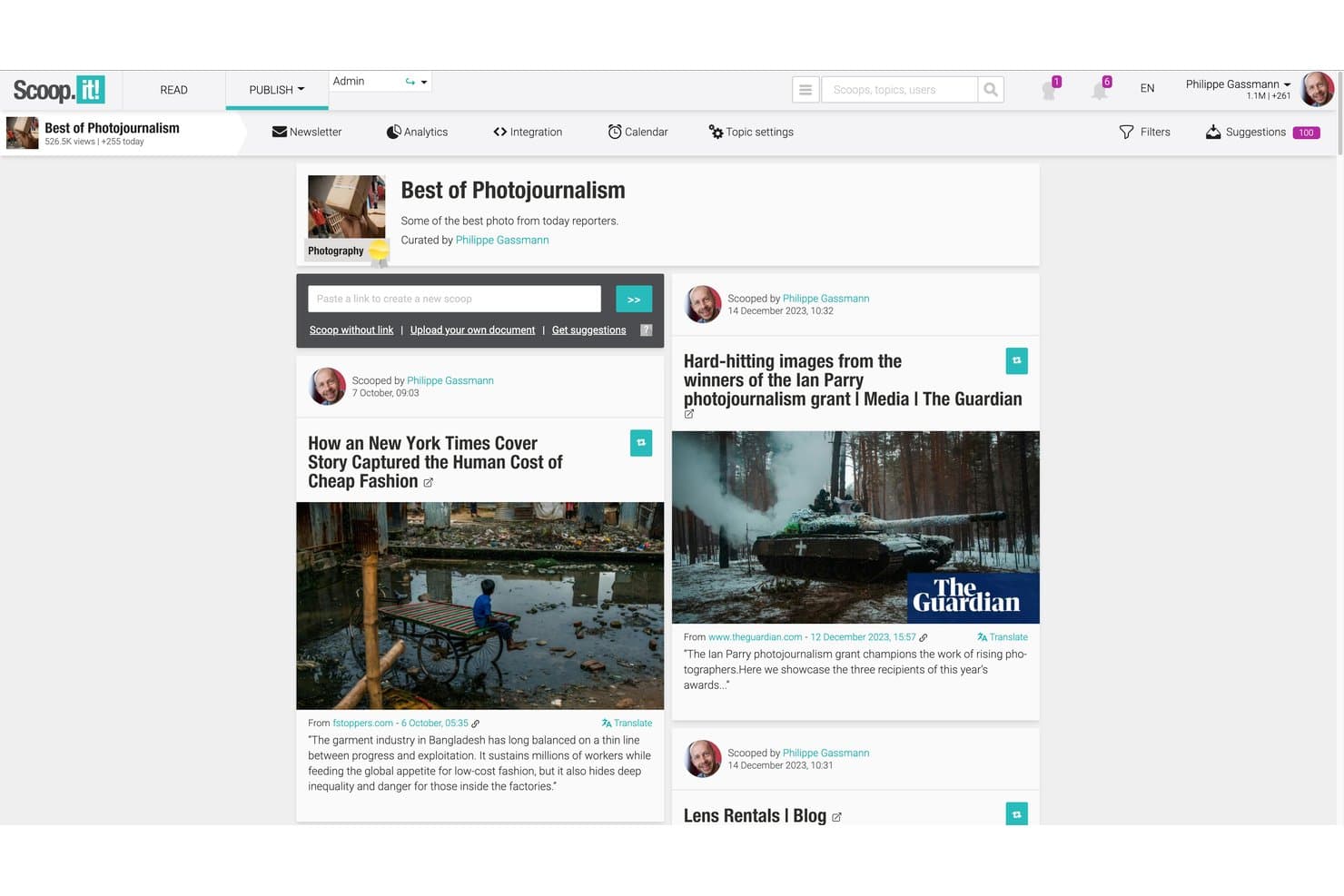
Scoop.it curateert door AI gevonden content in hubs, nieuwsbrieven en berichten voor sociale media. Scoop.it is een platform voor contentcuratie dat door AI ondersteunde contentontdekking, contenthubs op basis van onderwerpen, publiceren via sociale media en een native nieuwsbriefbouwer met door AI gegenereerde samenvattingen combineert.
Voor wie is Scoop.it het meest geschikt?
Scoop.it is een uitstekende keuze voor contentmarketeers en nieuwsbriefbeheerders die samengestelde branchecontent willen omzetten in e-mailcampagnes met een eigen merk, zonder een aparte toolstack te bouwen.
Waarom ik voor Scoop.it heb gekozen
Ik heb Scoop.it opgenomen in mijn topkeuzes omdat de native nieuwsbriefbouwer iets doet wat de meeste curatietools overslaan: de tool gebruikt AI om met één klik automatisch artikelsamenvattingen te genereren, zodat je rechtstreeks vanuit je samengestelde feed een verzorgde nieuwsbrief met veel context kunt versturen. Ik vind het ook prettig dat je met het platform merkgerichte onderwerppagina's kunt maken die rechtstreeks naar die campagnes leiden, waardoor ontdekking en distributie op één plek blijven in plaats van dat je afzonderlijke tools aan elkaar moet koppelen.
Belangrijkste functies van Scoop.it
- Bladwijzerfunctie voor de browser: Curateer elk webartikel rechtstreeks vanaf de bronpagina met één klik, zonder terug te keren naar het Scoop.it-dashboard.
- Onderwerppagina's: Maak thematische contenthubs met je eigen merk die op je website, blog of intranet kunnen worden ingesloten als een live contentbibliotheek.
- Gepland publiceren via sociale media: Zet samengestelde content klaar voor distributie op geplande tijdstippen via gekoppelde Twitter/X-, LinkedIn- en Facebook-accounts.
- Analyses van contentprestaties: Volg betrokkenheid van je doelgroep, openingspercentages van nieuwsbrieven en prestatiestatistieken per artikel binnen het platform.
Integraties van Scoop.it
Scoop.it integreert met WordPress, Microsoft Teams, Slack, Meltwater Explore en Radarly. Het ondersteunt ook RSS-feeds, sitemaps, een Open API voor aangepaste integraties en een Zapier-koppeling.
Pros and Cons
Pros:
- Door AI gegenereerde nieuwsbriefsamenvattingen besparen handmatig schrijfwerk
- Contenthubs kunnen eenvoudig op elke website worden ingesloten
- Bladwijzerfunctie maakt directe curatie vanaf elke pagina mogelijk
Cons:
- Goedkeuringsworkflows vereisen het dure enterprise-abonnement
- Het aantal nieuwsbriefverzendingen is beperkt voor gebruikers van lagere abonnementen
Learn more about Scoop.it: Het beste voor het delen van samengestelde inzichten met marketingteams
- Gratis proefversie beschikbaar
- Vanaf $49/maand
Visit WebsiteCustomer Rating:4.4/5
UpContent verzamelt artikelen van derden voor beoordeling, annotatie en verspreiding. UpContent is een platform voor contentcuratie dat artikelen van derden van het hele web ontdekt en organiseert, zodat marketingteams content kunnen beoordelen, annoteren en via sociale media, e-mail en andere kanalen kunnen verspreiden.
Voor wie is UpContent het meest geschikt?
UpContent is bijzonder geschikt voor marketingteams bij financiële dienstverleners, waar het delen van conforme, door adviseurs aangestuurde content een belangrijk onderdeel van het verkoopproces is.
Waarom ik voor UpContent heb gekozen
Ik heb UpContent gekozen als een van de beste opties omdat het speciaal is ontwikkeld voor marketingteams die samengestelde content via meerdere kanalen moeten delen zonder de controle over de boodschap te verliezen. Dankzij de workflow voor teamsamenwerking kunnen managers artikelen beoordelen en goedkeuren voordat ze worden gepubliceerd. Dat is vooral belangrijk wanneer adviseurs of vertegenwoordigers zelfstandig berichten plaatsen.
Ik ben ook enthousiast over de Smart Seller-functie, die een aangepaste CTA-banner over elk gedeeld artikel plaatst. Zo blijven je merk en conversiepad intact, zelfs wanneer je naar content van derden verwijst.
Belangrijkste functies van UpContent
- Op onderwerpen gebaseerde contentontdekking: Maak onderwerpencollecties die voortdurend nieuwe artikelen binnenhalen die overeenkomen met de door jou gekozen zoekwoorden en bronnen.
- Contentfilters: Sorteer ontdekte artikelen op recentheid, deelbaarheid, invloed of bron om sneller de meest relevante stukken te vinden.
- UTM-tracking: Voegt automatisch UTM-parameters toe aan gedeelde artikellinks om betrokkenheid bij je curatieactiviteiten te meten.
- Galerijwidget: Voeg rechtstreeks een samengestelde contentfeed toe aan je website, zodat bezoekers je nieuwste onderwerpencollecties kunnen bekijken zonder je site te verlaten.
Integraties van UpContent
UpContent biedt rechtstreekse integraties met Hootsuite, HubSpot, Salesforce Marketing Cloud, Mailchimp, Buffer, Seismic LiveSocial, Proofpoint, Yext, EveryoneSocial en SOCXO. Het ondersteunt ook RSS-feeds van elke onderwerpencollectie, kan worden gekoppeld aan Zapier en beschikt over een API voor aangepaste integraties.
Pros and Cons
Pros:
- Goedkeuringsworkflows voor beoordeling door teams
- Toont artikelen op basis van deelbaarheid en invloed
- Voegt samengestelde feeds rechtstreeks toe aan websites
Cons:
- Het afstemmen van onderwerpzoekwoorden vereist vallen en opstaan
- Geen geografische filtering voor gelokaliseerde content
Learn more about UpContent: Beste voor beheer van sociale insluitingen op ondernemingsschaal
- 14 dagen gratis proefperiode
- Vanaf $110/maand (jaarlijks gefactureerd)
Visit WebsiteCustomer Rating:4.7/5
Flockler verzamelt, modereert en sluit sociale content in via digitale kanalen. Gebouwd rond aggregatie van sociale media, stelt Flockler je in staat om content van platforms zoals Instagram, TikTok en YouTube te verzamelen, te modereren en in te sluiten in websites, apps en digitale schermen.
Voor wie is Flockler het meest geschikt?
Flockler is een natuurlijke keuze voor merken in de retail-, horeca- en evenementensector die live sociale content willen weergeven op meerdere fysieke en digitale contactpunten.
Waarom ik voor Flockler heb gekozen
Ik heb Flockler gekozen als een van de beste opties vanwege de manier waarop het de distributie van insluitingen via meerdere contactpunten vanuit één bron beheert. Mijn team kan één gecureerde socialmediafeed implementeren op een merkwebsite, een scherm tijdens een live-evenement en een digitale kiosk, zonder de configuratie telkens opnieuw op te bouwen.
De native uitvoer voor digitale bewegwijzering zie ik zelden in andere tools voor contentcuratie, en deze is bijzonder nuttig voor campagnes die tegelijkertijd op fysieke en digitale locaties worden uitgevoerd.
Belangrijkste functies van Flockler
- Rechtenbeheer: Stuur rechtstreeks berichten met verzoeken om rechten naar contentmakers om toestemming te krijgen voordat je hun berichten uitlicht.
- Koopbare feed: Tag producten rechtstreeks in socialmediaberichten om gecureerde feeds om te zetten in klikbare winkelervaringen.
- Aangepaste CSS-editor: Pas aangepaste styling toe op elke ingesloten feed zodat deze aansluit bij de visuele richtlijnen van je merk.
- Analyticsdashboard: Volg vertoningen, klikken en betrokkenheid bij ingesloten feeds via alle actieve kanalen.
Integraties van Flockler
Flockler verzamelt content van Instagram, Facebook, X, YouTube, LinkedIn, TikTok, Pinterest, Bluesky, Google Reviews, RSS-feeds, SoundCloud en Flickr in uniforme feeds. Het werkt met Shopify, Webflow, WordPress en andere belangrijke CMS-platforms, en kan worden ingesloten in SharePoint en interne portalen.
Pros and Cons
Pros:
- Door AI gegenereerde alternatieve tekst voor sociale afbeeldingen
- Gearchiveerde content blijft beschikbaar nadat campagnes zijn afgelopen
- Feeds insluiten op schermen voor digitale bewegwijzering
Cons:
- Beperkt aantal contentbronnen bij lagere abonnementen
- Analyticsrapportage bevat geen diepgaandere gegevens over betrokkenheid
Learn more about Flockler: Ideaal voor het annoteren van opgeslagen webinhoud
- Gratis abonnement beschikbaar
- Vanaf $5.99/maand
Visit WebsiteCustomer Rating:4.4/5
Instapaper slaat artikelen op, markeert ze en ordent ze om ze later te lezen. Instapaper is gemaakt voor het opslaan en lezen van webinhoud en is een hulpmiddel om later te lezen, met markeringen, privénotities en een indeling op basis van mappen voor het beheren van artikelen en online onderzoek.
Voor wie is Instapaper het meest geschikt?
Instapaper is vooral geschikt voor zelfstandige professionals en makers van inhoud die een persoonlijke lees- en onderzoeksbibliotheek willen opbouwen en deze in de loop van de tijd willen raadplegen.
Waarom ik voor Instapaper heb gekozen
Ik heb Instapaper gekozen als een van de beste opties, omdat de annotatielaag verder gaat dan die van de meeste hulpmiddelen om later te lezen. Ik markeer passages in vier kleuren en voeg privénotities toe aan specifieke regels in elk opgeslagen artikel. Wanneer ik een artikel weken later opnieuw bekijk, helpen die kleurgecodeerde markeringen me om citaten en ideeën in mijn inhoud te verwerken zonder alles opnieuw te hoeven lezen.
Belangrijkste functies van Instapaper
- Indeling in mappen: Sorteer opgeslagen artikelen in aangepaste mappen om onderzoeksonderwerpen gescheiden en gemakkelijk doorzoekbaar te houden.
- Zoeken in volledige tekst: Zoek op trefwoord in alle opgeslagen artikelen om specifieke inhoud in je bibliotheek te vinden.
- Snel-lezenmodus: Lees opgeslagen artikelen woord voor woord in een ingesteld tempo om snel door inhoud heen te gaan.
- Browserextensie: Sla met één klik rechtstreeks vanuit je browser elke webpagina op in je Instapaper-bibliotheek.
Integraties van Instapaper
Instapaper biedt een kleinere reeks ingebouwde integraties, waaronder Notion, Kindle en Rakuten Kobo. Het is beschikbaar op Zapier en IFTTT en heeft een API voor aangepaste integraties.
Pros and Cons
Pros:
- Lezen zonder afleiding verwijdert advertenties en overbodige elementen
- Markeringen en notities worden op verschillende apparaten gesynchroniseerd
- Heldere tekst-naar-spraakfunctie voor opgeslagen artikelen
Cons:
- Onregelmatige app-updates en trage ondersteuning
- Notities worden weergegeven als afzonderlijke, versnipperde vermeldingen
Learn more about Instapaper: Het beste voor gepersonaliseerde nieuwsaggregatie
- Gratis te gebruiken, gratis te downloaden
- Gratis
Visit WebsiteCustomer Rating:4/5
Flipboard verzamelt gepersonaliseerd nieuws, verhalen en webinhoud per onderwerp. Flipboard is een app voor nieuwsaggregatie en inhoudcuratie die artikelen, verhalen en webinhoud verzamelt in gepersonaliseerde feeds in tijdschriftstijl, georganiseerd rond onderwerpen of interesses.
Voor wie is Flipboard het meest geschikt?
Flipboard is zeer geschikt voor individuele professionals, journalisten en inhoudmakers die een persoonlijke nieuwsfeed nodig hebben, georganiseerd rond specifieke onderwerpen of sectoren.
Waarom ik voor Flipboard heb gekozen
Flipboard staat op mijn selectie omdat geen enkele andere tool nieuwsaggregatie zo sterk rond personalisatie op onderwerpniveau organiseert. De feed 'Voor jou' gebruikt een algoritme dat leert van wat je leuk vindt, volgt en toevoegt, waardoor de inhoud na verloop van tijd relevanter wordt zonder handmatige aanpassingen.
Ik vind ook de functie Slimme tijdschriften prettig. Deze begint met breed populair nieuws over een onderwerp en verfijnt dit vervolgens tot verhalen die aansluiten bij je specifieke leesgewoonten. De dagelijkse e-mail van FlipDigest gebruikt hetzelfde algoritme en geeft je een overzicht van de belangrijkste verhalen binnen je gevolgde onderwerpen, zonder dat je opnieuw bij de app hoeft in te loggen.
Belangrijkste functies van Flipboard
- Aangepaste tijdschriften: Maak doorlopende tijdschriften rond specifieke onderwerpen door artikelen, video's en podcasts van elke bron om te zetten in een deelbare verzameling.
- Verhalenborden: Bundel een eindige reeks samengestelde links in gestructureerde overzichten met secties, aangepaste tekst, onderwerptags en deelbare insluitingen.
- Groepstijdschriften: Nodig andere curatoren uit om inhoud aan een gedeeld tijdschrift toe te voegen, zodat gezamenlijke curatie binnen een team mogelijk wordt.
- Inhoudsanalyses: Houd openingen, vertoningen, doorklikratio en betrokkenheid bij voor je tijdschriften en verhalenborden via het Flipboard-dashboard.
Integraties van Flipboard
Met Flipboard kun je accounts op sociale media zoals Twitter, LinkedIn, Tumblr, SoundCloud, YouTube, Flickr en 500px koppelen om inhoud binnen de app op te halen en te delen. Het ondersteunt ook Mastodon en de bredere fediverse via ActivityPub en verwerkt inhoud uit elke RSS-feed. Ondersteuning voor Zapier en API's is niet duidelijk gedocumenteerd.
Pros and Cons
Pros:
- De tijdschriftachtige indeling maakt het bekijken van visuele inhoud aantrekkelijk
- Onderwerpsfiltering via hashtags en categoriekeuze
- Het algoritme leert van interacties om feeds te personaliseren
Cons:
- Voor toegang tot sommige artikelen is extern inloggen vereist
- Analyses voor curatoren zijn zeer beperkt
Learn more about Flipboard :
Andere software voor contentcuratie
Hier zijn enkele aanvullende opties voor software voor contentcuratie die mijn shortlist niet hebben gehaald, maar die toch de moeite waard zijn om te bekijken:
- 11ListlyHet beste voor het maken van gezamenlijke lijstjes
- 12MediumIdeaal voor het publiceren van diepgaande thought leadership-content
- 13PinterestHet beste voor visuele ontdekking en het opslaan van bladwijzers
- 14ContentGemsIdeaal voor dagelijkse e-mailinhoudsmeldingen
- 15eLinkIdeaal voor het samenstellen van nieuwsbrieven in meerdere indelingen
- 16QuuuHet meest geschikt voor automatisering van socialmediaberichten met menselijke controle
Hoe ik software voor contentcuratie evalueer
Ik evalueer deze tools in twee lagen: de onmisbare mogelijkheden—zoals het verzamelen van bronnen en het inplannen van distributie—en de onderscheidende factoren die de sterkste opties van de rest onderscheiden.
Basisfunctionaliteit (Onmisbaar voor deze lijst)
Wanneer ik tools voor mijn lijst selecteer, beoordeel ik elk hulpmiddel op een schaal van 0 (biedt de functionaliteit niet aan) tot 5 (blink uit op dit gebied) voor elke hieronder vermelde basisfunctionaliteit. Vervolgens zet ik de totaalscore van de tool om in een percentage. Elke tool moet een minimale totaalscore van 65% behalen om voor opname in aanmerking te komen.
- Contentontdekking & -aggregatie: Ik controleer of een tool gegevens kan ophalen uit RSS-feeds, blogs, sociale platforms en nieuwssites en deze in één feed kan samenvoegen—zodat je niet tussen tientallen bronnen hoeft te wisselen.
- Filteren op onderwerp & trefwoord: Met sterke filtermogelijkheden kun je je richten op SaaS-relevante onderwerpen met behulp van opgeslagen zoekopdrachten, Booleaanse zoekopdrachten of regels op basis van tags, in plaats van door ruis te scrollen.
- Door AI aangedreven relevantierangschikking: Ik beoordeel hoe goed elke tool automatisch content met een hoge waarde naar voren haalt—tools zoals Curata en Feedly gebruiken bijvoorbeeld allebei AI om artikelen op relevantie te prioriteren.
- Distributie via meerdere kanalen: Ik kijk of het mogelijk is om gecureerde content rechtstreeks naar sociale profielen, nieuwsbrieven, Slack-kanalen of een blog te sturen zonder tussen afzonderlijke tools te hoeven schakelen.
- Contentorganisatie & tagging: Een bruikbare bibliotheek met tags, collecties of borden is belangrijk wanneer je team content cureert voor meerdere productlijnen of campagnethema's en middelen snel moet kunnen terugvinden.
- Samenwerking & goedkeuringen binnen teams: Ik beoordeel of de tool gedeelde werkruimten, opmerkingen en goedkeuringsworkflows ondersteunt, zodat een contentverantwoordelijke gecureerde selecties kan beoordelen voordat ze live gaan.
Zodra ik een lijst heb met tools die aan dit criterium voldoen, kijk ik naar wat elk platform onderscheidt.
Onderscheidende factoren (Wat leveranciers onderscheidt)
Zo vergelijk ik verschillende leveranciers met elkaar:
Opvallende functies
Ik let op ingebouwde analyses die laten zien hoe gecureerde posts op verschillende kanalen presteren—doorklikken, deelacties en trends in betrokkenheid helpen je meer in te zetten op onderwerpen waarop je doelgroep reageert. Door AI gegenereerde samenvattingen zijn een andere onderscheidende factor, waarmee je originele toelichting aan een gedeeld artikel kunt toevoegen zonder helemaal opnieuw te hoeven schrijven. Ik beoordeel ook het monitoren van concurrenten en trends, wat waardevol is voor SaaS-teams die lanceringen van concurrenten of nieuwe gesprekken binnen de sector in realtime volgen.
Meer dan functies alleen
Integraties zijn hier erg belangrijk. Ik controleer of een tool rechtstreeks verbinding maakt met de platforms die SaaS-teams al gebruiken—denk aan HubSpot, Slack, Buffer of WordPress—zodat gecureerde content in bestaande workflows terechtkomt. De prijsstructuur is een andere belangrijke factor; ik beoordeel of abonnementen redelijk meegroeien wanneer teams groter worden of het contentvolume toeneemt. Ook de omgang met auteursrechten en bronvermelding verdient aandacht, omdat het delen van content van derden zonder correcte bronvermelding of waarborgen voor het citeren van fragmenten je merk aan juridische risico's kan blootstellen.
Zo kies je software voor contentcuratie
Bij het kiezen van software voor contentcuratie draait het erom hoe effectief de software relevante content kan ontdekken, bronnen kan organiseren, publicatieworkflows kan ondersteunen en gecureerde content kan verspreiden via de kanalen die je team gebruikt.
| Als je prioriteit ligt bij… | Zoek dan naar… |
|---|---|
| Als je prioriteit ligt bij…Sneller relevante content vinden | Zoek dan naar…Door AI ondersteunde ontdekking en filteren op onderwerp |
| Als je prioriteit ligt bij…Grote contentbibliotheken organiseren | Zoek dan naar…Tags, mappen, verzamelingen en onderwerpcentrales |
| Als je prioriteit ligt bij…Gecureerde content publiceren | Zoek dan naar…Ingebouwde tools voor publicatie en planning |
| Als je prioriteit ligt bij…Content via verschillende kanalen delen | Zoek dan naar…Verspreiding via sociale media, nieuwsbrieven en websites |
| Als je prioriteit ligt bij…De kwaliteit van content bewaken | Zoek dan naar…Broncontroles en relevantiefilters |
| Als je prioriteit ligt bij…Teamworkflows ondersteunen | Zoek dan naar…Samenwerking, goedkeuringen en gedeelde bibliotheken |
Zo beoordeel je je shortlist
- Test het ontdekken van content: Maak een feed voor een onderwerp of trefwoord en controleer of het platform consequent relevante en actuele content uit betrouwbare bronnen naar voren brengt.
- Controleer de filtermogelijkheden: Test of je aanbevelingen kunt verfijnen op onderwerp, bron, taal, datum of andere criteria, zonder irrelevante resultaten handmatig te moeten sorteren.
- Maak een gecureerde verzameling: Sla verschillende stukken content op en organiseer ze in mappen, onderwerpen of verzamelingen om te zien hoe eenvoudig het is om een groeiende bibliotheek te beheren.
- Test publicatieworkflows: Maak een voorbeeldbericht of een voorbeeldnieuwsbrief met gecureerde content en controleer hoe het platform omgaat met bewerken, bronvermelding, planning en verspreiding.
- Beoordeel de teamsamenwerking: Voeg een andere gebruiker toe of test de beschikbare workflowfuncties om te bevestigen of je team content kan beoordelen, goedkeuren, organiseren en publiceren zonder dubbel werk te doen.
Wat is software voor contentcuratie?
Software voor contentcuratie is een platform dat wordt gebruikt om relevante content van derden of eigen content rond specifieke onderwerpen te ontdekken, verzamelen, organiseren en delen.
Deze tools kunnen artikelen, rapporten, video's, berichten op sociale media en andere bronnen vinden op basis van trefwoorden, interesses of geselecteerde bronnen. Teams kunnen die content vervolgens organiseren in collecties, nieuwsbrieven, berichten op sociale media, websites of interne bibliotheken.
Software voor contentcuratie vermindert het handmatige werk dat nodig is om nuttig materiaal te vinden en geeft teams tegelijkertijd meer controle over wat ze delen en hoe ze het verspreiden.
Functies
Let bij het selecteren van software voor contentcuratie op de volgende belangrijke functies:
- Webknippen: Hiermee kun je volledige webpagina's of artikelen rechtstreeks vanuit je browser opslaan, waardoor je eenvoudig een persoonlijke bibliotheek met nuttige bronnen kunt opbouwen.
- Organisatie met mappen en tags: Hiermee kun je opgeslagen content sorteren en categoriseren met mappen of aangepaste tags, zodat je items snel kunt vinden, groeperen of prioriteren voor toekomstig gebruik.
- Zoeken in volledige tekst: Hiermee kun je zoeken in alle opgeslagen content, inclusief artikelteksten en titels, zodat je precies de bronnen kunt vinden die je nodig hebt zonder handmatig te scrollen.
- Annotaties en markeringen: Biedt tools om passages te markeren en plaknotities of opmerkingen toe te voegen, ter ondersteuning van onderzoek, samenwerking en diepgaandere contentanalyse.
- Offline toegang: Hiermee kunnen gebruikers opgeslagen content lezen en ermee werken, ook als er geen internetverbinding is. Dit is handig tijdens het reizen of bij een instabiele netwerkverbinding.
- Browserextensies: Biedt add-ons voor Chrome, Firefox of andere browsers, zodat je met één klik eenvoudig overal online content kunt opslaan.
- Content delen: Hiermee kunnen gebruikers opgeslagen artikelen, mappen of annotaties met anderen delen via links, e-mail of rechten voor samenwerkers.
- Beschikbaarheid van een mobiele app: Ondersteunt curatie, lezen en annoteren op mobiele apparaten, voor toegang tot content en productiviteit onderweg.
- Importeren en exporteren in bulk: Hiermee kunnen gebruikers grote contentcollecties naar of uit het platform migreren, waardoor onboarding of archivering naar behoefte eenvoudiger wordt.
- Optimalisatie van leesbaarheid: Verwijdert advertenties en rommel van opgeslagen pagina's en biedt een overzichtelijke, afleidingsvrije leesomgeving voor betere concentratie.
Veelvoorkomende AI-functies van software voor contentcuratie
Naast de hierboven genoemde standaardfuncties van software voor contentcuratie integreren veel van deze oplossingen AI met functies zoals:
- Automatische contentaanbevelingen: Gebruikt kunstmatige intelligentie om je interesses en leesgedrag te analyseren en vervolgens relevante artikelen of bronnen aan te bieden die je mogelijk niet zelf zou vinden.
- Samenvattingen op basis van AI: Genereert beknopte samenvattingen van lange artikelen of webpagina's, zodat je snel de belangrijkste punten kunt bekijken zonder de volledige content te lezen.
- Slimme tagging en organisatie: Voegt automatisch tags, categorieën of mappen toe aan nieuwe content op basis van het onderwerp, waardoor je tijd bespaart en alles netjes georganiseerd blijft.
- Sentimentanalyse: Analyseert de toon en stemming van artikelen, zodat je kunt inschatten hoe content kan worden ontvangen of snel kunt filteren op specifieke perspectieven.
- Detectie van duplicaten: Identificeert en verwijdert herhaalde of zeer vergelijkbare artikelen in je bibliotheek, zodat je gecureerde content uniek en vrij van rommel blijft.
Voordelen
Het implementeren van software voor contentcuratie biedt verschillende voordelen voor je team en je bedrijf. Hier zijn enkele voordelen waar je naar kunt uitkijken:
- Gecentraliseerd informatiebeheer: Verzamel en organiseer artikelen, onderzoek en inzichten uit meerdere bronnen in één doorzoekbare omgeving.
- Gestroomlijnde kennisdeling: Deel geselecteerde content en annotaties met belanghebbenden of teamleden—voor betere afstemming, samenwerking en gezamenlijk leren.
- Sneller content terugvinden: Vind opgeslagen bronnen snel via zoeken in volledige tekst, slimme tags en georganiseerde mappen.
- Meer diepgang in onderzoek: Voeg annotaties en markeringen toe aan opgeslagen items en plaats opmerkingen om inzichten en referenties eenvoudig opnieuw te bekijken en te hergebruiken.
- Consistente contentkwaliteit: Filter, tag en verwijder dubbele vermeldingen om een overzichtelijke, betrouwbare bibliotheek met hoogwaardige materialen te onderhouden.
- Efficiëntere werkprocessen: Gebruik browserextensies, mobiele apps en import- en exporttools om content op te slaan en te organiseren zonder dagelijkse routines te verstoren.
- Meer mobiliteit en toegang: Krijg op elk apparaat toegang tot opgeslagen en georganiseerde content—even offline—wanneer onderzoek of inspiratie zich aandient.
Kosten en prijzen
Bij het kiezen van software voor contentcuratie is inzicht in de verschillende beschikbare prijsmodellen en abonnementen belangrijk. De kosten variëren afhankelijk van functies, teamgrootte, uitbreidingen en meer. In de onderstaande tabel staan veelgebruikte abonnementen, hun gemiddelde prijzen en de typische functies die zijn inbegrepen in softwareoplossingen voor contentcuratie:
Vergelijkingstabel van abonnementen voor software voor contentcuratie
| Type abonnement | Gemiddelde prijs | Veelgebruikte functies |
|---|---|---|
| Type abonnementGratis abonnement | Gemiddelde prijs$0 | Veelgebruikte functiesBasiswebknipsels, een beperkt aantal mappen of tags, beperkte synchronisatie tussen apparaten en basisfunctionaliteit voor zoeken. |
| Type abonnementPersoonlijk abonnement | Gemiddelde prijs$5-$10/gebruiker/maand | Veelgebruikte functiesOnbeperkt opslaan, geavanceerde organisatie, markeringen en annotaties en prioriteitsondersteuning. |
| Type abonnementBedrijfsabonnement | Gemiddelde prijs$10-$25/gebruiker/maand | Veelgebruikte functiesSamenwerking binnen teams, beheerdersopties, gedeelde mappen of bibliotheken, analyses en integratiemogelijkheden. |
| Type abonnementOndernemingsabonnement | Gemiddelde prijs$25-$50/gebruiker/maand | Veelgebruikte functiesAangepaste integraties, verbeterde beveiliging, compliancefuncties, gebruikersprovisioning en toegewijde ondersteuning. |
Veelgestelde vragen over software voor contentcuratie
Hier vindt u antwoorden op veelgestelde vragen over software voor contentcuratie:
Kan ik bestaande bladwijzers of opgeslagen artikelen migreren naar software voor contentcuratie?
Ja, met de meeste software voor contentcuratie kunt u bladwijzers of opgeslagen items importeren vanuit browsers en andere platforms. Zoek naar importopties die HTML- of CSV-bestanden ondersteunen om de ingebruikname te vereenvoudigen en uw kennisbank te centraliseren.
Hoe ondersteunt software voor contentcuratie samenwerking binnen teams?
Software voor contentcuratie ondersteunt samenwerking door gedeelde mappen, groepsannotaties en rechten voor bewerken of bekijken mogelijk te maken. Hierdoor kunnen teams gemakkelijker samen bronnen verzamelen, bespreken en benutten.
Is het mogelijk om software voor contentcuratie offline te gebruiken?
Ja, veel oplossingen bieden offline toegang via desktop- of mobiele apps. U kunt opgeslagen content lezen, annoteren en organiseren zonder internetverbinding, wat handig is voor werken op afstand of reizen.
Welke beveiligingsmaatregelen mag ik verwachten in tools voor contentcuratie?
Verwacht essentiële beveiligingen zoals versleutelde gegevensopslag, gebruikersauthenticatie en beheertools om de toegang te beperken. Als u gevoelige informatie beheert, controleer dan vóór het kiezen van een platform of er compliancecertificeringen of geavanceerde beveiligingsinstellingen beschikbaar zijn.
Kunnen tools voor contentcuratie worden geïntegreerd met andere productiviteits- of onderzoeksapps?
Ja, veel tools maken rechtstreeks of via API’s verbinding met platforms zoals Notion, Slack of projectbeheersystemen. Dit helpt werkprocessen te stroomlijnen, onderzoek te centraliseren en handmatige stappen tussen uw tools te beperken.