

Contentkalendersoftware helpt je team bij het organiseren, plannen en volgen van contentproductie voor marketing-, sociale en redactionele kanalen. Als je op zoek bent naar de beste contentkalendersoftware, heb je waarschijnlijk te maken met krappe deadlines, verspreide bestanden en de druk om teams het hele jaar door op één lijn te houden.
Het juiste platform zorgt ervoor dat iedereen op dezelfde lijn zit, zodat je vol vertrouwen kunt plannen en nooit uit het oog verliest wat de volgende stap is. In deze lijst bespreek ik de beste beschikbare opties, laat ik zien waarin elke tool uitblinkt en help ik je een oplossing te kiezen die past bij jouw unieke werkproces in 2026.
Waarom u onze softwareaanbevelingen kunt vertrouwen
6,700+
Reviews
20
Industry experts
16+
Evaluation factors
14
Years
Ons team test en beoordeelt software sinds 2012. Als uitgevers en media-exploitanten weten we zelf hoe moeilijk — en belangrijk — het is om de juiste software te kiezen.
Voor deze gids hebben we tools geëvalueerd met behulp van praktijktests en onafhankelijk onderzoek, waarbij we tools beoordeelden aan de hand van onze selectiecriteria.
Onze reviews weerspiegelen ons menselijke redactionele oordeel, geen verkooppraatje.
Vergelijkingstabel van contentkalendersoftware
In de onderstaande tabel vergelijk ik de prijsgegevens van mijn beste keuzes voor contentkalendersoftware.
| Tool | Best For | Trial Info | Price | ||
|---|---|---|---|---|---|
| 1 | Beste voor zelfstandige makers | 14 dagen gratis proefversie | Vanaf $29/maand | Website | |
| 2 | Het beste voor schaalbare, AI-aangedreven mogelijkheden voor datasamenwerking | Gratis abonnement + gratis demo beschikbaar | Vanaf $20/gebruiker/maand (jaarlijks gefactureerd) | Website | |
| 3 | Het beste voor AI-ondersteunde planning van content voor sociale media | Gratis proefperiode beschikbaar | Vanaf $49/maand (jaarlijks gefactureerd) | Website | |
| 4 | Beste voor campagne- en redactionele planning op grote schaal | Gratis abonnement beschikbaar | Vanaf $10.99/gebruiker/maand (jaarlijks gefactureerd) | Website | |
| 5 | Het beste voor het beheren van merkervaringen via meerdere kanalen | Gratis demo beschikbaar | Prijzen op aanvraag | Website | |
| 6 | Het beste voor het centraliseren van al het projectwerk in één centrale omgeving | Gratis abonnement + gratis demo beschikbaar | Vanaf $7/gebruiker/maand (jaarlijks gefactureerd) | Website | |
| 7 | Het meest geschikt voor bureaus die meerkanaals-mediaplannen beheren | Gratis demo beschikbaar | Prijs op aanvraag | Website | |
| 8 | Beste voor gestructureerde workflows voor contentgoedkeuring | Gratis demo beschikbaar | Prijzen op aanvraag | Website | |
| 9 | Beste voor geïntegreerde marketingcampagneplanning | 7 dagen gratis proefperiode | Vanaf $117.33/maand (jaarlijks gefactureerd) | Website | |
| 10 | Het meest geschikt voor teams die geavanceerde automatisering nodig hebben | Gratis proefperiode van 14 dagen + gratis abonnement beschikbaar | Vanaf $10/gebruiker/maand (jaarlijks gefactureerd) | Website |


Beoordelingen van de beste contentkalendersoftware
Hieronder vind je mijn uitgebreide samenvattingen van de beste contentkalendersoftware die op mijn shortlist terecht is gekomen. In mijn beoordelingen bespreek ik de functies, beste gebruiksscenario’s en integraties van elk platform in detail, zodat je de beste optie voor jou kunt vinden.
 1Beste voor zelfstandige makers
Enji
- 14 dagen gratis proefversie
- Vanaf $29/maand
Visit WebsiteCustomer Rating:4.9/5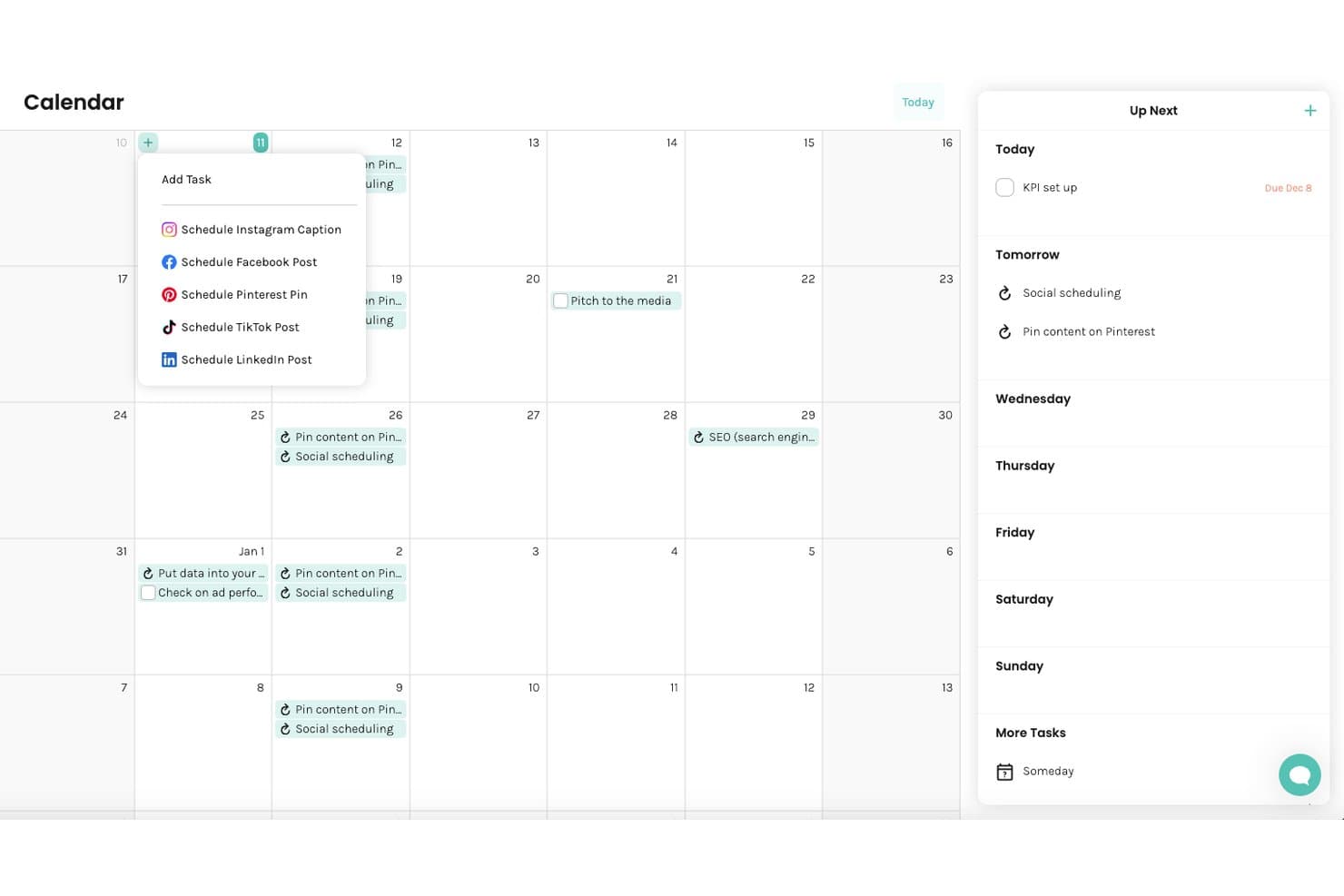
Enji biedt een kalenderweergave met opties voor het inplannen van berichten op sociale media, terugkerende taken en een zijbalk met een dagelijks en wekelijks overzicht van taken. Enji is een marketingplatform voor kleine bedrijven dat een begeleide strategiegenerator, marketingkalender, AI-copywriter en planner voor sociale media combineert in één tool.
Voor wie is Enji het meest geschikt?
Enji is ontwikkeld voor zelfstandige ondernemers en eigenaren van kleine bedrijven die hun marketing zelf regelen zonder een toegewijd team of een marketingachtergrond.
Waarom ik voor Enji koos
Ik koos Enji als een van de beste opties omdat de marketingstrategiegenerator iets doet wat de meeste tools voor contentkalenders volledig overslaan. Beantwoord een korte vragenlijst en Enji bouwt automatisch een gepersonaliseerd marketingplan op met taken die rechtstreeks in je kalender terechtkomen. Ik vind ook de vooraf gebouwde campagnetemplates voor twee weken handig. Deze bevatten toegewezen taken, timing en statistieken, zodat een zelfstandige ondernemer een campagne kan lanceren zonder de strategie vanaf nul op te bouwen.
Belangrijkste functies van Enji
- AI-copywriter: Genereert bijschriften voor sociale media, blogconcepten, nieuwsbrieven en meer in jouw merkstem.
- Tool voor hergebruik van content: Zet één stuk content snel om in meerdere nieuwe middelen voor verschillende kanalen.
- KPI-dashboard: Toont analyses van sociale kanalen en Google Analytics 4 binnen het platform.
- Opslag voor merkbeheer: Slaat je merkstem, visuele elementen en belangrijke merkinformatie op en ordent deze voor eenvoudige raadpleging.
Integraties van Enji
Enji biedt native integraties met Instagram, Facebook, LinkedIn, TikTok, YouTube, Pinterest, Threads, Google Analytics 4 en Canva.
Pros and Cons
Pros:
- Vult je marketingkalender automatisch in
- Vooraf gebouwde templates bevatten toegewezen contenttaken
- AI-copywriter voor blogs, sociale media en nieuwsbrieven
Cons:
- Niet ontworpen voor workflows van teams met meerdere personen
- Rapportage is beperkter dan bij gespecialiseerde tools
Learn more about Enji: Het beste voor schaalbare, AI-aangedreven mogelijkheden voor datasamenwerking
- Gratis abonnement + gratis demo beschikbaar
- Vanaf $20/gebruiker/maand (jaarlijks gefactureerd)
Visit WebsiteCustomer Rating:4.6/5
Airtable organiseert contentworkflows, aangepaste weergaven, databases en AI-agenten. Airtable is een database- en appbouwplatform zonder code waarmee teams contentworkflows kunnen plannen, organiseren en beheren met aanpasbare weergaven zoals kalender, raster, Kanban en Gantt, met AI-agenten die rechtstreeks in de datalaag zijn ingebouwd.
Voor wie is Airtable het meest geschikt?
Het is zeer geschikt voor content- en marketingteams van middelgrote tot grote ondernemingen die grote hoeveelheden content van meerdere bijdragers beheren en behoefte hebben aan gestructureerde, aanpasbare workflows.
Waarom ik voor Airtable heb gekozen
Airtable staat op mijn shortlist omdat geen andere contentkalendertool gegevens op deze schaal verwerkt. Met veldagenten kun je AI tegelijkertijd op duizenden records inzetten, zodat je team contentprestaties kan analyseren, assets kan categoriseren of briefings kan genereren voor een volledige contentbibliotheek, zonder handmatig werk.
HyperDB ondersteunt maximaal 100 miljoen records per tabel, waardoor het platform niet vastloopt naarmate je contentactiviteiten groeien. Ik vind het ook prettig dat elk team vanuit dezelfde gedeelde datalaag werkt, zodat campagne-updates in realtime worden gesynchroniseerd in elke weergave en workflow.
Belangrijkste functies van Airtable
- Kalenderweergave: Visualiseer geplande content per datum in elke tabel en plan deze rechtstreeks in de kalender opnieuw met slepen en neerzetten.
- Automatiseringen: Stel triggergebaseerde workflows in om teamleden op de hoogte te brengen, records bij te werken of content zonder handmatige invoer door goedkeuringsfasen te verplaatsen.
- Interfaceontwerper: Bouw aangepaste dashboards en intakeportalen die alleen de velden en weergaven tonen die elke bijdrager of belanghebbende nodig heeft.
- Formulieren voor contentintake: Verzamel contentverzoeken via deelbare formulieren die rechtstreeks als gestructureerde records aan je basis worden toegevoegd.
Airtable-integraties
Airtable biedt onder andere ingebouwde integraties met Google Drive, Google Calendar, Slack, Salesforce, Jira, GitHub, Gmail, Box, Dropbox en Tableau, naast de andere integraties op de integratiepagina. Het is beschikbaar op Zapier en biedt een API voor aangepaste integraties.
Pros and Cons
Pros:
- Gekoppelde records verbinden content tussen tabellen
- Meerdere kalender- en Kanban-weergaven inbegrepen bij het gratis abonnement
- Aangepaste automatiseringen sluiten aan op je exacte workflows
Cons:
- Geen ingebouwde goedkeuringsworkflows voor content
- Kalenderweergave beperkt tot één tabel
Learn more about Airtable: Het beste voor AI-ondersteunde planning van content voor sociale media
- Gratis proefperiode beschikbaar
- Vanaf $49/maand (jaarlijks gefactureerd)
Visit WebsiteCustomer Rating:4.6/5
Loomly coördineert AI-postcreatie, planning, goedkeuringen en doelgroepbepaling. Loomly is een platform voor contentkalenders voor sociale media dat AI-ondersteunde postcreatie, planning via meerdere kanalen, goedkeuringsworkflows en doelgroepgerichte content op de belangrijkste sociale netwerken combineert.
Voor wie is Loomly het meest geschikt?
Loomly is geschikt voor kleine tot middelgrote socialemediateams en freelance managers die content voor meerdere merkaccounts beheren.
Waarom ik voor Loomly koos
Loomly staat op mijn shortlist vanwege de manier waarop de AI-ondersteunde postcreatie in de praktijk werkt. Wanneer ik content plan, geeft de functie Postideeën onderwerpsuggesties op basis van populaire hashtags, RSS-feeds en datumgebonden evenementen.
Ik vind het ook prettig dat de AI per platform verschillende bijschriftvarianten genereert, zodat dezelfde campagneboodschap op LinkedIn en Instagram niet identiek klinkt.
Belangrijkste functies van Loomly
- Tips voor postoptimalisatie: Loomly geeft kanaalspecifieke aanbevelingen bij elk conceptbericht en signaleert het aantal tekens, de afbeeldingsgrootte en suggesties voor het publicatiemoment voordat je publiceert.
- Labels en campagnecategorisering: Wijs kleurgecodeerde labels toe aan posts, zodat je content in de kalender kunt filteren, groeperen en volgen op campagne, contenttype of klant.
- Gecombineerde community-inbox: Beheer reacties, vermeldingen en directe berichten van alle gekoppelde sociale kanalen in één inbox, met de mogelijkheid om gesprekken aan specifieke teamleden toe te wijzen.
- UTM-parametertracking: Voeg UTM-parameters rechtstreeks toe aan links in posts binnen Loomly om klikprestaties in je analyseplatform te volgen zonder de tool te verlaten.
Loomly-integraties
Loomly biedt ingebouwde integraties met Slack, Microsoft Teams, Canva, Giphy, Google Drive en Unsplash, evenals directe publicatieverbindingen met Instagram, Facebook, LinkedIn, TikTok, YouTube, Threads, Pinterest, Snapchat en Google Bedrijfsprofiel. Het maakt ook verbinding met Zapier. Een openbare API voor aangepaste integraties is niet duidelijk gedocumenteerd.
Pros and Cons
Pros:
- AI genereert bijschriften en beeldmateriaal per kanaal
- Ingebouwde goedkeuringsworkflows met roltoewijzingen
- Voorvertoningen van posts tonen content voordat deze wordt gepubliceerd
Cons:
- Beperkte videoplanning voor Reels en TikTok
- Forse prijsstijgingen tussen de verschillende abonnementsniveaus
Learn more about Loomly: Beste voor campagne- en redactionele planning op grote schaal
- Gratis abonnement beschikbaar
- Vanaf $10.99/gebruiker/maand (jaarlijks gefactureerd)
Visit WebsiteCustomer Rating:4.4/5
Asana organiseert taaktracking, projecttijdlijnen, werkstromen en samenwerking tussen teams. Asana is een platform voor werkbeheer dat taaktracking, projecttijdlijnen, workflowautomatisering en samenwerkingstools voor teams combineert voor het plannen en uitvoeren van campagnes en redactionele projecten.
Voor wie is Asana het meest geschikt?
Asana is zeer geschikt voor middelgrote en grote marketingteams die meerdere campagnes of redactionele programma's tegelijkertijd uitvoeren en behoefte hebben aan gestructureerde coördinatie tussen afdelingen.
Waarom ik voor Asana koos
Asana verdient een plek op mijn shortlist vanwege de manier waarop het redactionele planning en campagneplanning voor meerdere teams tegelijkertijd ondersteunt. Ik gebruik de functie Portfolio's om elke actieve campagne in één overzicht te volgen, waarbij de status, voortgang en deadlines in één oogopslag zichtbaar zijn.
Met de tijdlijnweergave kan mijn team afhankelijkheden tussen content in kaart brengen, zodat niets in de verkeerde volgorde wordt gepubliceerd. Met de werklastweergave zie je waar de capaciteit onder druk staat voordat dit een planningsprobleem wordt.
Belangrijkste functies van Asana
- Aangepaste velden: Voorzie taken van labels voor contenttype, kanaal of campagnestadium om je redactionele pijplijn te filteren en sorteren.
- Regels en triggers: Wijs automatisch taken toe, werk statussen bij of verplaats content naar de volgende fase op basis van ingestelde voorwaarden.
- Doelen: Koppel afzonderlijke contenttaken rechtstreeks aan bredere campagne- of bedrijfsdoelstellingen.
- Kalenderweergave: Bekijk alle geplande content op vervaldatum voor meerdere projecten in één kalenderoverzicht.
Integraties van Asana
Asana biedt meer dan 300 integraties via de ingebouwde appcatalogus, waaronder Slack, Google Drive, Google Calendar, Microsoft Teams, HubSpot, Salesforce, Jira, Figma, Adobe Creative Cloud en Hootsuite. Het maakt ook verbinding met Zapier en biedt een API voor aangepaste integraties.
Pros and Cons
Pros:
- Meerdere projectweergaven, waaronder kalender en tijdlijn
- Taaktracking voor meerdere projecten voorkomt dubbel werk
- Workflowautomatisering verplaatst content door goedkeuringsfasen
Cons:
- Rapportagedashboards zijn alleen beschikbaar in abonnementen van een hoger niveau
- Geen ingebouwde publicatie of planning van content
Learn more about Asana: Het beste voor het beheren van merkervaringen via meerdere kanalen
- Gratis demo beschikbaar
- Prijzen op aanvraag
Visit WebsiteCustomer Rating:4/5
Sprinklr centraliseert het plannen van content, campagneplanning en publicatie. Sprinklr is een platform voor sociale media en contentbeheer voor ondernemingen dat het plannen van content, campagneplanning en publicatie op meer dan 30 sociale en digitale kanalen centraliseert.
Voor wie is Sprinklr het meest geschikt?
Het is een sterke keuze voor grote ondernemingen en wereldwijde merken met verspreide marketingteams die tegelijkertijd content beheren voor meerdere regio's en kanalen.
Waarom ik voor Sprinklr heb gekozen
Ik heb Sprinklr opgenomen in mijn beste keuzes omdat geen enkel ander platform contentteams op ondernemingsschaal hetzelfde niveau van controle over meerdere kanalen biedt. Ik vind het prettig dat de AI van Sprinklr content markeert die niet bij het merk past of niet aan de voorschriften voldoet voordat deze live gaat, zodat verspreide teams in verschillende regio's en bedrijfsonderdelen kunnen publiceren zonder een knelpunt door handmatige controles.
Ik gebruik ook de aangepaste workflowbouwer om content door merkspecifieke goedkeuringsketens te leiden. Dat is iets wat de meeste tools voor contentkalenders niet op dit detailniveau kunnen evenaren.
Belangrijkste functies van Sprinklr
- Geïntegreerde contentkalender: Bekijk en beheer geplande berichten op meer dan 30 kanalen in één kalender met filters.
- Campagneplanning: Groepeer content per campagne, thema of initiatief en houd publicatietijdlijnen tussen teams bij.
- Bibliotheek voor digitale middelen: Sla door het merk goedgekeurde afbeeldingen, video's en teksten rechtstreeks in het platform op, voorzie ze van tags en vind ze terug.
- Publicatieregels: Stel kanaalspecifieke regels in die content automatisch opmaken en aanpassen voor elk platform voordat deze live gaat.
Integraties van Sprinklr
Sprinklr biedt een marktplaats met integraties en details voor elke app, waaronder tools zoals Salesforce, Adobe, Snowflake en Jira. Er zijn meer dan 90 beschikbare integraties in categorieën zoals analyse, CRM, beheer van digitale middelen en contentbeheer, waaronder Google Analytics, HubSpot, Slack, Microsoft Teams, Google Drive, Shutterstock, WordPress, Power BI, Tableau en Zendesk.
Pros and Cons
Pros:
- Betaalde, eigen en verdiende content in één kalender
- Kalender filteren op account, kanaal en status
- Ingebouwde analysefuncties met aanpasbare campagnestatistieken
Cons:
- Lange laadtijden bij grote hoeveelheden gegevens
- Geen visueel rastervoorbeeld voor feeds voor sociale media
Learn more about Sprinklr: Het beste voor het centraliseren van al het projectwerk in één centrale omgeving
- Gratis abonnement + gratis demo beschikbaar
- Vanaf $7/gebruiker/maand (jaarlijks gefactureerd)

ClickUp beheert taken, documenten, kalenders, doelen en contentproductie. ClickUp is een alles-in-éénproductiviteitsplatform waar contentteams taken kunnen beheren, documenten kunnen schrijven, publicatiekalenders kunnen plannen en doelen kunnen volgen tijdens elke fase van de contentproductie.
Voor wie is ClickUp het meest geschikt?
ClickUp is zeer geschikt voor kleine tot middelgrote teams die contentproductie naast bredere projectwerkzaamheden beheren en niet met meerdere tools willen werken.
Waarom ik voor ClickUp koos
Ik koos ClickUp als een van de beste opties omdat het contentbriefings, taken en publicatietijdlijnen in dezelfde werkruimte bij elkaar houdt. Ik vind het prettig dat ClickUp-documenten rechtstreeks in een project zijn geïntegreerd, zodat schrijvers content kunnen opstellen naast de taak die de status en deadline ervan bijhoudt.
Mijn team kan ook schakelen tussen kalender-, lijst- en bordweergaven binnen hetzelfde contentplan zonder iets opnieuw op te bouwen. Daardoor zien redacteuren en strategen hetzelfde werk in de indeling die het beste bij hun rol past.
Belangrijkste functies van ClickUp
- Aangepaste statussen: Definieer contentgerichte werkstroomfasen zoals Concept, Ter controle en Gepland, zodat ze aansluiten op het publicatieproces van je team.
- Terugkerende taken: Stel taken zo in dat ze volgens een schema worden herhaald, zodat regelmatige publicatieverplichtingen zoals wekelijkse nieuwsbrieven automatisch worden gegenereerd zonder handmatige configuratie.
- Automatiseringsbouwer: Laat statuswijzigingen, taaktoewijzingen of meldingen automatisch activeren wanneer content door vooraf gedefinieerde werkstroomfasen gaat.
- Tijdregistratie: Registreer rechtstreeks op contenttaken hoeveel tijd briefings, concepten en revisies daadwerkelijk in beslag nemen.
ClickUp-integraties
ClickUp biedt meer dan 40 ingebouwde integraties, waaronder Slack, Google Drive, Google Calendar, HubSpot, Microsoft Teams, Figma, Zoom, Dropbox, GitHub en Calendly, en kan worden gekoppeld aan Zapier. Er zijn een API en webhooks beschikbaar voor aangepaste integraties.
Pros and Cons
Pros:
- Meerdere weergavetypen voor contentplanning
- Documenten geïntegreerd in taken voor direct opstellen
- Meer dan 100 vooraf gebouwde werkstroomautomatiseringen
Cons:
- Kalenderkleuren van gebeurtenissen lijken te veel op elkaar om ze goed te kunnen onderscheiden
- Lange laadtijden in grotere werkruimten
Learn more about ClickUp: Het meest geschikt voor bureaus die meerkanaals-mediaplannen beheren
- Gratis demo beschikbaar
- Prijs op aanvraag

Mediatool plant mediabudgetten, campagnes, prestaties en activering. Mediatool, nu Camphouse, is een platform voor mediaplanning en campagnebeheer dat budgettoewijzing, meerkanaals-mediaplanning, prestatierapportage en campagneactivering voor wereldwijde teams omvat.
Voor wie is Mediatool het meest geschikt?
Mediatool is zeer geschikt voor mediabureaus en interne marketingteams die betaalde campagnes tegelijkertijd via meerdere kanalen, in verschillende regio's of voor meerdere merken uitvoeren.
Waarom ik voor Mediatool heb gekozen
Ik heb Mediatool gekozen als een van de beste opties vanwege de manier waarop het meerkanaals-mediaplanning op bureauniveau afhandelt. Met de module Toewijzing kan ik wereldwijde budgetten over regio's en merken verdelen en tegelijkertijd harde limieten instellen om overschrijdingen te voorkomen.
De planning vindt plaats in een dynamische bladweergave met geautomatiseerde naamgevingsconventies en goedkeuringsworkflows op meerdere niveaus, zodat klantplannen in elke markt consistent blijven. Voor bureaus die tientallen klanten en kanalen beheren, neemt deze structuur het handmatige samenvoegwerk weg dat ten koste gaat van de marges.
Belangrijkste functies van Mediatool
- Activeringsmodule: Goedgekeurde campagnestructuren, UTM's en plaatsings-ID's automatisch rechtstreeks naar inkoopplatforms pushen via API of een tussenlaag.
- Realtime rapportagedashboards: Plannings-, budget- en prestatiegegevens samenbrengen in uniforme dashboards met aangepaste statistieken op basis van formules en voortgangscontrole voor wereldwijde markten.
- AI-copiloot: Volledige mediaplannen genereren op basis van een briefing, met gebruik van historische prestatiegegevens en branchenormen, inclusief ingebouwde scenariOvergelijking.
- Uitschieterdetectie: Prestatieafwijkingen tijdens de campagne automatisch markeren, zodat je budgetten kunt herverdelen voordat een campagne eindigt.
Integraties van Mediatool
Mediatool biedt standaardintegraties met Google Analytics, Google Ads, Google Campaign Manager, Google Display & Video 360, Google Search Ads 360, Google Search Console, Google Sheets, Facebook Ads, Facebook Pages, Instagram Pages, LinkedIn Ads, LinkedIn Pages, X (Twitter) Ads, Adform, Pinterest Ads, TikTok Ads, The Trade Desk en Outbrain Amplify.
Pros and Cons
Pros:
- Ingebouwde tracking van gepland versus werkelijk budget
- Aangepaste kalenderweergave per gebruikersrol
- Geautomatiseerde naamgevingsconventies en UTM-generatie
Cons:
- De volgorde van rijen in de bladweergave kan inconsistent zijn
- Voor de onboarding is een uitgebreide initiële campagne-instelling vereist
Learn more about Mediatool: Beste voor gestructureerde workflows voor contentgoedkeuring
- Gratis demo beschikbaar
- Prijzen op aanvraag

GatherContent begeleidt contentcreatie, goedkeuringen en publicatie naar het CMS. Content Workflow by Bynder, voorheen GatherContent, is een platform voor contentworkflows en -planning dat contentcreatie op basis van sjablonen, goedkeuringsworkflows met meerdere fasen en rechtstreeks publiceren naar CMS'en voor redactionele en marketingteams ondersteunt.
Voor wie is GatherContent het meest geschikt?
GatherContent is zeer geschikt voor contentmanagers en redacteuren bij digitale bureaus of interne publicatieteams die de contentproductie voor grote groepen bijdragers coördineren.
Waarom ik GatherContent heb gekozen
Ik heb GatherContent opgenomen in mijn topselectie omdat de workflowengine met meerdere fasen speciaal is ontwikkeld voor contentprocessen met veel goedkeuringen. Elk contentitem doorloopt benoemde fasen, waarbij aan elke stap specifieke teamleden worden toegewezen en de duidelijke status voor het hele team zichtbaar is.
Ik vind het prettig dat je zoveel fasen kunt configureren als je proces vereist, of het nu gaat om een juridische beoordeling, een merkcontrole of een definitieve goedkeuring vóór publicatie.
Belangrijkste functies van GatherContent
- Kalenderweergave: Visualiseer alle geplande contentitems op basis van hun vervaldatum in een gedeelde teamkalender.
- Opmerkingen in de tekst: Laat rechtstreeks opmerkingen achter bij specifieke contentsecties voor contextuele beoordeling.
- Contentsjablonen: Bouw herbruikbare sjablonen met gestructureerde velden en instructietekst om contentcreatie te standaardiseren.
- Dashboard voor contentinventaris: Volg elk contentitem, de eigenaar ervan en de huidige workflowfase vanuit één centraal overzicht.
Integraties van GatherContent
GatherContent biedt standaardintegraties met WordPress, Sitecore, Drupal, Craft CMS en Umbraco voor rechtstreekse contentmigratie naar je CMS. Het integreert ook met Gatsby, Vercel en Netlify voor publicatieworkflows zonder frontend. GatherContent maakt verbinding met Zapier en beschikt over een API voor aangepaste integraties.
Pros and Cons
Pros:
- Herbruikbare contentsjablonen zorgen voor consistentie
- Goedkeuringsworkflows met meerdere stappen en audittrails
- Exporteert content rechtstreeks naar je CMS
Cons:
- E-mailmeldingen worden bij elke update geactiveerd
- Geen ingebouwde wijzigingsregistratie voor bewerkingen
Learn more about GatherContent: Beste voor geïntegreerde marketingcampagneplanning
- 7 dagen gratis proefperiode
- Vanaf $117.33/maand (jaarlijks gefactureerd)

Semrush Marketing Calendar organiseert campagnes, contentplannen en SEO-tracking. Semrush Marketing Calendar is een tool voor contentplanning en campagneplanning binnen het Semrush-platform, waarmee je content voor campagnes kunt plannen, organiseren en bijhouden, naast ingebouwde SEO-, zoekwoordonderzoeks- en onderwerpvolgingsgegevens.
Voor wie is Semrush Marketing Calendar het meest geschikt?
Het is een natuurlijke keuze voor digitale marketingteams die al in Semrush werken en contentplanning rechtstreeks willen koppelen aan SEO-onderzoek en campagnegegevens.
Waarom ik Semrush Marketing Calendar heb gekozen
Ik heb Semrush Marketing Calendar gekozen omdat het de enige contentkalender is die deel uitmaakt van een complete marketingintelligentie-suite. Ik kan zoekwoordgegevens uit de Keyword Magic Tool ophalen, deze aan een campagne koppelen en content binnen dezelfde workflow inplannen.
Met campagnetags kan ik gerelateerde contentstukken groeperen, zodat ik kan zien hoe een productlancering zich over kanalen en tijdlijnen heen ontvouwt, zonder Semrush te verlaten.
Belangrijkste functies van Semrush Marketing Calendar
- Campagnesjablonen: Sla een bestaande campagne op als herbruikbaar sjabloon, waarbij activiteiten automatisch opnieuw worden ingepland ten opzichte van de startdatum van de nieuwe campagne.
- Prestatiebewaking na publicatie: Houd paginaweergaven, betrokkenheidsstatistieken en andere KPI's voor gepubliceerde content rechtstreeks in de kalender bij.
- Realtime meldingen over deadlines: Ontvang meldingen over contentdeadlines, publicatiedata en de voortgang van taken terwijl deze worden bijgewerkt.
- Planner voor socialemediapublicaties: Plan, plan in en publiceer content op Facebook, Instagram, LinkedIn, Google Business Profile, Pinterest en TikTok vanuit het platform.
Integraties van Semrush Marketing Calendar
Semrush biedt native integraties met Google Analytics, Google Search Console, Google Ads, Google Docs, Looker Studio, WordPress en Trello. Je kunt ook je Google Analytics-account koppelen om campagneresultaten bij te houden en Outlook-, Google- en Apple-agenda's importeren in de Marketing Calendar. De tool is beschikbaar op Zapier en heeft een API voor aangepaste integraties.
Pros and Cons
Pros:
- SEO-gegevens worden rechtstreeks in de contentplanning verwerkt
- Tagging op campagneniveau groepeert content over meerdere kanalen
- Herbruikbare campagnesjablonen met automatische herplanning
Cons:
- Gedeelde kalenderlinks zijn statische momentopnamen
- Per abonnement is slechts één gebruikerslicentie inbegrepen
Learn more about Semrush Marketing Calendar: 10Het meest geschikt voor teams die geavanceerde automatisering nodig hebben
Wrike
- Gratis proefperiode van 14 dagen + gratis abonnement beschikbaar
- Vanaf $10/gebruiker/maand (jaarlijks gefactureerd)
Visit WebsiteCustomer Rating:4.3/5
Wrike coördineert campagnes, redactionele workflows, taken en goedkeuringen. Wrike is een platform voor project- en werkbeheer waarmee marketing- en contentteams campagnes kunnen plannen, redactionele workflows kunnen opzetten, taken kunnen volgen en goedkeuringen voor meerdere projecten op één plek kunnen beheren.
Voor wie is Wrike het meest geschikt?
Wrike is zeer geschikt voor marketingteams van middelgrote tot grote ondernemingen die contentproductie met een hoog volume beheren voor meerdere afdelingen of regio's.
Waarom ik voor Wrike koos
Ik koos Wrike als een van de beste opties omdat de automatiseringsmogelijkheden veel verder gaan dan wat de meeste tools voor contentkalenders bieden. Vooral de geautomatiseerde goedkeuringsworkflows vind ik sterk: contentonderdelen kunnen beoordelingsverzoeken activeren, belanghebbenden op de hoogte brengen en statussen automatisch bijwerken, zonder dat iemand taken handmatig hoeft door te schuiven.
Met Wrike kun je automatiseringsregels ook tegelijkertijd op meerdere projecten toepassen. Als je team meerdere contentprogramma's tegelijk uitvoert, kan één regelset ze dus allemaal aansturen.
Belangrijkste functies van Wrike
- Aangepaste aanvraagformulieren: Verzamel contentbriefings van belanghebbenden via gestructureerde intakeformulieren die automatisch taken op je redactionele bord aanmaken.
- Interactieve Gantt-diagrammen: Sleep contentdeadlines in een tijdlijnweergave om te zien hoe publicatieschema's elkaar in verschillende campagnes overlappen.
- Tools voor proeflezen en markeringen: Beoordeel en annoteer afbeeldingen, video's en documenten rechtstreeks in Wrike, zonder bestanden te exporteren.
- Blauwdrukken: Sla herbruikbare structuren voor contentcampagnes op als sjablonen en start ze met vooraf ingestelde taken, toegewezen personen en vervaldatums.
Integraties van Wrike
Wrike biedt meer dan 50 native integraties en apps uit de marketplace, waaronder Salesforce, Microsoft Teams, Google Drive, Adobe Creative Cloud, Slack, Zoom, Power BI, Tableau, QuickBooks en Google Sheets.
Pros and Cons
Pros:
- Kalenderweergaven voor meerdere projecten om deadlines bij te houden
- Aangepaste aanvraagformulieren voor contentintake
- Workloadgrafieken tonen de teamcapaciteit in één oogopslag
Cons:
- Kalenderweergave alleen beschikbaar in abonnementen van hogere niveaus
- Te veel meldingen zonder zorgvuldige configuratie
Learn more about Wrike:
Andere contentkalendersoftware
Hier zijn enkele aanvullende opties voor contentkalendersoftware die mijn shortlist niet hebben gehaald, maar die toch de moeite waard zijn om te bekijken:
- 11monday.comHet beste voor het bouwen van aangepaste werkstromen zonder code
- 12HootsuiteHet beste voor realtime monitoring van merkreputatie
- 13WordPress Editorial CalendarIdeaal voor het beheren van WordPress-blogs met meerdere auteurs
Hoe ik software voor contentkalenders beoordeel
Ik splits mijn beoordeling op in basiscriteria—planning via meerdere kanalen, redactionele workflows en visuele kalenders—en onderscheidende factoren die tools voor slanke SaaS-teams onderscheiden van organisaties voor opgeschaalde vraaggeneratie.
Kernfunctionaliteit (basisvereisten voor deze lijst)
Wanneer ik tools voor mijn lijst selecteer, beoordeel ik elke tool op een schaal van 0 (biedt de functionaliteit niet) tot 5 (blink uit op dit gebied) voor elke hieronder vermelde kernfunctionaliteit. Vervolgens zet ik de totaalscore van de tool om in een percentage. Elke tool moet een minimale totaalscore van 75% behalen om voor opname in aanmerking te komen.
- Visuele kalenderweergave: Ik controleer of de kalender het opnieuw plannen via slepen en neerzetten, meerdere weergaven (wekelijks, maandelijks, tijdlijn) en filteren op kanaal of contentstatus ondersteunt.
- Planning via meerdere kanalen: Elke tool moet je in staat stellen blogberichten, updates voor sociale media, e-mails en betaalde campagnes vanuit één kalender te plannen, in plaats van tussen afzonderlijke platforms te moeten schakelen.
- Beheer van redactionele workflows: Ik let op aangepaste contentstatussen (concept, ter beoordeling, goedgekeurd), velden voor toegewezen personen, deadlines en goedkeuringsfasen die weerspiegelen hoe SaaS-marketingteams content daadwerkelijk van briefing tot publicatie brengen.
- Samenwerking & opmerkingen: Teams moeten rechtstreeks feedback kunnen achterlaten bij kalenderitems. Daarom beoordeel ik of de tool @vermeldingen, opmerkingen met discussielijnen en meldingen voor beoordelaars ondersteunt.
- Opslag van contentmiddelen: Ik controleer of je briefings, afbeeldingen en concepten aan elke vermelding kunt toevoegen en ze kunt taggen op campagne, persona of trechterfase, zodat je ze later gemakkelijk kunt terugvinden.
- Integraties & publicatie: De tool moet verbinding kunnen maken met de platforms die je team al gebruikt—WordPress, HubSpot of sociale netwerken—met native publicatie of tweerichtingssynchronisatie in plaats van handmatig kopiëren en plakken.
Zodra ik een lijst heb met tools die aan deze criteria voldoen, kijk ik naar wat elk platform onderscheidt.
Onderscheidende factoren (wat leveranciers van elkaar onderscheidt)
Zo vergelijk ik verschillende leveranciers met elkaar:
Opvallende functies
Ik let op het in kaart brengen van campagnes en trechters, waarmee je kalenderitems kunt groeperen op productlancering, persona of trechterfase—essentieel wanneer je een SaaS-functierelease tegelijkertijd voor blog, e-mail en sociale media coördineert. Ingebouwde analyses die prestatiegegevens per bericht terugkoppelen aan kalenderitems zijn ook belangrijk, omdat ze teams helpen te zien wat werkt zonder naar een afzonderlijk dashboard te hoeven gaan. AI-ondersteuning voor content is een andere onderscheidende factor die het beoordelen waard is, vooral voor kleinere teams die snel briefings moeten genereren of content opnieuw moeten gebruiken.
Naast functies
Integratie met de bredere SaaS-marketingstack is een van de eerste dingen die ik beoordeel—of een tool native verbinding maakt met je CMS, marketingautomatiseringsplatform en projectmanagementtools bepaalt hoeveel handmatig werk je team op zich neemt. Ook het prijsmodel is belangrijk, vooral hoe de kosten per gebruiker meegroeien wanneer je freelancers of medewerkers uit andere teams toevoegt. Ik kijk ook naar de tijd tot resultaat: biedt het platform vooraf gebouwde sjablonen voor contentworkflows, of is je team weken bezig met het vanaf nul configureren van statussen en goedkeuringsketens?
Zo kies je contentkalendersoftware
Je kunt gemakkelijk verstrikt raken in lange functielijsten en complexe prijsstructuren. Om je te helpen gefocust te blijven tijdens je unieke selectieproces voor software, vind je hier een checklist met factoren om rekening mee te houden:
| Factor | Waar je op moet letten |
|---|---|
| FactorSchaalbaarheid | Waar je op moet lettenPast de tool nog steeds als je marketingteam verdubbelt of als je meer kanalen gaat gebruiken? Controleer of gebruikerslimieten of de abonnementsstructuur binnenkort opwaarderingen vereisen. |
| FactorIntegraties | Waar je op moet lettenMaakt de tool rechtstreeks verbinding met je belangrijkste sociale netwerken, projectbeheersystemen of DAM’s? Vermijd handmatige omwegen en extra exportstappen. |
| FactorAanpasbaarheid | Waar je op moet lettenKun je kalenders, velden, goedkeuringen of contenttypen aanpassen aan de unieke workflows of merkrichtlijnen van je team? |
| FactorGebruiksgemak | Waar je op moet lettenIs de tool eenvoudig te gebruiken voor teamleden met elk technisch niveau? Probeer de tool voordat je deze aanschaft en let op extra navigatie, verborgen acties of traag ladende onderdelen. |
| FactorImplementatie en onboarding | Waar je op moet lettenHoe moeilijk is het om aan de slag te gaan? Zijn er snelstartsjablonen of live ondersteuning bij de introductie beschikbaar voor een snellere overstap? |
| FactorKosten | Waar je op moet lettenBekijk de doorlopende softwarekosten, modellen voor gebruikerslicenties en extra kosten voor opslag, gebruikers of geavanceerde analyses. Stel een budget vast voor zowel het eerste gebruik als opschaling. |
| FactorBeveiligingsmaatregelen | Waar je op moet lettenBeschermt het platform je content, concepten, klantgegevens en accounttoegang? Controleer waar relevant op SOC2, SSO, MFA en rechtenbeheer. |
| FactorBeschikbaarheid van ondersteuning | Waar je op moet lettenKun je tijdig hulp krijgen als je team tegen een probleem aanloopt? Let op openingstijden, communicatiekanalen, zelfbedieningsbronnen en regiogebonden beperkingen voor ondersteuning. |
Wat is contentkalendersoftware?
Contentkalendersoftware bestaat uit digitale tools waarmee teams marketingcontent voor verschillende kanalen kunnen plannen, inplannen, organiseren en volgen vanuit één centrale kalenderweergave.
Deze platforms ondersteunen doorgaans taaktoewijzingen, goedkeuringsprocessen en deadlinebeheer, waardoor het eenvoudiger wordt om campagnes te coördineren, samenwerking te beheren en de zichtbaarheid van content gedurende het productieproces te behouden.
Functies
Let bij het selecteren van contentkalendersoftware op de volgende belangrijke functies:
- Kalenderweergave: Toont alle geplande en eerdere content in een kleurgecodeerde, tijdgebaseerde indeling, zodat teams deadlines en hiaten snel kunnen herkennen.
- Taaktoewijzing: Hiermee kunnen gebruikers specifieke taken, deadlines en verantwoordelijkheden binnen elk contentitem of elke campagne aan individuele teamleden toewijzen.
- Planning voor meerdere kanalen: Hiermee kunt u content voor meerdere platforms—zoals e-mail, blogs en sociale media—rechtstreeks vanuit één uniform dashboard plannen en inroosteren.
- Goedkeuringsprocessen: Ondersteunt aangepaste goedkeuringsprocessen in meerdere stappen, waarbij belanghebbenden op de hoogte worden gebracht voor beoordelingen en goedkeuringen voordat content wordt gepubliceerd.
- Contentbibliotheek: Slaat alle concepten, middelen, sjablonen en gepubliceerde content op in een georganiseerde opslagplaats om hergebruik en samenwerking te stroomlijnen.
- Bewerken met slepen en neerzetten: Hiermee kunnen gebruikers content snel verplaatsen, opnieuw inplannen of bijwerken door agenda-items of blokken te verslepen, waardoor aanpassingen eenvoudig en visueel worden.
- Samenwerkingstools: Biedt reactieketens, meldingen en gedeelde bewerkingsruimten voor realtime teamcommunicatie rond elk contentitem.
- Versiebeheer: Houdt een historisch overzicht van bewerkingen en updates van content bij, zodat teams eerdere concepten kunnen herstellen en wijzigingen kunnen volgen.
- Publicatieautomatisering: Maakt verbinding met ondersteunde kanalen en plaatst content automatisch op basis van geplande tijden, waardoor er minder handmatig hoeft te worden gepubliceerd.
- Analyserapportage: Biedt rapportages over publicatieactiviteiten, behaalde deadlines en teamproductiviteit om werklasten te beheren en campagneprestaties te meten.
Veelvoorkomende AI-functies van contentkalendersoftware
Naast de hierboven genoemde standaardfuncties van contentkalendersoftware integreren veel van deze oplossingen AI met functies zoals:
- Contentsuggesties: Analyseert gegevens over betrokkenheid van het publiek en trending onderwerpen om nieuwe ideeën voor berichten aan te bevelen die aansluiten bij de contentstrategie van uw merk.
- Onderschriftgeneratie: Maakt automatisch voorgestelde bijschriften voor berichten met behulp van natuurlijke taalverwerking, zodat teams snel berichten kunnen opstellen zonder helemaal opnieuw te beginnen.
- Analyse van optimale publicatietijden: Onderzoekt de prestaties van eerdere content en betrokkenheidsanalyses om de beste dagen en tijden aan te bevelen voor het inplannen van berichten op elk platform.
- AI-gestuurde hashtagaanbevelingen: Stelt relevante en populaire hashtags voor om de zichtbaarheid en betrokkenheid van berichten te vergroten, waarbij de suggesties worden afgestemd op de content en het publiek van elk bericht.
- Sentimentanalyse: Gebruikt AI om geplande content te scannen op toon en sentiment en markeert berichten die verkeerd kunnen worden geïnterpreteerd of buiten uw merkrichtlijnen vallen.
Voordelen
Het implementeren van contentkalendersoftware biedt verschillende voordelen voor uw team en uw bedrijf. Hier zijn enkele voordelen waar u naar kunt uitkijken:
- Gecentraliseerde planning: Houdt alle campagneschema's, deadlines, taken en contentmiddelen georganiseerd in één eenvoudig toegankelijke kalenderweergave.
- Gestroomlijnde samenwerking: Hiermee kunnen teams taken toewijzen, feedback delen en goedkeuringen beheren binnen één werkruimte, waardoor heen-en-weer communiceren via e-mail wordt beperkt.
- Consistente publicatie: Ondersteunt tijdige en betrouwbare publicatie op alle kanalen dankzij ingebouwde planning, herinneringen en publicatieautomatisering.
- Duidelijke verantwoordelijkheid: Wijst eigenaarschap en goedkeuringsstappen toe aan elk project, waardoor het eenvoudig is om te zien wie verantwoordelijk is voor elk onderdeel en gemiste deadlines worden beperkt.
- Verbeterde zichtbaarheid: Biedt kalenderanalyses en versiebeheer om teams te helpen hiaten te herkennen, de impact van content te meten en toekomstige campagnes te optimaliseren.
- Snellere contentcreatie: Gebruikt hulpmiddelen voor slepen en neerzetten, sjablonen en vaak door AI ondersteunde suggesties om uw team te helpen efficiënt contentideeën te genereren en te organiseren.
- Veilig beheer van middelen: Beschermt campagneconcepten en gepubliceerde content door middel van gebruikersrechten en audittrail, ter ondersteuning van naleving en merkveiligheid.
Kosten en prijzen
Bij het selecteren van contentkalendersoftware is inzicht in de verschillende beschikbare prijsmodellen en abonnementen vereist. De kosten variëren op basis van functies, teamgrootte, uitbreidingen en meer. De onderstaande tabel geeft een overzicht van veelvoorkomende abonnementen, hun gemiddelde prijzen en de typische functies die in oplossingen voor contentkalendersoftware zijn opgenomen:
Vergelijkingstabel van abonnementen voor software voor contentkalenders
| Type abonnement | Gemiddelde prijs | Veelgebruikte functies |
|---|---|---|
| Type abonnementGratis abonnement | Gemiddelde prijs$0 | Veelgebruikte functiesBasisweergaven van kalenders, een beperkt aantal gebruikers, publicatie via één kanaal, basis toewijzing van taken en eenvoudige hulpmiddelen voor planning. |
| Type abonnementPersoonlijk abonnement | Gemiddelde prijs$5-$15/gebruiker/maand | Veelgebruikte functiesPlanning via meerdere kanalen, basisrapportage, sjablonen voor berichten, beperkte werkstromen voor goedkeuring en opslag van middelen voor individuen. |
| Type abonnementBedrijfsabonnement | Gemiddelde prijs$20-$50/gebruiker/maand | Veelgebruikte functiesSamenwerking binnen teams, machtigingen voor meerdere gebruikers, geavanceerde werkstromen voor goedkeuring, analysedashboards en meer integratiemogelijkheden. |
| Type abonnementAbonnement voor grote organisaties | Gemiddelde prijs$60-$150/gebruiker/maand | Veelgebruikte functiesAangepaste werkstromen, prioriteitsondersteuning, verbeterde beveiliging, geavanceerde analyses, gebruikersbeheer en speciaal accountbeheer. |
Veelgestelde vragen over software voor contentkalenders
Hier vind je veelgestelde vragen over software voor contentkalenders:
Kan software voor contentkalenders meerdere kanalen ondersteunen?
Ja, veel hulpmiddelen ondersteunen blogs, sociale media, e-mailcampagnes, nieuwsbrieven, video’s en betaalde campagnes, zodat teams één plek hebben om publicatieschema’s te beheren.
Kan software voor contentkalenders werkstromen voor goedkeuring beheren?
Ja, veel platforms bevatten beoordelingsfasen voor concepten, bewerkingen, creatieve middelen en definitieve goedkeuringen voordat content wordt gepubliceerd.
Verbetert software voor contentkalenders de samenwerking binnen teams?
Ja, schrijvers, redacteurs, ontwerpers en managers krijgen hiermee gedeeld inzicht in deadlines, verantwoordelijkheid voor taken en de status van content.
Kan software voor contentkalenders de voortgang van campagnes bijhouden?
Ja, veel hulpmiddelen gebruiken dashboards, statuslabels en kalenderweergaven om te laten zien of content gepland, in uitvoering, ter beoordeling, goedgekeurd of gepubliceerd is.
Biedt software voor contentkalenders machtigingen op basis van rollen?
Ja, met veel hulpmiddelen kunnen teams bepalen wie content mag bekijken, bewerken, goedkeuren of publiceren. Dit is handig bij het werken met freelancers, klanten of externe beoordelaars.