

Software voor contentplanning helpt je team om contentprojecten van idee tot publicatie te organiseren, in te plannen en te beheren. Als je op zoek bent naar de beste software voor contentplanning, wil je tools die campagnes op koers houden, samenwerking ondersteunen en je inspanningen verbinden met concrete bedrijfsresultaten.
Naarmate de vraag naar content toeneemt, maakt het juiste platform het verschil tussen gemiste deadlines en een zelfverzekerde, gecoördineerde uitvoering. In deze lijst bespreek ik de beste opties, zodat je functies kunt vergelijken en de software kunt kiezen die past bij de manier waarop je team werkt—of je nu blogposts in kaart brengt, campagnes via meerdere kanalen lanceert of met meerdere bijdragers werkt.
Waarom u onze softwareaanbevelingen kunt vertrouwen
6,700+
Reviews
20
Industry experts
16+
Evaluation factors
14
Years
Ons team test en beoordeelt software sinds 2012. Als uitgevers en media-exploitanten weten we zelf hoe moeilijk — en belangrijk — het is om de juiste software te kiezen.
Voor deze gids hebben we tools geëvalueerd met behulp van praktijktests en onafhankelijk onderzoek, waarbij we tools beoordeelden aan de hand van onze selectiecriteria.
Onze reviews weerspiegelen ons menselijke redactionele oordeel, geen verkooppraatje.
Vergelijkingstabel: software voor contentplanning
Deze vergelijkingstabel vat de prijsgegevens samen van mijn beste keuzes voor software voor contentplanning.
| Tool | Best For | Trial Info | Price | ||
|---|---|---|---|---|---|
| 1 | Beste voor zelfstandige makers | 14 dagen gratis uitproberen | Vanaf $29/maand | Website | |
| 2 | Het meest geschikt voor gezamenlijke planning van berichten op sociale media | Gratis proefperiode beschikbaar | Vanaf $49/maand (jaarlijks gefactureerd) | Website | |
| 3 | Het beste voor snel content in de huisstijl maken | Gratis abonnement beschikbaar | Vanaf $9.99/maand | Website | |
| 4 | Het beste voor AI-aangedreven inzichten in contentstrategie | Gratis abonnement beschikbaar | Prijzen op aanvraag | Website | |
| 5 | Het beste voor coördinatie van campagnes tussen teams | Gratis abonnement beschikbaar | Vanaf $10.99/gebruiker/maand (jaarlijks gefactureerd) | Website | |
| 6 | Ideaal voor het ontwerpen van interactieve content | Gratis abonnement + gratis demo beschikbaar | Prijzen op aanvraag | Website | |
| 7 | Beste voor geavanceerde analyses van sociale media | Gratis proefperiode van 14 dagen + gratis demo beschikbaar | Vanaf $99/gebruiker/maand (jaarlijks gefactureerd) | Website | |
| 8 | Het beste voor AI-gestuurde productiviteitsplanning | Gratis proefperiode beschikbaar | Vanaf $19/licentie/maand (jaarlijks gefactureerd) | Website | |
| 9 | Het beste voor influencercampagnebeheer | Gratis proefperiode van 14 dagen + gratis demo beschikbaar | Vanaf $18.75/maand (jaarlijks gefactureerd) | Website | |
| 10 | Beste keuze voor verkoop- en marketingondersteuning voor grote ondernemingen | Gratis demo beschikbaar | Prijs op aanvraag | Website |


Beoordelingen van de beste software voor contentplanning
Hieronder vind je mijn uitgebreide samenvattingen van de beste software voor contentplanning die op mijn shortlist staat. Mijn beoordelingen geven een gedetailleerd overzicht van de functies, beste gebruiksscenario’s en integraties van elk platform, zodat je de beste optie voor jou kunt vinden.
 1Beste voor zelfstandige makers
Enji
- 14 dagen gratis uitproberen
- Vanaf $29/maand
Visit WebsiteCustomer Rating:4.9/5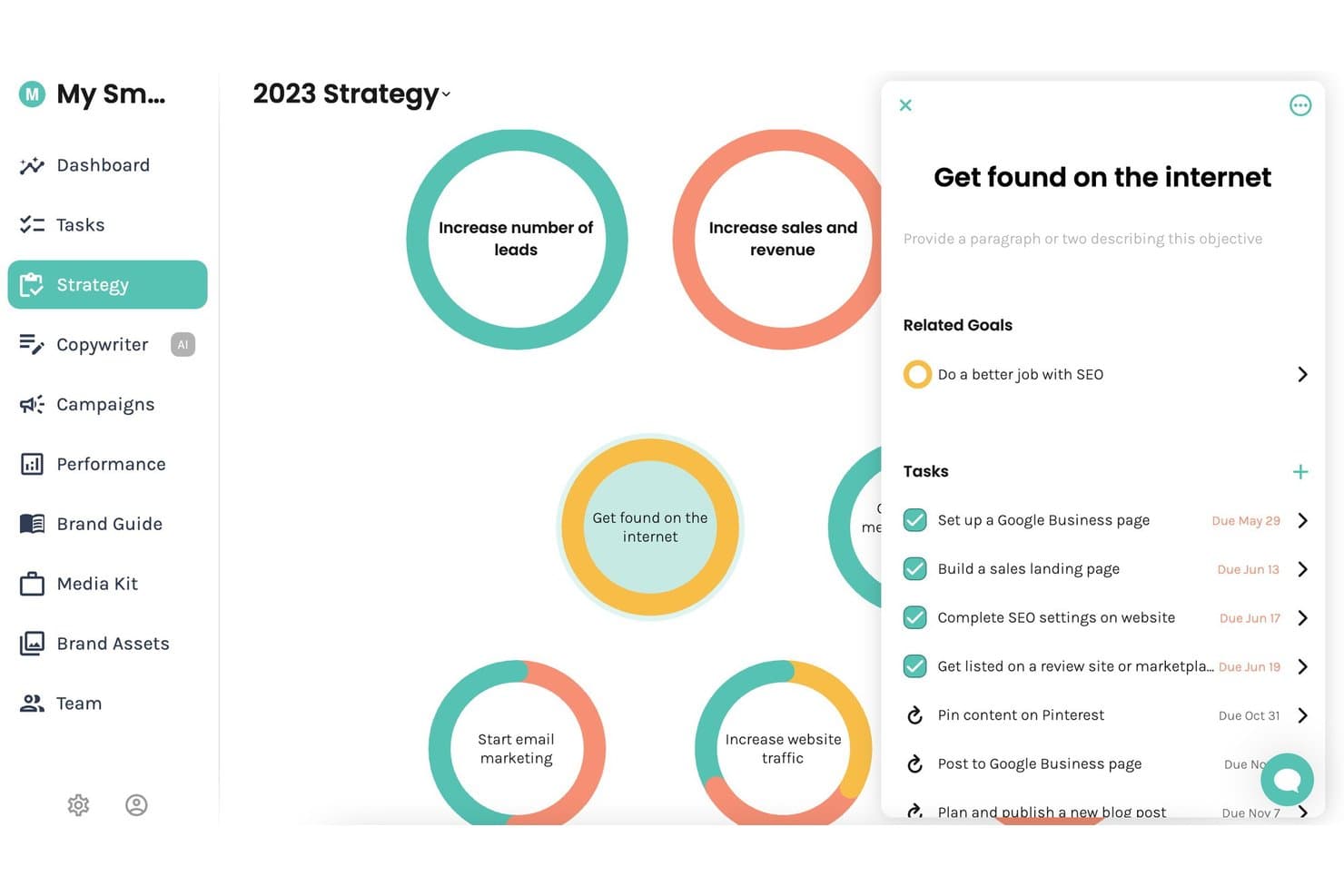
Enji biedt een visueel strategieoverzicht waarin gebruikers marketingdoelstellingen, bijbehorende doelen en taken met vervaldatums in één gecentraliseerd overzicht kunnen beheren. Enji is een alles-in-één marketingplanningstool die strategieontwikkeling, een marketingkalender, contentcreatie met AI, planning voor sociale media en prestatieanalyses combineert.
Voor wie is Enji het meest geschikt?
Enji is zeer geschikt voor zelfstandige ondernemers en freelancers die hun eigen marketing beheren zonder een toegewijd team of bureau achter zich.
Waarom ik voor Enji heb gekozen
Enji staat op mijn shortlist omdat de workflow van strategie naar kalender specifiek is ontwikkeld voor één persoon die alles alleen uitvoert. Ik vind het geweldig dat het beantwoorden van een vragenlijst met 20 vragen een gepersonaliseerd marketingplan oplevert dat automatisch als een geprioriteerde takenlijst in een kalender wordt geplaatst. De AI-tekstschrijver, die is getraind op jouw specifieke merkstem, maakt vervolgens bijschriften voor sociale media en blogberichten die rechtstreeks aan die geplande taken zijn gekoppeld.
Belangrijkste functies van Enji
- Tool voor het hergebruiken van content met AI: Zet één stuk content direct om in meerdere berichten voor sociale media op verschillende platforms.
- Suite voor merkbeheer: Centraliseert instellingen voor de merkstem, stijlgidsen, mediakits en belangrijke merkactiva op één plek.
- Integratie met KPI-dashboard: Haalt website- en socialemedia-analyses rechtstreeks naar je marketingdashboard voor snelle prestatiecontroles.
- Canva-integratie: Hiermee krijg je rechtstreeks binnen Enji toegang tot je Canva-ontwerpen en kun je ze gebruiken zonder ze opnieuw te uploaden.
Integraties van Enji
Enji biedt rechtstreekse integraties met Instagram, Facebook, LinkedIn, Pinterest, Threads, TikTok, YouTube, Canva en Google Analytics 4.
Pros and Cons
Pros:
- Vragenlijst genereert een volledige marketingkalender
- AI-tekstschrijver getraind op je merk
- Alles-in-één-tool voor strategie, kalender en publicatie
Cons:
- Ondersteunt geen samenwerking tussen meerdere gebruikers
- Ontbreekt aan rechtstreekse tools voor SEO-zoekwoordonderzoek
Learn more about Enji: Het meest geschikt voor gezamenlijke planning van berichten op sociale media
- Gratis proefperiode beschikbaar
- Vanaf $49/maand (jaarlijks gefactureerd)
Visit WebsiteCustomer Rating:4.6/5
Loomly plant berichten voor sociale media, plant content, beheert goedkeuringen en ondersteunt teamwerkprocessen. Loomly is een platform voor beheer van sociale media, opgebouwd rond een contentkalender, met tools voor het maken van berichten, planning via meerdere kanalen, teamsamenwerking, goedkeuringsworkflows en door AI ondersteunde contentcreatie.
Voor wie is Loomly het meest geschikt?
Loomly is zeer geschikt voor kleine tot middelgrote marketingteams en socialemediamanagers die een gedeelde werkruimte nodig hebben voor het plannen en goedkeuren van content voor sociale media.
Waarom ik voor Loomly heb gekozen
Loomly staat op mijn shortlist omdat de goedkeuringsworkflow echt een van de duidelijkste is die ik voor content op sociale media heb gebruikt. Mijn team kan een bericht door meerdere beoordelingsfasen leiden, van concept naar wachtend op goedkeuring en vervolgens naar gepland, zonder heen-en-weercommunicatie buiten het platform. Ik vind de voorbeeldweergave van berichten ook prettig, omdat daarmee wordt weergegeven hoe content er op elk specifiek kanaal uitziet voordat deze wordt gepubliceerd. Zo worden opmaakproblemen vroegtijdig ontdekt, wat veel last-minute aanpassingen bespaart.
Belangrijkste functies van Loomly
- Contentkalender: Een centrale kalenderweergave om geplande berichten op alle gekoppelde socialemediakanalen per dag, week of maand te visualiseren.
- Berichtideeën: Loomly biedt contentideeën op basis van populaire onderwerpen, RSS-feeds en aankomende evenementen om je kalender te helpen vullen.
- Assetbibliotheek: Een ingebouwde mediabibliotheek voor het opslaan, organiseren en hergebruiken van afbeeldingen en video's in meerdere berichten.
- Analysedashboard: Volg statistieken over de prestaties van berichten, zoals bereik, klikken en interactie, rechtstreeks binnen het platform.
Integraties van Loomly
Loomly biedt rechtstreekse integraties met Slack, Microsoft Teams, Canva, Google Drive, Unsplash en Giphy, evenals verbindingen met Instagram, Facebook, LinkedIn, TikTok, YouTube, Pinterest, Snapchat, Threads en Google Business Profile. Het maakt ook verbinding met Zapier, hoewel een openbare API voor aangepaste integraties niet duidelijk is gedocumenteerd.
Pros and Cons
Pros:
- Pas de tekst van berichten per socialemediakanaal aan
- Kalender met slepen en neerzetten voor snel opnieuw plannen
- Goedkeuringsworkflows voor teams van bureaus en klanten
Cons:
- Beperkte ingebouwde tools voor beeldbewerking
- Analytics zijn onvoldoende uitgebreid voor geavanceerde rapportages
Learn more about Loomly: Het beste voor snel content in de huisstijl maken
- Gratis abonnement beschikbaar
- Vanaf $9.99/maand
Visit WebsiteCustomer Rating:4.7/5
Adobe Express maakt merkvriendelijke grafieken, video's, pdf's en webpagina's. Adobe Express is een tool voor het maken van web- en mobiele content waarmee marketingteams merkvriendelijke socialmediagrafieken, korte video's, pdf's en webpagina's kunnen ontwerpen met behulp van een aanpasbare sjabloonbibliotheek.
Voor wie is Adobe Express het meest geschikt?
Adobe Express is zeer geschikt voor kleine marketingteams en individuele contentmakers die visuele content in hun huisstijl moeten produceren zonder een toegewijde ontwerper.
Waarom ik voor Adobe Express heb gekozen
Ik heb Adobe Express opgenomen in mijn topkeuzes vanwege de manier waarop de functie merkhuisstijl consistente contentcreatie op schaal ondersteunt. Mijn team slaat onze logo's, kleurenpaletten en lettertypen rechtstreeks op in het platform, zodat elk onderdeel dat we produceren in onze huisstijl blijft zonder handmatige controles.
Ik vertrouw ook op de tool voor het wijzigen van het formaat met één klik om één contentonderdeel om te zetten naar elke socialmedia-afmeting die we nodig hebben. Hierdoor verkorten we de productietijd aanzienlijk voor campagnes.
Belangrijkste functies van Adobe Express
- Contentplanner: Plan, programmeer, bekijk en publiceer socialmediaberichten rechtstreeks vanuit het platform zonder van tool te wisselen.
- Adobe Firefly-AI-hulpmiddelen: Genereer afbeeldingen, teksteffecten en sjablonen met tekstprompts in de editor.
- Animatie-effecten: Voeg beweging toe aan tekst, afbeeldingen en pictogrammen om statische ontwerpen om te zetten in geanimeerde socialmedia-content.
- Adobe Stock-bibliotheek: Krijg rechtstreeks in de editor toegang tot miljoenen rechtenvrije foto's, video's en audiobestanden.
Integraties van Adobe Express
Adobe Express integreert standaard met apps uit het Adobe-ecosysteem, zoals Creative Cloud, Acrobat, Experience Manager Assets, Workfront, Firefly Custom Models en GenStudio for Performance Marketing. Het heeft ook standaardintegraties met externe diensten zoals Box, Miro, Slack, HubSpot, Figma, Bynder, Webflow, Google Workspace en OpenAI's ChatGPT, plus meer dan 150 invoegtoepassingen die beschikbaar zijn in de marktplaats. Er is een SDK voor invoegtoepassingen beschikbaar om aangepaste uitbreidingen te bouwen.
Pros and Cons
Pros:
- Ingebouwde planning en publicatie voor sociale media
- Door AI gegenereerde sjablonen versnellen het maken van content
- De merkhuisstijl zorgt automatisch voor visuele consistentie
Cons:
- Geen redactionele kalender voor lange content
- Beperkte samenwerking met meerdere gebruikers en goedkeuringsprocessen
Learn more about Adobe Express: Het beste voor AI-aangedreven inzichten in contentstrategie
- Gratis abonnement beschikbaar
- Prijzen op aanvraag
Visit WebsiteCustomer Rating:4.6/5
MarketMuse brengt contenthiaten, thematische autoriteit, concurrenten en roadmaps in kaart. MarketMuse is een AI-aangedreven platform voor contentstrategie en -planning dat je bestaande contentinventaris analyseert, hiaten in de thematische autoriteit identificeert en gepersonaliseerde contentroadmaps genereert op basis van concurrentieanalyse en zoekwoordmoeilijkheid.
Voor wie is MarketMuse het meest geschikt?
MarketMuse is zeer geschikt voor SEO- en contentteams bij middelgrote tot grote ondernemingen die grote hoeveelheden content produceren en behoefte hebben aan een datagedreven aanpak voor het prioriteren van onderwerpen.
Waarom ik MarketMuse heb gekozen
Ik heb MarketMuse opgenomen in mijn topkeuzes omdat de AI-aangedreven inzichten voor contentstrategie verder gaan dan standaard zoekwoordtools. De functie voor onderwerpmodellen identificeert elk gerelateerd subonderwerp dat mijn content nodig heeft om goed te scoren, terwijl de gepersonaliseerde moeilijkheidsscore kansen prioriteert op basis van de bestaande autoriteit van mijn domein.
Ik gebruik de contentinventaris ook om ondermaats presterende pagina's te vinden die moeten worden bijgewerkt voordat ik iets nieuws plan.
Belangrijkste functies van MarketMuse
- Contentbriefs: Genereert automatisch gestructureerde briefs met aanbevolen onderwerpen, koppen en vragen die aan bod moeten komen.
- Optimalisatiescore: Beoordeelt je concept in realtime aan de hand van een onderwerpmodel terwijl je content schrijft of plakt.
- SERP-analyse: Analyseert wat pagina's met een hoge ranking behandelen om hiaten in de planningsfase te identificeren.
- Onderzoekstool: Brengt semantisch gerelateerde concepten en vragen voor elk doelonderwerp naar voren.
MarketMuse-integraties
MarketMuse biedt export naar Google Docs en integratie met Acrolinx, evenals een ingebouwde ChatGPT-integratie met behulp van de API van OpenAI. Aangepaste integraties zijn beschikbaar via de API. Ondersteuning voor Zapier is niet duidelijk gedocumenteerd.
Pros and Cons
Pros:
- Brengt hiaten in subonderwerpen aan het licht die concurrenten volledig missen
- Geautomatiseerde onderwerpclustering vervangt handmatige zoekwoordmapping
- Meet de kwaliteit van content voordat je publiceert
Cons:
- Geen waarschuwing voordat tegoed wordt verbruikt
- Verwarrende navigatie tussen projecten en plannen
Learn more about MarketMuse: Het beste voor coördinatie van campagnes tussen teams
- Gratis abonnement beschikbaar
- Vanaf $10.99/gebruiker/maand (jaarlijks gefactureerd)
Visit WebsiteCustomer Rating:4.4/5
Asana coördineert het volgen van projecten, taaktoewijzingen, tijdlijnen en werkstromen. Asana is een platform voor werkbeheer dat projectopvolging, taaktoewijzing, tijdlijnplanning en afdelingsoverschrijdende werkstroomcoördinatie binnen teams combineert.
Voor wie is Asana het meest geschikt?
Asana is zeer geschikt voor marketingteams van middelgrote tot grote ondernemingen die campagnes coördineren tussen meerdere afdelingen, bureaus of regionale teams.
Waarom ik voor Asana heb gekozen
Ik heb Asana opgenomen in mijn topkeuzes omdat de coördinatie van campagnes tussen teams precies is waar het platform in uitblinkt. Met portfolio's kun je elk campagneproject in één overzicht volgen, met actuele status- en werkbelastinggegevens voor alle teams.
Ik gebruik Doelen ook om campagnetaken rechtstreeks aan bedrijfsdoelstellingen te koppelen, zodat niets geïsoleerd wordt uitgevoerd. Afhankelijkheden zorgen ervoor dat overdrachten tussen ontwerp-, tekst- en betaalde-mediateams op schema blijven zonder voortdurend overleg.
Belangrijkste functies van Asana
- Tijdlijnweergave: Een visuele planner in Gantt-stijl voor het in kaart brengen van campagneschema's, deadlines en taakvolgorden binnen een project.
- Projectsjablonen: Vooraf gebouwde sjablonen voor campagnes, redactionele kalenders en contentlanceringen die teams een gestructureerd startpunt bieden.
- Automatiseringsregels: Op triggers gebaseerde automatiseringen die taken opnieuw toewijzen, statussen bijwerken of meldingen versturen wanneer aan ingestelde voorwaarden wordt voldaan.
- Aangepaste velden: Configureerbare gegevensvelden voor het bijhouden van contenttype, kanaal, prioriteit of elk ander kenmerk dat je team voor taken nodig heeft.
Integraties van Asana
Asana biedt meer dan 300 integraties via de ingebouwde integraties en appdirectory, waaronder Slack, Google Drive, Microsoft Teams, Salesforce, HubSpot, Jira, Google Calendar, Figma, Canva en Adobe Creative Cloud. Het maakt ook verbinding met Zapier en biedt een API voor aangepaste integraties.
Pros and Cons
Pros:
- Meerdere projectweergaven, waaronder kalender en tijdlijn
- Slechts één toegewezene per taak vermindert verwarring over eigenaarschap
- Opmerkingen en proeflezen in de app voor het beoordelen van concepten
Cons:
- Geen ingebouwde tracking van contentprestaties of analyses
- Terugkerende taken tonen alleen de volgende instantie in de kalender
Learn more about Asana: Ideaal voor het ontwerpen van interactieve content
- Gratis abonnement + gratis demo beschikbaar
- Prijzen op aanvraag
Visit WebsiteCustomer Rating:4.3/5
Ceros maakt geanimeerde landingspagina's, interactieve rapporten en digitale ervaringen. Ceros is een no-codeplatform voor het maken van interactieve content waarmee marketingteams geanimeerde landingspagina's, interactieve rapporten en digitale ervaringen kunnen ontwerpen en publiceren zonder ondersteuning van ontwikkelaars.
Voor wie is Ceros het meest geschikt?
Ceros is zeer geschikt voor B2B-marketingteams bij middelgrote tot grote ondernemingen die grote hoeveelheden content produceren, zoals e-books, rapporten en landingspagina's voor campagnes.
Waarom ik voor Ceros heb gekozen
Ceros staat op mijn shortlist omdat geen enkele andere contenttool die ik heb gebruikt marketingteams dezelfde vrijheid geeft om interactieve ervaringen te ontwerpen zonder code aan te raken. Ik ben vooral te spreken over het vrij vormgegeven ontwerpcanvas in Ceros Studio, waarmee mijn team rechtstreeks in de browser geanimeerde, scrollbare content kan maken, zoals interactieve rapporten en microsites voor campagnes.
Dankzij de ingebouwde realtimeanalyses kan ik bovendien precies zien hoe doelgroepen met elk onderdeel omgaan en aanpassingen doorvoeren vóór de volgende contentcyclus.
Belangrijkste functies van Ceros
- Flex AI-ontwerpassistent: Genereer en bouw interactieve content rechtstreeks op het canvas met AI-modi voor ideevorming, planning, bouw en beoordeling.
- MarkUp-feedbacktool: Plaats visuele annotaties en opmerkingen rechtstreeks op PDF's, websites en video's om contentbeoordelingen te beheren zonder eindeloze e-mailwisselingen.
- Ceros Editor: Laat marketeers tekst, afbeeldingen en interacties in gepubliceerde Ceros-content bewerken zonder ondersteuning van een ontwerper, dankzij een bibliotheek met middelen die met slepen en neerzetten werkt.
- Gedeelde bibliotheek met middelen: Sla merkmiddelen op, beheer ze en gebruik ze opnieuw in verschillende projecten om de visuele consistentie van content te behouden.
Integraties van Ceros
Ceros biedt native integraties met Eloqua, Google Analytics, Google Tag Manager, HubSpot, Marketo en Seismic, evenals ondersteuning voor analyticsdiensten van derden, zoals Adobe Analytics, via de Universal Analytics-integratie. MarkUp, onderdeel van de Ceros-suite, maakt verbinding met Zapier en biedt een API voor aangepaste integraties. Ceros beschikt ook over een SDK voor het insluiten van interactieve content in e-commerceplatforms en andere externe platforms.
Pros and Cons
Pros:
- Vrij vormgegeven canvas voor aangepaste interactieve lay-outs
- Geen codering nodig om content te publiceren
- Inspiratiegalerij stimuleert nieuwe contentideeën
Cons:
- Exports van analyses zijn rommelig en moeilijk te lezen
- Conversie van desktop naar mobiel vereist handmatige herbouw
Learn more about Ceros: Beste voor geavanceerde analyses van sociale media
- Gratis proefperiode van 14 dagen + gratis demo beschikbaar
- Vanaf $99/gebruiker/maand (jaarlijks gefactureerd)
Visit WebsiteCustomer Rating:4.1/5
Hootsuite plant, publiceert, monitort en analyseert content voor sociale media. Hootsuite is een platform voor beheer van sociale media dat contentplanning, publicatie, monitoring van sociale media, teamsamenwerking en analyses op meerdere sociale netwerken omvat.
Voor wie is Hootsuite het meest geschikt?
Hootsuite is een logische keuze voor marketingteams van middelgrote tot grote ondernemingen die tegelijkertijd de aanwezigheid op sociale media van meerdere merken, kanalen en regio's beheren.
Waarom ik voor Hootsuite koos
Hootsuite staat op mijn shortlist omdat de analysemogelijkheden veel verder gaan dan wat de meeste tools voor contentplanning bieden. Vooral de functie voor vergelijkende concurrentieanalyse spreekt me aan: hiermee kun je de publicatiefrequentie, publieksgroei en betrokkenheidspercentages van maximaal 20 concurrenten in één dashboard volgen.
De uitbreiding Geavanceerde analyses gaat nog een stap verder doordat je aangepaste statistieken met je eigen formules kunt maken en gegevens uit Google Analytics en Adobe Analytics kunt combineren met je prestaties op sociale media. Zo krijg je een werkelijk compleet beeld van het rendement van je content.
Belangrijkste functies van Hootsuite
- Bulksgewijs plannen: Upload en plan maximaal 350 berichten tegelijk met behulp van een CSV-bestand voor meerdere sociale accounts.
- Goedkeuringsworkflows voor content: Stuur conceptberichten door meerdere goedkeuringsstappen voordat ze worden gepubliceerd, waarbij opmerkingen en feedback in dezelfde conversatie blijven staan.
- Streams voor monitoring van sociale media: Volg zoekwoorden, hashtags en merkvermeldingen op verschillende platforms rechtstreeks in je Hootsuite-dashboard.
- AI-schrijver voor bijschriften: Genereer bijschriften voor berichten op basis van een prompt, met ingebouwde aanpassingen voor toon en platform in de editor.
Integraties van Hootsuite
Hootsuite biedt via de appgids meer dan 100 apps en integraties, waaronder Canva, Adobe Express, Salesforce, HubSpot, Slack, Shopify, Google My Business, Dropbox, monday.com en Wrike. Het maakt ook verbinding met Zapier en biedt een API voor aangepaste integraties.
Pros and Cons
Pros:
- Ondersteunt planning voor negen sociale platforms
- De functie Beste tijd om te publiceren stelt optimale momenten voor
- Vergelijkende concurrentieanalyse volgt maximaal 20 concurrenten
Cons:
- Geavanceerde analyses zijn alleen beschikbaar via betaalde add-ons
- Geplande berichten worden soms niet gepubliceerd zonder waarschuwing
Learn more about Hootsuite: Het beste voor AI-gestuurde productiviteitsplanning
- Gratis proefperiode beschikbaar
- Vanaf $19/licentie/maand (jaarlijks gefactureerd)
Visit WebsiteCustomer Rating:4.2/5
Motion plant taken, vergaderingen en deadlines rond prioriteiten en werkbelasting. Motion is een door AI aangedreven hulpmiddel voor taak- en projectbeheer dat taken, vergaderingen en deadlines automatisch in je agenda plant op basis van prioriteiten en werkbelasting.
Voor wie is Motion het meest geschikt?
Motion is zeer geschikt voor individuele medewerkers, freelancers en kleine teams die zware werklasten over meerdere projecten beheren en geautomatiseerde planning nodig hebben om hun prioriteiten onder controle te houden.
Waarom ik voor Motion koos
Ik koos Motion als een van de beste opties omdat de AI-planner iets doet wat geen standaardtool voor projectbeheer doet: alle taken uit al je actieve projecten worden automatisch als tijdsblokken in je agenda gepland, waarbij het plan in realtime wordt aangepast wanneer prioriteiten verschuiven.
Ik ben vooral te spreken over de AI-projectbouwer, die op basis van een eenvoudige projectbeschrijving een volledige takenlijst met deadlines en toegewezen personen genereert. De proactieve waarschuwingen voor deadline-risico's zijn ook een opvallende functie voor contentteams die meerdere campagnes tegelijk beheren.
Belangrijkste functies van Motion
- AI-Gantt-diagram: Bekijk alle actieve projecten op een live tijdlijn die automatisch wordt bijgewerkt wanneer taken, deadlines en toegewezen personen veranderen, met beschikbare weergaven per week, kwartaal en jaar.
- Planning van terugkerende taken: Stel dagelijkse, wekelijkse, maandelijkse of driemaandelijkse taken in en Motion blokkeert automatisch tijd in je agenda om ze uit te voeren.
- AI-notulist voor vergaderingen: Leg tijdens vergaderingen automatisch notities vast, zodat je team beslissingen en actiepunten kan raadplegen zonder handmatig aantekeningen te maken.
- Kanban-bordweergave: Schakel met één klik tussen lijst-, Kanban- en Gantt-weergaven om contentwerk te beheren en te visualiseren in de indeling die het beste bij je team past.
Integraties van Motion
Motion biedt ingebouwde integraties met Google Calendar, Microsoft Outlook 365, iCloud Calendar, Gmail, Zoom, Google Meet, Microsoft Teams en Siri. Het maakt verbinding met Zapier en biedt een API voor aangepaste integraties.
Pros and Cons
Pros:
- Plant gemiste taken automatisch opnieuw in toekomstige tijdvakken
- Zet vergadernotities om in toegewezen taken
- E-maildoorsturen zet berichten om in taken
Cons:
- Beperkte taakafhankelijkheden buiten projecten
- De mobiele app biedt niet alle functionaliteit van de desktopversie
Learn more about Motion: Het beste voor influencercampagnebeheer
- Gratis proefperiode van 14 dagen + gratis demo beschikbaar
- Vanaf $18.75/maand (jaarlijks gefactureerd)

Later plant sociale content en beheert creatorcampagnes met analyses. Later is een platform voor beheer van sociale media en influencermarketing dat contentplanning, publicatie en analyses combineert met een ingebouwde suite voor het ontdekken van creators en campagnebeheer.
Voor wie is Later het meest geschikt?
Later is zeer geschikt voor DTC-merken, e-commercebedrijven en beheerders van sociale media die influencerpartnerschappen beheren naast hun organische contentprogramma's.
Waarom ik voor Later heb gekozen
Ik heb Later opgenomen in mijn topkeuzes omdat het beheer van influencercampagnes verder gaat dan een eenvoudige creatordirectory. De functie Incentive Advisor toont de daadwerkelijke vergoedingen van creators op verschillende kanalen, zodat je niet hoeft te gokken naar budgetten of te veel betaalt.
Ik ben ook enthousiast over Later EdgeAI, dat gegevens van meer dan 16 miljoen geanalyseerde creators gebruikt om campagneresultaten te voorspellen voordat je van start gaat. Het beveelt combinaties van creators aan en signaleert risico's in een vroeg stadium. Combineer dat met geïntegreerde rapportages voor betaalde, organische en verkoopactiviteiten, en je krijgt een werkelijk compleet beeld van de impact van je campagne.
Belangrijkste functies van Later
- Visuele contentkalender: Content plannen met slepen en neerzetten voor Instagram, TikTok, Facebook, Pinterest en LinkedIn in één kalenderweergave.
- Mediabibliotheek: Gecentraliseerde opslag voor foto's en video's met labels en zoekfunctie, zodat je team snel middelen aan berichten kan toevoegen.
- Linkin.bio: Een aanpasbare landingspagina die aan je Instagram-bio is gekoppeld en afzonderlijke berichten omzet in klikbare of winkelbare bestemmingen.
- Hashtagsuggesties: Automatisch gegenereerde aanbevelingen voor hashtags op basis van de inhoud en categorie van je bijschrift.
Integraties van Later
Later biedt native integraties met Canva, Adobe, Google Drive, Dropbox, Mailchimp, Bazaarvoice, Yotpo, PowerReviews en Everflow. Het ondersteunt publicatie naar Instagram, Facebook, TikTok, Pinterest, LinkedIn, YouTube, Threads en Snapchat. Later Influence bevat een rapportage-API voor het exporteren van campagnegegevens, maar Zapier wordt momenteel niet ondersteund.
Pros and Cons
Pros:
- Voorbeeld van Instagram-raster vóór publicatie
- Bulkuploads van media met gebruiksregistratie
- Ingebouwde tools voor samenwerking tussen influencers en merken
Cons:
- Reels en carrouselberichten kunnen mislukken tijdens het publiceren
- Samenwerking binnen teams loopt achter op concurrenten zoals Hootsuite
Learn more about Later: 10Beste keuze voor verkoop- en marketingondersteuning voor grote ondernemingen
Seismic
- Gratis demo beschikbaar
- Prijs op aanvraag

Seismic brengt verkoopcontent, betrokkenheid van kopers, coaching en marktintroductieprogramma's samen. Seismic is een platform voor verkoopondersteuning dat contentbeheer, betrokkenheid van kopers, verkoopcoaching en de uitvoering van marktintroductieprogramma's voor omzetgerichte teams binnen ondernemingen centraliseert.
Voor wie is Seismic het meest geschikt?
Seismic is ontwikkeld voor grote ondernemingen met toegewijde verkoop- en marketingteams die een uniform systeem nodig hebben om verkoopcontent op grote schaal te beheren en te distribueren.
Waarom ik Seismic heb gekozen
Ik heb Seismic opgenomen in mijn topkeuzes omdat verkoop- en marketingcontent hier daadwerkelijk wordt verbonden met omzet. Marketingteams kunnen in Seismic content op basis van sjablonen maken die vertegenwoordigers binnen vastgestelde parameters kunnen personaliseren, zodat het eindresultaat in overeenstemming blijft met de merkidentiteit zonder dat er een heen-en-weergaande beoordelingsronde nodig is.
Ook de contentanalyses vind ik goed: ze laten zien welke middelen vertegenwoordigers daadwerkelijk gebruiken in deals en hoe kopers ermee omgaan.
Belangrijkste functies van Seismic
- Digitale verkoopruimtes: Maak gepersonaliseerde microsites in de huisstijl waar vertegenwoordigers rechtstreeks samengestelde contentcollecties met kopers kunnen delen.
- Voorspellende contentaanbevelingen: AI toont de meest relevante middelen voor een vertegenwoordiger op basis van de dealfase, branche en het kopersprofiel.
- Tools voor leren en coaching: Wijs trainingscontent toe, houd de voltooiing bij en versterk verkoopvaardigheden via ingebouwde coachingworkflows.
- Beheer van contentbeleid: Stel vervaldatums en toegangsrechten voor middelen in om te voorkomen dat verouderd materiaal actief wordt gebruikt.
Seismic-integraties
Seismic biedt integraties via de Seismic Exchange-marktplaats, waaronder Salesforce, Microsoft Teams, Google Slides, Slack, Zoom, Webex, Gong, Oracle Sales Cloud, Adobe Experience Manager en Snowflake. Er is een API beschikbaar voor aangepaste integraties, evenals ondersteuning voor Microsoft Power Automate voor workflowautomatisering.
Pros and Cons
Pros:
- Houdt de betrokkenheid van kopers bij gedeelde content bij
- AI beveelt middelen aan op basis van de dealfase
- Versiebeheer voorkomt dat verouderde content wordt gedeeld
Cons:
- Vereist een toegewijde beheerder voor doorlopend beheer
- Zoeken werkt minder goed bij grote bibliotheken
Learn more about Seismic:
Andere software voor contentplanning
Hier zijn enkele aanvullende opties voor software voor contentplanning die mijn shortlist niet hebben gehaald, maar die toch de moeite waard zijn om te bekijken:
- 11monday.comHet beste voor aangepaste workflowautomatisering
- 12GatherContentHet meest geschikt voor aanpasbare redactionele werkprocessen
- 13DYNO MapperHet meest geschikt voor analyse van de contentinventaris van websites
Hoe ik software voor contentplanning evalueer
Ik verdeel mijn evaluatie in twee lagen: de kernmogelijkheden die een tool nodig heeft—redactionele kalender, briefopbouw, goedkeuringen binnen de werkstroom—en de onderscheidende factoren die de beste opties van elkaar onderscheiden.
Kernfunctionaliteit (basisvereisten voor deze lijst)
Wanneer ik tools voor mijn lijst selecteer, beoordeel ik elk exemplaar op een schaal van 0 (biedt de functionaliteit niet) tot 5 (blink uit op dit gebied) voor elke hieronder vermelde kernfunctionaliteit. Vervolgens reken ik de totaalscore van de tool om naar een percentage. Elke tool moet een minimale totaalscore van 65% behalen om in aanmerking te komen voor opname.
- Redactionele kalender: Ik zoek naar een visuele, filterbare kalender waarin je berichten tussen datums kunt slepen, kunt wisselen tussen kanaalweergaven en in één oogopslag hiaten in je publicatieritme kunt zien.
- Contentbriefs & ideevorming: Met een goede tool kun je gestructureerde briefs opbouwen met velden voor het doelzoekwoord, de doelgroep en de opbouw—en ze vervolgens koppelen aan een gedeelde ideeënbacklog waaruit je team put.
- Werkstroom & samenwerking: Ik beoordeel of het platform toewijsbare taken, aangepaste statussen en goedkeuringsstappen ondersteunt, zodat een concept van schrijver naar redacteur en vervolgens naar belanghebbende gaat zonder e-mailketens.
- Strategie in kaart brengen: Content taggen op funnelniveau, persona of campagne is belangrijk. Ik controleer of je je kalender kunt filteren om bijvoorbeeld alleen inhoud onderaan de trechter te zien die aan een lancering in het derde kwartaal is gekoppeld.
- SEO & zoekwoordplanning: Of het nu native is of via integraties met tools zoals Semrush of Ahrefs, ik zoek naar zoekwoordgegevens—volume, moeilijkheidsgraad en zoekintentie—die zichtbaar worden gemaakt op de plek waar planners beslissingen over onderwerpen nemen.
- Analyses & integraties: De tool moet verbinding kunnen maken met je CMS en analyse-ecosysteem, zodat je kunt controleren hoe gepubliceerde content presteert zonder de planningsomgeving te verlaten.
Zodra ik een lijst heb met tools die aan deze criteria voldoen, kijk ik naar wat elk platform onderscheidt.
Onderscheidende factoren (wat leveranciers van elkaar onderscheidt)
Zo vergelijk ik verschillende leveranciers met elkaar:
Opvallende functies
Het genereren van briefs met behulp van AI is een belangrijke onderscheidende factor. Tools die op basis van een doelzoekwoord opzetten kunnen voorstellen of gestructureerde briefs kunnen opstellen, besparen uren aan voorbereidend planningswerk. Ik kijk ook naar visualisatie van onderwerpclusters, waarmee je pijlerpagina's aan ondersteunende berichten kunt koppelen en hiaten in interne links in je contentbibliotheek kunt ontdekken. Workflows voor het hergebruiken van content zijn belangrijk voor SaaS-teams die een webinar of uitgebreide gids binnen één planningsweergave moeten opdelen in blogberichten, fragmenten voor sociale media en e-mailreeksen.
Meer dan functies
De diepgang van de integratie met de technologiestack is een van de eerste dingen die ik beoordeel. Een tool voor contentplanning die synchroniseert met je CMS, SEO-suite en marketingautomatiseringsplatform voorkomt dat je team tussen tabbladen moet wisselen om zoekwoordgegevens of de publicatiestatus te controleren. Schaalbaarheid is ook belangrijk—ik controleer of de tool inhoudportfolio's voor meerdere merken en flexibele gebruikersstructuren voor freelancers aankan. Tot slot is de tijd tot waarde het overwegen waard. Tools met vooraf gebouwde redactionele sjablonen en een eenvoudige migratie vanuit spreadsheets of projectmanagementplatforms zorgen ervoor dat teams sneller aan de slag kunnen met plannen.
Zo kies je software voor contentplanning
Bij het kiezen van software voor contentplanning draait het erom hoe goed deze je redactionele workflow, campagneplanning, teamcoördinatie en publicatieschema ondersteunt. Het juiste platform moet het eenvoudiger maken om ideeën te organiseren, werk toe te wijzen, deadlines bij te houden en zicht te houden op geplande content.
| Als je prioriteit is… | Zoek dan naar… |
|---|---|
| Als je prioriteit is…Redactionele planningen beheren | Zoek dan naar…Visuele contentkalenders en tijdlijnweergaven |
| Als je prioriteit is…Meerdere bijdragers coördineren | Zoek dan naar…Toewijzingen, eigenaarschap en status bijhouden |
| Als je prioriteit is…Campagnes via meerdere kanalen plannen | Zoek dan naar…Campagneplanning voor meerdere kanalen |
| Als je prioriteit is…Contentideeën organiseren | Zoek dan naar…Ideeënbacklogs, briefs en contentbibliotheken |
| Als je prioriteit is…Deadlines bewaken | Zoek dan naar…Vervaldatums, herinneringen en workflowfasen |
| Als je prioriteit is…Content beoordelen vóór publicatie | Zoek dan naar…Goedkeuringsworkflows en tools voor opmerkingen |
Zo beoordeel je je shortlist
- Maak een voorbeeld van een redactionele kalender: Voeg verschillende aankomende artikelen, campagnes en berichten voor sociale media toe om te zien hoe duidelijk het platform deadlines, kanalen, verantwoordelijken en publicatiedata weergeeft.
- Test de aanpassing van workflows: Maak je bestaande contentfasen aan, zoals idee, briefing, concept, beoordeling, goedgekeurd en gepubliceerd, om te bevestigen dat het platform aansluit op je huidige proces.
- Wijs een volledige contentcyclus toe: Maak een taak aan, wijs een verantwoordelijke toe, voeg een deadline toe, voeg een briefing toe en verplaats het item door de beoordelingsfase om te controleren hoe goed het systeem overdrachten afhandelt.
- Plan een campagne voor meerdere kanalen: Voeg content voor verschillende kanalen toe onder één campagne en controleer of je afhankelijkheden, publicatiedata en verantwoordelijkheden op één plek kunt bekijken.
- Controleer rapportages en inzicht: Bekijk werkbelasting, achterstallige taken, aankomende deadlines en rapportages over de contentstatus om te bepalen of managers knelpunten snel kunnen identificeren.
Wat is software voor contentplanning?
Software voor contentplanning is een platform dat wordt gebruikt om contentideeën, redactionele kalenders, campagnes, opdrachten en publicatieschema's te organiseren.
Deze tools bieden teams een centrale plek om aankomende content te plannen, verantwoordelijkheden toe te wijzen, deadlines bij te houden en de voortgang van het eerste idee tot en met publicatie te volgen. Veel platforms bevatten ook contentbriefings, goedkeuringsworkflows, campagneweergaven en samenwerkingstools.
Software voor contentplanning geeft teams een duidelijker inzicht in wat er wordt gemaakt, wie verantwoordelijk is voor elke taak en wanneer content naar verwachting live gaat.
Functies
Let bij het selecteren van software voor contentplanning op de volgende belangrijke functies:
- Redactionele kalender: Een gecentraliseerd, visueel schema dat geplande, opgestelde en gepubliceerde content voor de komende weken of maanden weergeeft. Dit helpt teams campagnes te coördineren en overlap tussen content te voorkomen.
- Taaktoewijzing: Hiermee kunnen managers specifieke taken delegeren, deadlines instellen en de voortgang van elke medewerker gedurende de productie en goedkeuring van content volgen.
- Documentbeheer: Biedt een plek om alle concepten, middelen en ondersteunende bestanden op te slaan, te organiseren en terug te vinden, met versiegeschiedenis en toegangsbeheer voor content.
- Workflowbeheer: Hiermee kun je elke stap in het proces voor het maken en goedkeuren van content ontwerpen, afdwingen en bewaken, zodat er geen taken tussen wal en schip vallen.
- Samenwerkingstools: Hiermee kunnen teamleden rechtstreeks binnen het systeem reageren, feedback geven en content beoordelen, waardoor heen-en-weercommunicatie via e-mail of chat wordt beperkt.
- Sjablonen voor contentbriefings: Bieden herbruikbare structuren en checklists, zodat elk onderdeel begint met duidelijke doelstellingen, informatie over de doelgroep en referentiemateriaal.
- Op rollen gebaseerde machtigingen: Bepalen wat elke gebruiker kan bekijken, bewerken of goedkeuren, zodat verantwoordelijkheden en aanspreekbaarheid altijd duidelijk zijn.
- Publicatieplanner: Hiermee kun je rechtstreeks vanuit de kalender specifieke publicatiedata en -tijden instellen, vaak met ondersteuning voor publicatie op meerdere kanalen.
- Analyses en rapportages: Volgen zowel de efficiëntie van de productie als de prestaties van gepubliceerde content bij het publiek en bieden inzicht in wat werkt en waar verbetering mogelijk is.
Veelvoorkomende AI-functies van software voor contentplanning
Naast de standaardfuncties van software voor contentplanning die hierboven zijn genoemd, integreren veel van deze oplossingen AI met functies zoals:
- Geautomatiseerde contentanalyse: Gebruikt AI om concepten te beoordelen op stijl, toon en zoekwoordgebruik en levert bruikbare suggesties om de duidelijkheid en effectiviteit vóór publicatie te verbeteren.
- Intelligente contentideeën: Analyseert huidige trends en de prestaties van eerdere content om actuele en relevante onderwerpen aan te bevelen, zodat teams een frisse redactionele kalender kunnen behouden.
- Voorspellende prognoses van betrokkenheid: Analyseert historische gegevens uit analyses en gegevens uit de sector om te voorspellen hoe goed verschillende contentconcepten vóór de creatie bij je publiek zullen aanslaan.
- Intelligente workflowautomatisering: Herkent afhankelijkheden en knelpunten in je pijplijn en stuurt taken vervolgens automatisch door of schaalt ze op basis van voorspelde vertragingen of verschuivingen in prioriteiten.
- Identificatie van contenthiaten: Gebruikt AI om eigen content en content van concurrenten te analyseren en brengt gebieden en onderwerpen aan het licht die ondervertegenwoordigd zijn in je contentstrategie.
Voordelen
Het implementeren van software voor contentplanning biedt verschillende voordelen voor je team en je bedrijf. Hier zijn enkele voordelen waar je naar kunt uitkijken:
- Gecentraliseerd contentbeheer: Brengt alle planningen, concepten en goedkeuringen samen in één werkruimte, waardoor versnippering en zoekgeraakte bestanden worden verminderd.
- Grotere verantwoordelijkheid binnen het team: Wijst duidelijke taakeigenaren aan en stelt deadlines in, waardoor het eenvoudig is om de voortgang te volgen en ervoor te zorgen dat content op tijd wordt opgeleverd.
- Soepelere samenwerking: Ondersteunt feedback en goedkeuringen binnen het platform, zodat iedereen op één lijn blijft zonder afhankelijk te zijn van eindeloze e-mailwisselingen.
- Snellere publicatie: Signaleert knelpunten en automatiseert stappen in de workflow, waardoor het maken van content doorgaat en vertragingen worden verminderd.
- Hogere contentkwaliteit: Standaardiseert briefings en processen, zodat elk onderdeel voldoet aan de richtlijnen en merknormen van je organisatie.
- Inzichten waarop je actie kunt ondernemen: Biedt ingebouwde inzichten in prestaties, zodat je kunt zien wat werkt en je strategie kunt aanpassen voor betere resultaten.
- Minder handmatig werk: Automatiseert repetitieve taken en integreert met je bestaande tools, waardoor tijd vrijkomt voor creatief werk.
Kosten en prijzen
Bij het selecteren van software voor contentplanning is inzicht nodig in de verschillende prijsmodellen en beschikbare abonnementen. De kosten variëren op basis van functies, teamgrootte, uitbreidingen en meer. De onderstaande tabel geeft een overzicht van veelvoorkomende abonnementen, hun gemiddelde prijzen en de functies die doorgaans zijn inbegrepen in oplossingen voor contentplanning:
Vergelijkingstabel van abonnementen voor software voor contentplanning
| Type abonnement | Gemiddelde prijs | Veelvoorkomende functies |
|---|---|---|
| Type abonnementGratis abonnement | Gemiddelde prijs$0 | Veelvoorkomende functiesBasiskalender, eenvoudige taaktracking, beperkt aantal gebruikers en e-mailondersteuning. |
| Type abonnementPersoonlijk abonnement | Gemiddelde prijs$5–$15/user/month | Veelvoorkomende functiesToegang voor één gebruiker, onbeperkt aantal concepten, uitgebreidere taakopties en basisintegraties. |
| Type abonnementZakelijk abonnement | Gemiddelde prijs$15–$40/user/month | Veelvoorkomende functiesMeerdere gebruikers, samenwerkingsworkflows, op rollen gebaseerde toegang, geavanceerde analyses, integraties en goedkeuringen. |
| Type abonnementAbonnement voor grote ondernemingen | Gemiddelde prijs$40–$100+/user/month | Veelvoorkomende functiesOnbeperkt aantal gebruikers, aangepaste integraties, geavanceerde beveiliging, toegewezen ondersteuning, API-toegang en tools voor naleving. |
Veelgestelde vragen over software voor contentplanning
Hier vind je antwoorden op veelgestelde vragen over software voor contentplanning:
Hoe verbetert software voor contentplanning de coördinatie binnen een team?
Software voor contentplanning centraliseert planningen, taaktoewijzingen en samenwerkingstools, zodat iedereen op de hoogte is van deadlines, verantwoordelijkheden en de projectstatus. Hierdoor kan je team zich afstemmen op doelen en projecten op schema houden.
Kan software voor contentplanning verschillende soorten content ondersteunen, zoals blogs, video's en socialmediaberichten?
Ja, de meeste software voor contentplanning is flexibel genoeg om meerdere soorten content te beheren, waaronder blogs, video’s, infographics en socialmediacampagnes. Meestal kun je sjablonen, workflows en kalenders voor elk format aanpassen.
Waar moet ik op letten bij het kiezen van software voor contentplanning voor een groot team?
Let op functies zoals geavanceerd workflowbeheer, op rollen gebaseerde rechten en integraties met bestaande tools. Zorg ervoor dat het platform meerdere gebruikers, verschillende goedkeuringsketens en complexe contentplanningen aankan.
Is training vereist om software voor contentplanning te gebruiken?
Nee, de meeste tools zijn gebruiksvriendelijk ontworpen en bevatten introductiegidsen, stapsgewijze zelfstudies en bibliotheken met sjablonen. Sommige leveranciers bieden ook live introducties of ondersteuning als je team extra hulp nodig heeft.
Hoe helpt software voor contentplanning bij het meten van contentprestaties?
De meeste platforms bevatten analyse- en rapportagefuncties die statistieken over de productie van content en prestaties na publicatie bijhouden. Deze inzichten helpen je te zien welke onderwerpen en formats resultaten opleveren, zodat je toekomstige planningen kunt optimaliseren.