

O software de criação de conteúdos fornece à sua equipa as ferramentas necessárias para escrever, conceber, publicar e gerir conteúdos em diferentes formatos. Se está à procura do melhor software de criação de conteúdos, provavelmente está a lidar com rascunhos dispersos, designs que não respeitam a identidade da marca, aprovações lentas ou demasiadas ferramentas para diferentes tipos de conteúdo.
A plataforma certa proporciona à sua equipa uma forma mais clara de produzir conteúdos sem perder o controlo sobre a qualidade, a identidade da marca, os prazos ou a distribuição. Nesta lista, vou analisar as principais opções disponíveis, destacar onde cada ferramenta se adapta melhor e facilitar a escolha de um software que corresponda ao seu fluxo de trabalho de conteúdos em 2026.
Why Trust Our Software Recommendations
6,700+
Reviews
20
Industry experts
16+
Evaluation factors
14
Years
Our team has been testing and reviewing software since 2012. As publishers and media operators ourselves, we know how difficult—and important—it is to choose the right software.
For this guide, we evaluated tools using hands-on testing and independent research, scoring tools using our selection criteria.
Our reviews reflect our human editorial judgment, not a sales pitch.
Tabela de comparação de software de criação de conteúdos
A tabela abaixo compara os preços, o acesso a períodos de teste e os casos de utilização de conteúdos das minhas principais escolhas de software de criação de conteúdos.
| Tool | Best For | Trial Info | Price | ||
|---|---|---|---|---|---|
| 1 | Best for solo founders | 14-day free trial | From $29/month | Website | |
| 2 | Best for SEO-led content planning | 14-day free trial | From $139/month | Website | |
| 3 | Best for AI social content planning | 7-day free trial available | From $19/month (billed annually) | Website | |
| 4 | Best for digital magazines and catalogs | Free demo available | From $50/month/account | Website | |
| 5 | Best for professional creative production | 14-day free trial | From $37.99/month (billed annually) | Website | |
| 6 | Best for enterprise AI content governance | Free trial + free demo available | Pricing upon request | Website | |
| 7 | Best for locked brand templates | Free plan + free demo available | From $10/user/month (billed annually) | Website | |
| 8 | Best for interactive sales content | Free demo available | From $15/user/month (billed annually) | Website | |
| 9 | Best for optimizing LinkedIn post performance | Free demo available | From £5/user/month (billed annually) | Website | |
| 10 | Best for branded microsites | Free demo available | Pricing upon request | Website |


Análises do melhor software de criação de conteúdos
Seguem-se os meus resumos detalhados do melhor software de criação de conteúdos que entrou na minha seleção. Estas análises abrangem o caso de utilização, as principais funcionalidades, as integrações e as vantagens e desvantagens de cada ferramenta.

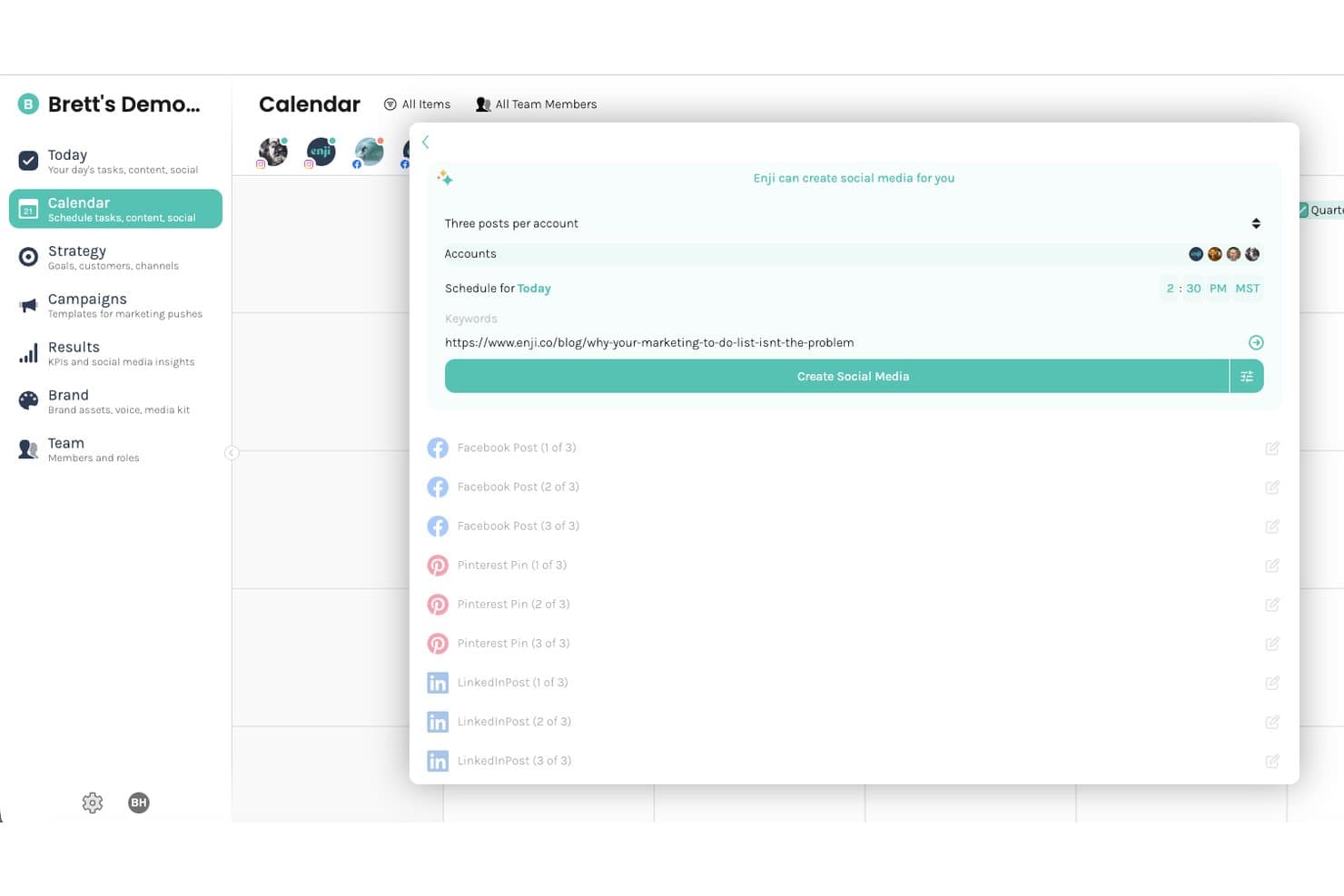
Enji offers an AI-powered social media creation tool that generates multiple posts across Facebook, Pinterest, and LinkedIn from a single URL input. Enji is a small business marketing platform that combines AI-powered content creation, social media scheduling, a marketing strategy builder, and a KPI dashboard in one tool.
Who Is Enji Best For?
Enji is a strong fit for solopreneurs and very small business owners who handle all of their own marketing without a dedicated team.
Why I Picked Enji
I picked Enji as one of the best because it's the only tool on this list that pairs AI content creation with a full marketing execution layer built for one person. I like how the AI copywriter learns your brand voice and applies it consistently across blog posts, captions, and newsletters, so every output sounds like you wrote it. The content repurposing tool is where it really earns its place: one blog post becomes a month of social content without starting from scratch each time.
Enji Key Features
- Marketing calendar with task management: Map out campaigns and manage tasks on a unified drag-and-drop calendar view.
- KPI and analytics dashboard: Monitor marketing campaign performance and social engagement data in one place.
- Brand management workspace: Store brand visuals, preferences, and messaging guidelines for consistent outputs.
- Social media scheduling: Connect accounts to draft and schedule posts directly to multiple social platforms.
Enji Integrations
Enji offers native integrations with Instagram, Facebook (Meta), LinkedIn, TikTok, Pinterest, Threads, YouTube, Canva, and Google Analytics 4.
Pros and Cons
Pros:
- Strategy and execution live in one place
- Content repurposing across social formats built in
- AI copywriter adapts to your brand voice
Cons:
- Not built for multi-user team collaboration
- Limited depth for long-form SEO content
Learn more about Enji:

Semrush supports SEO research, content planning, keyword analysis, and brand visibility tracking. Semrush is a digital visibility platform for SEO, PPC, social, content marketing, and AI search visibility. Its platform covers keyword research, competitive analysis, site audits, backlink tracking, and visibility insights, making it useful for teams that create content based on search demand and competitor data.
Who Is Semrush Best For?
Semrush is a strong fit for content marketers, SEO teams, and agencies that need content creation tied to keyword research, rankings, competitor analysis, and search visibility.
Why I Picked Semrush
I picked Semrush because it is useful before the writing starts. It gives content teams the research layer they need to choose topics, understand search intent, identify keyword gaps, and prioritize content based on demand.
I especially like it for teams that do not want content creation to be based only on brainstorming. Semrush gives writers and strategists a clearer foundation for briefs, topic clusters, and optimization work.
Semrush Key Features
- Keyword research: Find keyword ideas, search volume, competition data, and related search terms.
- Competitive analysis: Review competitor visibility, traffic estimates, and ranking opportunities.
- Content marketing tools: Plan and optimize content using SEO and audience insights.
- Site audit: Identify technical SEO issues that may affect content performance.
Semrush Integrations
Semrush integrates with Google Analytics, Google Search Console, Google Ads, Google Business Profile, Looker Studio, Trello, WordPress, and Google Docs.
Pros and Cons
Pros:
- Useful for briefs, optimization, and content gap analysis
- Good fit for SEO-led content planning
- Strong keyword and competitor research tools
Cons:
- Learning curve may be steep for non-SEO users
- Pricing can be high for small teams
Learn more about Semrush: Best for AI social content planning
- 7-day free trial available
- From $19/month (billed annually)
Visit WebsiteCustomer Rating:4.6/5
ContentStudio plans, creates, schedules, publishes, and analyzes social media content. ContentStudio is a social media management and content marketing platform backed by AI. It gives teams a shared workspace to plan content calendars, schedule posts, manage approvals, publish across social channels, and track performance from one dashboard.
Who Is ContentStudio Best For?
ContentStudio is a good fit for social media teams, agencies, and content marketers that manage multiple channels and need planning, publishing, approvals, and reporting in one place.
Why I Picked ContentStudio
I picked ContentStudio because it brings content planning and social publishing into the same workflow. Teams can plan posts in calendar, list, feed, or grid views, then move the content into scheduling, approval, and reporting without shifting between separate tools.
I also like that its AI features support social content creation and performance analysis, which makes it useful for teams that need to produce posts consistently across different channels.
ContentStudio Key Features
- Unified content calendar: Plan and review content in calendar, list, feed, and grid views.
- AI content creation: Generate social captions and content ideas using built-in AI tools.
- Approval workflows: Share calendars with team members, clients, or approvers for review.
- Analytics and reporting: Track campaign, label, and competitor performance across social channels.
ContentStudio Integrations
ContentStudio integrates with Facebook, Instagram, LinkedIn, X, Pinterest, YouTube, TikTok, Google Business Profile, WordPress, Medium, Tumblr, Webflow, Shopify, Canva, Bitly, Feedly, Pocket, Replug, Google Drive, Dropbox, Box, and OneDrive.
Pros and Cons
Pros:
- Supports approvals, publishing, and reporting in one platform
- AI tools for content creation and performance insights
- Multiple calendar views for planning social content
Cons:
- Advanced collaboration and reporting may require higher-tier plans
- No permanent free plan listed
Learn more about ContentStudio: Best for digital magazines and catalogs
- Free demo available
- From $50/month/account
Visit WebsiteCustomer Rating:4.5/5
Joomag creates digital magazines, catalogs, brochures, reports, and content experiences. Joomag is a content experience platform for creating and distributing high-design digital publications such as magazines, catalogs, brochures, proposals, and reports. It also supports personalized and interactive content, with tools for AI, content automation, analytics, forms, and reader data capture.
Who Is Joomag Best For?
Joomag is a strong fit for teams that create polished digital publications and need tools for distribution, reader engagement, and performance tracking.
Why I Picked Joomag
I picked Joomag because it focuses on publication-style content rather than general project management. It works well when the output needs to look like a magazine, catalog, annual report, brochure, or interactive document.
I also like that its platform includes analytics and reader data capture, which makes it useful for teams that want to understand how audiences interact with their published content.
Joomag Key Features
- Digital publication editor: Create magazines, catalogs, brochures, reports, and other designed content formats.
- Interactive publications: Add interactive elements to make content more engaging than static PDFs.
- Reader data capture: Collect audience data from publication interactions and embedded forms.
- Analytics: Track publication performance and reader behavior after distribution.
Joomag Integrations
Joomag integrates with Salesforce, HubSpot, Mailchimp, Google Analytics, Dropbox, Box, and Constant Contact.
Pros and Cons
Pros:
- Supports interactive and personalized content
- Built-in analytics for publication performance
- Strong fit for digital magazines and catalogs
Cons:
- Less suited to simple blog or social post workflows
- Pricing is not clearly listed on the main site
Learn more about Joomag: Best for professional creative production
- 14-day free trial
- From $37.99/month (billed annually)
Visit WebsiteCustomer Rating:4.5/5
Adobe Creative Cloud creates graphics, videos, layouts, photos, audio, and branded creative assets. Adobe Creative Cloud is a creative production suite with 20+ apps for design, photography, video editing, illustration, animation, and document creation, including Photoshop, Illustrator, Premiere Pro, InDesign, Acrobat Pro, and Adobe Firefly.
Who Is Adobe Creative Cloud Best For?
Adobe Creative Cloud is a strong fit for creative, design, and marketing teams that need professional-grade tools for producing high-quality visual, video, print, and digital content.
Why I Picked Adobe Creative Cloud
I picked Adobe Creative Cloud because it covers nearly every major creative format a content team might produce. Instead of relying on separate apps for photo editing, page layout, video editing, design, and generative image work, teams can use one creative suite across many production needs.
I especially like its fit for teams with experienced designers, editors, or brand specialists who need deeper control than lightweight content creation platforms usually offer.
Adobe Creative Cloud Key Features
- Photoshop: Edit, retouch, and create images for campaigns, web pages, ads, and social content.
- Illustrator: Create logos, icons, vector graphics, and brand illustrations.
- Premiere Pro: Edit video content for campaigns, social channels, and long-form creative projects.
- Adobe Firefly: Generate and edit creative assets using Adobe’s generative AI tools.
Adobe Creative Cloud Integrations
Adobe Creative Cloud integrates with Slack, Microsoft Teams, and other third-party apps through Adobe Exchange.
Pros and Cons
Pros:
- Includes industry-standard apps used by design teams
- Strong fit for professional creative production
- Covers design, video, photo, layout, and AI content creation
Cons:
- Steeper learning curve than simpler creation tools
- A full suite may be more than smaller teams need
Learn more about Adobe Creative Cloud: Best for enterprise AI content governance
- Free trial + free demo available
- Pricing upon request
Visit WebsiteCustomer Rating:4.4/5
Writer creates governed AI content, brand-compliant copy, and enterprise-ready workflows. Writer is an enterprise AI platform that supports content generation, automation, brand governance, and compliant AI workflows. Its platform includes WRITER Agent, AI Studio, Graph RAG, Palmyra LLMs, Knowledge Graph, and brand controls for teams that need AI-generated work to follow internal standards.
Who Is Writer Best For?
Writer is a strong fit for enterprise marketing, content, legal, and operations teams that need AI content creation with brand, compliance, and knowledge controls.
Why I Picked Writer
I picked Writer because it focuses on governed AI content rather than simple AI writing. That matters for larger teams where content needs to follow brand rules, approved terminology, internal knowledge, legal standards, and role-specific workflows.
I especially like that Writer gives teams more control over how AI produces content. Instead of letting every user generate copy differently, teams can use shared knowledge, playbooks, and brand settings to keep output consistent.
Writer Key Features
- WRITER Agent: Use one interface for chat, automation, and AI-assisted work.
- Playbooks: Create reusable instructions for repeatable content and workflow tasks.
- Knowledge Graph: Ground AI output in approved company information.
- Brand and style controls: Guide AI-generated content using shared standards for voice, terminology, and compliance.
Writer Integrations
Writer integrates with Google Drive through its Knowledge Graph and offers basic connectors in its Starter plan. Its platform also supports enterprise AI workflows through AI Studio, WRITER Agent, Graph RAG, and custom enterprise setup options.
Pros and Cons
Pros:
- 14-day free trial available
- Supports brand, compliance, and knowledge controls
- Strong fit for governed AI content creation
Cons:
- May be too advanced for small teams needing simple writing support
- Pricing is not fully public for enterprise needs
Learn more about Writer: Best for locked brand templates
- Free plan + free demo available
- From $10/user/month (billed annually)

Lucidpress protects brand assets with locked templates and customization. LucidPress, now Marq is a brand enablement and design platform that gives teams access to branded templates for assets like brochures, flyers, social posts, newsletters, and one-sheets. Its template-locking tools allow brand teams to protect logos, fonts, and colors while still giving other teams room to customize approved materials.
Who Is LucidPress Best For?
LucidPress is a good fit for marketing, sales, and brand teams that need non-designers to create approved content without breaking brand rules.
Why I Picked LucidPress
I picked LucidPress because it solves a common content creation issue: too many teams need marketing assets, but not every asset should go through a designer. I like that Marq allows creative teams to lock specific brand elements inside templates, so local teams, sales teams, or field marketers can edit approved sections without changing the full design.
That makes it useful for teams producing repeated content formats like flyers, brochures, event materials, social graphics, or sales sheets.
LucidPress Key Features
- Lockable templates: Protect brand elements like logos, colors, fonts, and layouts while still allowing controlled edits.
- Template library: Start from ready-made templates for brochures, social posts, flyers, newsletters, and other branded content.
- Drag-and-drop editor: Create and adjust layouts without advanced design knowledge.
- Brand asset control: Store approved fonts, colors, images, and logos so teams work from the same visual system.
LucidPress Integrations
LucidPress integrates with Flipsnack, MediaValet, Bynder, HubSpot, Asana, and PhotoShelter.
Pros and Cons
Pros:
- Brand consistency controls
- Good fit for repeatable marketing collateral
- Strong template-locking for brand control
Cons:
- More focused on branded design than long-form content workflows
- LucidPress branding has changed to Marq, which may cause search confusion
Learn more about Marq (formerly LucidPress): Best for interactive sales content
- Free demo available
- From $15/user/month (billed annually)

Cleverstory creates interactive pages, content experiences, and sales enablement assets. Cleverstory by Paperflite is an interactive content creation platform that allows marketers to create interactive content experiences without writing code. Its website positions the product for teams that want to move beyond static documents and understand content consumption in more detail.
Who Is Cleverstory Best For?
Cleverstory is a good fit for marketing and sales teams that need interactive content experiences for campaigns, product stories, lead generation, and sales conversations.
Why I Picked Cleverstory
I picked Cleverstory because it turns content into interactive experiences instead of simple static assets. That makes it useful for teams creating pitch materials, sales pages, product explainers, or gated content that needs to feel more engaging than a standard PDF.
I also like that Cleverstory connects content creation with audience behavior, giving teams a clearer view of how people interact with the content after it is shared.
Cleverstory Key Features
- No-code interactive builder: Create interactive content pages without relying on developers.
- Content experience tracking: See how audiences interact with shared content.
- Drag-and-drop creation: Build interactive pages using a visual content editor.
- Sales content experiences: Create content pages for buyer education, campaigns, and sales follow-up.
Cleverstory Integrations
Cleverstory integrates with HubSpot, Pardot, Marketo, and Microsoft Azure SSO.
Pros and Cons
Pros:
- Tracks how audiences engage with content
- No-code creation reduces developer dependency
- Strong fit for interactive sales and marketing content
Cons:
- Less suited to basic writing or design tasks
- Pricing is not publicly listed
Learn more about Cleverstory: Best for optimizing LinkedIn post performance
- Free demo available
- From £5/user/month (billed annually)
Visit WebsiteCustomer Rating:5/5
Vulse shows a post creation dashboard with a content score evaluation. Vulse is a LinkedIn employee advocacy platform that combines AI post generation, content scoring, scheduling, and team analytics for B2B teams that want to manage and measure LinkedIn content across personal profiles and company pages.
Who Is Vulse Best For?
Vulse works well for B2B marketing teams and sales professionals who manage LinkedIn content at scale across multiple team members or company pages.
Why I Picked Vulse
I picked Vulse as one of the best because of how directly its content scoring system connects to post performance. Every post you draft gets scored before it goes live, which means I can see immediately whether a piece of content has what it takes to perform on LinkedIn rather than guessing after the fact. Pair that with its AI-powered post generator, which learns individual tone of voice and surfaces topic suggestions tailored to your audience, and your team is consistently producing content that's built to drive engagement.
Vulse Key Features
- Content calendar: Schedule and manage LinkedIn posts for individuals and company pages from a single shared calendar view.
- Live analytics dashboard: Track post-level performance data, including impressions, engagement, and follower growth, in real time.
- Article summariser: Generate a LinkedIn post from any article by pasting its URL into Vulse.
- Team leaderboard: See which team members are most active and engaging to strengthen your LinkedIn presence.
Vulse Integrations
Vulse offers native integrations with LinkedIn. An API is available for custom integrations.
Pros and Cons
Pros:
- Scores post quality with optimization meters
- Includes an employee advocacy leaderboard
- AI tone matching tailored to each user
Cons:
- Lacks publishing tools for other B2B networks
- Offers few third-party integrations
Learn more about Vulse:

Zoomforth creates branded microsites, sales proposals, customer portals, and internal content hubs. Zoomforth is an enterprise microsite builder and content platform that allows teams to create branded, media-rich microsites without relying on development resources. It supports use cases like sales proposals, marketing campaigns, customer portals, and internal communications. Its site also references enterprise security features such as SOC 2, GDPR readiness, and SSO.
Who Is Zoomforth Best For?
Zoomforth is a strong fit for enterprise marketing, sales, and communications teams that need branded microsites for specific campaigns, clients, accounts, or internal audiences.
Why I Picked Zoomforth
I picked Zoomforth because it focuses on a specific content format that many teams struggle to manage: microsites. Instead of building one-off pages through web development, teams can create branded content destinations for proposals, campaigns, customer education, or internal updates.
I also like that Zoomforth includes tracking, which matters when teams need to see how viewers engage with content after it is shared.
Zoomforth Key Features
- Microsite builder: Create branded microsites for campaigns, proposals, portals, and internal communications.
- Media-rich content: Add visual and multimedia content to make pages more engaging.
- Engagement tracking: Track how audiences interact with microsite content.
- Enterprise controls: Use security and access features suited to enterprise content teams.
Zoomforth Integrations
Zoomforth integrates with Adobe Analytics, Azure AD, HubSpot, Google Analytics, LinkedIn, Microsoft Teams, Microsoft Word, Microsoft Excel, Salesforce, Zapier, and custom domains.
Pros and Cons
Pros:
- Includes enterprise security positioning
- Useful for sales, marketing, and internal content hubs
- Strong fit for branded microsites
Cons:
- Annual contract requirement may be too much for smaller teams
- Pricing is not publicly listed
Learn more about Zoomforth:
Outro software de criação de conteúdos
Eis algumas opções adicionais de software de criação de conteúdos que não entraram na minha seleção, mas que continuam a merecer atenção:
- 11GatherContentBest for structured editorial workflows
- 12Ceros StudioBest for no-code interactive content
- 13GrammarlyBest for AI writing corrections
- 14PixlrBest for browser-based image editing
- 15CanvaBest for quick visual content creation
- 16ion interactive Best for enterprise interactive content
- 17involve.meBest for lead-generation content funnels
- 18ZencastrBest for remote podcast recording
- 19Hemingway EditorBest for improving readability
- 20VidlabBest for mobile video editing
- 21Izitext.ioBest for fast transcription editing
- 22ApesterBest for interactive audience polls
- 23AudacityBest for open-source audio editing
- 24GarageBandBest for Apple-based audio production
How I Evaluate Content Creation Software
I evaluate these tools in two layers: the baseline capabilities a SaaS marketer needs to ship blog posts and product pages, and the differentiators that make one tool the right fit over another.
Core Functionality (Table Stakes For This List)
When I'm selecting tools for my list, I rank each one on a scale from 0 (does not offer the functionality) to 5 (excels in this area) for each core functionality listed below. Then, I calculate the tool's total score into a percentage. Each tool needs to achieve a minimum total score of 65% to be considered for inclusion.
- Multi-Format Content Creation: I check whether a tool handles text, images, video, and graphics—or just one format. SaaS teams need to ship blog posts and ad creatives from one place.
- AI-Assisted Generation: From first drafts to social copy, I look for AI that goes beyond basic templates and actually accelerates how fast your team produces assets.
- Brand Consistency Controls: Brand kits with locked fonts and colors are table stakes. I evaluate whether a tool lets you enforce tone and voice across every asset your team creates.
- Collaboration & Review Workflows: Real-time editing, comments, and approval chains matter when product marketing and demand gen are working on the same launch page.
- SaaS Marketing Integrations: I look for native connections to tools like HubSpot, WordPress, and Webflow—plus API or Zapier access for custom workflows your team relies on.
- Content Export & Publishing: Your team should be able to export in multiple formats or publish directly to a CMS, social channel, or email platform without extra steps.
Once I have a list of tools that meet this criteria, I consider what sets each platform apart.
Differentiating Factors (What Sets Vendors Apart)
Here's how I compare and contrast different vendors:
Standout Features
Built-in SEO scoring is a big differentiator. I look for tools that surface keyword opportunities and on-page recommendations inside the editor, so your team doesn't toggle between platforms. Content repurposing automation also matters. When a tool can break a webinar into social clips, email snippets, and blog summaries, it saves hours of manual reformatting. I also evaluate whether a platform lets you train its AI on your product docs and messaging frameworks to keep generated output accurate and on-brand.
Beyond Features
Pricing and time-to-value are top of mind. I look for transparent pricing and a free trial or freemium tier, because SaaS marketers need to validate a tool's fit before committing budget. AI data policies also deserve close attention—I check whether a vendor trains its models on your inputs, which matters when you're feeding in unreleased product messaging. Finally, I consider how well a platform scales from a two-person marketing team to a multi-brand org with SSO and role-based permissions.
Como escolher software de criação de conteúdos
É fácil distrair-se com listas extensas de funcionalidades, sobretudo porque o software de criação de conteúdos pode abranger escrita, design, vídeo, áudio, redes sociais e conteúdos interativos. Para se manter focado, utilize estes fatores ao comparar as suas opções:
| Fator | O que deve considerar |
|---|---|
| FatorEscalabilidade | O que deve considerarA ferramenta continuará a ser adequada à medida que a sua produção de conteúdos aumenta? Verifique os limites de utilizadores, o armazenamento de recursos, os controlos dos modelos e se as equipas maiores necessitam de um plano de nível superior. |
| FatorFormatos de conteúdo | O que deve considerarA plataforma suporta o tipo de conteúdo que a sua equipa cria com maior frequência, como artigos de blogues, publicações para redes sociais, vídeos, documentos com a identidade da marca, microsites, podcasts ou recursos interativos? |
| FatorPersonalização | O que deve considerarPode ajustar modelos, fluxos de trabalho, campos, regras da marca, fases de aprovação e definições de exportação para corresponder à forma como a sua equipa trabalha? |
| FatorFacilidade de utilização | O que deve considerarO editor é suficientemente simples para os utilizadores diários? Teste a rapidez com que alguém consegue criar, rever e exportar conteúdos sem formação intensiva. |
| FatorImplementação e integração inicial | O que deve considerarQuão difícil é configurar modelos, migrar recursos da marca, convidar membros da equipa e criar fluxos de trabalho repetíveis? |
| FatorCusto | O que deve considerarAnalise as mensalidades, os preços baseados no número de utilizadores, os limites de armazenamento de recursos, os limites de utilização de IA e os complementos para publicação, análise ou colaboração avançada. |
| FatorMedidas de segurança | O que deve considerarA plataforma suporta permissões, SSO, MFA, registos de auditoria e controlos de acesso aos conteúdos quando necessário? Isto é importante ao gerir ficheiros de clientes, recursos da marca ou campanhas não publicadas. |
| FatorDisponibilidade do suporte | O que deve considerarA sua equipa consegue obter assistência atempada durante a configuração ou perante problemas de produção? Verifique os canais de suporte, os tempos de resposta, os serviços de integração inicial e a abrangência do centro de ajuda. |
O que é software de criação de conteúdos?
O software de criação de conteúdos consiste em ferramentas digitais que ajudam as equipas a criar, editar, gerir e publicar conteúdos em formatos como texto escrito, elementos gráficos, vídeos, áudio, publicações para redes sociais, publicações digitais e experiências interativas.
Estas plataformas suportam normalmente modelos, ferramentas de edição, funcionalidades de colaboração, controlos da marca, fluxos de aprovação e opções de publicação ou exportação. Algumas ferramentas concentram-se num único formato, como a edição de áudio ou o design de imagens, enquanto outras suportam operações de conteúdos mais abrangentes, desde o planeamento, produção e revisão até à distribuição.
Funcionalidades
Ao selecionar software de criação de conteúdos, esteja atento às seguintes funcionalidades essenciais:
- Editor de conteúdos: Permite aos utilizadores criar e editar conteúdos escritos, visuais, de áudio, de vídeo ou interativos dentro da plataforma.
- Modelos: Disponibiliza esquemas, briefings, designs ou estruturas de conteúdos pré-criados que aceleram o trabalho de produção repetível.
- Controlos da marca: Mantém os logótipos, as cores, os tipos de letra, o tom e as mensagens aprovadas consistentes em todos os recursos de conteúdo.
- Ferramentas de colaboração: Suportam comentários, edição partilhada, atribuição de tarefas e feedback da equipa durante o processo de criação.
- Fluxos de aprovação: Encaminham os conteúdos através de fases de revisão para que editores, gestores, equipas jurídicas ou clientes possam aprovar o trabalho antes da publicação.
- Biblioteca de recursos: Armazena imagens, vídeos, documentos, modelos e outros ficheiros criativos reutilizáveis num único local.
- Ferramentas de escrita ou design com IA: Geram rascunhos, legendas, estruturas, elementos visuais ou sugestões de conteúdos com base em instruções ou materiais existentes.
- Ferramentas de publicação: Enviam conteúdos finalizados para sites, canais sociais, plataformas CMS, ferramentas de e-mail ou outros canais de distribuição.
- Análise: Acompanha o desempenho dos conteúdos, o envolvimento, as visualizações, os cliques ou o comportamento do público após a publicação.
- Controlos de permissões: Limitam quem pode visualizar, editar, aprovar, publicar ou gerir recursos de conteúdo e fluxos de trabalho específicos.
Funcionalidades de IA comuns do software de criação de conteúdos
Para além das funcionalidades padrão do software de criação de conteúdos indicadas acima, muitas plataformas estão a adicionar IA com funcionalidades como:
- Assistência de escrita com IA: Gera estruturas, secções de blogues, legendas, e-mails, descrições de produtos ou textos de campanhas a partir de instruções.
- Reutilização de conteúdos: Transforma um recurso em vários formatos, como converter uma publicação de blogue em legendas para redes sociais, texto para e-mail ou guiões de vídeo.
- Orientação sobre a voz da marca: Verifica os conteúdos face às regras aprovadas de tom, terminologia e estilo antes da publicação.
- Geração de imagens: Cria elementos visuais, fundos ou recursos de campanhas a partir de instruções de texto.
- Sugestões de legendas e hashtags: Recomenda legendas e hashtags para redes sociais com base nos temas das campanhas, nos dados do público ou nas tendências das plataformas.
- Recomendações de SEO: Sugere palavras-chave, títulos, lacunas de conteúdo e melhorias de legibilidade para conteúdos orientados para a pesquisa.
- Informações sobre o desempenho dos conteúdos: Utiliza dados de envolvimento para recomendar temas, formatos, horários de publicação ou oportunidades de otimização.
- Transcrição automática: Converte ficheiros de áudio ou vídeo em texto editável para podcasts, entrevistas, webinars e conteúdos de vídeo.
- Personalização: Ajusta variações de conteúdos para diferentes segmentos de público, setores, regiões ou fases do processo de compra.
Benefícios
A implementação de software de criação de conteúdos proporciona vários benefícios à sua equipa. Eis alguns que pode esperar:
- Produção de conteúdos mais rápida: Disponibiliza às equipas modelos, editores, ferramentas de IA e espaços de trabalho partilhados que reduzem o tempo gasto a começar do zero.
- Maior consistência da marca: Mantém os logótipos, as cores, os tipos de letra, os modelos e as orientações de mensagens num único local, para que os conteúdos permaneçam alinhados entre as equipas.
- Colaboração melhorada: Proporciona a escritores, designers, editores, profissionais de marketing e revisores um local partilhado para comentar, rever e aprovar o trabalho.
- Maior variedade de formatos de conteúdo: Suporta diferentes formatos, como blogues, vídeos, publicações nas redes sociais, gráficos, podcasts, publicações digitais e experiências interativas.
- Processos de revisão mais claros: Encaminha os conteúdos através de fases de aprovação para que as partes interessadas possam verificar rascunhos, designs ou recursos antes de serem publicados.
- Reutilização mais fácil de conteúdos: Armazena modelos, recursos, campanhas anteriores e textos aprovados, para que as equipas possam reutilizar trabalho existente em vez de recriar tudo.
- Acompanhamento mais eficaz do desempenho dos conteúdos: Utiliza dados analíticos e de envolvimento para mostrar quais os recursos que estão a obter visualizações, cliques, conversões ou interação do público.
- Utilização da IA mais controlada: Disponibiliza às equipas ferramentas de escrita, design e reutilização com IA, continuando a suportar regras de voz da marca, permissões e etapas de revisão.
Custos e preços
A seleção de software de criação de conteúdos requer uma compreensão dos diferentes modelos de preços disponíveis. Os custos variam consoante o formato do conteúdo, o número de licenças de utilizador, a utilização de IA, o armazenamento, as funcionalidades de publicação, os controlos da marca, as análises e as necessidades de segurança empresarial.
A tabela abaixo resume os planos comuns, os seus preços médios e as funcionalidades normalmente incluídas nas soluções de software de criação de conteúdos:
Tabela de comparação de planos de software de criação de conteúdos
| Tipo de plano | Preço médio | Funcionalidades comuns |
|---|---|---|
| Tipo de planoPlano gratuito | Preço médio$0 | Funcionalidades comunsFerramentas básicas de edição, modelos limitados, exportações simples, armazenamento restrito e funcionalidades básicas de colaboração. |
| Tipo de planoPlano pessoal | Preço médio$5-$20/utilizador/mês | Funcionalidades comunsMais modelos, exportações padrão, assistência ligeira de IA, armazenamento pessoal de recursos e opções básicas de publicação. |
| Tipo de planoPlano empresarial | Preço médio$20-$100/utilizador/mês | Funcionalidades comunsEspaços de trabalho para equipas, fluxos de trabalho de aprovação, controlos da marca, bibliotecas partilhadas de recursos, análises, ferramentas de publicação e armazenamento ampliado. |
| Tipo de planoPlano para empresas | Preço médioPreço personalizado | Funcionalidades comunsSSO, registos de auditoria, permissões avançadas, integrações personalizadas, IA governada, suporte dedicado e controlos de segurança reforçados. |
Perguntas frequentes sobre software de criação de conteúdos
Eis as perguntas frequentes sobre software de criação de conteúdos:
O software de criação de conteúdos pode suportar vários formatos de conteúdo?
Sim, muitas ferramentas suportam vários formatos, incluindo publicações de blogue, gráficos, vídeos, publicações nas redes sociais, ficheiros de áudio, publicações digitais e conteúdos interativos. Algumas plataformas concentram-se num único formato, enquanto outras abrangem fluxos de trabalho de produção mais amplos.
O software de criação de conteúdos pode melhorar a consistência da marca?
Sim, muitas plataformas incluem kits de marca, modelos bloqueados, bibliotecas de recursos aprovados, guias de estilo e controlos de permissões para manter os conteúdos alinhados entre equipas e canais.
O software de criação de conteúdos suporta a colaboração entre equipas?
Sim, a maioria das ferramentas de criação de conteúdos inclui comentários, edição partilhada, atribuição de tarefas, fases de revisão e fluxos de trabalho de aprovação, para que redatores, designers, editores e partes interessadas possam trabalhar no mesmo espaço.
O software de criação de conteúdos pode incluir funcionalidades de IA?
Sim, muitas plataformas disponibilizam agora assistência de escrita com IA, geração de imagens, sugestões de legendas, reutilização de conteúdos, transcrição, recomendações de SEO e verificações da voz da marca.
O software de criação de conteúdos substitui designers ou redatores?
Não. Pode acelerar a produção e reduzir o trabalho repetitivo, mas os conteúdos de qualidade continuam a exigir planeamento, edição, discernimento criativo e revisão da qualidade por parte da equipa.