

Content planning software helps your team organize, schedule, and manage content projects from idea to publication. If you’re looking for the best content planning software, you want tools that will keep campaigns on track, support collaboration, and connect your effort to real business outcomes.
As content demands grow, getting the right platform is the difference between missed deadlines and confident, coordinated execution. In this list, I’ll walk you through top options so you can compare features and pick the software that fits how your team works—whether you’re mapping out blog posts, launching cross-channel campaigns, or wrangling multiple contributors.
Why Trust Our Software Recommendations
6,700+
Reviews
20
Industry experts
16+
Evaluation factors
14
Years
Our team has been testing and reviewing software since 2012. As publishers and media operators ourselves, we know how difficult—and important—it is to choose the right software.
For this guide, we evaluated tools using hands-on testing and independent research, scoring tools using our selection criteria.
Our reviews reflect our human editorial judgment, not a sales pitch.
Comparison Table: Content Planning Software
This comparison table summarizes pricing details for my top content planning software selections.
| Tool | Best For | Trial Info | Price | ||
|---|---|---|---|---|---|
| 1 | Best for solo creators | 14-day free trial | From $29/month | Website | |
| 2 | Best for collaborative social post scheduling | Free trial available | From $49/month (billed annually) | Website | |
| 3 | Best for quick branded content creation | Free plan available | From $7.99/user/month (billed annually) | Website | |
| 4 | Best for AI-powered content strategy insights | Free plan available | Pricing upon request | Website | |
| 5 | Best for cross-team campaign coordination | Free plan available | From $10.99/user/month (billed annually) | Website | |
| 6 | Best for interactive content design | Free plan + free demo available | Pricing upon request | Website | |
| 7 | Best for advanced social media analytics | 14-day free trial | From $99/month (billed annually) | Website | |
| 8 | Best for AI-driven productivity planning | Free trial available | From $19/seat/month (billed annually) | Website | |
| 9 | Best for influencer campaign management | 14-day free trial + free demo available | From $18.75/month (billed annually) | Website | |
| 10 | Best for enterprise sales and marketing enablement | Free demo available | Pricing upon request | Website |


Best Content Planning Software Reviews
Below are my detailed summaries of the best content planning software that made it onto my shortlist. My reviews offer a detailed look at the features, best use cases, and integrations of each platform to help you find the best one for you.

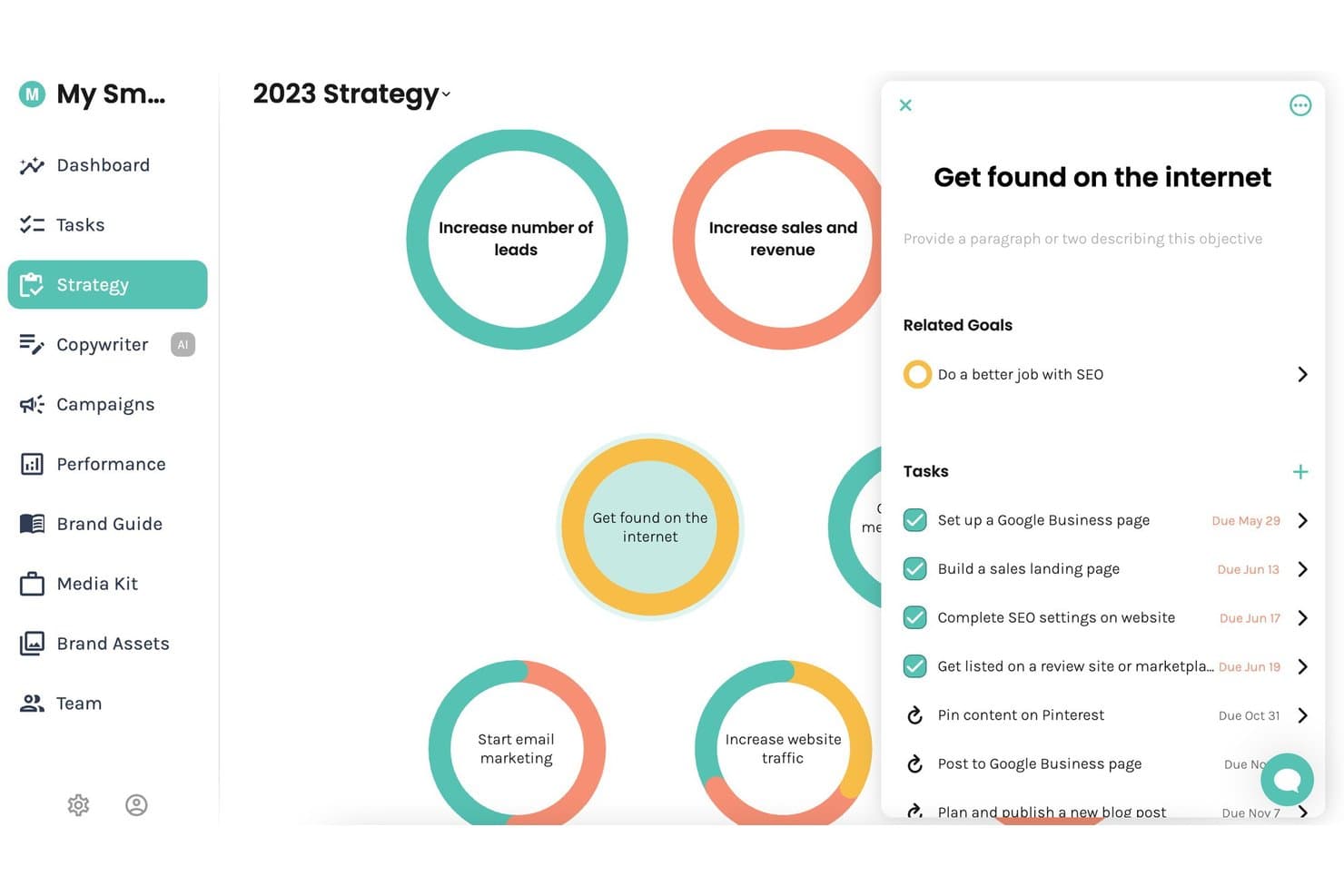
Enji offers a visual strategy board where users can manage marketing objectives, related goals, and tasks with due dates in one centralized view. Enji is an all-in-one marketing planning tool that combines strategy generation, a marketing calendar, AI-powered content creation, social media scheduling, and performance analytics.
Who Is Enji Best For?
Enji is a strong fit for solopreneurs and freelancers who manage their own marketing without a dedicated team or agency behind them.
Why I Picked Enji
Enji earns its spot on my shortlist because its strategy-to-calendar workflow is built specifically for one person running everything alone. I love that answering a 20-question questionnaire produces a personalized marketing plan that auto-populates a calendar as a prioritized to-do list. The AI Copywriter, trained on your specific brand voice, then drafts social captions and blog posts tied directly to those planned tasks.
Enji Key Features
- AI content repurposing tool: Instantly transforms a single piece of content into multiple social posts for different platforms.
- Brand management suite: Centralizes brand voice settings, style guides, media kits, and core brand assets in one place.
- KPI dashboard integration: Pulls website and social analytics directly into your marketing dashboard for quick performance checks.
- Canva integration: Allows you to access and use your Canva designs directly within Enji without reuploading.
Enji Integrations
Enji offers native integrations with Instagram, Facebook, LinkedIn, Pinterest, Threads, TikTok, YouTube, Canva, and Google Analytics 4.
Pros and Cons
Pros:
- All-in-one strategy, calendar, and publishing tool
- AI copywriter trained on your brand
- Questionnaire generates a full marketing calendar
Cons:
- Lacks native SEO keyword research tools
- No multi-user team collaboration supported
Learn more about Enji: Best for collaborative social post scheduling
- Free trial available
- From $49/month (billed annually)
Visit WebsiteCustomer Rating:4.6/5
Loomly plans social posts, schedules content, approvals, and team workflows. Loomly is a social media management platform built around a content calendar, with tools for post creation, multi-channel scheduling, team collaboration, approval workflows, and AI-assisted content generation.
Who Is Loomly Best For?
Loomly is a natural fit for small to mid-size marketing teams and social media managers who need a shared workspace for planning and approving social content.
Why I Picked Loomly
Loomly earns its spot on my shortlist because the approval workflow is genuinely one of the clearest I've used for social content. My team can move a post through multiple review stages, from draft to pending approval to scheduled, without any back-and-forth outside the platform. I also like the post preview feature, which renders how content will look on each specific channel before it goes live. That catches formatting issues early, which saves a lot of last-minute edits.
Loomly Key Features
- Content calendar: A central calendar view for visualizing scheduled posts across all connected social channels by day, week, or month.
- Post ideas: Loomly surfaces content ideas based on trending topics, RSS feeds, and upcoming events to help fill your calendar.
- Asset library: A built-in media library for storing, organizing, and reusing images and videos across multiple posts.
- Analytics dashboard: Track post performance metrics like reach, clicks, and engagement directly within the platform.
Loomly Integrations
Loomly offers native integrations with Slack, Microsoft Teams, Canva, Google Drive, Unsplash, and Giphy, along with social channel connections to Instagram, Facebook, LinkedIn, TikTok, YouTube, Pinterest, Snapchat, Threads, and Google Business Profile. It also connects with Zapier, though a public API for custom integrations is not clearly documented.
Pros and Cons
Pros:
- Approval workflows built for agency-client teams
- Drag-and-drop calendar for quick rescheduling
- Customize post copy per social channel
Cons:
- Analytics lack depth for advanced reporting
- Limited built-in image editing tools
Learn more about Loomly: Best for quick branded content creation
- Free plan available
- From $7.99/user/month (billed annually)
Visit WebsiteCustomer Rating:4.7/5
Adobe Express creates branded graphics, videos, PDFs, and web pages. Adobe Express is a web and mobile content creation tool that lets marketing teams design on-brand social graphics, short videos, PDFs, and web pages using a customizable template library.
Who Is Adobe Express Best For?
Adobe Express is a strong fit for small marketing teams and solo content creators who need to produce branded visual content without a dedicated designer.
Why I Picked Adobe Express
I've included Adobe Express in my top picks because of how well its Brand Kit feature supports consistent content creation at scale. My team stores our logos, color palettes, and fonts directly in the platform, so every asset we produce stays on-brand without manual checks.
I also rely on the one-click resize tool to reformat a single piece of content into every social media dimension we need, which cuts production time significantly across campaigns.
Adobe Express Key Features
- Content scheduler: Plan, schedule, preview, and publish social media posts directly from the platform without switching tools.
- Adobe Firefly AI tools: Generate images, text effects, and templates from text prompts inside the editor.
- Animation effects: Add motion to text, images, and icons to turn static designs into animated social content.
- Adobe Stock library: Access millions of royalty-free photos, videos, and audio files directly within the editor.
Adobe Express Integrations
Adobe Express integrates natively with Adobe ecosystem apps like Creative Cloud, Acrobat, Experience Manager Assets, Workfront, Firefly Custom Models, and GenStudio for Performance Marketing. It also has native third-party integrations with Box, Miro, Slack, HubSpot, Figma, Bynder, Webflow, Google Workspace, and OpenAI's ChatGPT, along with 150+ add-ons available in its marketplace. An add-ons SDK is available for building custom extensions.
Pros and Cons
Pros:
- Brand Kit enforces visual consistency automatically
- AI-generated templates speed up content creation
- Built-in social media scheduling and publishing
Cons:
- Limited multi-user collaboration and approval workflows
- No editorial calendar for long-form content
Learn more about Adobe Express: Best for AI-powered content strategy insights
- Free plan available
- Pricing upon request
Visit WebsiteCustomer Rating:4.6/5
MarketMuse maps content gaps, topic authority, competitors, and roadmaps. MarketMuse is an AI-powered content strategy and planning platform that analyzes your existing content inventory, identifies topic authority gaps, and generates personalized content roadmaps based on competitor analysis and keyword difficulty.
Who Is MarketMuse Best For?
MarketMuse is a strong fit for SEO and content teams at mid-size to enterprise companies that produce high volumes of content and need a data-driven approach to topic prioritization.
Why I Picked MarketMuse
I've included MarketMuse in my top picks because its AI-powered content strategy insights go deeper than standard keyword tools. The Topic Model feature identifies every related subtopic my content needs to rank, while the Personalized Difficulty score prioritizes opportunities based on my domain's existing authority.
I also use the Content Inventory to find underperforming pages that need updating before planning anything new.
MarketMuse Key Features
- Content briefs: Auto-generates structured briefs with recommended topics, headers, and questions to cover.
- Optimize score: Grades your draft against a topic model in real time as you write or paste content.
- SERP analysis: Breaks down what top-ranking pages cover to identify gaps at the planning stage.
- Research tool: Surfaces semantically related concepts and questions for any target topic.
MarketMuse Integrations
MarketMuse offers Google Docs exports and Acrolinx integration, along with a built-in ChatGPT integration using OpenAI's API. Custom integrations are available via the API. Zapier support is not clearly documented.
Pros and Cons
Pros:
- Benchmarks content quality before you publish
- Automated topic clustering replaces manual keyword mapping
- Uncovers subtopic gaps competitors miss entirely
Cons:
- Confusing navigation between projects and plans
- No warning before credits are consumed
Learn more about MarketMuse: Best for cross-team campaign coordination
- Free plan available
- From $10.99/user/month (billed annually)
Visit WebsiteCustomer Rating:4.4/5
Asana coordinates project tracking, task assignments, timelines, and workflows. Asana is a work management platform that combines project tracking, task assignment, timeline planning, and cross-functional workflow coordination across teams.
Who Is Asana Best For?
Asana is a natural fit for mid-size to enterprise marketing teams coordinating campaigns across multiple departments, agencies, or regional teams.
Why I Picked Asana
I've included Asana in my top picks because cross-team campaign coordination is genuinely where it shines. Portfolios let you monitor every campaign project in one view, with live status and workload data across teams.
I also rely on Goals to connect campaign tasks directly to business objectives, so nothing gets worked on in isolation. Dependencies keep handoffs between design, copy, and paid media teams on track without constant check-ins.
Asana Key Features
- Timeline view: A Gantt-style visual planner for mapping out campaign schedules, deadlines, and task sequences across a project.
- Project templates: Pre-built templates for campaigns, editorial calendars, and content launches that give teams a structured starting point.
- Automation rules: Trigger-based automations that reassign tasks, update statuses, or send notifications when set conditions are met.
- Custom fields: Configurable data fields for tracking content type, channel, priority, or any other attribute your team needs on tasks.
Asana Integrations
Asana offers 300+ integrations through its built-in integrations and app directory, including Slack, Google Drive, Microsoft Teams, Salesforce, HubSpot, Jira, Google Calendar, Figma, Canva, and Adobe Creative Cloud. It also connects with Zapier and provides an API for custom integrations.
Pros and Cons
Pros:
- In-app commenting and proofing for draft reviews
- Only one assignee per task reduces ownership confusion
- Multiple project views including calendar and timeline
Cons:
- Recurring tasks only show next instance on calendar
- No built-in content performance tracking or analytics
Learn more about Asana: Best for interactive content design
- Free plan + free demo available
- Pricing upon request
Visit WebsiteCustomer Rating:4.3/5
Ceros creates animated landing pages, interactive reports, and digital experiences. Ceros is a no-code interactive content creation platform that lets marketing teams design and publish animated landing pages, interactive reports, and digital experiences without developer support.
Who Is Ceros Best For?
Ceros is a strong fit for B2B marketing teams at mid-size to enterprise companies that produce high-volume content like eBooks, reports, and campaign landing pages.
Why I Picked Ceros
Ceros earns its spot on my shortlist because no other content tool I've used gives marketing teams the same freedom to design interactive experiences without touching code. I particularly like the freeform design canvas in Ceros Studio, which lets my team build animated, scrollable content like interactive reports and campaign microsites directly in the browser.
The built-in real-time analytics also mean I can see exactly how audiences engage with each piece and adjust before the next content cycle.
Ceros Key Features
- Flex AI design assistant: Generate and build interactive content directly on the canvas using AI modes for ideation, planning, building, and review.
- MarkUp feedback tool: Pin visual annotations and comments directly onto PDFs, websites, and videos to manage content review without email chains.
- Ceros Editor: Let marketers edit copy, images, and interactions in published Ceros content without designer support, using a drag-and-drop asset library.
- Shared asset library: Store, manage, and reuse branded assets across projects to maintain visual consistency across content.
Ceros Integrations
Ceros offers native integrations with Eloqua, Google Analytics, Google Tag Manager, HubSpot, Marketo, and Seismic, along with support for third-party analytics services like Adobe Analytics through its Universal Analytics integration. MarkUp, part of the Ceros suite, connects with Zapier and provides an API for custom integrations. Ceros also has an SDK for embedding interactive content into ecommerce and other external platforms.
Pros and Cons
Pros:
- Inspiration gallery sparks new content ideas
- No coding needed to publish content
- Freeform canvas for custom interactive layouts
Cons:
- Desktop-to-mobile conversion requires manual rebuilding
- Analytics exports are messy and hard to read
Learn more about Ceros: Best for advanced social media analytics
- 14-day free trial
- From $99/month (billed annually)
Visit WebsiteCustomer Rating:4.1/5
Hootsuite schedules, publishes, listens, and analyzes social media content. Hootsuite is a social media management platform that covers content scheduling, publishing, social listening, team collaboration, and analytics across multiple social networks.
Who Is Hootsuite Best For?
Hootsuite is a natural fit for mid-size to enterprise marketing teams that manage social media presence across multiple brands, channels, and regions simultaneously.
Why I Picked Hootsuite
Hootsuite earns its spot on my shortlist because its analytics depth goes well beyond what most content planning tools offer. I particularly like the competitive benchmarking feature, which lets you track up to 20 competitors' posting frequency, audience growth, and engagement rates in one dashboard.
The Advanced Analytics add-on takes things further by letting you build custom metrics with your own formulas and pulling in Google Analytics and Adobe Analytics data alongside your social performance, which gives a genuinely complete picture of content ROI.
Hootsuite Key Features
- Bulk scheduling: Upload and schedule up to 350 posts at once using a CSV file across multiple social accounts.
- Content approval workflows: Route draft posts through multi-step approval chains before publishing, with comments and feedback kept in-thread.
- Social listening streams: Monitor keywords, hashtags, and brand mentions across platforms directly inside your Hootsuite dashboard.
- AI caption writer: Generate post captions from a prompt, with tone and platform adjustments built into the editor.
Hootsuite Integrations
Hootsuite offers over 100 apps and integrations through its App Directory, including Canva, Adobe Express, Salesforce, HubSpot, Slack, Shopify, Google My Business, Dropbox, monday.com, and Wrike. It also connects with Zapier and provides an API for custom integrations.
Pros and Cons
Pros:
- Competitive benchmarking tracks up to 20 rivals
- Best Time to Publish suggests optimal slots
- Supports scheduling to nine social platforms
Cons:
- Scheduled posts occasionally fail without alerts
- Advanced analytics locked behind add-on costs
Learn more about Hootsuite: Best for AI-driven productivity planning
- Free trial available
- From $19/seat/month (billed annually)
Visit WebsiteCustomer Rating:4.2/5
Motion schedules tasks, meetings, and deadlines around priorities and workload. Motion is an AI-powered task and project management tool that automatically schedules tasks, meetings, and deadlines across your calendar based on priorities and workload.
Who Is Motion Best For?
Motion is a strong fit for individual contributors, freelancers, and small teams who manage heavy workloads across multiple projects and need automated scheduling to stay on top of priorities.
Why I Picked Motion
I picked Motion as one of the best because its AI scheduler does something no standard project management tool does: it takes every task across all your active projects and automatically time-blocks them on your calendar, adjusting the plan in real time as priorities shift.
I especially like the AI project builder, which generates a full task list with deadlines and assignees from a simple project description. The proactive deadline risk alerts are also a standout feature for content teams juggling multiple campaigns.
Motion Key Features
- AI Gantt chart: View all active projects on a live timeline that auto-updates as tasks, deadlines, and assignees change, with weekly, quarterly, and yearly views available.
- Recurring task scheduling: Set daily, weekly, monthly, or quarterly tasks and Motion automatically blocks time on your calendar to complete them.
- AI meeting notetaker: Auto-capture notes during meetings so your team can reference decisions and action items without manual note-taking.
- Kanban board view: Switch between list, Kanban, and Gantt views in one click to manage and visualize content work in the format that fits your team.
Motion Integrations
Motion offers native integrations with Google Calendar, Microsoft Outlook 365, iCloud Calendar, Gmail, Zoom, Google Meet, Microsoft Teams, and Siri. It connects with Zapier and provides an API for custom integrations.
Pros and Cons
Pros:
- Email forwarding converts messages into tasks
- Turns meeting notes into assigned tasks
- Auto-reschedules missed tasks to future slots
Cons:
- Mobile app lacks full desktop functionality
- Limited task dependencies outside of projects
Learn more about Motion: Best for influencer campaign management
- 14-day free trial + free demo available
- From $18.75/month (billed annually)

Later schedules social content and manages creator campaigns with analytics. Later is a social media management and influencer marketing platform that combines content scheduling, publishing, and analytics with a built-in creator discovery and campaign management suite.
Who Is Later Best For?
Later is a strong fit for DTC brands, ecommerce companies, and social media managers who run influencer partnerships alongside their organic content programs.
Why I Picked Later
I've included Later in my top picks because its influencer campaign management goes deeper than a simple creator directory. The Incentive Advisor feature shows actual creator pay rates across channels, so you're not guessing at budgets or overpaying.
I also like Later EdgeAI, which pulls from 16M+ analyzed creators to predict campaign outcomes before you launch—recommending creator mixes and flagging risks early. Pair that with unified paid, organic, and sales reporting, and you get a genuinely complete picture of campaign impact.
Later Key Features
- Visual content calendar: Drag-and-drop scheduling across Instagram, TikTok, Facebook, Pinterest, and LinkedIn in one calendar view.
- Media library: Centralized storage for photos and videos with labeling and search so your team can pull assets into posts quickly.
- Linkin.bio: A customizable landing page linked to your Instagram bio that turns individual posts into clickable or shoppable destinations.
- Hashtag suggestions: Auto-generated hashtag recommendations based on your caption content and category.
Later Integrations
Later offers native integrations with Canva, Adobe, Google Drive, Dropbox, Mailchimp, Bazaarvoice, Yotpo, PowerReviews, and Everflow. It supports publishing to Instagram, Facebook, TikTok, Pinterest, LinkedIn, YouTube, Threads, and Snapchat. Later Influence includes a Reporting API for exporting campaign data, but Zapier is not currently supported.
Pros and Cons
Pros:
- Built-in influencer and brand collaboration tools
- Bulk media uploads with usage tracking
- Instagram grid preview before publishing
Cons:
- Team collaboration trails competitors like Hootsuite
- Reels and carousel posts can fail during publishing
Learn more about Later:

Seismic aligns sales content, buyer engagement, coaching, and GTM programs. Seismic is a sales enablement platform that centralizes content management, buyer engagement, sales coaching, and go-to-market program execution for enterprise revenue teams.
Who Is Seismic Best For?
Seismic is built for large enterprise organizations with dedicated sales and marketing teams that need a unified system for managing and distributing sales content at scale.
Why I Picked Seismic
I've included Seismic in my top picks because it's where sales and marketing content actually connects to revenue. Marketing teams can build templated content in Seismic that reps can personalize within set parameters, so the final output stays on-brand without needing a back-and-forth review cycle.
I also like the content analytics, which show which assets reps are actually using in deals and how buyers are engaging with them.
Seismic Key Features
- Digital sales rooms: Create personalized, branded microsites where reps can share curated content collections directly with buyers.
- Predictive content recommendations: AI surfaces the most relevant assets for a rep based on deal stage, industry, and buyer profile.
- Learning and coaching tools: Assign training content, track completion, and reinforce sales skills through built-in coaching workflows.
- Content governance controls: Set expiration dates and access permissions on assets to keep outdated materials out of active use.
Seismic Integrations
Seismic offers integrations through its Seismic Exchange marketplace, including Salesforce, Microsoft Teams, Google Slides, Slack, Zoom, Webex, Gong, Oracle Sales Cloud, Adobe Experience Manager, and Snowflake. An API is available for custom integrations, along with Microsoft Power Automate support for workflow automation.
Pros and Cons
Pros:
- Version control prevents outdated content sharing
- AI recommends assets by deal stage
- Tracks buyer engagement on shared content
Cons:
- Search breaks down with large libraries
- Requires dedicated admin for ongoing management
Learn more about Seismic:
Other Content Planning Software
Here are some additional content planning software options that didn’t make it onto my shortlist, but are still worth checking out:
- 11monday.comBest for custom workflow automation
- 12WrikeBest for built-in visual whiteboarding
- 13CoScheduleBest for integrated marketing calendars
- 14TrelloBest for AI-powered to-do organization
- 15KapostBest for aligning content to customer journey
- 16WistiaBest for branded video content management
- 17AirtableBest for no-code workflow customization
- 18Google CalendarBest for shared calendar scheduling
- 19NotionBest for unified workspace and docs
- 20Content SnareBest for document collection automation
How I Evaluate Content Planning Software
I split my evaluation into two layers: the core capabilities a tool needs—editorial calendar, brief building, workflow approvals—and the differentiators that set the best options apart.
Core Functionality (Table Stakes For This List)
When I'm selecting tools for my list, I rank each one on a scale from 0 (does not offer the functionality) to 5 (excels in this area) for each core functionality listed below. Then, I calculate the tool's total score into a percentage. Each tool needs to achieve a minimum total score of 65% to be considered for inclusion.
- Editorial Calendar: I look for a visual, filterable calendar where you can drag posts between dates, toggle between channel views, and spot gaps in your publishing cadence at a glance.
- Content Briefs & Ideation: A good tool lets you build structured briefs with target keyword, audience, and outline fields—then link them to a shared idea backlog your team draws from.
- Workflow & Collaboration: I evaluate whether the platform supports assignable tasks, custom statuses, and approval steps so a draft moves from writer to editor to stakeholder without email chains.
- Strategy Mapping: Tagging content by funnel stage, persona, or campaign matters. I check whether you can filter your calendar to see, for example, only bottom-of-funnel assets tied to a Q3 launch.
- SEO & Keyword Planning: Whether native or through integrations with tools like Semrush or Ahrefs, I look for keyword data—volume, difficulty, intent—surfaced where planners make topic decisions.
- Analytics & Integrations: The tool should connect to your CMS and analytics stack so you can check how published content performs without leaving the planning environment.
Once I have a list of tools that meet this criteria, I consider what sets each platform apart.
Differentiating Factors (What Sets Vendors Apart)
Here's how I compare and contrast different vendors:
Standout Features
AI-powered brief generation is a major differentiator. Tools that can suggest outlines or draft structured briefs from a target keyword save hours of upfront planning work. I also look for topic cluster visualization, where you can map pillar pages to supporting posts and spot linking gaps across your content library. Content repurposing workflows matter for SaaS teams that need to atomize a webinar or long-form guide into blog posts, social clips, and email sequences within one planning view.
Beyond Features
Tech stack integration depth is one of the first things I evaluate. A content planning tool that syncs with your CMS, SEO suite, and marketing automation platform keeps your team from toggling between tabs to check keyword data or publish status. Scalability matters too—I check whether the tool handles multi-brand content portfolios and flexible seat structures for freelancers. Finally, time-to-value is worth considering. Tools with prebuilt editorial templates and easy migration from spreadsheets or project management platforms get teams planning faster.
How to Choose Content Planning Software
Choosing content planning software comes down to how well it supports your editorial workflow, campaign planning, team coordination, and publishing schedule. The right platform should make it easier to organize ideas, assign work, track deadlines, and maintain visibility across upcoming content.
| If your priority is… | Look for… |
|---|---|
| If your priority is…Managing editorial schedules | Look for…Visual content calendars and timeline views |
| If your priority is…Coordinating multiple contributors | Look for…Assignments, ownership, and status tracking |
| If your priority is…Planning campaigns across channels | Look for…Multi-channel campaign planning |
| If your priority is…Organizing content ideas | Look for…Idea backlogs, briefs, and content repositories |
| If your priority is…Keeping deadlines on track | Look for…Due dates, reminders, and workflow stages |
| If your priority is…Reviewing content before publishing | Look for…Approval workflows and commenting tools |
How to Vet Your Shortlist
- Build a sample editorial calendar: Add several upcoming articles, campaigns, and social posts to see how clearly the platform displays deadlines, channels, owners, and publishing dates.
- Test workflow customization: Create your existing content stages, such as idea, brief, draft, review, approved, and published, to confirm the platform can match your current process.
- Assign a complete content cycle: Create a task, assign an owner, add a deadline, attach a brief, and move the item through review to check how well the system handles handoffs.
- Plan a multi-channel campaign: Add content for several channels under one campaign and confirm whether you can view dependencies, publication dates, and responsibilities in one place.
- Check reporting and visibility: Review workload, overdue tasks, upcoming deadlines, and content status reports to determine whether managers can quickly identify bottlenecks.
What Is Content Planning Software?
Content planning software is a platform used to organize content ideas, editorial calendars, campaigns, assignments, and publishing schedules.
These tools give teams a central place to plan upcoming content, assign responsibilities, track deadlines, and monitor progress from initial idea through publication. Many platforms also include content briefs, approval workflows, campaign views, and collaboration tools.
Content planning software gives teams clearer visibility into what is being created, who owns each task, and when content is expected to go live.
Features
When selecting content planning software, keep an eye out for the following key features:
- Editorial calendar: A centralized, visual schedule that displays planned, drafted, and published content across upcoming weeks or months. This helps teams coordinate campaigns and avoid content overlaps.
- Task assignment: Allows managers to delegate specific tasks, set deadlines, and track each contributor’s progress throughout content production and approval.
- Document management: Provides a place to store, organize, and retrieve all drafts, assets, and supporting files, with version history and content access controls.
- Workflow management: Lets you design, enforce, and monitor each step in the content creation and approval process, ensuring no tasks fall through the cracks.
- Collaboration tools: Enables team members to comment, give feedback, and review content directly within the system, reducing back-and-forth on email or chat.
- Content brief templates: Offers reusable outlines and checklists so every piece starts with clear objectives, target audience details, and reference materials.
- Role-based permissions: Controls what each user can view, edit, or approve, so responsibilities and accountability are always clear.
- Publishing scheduler: Allows you to set specific publication dates and times directly from the calendar, often supporting publishing to multiple channels.
- Analytics and reporting: Tracks both production efficiency and the audience performance of published content, providing insights into what’s working and where to improve.
Common Content Planning Software AI Features
Beyond the standard content planning software features listed above, many of these solutions are incorporating AI with features like:
- Automated content analysis: Uses AI to assess drafts for style, tone, and keyword usage, delivering actionable suggestions to enhance clarity and effectiveness before publishing.
- Intelligent content ideation: Scans current trends and past content performance to recommend timely and relevant topics, helping teams maintain a fresh editorial calendar.
- Predictive engagement forecasting: Analyzes historical analytics and industry data to predict how well different content concepts will resonate with your audience before creation.
- Smart workflow automation: Recognizes dependencies and bottlenecks in your pipeline, then automatically routes or escalates tasks based on predicted delays or priority shifts.
- Content gap identification: Employs AI to analyze owned and competitor content, surfacing areas and subjects that are underrepresented in your content strategy.
Benefits
Implementing content planning software provides several benefits for your team and your business. Here are a few you can look forward to:
- Centralized content management: Brings all schedules, drafts, and approvals into one workspace, reducing fragmentation and lost files.
- Stronger team accountability: Assigns clear task ownership and sets deadlines, making it easy to track progress and ensure content is delivered on time.
- Smoother collaboration: Supports feedback and approvals within the platform, so everyone stays on the same page without relying on endless email chains.
- Quicker time to publish: Flags bottlenecks and automates steps in the workflow, keeping content creation moving and reducing delays.
- Higher content quality: Standardizes briefs and processes, helping every piece meet your organization’s guidelines and brand standards.
- Actionable analytics: Provides built-in performance insights so you can see what’s working and adjust your strategy to drive better results.
- Reduced manual effort: Automates repetitive tasks and integrates with your existing tools, freeing up time for creative work.
Costs and Pricing
Selecting content planning software requires an understanding of the various pricing models and plans available. Costs vary based on features, team size, add-ons, and more. The table below summarizes common plans, their average prices, and typical features included in content planning software solutions:
Plan Comparison Table for Content Planning Software
| Plan Type | Average Price | Common Features |
|---|---|---|
| Plan TypeFree Plan | Average Price$0 | Common FeaturesBasic calendar, simple task tracking, limited users, and email support. |
| Plan TypePersonal Plan | Average Price$5–$15/user/month | Common FeaturesSingle user access, unlimited drafts, enhanced task options, and basic integrations. |
| Plan TypeBusiness Plan | Average Price$15–$40/user/month | Common FeaturesMultiple users, collaborative workflows, role-based access, advanced analytics, integrations, and approvals. |
| Plan TypeEnterprise Plan | Average Price$40–$100+/user/month | Common FeaturesUnlimited users, custom integrations, advanced security, dedicated support, API access, and compliance tools. |
Content Planning Software FAQs
Here are some answers to common questions about content planning software:
How does content planning software improve team coordination?
Content planning software centralizes schedules, task assignments, and collaboration tools, so everyone knows deadlines, responsibilities, and project status. This helps your team align on goals and keep projects on track.
Can content planning software support different types of content, like blogs, videos, and social posts?
Yes, most content planning software is flexible enough to manage multiple content types, including blogs, videos, infographics, and social campaigns. You can usually customize templates, workflows, and calendars for each format.
What should I consider when choosing content planning software for a large team?
Look for features like advanced workflow management, role-based permissions, and integrations with existing tools. Make sure the platform can handle multiple users, varied approval chains, and complex content schedules.
Is training required to use content planning software?
No, most tools are designed to be user-friendly and include onboarding guides, step-by-step tutorials, and template libraries. Some vendors also offer live onboarding or support if your team wants extra help.
How does content planning software help measure content performance?
Most platforms include analytics and reporting features that track content production metrics and post-publish performance. These insights help you see which topics and formats drive results so you can optimize future planning.