

Content marketing software helps you plan, create, publish, and analyze your digital content across multiple channels from one place. If you’re comparing the best content marketing software, you’re likely feeling the pressure to manage high content demands, multiple stakeholders, and fragmented tools.
Choosing the right platform can clarify your workflow, help you hit deadlines, keep your team aligned, and show how your content impacts your business. In this guide, you’ll get a practical breakdown of the top solutions so you can match your team’s needs with the software that actually delivers real value.
Why Trust Our Software Recommendations
6,700+
Reviews
20
Industry experts
16+
Evaluation factors
14
Years
Our team has been testing and reviewing software since 2012. As publishers and media operators ourselves, we know how difficult—and important—it is to choose the right software.
For this guide, we evaluated tools using hands-on testing and independent research, scoring tools using our selection criteria.
Our reviews reflect our human editorial judgment, not a sales pitch.
Content Marketing Software Comparison Table
This comparison table summarizes pricing details for my top content marketing software:
| Tool | Best For | Trial Info | Price | ||
|---|---|---|---|---|---|
| 1 | Best for small teams | 14-day free trial | From $29/month | Website | |
| 2 | Best for AI-powered content optimization | 14-day free trial | From $139/month | Website | |
| 3 | Best for multichannel content scheduling | Free plan available | From $5/month per channel (billed annually) | Website | |
| 4 | Best for creating interactive experiences | Free plan + free demo available | Pricing upon request | Website | |
| 5 | Best for user-generated content curation | Free demo available | From $1,249/month | Website | |
| 6 | Best for marketing data integration | Free demo available | From $200/month (billed annually) | Website | |
| 7 | Best for lead data governance | Free demo available | Pricing upon request | Website | |
| 8 | Best for AI-generated interactive content | 14-day free trial | Pricing upon request | Website | |
| 9 | Best for template-driven project planning | Free plan + free demo available | From $5/user/month | Website | |
| 10 | Best with AI-powered resource allocation | Free plan available; 14-day free trial | From $9/user/month (billed annually) | Website |


Best Content Marketing Software Reviews
Below are my detailed summaries of the best content marketing software that made it onto my shortlist. My reviews offer a detailed look at the features, best use cases, and integrations of each platform to help you find the best one for you.

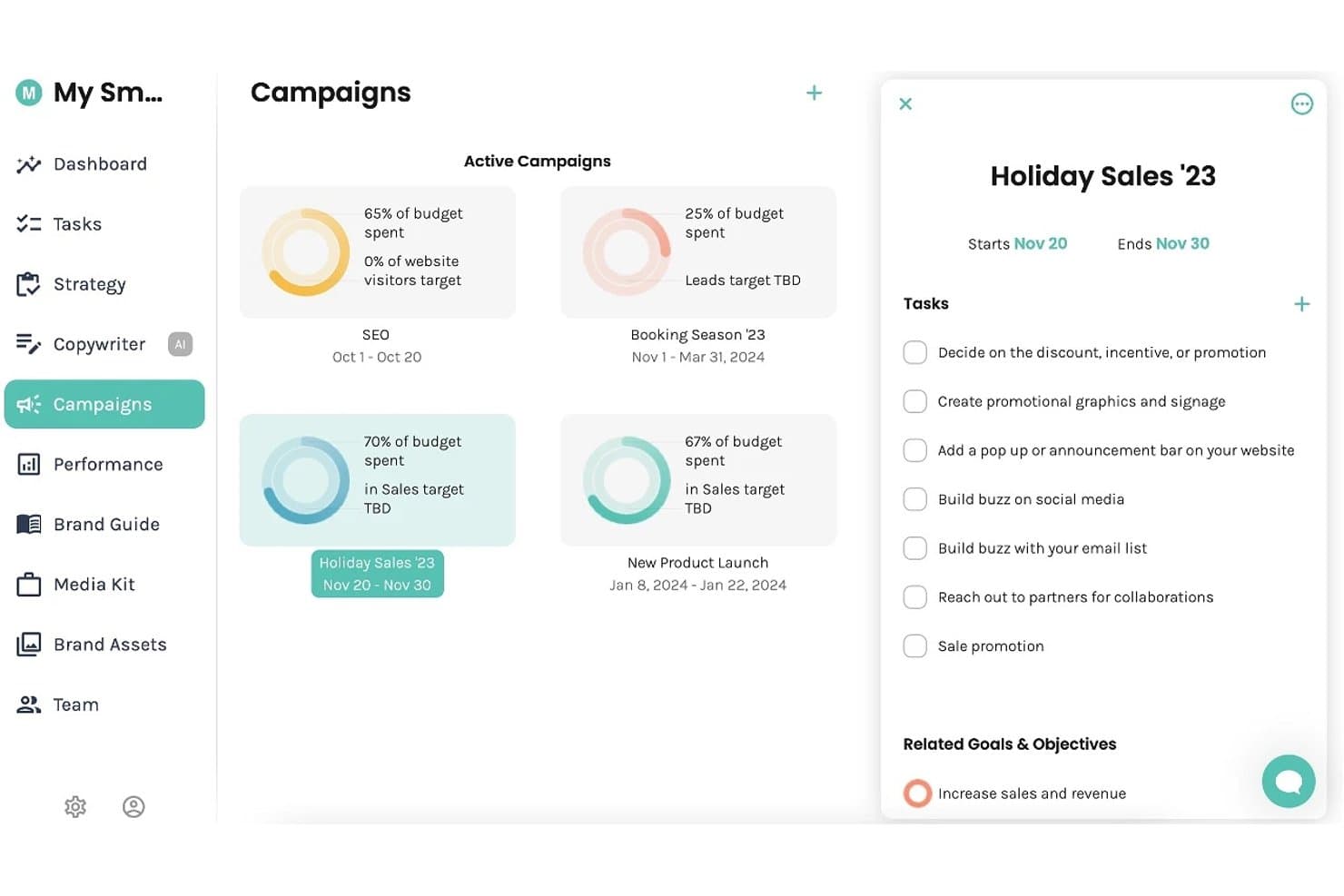
Enji offers a Campaigns dashboard where users can track active campaigns, budget spend, and manage tasks and goals. Enji is a marketing planning and execution platform for small businesses that combines AI-powered content creation, a marketing calendar, social media scheduling, and performance tracking.
Who Is Enji Best For?
Enji is a strong fit for solopreneurs and freelancers who manage their own marketing without a dedicated team or marketing background.
Why I Picked Enji
I picked Enji as one of the best because it bundles strategy generation, AI copywriting, and social scheduling into a single platform built specifically for one- or two-person teams. I love how the Marketing Strategy Generator builds a personalized plan from a short questionnaire, so small teams don't have to start from a blank page. The Content Repurposing Tool then turns a single blog post or caption into a full month of social content.
Enji Key Features
- KPI dashboard: Centralizes social and website analytics for quick access to performance metrics.
- Marketing campaign templates: Provides ready-to-use campaign outlines with tasks and timing built in.
- Brand library: Organizes brand voice, visual assets, and messaging guidelines in a single location.
- Canva integration: Allows users to pull designs directly into content workflows without manual uploading.
Enji Integrations
Enji offers native integrations with Canva, Google Analytics, Facebook, Instagram, Pinterest, YouTube, LinkedIn, TikTok, and Threads.
Pros and Cons
Pros:
- Social scheduling and planning in one place
- Strategy builder removes guesswork for solopreneurs
- Built-in AI generates content from scratch
Cons:
- No multi-user collaboration or approval workflows
- Limited SEO and keyword research tools
Learn more about Enji: Best for AI-powered content optimization
- 14-day free trial
- From $139/month
Visit WebsiteCustomer Rating:4.5/5
Semrush analyzes keywords, competitors, content performance, and site health. Semrush is an SEO and content marketing platform with tools for keyword research, topic ideation, on-page content optimization, competitive content analysis, and technical site auditing.
Who Is Semrush Best For?
Semrush is a strong fit for SEO-focused content marketers, in-house marketing teams, and digital agencies managing content strategy and search performance at scale.
Why I Picked Semrush
I've included Semrush in my top picks because its AI content optimization tools go deeper than most. The SEO Writing Assistant scores your content in real time against top-ranking pages for tone, readability, and keyword use as you write.
I also rely on ContentShake AI to generate briefs and draft articles directly from search data. That combination of live scoring and AI drafting in one platform is what sets it apart.
Semrush Key Features
- Keyword Magic Tool: Search a seed keyword to generate thousands of related keyword ideas with search volume, difficulty scores, and intent filters.
- Topic Research: Enter a subject to surface trending subtopics, headline ideas, and related questions pulled from top-performing content.
- Content audit: Connect your sitemap to analyze existing pages by traffic, backlinks, and content quality to identify what to update or remove.
- On-page SEO checker: Get a prioritized list of optimization recommendations for specific URLs based on your target keywords and top competitors.
Semrush Integrations
Semrush offers integrations with Google Analytics, Google Search Console, Google Ads, Google Docs, Google Sheets, Looker Studio, WordPress, Trello, and social platforms including Facebook, Instagram, LinkedIn, Pinterest, and YouTube. It also has partner integrations with tools like monday.com, Wix, AIOSEO, Zoho Analytics, and Scalenut. Semrush connects with Zapier, and an API is available for custom integrations.
Pros and Cons
Pros:
- Built-in competitor content gap analysis
- Tracks brand visibility in AI search
- Largest keyword database with 25 billion terms
Cons:
- Free plan has very limited daily queries
- Add-on costs can increase unexpectedly
Learn more about Semrush: Best for multichannel content scheduling
- Free plan available
- From $5/month per channel (billed annually)
Visit WebsiteCustomer Rating:4.4/5
Buffer schedules, publishes, and analyzes social content across channels. Buffer is a social media management platform that lets you schedule, publish, and analyze content across channels like Instagram, LinkedIn, TikTok, X, and more, with built-in tools for content creation, team collaboration, and audience engagement.
Who Is Buffer Best For?
Buffer is a good fit for small businesses, freelancers, and solo creators who manage social media content across multiple platforms without a large team.
Why I Picked Buffer
Buffer earns its spot on my shortlist for how well it handles multichannel content scheduling across 11 platforms, including TikTok, LinkedIn, Instagram, YouTube, and Bluesky.
I love that you can create a post once and crosspost it everywhere, with per-channel previews so you can see exactly how it'll render before it goes live. The Queue feature keeps your publishing calendar consistently filled without you manually scheduling every single post.
Buffer Key Features
- AI assistant: Generate post captions, repurpose existing content, and get suggestions for different tones directly inside the post composer.
- Analytics dashboard: Track post performance by channel, including reach, clicks, and engagement, with exportable reports.
- Engagement inbox: View and reply to comments and mentions across connected social channels from a single inbox.
- Content ideas: Log and store content ideas in Buffer before they're ready to schedule, so nothing gets lost between brainstorms.
Buffer Integrations
Buffer offers 24 integrations, including Canva, Bitly, Dropbox, Google Drive, Feedly, WordPress, OneDrive, Unsplash, IFTTT, and Make. It also connects with Zapier for additional automation workflows.
Pros and Cons
Pros:
- Saves reusable hashtag groups for posts
- AI repurposes content per individual channel
- Supports scheduling to 11+ social channels
Cons:
- Limited team collaboration for larger groups
- Analytics are basic on lower-tier plans
Learn more about Buffer: Best for creating interactive experiences
- Free plan + free demo available
- Pricing upon request
Visit WebsiteCustomer Rating:4.3/5
Ceros builds interactive infographics, microsites, lookbooks, and landing pages. Ceros is a no-code design platform for building interactive digital content, including infographics, microsites, lookbooks, and landing pages with animation and embedded media.
Who Is Ceros Best For?
Ceros is a strong fit for content and creative teams at B2B companies who produce high-volume marketing assets and need to publish without relying on developers.
Why I Picked Ceros
Ceros earns its spot on my shortlist because its Studio editor lets my team build scroll-triggered animations, clickable hotspots, and layered interactive states without writing a single line of code.
I especially like the built-in engagement analytics, which show exactly where readers click and drop off inside a published experience. That kind of content-level behavioral data is something static PDFs and blog posts simply can't provide.
Ceros Key Features
- Template library: Browse and customize pre-built templates for common content formats like infographics, pitch decks, and interactive reports.
- Real-time collaboration: Multiple team members can work inside the same Studio project simultaneously, with live edits visible to all.
- Embed publishing: Publish finished experiences as embeddable code snippets that drop into any CMS, website, or landing page.
- Brand kit: Store and apply shared fonts, colors, and logos across projects to keep content on-brand.
Ceros Integrations
Ceros offers a small set of integrations focused on marketing automation and analytics, including Google Analytics, Google Tag Manager, HubSpot, Marketo, Eloqua, and Adobe Analytics. Its MarkUp collaboration tool integrates with Microsoft Teams and Slack, and connects with Zapier. Ceros also provides an SDK for building custom plugins and extensions.
Pros and Cons
Pros:
- Small teams can create assets without developers
- Studio can freeze on complex projects
- No-code animation familiar to Adobe users
Cons:
- Hosted content may limit SEO control
- Studio can freeze on complex layered projects
Learn more about Ceros: Best for user-generated content curation
- Free demo available
- From $1,249/month
Visit WebsiteCustomer Rating:4.4/5
Pixlee curates customer and influencer content across ecommerce and social channels. Pixlee is a UGC platform, now part of Emplifi, that lets brands collect, curate, and publish customer and influencer content across ecommerce pages, social channels, and marketing campaigns.
Who Is Pixlee Best For?
Pixlee is a natural fit for ecommerce and retail brands that rely on social proof and customer content to drive product page conversions.
Why I Picked Pixlee
I've included Pixlee in my top picks because its rights management workflow is something I haven't seen done as cleanly elsewhere. When my team spots customer photos on Instagram or TikTok, Pixlee's automated outreach sends rights approval requests directly to the content creators, so we're never manually DMing dozens of people.
I also like that its AI image recognition automatically tags products within UGC photos, making it easy to turn a customer selfie into a shoppable gallery on a product page.
Pixlee Key Features
- Customizable display: Build dynamic UGC galleries and carousels that you can embed directly on product pages, homepages, or campaign landing pages.
- Ratings & reviews collection: Gather and display product reviews, Q&As, and seller ratings across your site, with moderation tools for language filtering and content tagging.
- Publisher integration: Schedule and distribute UGC across digital channels from within the same platform where you collect and curate it.
- Influencer discovery: Search a database of over 30 million influencers using AI-matching to find creators that align with your brand, then manage campaigns and track ROI in one place.
Pixlee Integrations
Pixlee offers ecommerce integrations with Shopify, BigCommerce, Magento, Adobe Commerce, and Salesforce Commerce Cloud, along with integrations with marketing platforms like Klaviyo, Attentive, Emarsys, and Movable Ink. It also supports Google Tag Manager, provides iOS and Android SDKs, and has an API for custom integrations.
Pros and Cons
Pros:
- UGC widgets update in real time on-site
- Influencer search filters by follower size and hashtags
- Automates hashtag and location-based content discovery
Cons:
- High content volume makes moderation time-consuming
- Embedded widgets can increase page load time
Learn more about Emplifi (formerly Pixlee): Best for marketing data integration
- Free demo available
- From $200/month (billed annually)
Visit WebsiteCustomer Rating:4.5/5
Funnel unifies marketing data, attribution, modeling, and automated reporting. Funnel is a marketing intelligence platform that collects, unifies, and organizes data from 600+ marketing sources, with built-in tools for multi-touch attribution, marketing mix modeling, and automated reporting.
Who Is Funnel Best For?
Funnel is a natural fit for performance marketing teams at mid-size to enterprise companies managing paid spend across multiple channels who need clean, centralized data for reporting.
Why I Picked Funnel
I've included Funnel in my top picks because no other tool in this space handles cross-channel data normalization as cleanly. When my team pulls in data from paid social, search, and programmatic simultaneously, Funnel's data mapping layer reconciles mismatched field names and metrics automatically.
I also like that it pushes clean, analysis-ready data directly to downstream tools like Looker Studio and BigQuery without manual exports.
Funnel Key Features
- Multi-touch attribution modeling: Assign conversion credit across multiple paid and organic touchpoints using configurable attribution models.
- Budget pacing tracker: Monitor actual spend against planned budgets in real time across all active campaigns and channels.
- Custom metric builder: Create calculated metrics by combining raw data fields from different sources into a single, unified measure.
- Automated report scheduling: Set reports to generate and deliver to stakeholders on a recurring schedule without manual intervention.
Funnel Integrations
Funnel offers 635 native data connectors for pulling in marketing data from sources like Google Ads, Facebook Ads, LinkedIn, TikTok Ads, Microsoft Advertising, Instagram, and Pinterest, plus 44 destination connectors for pushing data to tools like Google Sheets, Looker Studio, BigQuery, Tableau, Microsoft Power BI, and Amazon S3. It also supports webhooks for file imports via Zapier and provides an API for custom integrations.
Pros and Cons
Pros:
- Historical data tracking across all sources
- Supports 500+ advertising platform connectors
- Unifies cross-channel marketing data automatically
Cons:
- Data refreshes every 2-4 hours only
- Limited built-in visualization and dashboarding
Learn more about Funnel:

Integrate validates, deduplicates, and routes B2B leads from demand sources. Integrate is a B2B lead management platform built for enterprise marketing teams that centralizes lead ingestion from multi-channel demand sources and automates lead validation, deduplication, compliance checks, and data delivery to MAPs and CRMs.
Who Is Integrate Best For?
Integrate is a strong fit for enterprise demand generation teams that buy leads from multiple third-party vendors and need a central system to validate and normalize that data before it hits their CRM.
Why I Picked Integrate
I picked Integrate as one of the best because its lead governance engine does something no basic MAP can replicate. Every inbound lead, regardless of source, goes through automated validation, deduplication, field standardization, and privacy compliance checks before it ever reaches your CRM.
I especially like the out-of-the-box content syndication reporting, which lets my team see exactly which partners are delivering quality leads versus burning budget. That level of data control is what makes Integrate the right call for teams managing high-volume, multi-source demand programs.
Integrate Key Features
- Buying group engagement tracking: Monitor how groups of stakeholders from the same account interact with your campaigns across channels.
- Privacy compliance automation: Automatically screen every incoming lead against global privacy regulations like GDPR before it reaches your MAP or CRM.
- Channel and partner performance dashboards: Use out-of-the-box reports to compare lead quality and volume across your content syndication partners and demand channels.
- Lead field transformation: Map and reformat incoming lead data fields to match your CRM or MAP's exact data schema on ingestion.
Integrate Integrations
Integrate offers pre-built integrations with Salesforce, Marketo, 6sense, and HubSpot, along with a universal API and inbound connector for custom integrations with any technology or data source. The platform also connects with event lead capture tools through its Captello partnership and supports CSV file imports for non-integrated channels. Zapier support is not clearly documented.
Pros and Cons
Pros:
- Real-time campaign performance reporting by source
- Built-in GDPR compliance screening on ingestion
- Automated lead validation catches bad data pre-CRM
Cons:
- Bulk source updates require repetitive manual edits
- Initial campaign setup takes significant onboarding time
Learn more about Integrate:

Dot creates no-code quizzes, product finders, videos, and gamified campaigns. Dot is an AI-powered interactive content platform that lets you build quizzes, product finders, interactive videos, flipbooks, assessments, guided selling experiences, and gamified campaigns without writing any code.
Who Is Dot Best For?
Dot is a strong fit for marketing teams at mid-size to enterprise companies that produce high volumes of campaign content and want to move beyond static formats.
Why I Picked Dot
I picked Dot as one of the best because its AI Interactive Builder is something my team genuinely relies on to turn campaign briefs into live content fast. I type a prompt like "build a five-question product finder for a skincare brand" and Dot generates the full logic, triggers, and layout in minutes.
I also like that every AI-generated component saves as a reusable building block inside Dot.vu Studio, so my team can repurpose quiz formats or calculator structures across multiple campaigns without rebuilding from scratch.
Dot Key Features
- Branching video builder: Add decision points to videos so viewers choose their own path, creating a different viewing experience based on their answers.
- Gamification engine: Layer badges, points, leaderboards, and referral mechanics onto any interactive experience, including quizzes and flipbooks.
- Lead gating controls: Gate an entire experience or specific sections with a lead form, letting you decide exactly when to capture visitor data.
- A/B testing: Set conditional rules within any project to test different content variations and identify what drives the most engagement.
Dot Integrations
Dot offers integrations with Salesforce, HubSpot, Mailchimp, Google Analytics, Google Tag Manager, Adobe Marketo Engage, Pardot, LinkedIn, Facebook, and YouTube. It also connects with Zapier and supports custom JavaScript through its code addon for additional third-party connections.
Pros and Cons
Pros:
- No-code editor for branching video experiences
- Built-in gamification for quizzes and campaigns
- 200+ ready-to-customize interactive content templates
Cons:
- Bulk action editing across slides is unavailable
- Editor navigation feels unintuitive at first
Learn more about Dot: Best for template-driven project planning
- Free plan + free demo available
- From $5/user/month

Hive for Marketers coordinates campaigns, content schedules, approvals, and teamwork. Hive for Marketers is a project management platform built for marketing teams, with tools for campaign planning, content scheduling, proofing and approvals, and team collaboration across multiple project views.
Who Is Hive for Marketers Best For?
Hive for Marketers is a strong fit for in-house marketing teams at small to mid-size companies that run multiple concurrent campaigns.
Why I Picked Hive for Marketers
I picked Hive for Marketers as one of the best because its template library is built specifically for marketing workflows. There are ready-to-use templates for content calendars, paid campaigns, PR outreach, and product launches, and each one comes pre-loaded with phased tasks, status stages, and sample assets.
I also like that you can switch any template between Gantt, Kanban, and table views without rebuilding the project structure. That flexibility makes it easy to start a new campaign from scratch in minutes, not hours.
Hive for Marketers Key Features
- Proofing and approvals: Annotate and approve files directly inside Hive, with internal or external reviewers attached to specific tasks.
- Form intakes: Build intake forms that route incoming content requests straight into your project boards as new action cards.
- Resourcing: Assign team members to projects and view their availability across active campaigns in a single timeline.
- Hive Notes: Create collaborative documents that connect directly to tasks, useful for drafting briefs, meeting notes, or content outlines.
Hive for Marketers Integrations
Hive offers 1,000+ integrations in total, with native integrations including Google Drive, Google Calendar, Dropbox, Slack, Zoom, Jira, GitHub, Microsoft OneDrive, Microsoft Teams, and Bynder. It also connects with Zapier and provides an API for custom integrations.
Pros and Cons
Pros:
- Proofing supports markup and version comparison
- External reviewers join without paid seats
- Built-in chat threads keep content feedback organized
Cons:
- Key features like proofing are paid add-ons
- Mobile app lacks full desktop functionality
Learn more about Hive for Marketers: Best with AI-powered resource allocation
- Free plan available; 14-day free trial
- From $9/user/month (billed annually)
Visit WebsiteCustomer Rating:4.6/5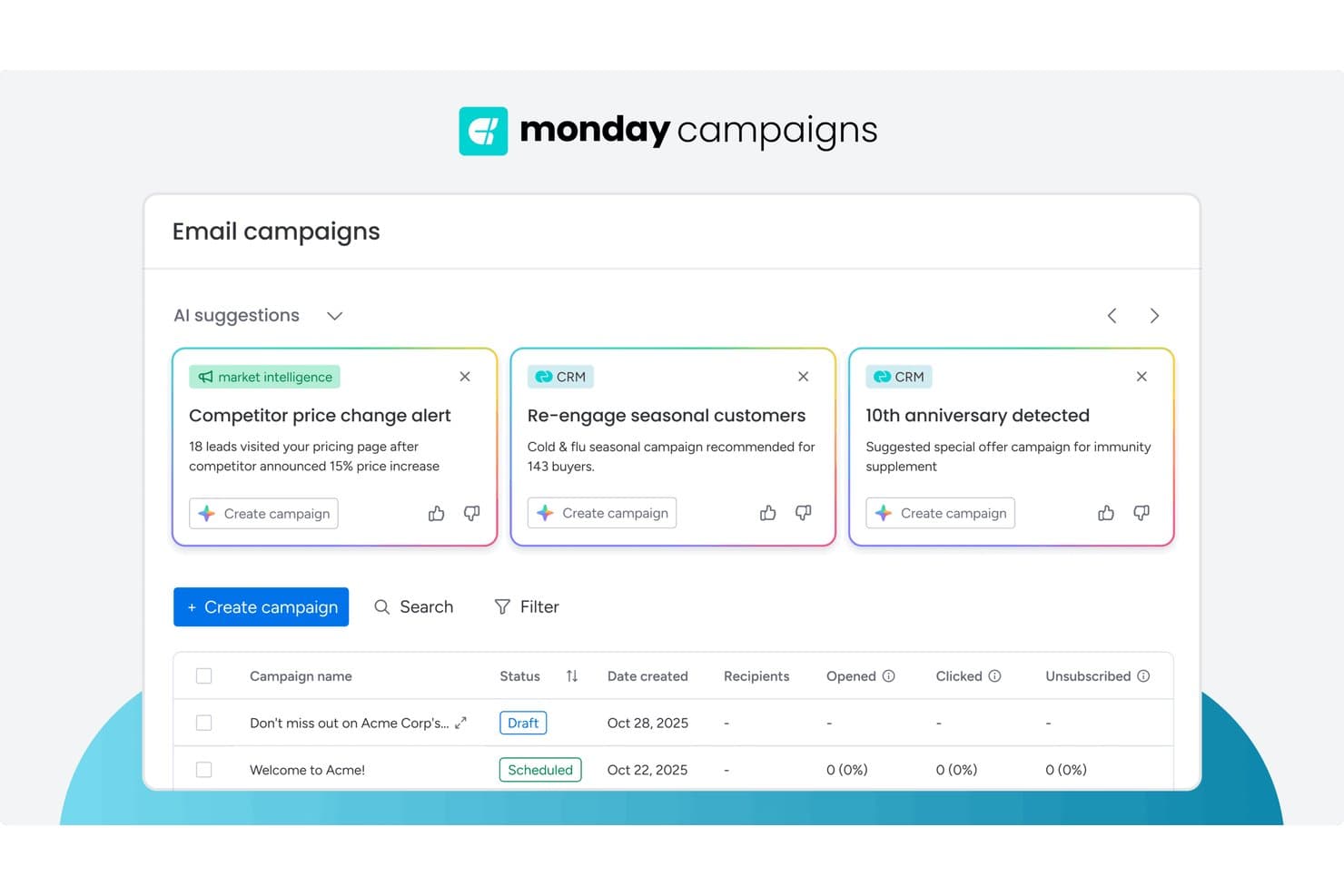
monday AI Workspace offers AI-powered campaign suggestions pulling from CRM and market intelligence data to help marketers create targeted email campaigns faster. monday AI Workspace is an AI-powered work management platform that combines editorial planning, content pipeline management, cross-functional workflow automation, and multi-team collaboration tools in a single workspace.
Who Is monday AI Workspace Best For?
It's a strong fit for marketing teams that manage complex, cross-functional content operations and need a flexible, AI-assisted workspace to coordinate multiple stakeholders.
Why I Picked monday AI Workspace
monday AI Workspace earns its spot on my shortlist because its AI-powered resource allocation genuinely changes how content teams operate at scale. I use the AI workflow builder to automatically route new content requests to the right writer or designer based on current workload, rather than manually checking who has capacity. The AI Blocks feature goes further, triggering automated label assignments and handoffs when a piece moves between drafting, review, and approval stages.
monday AI Workspace Key Features
- Multi-view editorial calendar: Visualize content plans with board, timeline, Gantt, and calendar views for different levels of planning detail.
- Workdocs with real-time editing: Draft, share, and collaboratively edit documents with version history and commenting in the same workspace.
- Campaign management boards: Track creative briefs, approvals, and production workflows with customizable columns and automations.
- Native integration hub: Connect to HubSpot, Salesforce, Google Drive, WordPress, Slack, and more for seamless martech stack handoffs.
monday AI Workspace Integrations
monday AI Workspace offers hundreds of native integrations through its built-in integrations and marketplace, including Slack, Salesforce, HubSpot, Google Drive, Microsoft 365, Outlook, Gmail, Mailchimp, Adobe Creative Cloud, and Canva. It also supports Zapier and provides an API for custom integrations.
Pros and Cons
Pros:
- Automated campaign handoffs and label triggers
- Highly flexible editorial calendar views
- AI-powered workload balancing for content teams
Cons:
- Approval process lacks granular permission settings
- No built-in content optimization for SEO
Learn more about monday AI Workspace:
Other Content Marketing Software
Here are some additional content marketing software options that didn’t make it onto my shortlist, but are still worth checking out:
- 11HootsuiteBest for social analytics depth
- 12WrikeBest for cross-team project visibility
- 13Falcon.ioBest for social media campaign planning
- 14PaperfliteBest for real-time content engagement tracking
- 15Facelift CloudBest for GDPR-compliant social publishing
- 16SprinklrBest for unified brand management
- 17TrelloBest for visual task organization
- 18KapostBest for B2B content collaboration
- 19ContentlyBest for managing large-scale content operations
- 20BuzzSumoBest for content performance insights
- 21SpottBest for shoppable media experiences
- 22ContentStudioBest for multi-network social publishing
- 23CurataBest for automated content curation
- 24WordtuneBest for AI-powered editorial suggestions
- 25TopicBest for SEO-focused content briefs
- 26IssuuBest for digital magazine publishing
- 27FoleonBest for interactive content creation at scale
- 28ClearVoiceBest for end-to-end freelancer collaboration
- 29MyAdBoxBest for distributed brand asset control
- 30BlogelyBest for research-driven blog writing
- 31Ion by Rock ContentBest for enterprise interactive content
- 32ReadableBest for content readability analysis
- 33OrchestraCMSBest for Salesforce-native content workflows
How I Evaluate Content Marketing Software
I split my evaluation into baseline requirements every SaaS content team needs—editorial workflows, SEO, analytics—and the differentiators that set tools apart.
Core Functionality (Table Stakes For This List)
When I'm selecting tools for my list, I rank each one on a scale from 0 (does not offer the functionality) to 5 (excels in this area) for each core functionality listed below. Then, I calculate the tool's total score into a percentage. Each tool needs to achieve a minimum total score of 75% to be considered for inclusion.
- Editorial Planning & Calendar: I check whether the calendar supports campaign grouping, assignees, and deadlines—like planning a SaaS product launch across blog, email, and social.
- Content Creation & Collaboration: Teams need to draft, review, and approve assets in one place, so I look for inline comments, approval workflows, and version history.
- SEO & Content Optimization: From keyword research to on-page scoring, I evaluate how well a tool helps writers build search-optimized briefs and hit target topics.
- Multi-Channel Publishing & Distribution: I look for native publishing to CMS, social, and email so a single blog post can be scheduled across WordPress, LinkedIn, and HubSpot.
- Content Performance Analytics: Traffic and engagement are a start, but I evaluate whether the tool ties content to conversions, MQLs, and pipeline—not just page views.
- Workflow Automation & Integrations: A content tool needs to fit your martech stack, so I check for native connections to platforms like HubSpot, Salesforce, GA4, and Slack.
Once I have a list of tools that meet this criteria, I consider what sets each platform apart.
Differentiating Factors (What Sets Vendors Apart)
Here's how I compare and contrast different vendors:
Standout Features
AI-powered content generation is a big differentiator. I evaluate whether a tool can draft briefs, outlines, or full posts tuned to your brand voice rather than producing generic output. Competitive content intelligence also matters—knowing which topics your SaaS competitors rank for helps you spot gaps faster than manual SERP analysis. I also look at custom attribution reporting to see if the tool connects content assets to trials, signups, and pipeline instead of stopping at traffic dashboards.
Beyond Features
Martech stack fit is one of the first things I evaluate. A content tool that doesn't sync with your CRM, analytics, or automation platform creates data silos that make attribution impossible. Time-to-value also weighs heavily—I check whether a vendor offers SaaS-specific templates and onboarding resources so a two-person content team isn't spending weeks configuring workflows. Pipeline impact matters too. I look for case studies from SaaS companies showing the tool helped tie content to revenue outcomes, not just vanity metrics.
How to Choose Content Marketing Software
It’s easy to get bogged down in long feature lists and complex pricing structures. To help you stay focused as you work through your unique software selection process, here’s a checklist of factors to keep in mind:
| Factor | What to Consider |
|---|---|
| FactorScalability | What to ConsiderWill the tool support your growth in content volume, user seats, and new channels without steep added costs? |
| FactorIntegrations | What to ConsiderDoes it connect natively to your CMS, analytics, CRM, and social platforms to avoid manual imports or exports? |
| FactorCustomizability | What to ConsiderCan you modify workflows, approval processes, or brand guidelines to match your team’s day-to-day reality? |
| FactorEase of use | What to ConsiderWill users adapt quickly, or is there potential resistance due to complexity or unfamiliar UX patterns? |
| FactorImplementation and onboarding | What to ConsiderWhat resources does initial setup demand? Look for required IT involvement, migration support, and learning aids. |
| FactorCost | What to ConsiderAre all must-have features available at your budget? Check for hidden fees or add-on pricing that impact TCO. |
| FactorSecurity safeguards | What to ConsiderDoes the software meet your organization’s data protection, access controls, and compliance requirements? |
| FactorSupport availability | What to ConsiderWhen issues pop up, is help available in your team’s time zone—and is support limited to chat, or multi-channel? |
What Is Content Marketing Software?
Content marketing software is a digital platform designed to help teams plan, create, organize, distribute, and analyze marketing content across multiple channels.
These tools centralize content workflows, support collaboration among team members, and provide campaign performance tracking, making it easier to align content output with business goals and audience needs.
Features
When selecting content marketing software, keep an eye out for the following key features:
- Content calendar: Organizes publishing schedules, deadlines, and campaign timelines, letting your team see upcoming content at a glance and coordinate efforts.
- Workflow management: Enables you to set up stages like drafting, review, approval, and publishing, so everyone knows their responsibilities and tasks move forward without bottlenecks.
- Multi-channel distribution: Allows you to publish or schedule content across blogs, social media, email, and more from one platform, saving time and ensuring consistency.
- Collaboration tools: Supports in-app commenting, file sharing, and task assignments so writers, designers, and editors can seamlessly work together in real-time.
- Digital asset management: Centralizes brand images, videos, templates, and documents, ensuring the right people can quickly find, update, or reuse resources.
- Content analytics: Tracks metrics like reach, engagement, and conversions to help your team understand which content performs best and inform future strategy.
- Version control: Maintains a record of edits and past drafts, allowing users to revert to earlier versions and track changes for accountability.
- Permissions and roles: Lets you define who can create, edit, approve, or publish content, preventing errors and maintaining security.
- Template library: Provides pre-built layouts and content outlines that speed up production and help maintain brand consistency across campaigns.
Common Content Marketing Software AI Features
Beyond the standard content marketing software features listed above, many of these solutions are incorporating AI with features like:
- Automated content suggestions: AI reviews your content calendar and marketing strategy to propose fresh topic ideas, draft outlines, or headlines tailored to your audience’s preferences and trending themes.
- Natural language generation: AI creates entire articles, social posts, or summaries from keywords or briefs, rapidly producing first drafts and saving teams significant copywriting time.
- Content performance prediction: AI analyzes historical data and audience engagement to forecast how well a draft or scheduled post will perform, guiding teams before publishing.
- Image and video enhancement: AI automatically optimizes visuals by adjusting brightness, cropping, or even generating branded images and short clips aligned with your content’s goals.
- Sentiment analysis: AI scans comments, reviews, and social interactions to assess the emotional tone around your content, offering actionable feedback to tweak messaging or timing.
Benefits
Implementing content marketing software provides several benefits for your team and your business. Here are a few you can look forward to:
- Increased content consistency: Centralized calendars and templates help maintain brand voice and publishing rhythm across channels.
- Faster campaign execution: Streamlined workflows and collaborative tools shorten approval cycles and enable quick pivots on campaigns.
- Better team alignment: Shared dashboards and role-based permissions keep everyone informed and empower each contributor to focus on their part.
- Deeper audience insights: Built-in analytics and reporting tools offer real-time feedback that clarifies what’s resonating and where to improve.
- Simplified multi-channel management: Distribute and monitor content for websites, blogs, email, and social media in one place, reducing manual effort.
- Improved compliance and security: Permission controls and version tracking reduce the risk of unauthorized changes or off-brand messaging.
Costs and Pricing
Selecting content marketing software requires an understanding of the various pricing models and plans available. Costs vary based on features, team size, add-ons, and more. The table below summarizes common plans, their average prices, and typical features included in content marketing software solutions:
Plan Comparison Table for Content Marketing Software
| Plan Type | Average Price | Common Features |
|---|---|---|
| Plan TypeFree Plan | Average Price$0-$15/user/month | Common FeaturesBasic content calendar, single-user access, limited templates, basic analytics, and community support. |
| Plan TypePersonal Plan | Average Price$10-$35/user/month | Common FeaturesMulti-channel publishing, simple workflow tools, asset management, standard reporting, and email support. |
| Plan TypeBusiness Plan | Average Price$30-$80/user/month | Common FeaturesTeam collaboration, permissions control, approval workflows, campaign analytics, integrations, and priority support. |
| Plan TypeEnterprise Plan | Average Price$70-$200+/user/month | Common FeaturesAdvanced security, custom workflows, dedicated onboarding, premium integrations, compliance tools, and SLA-backed support. |
Content Marketing Software FAQs
Here are some answers to common questions about content marketing software:
How does content marketing software help manage large teams?
Content marketing software centralizes calendars, task assignments, and feedback in one platform. This makes it easier for large teams to manage campaigns, coordinate approvals, and track responsibilities without emails or spreadsheets.
Can I integrate content marketing software with my existing tools?
Yes, most platforms offer integrations with CMS, CRM, analytics, and social media tools. Always check if your vital systems are supported natively or require middleware for smooth workflows.
Is content marketing software suitable for small businesses?
Yes, many solutions offer flexible plans and features for small teams. Look for platforms with entry-level pricing, easy onboarding, and simple collaboration options suited for a few users.
How secure is the data stored in content marketing software?
Most vendors provide standard security safeguards like role-based access, data encryption, and regular backups. Review each tool’s compliance certifications and privacy policies to match your organization’s requirements.
What onboarding resources are available with most content marketing software?
Many platforms include setup tutorials, training videos, onboarding webinars, starter templates, and in-app product tours. Some also offer live chat or onboarding specialists, depending on your subscription tier.
Does content marketing software offer analytics on published content?
Yes, tracking and analytics features are standard. Expect to see performance dashboards, campaign reports, and engagement metrics that help analyze what drives results or needs improvement.